
Cloning & Back Ups

Anybody any idea as to what happens though when the computer is switched off at scheduled back up?

Yes, conditionally. I know how you can modify many aspects of when and how the backup runs.

This is not a complicated procedure but will require close attention to detail.

When would you like the backup to run and under what conditions?

Backup is one of the few programs that tries to force MS ideas of when and how backup should run.

Somehow I suspect that even a great and industrious tutorial writer may come up with something here but only he can speak for himself and his schedule and whether he considers the tutorial could do more harm than good. A little knowledge can be a dangerous thing and I trust his judgment.
 

My Computer

Computer Manufacturer/Model Number
Toshiba Satellite S875D-S7239 laptop
OS
MS Windows 7 Ultimate SP1 64-bit
CPU
AMD A10-4600M
Motherboard
AMD Pumori (Socket FT1)
Memory
6.00 GB Dual-Channel DDR3 @ 798MHz (11-11-12-28)
Graphics Card(s)
AMD Radeon HD 7660G
Sound Card
High Definition Audio Device
Monitor(s) Displays
Generic PnP Monitor (1600x900@60Hz)
Screen Resolution
1600x900@60Hz
Hard Drives
SSD 119GB Corsair CSSD-V128GB2 ATA Device
Keyboard
Standard PS/2 Keyboard
Mouse
HP Wireless Optical Mobile Mouse Model FHA-3410
Internet Speed
What the local pub, local coffee shop offers.
Other Info
Optical Drive:MATSHITA BD-CMB UJ160B ATA Device


Also have an Asus ha1002xp netbook with Win 7 Ultimate installed.
Anybody any idea as to what happens though when the computer is switched off at scheduled back up?

Yes, conditionally. I know how you can modify many aspects of when and how the backup runs.

This is not a complicated procedure but will require close attention to detail.

When would you like the backup to run and under what conditions?

Backup is one of the few programs that tries to force MS ideas of when and how backup should run.

Somehow I suspect that even a great and industrious tutorial writer may come up with something here but only he can speak for himself and his schedule and whether he considers the tutorial could do more harm than good. A little knowledge can be a dangerous thing and I trust his judgment.

Hmmmm, sounds like we're starting to get into the realms of "difficult" now then!?!

Ideally, I'd like the backups to be made every few days. I have no particular time of the day in mind but I guess it would be useful if they could be run at power off......I presume that would be problematic? Alternatively, they could just be scheduled to run at a certain time of day when the computer's likely to be on (say midday) and if the computer happens to be switched off at that time then the program either carries out the backup at next power on or the user is reminded that a backup has not been able to be completed and is asked to do it manually. I'd like to make the process as automated as possible as the end user (my father) isn't all that computer literate despite using it regularly for business

I'd also schedule a system image to be made say every month to a separate partition on the external drive, o/and to a removeable HDD. As this is only a monthly task, I'd (he'd) have no problems just being prompted to carry this out if the computer hadn't been switched on at the scheduled time. In fact, if I'm using a removeable HDD that may be better anyway as I'd prefer the disk to only be in the case whilst the image was being carried out.

I have no idea if the above is possible, but's it's an ideal. There seems very little information on the net as to how schedulers work when the computer is powered down. Out of interest, do you guys just leave your machines in sleep/hibernate rather than shutting down?
 

My Computer

OS
Win 7 64
Although there have been other very good suggestions, In your case, Something like Acronis might possibly be worth looking into.

Its scheduling is actually pretty straight forward and easy to set up.


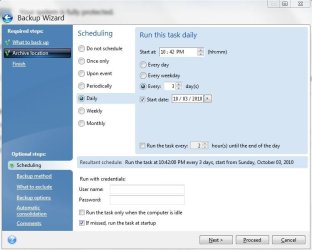
Once you tell it what to back up, and where to store that back up (each back up can be different), you then create a schedule associated with just that back up, in the Optional section.


So each back up can have its own seperate schedule, as well as notes and comments about that back up.
It's the same for Images and/or File backups.

You could have it do a System Image on an external HD every Month on the 1st and keep that untouched, until the 1st of next month, at which point it can delete the old and create a new Full back up (If you choose)

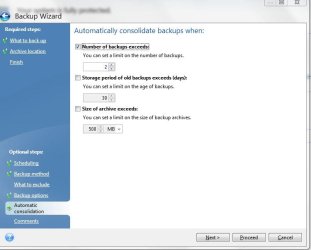
Mean while, it can be making Daily Incremental Images, on a Internal hodden Partition (Secure Zone) and consolodating every 7 days for example on a separate schedule.


Setting up what intervals to do each back up, type, and when to start.
 

Attachments

  • 1.JPG
    1.JPG
    51.3 KB · Views: 3
  • 2.JPG
    2.JPG
    47.9 KB · Views: 4
  • 3.JPG
    3.JPG
    39 KB · Views: 4

My Computer

Computer Manufacturer/Model Number
Custom (Self Build)
OS
Windows 7 Home Premium 64bit
CPU
Intel Core i7 2700k
Motherboard
eVGA P67 SLI
Memory
8GB Mushkin Redline Ridgebacks @1866
Graphics Card(s)
EVGA GTX570 SC
Sound Card
XiFi Titanium HD
Monitor(s) Displays
LG W2453V
Screen Resolution
1920x1080
Hard Drives
Intel 320 80GB -- Intel X25-V 40GB --WD Black 1TB x2 -- WD Blue 640GB
PSU
Seasonic x750
Case
Corsair 600T SE White
Cooling
eVGA Superclocked CPU Cooler
Keyboard
Saitek Cyborg
Antivirus
Kaspersky
Browser
IE
Other Info
LG BD/DVD
Stranexuk,

Procedure isn't difficult but there are a couple of gotchas which most are not aware of. Will you be running the backup on a desktop or a laptop computer?

There are additional scheduling options not shown in the Backup and Restore dialogs which can be set/reset/configured using the the Task Scheduler.

When MS wrote this software they didn't consider that you might be sitting at an airport with a battery with limited life and not wanting to waste those precious minutes running a backup.

I've got a couple more options still to test before I go thru all of the steps and precautions. The precautions have to do with one-time configuration.

Once I've documented everything you will find the procedure straight-forward. The trouble is that I've never written down the procedure for another to use. If it's a desktop and you don't care if your computer wants to do a backup in the morning when you turn it on or maybe you want the backup to run in the middle of the night.

These are all considerations when running any backup program or any program which you want to "schedule".

Myself I disable all scheduled tasks and run them when, where, and how I want to. I don't even let Windows Update run automatically.
 

My Computer

Computer Manufacturer/Model Number
Toshiba Satellite S875D-S7239 laptop
OS
MS Windows 7 Ultimate SP1 64-bit
CPU
AMD A10-4600M
Motherboard
AMD Pumori (Socket FT1)
Memory
6.00 GB Dual-Channel DDR3 @ 798MHz (11-11-12-28)
Graphics Card(s)
AMD Radeon HD 7660G
Sound Card
High Definition Audio Device
Monitor(s) Displays
Generic PnP Monitor (1600x900@60Hz)
Screen Resolution
1600x900@60Hz
Hard Drives
SSD 119GB Corsair CSSD-V128GB2 ATA Device
Keyboard
Standard PS/2 Keyboard
Mouse
HP Wireless Optical Mobile Mouse Model FHA-3410
Internet Speed
What the local pub, local coffee shop offers.
Other Info
Optical Drive:MATSHITA BD-CMB UJ160B ATA Device


Also have an Asus ha1002xp netbook with Win 7 Ultimate installed.
OK. I've been playing with the auto-backup feature of Win 7 Backup And Restore, and I am impressed. Works effortlessly and non-obtrusively. For standard situations, very easy to configure.

The one case requiring anything out of the ordinary is if you need to make sure that on a laptop, running on battery power, and a heavy backup that the backup doesn't occur while on battery power.
 

My Computer

Computer Manufacturer/Model Number
Toshiba Satellite S875D-S7239 laptop
OS
MS Windows 7 Ultimate SP1 64-bit
CPU
AMD A10-4600M
Motherboard
AMD Pumori (Socket FT1)
Memory
6.00 GB Dual-Channel DDR3 @ 798MHz (11-11-12-28)
Graphics Card(s)
AMD Radeon HD 7660G
Sound Card
High Definition Audio Device
Monitor(s) Displays
Generic PnP Monitor (1600x900@60Hz)
Screen Resolution
1600x900@60Hz
Hard Drives
SSD 119GB Corsair CSSD-V128GB2 ATA Device
Keyboard
Standard PS/2 Keyboard
Mouse
HP Wireless Optical Mobile Mouse Model FHA-3410
Internet Speed
What the local pub, local coffee shop offers.
Other Info
Optical Drive:MATSHITA BD-CMB UJ160B ATA Device


Also have an Asus ha1002xp netbook with Win 7 Ultimate installed.
Karls.....it will be on a desktop and I'd like any backups to run during the day when the computer is likely to be on (during the night it will be shut down). There's not really any problem with it running when other programs are running.

Wish....I must admit, the more I am learning about Acronis TIH, the more I like it's customability. I note in one of your screen shots, it shows the option to "run on startup" if the scheduled backup is missed.....that's EXACTLY what I want and if it means paying a little more, then so be it. Of course, if Karls can explain the process to make the same thing happen with Win7 BU&R, then may choices aren't so limited!
 

My Computer

OS
Win 7 64

My Computer

Computer Manufacturer/Model Number
* BFK Customs *
OS
W 7 64-bit Ultimate
CPU
Intel Q9550 Yorkfield
Motherboard
ASUS P5Q Pro
Memory
8GB Dominator 8500C5D
Graphics Card(s)
ATI : XFX 5870
Sound Card
Realtek HD Audio 7-1
Monitor(s) Displays
1x 47" LCD HDMI & 3x 26" LCD HDMI
Screen Resolution
1920x1080P & 1920x1200
Hard Drives
1x 80GB Intel X25-M G2 SSD : 1x 500GB & 1x 640GB WD Caviar Black(s)
PSU
Corsair 620HX
Case
Cooler Master RC-690
Cooling
Tuniq Tower 120, 2x 140mm and 3x 120mm case fans
Keyboard
Microsoft 500
Mouse
Razer Diamondback 3G
Internet Speed
14 Mb/s
Other Info
1x Koutech 3Gb/s SATA HDD Hot Swap Rack
stranexuk,

With desktop, all will just real slick.

No work on your part at all except to set your schedurle which I'll bet Brink covered in his tutorial, but I'll check. And yes, Win 7 Backup & Restore, will automatically run if you missed your "scheduled" backup. I've been testing and trying to make it fail and I can't. The backup just works perfectly and so unobtrusively that I even had to go check my backup disk to make sure that it was there.

I'd always just run on demand, but the scheduling works like a charm. Later today, I'lll look at Brink's tutorial again to make sure that the scheduling is covered. I'd be surprised if it is not since he does such a marvelous job.

Your father is going to love Win 7 Backup and Restore.
 

My Computer

Computer Manufacturer/Model Number
Toshiba Satellite S875D-S7239 laptop
OS
MS Windows 7 Ultimate SP1 64-bit
CPU
AMD A10-4600M
Motherboard
AMD Pumori (Socket FT1)
Memory
6.00 GB Dual-Channel DDR3 @ 798MHz (11-11-12-28)
Graphics Card(s)
AMD Radeon HD 7660G
Sound Card
High Definition Audio Device
Monitor(s) Displays
Generic PnP Monitor (1600x900@60Hz)
Screen Resolution
1600x900@60Hz
Hard Drives
SSD 119GB Corsair CSSD-V128GB2 ATA Device
Keyboard
Standard PS/2 Keyboard
Mouse
HP Wireless Optical Mobile Mouse Model FHA-3410
Internet Speed
What the local pub, local coffee shop offers.
Other Info
Optical Drive:MATSHITA BD-CMB UJ160B ATA Device


Also have an Asus ha1002xp netbook with Win 7 Ultimate installed.
Excellent! Many thanks Karls, your research and advice is most appreciated, by me, and no doubt by my father when it comes to not having to remember to do his backups!!!
 

My Computer

OS
Win 7 64
Glad to be of assistance.
 

My Computer

Computer Manufacturer/Model Number
Toshiba Satellite S875D-S7239 laptop
OS
MS Windows 7 Ultimate SP1 64-bit
CPU
AMD A10-4600M
Motherboard
AMD Pumori (Socket FT1)
Memory
6.00 GB Dual-Channel DDR3 @ 798MHz (11-11-12-28)
Graphics Card(s)
AMD Radeon HD 7660G
Sound Card
High Definition Audio Device
Monitor(s) Displays
Generic PnP Monitor (1600x900@60Hz)
Screen Resolution
1600x900@60Hz
Hard Drives
SSD 119GB Corsair CSSD-V128GB2 ATA Device
Keyboard
Standard PS/2 Keyboard
Mouse
HP Wireless Optical Mobile Mouse Model FHA-3410
Internet Speed
What the local pub, local coffee shop offers.
Other Info
Optical Drive:MATSHITA BD-CMB UJ160B ATA Device


Also have an Asus ha1002xp netbook with Win 7 Ultimate installed.
Back
Top