
Cloning C: to mSATA - "Set active"?

Yes, I was waiting for an answer from the person who sold me the computer, in the end he told me not to bother with it.

I had already discovered that I couldn't clone both the reserved partition and C: at the same time, and was nervous about doing the reserved first and then C: because one might overwrite the other.

When I initialised etc the mSATA it could obviously (I thought) not be called C: because that already existed. I assumed I would be able to "re-letter" it.

When the mSATA is up and running as my boot and OS drive, I will repartition the existing 1TB for data only.
 

Attachments
  • 2014-07-08 06_07_46-Computer Management.jpg
    2014-07-08 06_07_46-Computer Management.jpg
    281.1 KB · Views: 5

My Computer

Computer type
Laptop
Computer Manufacturer/Model Number
Clevo W230ST | Precision M3800 | Precision M4500 | Alienware M11x-R3
OS
W7 Pro 64-bit | W10 Pro 64-bit
CPU
i7-4700MQ
Memory
16GB
Graphics Card(s)
NVIDIA GTX 765M
Screen Resolution
1920x1080
Hard Drives
256GB SSD | 1TB HD
Antivirus
Microsoft Security Essentials, Malwarebytes Pro
Browser
Firefox, Chrome, Pale Moon
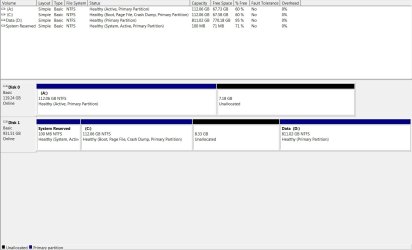
You can see in that pic that System Reserved is marked "system". That's an indicator of boot files. You don't see that on A.

I wasn't aware you could not clone 2 partitions simultaneously.

I'd walk through the clone procedure again and see if you can get System Reserved cloned into that 7 GB unallocated space at the end of the SSD.

If that fails, then you can use Easy BCD.

https://neosmart.net/EasyBCD/

There's may be a tutorial for Easy BCD somewhere on this site.
 

My Computer

Computer type
PC/Desktop
Computer Manufacturer/Model Number
Ignatz Special; 4 speed manual gearbox; factory air conditioning; one of one
OS
Windows 7 Home Premium SP1, 64-bit
CPU
Intel Skylake i5-6600K, not overclocked
Motherboard
AsRock Z170M Extreme 4, micro ATX
Memory
8 GB HyperX DDR4-2666 (2 x 4 GB)
Graphics Card(s)
none; graphics are integrated on CPU
Sound Card
onboard: Realtek ALC1150; external: USB Behringer UF0-202
Monitor(s) Displays
Dell S2340M 23 inch IPS
Screen Resolution
1600 x 900
Hard Drives
System: Crucial MX100 series SSD, 128 GB;
Data: Samsung Spinpoint 103SJ, 1 TB;
Backup: WD Caviar Green WD30EZRX-00D8PB0, 3 TB
PSU
Rosewill SilentNight 500 watt fanless, semi-modular
Case
Antec Solo II
Cooling
Noctua NH-U12S; Noctua F12 intake, Noctua S12A exhaust
Keyboard
Microsoft 200 6JH-00001 USB
Mouse
Dell or Microsoft optical wired; USB
Antivirus
Microsoft Security Essentials and Malwarebytes Premium
Browser
Pale Moon
Other Info
All fans PWM; speeds at idle: CPU circa 500 rpm; intake circa 600 rpm; exhaust circa 600 rpm; CPU temps 27 idle and 47 C load in a warm room (27 C/81 F) when running Intel Extreme Tuning Utility stress test.

My Computer

Computer type
PC/Desktop
Computer Manufacturer/Model Number
Home Built Desktop By DataTech
OS
Windows 7 Ultimate X64 SP1
CPU
Intel i5-2550K, Differing ~4.4-4.8GHz No built in GPU
Motherboard
ASUS P8Z68-V PRO/GEN3
Memory
16GB G.Skill Sniper 1866MHz @ 2133MHz 2x8GB
Graphics Card(s)
ASUS GTX650TIB-DC2OC-2GD5, (650TI Boost)
Sound Card
Onboard Realtek 5-1
Monitor(s) Displays
Samsung P2570HD
Screen Resolution
1920x1080
Hard Drives
Samsung 840 Pro 256GB SSD for OS, 500GB Seagate Constellation (Enterprise drive) for Data
PSU
Corsair HX650W
Case
Inwin Dragon Rider
Cooling
Hyper 212 EVO w/two Noctua fans, push-pull, @1300 RPM
Keyboard
E-Z Eyes, bright yellow keys with large characters
Mouse
steelseries SENSEI Laser Pro Gaming
Internet Speed
48-51Mbs Mbs down, 11 Mbs up Xfinity Cable
Antivirus
Norton Internet Security 2013
Browser
IE 10, Opera, Pale Moon if needed
Other Info
4 case fans, LG BluRay-RE, ASUS DVD-RW, Mr. Fusion power supply, 1.21 gigawatts.
I'm just succumbing to a depression at the thought of having to take in a lot of instructions in unfamiliar territory. I shall return after a sleep. Thank you both very much.
 

My Computer

Computer type
Laptop
Computer Manufacturer/Model Number
Clevo W230ST | Precision M3800 | Precision M4500 | Alienware M11x-R3
OS
W7 Pro 64-bit | W10 Pro 64-bit
CPU
i7-4700MQ
Memory
16GB
Graphics Card(s)
NVIDIA GTX 765M
Screen Resolution
1920x1080
Hard Drives
256GB SSD | 1TB HD
Antivirus
Microsoft Security Essentials, Malwarebytes Pro
Browser
Firefox, Chrome, Pale Moon
Well I haven't been sleeping all this time ;) But I decided to start all over again, so I formatted A: mSATA and deleted D: from my 1TB 5400rpm, so's to be able to clone the whole drive.
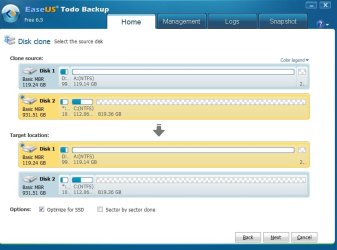
I've already tried once but cancelled the process when it appeared to be throwing up unknown drive letters, I panicked. After that, the mSATA was nearly all unallocated so I repeated creating a simple volume and formatting as NTFS.

The 800gb space left where D: used to be appears as unallocated. Will the cloning process ignore this space if I select Disk Clone? I have to wonder because of the above 'phenomenon'.

Here's where I am now:
 

Attachments

  • 2014-07-09 14_25_31-EaseUS Todo Backup.jpg
    2014-07-09 14_25_31-EaseUS Todo Backup.jpg
    215.9 KB · Views: 1

My Computer

Computer type
Laptop
Computer Manufacturer/Model Number
Clevo W230ST | Precision M3800 | Precision M4500 | Alienware M11x-R3
OS
W7 Pro 64-bit | W10 Pro 64-bit
CPU
i7-4700MQ
Memory
16GB
Graphics Card(s)
NVIDIA GTX 765M
Screen Resolution
1920x1080
Hard Drives
256GB SSD | 1TB HD
Antivirus
Microsoft Security Essentials, Malwarebytes Pro
Browser
Firefox, Chrome, Pale Moon
I'm unfamiliar with EaseUS, but I'd expect unallocated space to be ignored.

Why are you using EaseUS rather than Macrium?

I find that last screen shot of EaseUS confusing. Do you think you are cloning both System Reserved and C?

Unclear why you would panic over drive letters. I'd worry about them later.

The only way to know if it works is to complete the procedure and see what happens when it's done--either the new drive boots or it doesn't. Cloning isn't foolproof, but the source drive shouldn't be harmed--so you could re-do it if needed.
 

My Computer

Computer type
PC/Desktop
Computer Manufacturer/Model Number
Ignatz Special; 4 speed manual gearbox; factory air conditioning; one of one
OS
Windows 7 Home Premium SP1, 64-bit
CPU
Intel Skylake i5-6600K, not overclocked
Motherboard
AsRock Z170M Extreme 4, micro ATX
Memory
8 GB HyperX DDR4-2666 (2 x 4 GB)
Graphics Card(s)
none; graphics are integrated on CPU
Sound Card
onboard: Realtek ALC1150; external: USB Behringer UF0-202
Monitor(s) Displays
Dell S2340M 23 inch IPS
Screen Resolution
1600 x 900
Hard Drives
System: Crucial MX100 series SSD, 128 GB;
Data: Samsung Spinpoint 103SJ, 1 TB;
Backup: WD Caviar Green WD30EZRX-00D8PB0, 3 TB
PSU
Rosewill SilentNight 500 watt fanless, semi-modular
Case
Antec Solo II
Cooling
Noctua NH-U12S; Noctua F12 intake, Noctua S12A exhaust
Keyboard
Microsoft 200 6JH-00001 USB
Mouse
Dell or Microsoft optical wired; USB
Antivirus
Microsoft Security Essentials and Malwarebytes Premium
Browser
Pale Moon
Other Info
All fans PWM; speeds at idle: CPU circa 500 rpm; intake circa 600 rpm; exhaust circa 600 rpm; CPU temps 27 idle and 47 C load in a warm room (27 C/81 F) when running Intel Extreme Tuning Utility stress test.
Why are you using EaseUS rather than Macrium?

I find Macrium very confusing.

I find that last screen shot of EaseUS confusing. Do you think you are cloning both System Reserved and C?
I'm hoping so.

Unclear why you would panic over drive letters. I'd worry about them later.
I wasn't panicking over mere letters that I might end up with, but over drive letters that might be being cloned instead of the ones I needed - had I ticked a wrong box or summat???

The only way to know if it works is to complete the procedure and see what happens when it's done--either the new drive boots or it doesn't. Cloning isn't foolproof, but the source drive shouldn't be harmed--so you could re-do it if needed.
That's exactly what I thought, so I did it, and it doesn't boot still - it's listed in the BIOS under Main but not under Boot.

So I thought I'd do an image with Macrium (I noticed that Britton had suggested this), but it wouldn't let me save it to my preferred laptop because that one only has a C: drive and Macrium said I couldn't have the same something-or-other. Another laptop's D: drive is too small, so I've found a 64GB USB stick and formatted that to NTFS and was about to create the image, but...

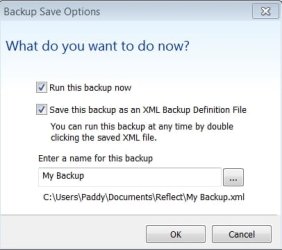
When I click Finish in Macrium this mystifying box pops up - who said anything about running a backup, I just want to create an image :shock: So I'm stymied again.
 

Attachments

  • 2014-07-09 18_07_29-Backup Save Options.jpg
    2014-07-09 18_07_29-Backup Save Options.jpg
    83.5 KB · Views: 10

My Computer

Computer type
Laptop
Computer Manufacturer/Model Number
Clevo W230ST | Precision M3800 | Precision M4500 | Alienware M11x-R3
OS
W7 Pro 64-bit | W10 Pro 64-bit
CPU
i7-4700MQ
Memory
16GB
Graphics Card(s)
NVIDIA GTX 765M
Screen Resolution
1920x1080
Hard Drives
256GB SSD | 1TB HD
Antivirus
Microsoft Security Essentials, Malwarebytes Pro
Browser
Firefox, Chrome, Pale Moon
It doesn't clone drive letters.
The Macrium window is for making an image, it is a backup, when you use that image it's called "Restore".
 

My Computer

Computer type
PC/Desktop
Computer Manufacturer/Model Number
Home Built Desktop By DataTech
OS
Windows 7 Ultimate X64 SP1
CPU
Intel i5-2550K, Differing ~4.4-4.8GHz No built in GPU
Motherboard
ASUS P8Z68-V PRO/GEN3
Memory
16GB G.Skill Sniper 1866MHz @ 2133MHz 2x8GB
Graphics Card(s)
ASUS GTX650TIB-DC2OC-2GD5, (650TI Boost)
Sound Card
Onboard Realtek 5-1
Monitor(s) Displays
Samsung P2570HD
Screen Resolution
1920x1080
Hard Drives
Samsung 840 Pro 256GB SSD for OS, 500GB Seagate Constellation (Enterprise drive) for Data
PSU
Corsair HX650W
Case
Inwin Dragon Rider
Cooling
Hyper 212 EVO w/two Noctua fans, push-pull, @1300 RPM
Keyboard
E-Z Eyes, bright yellow keys with large characters
Mouse
steelseries SENSEI Laser Pro Gaming
Internet Speed
48-51Mbs Mbs down, 11 Mbs up Xfinity Cable
Antivirus
Norton Internet Security 2013
Browser
IE 10, Opera, Pale Moon if needed
Other Info
4 case fans, LG BluRay-RE, ASUS DVD-RW, Mr. Fusion power supply, 1.21 gigawatts.
An image is a backup. A clone is not.

Saving as an XML file is unnecessary. That's just like a shortcut that would enable you to re-run the procedure at a later date. Like if you were making an image daily or weekly. I never use the XML method. I just walk through the procedure again from the beginning, as you are doing now. So uncheck the XML box and leave "run this backup now checked.

The imaging will then start and will take a few minutes; maybe a half hour or more to a slow USB drive.

Not clear why you are using imaging when Macrium cloning has not failed for you yet.

If you make that image, you will then have to find a way to restore it.

You could not save the image file to C because C is what you are imaging. You must save the image file to a location OTHER THAN the partitions being imaged. So you are using the USB.
 

My Computer

Computer type
PC/Desktop
Computer Manufacturer/Model Number
Ignatz Special; 4 speed manual gearbox; factory air conditioning; one of one
OS
Windows 7 Home Premium SP1, 64-bit
CPU
Intel Skylake i5-6600K, not overclocked
Motherboard
AsRock Z170M Extreme 4, micro ATX
Memory
8 GB HyperX DDR4-2666 (2 x 4 GB)
Graphics Card(s)
none; graphics are integrated on CPU
Sound Card
onboard: Realtek ALC1150; external: USB Behringer UF0-202
Monitor(s) Displays
Dell S2340M 23 inch IPS
Screen Resolution
1600 x 900
Hard Drives
System: Crucial MX100 series SSD, 128 GB;
Data: Samsung Spinpoint 103SJ, 1 TB;
Backup: WD Caviar Green WD30EZRX-00D8PB0, 3 TB
PSU
Rosewill SilentNight 500 watt fanless, semi-modular
Case
Antec Solo II
Cooling
Noctua NH-U12S; Noctua F12 intake, Noctua S12A exhaust
Keyboard
Microsoft 200 6JH-00001 USB
Mouse
Dell or Microsoft optical wired; USB
Antivirus
Microsoft Security Essentials and Malwarebytes Premium
Browser
Pale Moon
Other Info
All fans PWM; speeds at idle: CPU circa 500 rpm; intake circa 600 rpm; exhaust circa 600 rpm; CPU temps 27 idle and 47 C load in a warm room (27 C/81 F) when running Intel Extreme Tuning Utility stress test.
It's done. I think it was OK all the time, if only I'd known how to change the boot order in BIOS. Something about BBS priorities, not where I was looking at all.

Just for the record (in case anyone reads this thread and wonders what I did in the end), that's via clone with EaseUS.

Thank you both for the time you've given me.
 

My Computer

Computer type
Laptop
Computer Manufacturer/Model Number
Clevo W230ST | Precision M3800 | Precision M4500 | Alienware M11x-R3
OS
W7 Pro 64-bit | W10 Pro 64-bit
CPU
i7-4700MQ
Memory
16GB
Graphics Card(s)
NVIDIA GTX 765M
Screen Resolution
1920x1080
Hard Drives
256GB SSD | 1TB HD
Antivirus
Microsoft Security Essentials, Malwarebytes Pro
Browser
Firefox, Chrome, Pale Moon
You're welcome, hope it goes well for you.
Macrium can make you useable image in 3 clicks, very easy. ;)
 

My Computer

Computer type
PC/Desktop
Computer Manufacturer/Model Number
Home Built Desktop By DataTech
OS
Windows 7 Ultimate X64 SP1
CPU
Intel i5-2550K, Differing ~4.4-4.8GHz No built in GPU
Motherboard
ASUS P8Z68-V PRO/GEN3
Memory
16GB G.Skill Sniper 1866MHz @ 2133MHz 2x8GB
Graphics Card(s)
ASUS GTX650TIB-DC2OC-2GD5, (650TI Boost)
Sound Card
Onboard Realtek 5-1
Monitor(s) Displays
Samsung P2570HD
Screen Resolution
1920x1080
Hard Drives
Samsung 840 Pro 256GB SSD for OS, 500GB Seagate Constellation (Enterprise drive) for Data
PSU
Corsair HX650W
Case
Inwin Dragon Rider
Cooling
Hyper 212 EVO w/two Noctua fans, push-pull, @1300 RPM
Keyboard
E-Z Eyes, bright yellow keys with large characters
Mouse
steelseries SENSEI Laser Pro Gaming
Internet Speed
48-51Mbs Mbs down, 11 Mbs up Xfinity Cable
Antivirus
Norton Internet Security 2013
Browser
IE 10, Opera, Pale Moon if needed
Other Info
4 case fans, LG BluRay-RE, ASUS DVD-RW, Mr. Fusion power supply, 1.21 gigawatts.
Back
Top