Solved Cloning HDD to SSD without having to reinstall Windows 7

Lostalpha

New member
Local time
2:00 PM
Messages
8
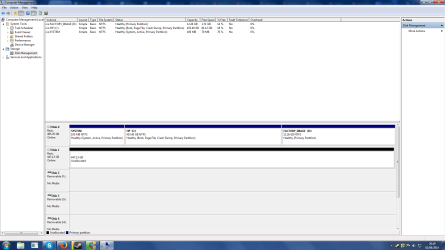
So as the title says im planning on Cloning the contents of my HDD to my SSD but im a little bit worried that if I do that it will cause Windows 7 to start playing up. Now my HDD has 3 Partitions to it one is called System, the next Hp C: and Factory_Image D: .
From what i have gathered on the forums is if I copy the system partition into the Hp C: partition I wont have to worry about it playing up once I clone the Hp C: to my new SSD or thats the idea im getting here.

Also the program im going to use for this is called EaseUS Todo if that is of any help.

Thanks for any help that you can provide and sorry in advance if this is in the wrong section.
 

My Computer My Computer

At a glance

Windows 7 Home Premium 64bitAMD Anthlon(tm) 2 X3 435 Processor 2.90 GHz3 GBGeForce GTX 660
Computer type
PC/Desktop
Computer Manufacturer/Model Number
HP - p6313uk
OS
Windows 7 Home Premium 64bit
CPU
AMD Anthlon(tm) 2 X3 435 Processor 2.90 GHz
Motherboard
Do not know
Memory
3 GB
Graphics Card(s)
GeForce GTX 660
Hard Drives
1 HDD 500GB (Dont know the maker)
1 SSD 480GB (Sandisk)
Antivirus
Norton
Browser
Firefox
If you do a proper clone, all 3 of your partitions should be copied to the new drive.

The system partition probably contains your boot files. You could move those boot files to C before you begin the clone process and get rid of the system partition entirely--before you do the clone. But there's no over-riding reason to do that.

I'd guess that EaseUs is capable of imaging as well as cloning. You could try the clone and if it fails, try imaging instead.

Be prepared to do a clean install to the SSD from scratch if it comes to that. Cloning or imaging usually works, but you need to know how to do a clean install if it comes to that.

A screen shot of your Windows Disk Management might be helpful to confirm what your situation.
 

My Computer My Computer

At a glance

Windows 7 Home Premium SP1, 64-bitIntel Skylake i5-6600K, not overclocked8 GB HyperX DDR4-2666 (2 x 4 GB)none; graphics are integrated on CPU
Computer type
PC/Desktop
Computer Manufacturer/Model Number
Ignatz Special; 4 speed manual gearbox; factory air conditioning; one of one
OS
Windows 7 Home Premium SP1, 64-bit
CPU
Intel Skylake i5-6600K, not overclocked
Motherboard
AsRock Z170M Extreme 4, micro ATX
Memory
8 GB HyperX DDR4-2666 (2 x 4 GB)
Graphics Card(s)
none; graphics are integrated on CPU
Sound Card
onboard: Realtek ALC1150; external: USB Behringer UF0-202
Monitor(s) Displays
Dell S2340M 23 inch IPS
Screen Resolution
1600 x 900
Hard Drives
System: Crucial MX100 series SSD, 128 GB;
Data: Samsung Spinpoint 103SJ, 1 TB;
Backup: WD Caviar Green WD30EZRX-00D8PB0, 3 TB
PSU
Rosewill SilentNight 500 watt fanless, semi-modular
Case
Antec Solo II
Cooling
Noctua NH-U12S; Noctua F12 intake, Noctua S12A exhaust
Keyboard
Microsoft 200 6JH-00001 USB
Mouse
Dell or Microsoft optical wired; USB
Antivirus
Microsoft Security Essentials and Malwarebytes Premium
Browser
Pale Moon
Other Info
All fans PWM; speeds at idle: CPU circa 500 rpm; intake circa 600 rpm; exhaust circa 600 rpm; CPU temps 27 idle and 47 C load in a warm room (27 C/81 F) when running Intel Extreme Tuning Utility stress test.
You cannot put the system partition into the C partition. But you can copy the bootmgr from the system partition to the C partition. Here is how. Once you have done that, you can forget about the system partition.

The factory image I would copy to a DVD and not copy it to the SSD. Make frequent images, then you don't need it.

Next you have to worry about the alignment of the SSD. It is all explained in my little tutorial:

http://www.sevenforums.com/tutorials/149969-ssd-install-transfer-operating-system.html
 

My Computer My Computer

At a glance

Vista, Windows7, Mint Mate, Zorin, Windows 8from 1.6GHz Duo to i7
Computer Manufacturer/Model Number
HP, Dell, Gateway, Toshiba - 4 laptops and 2 desktops
OS
Vista, Windows7, Mint Mate, Zorin, Windows 8
CPU
from 1.6GHz Duo to i7
Monitor(s) Displays
2x HP w2207
Hard Drives
5x HDD, 7x SSD, 12x Externals
Keyboard
with trackball - no mices
Mouse
Trackball mice
Internet Speed
DSL 6000
Thank you for the quick replies.

Below is the image of my disks or my HDD and SSD and as you can see the 3 partitions on my HDD.
Also a little more information EasyUs it also allows for specific partition cloning so that could allow me to keep the Factory_image on the HDD yes?
Also the EasyUs also says it has the abilty to Align the SSD by itself so should i trust that or would it be better to do it myself manualy then clone over the hp C: ?

Computer Management.png
 

My Computer My Computer

At a glance

Windows 7 Home Premium 64bitAMD Anthlon(tm) 2 X3 435 Processor 2.90 GHz3 GBGeForce GTX 660
Computer type
PC/Desktop
Computer Manufacturer/Model Number
HP - p6313uk
OS
Windows 7 Home Premium 64bit
CPU
AMD Anthlon(tm) 2 X3 435 Processor 2.90 GHz
Motherboard
Do not know
Memory
3 GB
Graphics Card(s)
GeForce GTX 660
Hard Drives
1 HDD 500GB (Dont know the maker)
1 SSD 480GB (Sandisk)
Antivirus
Norton
Browser
Firefox
I haven't used EaseUS in a long time, but the key point is that if you are going to clone, you need to clone all 3 partitions or the entire disc. It's anybody's guess how clear the instructions or menus are. They are typically made by a non-native English speaker, so expect some confusion. If you clone C alone, it won't boot. If you first copy the boot files from System to C before you begin (as WHS suggests), then you would delete System partition before you begin the clone of the remaining 2 partitions. If you do that, you should of course confirm that the system will boot and run properly without System partition BEFORE you begin the clone. If it won't boot before the clone, it certainly won't boot after.

Most cloning and imaging apps should preserve the alignment of the source partitions. If aligned OK before the clone, you should be aligned OK after. BUT, you should check alignment after the clone. It's correctable if not aligned correctly.

I would not assume the factory image partition is going to work before the clone, after the clone, or at all ever. It should. It may not. You should certainly make (burn) a set of recovery disks before you begin any clone. They may not work either, but at least that would give you some sort of fall back position if the factory image partition doesn't work when you get in a jam 6 months from now after a clone. Just don't get yourself in a position of relying on factory image or recovery disks. BE PREPARED to do a clean install at all times. You can easily make a legit Windows install disc if you don't already have one.
 

My Computer My Computer

At a glance

Windows 7 Home Premium SP1, 64-bitIntel Skylake i5-6600K, not overclocked8 GB HyperX DDR4-2666 (2 x 4 GB)none; graphics are integrated on CPU
Computer type
PC/Desktop
Computer Manufacturer/Model Number
Ignatz Special; 4 speed manual gearbox; factory air conditioning; one of one
OS
Windows 7 Home Premium SP1, 64-bit
CPU
Intel Skylake i5-6600K, not overclocked
Motherboard
AsRock Z170M Extreme 4, micro ATX
Memory
8 GB HyperX DDR4-2666 (2 x 4 GB)
Graphics Card(s)
none; graphics are integrated on CPU
Sound Card
onboard: Realtek ALC1150; external: USB Behringer UF0-202
Monitor(s) Displays
Dell S2340M 23 inch IPS
Screen Resolution
1600 x 900
Hard Drives
System: Crucial MX100 series SSD, 128 GB;
Data: Samsung Spinpoint 103SJ, 1 TB;
Backup: WD Caviar Green WD30EZRX-00D8PB0, 3 TB
PSU
Rosewill SilentNight 500 watt fanless, semi-modular
Case
Antec Solo II
Cooling
Noctua NH-U12S; Noctua F12 intake, Noctua S12A exhaust
Keyboard
Microsoft 200 6JH-00001 USB
Mouse
Dell or Microsoft optical wired; USB
Antivirus
Microsoft Security Essentials and Malwarebytes Premium
Browser
Pale Moon
Other Info
All fans PWM; speeds at idle: CPU circa 500 rpm; intake circa 600 rpm; exhaust circa 600 rpm; CPU temps 27 idle and 47 C load in a warm room (27 C/81 F) when running Intel Extreme Tuning Utility stress test.
The HP Factory install of Win7 is the worst possible install one can have, larded with bloatware and duplicate utilities which interfere with better versions built into Win7. So I'd use this opportunity to do a perfect Clean Reinstall Factory OEM to your new SSD and enjoy blazing glory instead of flaming molasses.
 
Though that sounds like a nice idea it would mean i would have to move my files around and do some other things so ill stick to my current windows 7 till such a time as i have alot of trouble with it thanks gregrocker.

So i should trust the program to do the clone but go back and make sure it aligned currectly, but before i do that i should copy the boot from the system to C then delete system, but before doing that i should burn the factory_image onto a disk then delete the factory_image so that only the C: partition is left on the HDD.

And maybe also create a disk to repair Windows 7 as well which i can create on my computer, but do i need any burn to cd program for factory_image or the windows 7 repair disk?

P.s
sorry for all the questions first time ive done any of this so i wont as much information about it before i break something on my computer.
 

My Computer My Computer

At a glance

Windows 7 Home Premium 64bitAMD Anthlon(tm) 2 X3 435 Processor 2.90 GHz3 GBGeForce GTX 660
Computer type
PC/Desktop
Computer Manufacturer/Model Number
HP - p6313uk
OS
Windows 7 Home Premium 64bit
CPU
AMD Anthlon(tm) 2 X3 435 Processor 2.90 GHz
Motherboard
Do not know
Memory
3 GB
Graphics Card(s)
GeForce GTX 660
Hard Drives
1 HDD 500GB (Dont know the maker)
1 SSD 480GB (Sandisk)
Antivirus
Norton
Browser
Firefox
You'd want to make your HP Recovery disks first to use in place of the Recovery partition in the future.

At that point you can clone over the System and C partitions to the new SSD, or save as a backup image if you want a copy. After the SSD is up and running awhile, you can plug in the HD to wipe it with Diskpart Clean Command and then repartition as a data drive in Disk Mgmt.

If you have no plans for the HD you could also save it as the backup image and if necessary to run Recovery from its partition using the F11 key or Boot Recovery Partition using EasyBCD
 
Last edited:
see comments in bold

So i should trust the program to do the clone but go back and make sure it aligned currectly, but before i do that i should copy the boot from the system to C then delete system,

Not necessarily. You don't need to copy boot files from System to C. You can instead just clone System along with C. One way or another, the current contents of System have to arrive on the SSD--either as part of System on SSD or as part of C on SSD.


but before doing that i should burn the factory_image onto a disk then delete the factory_image so that only the C: partition is left on the HDD.

Not quite. You would create a series of recovery disks from that factory image partition, using a menu of some type found on your PC. Not sure how many disks this would amount to. Two, maybe 3? These discs, in combination, should, I say should, be the functional equivalent of the factory image partition, but are not foolproof. To recover, you'd boot from the first of these disks and follow the onscreen instructions.

You wouldn't necessarily then delete the factory image partition. You could still include it in the clone. It might work later from the SSD and might not. The point of the burned discs is to give you another possible recovery method if the cloned factory image does NOT work.


And maybe also create a disk to repair Windows 7 as well which i can create on my computer, but do i need any burn to cd program for factory_image or the windows 7 repair disk?

I assume you do not currently have an ordinary Windows 7 installation disc. You should make one. It functions as a repair disk as well. You make it by downloading a legit Windows 7 ISO file from Digital River and burning that ISO to a blank DVD. You could at some point in the future use that burned disk to do a clean install should you ever want to.

You can burn the ISO with Windows built in tools or with a third party programs such as ImgBurn or others.


My Computer My Computer

At a glance

Windows 7 Home Premium SP1, 64-bitIntel Skylake i5-6600K, not overclocked8 GB HyperX DDR4-2666 (2 x 4 GB)none; graphics are integrated on CPU
Computer type
PC/Desktop
Computer Manufacturer/Model Number
Ignatz Special; 4 speed manual gearbox; factory air conditioning; one of one
OS
Windows 7 Home Premium SP1, 64-bit
CPU
Intel Skylake i5-6600K, not overclocked
Motherboard
AsRock Z170M Extreme 4, micro ATX
Memory
8 GB HyperX DDR4-2666 (2 x 4 GB)
Graphics Card(s)
none; graphics are integrated on CPU
Sound Card
onboard: Realtek ALC1150; external: USB Behringer UF0-202
Monitor(s) Displays
Dell S2340M 23 inch IPS
Screen Resolution
1600 x 900
Hard Drives
System: Crucial MX100 series SSD, 128 GB;
Data: Samsung Spinpoint 103SJ, 1 TB;
Backup: WD Caviar Green WD30EZRX-00D8PB0, 3 TB
PSU
Rosewill SilentNight 500 watt fanless, semi-modular
Case
Antec Solo II
Cooling
Noctua NH-U12S; Noctua F12 intake, Noctua S12A exhaust
Keyboard
Microsoft 200 6JH-00001 USB
Mouse
Dell or Microsoft optical wired; USB
Antivirus
Microsoft Security Essentials and Malwarebytes Premium
Browser
Pale Moon
Other Info
All fans PWM; speeds at idle: CPU circa 500 rpm; intake circa 600 rpm; exhaust circa 600 rpm; CPU temps 27 idle and 47 C load in a warm room (27 C/81 F) when running Intel Extreme Tuning Utility stress test.
Hmm ok i will try that tomorrow when im more awake and see if it works and then get back when it is done.

Thank you for all the help guys you helped put my mind at ease and make it found fairly simple.
 

My Computer My Computer

At a glance

Windows 7 Home Premium 64bitAMD Anthlon(tm) 2 X3 435 Processor 2.90 GHz3 GBGeForce GTX 660
Computer type
PC/Desktop
Computer Manufacturer/Model Number
HP - p6313uk
OS
Windows 7 Home Premium 64bit
CPU
AMD Anthlon(tm) 2 X3 435 Processor 2.90 GHz
Motherboard
Do not know
Memory
3 GB
Graphics Card(s)
GeForce GTX 660
Hard Drives
1 HDD 500GB (Dont know the maker)
1 SSD 480GB (Sandisk)
Antivirus
Norton
Browser
Firefox
I would be careful regarding the SSD alignment. I am not famililiar with EasyUS but I know that some other imaging programs will preserve the alignment during the restore provided the partition was aligned when the image was taken. But when it comes from a HDD, you can assume that it is not aligned.

This is a program that will do the alignment and all other relevamt SSD settings when you use it for migration. I have used that many times. It does the perfect jon with 3 clicks.

Paragon Migrate OS to SSD - System migration to Solid State Drives (SSD) - Overview
 

My Computer My Computer

At a glance

Vista, Windows7, Mint Mate, Zorin, Windows 8from 1.6GHz Duo to i7
Computer Manufacturer/Model Number
HP, Dell, Gateway, Toshiba - 4 laptops and 2 desktops
OS
Vista, Windows7, Mint Mate, Zorin, Windows 8
CPU
from 1.6GHz Duo to i7
Monitor(s) Displays
2x HP w2207
Hard Drives
5x HDD, 7x SSD, 12x Externals
Keyboard
with trackball - no mices
Mouse
Trackball mice
Internet Speed
DSL 6000
Well ive done the clone about 6 hours ago and everything is in order still, so i think the program did the alignment correctly and ive tested it and im getting alot better loading speeds then i did, with the HDD but ill be keeping an eye on it for any problems.

For now ill mark the thread as solved and thank you all for the helpful words and helping to point me in the right direction and clearing up what i need to do very nice community indeed.
 

My Computer My Computer

At a glance

Windows 7 Home Premium 64bitAMD Anthlon(tm) 2 X3 435 Processor 2.90 GHz3 GBGeForce GTX 660
Computer type
PC/Desktop
Computer Manufacturer/Model Number
HP - p6313uk
OS
Windows 7 Home Premium 64bit
CPU
AMD Anthlon(tm) 2 X3 435 Processor 2.90 GHz
Motherboard
Do not know
Memory
3 GB
Graphics Card(s)
GeForce GTX 660
Hard Drives
1 HDD 500GB (Dont know the maker)
1 SSD 480GB (Sandisk)
Antivirus
Norton
Browser
Firefox

My Computer My Computer

At a glance

Vista, Windows7, Mint Mate, Zorin, Windows 8from 1.6GHz Duo to i7
Computer Manufacturer/Model Number
HP, Dell, Gateway, Toshiba - 4 laptops and 2 desktops
OS
Vista, Windows7, Mint Mate, Zorin, Windows 8
CPU
from 1.6GHz Duo to i7
Monitor(s) Displays
2x HP w2207
Hard Drives
5x HDD, 7x SSD, 12x Externals
Keyboard
with trackball - no mices
Mouse
Trackball mice
Internet Speed
DSL 6000
Sorry for the late reply been busy tweaking the SSD so not as many things are writing to it, only got the systems writing large amounts of data to it but dont know how to fix that sadly.

I checked the alignment using your method and another where i divide by 4096, and in both cases ive only gotten primary numbers and no decimals so it is aligned by both tests yes?
 

My Computer My Computer

At a glance

Windows 7 Home Premium 64bitAMD Anthlon(tm) 2 X3 435 Processor 2.90 GHz3 GBGeForce GTX 660
Computer type
PC/Desktop
Computer Manufacturer/Model Number
HP - p6313uk
OS
Windows 7 Home Premium 64bit
CPU
AMD Anthlon(tm) 2 X3 435 Processor 2.90 GHz
Motherboard
Do not know
Memory
3 GB
Graphics Card(s)
GeForce GTX 660
Hard Drives
1 HDD 500GB (Dont know the maker)
1 SSD 480GB (Sandisk)
Antivirus
Norton
Browser
Firefox
Establish a Clean Boot, run a Disk Check from Troubleshooting steps below picture below.

Check newer firmware Update for SSD
 
The SSD is up to date, But why do i need to establish a clean boot everything seems to be running ok and the only problem i have is the system (PID 4 if that helps), deciding to write large amounts sometimes for no reason at all. Like 2 hours ago it was writing 10gb in a few minutes then it running back to like 50 to 80 kb since


Edit.
After putting clean boot into google and finding out what it means i understand a little more now but how will that help?
 

My Computer My Computer

At a glance

Windows 7 Home Premium 64bitAMD Anthlon(tm) 2 X3 435 Processor 2.90 GHz3 GBGeForce GTX 660
Computer type
PC/Desktop
Computer Manufacturer/Model Number
HP - p6313uk
OS
Windows 7 Home Premium 64bit
CPU
AMD Anthlon(tm) 2 X3 435 Processor 2.90 GHz
Motherboard
Do not know
Memory
3 GB
Graphics Card(s)
GeForce GTX 660
Hard Drives
1 HDD 500GB (Dont know the maker)
1 SSD 480GB (Sandisk)
Antivirus
Norton
Browser
Firefox
Win7 runs better with a Clean Boot only allowing your AV and any sync. Nothing else is needed though dozens of programs sneak in to spy.

I told you it is explained in Troubleshooting tutorial under the picture below.
 
Oh ok sorry i misread your last post.

I went though your guide and disabled a several programs which were unneeded which did seem to help reduce the amount of write. But then i realised that the page(vitural memory) that system was making was causing a vast amount of the writing, and so after moving that to a partition on my HDD that has reduced it down to next to nothing now.

So thanks for the help again everything should be working now but if not ill be back in a few days asking for some more help haha.
 

My Computer My Computer

At a glance

Windows 7 Home Premium 64bitAMD Anthlon(tm) 2 X3 435 Processor 2.90 GHz3 GBGeForce GTX 660
Computer type
PC/Desktop
Computer Manufacturer/Model Number
HP - p6313uk
OS
Windows 7 Home Premium 64bit
CPU
AMD Anthlon(tm) 2 X3 435 Processor 2.90 GHz
Motherboard
Do not know
Memory
3 GB
Graphics Card(s)
GeForce GTX 660
Hard Drives
1 HDD 500GB (Dont know the maker)
1 SSD 480GB (Sandisk)
Antivirus
Norton
Browser
Firefox
Did you set paging file as System Managed, and moving it to a HD reduced r/w's over having it on the SSD? That seems counterintuitive. Maybe someone can explain why a lightning fast drive would not have a faster paging file than putting it on a spinner.
 
Back
Top