Code 5 error on boot with Windows 7

liliwaste

New member
Local time
4:58 PM
Messages
4
I am having a problem with the install of Windows 7 on a 32 bit AMD system. I DL'd the file and copied it to DVD however after I set the setup to boot from CD 1st it looks for the boot files and then tells me that it cannot find the files and gives an error 5. I have loaded a beta version of Vista with out a problem on this same computer. I also used the Win 7 disk to load files into my regular system and it appeared to load without a problemAny information on this will be greatly appreciated, thank you in advance.
 

My Computer

OS
XP
Hi, liliwaste, and welcome to the forums.

I suspect you did not burn the .ISO file to disc correctly. Can you boot into a working install and then insert the DVD and use Windows Explore to look at the DVD and tell me what files you see?
 

My Computers

System One System Two

  • Computer type
    PC/Desktop
    Computer Manufacturer/Model Number
    The Beast Model A (homebrew)
    OS
    Windows 11 21H2 Current build
    CPU
    AMD Ryzen 9 3950X
    Motherboard
    MSI MEG X570 GODLIKE
    Memory
    4 * 32 GB - Corsair Vengeance 3600 MHz
    Graphics Card(s)
    EVGA GeForce RTX 3080 Ti XC3 ULTRA GAMING (12G-P5-3955-KR)
    Sound Card
    Realtek® ALC1220 Codec
    Monitor(s) Displays
    2x Eve Spectrum ES07D03 4K Gaming Monitor (Matte) | Eve Spec
    Screen Resolution
    3x 3840 x 2160
    Hard Drives
    3x Samsung 980 Pro NVMe PCIe 4 M.2 2 TB SSD (MZ-V8P2T0B/AM) } 3x Sabrent Rocket NVMe 4.0 1 TB SSD
    PSU
    PC Power & Cooling’s Silencer Series 1050 Watt, 80 Plus Plat
    Case
    Fractal Design Define 7 XL Dark ATX Full Tower Case
    Cooling
    SteelSeries Apex Pro Wired Gaming Keyboard
    Keyboard
    SteelSeries Apex Pro
    Mouse
    Logitech MX Master 3S | MX Master 3 for business
    Internet Speed
    AT&T LightSpeed Gigabit Duplex Ftth
    Antivirus
    Windows Defender + MB 3
    Browser
    Nightly (default) + Firefox (stable),Chrome, Edge
  • Computer type
    PC/Desktop
    System Manufacturer/Model Number
    Dell Latitude E5470
    OS
    ChromeOS Flex Dev Channel (current)
    CPU
    Intel(R) Core(TM) i5-6300U CPU @ 2.40GHz, 2501 Mhz, 2 Core(s), 4 Logical Processor(s)
    Motherboard
    Dell
    Memory
    16 GB
    Graphics Card(s)
    Intel(R) HD Graphics 520
    Sound Card
    Intel(R) HD Graphics 520 + RealTek Audio
    Monitor(s) Displays
    Dell laptop display 15"
    Screen Resolution
    1920 * 1080
    Hard Drives
    Toshiba 128GB M.2 22300 drive
    INTEL Cherryville 520 Series SSDSC2CW180A 180 GB SATA III SSD
    PSU
    Dell
    Case
    Dell
    Cooling
    Dell
    Keyboard
    Dell
    Mouse
    Logitech MX Master 3S (shared w. Sys 1) | Dell TouchPad
    Internet Speed
    AT&T LightSpeed Gigabit Duplex Ftth
I'll try that and get back to you

Hi, liliwaste, and welcome to the forums.

I suspect you did not burn the .ISO file to disc correctly. Can you boot into a working install and then insert the DVD and use Windows Explore to look at the DVD and tell me what files you see?

Thanks John I will try that how ever I have a buddy in the IS Dept at work and he discovered this problem 1st. He did go on to install Win 7 on one of his lap tops and it ran well. I then took my sys home and am having the same problem and like I said I dropped the DVD in my main computer fired it up and it loaded without a problem. I was just wondering what an error 5 really was. Besides sorry charlie only the best tuna.
Thanks much
 

My Computer

OS
XP
Reading the DVD

OK on the DVD the folders from the left are boot, efi, sources, upgrade, then files autorun and bootmgr, all on the top line and underneath that is setup. By the way when I read the disk the last screen showing is the install screen. I don't know whats causing the boot problem with the other computer especially when I can stick the old longhorn DVD in the computer and away it goes. There are two new DVD Drives in the unit also so I'm pretty sure that is is not a hardware problem.
Thanks for all your help
 

My Computer

OS
XP
Hmmm - then it might be something entirely different - is either machine overclocked?

W7 would *not* install at all until I removed the OCing I had on my machine...
 

My Computers

System One System Two

  • Computer type
    PC/Desktop
    Computer Manufacturer/Model Number
    The Beast Model A (homebrew)
    OS
    Windows 11 21H2 Current build
    CPU
    AMD Ryzen 9 3950X
    Motherboard
    MSI MEG X570 GODLIKE
    Memory
    4 * 32 GB - Corsair Vengeance 3600 MHz
    Graphics Card(s)
    EVGA GeForce RTX 3080 Ti XC3 ULTRA GAMING (12G-P5-3955-KR)
    Sound Card
    Realtek® ALC1220 Codec
    Monitor(s) Displays
    2x Eve Spectrum ES07D03 4K Gaming Monitor (Matte) | Eve Spec
    Screen Resolution
    3x 3840 x 2160
    Hard Drives
    3x Samsung 980 Pro NVMe PCIe 4 M.2 2 TB SSD (MZ-V8P2T0B/AM) } 3x Sabrent Rocket NVMe 4.0 1 TB SSD
    PSU
    PC Power & Cooling’s Silencer Series 1050 Watt, 80 Plus Plat
    Case
    Fractal Design Define 7 XL Dark ATX Full Tower Case
    Cooling
    SteelSeries Apex Pro Wired Gaming Keyboard
    Keyboard
    SteelSeries Apex Pro
    Mouse
    Logitech MX Master 3S | MX Master 3 for business
    Internet Speed
    AT&T LightSpeed Gigabit Duplex Ftth
    Antivirus
    Windows Defender + MB 3
    Browser
    Nightly (default) + Firefox (stable),Chrome, Edge
  • Computer type
    PC/Desktop
    System Manufacturer/Model Number
    Dell Latitude E5470
    OS
    ChromeOS Flex Dev Channel (current)
    CPU
    Intel(R) Core(TM) i5-6300U CPU @ 2.40GHz, 2501 Mhz, 2 Core(s), 4 Logical Processor(s)
    Motherboard
    Dell
    Memory
    16 GB
    Graphics Card(s)
    Intel(R) HD Graphics 520
    Sound Card
    Intel(R) HD Graphics 520 + RealTek Audio
    Monitor(s) Displays
    Dell laptop display 15"
    Screen Resolution
    1920 * 1080
    Hard Drives
    Toshiba 128GB M.2 22300 drive
    INTEL Cherryville 520 Series SSDSC2CW180A 180 GB SATA III SSD
    PSU
    Dell
    Case
    Dell
    Cooling
    Dell
    Keyboard
    Dell
    Mouse
    Logitech MX Master 3S (shared w. Sys 1) | Dell TouchPad
    Internet Speed
    AT&T LightSpeed Gigabit Duplex Ftth
got the same error trying to boot from the win7 dvd I created. So I booted on an activedisk cd that allowed me to navigate to the dvd drive and choose setup and it installed without any problem.
 

My Computer

OS
xp
weird.

Although I do remember that an XP disc I had burned worked flawlessly for me every time I used it - but 2 friends tried (3 years apart) and neither could get it to boot correctly....
 

My Computers

System One System Two

  • Computer type
    PC/Desktop
    Computer Manufacturer/Model Number
    The Beast Model A (homebrew)
    OS
    Windows 11 21H2 Current build
    CPU
    AMD Ryzen 9 3950X
    Motherboard
    MSI MEG X570 GODLIKE
    Memory
    4 * 32 GB - Corsair Vengeance 3600 MHz
    Graphics Card(s)
    EVGA GeForce RTX 3080 Ti XC3 ULTRA GAMING (12G-P5-3955-KR)
    Sound Card
    Realtek® ALC1220 Codec
    Monitor(s) Displays
    2x Eve Spectrum ES07D03 4K Gaming Monitor (Matte) | Eve Spec
    Screen Resolution
    3x 3840 x 2160
    Hard Drives
    3x Samsung 980 Pro NVMe PCIe 4 M.2 2 TB SSD (MZ-V8P2T0B/AM) } 3x Sabrent Rocket NVMe 4.0 1 TB SSD
    PSU
    PC Power & Cooling’s Silencer Series 1050 Watt, 80 Plus Plat
    Case
    Fractal Design Define 7 XL Dark ATX Full Tower Case
    Cooling
    SteelSeries Apex Pro Wired Gaming Keyboard
    Keyboard
    SteelSeries Apex Pro
    Mouse
    Logitech MX Master 3S | MX Master 3 for business
    Internet Speed
    AT&T LightSpeed Gigabit Duplex Ftth
    Antivirus
    Windows Defender + MB 3
    Browser
    Nightly (default) + Firefox (stable),Chrome, Edge
  • Computer type
    PC/Desktop
    System Manufacturer/Model Number
    Dell Latitude E5470
    OS
    ChromeOS Flex Dev Channel (current)
    CPU
    Intel(R) Core(TM) i5-6300U CPU @ 2.40GHz, 2501 Mhz, 2 Core(s), 4 Logical Processor(s)
    Motherboard
    Dell
    Memory
    16 GB
    Graphics Card(s)
    Intel(R) HD Graphics 520
    Sound Card
    Intel(R) HD Graphics 520 + RealTek Audio
    Monitor(s) Displays
    Dell laptop display 15"
    Screen Resolution
    1920 * 1080
    Hard Drives
    Toshiba 128GB M.2 22300 drive
    INTEL Cherryville 520 Series SSDSC2CW180A 180 GB SATA III SSD
    PSU
    Dell
    Case
    Dell
    Cooling
    Dell
    Keyboard
    Dell
    Mouse
    Logitech MX Master 3S (shared w. Sys 1) | Dell TouchPad
    Internet Speed
    AT&T LightSpeed Gigabit Duplex Ftth
windows 7 installation (boot) error code 5

:shock: I have the same problem when I try to install windows 7 32 bit.


A error code 5 is coming. It is before windows 7 installation start. I did try to burn the iso file with star burn portable, and another program, I did use a low burning speed and did test the dvd on the computer at work and there is working with no problem. I did burn 5 dvd up til now with no luck.

I have only one dvd player but can easely put a cd player in.
Any suggestions??
More with same problem??

One last thing I did try if it would boot from a linux dvd an one cd, and there is no problem. But with my backup program paragon drive express it have the same problem to boot from the cd.

Hope to hear from you
 

My Computer

OS
Win 7
I think that my problem is a hardware thing but at this time it's hard to tell.
Thank you for your post
 

My Computer

OS
XP
This is better and easier solution.

You need Vista install DVD. Boot Vista Installation, choose Language press next and than press "Repair my computer". On next window u will have few options, choose "command promt". Remove Vista DVD and insert Windows 7 Install DVD. Navigate to DVD (for example d: or e:, depends on your drives setting, than go to folder sources (type "cd sources"), and type "setup". Installation will start shortly. Now just follow instructions :)

Good luck
 

My Computer

OS
Windows 7
Thank you for the vista tip

Hi mReXiTuS,

thank you for the tip about Vista, I am so lucky to have a copy of Vista somewere. I will try that in the installation of Win 7 RC that should be coming here in may. Have a nice weekend:)
 

My Computer

OS
Win 7
:) no problem

I think RC is already out (not officaily), i installed it yesterday, ist build 7100 and works perfect ... Try torrents and you will find it ;)
 

My Computer

OS
Windows 7
Solution for error code 5 in Windows 7

I am having a problem with the install of Windows 7 on a 32 bit AMD system. I DL'd the file and copied it to DVD however after I set the setup to boot from CD 1st it looks for the boot files and then tells me that it cannot find the files and gives an error 5. I have loaded a beta version of Vista with out a problem on this same computer. I also used the Win 7 disk to load files into my regular system and it appeared to load without a problemAny information on this will be greatly appreciated, thank you in advance.


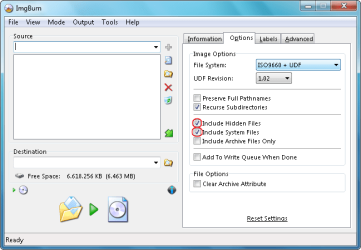
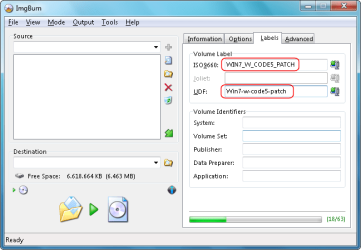
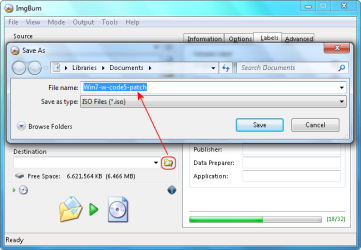
The problem isn't the dvd, the problem is your motherboard . I think you have am ASRock or MSI motherboard . I said that because i have an ASRock K7VT4A Pro and i had the same problem . The only solution for Windows 7 error code 5 is View attachment 48573 , you have here a freware program and pictures with the instructions.good luck. for me works .
 

My Computer

Computer Manufacturer/Model Number
K7VT4A PRO
OS
windows 7
CPU
AMD Barton 3000+
Motherboard
ASRock
Memory
2 GB DDR
Graphics Card(s)
NVIDIA 6200 (Asus)
Sound Card
AC'97
Monitor(s) Displays
19'' Asus LCD
Screen Resolution
1280-1024
Hard Drives
Samsung KJ321
PSU
450w Zalman
Case
ATX
Cooling
ICE
Keyboard
Microsoft
Mouse
Microsoft
Internet Speed
80MB/s
:D Many thanks for your solutions, it is wonderful to have such forums here


Have a nice time over there:)
 

My Computer

OS
Win 7
You are welcome . I'm glad that you resolved the problem .:orb::thumbsup:
 

My Computer

Computer Manufacturer/Model Number
K7VT4A PRO
OS
windows 7
CPU
AMD Barton 3000+
Motherboard
ASRock
Memory
2 GB DDR
Graphics Card(s)
NVIDIA 6200 (Asus)
Sound Card
AC'97
Monitor(s) Displays
19'' Asus LCD
Screen Resolution
1280-1024
Hard Drives
Samsung KJ321
PSU
450w Zalman
Case
ATX
Cooling
ICE
Keyboard
Microsoft
Mouse
Microsoft
Internet Speed
80MB/s
I am having a problem with the install of Windows 7 on a 32 bit AMD system. I DL'd the file and copied it to DVD however after I set the setup to boot from CD 1st it looks for the boot files and then tells me that it cannot find the files and gives an error 5. I have loaded a beta version of Vista with out a problem on this same computer. I also used the Win 7 disk to load files into my regular system and it appeared to load without a problemAny information on this will be greatly appreciated, thank you in advance.


Try work for Intel and AMD and you will have a clean instal everytime. At picture 10 mount windows 7 image
 

Attachments

  • 1.png
    1.png
    63.1 KB · Views: 349
  • 2.png
    2.png
    50 KB · Views: 440
  • 3.png
    3.png
    43.2 KB · Views: 361
  • 4.png
    4.png
    20.4 KB · Views: 294
  • 5.png
    5.png
    50.5 KB · Views: 357
  • 6.png
    6.png
    50.6 KB · Views: 326
  • 7.png
    7.png
    50.5 KB · Views: 347
  • 9.png
    9.png
    51.2 KB · Views: 293
  • 10 Insert Windows 7 IMG - ISO.png
    10 Insert Windows 7 IMG - ISO.png
    63.2 KB · Views: 312
  • 11.png
    11.png
    86 KB · Views: 273
  • 12.png
    12.png
    50.9 KB · Views: 222
  • 13.png
    13.png
    40.3 KB · Views: 213
  • 14.png
    14.png
    50.8 KB · Views: 205
  • 15.png
    15.png
    62.5 KB · Views: 179
  • 16.png
    16.png
    83.1 KB · Views: 210
  • 17.png
    17.png
    55.9 KB · Views: 187
  • 18.png
    18.png
    42.2 KB · Views: 181

My Computer

Computer Manufacturer/Model Number
K7VT4A PRO
OS
windows 7
CPU
AMD Barton 3000+
Motherboard
ASRock
Memory
2 GB DDR
Graphics Card(s)
NVIDIA 6200 (Asus)
Sound Card
AC'97
Monitor(s) Displays
19'' Asus LCD
Screen Resolution
1280-1024
Hard Drives
Samsung KJ321
PSU
450w Zalman
Case
ATX
Cooling
ICE
Keyboard
Microsoft
Mouse
Microsoft
Internet Speed
80MB/s
Boot Sectors

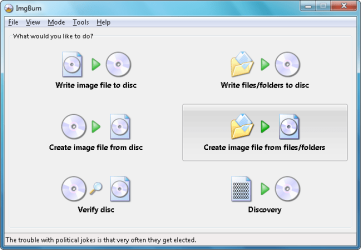
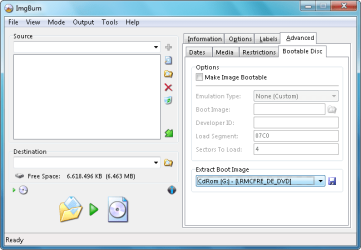
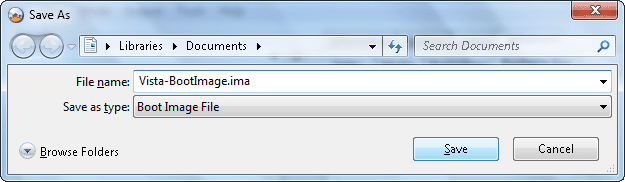
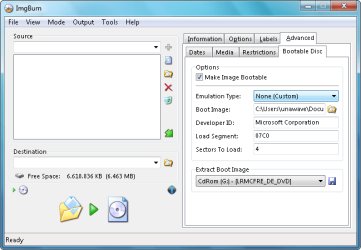
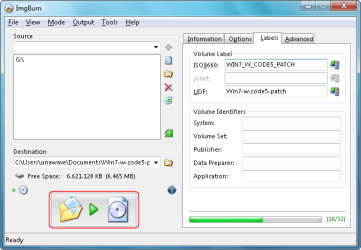
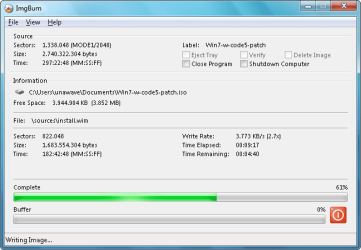
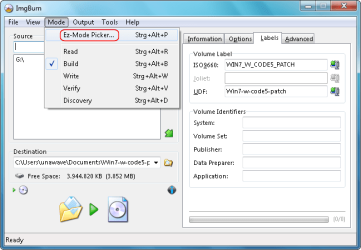
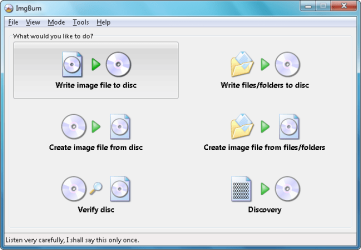
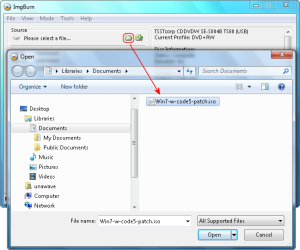
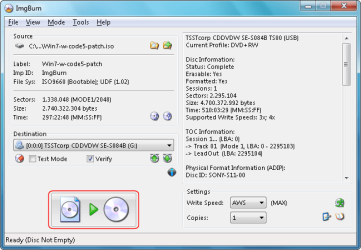
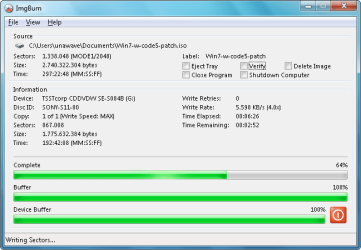
I had this problem as well and fixed it by changing the way I burned the ISO in imgburn. By default the number of boot sectors for the bootable file will be set at 4, Windows 7 requires 8 sectors. Change the number to 8, and burn the image at the slowest speed possible.
 

My Computer

OS
Windows 7 Ultimate
The problem could be that the disk is in Bootable UDF? Older drives & computers seem to have problems with this. Solution, use a program like Ultraiso and in the taskbar on the left it will tell whether it is Bootable UDF or Bootable CD/DVD, if it says Bootable UDF click on the red tick thingy and uncheck the UDF option. Now you can save it as a iso file and burn to disk.
I always use rewritables for this, just in case!!
Hope it works.

Regards Slasha
 

My Computer

Computer Manufacturer/Model Number
Custom built
OS
Windows 7 & XP
CPU
Q6600
Motherboard
ASUS P5Q Pro
Memory
4 Gb OCZ Reaper 800 Mhz 5 4 4 13
Graphics Card(s)
Zotac Gtx 260 SP192
Sound Card
Realtek 1200
Monitor(s) Displays
Benq G2420 HDBL
Hard Drives
2 x Hitachi HDT725032VLA360 in Raid 0
1 x Hitachi HDT721010SLA360 1 Tb
1 x SAMSUNG HD154UI 1.5 Tb
PSU
Enermax Nolisetaker Eg495ax-ve
Case
Custom
Cooling
Artic Cooling Freezer Pro 7
easy way

just throw in sec hardrive then boot while system runnig :p

not bad burn cause it happened to me and i installed it fine on laptop the had error on pc

hope i helped then move programs or files that are important on to new hard drive then reformat it :devil:
 

My Computer

OS
dell
Back
Top