Command Prompt at Startup

How to Open a Command Prompt at Boot in Windows 7

   Information
This will show you how to open a command prompt at boot from the System Recovery Options or Advanced Boot Options screen in Windows 7.
   Note
Command Prompt is a feature of Windows 7 that provides an entry point for typing MS‑DOS (Microsoft Disk Operating System) commands and other computer commands. The most important thing to know is that by typing commands, you can perform tasks on your computer without using the Windows 7 graphical interface (GUI). Command Prompt is typically only used by advanced users.


OPTION ONE

To Open a Command Prompt at Boot
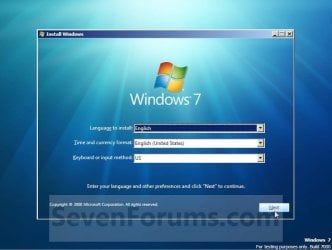
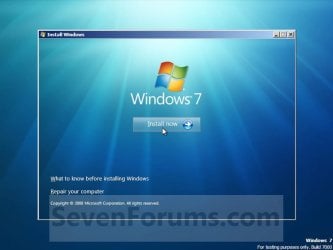
1. Boot from either your Windows 7 installation disc or Windows 7 System Repair Disc, and press Shift + F10 when at either screen below. Step3.jpg

Step4.jpg

A) Go to step 3.
OR

2. Boot to the System Recovery Options screen, and select the Command Prompt option. (see screenshot below) Command.jpg
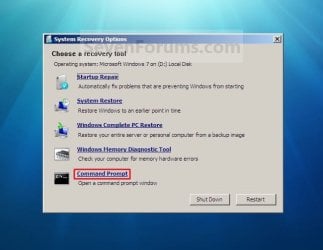
A) Continue on to step 3.
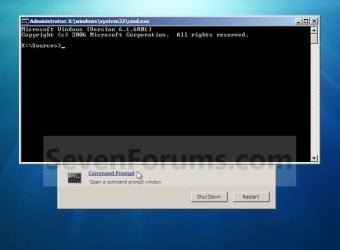
3. A command prompt window will now open. (see screenshot below)
NOTE: To exit and restart to the Windows 7 logon screen, close the command prompt window and click on the Restart button on the screenshot below step 2. Command_Prompt-1.jpg


OPTION TWO

To Boot to "Safe Mode with Command Prompt"


   Note
This starts Windows 7 in safe mode with a command prompt window instead of the usual Windows interface.
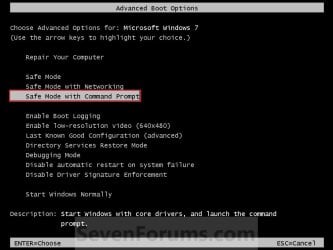
1. Boot to the Advanced Boot Options screen.

2. Select Safe Mode with Command Prompt and press Enter. (See screenshot below) Command-2.jpg
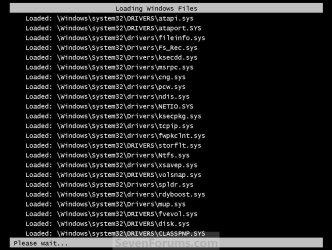
3. Windows 7 will now start loading Safe Mode with Command Prompt. (See screenshot below) Command-3.jpg
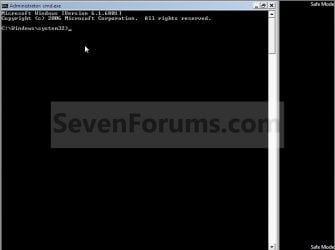
4. When finished, you are now in Safe Mode with Command Prompt. (See screenshot below)
NOTE: To exit from here, press Ctrl+Alt+Delete or type Exit and press Enter to restart the computer. Safe-Mode_Command-4.jpg
That's it,
Shawn


Last edited:
well but i have 2 drives and wanted to defrag both.

so shouldnt it be "defrag /c ..." ?
 

My Computer

Computer Manufacturer/Model Number
Asus
OS
Windows 7 Home Premium 64bit
CPU
Intel Core i7-2630QM @ 2.00/2.90GHz
Motherboard
ASUSTeK G74Sx
Memory
12GB DDR3 @ 1333MHz
Graphics Card(s)
GeForce GTX 560M - 3 GB GDDR5
Sound Card
Steelseries 7.1 Surround (external)
Screen Resolution
1920x1080 @ 60Hz
Hard Drives
500 GB 7200rpm + 500 GB 7200rpm + 1 TB MemUp 5400rpm (external)
Cooling
Asus + Coolermaster Notepal U3
Mouse
ASUS ROG GX800 3200 DPI Laser Gaming Mouse
Internet Speed
54Mbs wifi / 100Mbs cable
Sure, you could include the other drive letter as well, but the drive letters must have a colon : after them and not the backslash / in front of them. For example, with drive letters C and E.

defrag C: E: /F
 

My Computer

Computer type
PC/Desktop
Computer Manufacturer/Model Number
Self built custom
OS
64-bit Windows 11 Pro for Workstations
CPU
Intel i7-8700K OC'd to 5 GHz
Motherboard
ASUS ROG Maximus XI Formula Z390
Memory
64 GB (4x16GB) G.SKILL TridentZ RGB DDR4 3600 MHz
Graphics Card(s)
ASUS ROG-STRIX-GTX1080TI-O11G-GAMING
Sound Card
Integrated
Monitor(s) Displays
2 x Samsung Odyssey G7 27"
Screen Resolution
2560x1440
Hard Drives
1TB Samsung 990 PRO M.2,
4TB Samsung 990 PRO PRO M.2,
TerraMaster F8 SSD Plus NAS
PSU
Seasonic Prime Titanium 850W
Case
Thermaltake Core P3
Cooling
Corsair Hydro H115i
Keyboard
Logitech wireless K800
Mouse
Logitech MX Master 4
Internet Speed
2 Gb/s Download and 100 Mb/s Upload
Antivirus
Malwarebyte Anti-Malware Premium
Browser
Google Chrome
Other Info
Logitech Z625 speaker system,
Logitech BRIO 4K Pro webcam,
HP Color LaserJet Pro MFP M477fdn,
APC SMART-UPS RT 1000 XL - SURT1000XLI,
Galaxy S23 Plus phone
i was trying to use that because it says: /C - Perform the operation on all volumes. so it should work...

but ill try individually tonight and will let you know if it works!
 

My Computer

Computer Manufacturer/Model Number
Asus
OS
Windows 7 Home Premium 64bit
CPU
Intel Core i7-2630QM @ 2.00/2.90GHz
Motherboard
ASUSTeK G74Sx
Memory
12GB DDR3 @ 1333MHz
Graphics Card(s)
GeForce GTX 560M - 3 GB GDDR5
Sound Card
Steelseries 7.1 Surround (external)
Screen Resolution
1920x1080 @ 60Hz
Hard Drives
500 GB 7200rpm + 500 GB 7200rpm + 1 TB MemUp 5400rpm (external)
Cooling
Asus + Coolermaster Notepal U3
Mouse
ASUS ROG GX800 3200 DPI Laser Gaming Mouse
Internet Speed
54Mbs wifi / 100Mbs cable
Ah, I was thinking that you were wanting to do it on that drive letter instead of the switch, and just had the command wrong. Sorry about that. LOL

Yes, you can also use the command below in a elevated command prompt if you wanted to defrag all volumes.

defrag /C /F
 

My Computer

Computer type
PC/Desktop
Computer Manufacturer/Model Number
Self built custom
OS
64-bit Windows 11 Pro for Workstations
CPU
Intel i7-8700K OC'd to 5 GHz
Motherboard
ASUS ROG Maximus XI Formula Z390
Memory
64 GB (4x16GB) G.SKILL TridentZ RGB DDR4 3600 MHz
Graphics Card(s)
ASUS ROG-STRIX-GTX1080TI-O11G-GAMING
Sound Card
Integrated
Monitor(s) Displays
2 x Samsung Odyssey G7 27"
Screen Resolution
2560x1440
Hard Drives
1TB Samsung 990 PRO M.2,
4TB Samsung 990 PRO PRO M.2,
TerraMaster F8 SSD Plus NAS
PSU
Seasonic Prime Titanium 850W
Case
Thermaltake Core P3
Cooling
Corsair Hydro H115i
Keyboard
Logitech wireless K800
Mouse
Logitech MX Master 4
Internet Speed
2 Gb/s Download and 100 Mb/s Upload
Antivirus
Malwarebyte Anti-Malware Premium
Browser
Google Chrome
Other Info
Logitech Z625 speaker system,
Logitech BRIO 4K Pro webcam,
HP Color LaserJet Pro MFP M477fdn,
APC SMART-UPS RT 1000 XL - SURT1000XLI,
Galaxy S23 Plus phone
yes but even if i do that it gives me those errors.... :cry:
 

My Computer

Computer Manufacturer/Model Number
Asus
OS
Windows 7 Home Premium 64bit
CPU
Intel Core i7-2630QM @ 2.00/2.90GHz
Motherboard
ASUSTeK G74Sx
Memory
12GB DDR3 @ 1333MHz
Graphics Card(s)
GeForce GTX 560M - 3 GB GDDR5
Sound Card
Steelseries 7.1 Surround (external)
Screen Resolution
1920x1080 @ 60Hz
Hard Drives
500 GB 7200rpm + 500 GB 7200rpm + 1 TB MemUp 5400rpm (external)
Cooling
Asus + Coolermaster Notepal U3
Mouse
ASUS ROG GX800 3200 DPI Laser Gaming Mouse
Internet Speed
54Mbs wifi / 100Mbs cable
Is that with the separate drive letters?

If so, then you may need to do a repair install if you do not have a restore point available that is dated before (if known when) this issue started to do a system restore with. :(
 

My Computer

Computer type
PC/Desktop
Computer Manufacturer/Model Number
Self built custom
OS
64-bit Windows 11 Pro for Workstations
CPU
Intel i7-8700K OC'd to 5 GHz
Motherboard
ASUS ROG Maximus XI Formula Z390
Memory
64 GB (4x16GB) G.SKILL TridentZ RGB DDR4 3600 MHz
Graphics Card(s)
ASUS ROG-STRIX-GTX1080TI-O11G-GAMING
Sound Card
Integrated
Monitor(s) Displays
2 x Samsung Odyssey G7 27"
Screen Resolution
2560x1440
Hard Drives
1TB Samsung 990 PRO M.2,
4TB Samsung 990 PRO PRO M.2,
TerraMaster F8 SSD Plus NAS
PSU
Seasonic Prime Titanium 850W
Case
Thermaltake Core P3
Cooling
Corsair Hydro H115i
Keyboard
Logitech wireless K800
Mouse
Logitech MX Master 4
Internet Speed
2 Gb/s Download and 100 Mb/s Upload
Antivirus
Malwarebyte Anti-Malware Premium
Browser
Google Chrome
Other Info
Logitech Z625 speaker system,
Logitech BRIO 4K Pro webcam,
HP Color LaserJet Pro MFP M477fdn,
APC SMART-UPS RT 1000 XL - SURT1000XLI,
Galaxy S23 Plus phone
well i think i will stick to defragging in safe mode or smth... dont wanna lose my tweaks.
will i get better results with defraggler while running it normally logged in than by defragging with CMD also normally logged in?

Because this is the only thing that is not working.
 

My Computer

Computer Manufacturer/Model Number
Asus
OS
Windows 7 Home Premium 64bit
CPU
Intel Core i7-2630QM @ 2.00/2.90GHz
Motherboard
ASUSTeK G74Sx
Memory
12GB DDR3 @ 1333MHz
Graphics Card(s)
GeForce GTX 560M - 3 GB GDDR5
Sound Card
Steelseries 7.1 Surround (external)
Screen Resolution
1920x1080 @ 60Hz
Hard Drives
500 GB 7200rpm + 500 GB 7200rpm + 1 TB MemUp 5400rpm (external)
Cooling
Asus + Coolermaster Notepal U3
Mouse
ASUS ROG GX800 3200 DPI Laser Gaming Mouse
Internet Speed
54Mbs wifi / 100Mbs cable
I don't blame you if this is the only issue.
 

My Computer

Computer type
PC/Desktop
Computer Manufacturer/Model Number
Self built custom
OS
64-bit Windows 11 Pro for Workstations
CPU
Intel i7-8700K OC'd to 5 GHz
Motherboard
ASUS ROG Maximus XI Formula Z390
Memory
64 GB (4x16GB) G.SKILL TridentZ RGB DDR4 3600 MHz
Graphics Card(s)
ASUS ROG-STRIX-GTX1080TI-O11G-GAMING
Sound Card
Integrated
Monitor(s) Displays
2 x Samsung Odyssey G7 27"
Screen Resolution
2560x1440
Hard Drives
1TB Samsung 990 PRO M.2,
4TB Samsung 990 PRO PRO M.2,
TerraMaster F8 SSD Plus NAS
PSU
Seasonic Prime Titanium 850W
Case
Thermaltake Core P3
Cooling
Corsair Hydro H115i
Keyboard
Logitech wireless K800
Mouse
Logitech MX Master 4
Internet Speed
2 Gb/s Download and 100 Mb/s Upload
Antivirus
Malwarebyte Anti-Malware Premium
Browser
Google Chrome
Other Info
Logitech Z625 speaker system,
Logitech BRIO 4K Pro webcam,
HP Color LaserJet Pro MFP M477fdn,
APC SMART-UPS RT 1000 XL - SURT1000XLI,
Galaxy S23 Plus phone
I don't blame you if this is the only issue.

I ended up using defraggler for both drives and im ok with that....
I set it up with similar settings of windows disk defragmenter (not to defrag files with fragments under 64mb)

Thanks for all time spent trying to help me!
 

My Computer

Computer Manufacturer/Model Number
Asus
OS
Windows 7 Home Premium 64bit
CPU
Intel Core i7-2630QM @ 2.00/2.90GHz
Motherboard
ASUSTeK G74Sx
Memory
12GB DDR3 @ 1333MHz
Graphics Card(s)
GeForce GTX 560M - 3 GB GDDR5
Sound Card
Steelseries 7.1 Surround (external)
Screen Resolution
1920x1080 @ 60Hz
Hard Drives
500 GB 7200rpm + 500 GB 7200rpm + 1 TB MemUp 5400rpm (external)
Cooling
Asus + Coolermaster Notepal U3
Mouse
ASUS ROG GX800 3200 DPI Laser Gaming Mouse
Internet Speed
54Mbs wifi / 100Mbs cable
You're most welcome. That would be the best option. :)
 

My Computer

Computer type
PC/Desktop
Computer Manufacturer/Model Number
Self built custom
OS
64-bit Windows 11 Pro for Workstations
CPU
Intel i7-8700K OC'd to 5 GHz
Motherboard
ASUS ROG Maximus XI Formula Z390
Memory
64 GB (4x16GB) G.SKILL TridentZ RGB DDR4 3600 MHz
Graphics Card(s)
ASUS ROG-STRIX-GTX1080TI-O11G-GAMING
Sound Card
Integrated
Monitor(s) Displays
2 x Samsung Odyssey G7 27"
Screen Resolution
2560x1440
Hard Drives
1TB Samsung 990 PRO M.2,
4TB Samsung 990 PRO PRO M.2,
TerraMaster F8 SSD Plus NAS
PSU
Seasonic Prime Titanium 850W
Case
Thermaltake Core P3
Cooling
Corsair Hydro H115i
Keyboard
Logitech wireless K800
Mouse
Logitech MX Master 4
Internet Speed
2 Gb/s Download and 100 Mb/s Upload
Antivirus
Malwarebyte Anti-Malware Premium
Browser
Google Chrome
Other Info
Logitech Z625 speaker system,
Logitech BRIO 4K Pro webcam,
HP Color LaserJet Pro MFP M477fdn,
APC SMART-UPS RT 1000 XL - SURT1000XLI,
Galaxy S23 Plus phone
this is the tutorial when we want install the windows right? so how if i'am not in the install mode,but in normal boot mode of windows?!
 

My Computer

Computer Manufacturer/Model Number
7600
OS
Windows 7 Profesional 32bit
CPU
intel
Motherboard
intel
Memory
1 gb
Graphics Card(s)
512mb

My Computer

Computer type
PC/Desktop
Computer Manufacturer/Model Number
Self built custom
OS
64-bit Windows 11 Pro for Workstations
CPU
Intel i7-8700K OC'd to 5 GHz
Motherboard
ASUS ROG Maximus XI Formula Z390
Memory
64 GB (4x16GB) G.SKILL TridentZ RGB DDR4 3600 MHz
Graphics Card(s)
ASUS ROG-STRIX-GTX1080TI-O11G-GAMING
Sound Card
Integrated
Monitor(s) Displays
2 x Samsung Odyssey G7 27"
Screen Resolution
2560x1440
Hard Drives
1TB Samsung 990 PRO M.2,
4TB Samsung 990 PRO PRO M.2,
TerraMaster F8 SSD Plus NAS
PSU
Seasonic Prime Titanium 850W
Case
Thermaltake Core P3
Cooling
Corsair Hydro H115i
Keyboard
Logitech wireless K800
Mouse
Logitech MX Master 4
Internet Speed
2 Gb/s Download and 100 Mb/s Upload
Antivirus
Malwarebyte Anti-Malware Premium
Browser
Google Chrome
Other Info
Logitech Z625 speaker system,
Logitech BRIO 4K Pro webcam,
HP Color LaserJet Pro MFP M477fdn,
APC SMART-UPS RT 1000 XL - SURT1000XLI,
Galaxy S23 Plus phone
need to reformat drives

I need to reformat my computer and am having trouble doing so. I went through the installation disc and chose command prompt when I get there, the directory is x:/sources. My husband thought that this was a virus because when I try to change the directory to c to reformat d or d to reformat c, it won't change from the x drive. But I saw in your tutorial about how to access the command prompt that your screen capture had the x:/sources.

I got to the home directory x, usding cd.. but it will not let me go to a different drive other than x. How can I reformat my c and d drives, and exactly what is the x drive?​
 

My Computer

OS
Windos 7 32 bit

My Computer

Computer type
PC/Desktop
Computer Manufacturer/Model Number
Golden Mk. I.4
OS
Windows 10 Pro x64 ; Xubuntu x64
CPU
Intel i7 860 @ 2.80 GHz O/C'ed to 4.0GHz
Motherboard
Gigabyte P55A-UD3R Rev.1. Award BIOS F13
Memory
16GB Corsair Vengance DDR3 @ 661 MHz Dual Channel (9-9-9-24)
Graphics Card(s)
EVGA NVidia GTX 560 1024MB
Sound Card
Realtek Integrated
Monitor(s) Displays
Dual Samsung SyncMaster 2494HS
Screen Resolution
1920*1080 and 1920*1080
Hard Drives
1*Samsung 840 EVO 120GB SSD;
1*OCZ Vertex 2 60GB SSD;
2*Samsung F3 SpinPoint 1TB in RAID0;
1*Samsung F1 SpinPoint 1TB;
2*Western Digital 1TB External USB 3.0
1*Western Digital 500GB External USB 3.0
1*Seagate 500GB External USB 2.0
PSU
Thermaltake ToughPower QFan 750W
Case
Thermaltake Element S VK60001W2Z
Cooling
Corsair H60 Water Cooling, 2*230mm and 2*80mm case fans
Keyboard
Logitech G110
Mouse
Logitech MX518
Thank you so much for your speedy reply, I will give it a try!
 

My Computer

OS
Windos 7 32 bit

My Computer

Computer Manufacturer/Model Number
7600
OS
Windows 7 Profesional 32bit
CPU
intel
Motherboard
intel
Memory
1 gb
Graphics Card(s)
512mb
You're most welcome Andy. No worries, you're English is good enough. :)
 

My Computer

Computer type
PC/Desktop
Computer Manufacturer/Model Number
Self built custom
OS
64-bit Windows 11 Pro for Workstations
CPU
Intel i7-8700K OC'd to 5 GHz
Motherboard
ASUS ROG Maximus XI Formula Z390
Memory
64 GB (4x16GB) G.SKILL TridentZ RGB DDR4 3600 MHz
Graphics Card(s)
ASUS ROG-STRIX-GTX1080TI-O11G-GAMING
Sound Card
Integrated
Monitor(s) Displays
2 x Samsung Odyssey G7 27"
Screen Resolution
2560x1440
Hard Drives
1TB Samsung 990 PRO M.2,
4TB Samsung 990 PRO PRO M.2,
TerraMaster F8 SSD Plus NAS
PSU
Seasonic Prime Titanium 850W
Case
Thermaltake Core P3
Cooling
Corsair Hydro H115i
Keyboard
Logitech wireless K800
Mouse
Logitech MX Master 4
Internet Speed
2 Gb/s Download and 100 Mb/s Upload
Antivirus
Malwarebyte Anti-Malware Premium
Browser
Google Chrome
Other Info
Logitech Z625 speaker system,
Logitech BRIO 4K Pro webcam,
HP Color LaserJet Pro MFP M477fdn,
APC SMART-UPS RT 1000 XL - SURT1000XLI,
Galaxy S23 Plus phone
I have a question about the CMD-mode boots and which ones are booting into RAM.

Method 1: Booting with a Win 7 Install or Repair disc to CMD Prompt:

I'm guessing that CMD is being loaded into RAM and no HDD is required to run anything within CMD, including DISKPART . Is that correct?

Method 2 - Boot to Safe Mode with CMD:

Is that also booting into RAM? Is the OS HDD being accessed when in CMD Safe Mode?
 

My Computer

Computer type
PC/Desktop
Computer Manufacturer/Model Number
Built at Micro Center Richardson, TX
OS
Windows 7 Home Premium 64 bit
CPU
Intel i5 650 Dual Core 3.20 GHz Cache 4MB Threads: 4
Motherboard
ASUS PRO P7P55D-E
Memory
Corsair 16GB DDR3 1600MHz 9-9-9-24 P/N: CMZ8GX3M2A1600C
Graphics Card(s)
ZOTAC GeFORCE 9500 ZT-95TEK2M-FSL 1GB GDDR2
Sound Card
Mother Bd
Monitor(s) Displays
ASUS V228H 21.5” Diag
Screen Resolution
1440 x 900
Hard Drives
SEAGATE BARRACUDA (2ea) 3.5” INTERNAL 1Tb 16 MB SATA ST1000DM003-9YN162 7200RPM, 64MB, SATA 6Gb/s ** 2 Sata Hot-Swap Racks installed in Tower
PSU
Thermaltake Model TR2 RX 750W
Cooling
2 Tower Fans
Keyboard
Dell Quietkey PS/2 Windows 104 P/N 0463CD
Mouse
Kensington Mechanical Trackball USB Model 64217
Internet Speed
35/35
Antivirus
Norton 360 & MBAM Pro
Browser
IE10
Other Info
Printer: HP DeskJet 3520 USB 2.0 **
Speakers: ALTEC Model VS4621 2.1 28 W/Channel w/Sub-woofer **
IOGEAR HDMI Monitor Switcher Swx3 MODEL GHDSW3 ** Addonics ZDRWESU3 eSata/USB 3.0 external DVD Read/Write DVD Drive** SEAGATE GoFlex USB 2.0 Portable HD 500GB 5400 RPM P/N: 9ZF2A2-570
Hello Scoop,

Method 1 loads from the DVD at boot instead of Windows. It would be pointless to run anything in a command prompt at boot without a hard drive though.

Method 2 loads Windows in Safe Mode.

Everything still runs using RAM, but not from RAM alone.
 

My Computer

Computer type
PC/Desktop
Computer Manufacturer/Model Number
Self built custom
OS
64-bit Windows 11 Pro for Workstations
CPU
Intel i7-8700K OC'd to 5 GHz
Motherboard
ASUS ROG Maximus XI Formula Z390
Memory
64 GB (4x16GB) G.SKILL TridentZ RGB DDR4 3600 MHz
Graphics Card(s)
ASUS ROG-STRIX-GTX1080TI-O11G-GAMING
Sound Card
Integrated
Monitor(s) Displays
2 x Samsung Odyssey G7 27"
Screen Resolution
2560x1440
Hard Drives
1TB Samsung 990 PRO M.2,
4TB Samsung 990 PRO PRO M.2,
TerraMaster F8 SSD Plus NAS
PSU
Seasonic Prime Titanium 850W
Case
Thermaltake Core P3
Cooling
Corsair Hydro H115i
Keyboard
Logitech wireless K800
Mouse
Logitech MX Master 4
Internet Speed
2 Gb/s Download and 100 Mb/s Upload
Antivirus
Malwarebyte Anti-Malware Premium
Browser
Google Chrome
Other Info
Logitech Z625 speaker system,
Logitech BRIO 4K Pro webcam,
HP Color LaserJet Pro MFP M477fdn,
APC SMART-UPS RT 1000 XL - SURT1000XLI,
Galaxy S23 Plus phone
Hello Scoop,

Method 1 loads from the DVD at boot instead of Windows. It would be pointless to run anything in a command prompt at boot without a hard drive though.

Method 2 loads Windows in Safe Mode.

Everything still runs using RAM, but not from RAM alone.

Thanks for the info :)

Method 1, the reason I was curious about it, is if I wanted to run "clean" or "clean all" from DISKPART, I'd like to run those commands outside of the OS and without any other HDD connected to my PC except for the target HDD.

I can use other means, DBAN, etc, but I was curious if I could use DISKPART (CMD) from the bootable Win DVD with no other HDD connected to my PC (no OS drive installed).

Method 2: I'm not sure I understand this part, not running from RAM alone. When booting into CMD Prompt Safe Mode, is the OS HDD being accessed?
 

My Computer

Computer type
PC/Desktop
Computer Manufacturer/Model Number
Built at Micro Center Richardson, TX
OS
Windows 7 Home Premium 64 bit
CPU
Intel i5 650 Dual Core 3.20 GHz Cache 4MB Threads: 4
Motherboard
ASUS PRO P7P55D-E
Memory
Corsair 16GB DDR3 1600MHz 9-9-9-24 P/N: CMZ8GX3M2A1600C
Graphics Card(s)
ZOTAC GeFORCE 9500 ZT-95TEK2M-FSL 1GB GDDR2
Sound Card
Mother Bd
Monitor(s) Displays
ASUS V228H 21.5” Diag
Screen Resolution
1440 x 900
Hard Drives
SEAGATE BARRACUDA (2ea) 3.5” INTERNAL 1Tb 16 MB SATA ST1000DM003-9YN162 7200RPM, 64MB, SATA 6Gb/s ** 2 Sata Hot-Swap Racks installed in Tower
PSU
Thermaltake Model TR2 RX 750W
Cooling
2 Tower Fans
Keyboard
Dell Quietkey PS/2 Windows 104 P/N 0463CD
Mouse
Kensington Mechanical Trackball USB Model 64217
Internet Speed
35/35
Antivirus
Norton 360 & MBAM Pro
Browser
IE10
Other Info
Printer: HP DeskJet 3520 USB 2.0 **
Speakers: ALTEC Model VS4621 2.1 28 W/Channel w/Sub-woofer **
IOGEAR HDMI Monitor Switcher Swx3 MODEL GHDSW3 ** Addonics ZDRWESU3 eSata/USB 3.0 external DVD Read/Write DVD Drive** SEAGATE GoFlex USB 2.0 Portable HD 500GB 5400 RPM P/N: 9ZF2A2-570
Back
Top