Hey friends,
Hello friends & guests this post aim at sharing information about "Commit charge" some of us must be aware of this term & many don't know what the Hell is this, so here is this article that will help you to understand another aspect of your wonderful Windows...
[FONT="]In computing, commit charge is a term used in Microsoft Windows operating systems to describe the total amount of virtual address space for which the backing store is the pagefile. It may be thought of as the maximum potential pagefile usage.[/FONT]
[FONT="]Overview
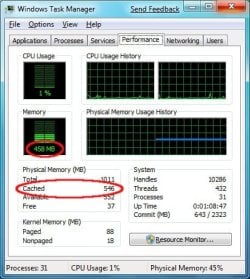
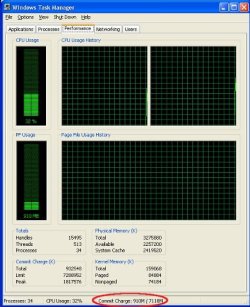
The Windows Task Manager utility, in its Performance tab, shows three counters related to commit charge:
• Total is the amount of pagefile-backed virtual address space in use, i.e., the current commit charge. The corresponding performance counter is called "Committed Bytes".
• Limit is the maximum possible value for Total; it is the sum of the current pagefile size plus the physical memory available for paging (this excludes RAM that is assigned to non-pageable areas). The corresponding performance counter is called "Commit Limit".
• Peak is the highest amount that the total commit charge has reached since the computer was last rebooted.[/FONT]
[FONT="]The program Process Explorer reports the same set of values with the slight variation that Total is called Current there and additionally provides percentages of Peak and Current towards the Limit value.
[/FONT]
[FONT="]The commit charge increases when any program is opened and used, and goes down when a program is closed. It will also change when already-running programs allocate or free private virtual memory; for example, with the VirtualAlloc and VirtualFree APIs.
[/FONT]
[FONT="]In the Task Manager utility under Windows XP and Windows Server 2003, the graphical displays labeled "PF usage" and "Page File Usage History" actually reflect not the pagefile contents but the total (or current) commit charge. The height of the graph area corresponds to the commit limit. Despite the label, these do not show how much has actually been written to the pagefile, but only the maximum potential pagefile usage at the moment. In Windows 2000 and Windows NT 4.0, these same displays are labeled "Mem usage" but again actually show the commit charge.
[/FONT]
[FONT="]In Task Manager's "Processes" display, each process's contribution to the "total commit charge" is shown in the "VM size" column. The total commit charge will always be larger than the sum of these values, as the total includes system-wide allocations such as the paged pool.
The "Mem Usage" column in Task Manager's "Processes" display shows each process's current working set. This is a count of physical memory (RAM) rather than virtual address space. It represents the subset of the process's virtual address space that is valid, meaning that it can be referenced without incurring a page fault.
[/FONT]
[FONT="]The commit charge for each process does not include other major contributions to the process's virtual address space, such as mapped files. For this reason, the process's working set may be larger than its "VM size" (its contribution to "total commit charge"), and the total commit charge is not at all inclusive of the total memory (physical plus virtual) actually in use.
[/FONT]
[FONT="]The commit limit may be increased by either creating additional pagefiles or, if pagefile expansion is enabled, by expanding an existing one. The operating system will expand the pagefile automatically, if possible, when the total commit charge approaches the limit. In such an event a popup window will be displayed stating that "The system is running low on virtual memory."
[/FONT]
[FONT="]If the system ever runs completely out of commit charge (that is, if the total reaches the limit), a popup window will be displayed stating that "The system is out of virtual memory," and it may become extremely sluggish or even nonresponsive. Closing programs (if the user is still able to do so at this point) decreases the total commit charge and may thereby free up the system.
[/FONT]
Hope this article helped you to get some idea about "Commit charge" it might sound a little technical, trust me i tried to be as simple as possible.
Please do write in your suggestions,feedback,advice...much appreciated...
Hello friends & guests this post aim at sharing information about "Commit charge" some of us must be aware of this term & many don't know what the Hell is this, so here is this article that will help you to understand another aspect of your wonderful Windows...
[FONT="]In computing, commit charge is a term used in Microsoft Windows operating systems to describe the total amount of virtual address space for which the backing store is the pagefile. It may be thought of as the maximum potential pagefile usage.[/FONT]
[FONT="]Overview
The Windows Task Manager utility, in its Performance tab, shows three counters related to commit charge:
• Total is the amount of pagefile-backed virtual address space in use, i.e., the current commit charge. The corresponding performance counter is called "Committed Bytes".
• Limit is the maximum possible value for Total; it is the sum of the current pagefile size plus the physical memory available for paging (this excludes RAM that is assigned to non-pageable areas). The corresponding performance counter is called "Commit Limit".
• Peak is the highest amount that the total commit charge has reached since the computer was last rebooted.[/FONT]
[FONT="]The program Process Explorer reports the same set of values with the slight variation that Total is called Current there and additionally provides percentages of Peak and Current towards the Limit value.
[/FONT]
[FONT="]The commit charge increases when any program is opened and used, and goes down when a program is closed. It will also change when already-running programs allocate or free private virtual memory; for example, with the VirtualAlloc and VirtualFree APIs.
[/FONT]
[FONT="]In the Task Manager utility under Windows XP and Windows Server 2003, the graphical displays labeled "PF usage" and "Page File Usage History" actually reflect not the pagefile contents but the total (or current) commit charge. The height of the graph area corresponds to the commit limit. Despite the label, these do not show how much has actually been written to the pagefile, but only the maximum potential pagefile usage at the moment. In Windows 2000 and Windows NT 4.0, these same displays are labeled "Mem usage" but again actually show the commit charge.
[/FONT]
[FONT="]In Task Manager's "Processes" display, each process's contribution to the "total commit charge" is shown in the "VM size" column. The total commit charge will always be larger than the sum of these values, as the total includes system-wide allocations such as the paged pool.
The "Mem Usage" column in Task Manager's "Processes" display shows each process's current working set. This is a count of physical memory (RAM) rather than virtual address space. It represents the subset of the process's virtual address space that is valid, meaning that it can be referenced without incurring a page fault.
[/FONT]
[FONT="]The commit charge for each process does not include other major contributions to the process's virtual address space, such as mapped files. For this reason, the process's working set may be larger than its "VM size" (its contribution to "total commit charge"), and the total commit charge is not at all inclusive of the total memory (physical plus virtual) actually in use.
[/FONT]
[FONT="]The commit limit may be increased by either creating additional pagefiles or, if pagefile expansion is enabled, by expanding an existing one. The operating system will expand the pagefile automatically, if possible, when the total commit charge approaches the limit. In such an event a popup window will be displayed stating that "The system is running low on virtual memory."
[/FONT]
[FONT="]If the system ever runs completely out of commit charge (that is, if the total reaches the limit), a popup window will be displayed stating that "The system is out of virtual memory," and it may become extremely sluggish or even nonresponsive. Closing programs (if the user is still able to do so at this point) decreases the total commit charge and may thereby free up the system.
[/FONT]
Hope this article helped you to get some idea about "Commit charge" it might sound a little technical, trust me i tried to be as simple as possible.
Please do write in your suggestions,feedback,advice...much appreciated...
My Computer
- Computer Manufacturer/Model Number
- Acer Aspire 4530
- OS
- windows 7 Ultimate x86
- CPU
- AMD Athlon x2 QL60 1900Mhz 1 MB L2 cache
- Motherboard
- Acer Grasmoor
- Memory
- 2GB DDR2
- Graphics Card(s)
- nVidia GeForce 9100M G
- Sound Card
- Onboard
- Monitor(s) Displays
- 14.1"
- Screen Resolution
- 1280*800
- Hard Drives
- 160 GB
- PSU
- Onboard
- Case
- Onboard
- Cooling
- Onboard
- Keyboard
- Standard laptop keyboard
- Mouse
- Touchpad & external iball usb mouse
- Internet Speed
- its slower then SNAIL


 )
)