Computer acting strange after update yesterday

mmurray1988

New member
Member
Local time
7:05 AM
Messages
98
Location
San Diego
Since getting my Windows update yesterday (4/12), there has been a change in behavior. Whenever I try to click on any windows at the bottom, sometimes they won't open if I have one up. I have to hit the show window button at the bottom right to be able to bring up anymore windows again.

Whenever I use photoshop anything I try to edit jumps or skips. Sometimes the pictures "disappears" until I hit close, and then everything pops up again.

It was as if the update messed with my display drivers, which are all up to date.

Any ideas?
 

My Computer My Computer

Computer type
PC/Desktop
Computer Manufacturer/Model Number
Custom Build
OS
Windows 7 Professional
CPU
GenuineIntel Intel(R) Core(TM) i7-3770K CPU @ 3.50GHz
Motherboard
ASRock, Z77 Extreme4
Memory
16.0 GB
Graphics Card(s)
NVIDIA GeForce GTX 1070
Monitor(s) Displays
Viewsonic VX2450WM-LED 24-Inch
Screen Resolution
1080
Hard Drives
1TB WD Black
250 GB 850 EVO
PSU
HX 650
Antivirus
MSE
Browser
Brave
Hello MM mate just doa ssytem rstore to before those updates and see if the problem goes away.

Right now the updates are in my mind in a state of disarray with all the 10 stuff going on, and I don't personally install any updates at all unless I know exactly what they are for and to do that is very time consuming so in general I just ignore the nagging.

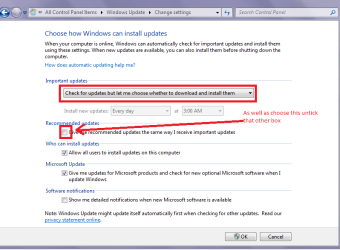
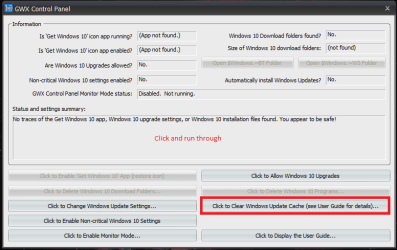
Just in case you are interested if you are not keen on having 10 installed just yet then run the batch file from this Upgrade to Windows 10 Update - Enable or Disable in Windows 7 or 8.1 - Windows 10 Forums

and I use this to keep the 10 files from being on my machines Ultimate Outsider - Software Downloads I just install the GWX Control Panel - nothig else - and after the initial setup work is done I just check each day (I have the GWX on my desktops) to keep the stuff at bay because there is a lot of 10 files that come through with what look like innocuous updates;) see pics
 

Attachments

  • UPDATE SETTINGS.PNG
    UPDATE SETTINGS.PNG
    22.9 KB · Views: 0
  • GWX CP SET.PNG
    GWX CP SET.PNG
    17.2 KB · Views: 0

My Computer My Computer

Computer type
PC/Desktop
Computer Manufacturer/Model Number
Own build (new) Desk1 / Asus ROG Win 7 / Desk2 1st build
OS
Desk1 7 Home Prem / Desk2 10 Pro / Main lap Asus ROG 10 Pro 2 laptop Toshiba 7 Pro Asus P2520 7 & 10
CPU
Desk1 i5 3750K / Laptop i7 GTX 860M / Desk2 i5 2500
Motherboard
Desk1 Asus P877-V / Desk2 Gigabyte H67 UD3H / Laptop ?
Memory
Desk1 8GB (1866) / Desk2 16GB (1333) / Laptop 8Gb DDR3
Graphics Card(s)
Desk 1& 2NVidia GTX 650 & Laptops on board Intel
Sound Card
Desk 1 & 2 -XONAR DG Realtek High Def audio Laptop
Monitor(s) Displays
Desk 1 Benq HD 2450 / Desk2 Philips 24" / Laptop 17.5"
Screen Resolution
1920x1080 D1 & D2 & Laptop 1
Hard Drives
Desk1 Samsung 120GB 830 SSD
Asus ROG 256GB 850 Pro SSD
Desk2 Samsung 840 256 SSD
Toshiba 120GB EVO
PSU
Desk 1 Corsair HX 1050/ Laptop ? / Desk 2 Corsair HX 650
Case
Desk 1 Cooler HAF XM ? Toshiba laptop / Desk2 Coolermaster
Cooling
Fans on all Desk1 -2 Desk2 - all Coolermasters 5 Laptop ?
Keyboard
Desk 1 MS Sidewinder X6 Desk 2 MS Sidewinder X 4
Mouse
Desk 1&2 - Gigabyte MS 900 gamer - laptop - Logitec wireless
Internet Speed
ADSL2+
Other Info
One other Desktop (tester) and spare Toshba laptop both with SSD's
Running Kaspersky 2016 ISS on all machines config'd identically
Logitec audio stereo systems on each machine (x3)
Canon MG5250MFC
Router/modem TP-Link running WPA2SK
Back
Top