
Computer Acting Very Strange

Josh7

New member
Member
Local time
2:14 PM
Messages
81
I remember my old computer used to do this (Now it's in the closet)

The thing is, my computer is acting really slow when it shouldn't be. I can tell when it's being slow because when i open windows of programs it makes the program jump down, or jump open really fast like it ran across the screen.

Just typing this it's going slow, like i said it never is like this.

I ran a full scan yesterday, came up with nothing.

I analyzed my disks and it was only 1%

Anyone no what I'm talking about? Can you help me fix this problem so I'm not worrying about it?
 

Attachments
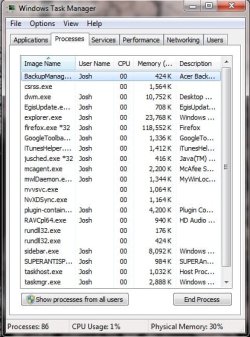
  • ctrl+Delt.jpg
    ctrl+Delt.jpg
    51.9 KB · Views: 31
Last edited:

My Computer

Computer Manufacturer/Model Number
Acer
OS
Windows 7 Home Premium x64
CPU
Quadcore
Motherboard
Nvidea Chipset 9200
Memory
4GB
Graphics Card(s)
Nvidea Gefore 9200
Monitor(s) Displays
Dell LCD Monitor
Screen Resolution
1280 x 1024
Hard Drives
1TB
Keyboard
Hp
Mouse
Acer Wired
Internet Speed
100.0 Mbps
Other Info
Got the Acer keyboard to lazy to plug it in.
What software did you scan with?
If it was not Malwarebytes Anti-Malware, I suggest downloading that and doing a scan.

Ctrl+Alt+Delete, select Task Manager, then check the Processes tab and look at what is taking up the most processor processes/most RAM (a screenshot would help).
 

My Computer

Computer type
PC/Desktop
Computer Manufacturer/Model Number
Frankenstein PC
OS
Windows 7 Home Premium 64-bit SP1
CPU
Intel core i7 920 @ 2.67Ghz; Bloomfield 45nm Technology
Motherboard
Intel Corporation DX58SO (J1PR)
Memory
16GB Dual-Channel DDR3 @ 540MHz (7-7-7-19)
Graphics Card(s)
4095MB NVIDIA GeForce GTX 960 (EVGA)
Sound Card
N/A Integrated Audio
Monitor(s) Displays
Acer S231HLbid LED Monitor 23"
Screen Resolution
1920x1080 1080p 60Hz
Hard Drives
BOOT: 59GB ADATA SP900 (SSD)
STORAGE 1: 977GB Hitachi HDS721010CLA (SATA) @7200RPM;
STORAGE 2: 465GB Western Digital WDC WD5000AAKS-65YGA0 (SATA) @ 7200RPM;
PSU
EVGA SuperNOVA 750 G1 80+ Gold (120-G1-0750-XR)
Case
Cooler Master Elite Gaming Case Black 430
Cooling
Cooler Master Hyper 212 Heatsink. Front and rear 120mm fan
Keyboard
Rosewill RIKB-11003
Mouse
James Donkey 112S
Internet Speed
200/40
Antivirus
Avast! Antivirus Free
Browser
Cyberfox x64 / FireFox / PaleMoon x64; kept up-to-date
Other Info
Windows Installed on March 21, 2014
Hello Josh, we have seen Acer computers with the nVIDIA 9200 with driver conflicts. Use the latest from nVIDIA. Don't use the Beta release, the latest WHQL certified is 270.61, 04/04/11. Don't know if this may be at fault, but it is a place to start.
Try using the Malwarebytes Free, update and run a scan to see what you come up with.
 

My Computer

Computer type
PC/Desktop
Computer Manufacturer/Model Number
Home Built Desktop By DataTech
OS
Windows 7 Ultimate X64 SP1
CPU
Intel i5-2550K, Differing ~4.4-4.8GHz No built in GPU
Motherboard
ASUS P8Z68-V PRO/GEN3
Memory
16GB G.Skill Sniper 1866MHz @ 2133MHz 2x8GB
Graphics Card(s)
ASUS GTX650TIB-DC2OC-2GD5, (650TI Boost)
Sound Card
Onboard Realtek 5-1
Monitor(s) Displays
Samsung P2570HD
Screen Resolution
1920x1080
Hard Drives
Samsung 840 Pro 256GB SSD for OS, 500GB Seagate Constellation (Enterprise drive) for Data
PSU
Corsair HX650W
Case
Inwin Dragon Rider
Cooling
Hyper 212 EVO w/two Noctua fans, push-pull, @1300 RPM
Keyboard
E-Z Eyes, bright yellow keys with large characters
Mouse
steelseries SENSEI Laser Pro Gaming
Internet Speed
48-51Mbs Mbs down, 11 Mbs up Xfinity Cable
Antivirus
Norton Internet Security 2013
Browser
IE 10, Opera, Pale Moon if needed
Other Info
4 case fans, LG BluRay-RE, ASUS DVD-RW, Mr. Fusion power supply, 1.21 gigawatts.
  • Like
Reactions: JMH
Hello Josh, we have seen Acer computers with the nVIDIA 9200 with driver conflicts. Use the latest from nVIDIA. Don't use the Beta release, the latest WHQL certified is 270.61, 04/04/11. Don't know if this may be at fault, but it is a place to start.
Try using the Malwarebytes Free, update and run a scan to see what you come up with.

I actually did this before someone posted. Was very out of date. Now got that latest version you said about Nvdia.

I posted a shot of WTM. Sometimes it's actually 102 process running, sometimes it's less than 81, all I know it's never done this to me before. This computer is awesome.
 

My Computer

Computer Manufacturer/Model Number
Acer
OS
Windows 7 Home Premium x64
CPU
Quadcore
Motherboard
Nvidea Chipset 9200
Memory
4GB
Graphics Card(s)
Nvidea Gefore 9200
Monitor(s) Displays
Dell LCD Monitor
Screen Resolution
1280 x 1024
Hard Drives
1TB
Keyboard
Hp
Mouse
Acer Wired
Internet Speed
100.0 Mbps
Other Info
Got the Acer keyboard to lazy to plug it in.
Have you got it working better then? You have the Google toolbar, which I don't usually advise and Java update is set to run. You may want to disable those. Also iTunes helper could be set to run manually along with Egis update. The nvvsvc.exe and NvXdSynch.exe are nVIDIA driver helpers which I don't think are needed.
You can go to start/all programs/administrative tools/services to disable or set these to manual startup.
 

My Computer

Computer type
PC/Desktop
Computer Manufacturer/Model Number
Home Built Desktop By DataTech
OS
Windows 7 Ultimate X64 SP1
CPU
Intel i5-2550K, Differing ~4.4-4.8GHz No built in GPU
Motherboard
ASUS P8Z68-V PRO/GEN3
Memory
16GB G.Skill Sniper 1866MHz @ 2133MHz 2x8GB
Graphics Card(s)
ASUS GTX650TIB-DC2OC-2GD5, (650TI Boost)
Sound Card
Onboard Realtek 5-1
Monitor(s) Displays
Samsung P2570HD
Screen Resolution
1920x1080
Hard Drives
Samsung 840 Pro 256GB SSD for OS, 500GB Seagate Constellation (Enterprise drive) for Data
PSU
Corsair HX650W
Case
Inwin Dragon Rider
Cooling
Hyper 212 EVO w/two Noctua fans, push-pull, @1300 RPM
Keyboard
E-Z Eyes, bright yellow keys with large characters
Mouse
steelseries SENSEI Laser Pro Gaming
Internet Speed
48-51Mbs Mbs down, 11 Mbs up Xfinity Cable
Antivirus
Norton Internet Security 2013
Browser
IE 10, Opera, Pale Moon if needed
Other Info
4 case fans, LG BluRay-RE, ASUS DVD-RW, Mr. Fusion power supply, 1.21 gigawatts.
Unfortunately no, it's being slow right now. I don't understand why all these programs running now would make a difference now and not before. I notice conhost.exe is running 4 times. what is that?

Oh...and it could be just because it was linked to a picture but i was searching on google images earlier and something poped up saying 'windows 2011 security center needs to scan your computer." i think it was a virus, so i just closed it.
 

My Computer

Computer Manufacturer/Model Number
Acer
OS
Windows 7 Home Premium x64
CPU
Quadcore
Motherboard
Nvidea Chipset 9200
Memory
4GB
Graphics Card(s)
Nvidea Gefore 9200
Monitor(s) Displays
Dell LCD Monitor
Screen Resolution
1280 x 1024
Hard Drives
1TB
Keyboard
Hp
Mouse
Acer Wired
Internet Speed
100.0 Mbps
Other Info
Got the Acer keyboard to lazy to plug it in.
The conhost.exe process fixes a fundamental problem in the way previous versions of Windows handled console windows, which broke drag & drop in Vista.
It’s a completely legitimate executable—as long as it’s running from the system32 folder, and is signed by Microsoft. Scanning your computer for viruses is never a bad idea, though.
More Here

Right click the conhost.exe entry then click Open file Location, if it is not System 32 that opens, likely it is a virus. More here too
If you haven't already, download, update and run a FULL scan with both of these:
Malwarebytes Free
Super Anti Spyware

If the scans come up clean, run SFC /scannow to see if you can fix any corrupt files. Do it 3 times as suggested, it doesn't always work the first time.
Windows 2011 security center could well be one/the virus. you may have more than one infection. Read Here
Good luck and please post back results.
Gary
 

My Computer

Computer type
PC/Desktop
Computer Manufacturer/Model Number
Home Built Desktop By DataTech
OS
Windows 7 Ultimate X64 SP1
CPU
Intel i5-2550K, Differing ~4.4-4.8GHz No built in GPU
Motherboard
ASUS P8Z68-V PRO/GEN3
Memory
16GB G.Skill Sniper 1866MHz @ 2133MHz 2x8GB
Graphics Card(s)
ASUS GTX650TIB-DC2OC-2GD5, (650TI Boost)
Sound Card
Onboard Realtek 5-1
Monitor(s) Displays
Samsung P2570HD
Screen Resolution
1920x1080
Hard Drives
Samsung 840 Pro 256GB SSD for OS, 500GB Seagate Constellation (Enterprise drive) for Data
PSU
Corsair HX650W
Case
Inwin Dragon Rider
Cooling
Hyper 212 EVO w/two Noctua fans, push-pull, @1300 RPM
Keyboard
E-Z Eyes, bright yellow keys with large characters
Mouse
steelseries SENSEI Laser Pro Gaming
Internet Speed
48-51Mbs Mbs down, 11 Mbs up Xfinity Cable
Antivirus
Norton Internet Security 2013
Browser
IE 10, Opera, Pale Moon if needed
Other Info
4 case fans, LG BluRay-RE, ASUS DVD-RW, Mr. Fusion power supply, 1.21 gigawatts.

My Computer

Computer type
PC/Desktop
Computer Manufacturer/Model Number
Bruce ... somewhere in his 40's
OS
Windows 7 Ultimate 32bit SP1
CPU
Intel(R) Core(TM)2 Quad CPU @ 2.40GHz, 2400 MHz
Motherboard
INTEL/D975XBX2
Memory
4 GB
Graphics Card(s)
ATI Radeon HD 2600 Pro
Monitor(s) Displays
Samsung SyncMaster 914v
Screen Resolution
1280 x 1024
Hard Drives
2/500GB each ... ST3500630AS ATA Device.
One is not connected
PSU
Rocketfish 700 W
Case
G.Skill Gigabyte Chassis
Keyboard
Standard PS/2 Keyboard
Mouse
Microsoft PS/2 Mouse
Internet Speed
DSL
Antivirus
Avira Internet Security
Browser
IE 11
Other Info
ATI HDMI Audio

My Computer

Computer type
PC/Desktop
Computer Manufacturer/Model Number
Home Built Desktop By DataTech
OS
Windows 7 Ultimate X64 SP1
CPU
Intel i5-2550K, Differing ~4.4-4.8GHz No built in GPU
Motherboard
ASUS P8Z68-V PRO/GEN3
Memory
16GB G.Skill Sniper 1866MHz @ 2133MHz 2x8GB
Graphics Card(s)
ASUS GTX650TIB-DC2OC-2GD5, (650TI Boost)
Sound Card
Onboard Realtek 5-1
Monitor(s) Displays
Samsung P2570HD
Screen Resolution
1920x1080
Hard Drives
Samsung 840 Pro 256GB SSD for OS, 500GB Seagate Constellation (Enterprise drive) for Data
PSU
Corsair HX650W
Case
Inwin Dragon Rider
Cooling
Hyper 212 EVO w/two Noctua fans, push-pull, @1300 RPM
Keyboard
E-Z Eyes, bright yellow keys with large characters
Mouse
steelseries SENSEI Laser Pro Gaming
Internet Speed
48-51Mbs Mbs down, 11 Mbs up Xfinity Cable
Antivirus
Norton Internet Security 2013
Browser
IE 10, Opera, Pale Moon if needed
Other Info
4 case fans, LG BluRay-RE, ASUS DVD-RW, Mr. Fusion power supply, 1.21 gigawatts.
The conhost.exe process fixes a fundamental problem in the way previous versions of Windows handled console windows, which broke drag & drop in Vista.
It’s a completely legitimate executable—as long as it’s running from the system32 folder, and is signed by Microsoft. Scanning your computer for viruses is never a bad idea, though.
More Here

Right click the conhost.exe entry then click Open file Location, if it is not System 32 that opens, likely it is a virus. More here too
If you haven't already, download, update and run a FULL scan with both of these:
Malwarebytes Free
Super Anti Spyware

If the scans come up clean, run SFC /scannow to see if you can fix any corrupt files. Do it 3 times as suggested, it doesn't always work the first time.
Windows 2011 security center could well be one/the virus. you may have more than one infection. Read Here
Good luck and please post back results.
Gary


Thank you both very much. I do have both Anti, and Malwarebytes installed. I don't think that 2011 security center got to do anything because I closed it to early, so thats good. I will try to look at conhost tomorrow, it's late and I'm tired. I will also run a full scan with both of those tomorrow. Thank you both for your time, I'll give you an update ASAP. Have a good night/day.
 

My Computer

Computer Manufacturer/Model Number
Acer
OS
Windows 7 Home Premium x64
CPU
Quadcore
Motherboard
Nvidea Chipset 9200
Memory
4GB
Graphics Card(s)
Nvidea Gefore 9200
Monitor(s) Displays
Dell LCD Monitor
Screen Resolution
1280 x 1024
Hard Drives
1TB
Keyboard
Hp
Mouse
Acer Wired
Internet Speed
100.0 Mbps
Other Info
Got the Acer keyboard to lazy to plug it in.
Maybe Josh, but don't bet on it, those fake AV's can hang on well. Hopefully it IS gone.
My experience was with one called Spyware Sheriff a few years ago. Don't know where it cam from but I suddenly had this yellow shield icon in my task bar and every few minutes a dire warning about being infected would pop up. that one took a scan and a registry change to remove.

Did you check to see where conhost.exe is running from?
 

My Computer

Computer type
PC/Desktop
Computer Manufacturer/Model Number
Home Built Desktop By DataTech
OS
Windows 7 Ultimate X64 SP1
CPU
Intel i5-2550K, Differing ~4.4-4.8GHz No built in GPU
Motherboard
ASUS P8Z68-V PRO/GEN3
Memory
16GB G.Skill Sniper 1866MHz @ 2133MHz 2x8GB
Graphics Card(s)
ASUS GTX650TIB-DC2OC-2GD5, (650TI Boost)
Sound Card
Onboard Realtek 5-1
Monitor(s) Displays
Samsung P2570HD
Screen Resolution
1920x1080
Hard Drives
Samsung 840 Pro 256GB SSD for OS, 500GB Seagate Constellation (Enterprise drive) for Data
PSU
Corsair HX650W
Case
Inwin Dragon Rider
Cooling
Hyper 212 EVO w/two Noctua fans, push-pull, @1300 RPM
Keyboard
E-Z Eyes, bright yellow keys with large characters
Mouse
steelseries SENSEI Laser Pro Gaming
Internet Speed
48-51Mbs Mbs down, 11 Mbs up Xfinity Cable
Antivirus
Norton Internet Security 2013
Browser
IE 10, Opera, Pale Moon if needed
Other Info
4 case fans, LG BluRay-RE, ASUS DVD-RW, Mr. Fusion power supply, 1.21 gigawatts.
Maybe Josh, but don't bet on it, those fake AV's can hang on well. Hopefully it IS gone.
My experience was with one called Spyware Sheriff a few years ago. Don't know where it cam from but I suddenly had this yellow shield icon in my task bar and every few minutes a dire warning about being infected would pop up. that one took a scan and a registry change to remove.

Did you check to see where conhost.exe is running from?

I haven't done the conhost.exe thing yet, but I did do a full scan of both MWB and SASW after new updates. SASW came up with 51 tracking cookies, and something called "Application PowerReg Scheduler" Hopefully, maybe that was the problem.

Just so I don't have to go and start a new thread for this question, windows is persisting me to download "Windows IE9" I don't want to, anyway to not download it and make it disappear from updates?

Thanks again.
 

My Computer

Computer Manufacturer/Model Number
Acer
OS
Windows 7 Home Premium x64
CPU
Quadcore
Motherboard
Nvidea Chipset 9200
Memory
4GB
Graphics Card(s)
Nvidea Gefore 9200
Monitor(s) Displays
Dell LCD Monitor
Screen Resolution
1280 x 1024
Hard Drives
1TB
Keyboard
Hp
Mouse
Acer Wired
Internet Speed
100.0 Mbps
Other Info
Got the Acer keyboard to lazy to plug it in.
Back
Top