Solved Computer Freezes for a 2 or 3 seconds.

haider

New member
Local time
11:36 AM
Messages
14
Location
Peshawar
Hello.
I need Help Regarding my Computer Freezing Problem.

My Computer Hardware.

Core 2 duo 3.0Ghz E8400
2GB+2GB DDR3 kingston Ram.
320GB Harddrive
1GB Nvidia 9500GT card. (Forsa)
500W Power Supply.
Windows 7 x64bit

My Issue is that my computer is keep Freezing for two or 3 seconds or some time more.

I see the Cpu Usage is mostly Down like cuz dont use much computer except when play games it goes up to 60+%
Mostly its 5-15%.

and i don't know why when my computer freezes my cpu goes to 0%.lol. then again it jump backs to 40-50% then come back to normal..

It is still doing it while i am typing now..


My Ram is 1.50 GB used right now.(No Game Running.)


Why it goes to 0% and why my comp freezes i dont understand..

PLease Guide me what to do? should i refresh my windows, will it gonna resolve my Problem, or is it some hardware issue..

Looking For Positive feedback.

Regards,
Syed Haider Hassan.
 

My Computer

OS
Windows 8.1 pro x64 for my pc and x86 for my Laptop
CPU
Core i7 970 3.20 Ghz in my PC
Motherboard
ASUS Rampage II Extreme LGA 1366
Memory
6GB DDR3
Graphics Card(s)
Club 3D GTX 660
Sound Card
On MotherBoard Default
Monitor(s) Displays
DELL 24" LED
Hard Drives
128GB SSD
320GB SATA
PSU
Cooler Master 500Watts
Antivirus
AVG Free
Do the following:
1. Click Start Menu
2. Type eventvwr into the Search programs and files (do not hit enter)
3. Right click eventvwr and click Run as administrator
4. Expand Windows Logs
5. Check Application logs for re-occurring errors and post the error dialog here.
6. Check System logs for re-occurring errors and post the error dialog here.

An error dialog will look like:
Faulting application name: mybot_stereo.exe_webots, version: 0.0.0.0, time stamp: 0x4efa811b
Faulting module name: mybot_stereo.exe_webots, version: 0.0.0.0, time stamp: 0x4efa811b
Exception code: 0xc0000005
Fault offset: 0x0001571a
Faulting process id: 0x20cc
Faulting application start time: 0x01ccc509c3253388
Faulting application path: C:\Users\Mike\Documents\webots\mybot_stereo_12272011\controllers\mybot_stereo\mybot_stereo.exe_webots
Faulting module path: C:\Users\Mike\Documents\webots\mybot_stereo_12272011\controllers\mybot_stereo\mybot_stereo.exe_webots
Report Id: 1a7cc42e-30fd-11e1-bc83-00264372f7e7
 

My Computer

Computer Manufacturer/Model Number
HP Pavilion e9110t
OS
Windows 7 Home Premium 64 Bit
CPU
Intel(R) Core(TM)2 Quad CPU Q9550 @ 2.83GHz
Motherboard
Pegatron IPIEL-LA3
Memory
6.00 GB Hundai HMT125U6BFR8C-H9
Graphics Card(s)
ATI Radeon HD 4850
Sound Card
Realtek High Definition Audio/ATI High Definition Audio
Monitor(s) Displays
Acer AL2216W
Screen Resolution
1680x1050
Hard Drives
Hitachi HDP725050GLA360 ATA Device 500 GB
PSU
Unknown/installed by HP
Case
HP generic case
Cooling
Intel Stock Cooling
Keyboard
HP Keyboard
Mouse
HP Mouse
Internet Speed
Download: 19.15 Mbps Upload: 1.67 Mbps
Other Info
Network Adapter Realtek RTL8168D/8111D Family PCI-E Gigabit Ethernet NIC (NDIS 6.20)
Network Adapter 802.11n Wireless PCI Express Card LAN Adapter
Thank you for the response..

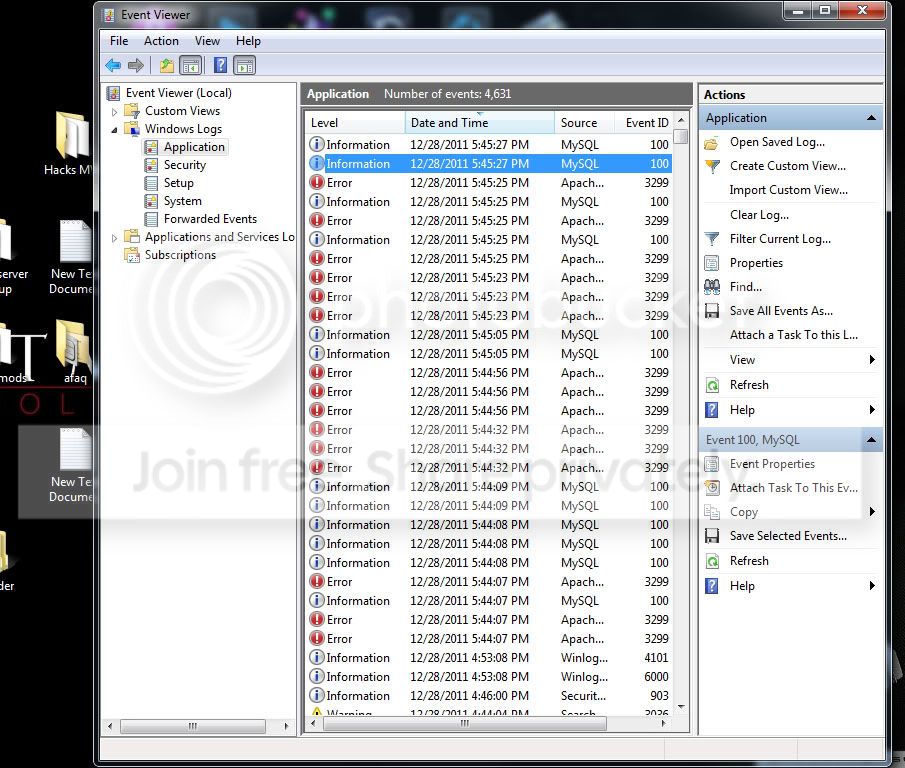
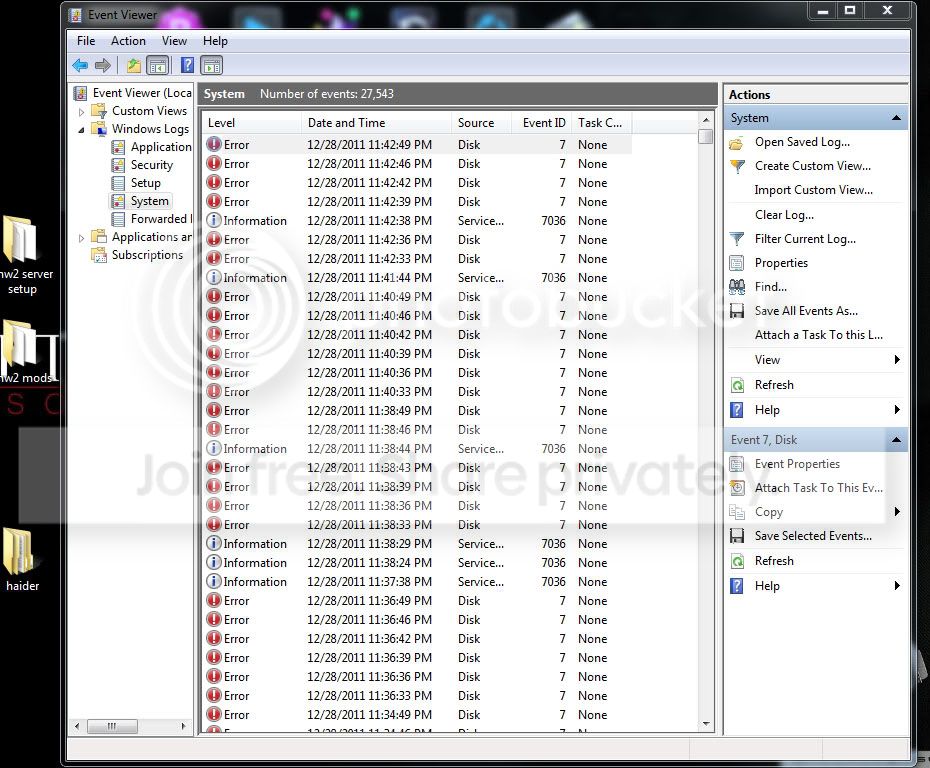
Here are screenshots that i captured.

ss.jpg


Untitled-2.jpg


when clicked on the error in system, it open dialog box and it says

Code:
The device, \Device\Harddisk0\DR0, has a bad block.
and when clicked on details tab of that dialog box(window), it says.

Code:
   [B]+[/B] [B]System[/B]           [B]-[/B] [B]Provider[/B]        [  [B]Name[/B]]  Disk
          [B]-[/B] [B]EventID[/B] 7        [  [B]Qualifiers[/B]]  49156
           [B]Level[/B] 2           [B]Task[/B] 0           [B]Keywords[/B] 0x80000000000000          [B]-[/B] [B]TimeCreated[/B]        [  [B]SystemTime[/B]]  2011-12-28T18:42:42.892897400Z
           [B]EventRecordID[/B] 27541           [B]Channel[/B] System           [B]Computer[/B] Lovesta           [B]Security[/B]
    [B]-[/B] [B]EventData[/B]     


\Device\Harddisk0\DR0    


030080000100000000000000070004C0000100009C0000C00000000000000000006E054D08000000DBEA180000000000FFFFFFFF01000000580000840200000000200A1240032040000000003C000000000000000000000098268B0680FAFFFF000000000000000090238B0680FAFFFFD02B680680FAFFFFB7822604000000002800042682B700000800000000000000F00003000000000B00000000000000000000000000000000
   [FONT=Segoe UI][B]Binary data:[/B]
[/FONT]
 [FONT=Segoe UI]In Words[/FONT]
 [FONT=Courier New]0000: 00800003 00000001 00000000 C0040007  
0008: 00000100 C000009C 00000000 00000000 
0010: 4D056E00 00000008  0018EADB 00000000 
0018: FFFFFFFF 00000001 84000058 00000002 
0020:  120A2000 40200340 00000000 0000003C 
0028: 00000000 00000000 068B2698  FFFFFA80 
0030: 00000000 00000000 068B2390 FFFFFA80 
0038: 06682BD0  FFFFFA80 042682B7 00000000 
0040: 26040028 0000B782 00000008 00000000  
0048: 000300F0 0B000000 00000000 00000000 
0050: 00000000 00000000    
[/FONT]
 [FONT=Segoe UI]In Bytes[/FONT]
 [FONT=Courier New]0000: 03 00 80 00 01 00 00 00    ..€.....
0008: 00 00 00 00 07 00 04 C0   .......À
0010: 00 01 00 00 9C 00  00 C0   ....œ..À
0018: 00 00 00 00 00 00 00 00   ........
0020: 00 6E 05  4D 08 00 00 00   .n.M....
0028: DB EA 18 00 00 00 00 00   Ûê......
0030:  FF FF FF FF 01 00 00 00   ÿÿÿÿ....
0038: 58 00 00 84 02 00 00 00    X..„....
0040: 00 20 0A 12 40 03 20 40   . ..@. @
0048: 00 00 00 00 3C 00  00 00   ....<...
0050: 00 00 00 00 00 00 00 00   ........
0058: 98 26  8B 06 80 FA FF FF   ˜&‹.€úÿÿ
0060: 00 00 00 00 00 00 00 00    ........
0068: 90 23 8B 06 80 FA FF FF   #‹.€úÿÿ
0070: D0 2B 68 06 80 FA  FF FF   Ð+h.€úÿÿ
0078: B7 82 26 04 00 00 00 00   ·‚&.....
0080: 28 00  04 26 82 B7 00 00   (..&‚·..
0088: 08 00 00 00 00 00 00 00    ........
0090: F0 00 03 00 00 00 00 0B   ð.......
0098: 00 00 00 00 00 00  00 00   ........
00a0: 00 00 00 00 00 00 00 00   ........
[/FONT]

what to do.. is my harddrive have bad sectors or is it some thing related virus..

What to do?
 

My Computer

OS
Windows 8.1 pro x64 for my pc and x86 for my Laptop
CPU
Core i7 970 3.20 Ghz in my PC
Motherboard
ASUS Rampage II Extreme LGA 1366
Memory
6GB DDR3
Graphics Card(s)
Club 3D GTX 660
Sound Card
On MotherBoard Default
Monitor(s) Displays
DELL 24" LED
Hard Drives
128GB SSD
320GB SATA
PSU
Cooler Master 500Watts
Antivirus
AVG Free
1. Click Start Menu
2. Click All Programs
3. Click Accessories
4. Right Click Command Prompt
5. Click Run as administrator
6. type "chkdsk /f /r" (without quotes) into the command prompt
7. Click Y when asked if you want to schedule the next time your computer starts and hit enter.
8. Restart your computer

The above will take ~1-3 hours to run depending on the size of the disk.
 

My Computer

Computer Manufacturer/Model Number
HP Pavilion e9110t
OS
Windows 7 Home Premium 64 Bit
CPU
Intel(R) Core(TM)2 Quad CPU Q9550 @ 2.83GHz
Motherboard
Pegatron IPIEL-LA3
Memory
6.00 GB Hundai HMT125U6BFR8C-H9
Graphics Card(s)
ATI Radeon HD 4850
Sound Card
Realtek High Definition Audio/ATI High Definition Audio
Monitor(s) Displays
Acer AL2216W
Screen Resolution
1680x1050
Hard Drives
Hitachi HDP725050GLA360 ATA Device 500 GB
PSU
Unknown/installed by HP
Case
HP generic case
Cooling
Intel Stock Cooling
Keyboard
HP Keyboard
Mouse
HP Mouse
Internet Speed
Download: 19.15 Mbps Upload: 1.67 Mbps
Other Info
Network Adapter Realtek RTL8168D/8111D Family PCI-E Gigabit Ethernet NIC (NDIS 6.20)
Network Adapter 802.11n Wireless PCI Express Card LAN Adapter
will it gonna fix my problem? i mean i won't gonna have to worry about freezing problem or bad sectors?
lol..sorry for noob questions, but worried cuz of my harddrive?
 

My Computer

OS
Windows 8.1 pro x64 for my pc and x86 for my Laptop
CPU
Core i7 970 3.20 Ghz in my PC
Motherboard
ASUS Rampage II Extreme LGA 1366
Memory
6GB DDR3
Graphics Card(s)
Club 3D GTX 660
Sound Card
On MotherBoard Default
Monitor(s) Displays
DELL 24" LED
Hard Drives
128GB SSD
320GB SATA
PSU
Cooler Master 500Watts
Antivirus
AVG Free
"The Type of the System is NTFS
cannot lock current drive."

after that it asked for sheduling and i pressed Y.

Restarting my PC now..

Just want to ask will NTFS drives gonna be a problem for chkdsk command?
 

My Computer

OS
Windows 8.1 pro x64 for my pc and x86 for my Laptop
CPU
Core i7 970 3.20 Ghz in my PC
Motherboard
ASUS Rampage II Extreme LGA 1366
Memory
6GB DDR3
Graphics Card(s)
Club 3D GTX 660
Sound Card
On MotherBoard Default
Monitor(s) Displays
DELL 24" LED
Hard Drives
128GB SSD
320GB SATA
PSU
Cooler Master 500Watts
Antivirus
AVG Free
It will fix any bad sectors. I won't know if it will fix your freezing problem until you try it. :)
 

My Computer

Computer Manufacturer/Model Number
HP Pavilion e9110t
OS
Windows 7 Home Premium 64 Bit
CPU
Intel(R) Core(TM)2 Quad CPU Q9550 @ 2.83GHz
Motherboard
Pegatron IPIEL-LA3
Memory
6.00 GB Hundai HMT125U6BFR8C-H9
Graphics Card(s)
ATI Radeon HD 4850
Sound Card
Realtek High Definition Audio/ATI High Definition Audio
Monitor(s) Displays
Acer AL2216W
Screen Resolution
1680x1050
Hard Drives
Hitachi HDP725050GLA360 ATA Device 500 GB
PSU
Unknown/installed by HP
Case
HP generic case
Cooling
Intel Stock Cooling
Keyboard
HP Keyboard
Mouse
HP Mouse
Internet Speed
Download: 19.15 Mbps Upload: 1.67 Mbps
Other Info
Network Adapter Realtek RTL8168D/8111D Family PCI-E Gigabit Ethernet NIC (NDIS 6.20)
Network Adapter 802.11n Wireless PCI Express Card LAN Adapter
"The Type of the System is NTFS
cannot lock current drive."

after that it asked for sheduling and i pressed Y.

Restarting my PC now..

Just want to ask will NTFS drives gonna be a problem for chkdsk command?

Nope, it will be able to run. NTFS is standard. It can also fix FAT32.
 

My Computer

Computer Manufacturer/Model Number
HP Pavilion e9110t
OS
Windows 7 Home Premium 64 Bit
CPU
Intel(R) Core(TM)2 Quad CPU Q9550 @ 2.83GHz
Motherboard
Pegatron IPIEL-LA3
Memory
6.00 GB Hundai HMT125U6BFR8C-H9
Graphics Card(s)
ATI Radeon HD 4850
Sound Card
Realtek High Definition Audio/ATI High Definition Audio
Monitor(s) Displays
Acer AL2216W
Screen Resolution
1680x1050
Hard Drives
Hitachi HDP725050GLA360 ATA Device 500 GB
PSU
Unknown/installed by HP
Case
HP generic case
Cooling
Intel Stock Cooling
Keyboard
HP Keyboard
Mouse
HP Mouse
Internet Speed
Download: 19.15 Mbps Upload: 1.67 Mbps
Other Info
Network Adapter Realtek RTL8168D/8111D Family PCI-E Gigabit Ethernet NIC (NDIS 6.20)
Network Adapter 802.11n Wireless PCI Express Card LAN Adapter
Many Super THanks..You are awesome.
Freezing problem fixed..

last questions.

Do i need to buy another harddrive?
is it permanent fixed or is it temporary fixed.
if temporary how long will my harddrive can live then.

Thanks again.. computer is working like a charm.. i thought i have some virus in computer before starting a thread here..was gonna install new windows.. but you saved me from hell of time.. Many Many THanks..

Please its last questions if you wont mind reply those too.. :)

Regards,
Syed Haider Hassan.
 

My Computer

OS
Windows 8.1 pro x64 for my pc and x86 for my Laptop
CPU
Core i7 970 3.20 Ghz in my PC
Motherboard
ASUS Rampage II Extreme LGA 1366
Memory
6GB DDR3
Graphics Card(s)
Club 3D GTX 660
Sound Card
On MotherBoard Default
Monitor(s) Displays
DELL 24" LED
Hard Drives
128GB SSD
320GB SATA
PSU
Cooler Master 500Watts
Antivirus
AVG Free
It is unlikely that you need to buy a new hard drive. If the problem comes back and it is shown in the event viewer logs for system that your hard drive is to blame again, then you might want to consider that the hard drive is going bad. More than likely, it was just a few bad sectors that needed to be swapped in the allocation table, and that happens over time with just about any hard drive. Just keep an eye on it and keep us updated if you have further issues.

You're very welcome for the help, and I am glad you were able to stop the freezing. :)


-Mike
 

My Computer

Computer Manufacturer/Model Number
HP Pavilion e9110t
OS
Windows 7 Home Premium 64 Bit
CPU
Intel(R) Core(TM)2 Quad CPU Q9550 @ 2.83GHz
Motherboard
Pegatron IPIEL-LA3
Memory
6.00 GB Hundai HMT125U6BFR8C-H9
Graphics Card(s)
ATI Radeon HD 4850
Sound Card
Realtek High Definition Audio/ATI High Definition Audio
Monitor(s) Displays
Acer AL2216W
Screen Resolution
1680x1050
Hard Drives
Hitachi HDP725050GLA360 ATA Device 500 GB
PSU
Unknown/installed by HP
Case
HP generic case
Cooling
Intel Stock Cooling
Keyboard
HP Keyboard
Mouse
HP Mouse
Internet Speed
Download: 19.15 Mbps Upload: 1.67 Mbps
Other Info
Network Adapter Realtek RTL8168D/8111D Family PCI-E Gigabit Ethernet NIC (NDIS 6.20)
Network Adapter 802.11n Wireless PCI Express Card LAN Adapter
Thank you sir.. it is working fine till now and everything is working smoothly..
it was great help..
 

My Computer

OS
Windows 8.1 pro x64 for my pc and x86 for my Laptop
CPU
Core i7 970 3.20 Ghz in my PC
Motherboard
ASUS Rampage II Extreme LGA 1366
Memory
6GB DDR3
Graphics Card(s)
Club 3D GTX 660
Sound Card
On MotherBoard Default
Monitor(s) Displays
DELL 24" LED
Hard Drives
128GB SSD
320GB SATA
PSU
Cooler Master 500Watts
Antivirus
AVG Free
Pc Freezing for 2 seconds a time - Help

hi guys/Writhziden... followed this post and went into Event Viewer and found under security 7036 = The Windows error reporting Service service entered the stop state - 7036 again The WinHTTP Web Proxy Discovery Service entered the running state. 7036 again the windows modules installer has entered the stop state Anyway lots more 7036 problems and 7040 issues and under Applications I have 1903 problem.. the description for event 1903 from source HHCTRL cannot be found. Either the component that raises the event is not installed on your computer or the installation process is corrupted. etc etc

Also as I looked down just noticed errors 2001, but repeated is 36887 which states the following fatal error was received. 10.

also just noticed have error id 3011 and 3012 under applications as well

Please advise what I can do Thanks

R
 

My Computer

Computer type
PC/Desktop
OS
64 bit windows 7 home premium
OK - well - I have had a similar problem for months - so I just stopped using that laptop.
Then I installed AutoCAD onto a new laptop and the same thing started happening.
Then I realized that the problem I started having on the old laptop had only started when I had installed a bunch of Autodesk programs.

The window open in each application literally turned off for a few seconds and then came back on again [it's color was visibly changing when off and back on].
So I would be typing in an email or word or in Excel - and then the typing would stop and pick up again - but it was missing what I had typed when the window of the application had gone off and gone 'grey', if you will.

I saw on the Autodesk forum that some persons had been having trouble with a utility called Autodesk Content Service - an indexing feature. Eventually, I turned it off at the Service level - and voila - things sort of back to normal as per the attached.

Man - this was a surprise....

So as you perhaps can see - when I turned off/disabled the service at 1746 today - the problems with errors every friggin minute - stopped - I had accumulated 16 895 events - without knowing what to do.

Thanks to folks like you for this neat service you all provide.
Cheers from Cape Town area.
 

My Computer

Computer type
Laptop
Computer Manufacturer/Model Number
Dell Latitude e6420
OS
WIn 7 64 bit enterprise SP1
CPU
i7 M640 2.8 GHz
Memory
4 GB
Graphics Card(s)
nvidia
Hard Drives
500 GB ST9500420AS
Antivirus
sophos
Browser
normally chrime
Thank you!!!!

I have a Windows 10 OS for a PC I just built. Tried your chkdsk /f /r suggestion and it totally seems to have done the trick! (Took forever though)

Had to make an account to let y'all know I'm really grateful for your help here. ^_^
writhziden
You da man. :)
 

My Computer

Computer type
PC/Desktop
OS
64-bit Windows 10
Back
Top