Computer HDD Low Disk Space Issue

Supercar Ace

New member
Member
Local time
5:00 PM
Messages
47
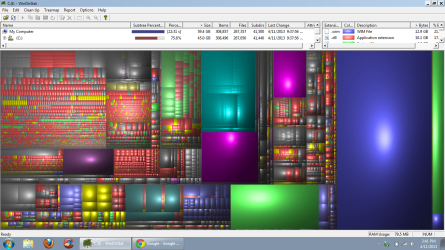
Hi everyone, So my Laptop which has a 277GB HDD is currently 99% full. I've been constantly deleting things (I removed 50 GB of music, I've removed over 15 GB of pictures and video), yet my HDD is still filling up. I ran WinDirStat to see where everything is going, and I checked my Drive C: to discover that it only accounts for 45.3 GB of memory! Anyone have any idea where my other 231.7 GB of memory is going? Something somewhere is filling up my HDD, but I don't how/where to look for it. Any help is appreciated! Thanks!
 

My Computer

Computer Manufacturer/Model Number
HP Probook 4530s
OS
Windows 7 Professional 32-bit
CPU
Intel Core i3-2310M CPU @ 2.10 GHZ
Motherboard
Hewlett-Packard 167C
Memory
4.00 GB Single-Channel DDR3 @ 665MHz (9-9-9-24)
Graphics Card(s)
Generic PnP Monitor (1366x768@60Hz)
Screen Resolution
1366x768 pixels
Hi everyone, So my Laptop which has a 277GB HDD is currently 99% full. I've been constantly deleting things (I removed 50 GB of music, I've removed over 15 GB of pictures and video), yet my HDD is still filling up. I ran WinDirStat to see where everything is going, and I checked my Drive C: to discover that it only accounts for 45.3 GB of memory! Anyone have any idea where my other 231.7 GB of memory is going? Something somewhere is filling up my HDD, but I don't how/where to look for it. Any help is appreciated! Thanks!

I only have 55GB HDD (yeah it;s an oldie) so I can relate to space concerns. Unneeded programs can take up space. Use CCleaner - PC Optimization and Cleaning - Free Download to see how much "unnoticed" material can be deleted.

If you have a factory software installed laptop Download Revo Uninstaller Freeware - Free and Full Download - Uninstall software, remove programs, solve uninstall problems can help with excess bloatware

Also check your downloads folder as it may contain exes, Rars and other hard files that could take up space, that is where the majority of my usage comes from.
 

My Computer

Computer type
PC/Desktop
OS
Microsoft Windows 7 Professional 64-bit SP1
CPU
Intel(R) Core(TM) i5 CPU M 520 @ 2.40GHz
Motherboard
Dell Inc. 0K42JR
Memory
8.00 GB
Graphics Card(s)
NVIDIA NVS 3100M
Sound Card
(1) NVIDIA High Definition Audio (2) IDT High Definition A
Monitor(s) Displays
1
Screen Resolution
1440 x 900 x 32 bits (4294967296 colors) @ 59 Hz
Hard Drives
Samsung SSD 840 PRO Series ATA Device

My Computer

Computer type
PC/Desktop
OS
Microsoft Windows 7 Professional 64-bit SP1
CPU
Intel(R) Core(TM) i5 CPU M 520 @ 2.40GHz
Motherboard
Dell Inc. 0K42JR
Memory
8.00 GB
Graphics Card(s)
NVIDIA NVS 3100M
Sound Card
(1) NVIDIA High Definition Audio (2) IDT High Definition A
Monitor(s) Displays
1
Screen Resolution
1440 x 900 x 32 bits (4294967296 colors) @ 59 Hz
Hard Drives
Samsung SSD 840 PRO Series ATA Device
Run this command in elevated command prompt and report back what it says for Allocated and Maximum for the C partition.

vssadmin list shadowstorage

The shadowstorage is the place where the restore points are being kept. And that you don't see in WinDirStat.

PS: when you are in the command prompt window, you can right click on the window > click on 'Select All' > then right click again on the window (any place there).

That puts the content of that window on the clipboard and you can paste it here into a reply window.
 

My Computer

Computer Manufacturer/Model Number
HP, Dell, Gateway, Toshiba - 4 laptops and 2 desktops
OS
Vista, Windows7, Mint Mate, Zorin, Windows 8
CPU
from 1.6GHz Duo to i7
Monitor(s) Displays
2x HP w2207
Hard Drives
5x HDD, 7x SSD, 12x Externals
Keyboard
with trackball - no mices
Mouse
Trackball mice
Internet Speed
DSL 6000
Run this command in elevated command prompt and report back what it says for Allocated and Maximum for the C partition.

vssadmin list shadowstorage

The shadowstorage is the place where the restore points are being kept. And that you don't see in WinDirStat.

PS: when you are in the command prompt window, you can right click on the window > click on 'Select All' > then right click again on the window (any place there).

That puts the content of that window on the clipboard and you can paste it here into a reply window.

Thanks! Here's what it showed
:

Microsoft Windows [Version 6.1.7600] Copyright (c) 2009 Microsoft Corporation. All rights reserved. C:\windows\system32>vssadmin list shadowstorage vssadmin 1.1 - Volume Shadow Copy Service administrative command-line tool (C) Copyright 2001-2005 Microsoft Corp. Shadow Copy Storage association For volume: (C:)\\?\Volume{4c37ec93-8e67-11e0-b722-806e6f6e6963}\ Shadow Copy Storage volume: (C:)\\?\Volume{4c37ec93-8e67-11e0-b722-806e6f6e69 63}\ Used Shadow Copy Storage space: 0 B (0%) Allocated Shadow Copy Storage space: 0 B (0%) Maximum Shadow Copy Storage space: 2.774 GB (1%) C:\windows\system32>
 

My Computer

Computer Manufacturer/Model Number
HP Probook 4530s
OS
Windows 7 Professional 32-bit
CPU
Intel Core i3-2310M CPU @ 2.10 GHZ
Motherboard
Hewlett-Packard 167C
Memory
4.00 GB Single-Channel DDR3 @ 665MHz (9-9-9-24)
Graphics Card(s)
Generic PnP Monitor (1366x768@60Hz)
Screen Resolution
1366x768 pixels
Hmm, so that is not the culprit. The used shadowstorage is zero and the maximum is small (1% of the partition).
 

My Computer

Computer Manufacturer/Model Number
HP, Dell, Gateway, Toshiba - 4 laptops and 2 desktops
OS
Vista, Windows7, Mint Mate, Zorin, Windows 8
CPU
from 1.6GHz Duo to i7
Monitor(s) Displays
2x HP w2207
Hard Drives
5x HDD, 7x SSD, 12x Externals
Keyboard
with trackball - no mices
Mouse
Trackball mice
Internet Speed
DSL 6000
Hmm, so that is not the culprit. The used shadowstorage is zero and the maximum is small (1% of the partition).

Yeah this is a real head scratcher...I've removed all my music and whatnot to compensate but my memory keeps filling up and I have no idea what part of my HDD is filling up.
 

My Computer

Computer Manufacturer/Model Number
HP Probook 4530s
OS
Windows 7 Professional 32-bit
CPU
Intel Core i3-2310M CPU @ 2.10 GHZ
Motherboard
Hewlett-Packard 167C
Memory
4.00 GB Single-Channel DDR3 @ 665MHz (9-9-9-24)
Graphics Card(s)
Generic PnP Monitor (1366x768@60Hz)
Screen Resolution
1366x768 pixels
Can you post a picture of the WinDirStat result - with the multi color part.
 

My Computer

Computer Manufacturer/Model Number
HP, Dell, Gateway, Toshiba - 4 laptops and 2 desktops
OS
Vista, Windows7, Mint Mate, Zorin, Windows 8
CPU
from 1.6GHz Duo to i7
Monitor(s) Displays
2x HP w2207
Hard Drives
5x HDD, 7x SSD, 12x Externals
Keyboard
with trackball - no mices
Mouse
Trackball mice
Internet Speed
DSL 6000

My Computer

Computer type
PC/Desktop
Computer Manufacturer/Model Number
HP Pavilion P7-1010
OS
Windows 7 Professional x64 Service Pack 1
CPU
AMD Athlon X4 645
Motherboard
Foxxcon N-Alvorix RS880
Memory
6GB DDR3 1066
Graphics Card(s)
Sapphire Radeon HD 5670 512MB GDDR5
Sound Card
Realtek Integrated Audio
Monitor(s) Displays
HP 2011x
Screen Resolution
1600x900
Hard Drives
1. Crucial M4 128GB SSD
2. 1TB Seagate Barracuda 7200.12 RPM
3. 1TB Western Digital Caviar Green 5400RPM
PSU
Seasonic S12 II Bronze 380 Watt
Case
HP OEM
Cooling
Coolermaster Heatsink, AVC Case Fan
Keyboard
HP OEM- Made by Chicony
Mouse
HP OEM- Made by Logitech
Internet Speed
20MBit Down/4 Up
Antivirus
Microsoft Security Essentials
Browser
Internet Explorer 10
Can you post a picture of the WinDirStat result - with the multi color part.

Here you go:


Hmm, so that is not the culprit. The used shadowstorage is zero and the maximum is small (1% of the partition).

Yeah this is a real head scratcher...I've removed all my music and whatnot to compensate but my memory keeps filling up and I have no idea what part of my HDD is filling up.
Try running a full scan with Malwarebytes Anti-Malware: Malwarebytes : Free anti-malware download

Will do!
 

Attachments

  • Screen Shot II.png
    Screen Shot II.png
    851.8 KB · Views: 15

My Computer

Computer Manufacturer/Model Number
HP Probook 4530s
OS
Windows 7 Professional 32-bit
CPU
Intel Core i3-2310M CPU @ 2.10 GHZ
Motherboard
Hewlett-Packard 167C
Memory
4.00 GB Single-Channel DDR3 @ 665MHz (9-9-9-24)
Graphics Card(s)
Generic PnP Monitor (1366x768@60Hz)
Screen Resolution
1366x768 pixels
The green area on the bottom is probably the page file. But what is the big blue area on the right. And also the few big purple areas.

Open the upper pane a bit more and then click on the big color areas. Then it will tell you in the upper pane what they are.
 

My Computer

Computer Manufacturer/Model Number
HP, Dell, Gateway, Toshiba - 4 laptops and 2 desktops
OS
Vista, Windows7, Mint Mate, Zorin, Windows 8
CPU
from 1.6GHz Duo to i7
Monitor(s) Displays
2x HP w2207
Hard Drives
5x HDD, 7x SSD, 12x Externals
Keyboard
with trackball - no mices
Mouse
Trackball mice
Internet Speed
DSL 6000
The green area on the bottom is probably the page file. But what is the big blue area on the right. And also the few big purple areas.

Open the upper pane a bit more and then click on the big color areas. Then it will tell you in the upper pane what they are.

Here's a closer look at the other pane
 

Attachments

  • Screen Shot III.png
    Screen Shot III.png
    192.9 KB · Views: 11

My Computer

Computer Manufacturer/Model Number
HP Probook 4530s
OS
Windows 7 Professional 32-bit
CPU
Intel Core i3-2310M CPU @ 2.10 GHZ
Motherboard
Hewlett-Packard 167C
Memory
4.00 GB Single-Channel DDR3 @ 665MHz (9-9-9-24)
Graphics Card(s)
Generic PnP Monitor (1366x768@60Hz)
Screen Resolution
1366x768 pixels
This 12.9GB file is an installation file (wim). I would delete it. You can do that in WinDirStat by right clicking on it.

You did not say what the 2 green files and the purple ones are. It's hard to tell from the pic.
 

My Computer

Computer Manufacturer/Model Number
HP, Dell, Gateway, Toshiba - 4 laptops and 2 desktops
OS
Vista, Windows7, Mint Mate, Zorin, Windows 8
CPU
from 1.6GHz Duo to i7
Monitor(s) Displays
2x HP w2207
Hard Drives
5x HDD, 7x SSD, 12x Externals
Keyboard
with trackball - no mices
Mouse
Trackball mice
Internet Speed
DSL 6000
This 12.9GB file is an installation file (wim). I would delete it. You can do that in WinDirStat by right clicking on it.

You did not say what the 2 green files and the purple ones are. It's hard to tell from the pic.

The bottom horizontal on is the hyberfil.sys which I believe is the sytem hibernation file, and the vertical green one in the corner is pagefil.sys, I do not know what that file does.

The purple near the top center is emails from Windows Mail, which I used for work purposes.
 

My Computer

Computer Manufacturer/Model Number
HP Probook 4530s
OS
Windows 7 Professional 32-bit
CPU
Intel Core i3-2310M CPU @ 2.10 GHZ
Motherboard
Hewlett-Packard 167C
Memory
4.00 GB Single-Channel DDR3 @ 665MHz (9-9-9-24)
Graphics Card(s)
Generic PnP Monitor (1366x768@60Hz)
Screen Resolution
1366x768 pixels
If you don't use hibernation, get rid of the hiberfile. The command is powercfg -h off
 

My Computer

Computer Manufacturer/Model Number
HP, Dell, Gateway, Toshiba - 4 laptops and 2 desktops
OS
Vista, Windows7, Mint Mate, Zorin, Windows 8
CPU
from 1.6GHz Duo to i7
Monitor(s) Displays
2x HP w2207
Hard Drives
5x HDD, 7x SSD, 12x Externals
Keyboard
with trackball - no mices
Mouse
Trackball mice
Internet Speed
DSL 6000
Done. I got rid of both the 12 GB WIM file and turned off hibernation and got rid of the hiberfile. I'm still curious though as to where the rest of my memory is going...I still have 200 GB not accounted for....:huh:
 

My Computer

Computer Manufacturer/Model Number
HP Probook 4530s
OS
Windows 7 Professional 32-bit
CPU
Intel Core i3-2310M CPU @ 2.10 GHZ
Motherboard
Hewlett-Packard 167C
Memory
4.00 GB Single-Channel DDR3 @ 665MHz (9-9-9-24)
Graphics Card(s)
Generic PnP Monitor (1366x768@60Hz)
Screen Resolution
1366x768 pixels
I see that the text file, VLC file and Font collection take up well over a gig, not too mention your email and Vmachine, application files and local disk take up quote a bit of space as well. It looks like aside from the WIM file, you may need to do some spring cleaning as a lot of little things seem to be adding up. How many external drives to you use? Perhaps RAID may be in your future if you cannot delete many of these items, but want/need space
 

My Computer

Computer type
PC/Desktop
OS
Microsoft Windows 7 Professional 64-bit SP1
CPU
Intel(R) Core(TM) i5 CPU M 520 @ 2.40GHz
Motherboard
Dell Inc. 0K42JR
Memory
8.00 GB
Graphics Card(s)
NVIDIA NVS 3100M
Sound Card
(1) NVIDIA High Definition Audio (2) IDT High Definition A
Monitor(s) Displays
1
Screen Resolution
1440 x 900 x 32 bits (4294967296 colors) @ 59 Hz
Hard Drives
Samsung SSD 840 PRO Series ATA Device
I see that the text file, VLC file and Font collection take up well over a gig, not too mention your email and Vmachine, application files and local disk take up quote a bit of space as well. It looks like aside from the WIM file, you may need to do some spring cleaning as a lot of little things seem to be adding up. How many external drives to you use? Perhaps RAID may be in your future if you cannot delete many of these items, but want/need space

Yeah, I've deleted 1 GB's worth of emails to make some space. I use my virtual machine (for the XP Mode) but I may get rid of it to save some space. I'll be checking into the VLC file and other stuff on my local disk...Hopefully I can clear up a stable amount of space.

I have an 700 MB external had drive which I've backed all of my music, files, and other various things onto.
 

My Computer

Computer Manufacturer/Model Number
HP Probook 4530s
OS
Windows 7 Professional 32-bit
CPU
Intel Core i3-2310M CPU @ 2.10 GHZ
Motherboard
Hewlett-Packard 167C
Memory
4.00 GB Single-Channel DDR3 @ 665MHz (9-9-9-24)
Graphics Card(s)
Generic PnP Monitor (1366x768@60Hz)
Screen Resolution
1366x768 pixels
Done. I got rid of both the 12 GB WIM file and turned off hibernation and got rid of the hiberfile. I'm still curious though as to where the rest of my memory is going...I still have 200 GB not accounted for....:huh:
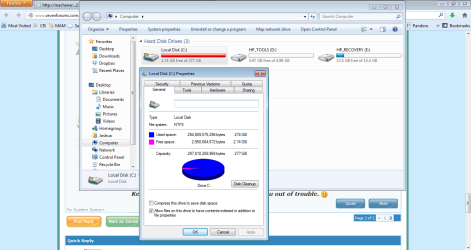
That's a lot and it did not really show in WinDirStat nor in vssadmin. Are you sure it is that much. Did you check in disk management what the free space really is.
 

My Computer

Computer Manufacturer/Model Number
HP, Dell, Gateway, Toshiba - 4 laptops and 2 desktops
OS
Vista, Windows7, Mint Mate, Zorin, Windows 8
CPU
from 1.6GHz Duo to i7
Monitor(s) Displays
2x HP w2207
Hard Drives
5x HDD, 7x SSD, 12x Externals
Keyboard
with trackball - no mices
Mouse
Trackball mice
Internet Speed
DSL 6000
Done. I got rid of both the 12 GB WIM file and turned off hibernation and got rid of the hiberfile. I'm still curious though as to where the rest of my memory is going...I still have 200 GB not accounted for....:huh:
That's a lot and it did not really show in WinDirStat nor in vssadmin. Are you sure it is that much. Did you check in disk management what the free space really is.

Here's a quick screen shot:
 

Attachments

  • Untitled.png
    Untitled.png
    106.8 KB · Views: 10

My Computer

Computer Manufacturer/Model Number
HP Probook 4530s
OS
Windows 7 Professional 32-bit
CPU
Intel Core i3-2310M CPU @ 2.10 GHZ
Motherboard
Hewlett-Packard 167C
Memory
4.00 GB Single-Channel DDR3 @ 665MHz (9-9-9-24)
Graphics Card(s)
Generic PnP Monitor (1366x768@60Hz)
Screen Resolution
1366x768 pixels
Back
Top