
Computer HDD Low Disk Space Issue

I see that the text file, VLC file and Font collection take up well over a gig, not too mention your email and Vmachine, application files and local disk take up quote a bit of space as well. It looks like aside from the WIM file, you may need to do some spring cleaning as a lot of little things seem to be adding up. How many external drives to you use? Perhaps RAID may be in your future if you cannot delete many of these items, but want/need space

Yeah, I've deleted 1 GB's worth of emails to make some space. I use my virtual machine (for the XP Mode) but I may get rid of it to save some space. I'll be checking into the VLC file and other stuff on my local disk...Hopefully I can clear up a stable amount of space.

I have an 700 MB external had drive which I've backed all of my music, files, and other various things onto.

I would say grab an upgrade if you go through all those files and decide which are needed for everyday use and move the rest . I just picked up a WD 1TB for 69 from BHphotovideo, not a bad brand and cheap enough for my liking so now I have a 1TB Seagate and 1 TB WD. I fill mine up, but not in RAID fashion, and try to keep my laptop pretty clean (only 55GB)
 

My Computer

Computer type
PC/Desktop
OS
Microsoft Windows 7 Professional 64-bit SP1
CPU
Intel(R) Core(TM) i5 CPU M 520 @ 2.40GHz
Motherboard
Dell Inc. 0K42JR
Memory
8.00 GB
Graphics Card(s)
NVIDIA NVS 3100M
Sound Card
(1) NVIDIA High Definition Audio (2) IDT High Definition A
Monitor(s) Displays
1
Screen Resolution
1440 x 900 x 32 bits (4294967296 colors) @ 59 Hz
Hard Drives
Samsung SSD 840 PRO Series ATA Device
I see that the text file, VLC file and Font collection take up well over a gig, not too mention your email and Vmachine, application files and local disk take up quote a bit of space as well. It looks like aside from the WIM file, you may need to do some spring cleaning as a lot of little things seem to be adding up. How many external drives to you use? Perhaps RAID may be in your future if you cannot delete many of these items, but want/need space

Yeah, I've deleted 1 GB's worth of emails to make some space. I use my virtual machine (for the XP Mode) but I may get rid of it to save some space. I'll be checking into the VLC file and other stuff on my local disk...Hopefully I can clear up a stable amount of space.

I have an 700 MB external had drive which I've backed all of my music, files, and other various things onto.

I would say grab an upgrade if you go through all those files and decide which are needed for everyday use and move the rest . I just picked up a WD 1TB for 69 from BHphotovideo, not a bad brand and cheap enough for my liking so now I have a 1TB Seagate and 1 TB WD. I fill mine up, but not in RAID fashion, and try to keep my laptop pretty clean (only 55GB)

Yeah I'm thinking an HDD upgrade might be the best solution. Since I'm only semi-computer savy (coming on these boards makes me realize just how much I don't know haha) my concern is upgrading my HDD while being able to keep my OS and programs (I don't wanna by MS office again).
 

My Computer

Computer Manufacturer/Model Number
HP Probook 4530s
OS
Windows 7 Professional 32-bit
CPU
Intel Core i3-2310M CPU @ 2.10 GHZ
Motherboard
Hewlett-Packard 167C
Memory
4.00 GB Single-Channel DDR3 @ 665MHz (9-9-9-24)
Graphics Card(s)
Generic PnP Monitor (1366x768@60Hz)
Screen Resolution
1366x768 pixels
This is absolutely crazy. Thos nums coincide neither with WinDirStat nor with vssadmin..

Suggest you double click on C (in Computer) and have a look what those massive files could be.
 

My Computer

Computer Manufacturer/Model Number
HP, Dell, Gateway, Toshiba - 4 laptops and 2 desktops
OS
Vista, Windows7, Mint Mate, Zorin, Windows 8
CPU
from 1.6GHz Duo to i7
Monitor(s) Displays
2x HP w2207
Hard Drives
5x HDD, 7x SSD, 12x Externals
Keyboard
with trackball - no mices
Mouse
Trackball mice
Internet Speed
DSL 6000
This is absolutely crazy. Thos nums coincide neither with WinDirStat nor with vssadmin..

Suggest you double click on C (in Computer) and have a look what those massive files could be.

Thank goodness...I though I was crazy. Yeah I don't know what those files are or where to find them...any thoughts?
 

My Computer

Computer Manufacturer/Model Number
HP Probook 4530s
OS
Windows 7 Professional 32-bit
CPU
Intel Core i3-2310M CPU @ 2.10 GHZ
Motherboard
Hewlett-Packard 167C
Memory
4.00 GB Single-Channel DDR3 @ 665MHz (9-9-9-24)
Graphics Card(s)
Generic PnP Monitor (1366x768@60Hz)
Screen Resolution
1366x768 pixels
Can you see 'those files' in C and can you post them here.
 

My Computer

Computer Manufacturer/Model Number
HP, Dell, Gateway, Toshiba - 4 laptops and 2 desktops
OS
Vista, Windows7, Mint Mate, Zorin, Windows 8
CPU
from 1.6GHz Duo to i7
Monitor(s) Displays
2x HP w2207
Hard Drives
5x HDD, 7x SSD, 12x Externals
Keyboard
with trackball - no mices
Mouse
Trackball mice
Internet Speed
DSL 6000
I would if I could. I don't know what files could possibly be eating up so much space or where to locate them, since WinDirStat doesn't show them. Is my HDD just shot? It's almost 2 years old now.
 

My Computer

Computer Manufacturer/Model Number
HP Probook 4530s
OS
Windows 7 Professional 32-bit
CPU
Intel Core i3-2310M CPU @ 2.10 GHZ
Motherboard
Hewlett-Packard 167C
Memory
4.00 GB Single-Channel DDR3 @ 665MHz (9-9-9-24)
Graphics Card(s)
Generic PnP Monitor (1366x768@60Hz)
Screen Resolution
1366x768 pixels
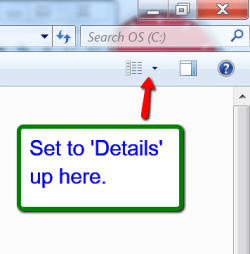
Nah, your HDD is probably alright. Double click on C in Computer and look thru all the folders whether you see any biggies. But set the view to 'Details' which will only show at the file level, not folder level.

For folders, you can right click on the folder and look in Properties. 200GB must be visible somehow.
 

Attachments

  • 2013-04-12_1947.png
    2013-04-12_1947.png
    40.7 KB · Views: 1

My Computer

Computer Manufacturer/Model Number
HP, Dell, Gateway, Toshiba - 4 laptops and 2 desktops
OS
Vista, Windows7, Mint Mate, Zorin, Windows 8
CPU
from 1.6GHz Duo to i7
Monitor(s) Displays
2x HP w2207
Hard Drives
5x HDD, 7x SSD, 12x Externals
Keyboard
with trackball - no mices
Mouse
Trackball mice
Internet Speed
DSL 6000
Do you use Windows XP Mode by any chance? If so, do you have any big files inside it? Is the virtual hard disk file located on your hard drive? I saw a virtual hard disk file in one of the screenshots you posted.
Also, have you run the Malwarebytes scan yet? If not, run it in Windows 7 and in the XP Mode virtual Machine. I am pretty sure the XP Mode hard disk file automatically expands. It could be very big and that might explain the huge amount of space taken up.
 

My Computer

Computer type
PC/Desktop
Computer Manufacturer/Model Number
HP Pavilion P7-1010
OS
Windows 7 Professional x64 Service Pack 1
CPU
AMD Athlon X4 645
Motherboard
Foxxcon N-Alvorix RS880
Memory
6GB DDR3 1066
Graphics Card(s)
Sapphire Radeon HD 5670 512MB GDDR5
Sound Card
Realtek Integrated Audio
Monitor(s) Displays
HP 2011x
Screen Resolution
1600x900
Hard Drives
1. Crucial M4 128GB SSD
2. 1TB Seagate Barracuda 7200.12 RPM
3. 1TB Western Digital Caviar Green 5400RPM
PSU
Seasonic S12 II Bronze 380 Watt
Case
HP OEM
Cooling
Coolermaster Heatsink, AVC Case Fan
Keyboard
HP OEM- Made by Chicony
Mouse
HP OEM- Made by Logitech
Internet Speed
20MBit Down/4 Up
Antivirus
Microsoft Security Essentials
Browser
Internet Explorer 10
Nah, your HDD is probably alright. Double click on C in Computer and look thru all the folders whether you see any biggies. But set the view to 'Details' which will only show at the file level, not folder level.

For folders, you can right click on the folder and look in Properties. 200GB must be visible somehow.

Ok, I believe I tracked down the culrpit folder:

C:\Windows\System32\config\systemprofile\AppData\Local\Microsoft

This folder shows up having over 130 GBs in it's properties. Looking in the folder though, I only see 3 folders:

Burn
Catches
Explorer

Checking the properties the trail runs cold, all 3 folders show up having a few KB's of data. Any thought here?


Do you use Windows XP Mode by any chance? If so, do you have any big files inside it? Is the virtual hard disk file located on your hard drive? I saw a virtual hard disk file in one of the screenshots you posted.
Also, have you run the Malwarebytes scan yet? If not, run it in Windows 7 and in the XP Mode virtual Machine. I am pretty sure the XP Mode hard disk file automatically expands. It could be very big and that might explain the huge amount of space taken up.

Yep I ran Malwarebytes and it found 6 malicious files. I removed them promptly and haven't seen a trace of them since. It's possible that the virtual drive is doing this, I hadn't thought of that. I loaded the XP Mode and discovered that the the HD in the virtual drive is 135 GB. I guess I'll have to remove it now...
 

My Computer

Computer Manufacturer/Model Number
HP Probook 4530s
OS
Windows 7 Professional 32-bit
CPU
Intel Core i3-2310M CPU @ 2.10 GHZ
Motherboard
Hewlett-Packard 167C
Memory
4.00 GB Single-Channel DDR3 @ 665MHz (9-9-9-24)
Graphics Card(s)
Generic PnP Monitor (1366x768@60Hz)
Screen Resolution
1366x768 pixels
Very good. Windude was right. It seems to be your virtual system. Just delete that VM folder and start a new virtual installation.

What is still puzzling is that this did not show in WinDirStat. My virtual partitions show there.
 

My Computer

Computer Manufacturer/Model Number
HP, Dell, Gateway, Toshiba - 4 laptops and 2 desktops
OS
Vista, Windows7, Mint Mate, Zorin, Windows 8
CPU
from 1.6GHz Duo to i7
Monitor(s) Displays
2x HP w2207
Hard Drives
5x HDD, 7x SSD, 12x Externals
Keyboard
with trackball - no mices
Mouse
Trackball mice
Internet Speed
DSL 6000
Very good. Windude was right. It seems to be your virtual system. Just delete that VM folder and start a new virtual installation.

What is still puzzling is that this did not show in WinDirStat. My virtual partitions show there.

Yep, I tried uninstalling the virtual drive and it BSOD my system. I'll try deleting the VM folder.
 

My Computer

Computer Manufacturer/Model Number
HP Probook 4530s
OS
Windows 7 Professional 32-bit
CPU
Intel Core i3-2310M CPU @ 2.10 GHZ
Motherboard
Hewlett-Packard 167C
Memory
4.00 GB Single-Channel DDR3 @ 665MHz (9-9-9-24)
Graphics Card(s)
Generic PnP Monitor (1366x768@60Hz)
Screen Resolution
1366x768 pixels
Glad to hear you found the culprit :thumbsup:
 

My Computer

Computer type
PC/Desktop
OS
Microsoft Windows 7 Professional 64-bit SP1
CPU
Intel(R) Core(TM) i5 CPU M 520 @ 2.40GHz
Motherboard
Dell Inc. 0K42JR
Memory
8.00 GB
Graphics Card(s)
NVIDIA NVS 3100M
Sound Card
(1) NVIDIA High Definition Audio (2) IDT High Definition A
Monitor(s) Displays
1
Screen Resolution
1440 x 900 x 32 bits (4294967296 colors) @ 59 Hz
Hard Drives
Samsung SSD 840 PRO Series ATA Device
I think it is normal for XP Mode to show that your virtual hard drive is big even if it isn't really that size on actual hard drive. The virtual hard disk file automatically expands as data is added to it.
 
Last edited:

My Computer

Computer type
PC/Desktop
Computer Manufacturer/Model Number
HP Pavilion P7-1010
OS
Windows 7 Professional x64 Service Pack 1
CPU
AMD Athlon X4 645
Motherboard
Foxxcon N-Alvorix RS880
Memory
6GB DDR3 1066
Graphics Card(s)
Sapphire Radeon HD 5670 512MB GDDR5
Sound Card
Realtek Integrated Audio
Monitor(s) Displays
HP 2011x
Screen Resolution
1600x900
Hard Drives
1. Crucial M4 128GB SSD
2. 1TB Seagate Barracuda 7200.12 RPM
3. 1TB Western Digital Caviar Green 5400RPM
PSU
Seasonic S12 II Bronze 380 Watt
Case
HP OEM
Cooling
Coolermaster Heatsink, AVC Case Fan
Keyboard
HP OEM- Made by Chicony
Mouse
HP OEM- Made by Logitech
Internet Speed
20MBit Down/4 Up
Antivirus
Microsoft Security Essentials
Browser
Internet Explorer 10
Glad to hear you found the culprit :thumbsup:
Thanks! I'm not out of the woods just yet...everytime I try to uninstall my VM I get a BSOD. Any thoughts on how to get around that?

I think it is normal for XP Mode to show that your virtual hard drive is big even if it isn't really that size on actual hard drive. The virtual hard disk file automatically expands as data is added to it.

Good to know...Thanks!
 

My Computer

Computer Manufacturer/Model Number
HP Probook 4530s
OS
Windows 7 Professional 32-bit
CPU
Intel Core i3-2310M CPU @ 2.10 GHZ
Motherboard
Hewlett-Packard 167C
Memory
4.00 GB Single-Channel DDR3 @ 665MHz (9-9-9-24)
Graphics Card(s)
Generic PnP Monitor (1366x768@60Hz)
Screen Resolution
1366x768 pixels
Glad to hear you found the culprit :thumbsup:
Thanks! I'm not out of the woods just yet...everytime I try to uninstall my VM I get a BSOD. Any thoughts on how to get around that?

I think it is normal for XP Mode to show that your virtual hard drive is big even if it isn't really that size on actual hard drive. The virtual hard disk file automatically expands as data is added to it.

Good to know...Thanks!

You may want to post what the BSOD states. I'm not to versed with BSOD problems, but plenty of people here are. Have you experienced the BSOD prior to uninstalling it or is it only when you try to uninstall?
 

My Computer

Computer type
PC/Desktop
OS
Microsoft Windows 7 Professional 64-bit SP1
CPU
Intel(R) Core(TM) i5 CPU M 520 @ 2.40GHz
Motherboard
Dell Inc. 0K42JR
Memory
8.00 GB
Graphics Card(s)
NVIDIA NVS 3100M
Sound Card
(1) NVIDIA High Definition Audio (2) IDT High Definition A
Monitor(s) Displays
1
Screen Resolution
1440 x 900 x 32 bits (4294967296 colors) @ 59 Hz
Hard Drives
Samsung SSD 840 PRO Series ATA Device
Boot into Safe mode and adjust your virtual memory settings from within there to 0 min 0 max, reboot, defragment your hard drive, then reboot again and try 2048 min 2048 max for VM, and reboot again.

Other space leaks are temp files and browser cache, you have a line on freeware to deal with those or just search for them, they are readily available as is the info on how to adjust the VM settings.

I have a techie folder on my browser bookmarks for all the things I know I will forget, and back up the bookmarks regularly to minimize loss, since all HDs fail, eventually.
 

My Computer

Computer type
PC/Desktop
Computer Manufacturer/Model Number
Self Built Custom
OS
Windows 7 Ultimate Retail Box (64-bit installed) + Service Pack 1
CPU
AMD FX-8350 CPU v1.15 (or 1.0F) BIOS was required!
Motherboard
MSI 890FXA-GD70
Memory
8G CAS-7 G-Skill DDR3 @1333 (2 fours) [mobo nonOC max rec'd]
Graphics Card(s)
Radeon HD 7950 [3 gigs of GDDR5] MSI Twin Frozr model
Sound Card
Realtek High Definition Audio (onboard mobo, ALC-889 chip)
Monitor(s) Displays
2 WS LED Monitors: One LG One Viewsonic
Screen Resolution
1920 by 1080
Hard Drives
SSD for OS: Samsung 840 Pro
SSD for VM and utilities: Adata SX900
7200 RPM SATA HDs for the rest: Hitachi and Seagate
PSU
Corsair TX850 - 850W max, in service since August 2010.
Case
Thermaltake Armor A90
Cooling
Thermaltake Spin Q CPU Cooler, in service since August 2010
Keyboard
Logitech G11
Mouse
Logitech M310 Wireless
Internet Speed
100 Megabit broadband supposedly upgraded from 50 (Cable)
Antivirus
Bitdefender Internet Security 2014 suite
Browser
Pale Moon 64-bit main, also IceDragon, Opera, and Maxthon.
Other Info
CompTIA A+ certified (220-800 series) in July 2013.
Boot into Safe mode and adjust your virtual memory settings from within there to 0 min 0 max, reboot, defragment your hard drive, then reboot again and try 2048 min 2048 max for VM, and reboot again.

Other space leaks are temp files and browser cache, you have a line on freeware to deal with those or just search for them, they are readily available as is the info on how to adjust the VM settings.

I have a techie folder on my browser bookmarks for all the things I know I will forget, and back up the bookmarks regularly to minimize loss, since all HDs fail, eventually.

Seems my computer doesn't want to corporate with me. I tried booting it in Safe Mode and it froze up (it's never taken 15 minutes to load Safe Mode before). I have a minidump file from my last BSOD crash. What do you guys think?

Thanks for the tips b the way!
 

Attachments

My Computer

Computer Manufacturer/Model Number
HP Probook 4530s
OS
Windows 7 Professional 32-bit
CPU
Intel Core i3-2310M CPU @ 2.10 GHZ
Motherboard
Hewlett-Packard 167C
Memory
4.00 GB Single-Channel DDR3 @ 665MHz (9-9-9-24)
Graphics Card(s)
Generic PnP Monitor (1366x768@60Hz)
Screen Resolution
1366x768 pixels
What exactly happened on the safe mode load attempt?

Like, did it go through the loading motions as usual and stop on a particular file (note that)?

Or it finishes and hangs at the Windows logo?

I'd give it extra time and see if an error does eventually show up, if none did.

....looked at the .dmp and iaStor.sys is the HDD controller driver for your system and here is a MS page with info on that BSOD code....

http://msdn.microsoft.com/en-us/library/windows/hardware/ff559271(v=vs.85).aspx

With cause and resolution info, I hope that helps!
 
Last edited:

My Computer

Computer type
PC/Desktop
Computer Manufacturer/Model Number
Self Built Custom
OS
Windows 7 Ultimate Retail Box (64-bit installed) + Service Pack 1
CPU
AMD FX-8350 CPU v1.15 (or 1.0F) BIOS was required!
Motherboard
MSI 890FXA-GD70
Memory
8G CAS-7 G-Skill DDR3 @1333 (2 fours) [mobo nonOC max rec'd]
Graphics Card(s)
Radeon HD 7950 [3 gigs of GDDR5] MSI Twin Frozr model
Sound Card
Realtek High Definition Audio (onboard mobo, ALC-889 chip)
Monitor(s) Displays
2 WS LED Monitors: One LG One Viewsonic
Screen Resolution
1920 by 1080
Hard Drives
SSD for OS: Samsung 840 Pro
SSD for VM and utilities: Adata SX900
7200 RPM SATA HDs for the rest: Hitachi and Seagate
PSU
Corsair TX850 - 850W max, in service since August 2010.
Case
Thermaltake Armor A90
Cooling
Thermaltake Spin Q CPU Cooler, in service since August 2010
Keyboard
Logitech G11
Mouse
Logitech M310 Wireless
Internet Speed
100 Megabit broadband supposedly upgraded from 50 (Cable)
Antivirus
Bitdefender Internet Security 2014 suite
Browser
Pale Moon 64-bit main, also IceDragon, Opera, and Maxthon.
Other Info
CompTIA A+ certified (220-800 series) in July 2013.
Try running chkdsk: http://www.sevenforums.com/tutorials/433-disk-check.html
Note: Be sure "Automatically fix file system errors" is checked and check "Scan for and attempt recovery of bad sectors"
If it finds errors, run it again with the same options checked. Also, what antivirus are you using?
 

My Computer

Computer type
PC/Desktop
Computer Manufacturer/Model Number
HP Pavilion P7-1010
OS
Windows 7 Professional x64 Service Pack 1
CPU
AMD Athlon X4 645
Motherboard
Foxxcon N-Alvorix RS880
Memory
6GB DDR3 1066
Graphics Card(s)
Sapphire Radeon HD 5670 512MB GDDR5
Sound Card
Realtek Integrated Audio
Monitor(s) Displays
HP 2011x
Screen Resolution
1600x900
Hard Drives
1. Crucial M4 128GB SSD
2. 1TB Seagate Barracuda 7200.12 RPM
3. 1TB Western Digital Caviar Green 5400RPM
PSU
Seasonic S12 II Bronze 380 Watt
Case
HP OEM
Cooling
Coolermaster Heatsink, AVC Case Fan
Keyboard
HP OEM- Made by Chicony
Mouse
HP OEM- Made by Logitech
Internet Speed
20MBit Down/4 Up
Antivirus
Microsoft Security Essentials
Browser
Internet Explorer 10
What exactly happened on the safe mode load attempt?

Like, did it go through the loading motions as usual and stop on a particular file (note that)?

Or it finishes and hangs at the Windows logo?

I'd give it extra time and see if an error does eventually show up, if none did.

....looked at the .dmp and iaStor.sys is the HDD controller driver for your system and here is a MS page with info on that BSOD code....

Bug Check 0x8E: KERNEL_MODE_EXCEPTION_NOT_HANDLED (Windows Debuggers)

With cause and resolution info, I hope that helps!

Try running chkdsk: http://www.sevenforums.com/tutorials/433-disk-check.html
Note: Be sure "Automatically fix file system errors" is checked and check "Scan for and attempt recovery of bad sectors"
If it finds errors, run it again with the same options checked. Also, what antivirus are you using?

I tried booting in Safe Mode but it stopped loading on the this file:

Loaded:\windows\system32\drivers\classpnp.sys

After that it stayed there for 45 minutes.

Any thoughts?
 

My Computer

Computer Manufacturer/Model Number
HP Probook 4530s
OS
Windows 7 Professional 32-bit
CPU
Intel Core i3-2310M CPU @ 2.10 GHZ
Motherboard
Hewlett-Packard 167C
Memory
4.00 GB Single-Channel DDR3 @ 665MHz (9-9-9-24)
Graphics Card(s)
Generic PnP Monitor (1366x768@60Hz)
Screen Resolution
1366x768 pixels
Back
Top