
Computer is shutting down randomly

if none of the above produces any improvement, its time to try a different power supply

Yes mate but didn't we go through that already?? and it tuned up all good?? without hunting right back I can't remember.

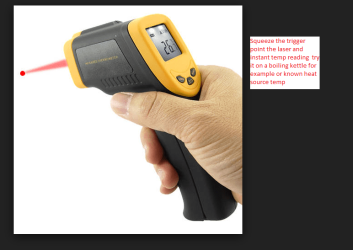
Another way of testing the temp on the CPU (or anything really) is to get one of those infrared/laser temp guns they are cheap enough and I use them all the time for lots of things. (I keep two handy to check each temp reading and also for keeping in another part of my house.
IR Laser Point Digital Infrared Thermometer Temp Temperature Gun Battery Powered | eBay

Getting the data of well I think I mentioned earlier how I do that but if you prefer the other method it is almost the same just quicker.
 

Attachments
  • TEMP.PNG
    TEMP.PNG
    63.2 KB · Views: 3

My Computer

Computer type
PC/Desktop
Computer Manufacturer/Model Number
Own build (new) Desk1 / Asus ROG Win 7 / Desk2 1st build
OS
Desk1 7 Home Prem / Desk2 10 Pro / Main lap Asus ROG 10 Pro 2 laptop Toshiba 7 Pro Asus P2520 7 & 10
CPU
Desk1 i5 3750K / Laptop i7 GTX 860M / Desk2 i5 2500
Motherboard
Desk1 Asus P877-V / Desk2 Gigabyte H67 UD3H / Laptop ?
Memory
Desk1 8GB (1866) / Desk2 16GB (1333) / Laptop 8Gb DDR3
Graphics Card(s)
Desk 1& 2NVidia GTX 650 & Laptops on board Intel
Sound Card
Desk 1 & 2 -XONAR DG Realtek High Def audio Laptop
Monitor(s) Displays
Desk 1 Benq HD 2450 / Desk2 Philips 24" / Laptop 17.5"
Screen Resolution
1920x1080 D1 & D2 & Laptop 1
Hard Drives
Desk1 Samsung 120GB 830 SSD
Asus ROG 256GB 850 Pro SSD
Desk2 Samsung 840 256 SSD
Toshiba 120GB EVO
PSU
Desk 1 Corsair HX 1050/ Laptop ? / Desk 2 Corsair HX 650
Case
Desk 1 Cooler HAF XM ? Toshiba laptop / Desk2 Coolermaster
Cooling
Fans on all Desk1 -2 Desk2 - all Coolermasters 5 Laptop ?
Keyboard
Desk 1 MS Sidewinder X6 Desk 2 MS Sidewinder X 4
Mouse
Desk 1&2 - Gigabyte MS 900 gamer - laptop - Logitec wireless
Internet Speed
ADSL2+
Other Info
One other Desktop (tester) and spare Toshba laptop both with SSD's
Running Kaspersky 2016 ISS on all machines config'd identically
Logitec audio stereo systems on each machine (x3)
Canon MG5250MFC
Router/modem TP-Link running WPA2SK
I know it has been a long time but here I am.
I took every component apart and I am williing to start over.
Can i test the mobo with just the psu connected?
No cpu, no fan, no anything.?
This way i can see if it stays on.

Thanks
 

My Computer

Computer type
PC/Desktop
Computer Manufacturer/Model Number
Custom Build
OS
Windows 7 x64bit Home Premium
CPU
Intel Core i5-2500K Quad-Core Processor 3.3 GHz 6 MB Cache
Motherboard
Intel Desktop Board Media Series LGA 1155 DDR 1333 Micro-ATX
Memory
8GB G.Skill DDR3 PC3-12800 1600MHz - F3-12800CL9D-8GBRL
Graphics Card(s)
Sandy Bridge
Sound Card
M-Audio Fast Track PRO - Avid digidesign 003 rack factory
Monitor(s) Displays
Acer X233H LCD monitor
Screen Resolution
1920x1080
Hard Drives
OS Drive: Silicon Power 256GB SSD 3D NAND A55 SLC Cache Performance Boost SATA III
PSU
Cooler Master eXtreme Power Plus 500w Power Supply
Other Info
This Computer was built from scratch
In a nutshell mate no because just what re you going to test? If I am not terribly wrong you can hook up the board and see if the power LEDs are on and it is going to tell just about that power is connected to the board.


You could put the board on the bench and test with a minimal number of components ie CPU RAM and monitor and takes readings of voltages etc that way but again this is very simplistic.

Have you thoroughly checked the bare board for any signs of faulty components ie caps burnt out resistors tiny chips or even scorch marks on the printer circuit board itself (PCB) any loose connection s such as RAM slots does the CMOS battery need a renewal etc etc.
 

My Computer

Computer type
PC/Desktop
Computer Manufacturer/Model Number
Own build (new) Desk1 / Asus ROG Win 7 / Desk2 1st build
OS
Desk1 7 Home Prem / Desk2 10 Pro / Main lap Asus ROG 10 Pro 2 laptop Toshiba 7 Pro Asus P2520 7 & 10
CPU
Desk1 i5 3750K / Laptop i7 GTX 860M / Desk2 i5 2500
Motherboard
Desk1 Asus P877-V / Desk2 Gigabyte H67 UD3H / Laptop ?
Memory
Desk1 8GB (1866) / Desk2 16GB (1333) / Laptop 8Gb DDR3
Graphics Card(s)
Desk 1& 2NVidia GTX 650 & Laptops on board Intel
Sound Card
Desk 1 & 2 -XONAR DG Realtek High Def audio Laptop
Monitor(s) Displays
Desk 1 Benq HD 2450 / Desk2 Philips 24" / Laptop 17.5"
Screen Resolution
1920x1080 D1 & D2 & Laptop 1
Hard Drives
Desk1 Samsung 120GB 830 SSD
Asus ROG 256GB 850 Pro SSD
Desk2 Samsung 840 256 SSD
Toshiba 120GB EVO
PSU
Desk 1 Corsair HX 1050/ Laptop ? / Desk 2 Corsair HX 650
Case
Desk 1 Cooler HAF XM ? Toshiba laptop / Desk2 Coolermaster
Cooling
Fans on all Desk1 -2 Desk2 - all Coolermasters 5 Laptop ?
Keyboard
Desk 1 MS Sidewinder X6 Desk 2 MS Sidewinder X 4
Mouse
Desk 1&2 - Gigabyte MS 900 gamer - laptop - Logitec wireless
Internet Speed
ADSL2+
Other Info
One other Desktop (tester) and spare Toshba laptop both with SSD's
Running Kaspersky 2016 ISS on all machines config'd identically
Logitec audio stereo systems on each machine (x3)
Canon MG5250MFC
Router/modem TP-Link running WPA2SK
if none of the above produces any improvement, its time to try a different power supply

That's never a bad thing. I usually have a Known-Good PSU laying around that I can use for testing.
Just the idea that any computer shuts down randomly is in error. Although it may seem random to the user, it's never random to the computer itself. Some error caused the shutdown, and it's just up to the user (or a repair tech) to figure out what that reason was.

The PSU is always my first thought, but that can change quickly when I open the case and see several of the motherboard capacitors Bulging and/or leaking. Even though I AM a board level repair tech, a mobo with bad caps is Dumpster Food. Oh yes, I have re-capped mobos before, but it's a long and tedious process and requires some special tools to do it right and not trash the board.

Good Luck
:cool:
 

My Computer

Computer type
PC/Desktop
Computer Manufacturer/Model Number
Various
OS
Win 7 Pro, SP1, x86, Win-11/Pro/64
CPU
AMD
Motherboard
Various
Memory
8GB Crucial
Graphics Card(s)
Various
Sound Card
OnBoard
Monitor(s) Displays
Acer 21.5"
Hard Drives
Crucial SSD, 500 GB
PSU
OEM
Case
SFF Slim Line Case
Cooling
OEM
Keyboard
eMachines
Mouse
Logitech Wireless
Internet Speed
varies
Antivirus
Windows Defender/Super Anti-Spyware
Browser
Firefox
I think you should test your computer on/off switch ( PC momentary switch) if you haven't already done so. I think that could be your problem as it was mine.

Follow the cable from the switch to the small plug on the m/board and remove it from the 2 small pins which it plugs into.

Switch on the power then momentarily connect the two pins together. I find a small phillips type screwdriver ideal for this.
Your pc will now boot. If it stays on then renew the momentary switch and problem solved. If not, then it's back to square one.

PC momentary switches are avaliable complete with cable and plug from Amazon and other outlets for a couple of pounds (or dollars).

Good luck.
 

My Computer

OS
Windows 7 home premium 64bit
That's never a bad thing. I usually have a Known-Good PSU laying around that I can use for testing.
Just the idea that any computer shuts down randomly is in error. Although it may seem random to the user, it's never random to the computer itself. Some error caused the shutdown, and it's just up to the user (or a repair tech) to figure out what that reason was.

The PSU is always my first thought, but that can change quickly when I open the case and see several of the motherboard capacitors Bulging and/or leaking. Even though I AM a board level repair tech, a mobo with bad caps is Dumpster Food. Oh yes, I have re-capped mobos before, but it's a long and tedious process and requires some special tools to do it right and not trash the board.

Good Luck
:cool:
Well I am no techie but Technomage has really said what I believe in and do. If there are any bulging caps then ok if they are fairly large (unlikely these days) then replace it but you can bet your sweet life there will be another one (or two) right behind it ready to go south.
 

My Computer

Computer type
PC/Desktop
Computer Manufacturer/Model Number
Own build (new) Desk1 / Asus ROG Win 7 / Desk2 1st build
OS
Desk1 7 Home Prem / Desk2 10 Pro / Main lap Asus ROG 10 Pro 2 laptop Toshiba 7 Pro Asus P2520 7 & 10
CPU
Desk1 i5 3750K / Laptop i7 GTX 860M / Desk2 i5 2500
Motherboard
Desk1 Asus P877-V / Desk2 Gigabyte H67 UD3H / Laptop ?
Memory
Desk1 8GB (1866) / Desk2 16GB (1333) / Laptop 8Gb DDR3
Graphics Card(s)
Desk 1& 2NVidia GTX 650 & Laptops on board Intel
Sound Card
Desk 1 & 2 -XONAR DG Realtek High Def audio Laptop
Monitor(s) Displays
Desk 1 Benq HD 2450 / Desk2 Philips 24" / Laptop 17.5"
Screen Resolution
1920x1080 D1 & D2 & Laptop 1
Hard Drives
Desk1 Samsung 120GB 830 SSD
Asus ROG 256GB 850 Pro SSD
Desk2 Samsung 840 256 SSD
Toshiba 120GB EVO
PSU
Desk 1 Corsair HX 1050/ Laptop ? / Desk 2 Corsair HX 650
Case
Desk 1 Cooler HAF XM ? Toshiba laptop / Desk2 Coolermaster
Cooling
Fans on all Desk1 -2 Desk2 - all Coolermasters 5 Laptop ?
Keyboard
Desk 1 MS Sidewinder X6 Desk 2 MS Sidewinder X 4
Mouse
Desk 1&2 - Gigabyte MS 900 gamer - laptop - Logitec wireless
Internet Speed
ADSL2+
Other Info
One other Desktop (tester) and spare Toshba laptop both with SSD's
Running Kaspersky 2016 ISS on all machines config'd identically
Logitec audio stereo systems on each machine (x3)
Canon MG5250MFC
Router/modem TP-Link running WPA2SK
Ok people.
I completely disassembled the computer and started over.
Only mobo, PSU and cpu and HSF. Still the same f***ing rebooting.
I then installed one stick of RAM and the same sh*t, a little different behavior, but still the booting loop.
I then took another PSU, a little different behavior, (probably takes a little longer to reboot, but still in loop.

The time it takes to reboot always seems to vary, which I find odd. Sometimes it takes less than a second to reboot the first time, sometimes it takes 3 or 4 seconds, and then it behaces randomly but always in loop.

I am tired....I have like one year with no computer dealing with this stuff.

I believe the faulty component is the MOBO correct?

If it's the mobo, How do you guys think I can get another mobo in order to preserve my current components??

thanks a lot...
 

My Computer

Computer type
PC/Desktop
Computer Manufacturer/Model Number
Custom Build
OS
Windows 7 x64bit Home Premium
CPU
Intel Core i5-2500K Quad-Core Processor 3.3 GHz 6 MB Cache
Motherboard
Intel Desktop Board Media Series LGA 1155 DDR 1333 Micro-ATX
Memory
8GB G.Skill DDR3 PC3-12800 1600MHz - F3-12800CL9D-8GBRL
Graphics Card(s)
Sandy Bridge
Sound Card
M-Audio Fast Track PRO - Avid digidesign 003 rack factory
Monitor(s) Displays
Acer X233H LCD monitor
Screen Resolution
1920x1080
Hard Drives
OS Drive: Silicon Power 256GB SSD 3D NAND A55 SLC Cache Performance Boost SATA III
PSU
Cooler Master eXtreme Power Plus 500w Power Supply
Other Info
This Computer was built from scratch
Ok well I suppose the finger is being pointed at the mobo if the PSU is still ok from memory the 12v rail was not real flash at I think it was 11.7v. Also if you use your spare pair of hands (just joking) test the temps (BIOS) should let you can if it starts at all which makes me think what are you BIOS setting's I would be inclined to se then at default or optimised.

Personally I would jury rig a multimeter to the grey and black connections and then see what the readout is when you power up. Also check for the RAM beep if you get more than one then I would be seriously thinking a RAM issue.

Now if it is the mobo then using the same components presuming you can find a board for and I would not be holding my breath on that one because I for example have an Ivy B with multiple problems like you that truly are beyond reason - fix one thing and another shows up and like you the chances of finding a new board for it are pretty darn zero (out here at least).

Those Sandy Bridge components then if you are stuck with the same issue then one of those components is likely to be the culprit. It might be an idea to take them to a techie who has specialised equipment to test them ie the CPUand the RAM if could save a new mobo and a lot of grief because I do know where you are stuck - in some hell hole of a creek without a paddle.

I do feel sorry you are stuck between that rock and hard place but don't give up just yet.
John:)
 

My Computer

Computer type
PC/Desktop
Computer Manufacturer/Model Number
Own build (new) Desk1 / Asus ROG Win 7 / Desk2 1st build
OS
Desk1 7 Home Prem / Desk2 10 Pro / Main lap Asus ROG 10 Pro 2 laptop Toshiba 7 Pro Asus P2520 7 & 10
CPU
Desk1 i5 3750K / Laptop i7 GTX 860M / Desk2 i5 2500
Motherboard
Desk1 Asus P877-V / Desk2 Gigabyte H67 UD3H / Laptop ?
Memory
Desk1 8GB (1866) / Desk2 16GB (1333) / Laptop 8Gb DDR3
Graphics Card(s)
Desk 1& 2NVidia GTX 650 & Laptops on board Intel
Sound Card
Desk 1 & 2 -XONAR DG Realtek High Def audio Laptop
Monitor(s) Displays
Desk 1 Benq HD 2450 / Desk2 Philips 24" / Laptop 17.5"
Screen Resolution
1920x1080 D1 & D2 & Laptop 1
Hard Drives
Desk1 Samsung 120GB 830 SSD
Asus ROG 256GB 850 Pro SSD
Desk2 Samsung 840 256 SSD
Toshiba 120GB EVO
PSU
Desk 1 Corsair HX 1050/ Laptop ? / Desk 2 Corsair HX 650
Case
Desk 1 Cooler HAF XM ? Toshiba laptop / Desk2 Coolermaster
Cooling
Fans on all Desk1 -2 Desk2 - all Coolermasters 5 Laptop ?
Keyboard
Desk 1 MS Sidewinder X6 Desk 2 MS Sidewinder X 4
Mouse
Desk 1&2 - Gigabyte MS 900 gamer - laptop - Logitec wireless
Internet Speed
ADSL2+
Other Info
One other Desktop (tester) and spare Toshba laptop both with SSD's
Running Kaspersky 2016 ISS on all machines config'd identically
Logitec audio stereo systems on each machine (x3)
Canon MG5250MFC
Router/modem TP-Link running WPA2SK
I do not understand, isn't it obvious that the mobo is the issue after doing what I did. ?
 

My Computer

Computer type
PC/Desktop
Computer Manufacturer/Model Number
Custom Build
OS
Windows 7 x64bit Home Premium
CPU
Intel Core i5-2500K Quad-Core Processor 3.3 GHz 6 MB Cache
Motherboard
Intel Desktop Board Media Series LGA 1155 DDR 1333 Micro-ATX
Memory
8GB G.Skill DDR3 PC3-12800 1600MHz - F3-12800CL9D-8GBRL
Graphics Card(s)
Sandy Bridge
Sound Card
M-Audio Fast Track PRO - Avid digidesign 003 rack factory
Monitor(s) Displays
Acer X233H LCD monitor
Screen Resolution
1920x1080
Hard Drives
OS Drive: Silicon Power 256GB SSD 3D NAND A55 SLC Cache Performance Boost SATA III
PSU
Cooler Master eXtreme Power Plus 500w Power Supply
Other Info
This Computer was built from scratch
I do not understand, isn't it obvious that the mobo is the issue after doing what I did. ?
Yes mate look I truly can understand your frustration - but you say starting from scratch nothing works as soon as you start a bare bons set up and yes that is suggestive of a board issue. All I am saying is that even if you found a replacement board if you stuck all that gear back on and it still will not go then you have done your dough.

I look at it like this you have a car now the engine is tuned and running, the transmission is fine, the final drive is great, the wheels and tyres all perfect, the doors all open and shut , the steering is spot on but if the brakes are shot you cannot driver what is in all likelihood a very nice car.

So with your machine getting for the sake of getting machines individual components tested out it means a complete rebuild.

I don't know if a techie store could test up that board you have a good one should) but it is getting on though having said that my Sandy is alive and well and eating 10 for breakfast.

Now I have been looking around to replace my Ivy B with a Skylake set up as it seems that any Kabylake stuff is not 7 compatible and the parts unless you want a really high end set up for gaming or graphical use then you are going to need a mortgage. On the other hand if all you want is a general use everyday machine then you are still going to be up for a considerable amount of money over and above what you paid for the Sandy. Prices and availability (out here at least) are eye wateringly awful and form my usual vendors hard to get anything approaching what I can afford. In the US of course you have much more choice and outlets and the prices are by comparison to us a steal but again I know you are between a rock and hard place and I fully sympathise with you but that is what I would be doing before I bin the board and possibly the lot.:(
 

My Computer

Computer type
PC/Desktop
Computer Manufacturer/Model Number
Own build (new) Desk1 / Asus ROG Win 7 / Desk2 1st build
OS
Desk1 7 Home Prem / Desk2 10 Pro / Main lap Asus ROG 10 Pro 2 laptop Toshiba 7 Pro Asus P2520 7 & 10
CPU
Desk1 i5 3750K / Laptop i7 GTX 860M / Desk2 i5 2500
Motherboard
Desk1 Asus P877-V / Desk2 Gigabyte H67 UD3H / Laptop ?
Memory
Desk1 8GB (1866) / Desk2 16GB (1333) / Laptop 8Gb DDR3
Graphics Card(s)
Desk 1& 2NVidia GTX 650 & Laptops on board Intel
Sound Card
Desk 1 & 2 -XONAR DG Realtek High Def audio Laptop
Monitor(s) Displays
Desk 1 Benq HD 2450 / Desk2 Philips 24" / Laptop 17.5"
Screen Resolution
1920x1080 D1 & D2 & Laptop 1
Hard Drives
Desk1 Samsung 120GB 830 SSD
Asus ROG 256GB 850 Pro SSD
Desk2 Samsung 840 256 SSD
Toshiba 120GB EVO
PSU
Desk 1 Corsair HX 1050/ Laptop ? / Desk 2 Corsair HX 650
Case
Desk 1 Cooler HAF XM ? Toshiba laptop / Desk2 Coolermaster
Cooling
Fans on all Desk1 -2 Desk2 - all Coolermasters 5 Laptop ?
Keyboard
Desk 1 MS Sidewinder X6 Desk 2 MS Sidewinder X 4
Mouse
Desk 1&2 - Gigabyte MS 900 gamer - laptop - Logitec wireless
Internet Speed
ADSL2+
Other Info
One other Desktop (tester) and spare Toshba laptop both with SSD's
Running Kaspersky 2016 ISS on all machines config'd identically
Logitec audio stereo systems on each machine (x3)
Canon MG5250MFC
Router/modem TP-Link running WPA2SK
Yes mate look I truly can understand your frustration - but you say starting from scratch nothing works as soon as you start a bare bons set up and yes that is suggestive of a board issue. All I am saying is that even if you found a replacement board if you stuck all that gear back on and it still will not go then you have done your dough.

I look at it like this you have a car now the engine is tuned and running, the transmission is fine, the final drive is great, the wheels and tyres all perfect, the doors all open and shut , the steering is spot on but if the brakes are shot you cannot driver what is in all likelihood a very nice car.

So with your machine getting for the sake of getting machines individual components tested out it means a complete rebuild.

I don't know if a techie store could test up that board you have a good one should) but it is getting on though having said that my Sandy is alive and well and eating 10 for breakfast.

Now I have been looking around to replace my Ivy B with a Skylake set up as it seems that any Kabylake stuff is not 7 compatible and the parts unless you want a really high end set up for gaming or graphical use then you are going to need a mortgage. On the other hand if all you want is a general use everyday machine then you are still going to be up for a considerable amount of money over and above what you paid for the Sandy. Prices and availability (out here at least) are eye wateringly awful and form my usual vendors hard to get anything approaching what I can afford. In the US of course you have much more choice and outlets and the prices are by comparison to us a steal but again I know you are between a rock and hard place and I fully sympathise with you but that is what I would be doing before I bin the board and possibly the lot.:(

Thanks a lot for the sympathy, This is a build used for music making.
That is why I have been so insistent, I do not want to install all the plugins and software etc I once installed for several days.
This is a long thread, I have tried the multimeter stuff and it went well, some people here suggested temperature issues which don't make any sense since the PC is looping immediately.

I want to keep my setup and go to work immediately. Thanks God I have not been making a living lately from it, but I need to get back.

On the other hand, all the Gigabytes Mobo's I've had had some sort of booting loop issue, I actually hate them.

The last thing I am going to try is taking this rig to a techie as you suggested, but in this country I don't think techies are going to do beyond what I did on this thread,, but I will try…
 

My Computer

Computer type
PC/Desktop
Computer Manufacturer/Model Number
Custom Build
OS
Windows 7 x64bit Home Premium
CPU
Intel Core i5-2500K Quad-Core Processor 3.3 GHz 6 MB Cache
Motherboard
Intel Desktop Board Media Series LGA 1155 DDR 1333 Micro-ATX
Memory
8GB G.Skill DDR3 PC3-12800 1600MHz - F3-12800CL9D-8GBRL
Graphics Card(s)
Sandy Bridge
Sound Card
M-Audio Fast Track PRO - Avid digidesign 003 rack factory
Monitor(s) Displays
Acer X233H LCD monitor
Screen Resolution
1920x1080
Hard Drives
OS Drive: Silicon Power 256GB SSD 3D NAND A55 SLC Cache Performance Boost SATA III
PSU
Cooler Master eXtreme Power Plus 500w Power Supply
Other Info
This Computer was built from scratch
Hmm that's is strange my friend because most issues I have had especially the Ivy B have been Asus boards the only Giga board that is currently playing up is in a build my son no longer uses but it is not Intel not that I suppose that makes much difference but I think the BIOS chip#1 is bricked. The Sandy is a Giga board as is one I refurbished (with a better CPU, GPU and SSD hard drive) and shipped it to the UK for my brother now Steve has had a few issues but they have been software ones. So I can't say Giga are so bad I wouldn't buy one a gain although I do prefer Asus gear.

Now it sounds (no pun intended) that you like myself really like audio things because I find graphical stuff a bit of a mystery at times and that this machine should be up and running if you use it for business.

So we have it right the board is set up outside the case on a say cardboard box and hooked up with the power supply CPU GPU and ? sound card and of course the monitor.

Now apart from the GPU and sound card the connecting cables for the hard drive (did we get a new drive?) which should be ideally new including the monitor. Have we tried another monitor? KB and mouse, have you got some known good RAM stick you can use is the install a fresh one and ideally using the freshest ISO from Microsoft oh and is the CMOS battery a new one? . I am going down this track because it is keeping the components to a minimum and avoiding using the current install. It doesn't take long to set up and it sounds sort of mad hatter/Heath Robinson but I would try and this fails then it could be said yes the board is dead.:(

Now this is very simplistic but how it is done now if you like you can bridge the black and green connections with paper clip to power up if by any chance that does work then use the screwdriver method.

how test your computer - YouTube
 

My Computer

Computer type
PC/Desktop
Computer Manufacturer/Model Number
Own build (new) Desk1 / Asus ROG Win 7 / Desk2 1st build
OS
Desk1 7 Home Prem / Desk2 10 Pro / Main lap Asus ROG 10 Pro 2 laptop Toshiba 7 Pro Asus P2520 7 & 10
CPU
Desk1 i5 3750K / Laptop i7 GTX 860M / Desk2 i5 2500
Motherboard
Desk1 Asus P877-V / Desk2 Gigabyte H67 UD3H / Laptop ?
Memory
Desk1 8GB (1866) / Desk2 16GB (1333) / Laptop 8Gb DDR3
Graphics Card(s)
Desk 1& 2NVidia GTX 650 & Laptops on board Intel
Sound Card
Desk 1 & 2 -XONAR DG Realtek High Def audio Laptop
Monitor(s) Displays
Desk 1 Benq HD 2450 / Desk2 Philips 24" / Laptop 17.5"
Screen Resolution
1920x1080 D1 & D2 & Laptop 1
Hard Drives
Desk1 Samsung 120GB 830 SSD
Asus ROG 256GB 850 Pro SSD
Desk2 Samsung 840 256 SSD
Toshiba 120GB EVO
PSU
Desk 1 Corsair HX 1050/ Laptop ? / Desk 2 Corsair HX 650
Case
Desk 1 Cooler HAF XM ? Toshiba laptop / Desk2 Coolermaster
Cooling
Fans on all Desk1 -2 Desk2 - all Coolermasters 5 Laptop ?
Keyboard
Desk 1 MS Sidewinder X6 Desk 2 MS Sidewinder X 4
Mouse
Desk 1&2 - Gigabyte MS 900 gamer - laptop - Logitec wireless
Internet Speed
ADSL2+
Other Info
One other Desktop (tester) and spare Toshba laptop both with SSD's
Running Kaspersky 2016 ISS on all machines config'd identically
Logitec audio stereo systems on each machine (x3)
Canon MG5250MFC
Router/modem TP-Link running WPA2SK
Hi there. This is a lost case. I took PC to technicians and PC started working for a while. Strange like everything with this mobo. Would you pleasse let me know what would be a compatible mobo with my actual components??

Thanks a lot
 

My Computer

Computer type
PC/Desktop
Computer Manufacturer/Model Number
Custom Build
OS
Windows 7 x64bit Home Premium
CPU
Intel Core i5-2500K Quad-Core Processor 3.3 GHz 6 MB Cache
Motherboard
Intel Desktop Board Media Series LGA 1155 DDR 1333 Micro-ATX
Memory
8GB G.Skill DDR3 PC3-12800 1600MHz - F3-12800CL9D-8GBRL
Graphics Card(s)
Sandy Bridge
Sound Card
M-Audio Fast Track PRO - Avid digidesign 003 rack factory
Monitor(s) Displays
Acer X233H LCD monitor
Screen Resolution
1920x1080
Hard Drives
OS Drive: Silicon Power 256GB SSD 3D NAND A55 SLC Cache Performance Boost SATA III
PSU
Cooler Master eXtreme Power Plus 500w Power Supply
Other Info
This Computer was built from scratch
Hello mate now sorry to hear that things are crap right now and as for a board replacement it is going to be hard to track one down being a Sandy core a a Z77 chipset.

Now I don't know where exactly you are because your profile shows anywhere on the eastern seaboard of the US down through South America. Now if you are in the US maybe Newegg might have a board but I would be real careful because I have noticed some gear they sell is refurbished and frankly I am not keen on that. There is always EBay but again you are taking a chance there too.

A sample of what I mean motherboards with z77 hcipsets - Newegg.com

So didn't the store give you any idea?? seems odd they couldn't say ata the time what was wrong and what your options were. Anyway keep me posted mate.
 

My Computer

Computer type
PC/Desktop
Computer Manufacturer/Model Number
Own build (new) Desk1 / Asus ROG Win 7 / Desk2 1st build
OS
Desk1 7 Home Prem / Desk2 10 Pro / Main lap Asus ROG 10 Pro 2 laptop Toshiba 7 Pro Asus P2520 7 & 10
CPU
Desk1 i5 3750K / Laptop i7 GTX 860M / Desk2 i5 2500
Motherboard
Desk1 Asus P877-V / Desk2 Gigabyte H67 UD3H / Laptop ?
Memory
Desk1 8GB (1866) / Desk2 16GB (1333) / Laptop 8Gb DDR3
Graphics Card(s)
Desk 1& 2NVidia GTX 650 & Laptops on board Intel
Sound Card
Desk 1 & 2 -XONAR DG Realtek High Def audio Laptop
Monitor(s) Displays
Desk 1 Benq HD 2450 / Desk2 Philips 24" / Laptop 17.5"
Screen Resolution
1920x1080 D1 & D2 & Laptop 1
Hard Drives
Desk1 Samsung 120GB 830 SSD
Asus ROG 256GB 850 Pro SSD
Desk2 Samsung 840 256 SSD
Toshiba 120GB EVO
PSU
Desk 1 Corsair HX 1050/ Laptop ? / Desk 2 Corsair HX 650
Case
Desk 1 Cooler HAF XM ? Toshiba laptop / Desk2 Coolermaster
Cooling
Fans on all Desk1 -2 Desk2 - all Coolermasters 5 Laptop ?
Keyboard
Desk 1 MS Sidewinder X6 Desk 2 MS Sidewinder X 4
Mouse
Desk 1&2 - Gigabyte MS 900 gamer - laptop - Logitec wireless
Internet Speed
ADSL2+
Other Info
One other Desktop (tester) and spare Toshba laptop both with SSD's
Running Kaspersky 2016 ISS on all machines config'd identically
Logitec audio stereo systems on each machine (x3)
Canon MG5250MFC
Router/modem TP-Link running WPA2SK
Thanks much. I am in DR the caribbean. After reading you I beleive I will have to build another one from scratch and ditch my lovely i5 sandy bridge and fan and stuff.

I really dont want to know what happened with a system that worked beautifully fot 3 years and appeared with this issue. Time to invest. So I am now going to pc parts.com to build my thing. ....

Oh gosh, to start installing all my programs again is really a bothersome thing to me
 

My Computer

Computer type
PC/Desktop
Computer Manufacturer/Model Number
Custom Build
OS
Windows 7 x64bit Home Premium
CPU
Intel Core i5-2500K Quad-Core Processor 3.3 GHz 6 MB Cache
Motherboard
Intel Desktop Board Media Series LGA 1155 DDR 1333 Micro-ATX
Memory
8GB G.Skill DDR3 PC3-12800 1600MHz - F3-12800CL9D-8GBRL
Graphics Card(s)
Sandy Bridge
Sound Card
M-Audio Fast Track PRO - Avid digidesign 003 rack factory
Monitor(s) Displays
Acer X233H LCD monitor
Screen Resolution
1920x1080
Hard Drives
OS Drive: Silicon Power 256GB SSD 3D NAND A55 SLC Cache Performance Boost SATA III
PSU
Cooler Master eXtreme Power Plus 500w Power Supply
Other Info
This Computer was built from scratch
Look I am so sorry we could not fix it mate and if is of any consolation my Ivy Bridge which I built after my Sandy B has a wobbly boot on too and I am left with the same decision as yourself re building.

I was thinking of building a Skylake based on an i7 but the prices have skyrocketed since I built those machines and they are now into the 8th gen Intel cores (Coffeelake) and while the cores are not so expensive I suppose when you take into consideration the board RAM GPU etc etc then it becomes really well priced for them not for us eh?

Plus as you say you have to reinstall your programs and I am fairly sure Windows 10 will have to be the oS because Intel support stopped at the Skylake cores for 7. The other thing is too that if you have soemthing like Office installed now is it going to be compatible with the new build all in all my friend pretty ordinary for the average user eh??

Still good luck I hope you get what you are after - myself I have gone back to doing a bit more painting this time in acrylics rather than computing though I still enjoy it hasn't been the same since the advent of 10 and all the new Intel stuff.
 

My Computer

Computer type
PC/Desktop
Computer Manufacturer/Model Number
Own build (new) Desk1 / Asus ROG Win 7 / Desk2 1st build
OS
Desk1 7 Home Prem / Desk2 10 Pro / Main lap Asus ROG 10 Pro 2 laptop Toshiba 7 Pro Asus P2520 7 & 10
CPU
Desk1 i5 3750K / Laptop i7 GTX 860M / Desk2 i5 2500
Motherboard
Desk1 Asus P877-V / Desk2 Gigabyte H67 UD3H / Laptop ?
Memory
Desk1 8GB (1866) / Desk2 16GB (1333) / Laptop 8Gb DDR3
Graphics Card(s)
Desk 1& 2NVidia GTX 650 & Laptops on board Intel
Sound Card
Desk 1 & 2 -XONAR DG Realtek High Def audio Laptop
Monitor(s) Displays
Desk 1 Benq HD 2450 / Desk2 Philips 24" / Laptop 17.5"
Screen Resolution
1920x1080 D1 & D2 & Laptop 1
Hard Drives
Desk1 Samsung 120GB 830 SSD
Asus ROG 256GB 850 Pro SSD
Desk2 Samsung 840 256 SSD
Toshiba 120GB EVO
PSU
Desk 1 Corsair HX 1050/ Laptop ? / Desk 2 Corsair HX 650
Case
Desk 1 Cooler HAF XM ? Toshiba laptop / Desk2 Coolermaster
Cooling
Fans on all Desk1 -2 Desk2 - all Coolermasters 5 Laptop ?
Keyboard
Desk 1 MS Sidewinder X6 Desk 2 MS Sidewinder X 4
Mouse
Desk 1&2 - Gigabyte MS 900 gamer - laptop - Logitec wireless
Internet Speed
ADSL2+
Other Info
One other Desktop (tester) and spare Toshba laptop both with SSD's
Running Kaspersky 2016 ISS on all machines config'd identically
Logitec audio stereo systems on each machine (x3)
Canon MG5250MFC
Router/modem TP-Link running WPA2SK
So I am now going to pc parts.com to build my thing. Oh gosh, to start installing all my programs again is really a bothersome thing to me

No need to re-install programs, you can just use your existing windows boot drive on the new machine. Just follow the instructions in this post I made a while back, plus follow the steps in "Scenario 1" that is a part of the referenced wintips link. You do this right before your very last shutdown on the old machine, just prior to moving the boot drive over to a new machine.

[Failing Motherboard]Transplanting Windows 7 SSD to an identical lapt) - Windows 7 Help Forums
 

My Computer

Computer type
PC/Desktop
Computer Manufacturer/Model Number
diy
OS
Win7 pro x64
CPU
stock i7 7700k
Motherboard
Gigabyte Z270N-WIFI mini-ITX
Memory
Corsair Vengeance LPX 16GB (2x8GB) DDR4 @ 3200MHz
Graphics Card(s)
integrated Intel HD 630
Sound Card
onboard Realtek ALC1220
Monitor(s) Displays
two vertically mounted samsung 55" 4k un55mu8000
Screen Resolution
1920x1280
Hard Drives
256GB Samsung EVO 960 M.2 pci-e NVMe SSD
PSU
SilverStone Nightjar ST45NF 450Watt Fanless
Case
No case. Motherboard is mounted directly onto power supply
Cooling
Evercool low profile 815EP with Panaflow 12L fan at 7v
Keyboard
Ortek MCK-86 mini
Mouse
Belkin 5-button USB
Internet Speed
spectrum 400mbps
No need to re-install programs, you can just use your existing windows boot drive on the new machine. Just follow the instructions in this post I made a while back, plus follow the steps in "Scenario 1" that is a part of the referenced wintips link. You do this right before your very last shutdown on the old machine, just prior to moving the boot drive over to a new machine.

[Failing Motherboard]Transplanting Windows 7 SSD to an identical lapt) - Windows 7 Help Forums

This is awesome. I was also thinking about Acronis Universal Restore. I have an acronis image as a backup too. Ideas welcome all the way. ..... thanks. I really want to keep things as they are, besides i need to get to work inmediately.....

Cool
 

My Computer

Computer type
PC/Desktop
Computer Manufacturer/Model Number
Custom Build
OS
Windows 7 x64bit Home Premium
CPU
Intel Core i5-2500K Quad-Core Processor 3.3 GHz 6 MB Cache
Motherboard
Intel Desktop Board Media Series LGA 1155 DDR 1333 Micro-ATX
Memory
8GB G.Skill DDR3 PC3-12800 1600MHz - F3-12800CL9D-8GBRL
Graphics Card(s)
Sandy Bridge
Sound Card
M-Audio Fast Track PRO - Avid digidesign 003 rack factory
Monitor(s) Displays
Acer X233H LCD monitor
Screen Resolution
1920x1080
Hard Drives
OS Drive: Silicon Power 256GB SSD 3D NAND A55 SLC Cache Performance Boost SATA III
PSU
Cooler Master eXtreme Power Plus 500w Power Supply
Other Info
This Computer was built from scratch
Well good luck withthe new machine mate I hope it all goes well for you.
 

My Computer

Computer type
PC/Desktop
Computer Manufacturer/Model Number
Own build (new) Desk1 / Asus ROG Win 7 / Desk2 1st build
OS
Desk1 7 Home Prem / Desk2 10 Pro / Main lap Asus ROG 10 Pro 2 laptop Toshiba 7 Pro Asus P2520 7 & 10
CPU
Desk1 i5 3750K / Laptop i7 GTX 860M / Desk2 i5 2500
Motherboard
Desk1 Asus P877-V / Desk2 Gigabyte H67 UD3H / Laptop ?
Memory
Desk1 8GB (1866) / Desk2 16GB (1333) / Laptop 8Gb DDR3
Graphics Card(s)
Desk 1& 2NVidia GTX 650 & Laptops on board Intel
Sound Card
Desk 1 & 2 -XONAR DG Realtek High Def audio Laptop
Monitor(s) Displays
Desk 1 Benq HD 2450 / Desk2 Philips 24" / Laptop 17.5"
Screen Resolution
1920x1080 D1 & D2 & Laptop 1
Hard Drives
Desk1 Samsung 120GB 830 SSD
Asus ROG 256GB 850 Pro SSD
Desk2 Samsung 840 256 SSD
Toshiba 120GB EVO
PSU
Desk 1 Corsair HX 1050/ Laptop ? / Desk 2 Corsair HX 650
Case
Desk 1 Cooler HAF XM ? Toshiba laptop / Desk2 Coolermaster
Cooling
Fans on all Desk1 -2 Desk2 - all Coolermasters 5 Laptop ?
Keyboard
Desk 1 MS Sidewinder X6 Desk 2 MS Sidewinder X 4
Mouse
Desk 1&2 - Gigabyte MS 900 gamer - laptop - Logitec wireless
Internet Speed
ADSL2+
Other Info
One other Desktop (tester) and spare Toshba laptop both with SSD's
Running Kaspersky 2016 ISS on all machines config'd identically
Logitec audio stereo systems on each machine (x3)
Canon MG5250MFC
Router/modem TP-Link running WPA2SK

My Computer

Computer type
PC/Desktop
Computer Manufacturer/Model Number
Custom Build
OS
Windows 7 x64bit Home Premium
CPU
Intel Core i5-2500K Quad-Core Processor 3.3 GHz 6 MB Cache
Motherboard
Intel Desktop Board Media Series LGA 1155 DDR 1333 Micro-ATX
Memory
8GB G.Skill DDR3 PC3-12800 1600MHz - F3-12800CL9D-8GBRL
Graphics Card(s)
Sandy Bridge
Sound Card
M-Audio Fast Track PRO - Avid digidesign 003 rack factory
Monitor(s) Displays
Acer X233H LCD monitor
Screen Resolution
1920x1080
Hard Drives
OS Drive: Silicon Power 256GB SSD 3D NAND A55 SLC Cache Performance Boost SATA III
PSU
Cooler Master eXtreme Power Plus 500w Power Supply
Other Info
This Computer was built from scratch
Back
Top