Computer lags and looses internet connection daily

NJV

New member
Local time
4:15 AM
Messages
11
I have a pretty good computer, — as computers go — but every day between 5-30 minutes after start-up, it begins to experience lag spikes, sharp sounds loops, and looses the internet connection regardless of how much RAM I am using. I can postpone dealing with it by restarting my computer, but it is annoying to do so everyday. If it starts this when, for example, I'm playing Terraria, it breaks the save file; so I have to keep frequent backups when I play.
I am running Microsoft Security Essentials and have scanned my computer for viruses, but the issue remains.
Any help would be much appreciated. Thanks.

Some specs: (appologies, 'not computer savvy)
Running 64-bit Windows 7 Pro
AMD FX(tm)-4170 Quad-Core Processor — 4.20 GHz
8GB of RAM
Nvidia GeForce GTX 550 Ti Graphics Card
 

My Computer My Computer

Computer type
PC/Desktop
Computer Manufacturer/Model Number
Custom Build (by a friend)
OS
Windows 7 Professional
CPU
AMD FX(tm)-4170 Quad-Core Processor : 4.20GHz
Graphics Card(s)
Nvidia GeForce GTX 550 Ti
Browser
Opera, Chrome
Hi and welcome to SevenForums,
Use Clean boot,
http://www.sevenforums.com/tutorials/179159-troubleshoot-application-conflicts-performing-clean-startup.html
Click Start and type in the search box,
msconfig
Click on the suggestion on top or hit the Enter key,
Go to the Startup section and take some screen shots for a complete list,
Go to the Services section and on the bottom left Check the box to Hide All Microsoft services,
Repeat the screen shots,
See the links above my signature on how to take and upload screen shots here,
Cheers.
 

My Computer My Computer

Computer type
PC/Desktop
Computer Manufacturer/Model Number
Custom assembled by me :}
OS
Win-7-Pro64bit 7-H-Prem-64bit
CPU
i7-5930K 2nd i9-9940x both water blocked VRM's too
Motherboard
ASUS SABERTOOTH X99 2nd ASUS x299 Apex
Memory
Trident-z 3200C14 2nd Trident-z 3600C16
Graphics Card(s)
EVGA 1080ti ftw3 2nd Titan Xp both water blocked
Sound Card
Built-in Realtek
Monitor(s) Displays
1-AOC G2460PG 24"G-Sync 144Hz/ 2nd 1-ASUS VG248QE 24" 144Hz
Screen Resolution
1920 x 1080 144Hz
Hard Drives
2-Samsung M.2 Evo & Evo Plus
2-Samsung 850 EVO 500GB SSD's/ 3-2.5 W.D. Black 1tb-&3-1tb/3-3.5 WD Black 1tb hdd's
PSU
EVGA SuperNOVA 1000-P2 2nd 1200-P2
Case
2-Corsair Obsidian Series 450D Black ATX Mid Tower
Cooling
Custom water loops
Keyboard
Logitech G710+/ 2nd Logitech G910
Mouse
2-RedDragon M901 Perdition 16400 dpi Gaming mouse = wired
Internet Speed
Comcast Ping 19ms 89.31mbps download speed 6.12mbps upload
Antivirus
Malwarebytes Pro/ Superantispyware Pro
Browser
FireFox & Pale moon
Other Info
2nd ASUS X299 Apex/Intel i9-9940x with Custom water loop/7H-Prem-x64/Corsair 450D case/Ram Trident-z 3600C16 4x8gb / Samsung970Evo plus 500gb SSD/Dual ssd EZ swap evo/PSU EVGA SuperNova 1200w-P2 80+Platinum/GPU Titan Xp /8-ML-140 on push-pull on 2-280GTX rads
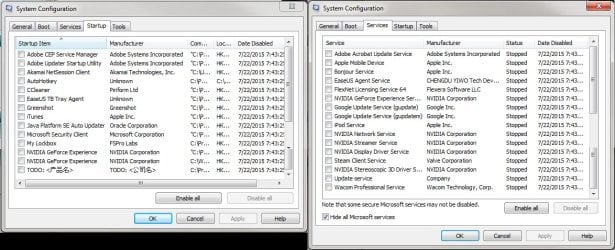
I followed the tutorial and disabled all startup items and non-Microsoft services, and tried running my computer like that for a day. It didn't immediately start lagging after startup and functioned smoothly for a few hours, but when I launched Skyrim, it began lagging again. I know my computer can handle Skyrim, because I am able to run it with very few issues normally after a reboot.

I really appreciate the help by the way. Thanks. Here's the list of services and startup items:
 

Attachments

  • Starup_and_Services.jpg
    Starup_and_Services.jpg
    119.9 KB · Views: 9

My Computer My Computer

Computer type
PC/Desktop
Computer Manufacturer/Model Number
Custom Build (by a friend)
OS
Windows 7 Professional
CPU
AMD FX(tm)-4170 Quad-Core Processor : 4.20GHz
Graphics Card(s)
Nvidia GeForce GTX 550 Ti
Browser
Opera, Chrome
Did you try launching Skyrim without any add-ons? Try open a Resource Monitor and see which component actually slows the system, CPU, Memory or Disk.
 

My Computer My Computer

Computer type
PC/Desktop
Computer Manufacturer/Model Number
Custom Build
OS
Windows 7 Ultimate x64 SP1
CPU
AMD Phenom 2 1090T
Motherboard
Gigabyte GA-890FXA-UD5
Memory
2x8GB Kingston HyperX Fury Black 1600Mhz Unganged
Graphics Card(s)
MSI GTX 970 Gaming 4G
Sound Card
Realtek On-Board HD 7.1 Audio / Logitech G35
Monitor(s) Displays
3xAcer GD245HQ
Screen Resolution
1920x1080
Hard Drives
Samsung 850 Pro 512GB SSD - OS /
WD Caviar Black SATA 3 - 1 TBx2 - Dynamic RAID 0 /
WD Caviar Green SATA 2 - 640GBx2 - Dynamic RAID 0 /
WD Caviar Green SATA 2 - 640GB - Internal Backup /
Seagate Barracude SATA 3 - 3TB - External Backup/ Sync
PSU
HighPower 1000W
Case
Cooler Master HAF 932
Cooling
Noctua NH-D14
Keyboard
Logitech G19
Mouse
Logitech G500
Internet Speed
100/4 Mbit Cable (100GB quota)
Antivirus
ZoneAlarm Extreme Security / MBAM Pro / MBAE Free / SAS Free
Browser
IE 11 - Firefox - Chrome
Other Info
Logitech F710/ G27/ G940/ Z5500 // TrackIR 5 // Nvidia 3D Surround Vision
My computer has been experiencing these lag sessions before I had Skyrim installed.
How would I identify what is causing the issue with the resource monitor? I opened it, but nothing stood out as abnormal.
 

My Computer My Computer

Computer type
PC/Desktop
Computer Manufacturer/Model Number
Custom Build (by a friend)
OS
Windows 7 Professional
CPU
AMD FX(tm)-4170 Quad-Core Processor : 4.20GHz
Graphics Card(s)
Nvidia GeForce GTX 550 Ti
Browser
Opera, Chrome
You need to check Resource Monitor when you are experiencing the problem.

Sort by relevant columns in each of the tabs mentioned.
 

My Computer My Computer

Computer type
PC/Desktop
Computer Manufacturer/Model Number
Custom Build
OS
Windows 7 Ultimate x64 SP1
CPU
AMD Phenom 2 1090T
Motherboard
Gigabyte GA-890FXA-UD5
Memory
2x8GB Kingston HyperX Fury Black 1600Mhz Unganged
Graphics Card(s)
MSI GTX 970 Gaming 4G
Sound Card
Realtek On-Board HD 7.1 Audio / Logitech G35
Monitor(s) Displays
3xAcer GD245HQ
Screen Resolution
1920x1080
Hard Drives
Samsung 850 Pro 512GB SSD - OS /
WD Caviar Black SATA 3 - 1 TBx2 - Dynamic RAID 0 /
WD Caviar Green SATA 2 - 640GBx2 - Dynamic RAID 0 /
WD Caviar Green SATA 2 - 640GB - Internal Backup /
Seagate Barracude SATA 3 - 3TB - External Backup/ Sync
PSU
HighPower 1000W
Case
Cooler Master HAF 932
Cooling
Noctua NH-D14
Keyboard
Logitech G19
Mouse
Logitech G500
Internet Speed
100/4 Mbit Cable (100GB quota)
Antivirus
ZoneAlarm Extreme Security / MBAM Pro / MBAE Free / SAS Free
Browser
IE 11 - Firefox - Chrome
Other Info
Logitech F710/ G27/ G940/ Z5500 // TrackIR 5 // Nvidia 3D Surround Vision
Hi and thanks,
First I would do is turn Windows security back on pronto that is never supposed to be unchecked,
Second is to get rid of Bonjour check it and uninstall it and what the heck is todo ?
 

My Computer My Computer

Computer type
PC/Desktop
Computer Manufacturer/Model Number
Custom assembled by me :}
OS
Win-7-Pro64bit 7-H-Prem-64bit
CPU
i7-5930K 2nd i9-9940x both water blocked VRM's too
Motherboard
ASUS SABERTOOTH X99 2nd ASUS x299 Apex
Memory
Trident-z 3200C14 2nd Trident-z 3600C16
Graphics Card(s)
EVGA 1080ti ftw3 2nd Titan Xp both water blocked
Sound Card
Built-in Realtek
Monitor(s) Displays
1-AOC G2460PG 24"G-Sync 144Hz/ 2nd 1-ASUS VG248QE 24" 144Hz
Screen Resolution
1920 x 1080 144Hz
Hard Drives
2-Samsung M.2 Evo & Evo Plus
2-Samsung 850 EVO 500GB SSD's/ 3-2.5 W.D. Black 1tb-&3-1tb/3-3.5 WD Black 1tb hdd's
PSU
EVGA SuperNOVA 1000-P2 2nd 1200-P2
Case
2-Corsair Obsidian Series 450D Black ATX Mid Tower
Cooling
Custom water loops
Keyboard
Logitech G710+/ 2nd Logitech G910
Mouse
2-RedDragon M901 Perdition 16400 dpi Gaming mouse = wired
Internet Speed
Comcast Ping 19ms 89.31mbps download speed 6.12mbps upload
Antivirus
Malwarebytes Pro/ Superantispyware Pro
Browser
FireFox & Pale moon
Other Info
2nd ASUS X299 Apex/Intel i9-9940x with Custom water loop/7H-Prem-x64/Corsair 450D case/Ram Trident-z 3600C16 4x8gb / Samsung970Evo plus 500gb SSD/Dual ssd EZ swap evo/PSU EVGA SuperNova 1200w-P2 80+Platinum/GPU Titan Xp /8-ML-140 on push-pull on 2-280GTX rads
Todo is EaseUS Todo Backup software. I haven't used it extensively (I have an external harddrive I've been trying to use for backups in case of less-than-desirable days), but I have it set so that it will only back up manually, so it shouldn't be doing anything in the background without my causing it to.
 

My Computer My Computer

Computer type
PC/Desktop
Computer Manufacturer/Model Number
Custom Build (by a friend)
OS
Windows 7 Professional
CPU
AMD FX(tm)-4170 Quad-Core Processor : 4.20GHz
Graphics Card(s)
Nvidia GeForce GTX 550 Ti
Browser
Opera, Chrome
Thanks with the weird listing seemed more like a virus or malware entry :confused:
How does it correspond with your issues ?
Where did you download it from ?
Where are you likely to download other third party programs ?
 

My Computer My Computer

Computer type
PC/Desktop
Computer Manufacturer/Model Number
Custom assembled by me :}
OS
Win-7-Pro64bit 7-H-Prem-64bit
CPU
i7-5930K 2nd i9-9940x both water blocked VRM's too
Motherboard
ASUS SABERTOOTH X99 2nd ASUS x299 Apex
Memory
Trident-z 3200C14 2nd Trident-z 3600C16
Graphics Card(s)
EVGA 1080ti ftw3 2nd Titan Xp both water blocked
Sound Card
Built-in Realtek
Monitor(s) Displays
1-AOC G2460PG 24"G-Sync 144Hz/ 2nd 1-ASUS VG248QE 24" 144Hz
Screen Resolution
1920 x 1080 144Hz
Hard Drives
2-Samsung M.2 Evo & Evo Plus
2-Samsung 850 EVO 500GB SSD's/ 3-2.5 W.D. Black 1tb-&3-1tb/3-3.5 WD Black 1tb hdd's
PSU
EVGA SuperNOVA 1000-P2 2nd 1200-P2
Case
2-Corsair Obsidian Series 450D Black ATX Mid Tower
Cooling
Custom water loops
Keyboard
Logitech G710+/ 2nd Logitech G910
Mouse
2-RedDragon M901 Perdition 16400 dpi Gaming mouse = wired
Internet Speed
Comcast Ping 19ms 89.31mbps download speed 6.12mbps upload
Antivirus
Malwarebytes Pro/ Superantispyware Pro
Browser
FireFox & Pale moon
Other Info
2nd ASUS X299 Apex/Intel i9-9940x with Custom water loop/7H-Prem-x64/Corsair 450D case/Ram Trident-z 3600C16 4x8gb / Samsung970Evo plus 500gb SSD/Dual ssd EZ swap evo/PSU EVGA SuperNova 1200w-P2 80+Platinum/GPU Titan Xp /8-ML-140 on push-pull on 2-280GTX rads
How does Todo correspond with my issues? I don't think it's the problem, but I am a bit un-eased by the Asian characters in the name and description — if only because nothing else stood out. I downloaded it from their website. I am willing to uninstall it, but I haven't been able to find a good free back-up software.
Generally, I don't download anything from websites that aren't the official websites for the software/file or from torrents, which are usually just audio files and images (I — other than in large groups of folders and files that would take to long to do so, which I rarely download — check through the files and make sure there aren't any .exe's or launchers that weren't desired).
 

My Computer My Computer

Computer type
PC/Desktop
Computer Manufacturer/Model Number
Custom Build (by a friend)
OS
Windows 7 Professional
CPU
AMD FX(tm)-4170 Quad-Core Processor : 4.20GHz
Graphics Card(s)
Nvidia GeForce GTX 550 Ti
Browser
Opera, Chrome
Macrium free is a good imaging/backup software many here use without any issues. For data files, sync software like FreeFileSync works very good.
 

My Computer My Computer

Computer type
PC/Desktop
Computer Manufacturer/Model Number
Custom Build
OS
Windows 7 Ultimate x64 SP1
CPU
AMD Phenom 2 1090T
Motherboard
Gigabyte GA-890FXA-UD5
Memory
2x8GB Kingston HyperX Fury Black 1600Mhz Unganged
Graphics Card(s)
MSI GTX 970 Gaming 4G
Sound Card
Realtek On-Board HD 7.1 Audio / Logitech G35
Monitor(s) Displays
3xAcer GD245HQ
Screen Resolution
1920x1080
Hard Drives
Samsung 850 Pro 512GB SSD - OS /
WD Caviar Black SATA 3 - 1 TBx2 - Dynamic RAID 0 /
WD Caviar Green SATA 2 - 640GBx2 - Dynamic RAID 0 /
WD Caviar Green SATA 2 - 640GB - Internal Backup /
Seagate Barracude SATA 3 - 3TB - External Backup/ Sync
PSU
HighPower 1000W
Case
Cooler Master HAF 932
Cooling
Noctua NH-D14
Keyboard
Logitech G19
Mouse
Logitech G500
Internet Speed
100/4 Mbit Cable (100GB quota)
Antivirus
ZoneAlarm Extreme Security / MBAM Pro / MBAE Free / SAS Free
Browser
IE 11 - Firefox - Chrome
Other Info
Logitech F710/ G27/ G940/ Z5500 // TrackIR 5 // Nvidia 3D Surround Vision
I ran a malware scan with Malwarebytes and removed any and all suspicious items (I think 37 in total), but my computer still lags after startup.
 

My Computer My Computer

Computer type
PC/Desktop
Computer Manufacturer/Model Number
Custom Build (by a friend)
OS
Windows 7 Professional
CPU
AMD FX(tm)-4170 Quad-Core Processor : 4.20GHz
Graphics Card(s)
Nvidia GeForce GTX 550 Ti
Browser
Opera, Chrome
Malwarebytes find 37 problems is something to worry about.
That is a lot.

I agree with GokAy post # 11. Those are very good programs.

I'm think you should do some more scans for security problems.
Malwarebytes is a great program but no program find everything.

This is another program I use that also does a great job.

Eset on line scan.

Free Virus Scan | Online Virus Scanner from ESET

I'm not sure I understand this from post #1.
I can postpone dealing with it by restarting my computer, but it is annoying to do so everyday.

Is restarting your computer once a day some sort of a hardship.

Never go online without a active anti virus and firewall program.
It only takes m/s for trouble to jump in your computer without security programs active.
 

My Computer My Computer

Computer type
PC/Desktop
Computer Manufacturer/Model Number
Home made Desktop
OS
Windows 10 Pro. 64/ version 1709 Windows 7 Pro/64
CPU
Intel i7-6800K @ 4.3
Motherboard
ASUS X-99 Deluxe II
Memory
Corsair Platinum 16 gig @2400
Graphics Card(s)
EVGA GTX 1070 OC
Monitor(s) Displays
Asus 27" LED LCD/VE278Q
Screen Resolution
1920-1080 or 1280-720 HDMI
Hard Drives
INTEL SSD 730-240 Gb Sata 3.0/
PSU
EVGA Platium 1200W
Case
Phanteks Luxe Tempered Glass 8 fans/ one radiator
Cooling
XSPC/ Water Cooled CPU
Keyboard
Das 4 Professional
Mouse
Logitech M705/MX Anywhere 2-S
Internet Speed
100 mbits
Antivirus
Microsoft Security Essentials/ Malwarebytes Premium 3.0/ SAS
Browser
I.E. 11 default/Firefox/ ISP Time Warner Cable/Spectrum
Other Info
LG BluRay Burner/
Sound system-KLipsch-THX/
Icy Dock ssd Hot Swap bays.
It isn't really that bad restarting my computer everyday, but it can be irritating when I'm in the middle of something and it stops working. I am more upset that the problem is there, though, even if it only takes a minute or two to "resolve." I just want the problem to be fixed.
Do you know of any good anti-virus software? I almost always use Opera if that helps anything.
I've only had a windows computer for about a year now, so I'm still a "greenie" to threat prevention and such.
 

My Computer My Computer

Computer type
PC/Desktop
Computer Manufacturer/Model Number
Custom Build (by a friend)
OS
Windows 7 Professional
CPU
AMD FX(tm)-4170 Quad-Core Processor : 4.20GHz
Graphics Card(s)
Nvidia GeForce GTX 550 Ti
Browser
Opera, Chrome
What anti virus program are you using now?
 

My Computer My Computer

Computer type
PC/Desktop
Computer Manufacturer/Model Number
Home made Desktop
OS
Windows 10 Pro. 64/ version 1709 Windows 7 Pro/64
CPU
Intel i7-6800K @ 4.3
Motherboard
ASUS X-99 Deluxe II
Memory
Corsair Platinum 16 gig @2400
Graphics Card(s)
EVGA GTX 1070 OC
Monitor(s) Displays
Asus 27" LED LCD/VE278Q
Screen Resolution
1920-1080 or 1280-720 HDMI
Hard Drives
INTEL SSD 730-240 Gb Sata 3.0/
PSU
EVGA Platium 1200W
Case
Phanteks Luxe Tempered Glass 8 fans/ one radiator
Cooling
XSPC/ Water Cooled CPU
Keyboard
Das 4 Professional
Mouse
Logitech M705/MX Anywhere 2-S
Internet Speed
100 mbits
Antivirus
Microsoft Security Essentials/ Malwarebytes Premium 3.0/ SAS
Browser
I.E. 11 default/Firefox/ ISP Time Warner Cable/Spectrum
Other Info
LG BluRay Burner/
Sound system-KLipsch-THX/
Icy Dock ssd Hot Swap bays.
I have Microsoft Security Essentials, but that's it I think.
Also, I ran the Eset scanner and it removed one item, but my computer still lags after startup.

Is it possible that this is being caused by a bad driver or something. I was talking to my friend (who built the computer, and from whom I bought it from) a bit ago, and he said that the wifi card had shotty internet connectivity and that it caused the computer to act up. I don't know how accurate that sounds; my brother (who's quite computer savvy) said that the wifi card wouldn't be the issue for a slow computer. And since I've had the card, it connects to the internet very well for me (other than during the lag sessions), and did so for a few months after I bought it from him.
 

My Computer My Computer

Computer type
PC/Desktop
Computer Manufacturer/Model Number
Custom Build (by a friend)
OS
Windows 7 Professional
CPU
AMD FX(tm)-4170 Quad-Core Processor : 4.20GHz
Graphics Card(s)
Nvidia GeForce GTX 550 Ti
Browser
Opera, Chrome
It can cause issues if it is somehow damaged, is it an add-on wifi card? Can you remove it?
 

My Computer My Computer

Computer type
PC/Desktop
Computer Manufacturer/Model Number
Custom Build
OS
Windows 7 Ultimate x64 SP1
CPU
AMD Phenom 2 1090T
Motherboard
Gigabyte GA-890FXA-UD5
Memory
2x8GB Kingston HyperX Fury Black 1600Mhz Unganged
Graphics Card(s)
MSI GTX 970 Gaming 4G
Sound Card
Realtek On-Board HD 7.1 Audio / Logitech G35
Monitor(s) Displays
3xAcer GD245HQ
Screen Resolution
1920x1080
Hard Drives
Samsung 850 Pro 512GB SSD - OS /
WD Caviar Black SATA 3 - 1 TBx2 - Dynamic RAID 0 /
WD Caviar Green SATA 2 - 640GBx2 - Dynamic RAID 0 /
WD Caviar Green SATA 2 - 640GB - Internal Backup /
Seagate Barracude SATA 3 - 3TB - External Backup/ Sync
PSU
HighPower 1000W
Case
Cooler Master HAF 932
Cooling
Noctua NH-D14
Keyboard
Logitech G19
Mouse
Logitech G500
Internet Speed
100/4 Mbit Cable (100GB quota)
Antivirus
ZoneAlarm Extreme Security / MBAM Pro / MBAE Free / SAS Free
Browser
IE 11 - Firefox - Chrome
Other Info
Logitech F710/ G27/ G940/ Z5500 // TrackIR 5 // Nvidia 3D Surround Vision
Yes, it can be removed. I doubt it's damaged. If so, not too severely, because it's only ever been in two computers and it's only ~2-3 years old.
 

My Computer My Computer

Computer type
PC/Desktop
Computer Manufacturer/Model Number
Custom Build (by a friend)
OS
Windows 7 Professional
CPU
AMD FX(tm)-4170 Quad-Core Processor : 4.20GHz
Graphics Card(s)
Nvidia GeForce GTX 550 Ti
Browser
Opera, Chrome
Back
Top