Computer locks up during certain games, event viewer included

My Computer My Computer

At a glance

windows 7 Ultimate Service pack 1 x64intel i5 2500k8gb RamSapphire AMD 6950 2gb
Computer type
PC/Desktop
OS
windows 7 Ultimate Service pack 1 x64
CPU
intel i5 2500k
Motherboard
Asus p8z68-v motherboard
Memory
8gb Ram
Graphics Card(s)
Sapphire AMD 6950 2gb
Screen Resolution
1920x1080
Hard Drives
2x samsung hd103SJ
1x ST2000DL003-9VT166
PSU
Silverstone silver 850watt power supply (ST85F-P)
Case
silverstone raven RV02-E
Keyboard
microsoft side winder x4
Mouse
Razer death adder v2
This would be to monitor temps at all times from System Tray.

Check also the logs and System Resources for other clues from Troubleshooting Steps for Windows 7.

By the time most work through the steps the problem's cause will be found one way or the other.
 
This would be to monitor temps at all times from System Tray.

Check also the logs and System Resources for other clues from Troubleshooting Steps for Windows 7.

By the time most work through the steps the problem's cause will be found one way or the other.

Just did furmark, using my resolution of 1920x1080 and the maximum anti aliasing i could do 8x MSAA my GPU reached a peak of 73 degrees C and stayed around there, going at 8 fps
my friend is also recommending me to do the same for CPU using prime95 and stressing the cpu.
 

My Computer My Computer

At a glance

windows 7 Ultimate Service pack 1 x64intel i5 2500k8gb RamSapphire AMD 6950 2gb
Computer type
PC/Desktop
OS
windows 7 Ultimate Service pack 1 x64
CPU
intel i5 2500k
Motherboard
Asus p8z68-v motherboard
Memory
8gb Ram
Graphics Card(s)
Sapphire AMD 6950 2gb
Screen Resolution
1920x1080
Hard Drives
2x samsung hd103SJ
1x ST2000DL003-9VT166
PSU
Silverstone silver 850watt power supply (ST85F-P)
Case
silverstone raven RV02-E
Keyboard
microsoft side winder x4
Mouse
Razer death adder v2

Attachments

  • cpu temps at max.png
    cpu temps at max.png
    51.3 KB · Views: 6
  • furmark_000000.jpg
    furmark_000000.jpg
    313.5 KB · Views: 2

My Computer My Computer

At a glance

windows 7 Ultimate Service pack 1 x64intel i5 2500k8gb RamSapphire AMD 6950 2gb
Computer type
PC/Desktop
OS
windows 7 Ultimate Service pack 1 x64
CPU
intel i5 2500k
Motherboard
Asus p8z68-v motherboard
Memory
8gb Ram
Graphics Card(s)
Sapphire AMD 6950 2gb
Screen Resolution
1920x1080
Hard Drives
2x samsung hd103SJ
1x ST2000DL003-9VT166
PSU
Silverstone silver 850watt power supply (ST85F-P)
Case
silverstone raven RV02-E
Keyboard
microsoft side winder x4
Mouse
Razer death adder v2
I only skimmed back through the thread but am wondering if you have tried the new install on SSD with all other HD's unplugged, to test if the problem then occurs.

If not add back the other HD's one at a time after confirming each does not cause the problem.

Are you using the same cables for the new drive that were used on the old one which caused the same prob?

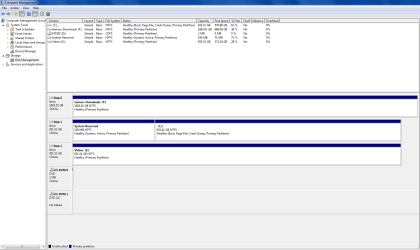
Please post another screenshot of Disk Management - Post a Screen Capture Image
 
I only skimmed back through the thread but am wondering if you have tried the new install on SSD with all other HD's unplugged, to test if the problem then occurs.

If not add back the other HD's one at a time after confirming each does not cause the problem.

Are you using the same cables for the new drive that were used on the old one which caused the same prob?

Please post another screenshot of Disk Management - Post a Screen Capture Image

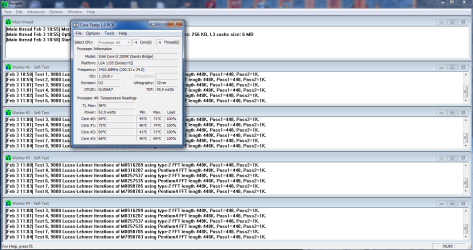
I had at the time of testing all hard drives, except the one with the old OS plugged in, and the same error occured. about 15 minutes into a game of company of heroes the computer locked up. Im currently not using my SSD since it hasn't solved the problem and until i do i won't be using it. I have also just confirmed that when i ran both prime95 and furmark the computer locked up about 5-10 minutes in
 

Attachments

  • screen capture management.png
    screen capture management.png
    34 KB · Views: 4

My Computer My Computer

At a glance

windows 7 Ultimate Service pack 1 x64intel i5 2500k8gb RamSapphire AMD 6950 2gb
Computer type
PC/Desktop
OS
windows 7 Ultimate Service pack 1 x64
CPU
intel i5 2500k
Motherboard
Asus p8z68-v motherboard
Memory
8gb Ram
Graphics Card(s)
Sapphire AMD 6950 2gb
Screen Resolution
1920x1080
Hard Drives
2x samsung hd103SJ
1x ST2000DL003-9VT166
PSU
Silverstone silver 850watt power supply (ST85F-P)
Case
silverstone raven RV02-E
Keyboard
microsoft side winder x4
Mouse
Razer death adder v2
My 2 cents worth and like Greg have only skimmed through the thread but I would return to the PSU and try this even if just to eliminate it.

PSU TESTING

http://www.sevenforums.com/tutorials/86648-psu-jump-start.html

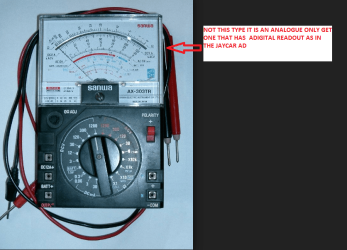
Test the sockets and leads with a digital multimeter NOT an analogue one because an analogue one injects 9v into a circuitwhich I am sure will know will do no good the board!!

Something like this is ideal http://www.newegg.com/Product/Product.aspx?Item=9SIA1TX0K36453

Anothergood ref http://www.sevenforums.com/tutorials/301799-psu-test-dc-output-voltage.html

Plus when testing place the blacklead to the case or one of the board fixing screws try not to use the blacks inthe 24 socket - you can but the other site are for more reliable forpreciseness. In fact you can get crocodile clips to fit the black probe toattach and forget leaving one hand free


Now you have to remember of coursecorrect volts does not always mean correct current.

Think of it as a car with a flatbattery it may test perfect at 12 - 13v but try and crank the engine it may dothat but leave no available current for the ignition and other essentialcircuits.

To test though you will need afairly good ammeter and run a known current draw though it however these areusually expensive pieces of equipment and is not really THAT necessary. .

Use this for volts refs and theyneed to be within 5% of the stated voltage - see text in this

http://www.tomshardware.com/reviews/power-supply-specifications-atx-reference,3061-2.html

Now I know that maybe the PSU might be new but doesn't mean it is running properly as with anything just one small part going south as in new cars could be the problem.
Just for info I just bought one of these and it is a real helpful gadget and it takes the reading direct from the source - that is when you can get near it of course.

NON Contact LCD IR Digital Infrared Thermometer Temperature With Laser GUN Point | eBay
 

My Computer My Computer

At a glance

Desk1 7 Home Prem / Desk2 10 Pro / Main lap A...Desk1 i5 3750K / Laptop i7 GTX 860M / Desk2 i...Desk1 8GB (1866) / Desk2 16GB (1333) / Laptop...Desk 1& 2NVidia GTX 650 & Laptops on board Intel
Computer type
PC/Desktop
Computer Manufacturer/Model Number
Own build (new) Desk1 / Asus ROG Win 7 / Desk2 1st build
OS
Desk1 7 Home Prem / Desk2 10 Pro / Main lap Asus ROG 10 Pro 2 laptop Toshiba 7 Pro Asus P2520 7 & 10
CPU
Desk1 i5 3750K / Laptop i7 GTX 860M / Desk2 i5 2500
Motherboard
Desk1 Asus P877-V / Desk2 Gigabyte H67 UD3H / Laptop ?
Memory
Desk1 8GB (1866) / Desk2 16GB (1333) / Laptop 8Gb DDR3
Graphics Card(s)
Desk 1& 2NVidia GTX 650 & Laptops on board Intel
Sound Card
Desk 1 & 2 -XONAR DG Realtek High Def audio Laptop
Monitor(s) Displays
Desk 1 Benq HD 2450 / Desk2 Philips 24" / Laptop 17.5"
Screen Resolution
1920x1080 D1 & D2 & Laptop 1
Hard Drives
Desk1 Samsung 120GB 830 SSD
Asus ROG 256GB 850 Pro SSD
Desk2 Samsung 840 256 SSD
Toshiba 120GB EVO
PSU
Desk 1 Corsair HX 1050/ Laptop ? / Desk 2 Corsair HX 650
Case
Desk 1 Cooler HAF XM ? Toshiba laptop / Desk2 Coolermaster
Cooling
Fans on all Desk1 -2 Desk2 - all Coolermasters 5 Laptop ?
Keyboard
Desk 1 MS Sidewinder X6 Desk 2 MS Sidewinder X 4
Mouse
Desk 1&2 - Gigabyte MS 900 gamer - laptop - Logitec wireless
Internet Speed
ADSL2+
Other Info
One other Desktop (tester) and spare Toshba laptop both with SSD's
Running Kaspersky 2016 ISS on all machines config'd identically
Logitec audio stereo systems on each machine (x3)
Canon MG5250MFC
Router/modem TP-Link running WPA2SK
I'm curious why testing the PSU requires jumpstarting the PSU which looks extremely dangerous.

Isn't testing sufficient?
 
I'm curious why testing the PSU requires jumpstarting the PSU which looks extremely dangerous.

Isn't testing sufficient?
No Greg the jump start is very safe only dismantling the PSU itself is dangerous and then only if that is done by either someone who doesn't know what they are looking for and if it has been running very recently. Usually unplugging the machine and powering on drains those large caps in the PSU.

It is just a matter of testing the sockets and leads to the board with a meter so it only involves volts up to a very max 12-13v and if it is that then there is something very wrong if you look at the tolerances given for those volts used in the machine. Now you can pull the 24 pin out and test or leave in situ I leave in situ and use the board as the negative (ground) point (board fixing screws) (black lead) and run the red lead into the back of the power pins. It is just a matter of seeing if the volts are within 5% + / - of the stated volts on the different coloured leads.
In fact you would need to put your tongue on the back of the 24 pin to get any effect and well I suppose there would be those who would try that but at worst it would just be very unpleasant (and a little moronic) LOL!!

It takes very little time to do the only thing is you must not use an analogue meter as it injects (usually 9volts) into a system to get the readings so you must use a digital meter.

But if you think it isn't worth the try then it really makes no odds to me as I said it would just take that possibility of the PSU being or going bad especially under load as Scott Mueller has quoted time and again that problems with PSU's are vastly underrated when a machine is not going properly.
 

My Computer My Computer

At a glance

Desk1 7 Home Prem / Desk2 10 Pro / Main lap A...Desk1 i5 3750K / Laptop i7 GTX 860M / Desk2 i...Desk1 8GB (1866) / Desk2 16GB (1333) / Laptop...Desk 1& 2NVidia GTX 650 & Laptops on board Intel
Computer type
PC/Desktop
Computer Manufacturer/Model Number
Own build (new) Desk1 / Asus ROG Win 7 / Desk2 1st build
OS
Desk1 7 Home Prem / Desk2 10 Pro / Main lap Asus ROG 10 Pro 2 laptop Toshiba 7 Pro Asus P2520 7 & 10
CPU
Desk1 i5 3750K / Laptop i7 GTX 860M / Desk2 i5 2500
Motherboard
Desk1 Asus P877-V / Desk2 Gigabyte H67 UD3H / Laptop ?
Memory
Desk1 8GB (1866) / Desk2 16GB (1333) / Laptop 8Gb DDR3
Graphics Card(s)
Desk 1& 2NVidia GTX 650 & Laptops on board Intel
Sound Card
Desk 1 & 2 -XONAR DG Realtek High Def audio Laptop
Monitor(s) Displays
Desk 1 Benq HD 2450 / Desk2 Philips 24" / Laptop 17.5"
Screen Resolution
1920x1080 D1 & D2 & Laptop 1
Hard Drives
Desk1 Samsung 120GB 830 SSD
Asus ROG 256GB 850 Pro SSD
Desk2 Samsung 840 256 SSD
Toshiba 120GB EVO
PSU
Desk 1 Corsair HX 1050/ Laptop ? / Desk 2 Corsair HX 650
Case
Desk 1 Cooler HAF XM ? Toshiba laptop / Desk2 Coolermaster
Cooling
Fans on all Desk1 -2 Desk2 - all Coolermasters 5 Laptop ?
Keyboard
Desk 1 MS Sidewinder X6 Desk 2 MS Sidewinder X 4
Mouse
Desk 1&2 - Gigabyte MS 900 gamer - laptop - Logitec wireless
Internet Speed
ADSL2+
Other Info
One other Desktop (tester) and spare Toshba laptop both with SSD's
Running Kaspersky 2016 ISS on all machines config'd identically
Logitec audio stereo systems on each machine (x3)
Canon MG5250MFC
Router/modem TP-Link running WPA2SK
I'm curious why testing the PSU requires jumpstarting the PSU which looks extremely dangerous.

Isn't testing sufficient?

I don't even know where to begin testing the PSU
I rang a comp shop thats about 20 min away, they think it could be CPU thermal paste (i don't see how) my graphics card or motherboard. Right now im replacing my 6950 with an old 450 gts i had and gonna run the tests again, if it happens again then i am sure this will eliminate the possibility that it is the graphics card, leaving 2 options. The motherboard or the PSU
 

My Computer My Computer

At a glance

windows 7 Ultimate Service pack 1 x64intel i5 2500k8gb RamSapphire AMD 6950 2gb
Computer type
PC/Desktop
OS
windows 7 Ultimate Service pack 1 x64
CPU
intel i5 2500k
Motherboard
Asus p8z68-v motherboard
Memory
8gb Ram
Graphics Card(s)
Sapphire AMD 6950 2gb
Screen Resolution
1920x1080
Hard Drives
2x samsung hd103SJ
1x ST2000DL003-9VT166
PSU
Silverstone silver 850watt power supply (ST85F-P)
Case
silverstone raven RV02-E
Keyboard
microsoft side winder x4
Mouse
Razer death adder v2
I'm curious why testing the PSU requires jumpstarting the PSU which looks extremely dangerous.

Isn't testing sufficient?
No Greg the jump start is very safe only dismantling the PSU itself is dangerous and then only if that is done by either someone who doesn't know what they are looking for and if it has been running very recently. Usually unplugging the machine and powering on drains those large caps in the PSU.

It is just a matter of testing the sockets and leads to the board with a meter so it only involves volts up to a very max 12-13v and if it is that then there is something very wrong if you look at the tolerances given for those volts used in the machine. Now you can pull the 24 pin out and test or leave in situ I leave in situ and use the board as the negative (ground) point (board fixing screws) (black lead) and run the red lead into the back of the power pins. It is just a matter of seeing if the volts are within 5% + / - of the stated volts on the different coloured leads.
In fact you would need to put your tongue on the back of the 24 pin to get any effect and well I suppose there would be those who would try that but at worst it would just be very unpleasant (and a little moronic) LOL!!

It takes very little time to do the only thing is you must not use an analogue meter as it injects (usually 9volts) into a system to get the readings so you must use a digital meter.

But if you think it isn't worth the try then it really makes no odds to me as I said it would just take that possibility of the PSU being or going bad especially under load as Scott Mueller has quoted time and again that problems with PSU's are vastly underrated when a machine is not going properly.

I have never used one of these things, where could i get one? and how would i use it on the power supply (im guessing i would also leave the power supply unplugged while i did this)
 

My Computer My Computer

At a glance

windows 7 Ultimate Service pack 1 x64intel i5 2500k8gb RamSapphire AMD 6950 2gb
Computer type
PC/Desktop
OS
windows 7 Ultimate Service pack 1 x64
CPU
intel i5 2500k
Motherboard
Asus p8z68-v motherboard
Memory
8gb Ram
Graphics Card(s)
Sapphire AMD 6950 2gb
Screen Resolution
1920x1080
Hard Drives
2x samsung hd103SJ
1x ST2000DL003-9VT166
PSU
Silverstone silver 850watt power supply (ST85F-P)
Case
silverstone raven RV02-E
Keyboard
microsoft side winder x4
Mouse
Razer death adder v2
I don't even know where to begin testing the PSU
I rang a comp shop thats about 20 min away, they think it could be CPU thermal paste (i don't see how) my graphics card or motherboard. Right now im replacing my 6950 with an old 450 gts i had and gonna run the tests again, if it happens again then i am sure this will eliminate the possibility that it is the graphics card, leaving 2 options. The motherboard or the PSU
Links are in post #48, the blue underlined text will open a tutorial.

To show volts and much more, download and install HWinfo for your 32 bit or 64 bit system.
HWiNFO, HWiNFO32/64 - Download

Scroll down to the green "Download Installer" button.
 

My Computer My Computer

At a glance

Windows 7 Ultimate X64 SP1Intel i5-2550K, Differing ~4.4-4.8GHz No buil...16GB G.Skill Sniper 1866MHz @ 2133MHz 2x8GBASUS GTX650TIB-DC2OC-2GD5, (650TI Boost)
Computer type
PC/Desktop
Computer Manufacturer/Model Number
Home Built Desktop By DataTech
OS
Windows 7 Ultimate X64 SP1
CPU
Intel i5-2550K, Differing ~4.4-4.8GHz No built in GPU
Motherboard
ASUS P8Z68-V PRO/GEN3
Memory
16GB G.Skill Sniper 1866MHz @ 2133MHz 2x8GB
Graphics Card(s)
ASUS GTX650TIB-DC2OC-2GD5, (650TI Boost)
Sound Card
Onboard Realtek 5-1
Monitor(s) Displays
Samsung P2570HD
Screen Resolution
1920x1080
Hard Drives
Samsung 840 Pro 256GB SSD for OS, 500GB Seagate Constellation (Enterprise drive) for Data
PSU
Corsair HX650W
Case
Inwin Dragon Rider
Cooling
Hyper 212 EVO w/two Noctua fans, push-pull, @1300 RPM
Keyboard
E-Z Eyes, bright yellow keys with large characters
Mouse
steelseries SENSEI Laser Pro Gaming
Internet Speed
48-51Mbs Mbs down, 11 Mbs up Xfinity Cable
Antivirus
Norton Internet Security 2013
Browser
IE 10, Opera, Pale Moon if needed
Other Info
4 case fans, LG BluRay-RE, ASUS DVD-RW, Mr. Fusion power supply, 1.21 gigawatts.
No you would leave the power hooked up and instead of the paper clip if that is bothering you see this XSPC 24pin ATX Bridge Tool [5060175581327] - $2.00 : PC Case Gear

If you are in doubt then don't worry mate I am just saying that the PSU itself you should not attempt to take out and especially take apart if you do not know what you are doing. Otherwise you are only dealing with a very top voltage of +12 volts and I ma sure you may have touched a car battery's terminals at some time in your life and unless one is very stupid and say soaks their hands in brine for a few hours before doing that then they would have to be a moron and the worst thing that they would feel would probably be just a tingling sensation if that!

The multimeter mate you can pick up at Dick Smiths or any electronic outlet for just a few dollars you don't need anything elaborate say $10 or something, maybe even somewhere like Big W.
See Mini Digital Multimeter - Jaycar Electronics but DO NOT get the type in the pic:)

There is also this but it is really for people like me who do a fair bit with machines from time to time EZ Power Supply Tester with Voltage LCD Display [PS-TST3] - $25.00 : PC Case Gear
 

Attachments

  • ANALOGUE.PNG
    ANALOGUE.PNG
    174.7 KB · Views: 0

My Computer My Computer

At a glance

Desk1 7 Home Prem / Desk2 10 Pro / Main lap A...Desk1 i5 3750K / Laptop i7 GTX 860M / Desk2 i...Desk1 8GB (1866) / Desk2 16GB (1333) / Laptop...Desk 1& 2NVidia GTX 650 & Laptops on board Intel
Computer type
PC/Desktop
Computer Manufacturer/Model Number
Own build (new) Desk1 / Asus ROG Win 7 / Desk2 1st build
OS
Desk1 7 Home Prem / Desk2 10 Pro / Main lap Asus ROG 10 Pro 2 laptop Toshiba 7 Pro Asus P2520 7 & 10
CPU
Desk1 i5 3750K / Laptop i7 GTX 860M / Desk2 i5 2500
Motherboard
Desk1 Asus P877-V / Desk2 Gigabyte H67 UD3H / Laptop ?
Memory
Desk1 8GB (1866) / Desk2 16GB (1333) / Laptop 8Gb DDR3
Graphics Card(s)
Desk 1& 2NVidia GTX 650 & Laptops on board Intel
Sound Card
Desk 1 & 2 -XONAR DG Realtek High Def audio Laptop
Monitor(s) Displays
Desk 1 Benq HD 2450 / Desk2 Philips 24" / Laptop 17.5"
Screen Resolution
1920x1080 D1 & D2 & Laptop 1
Hard Drives
Desk1 Samsung 120GB 830 SSD
Asus ROG 256GB 850 Pro SSD
Desk2 Samsung 840 256 SSD
Toshiba 120GB EVO
PSU
Desk 1 Corsair HX 1050/ Laptop ? / Desk 2 Corsair HX 650
Case
Desk 1 Cooler HAF XM ? Toshiba laptop / Desk2 Coolermaster
Cooling
Fans on all Desk1 -2 Desk2 - all Coolermasters 5 Laptop ?
Keyboard
Desk 1 MS Sidewinder X6 Desk 2 MS Sidewinder X 4
Mouse
Desk 1&2 - Gigabyte MS 900 gamer - laptop - Logitec wireless
Internet Speed
ADSL2+
Other Info
One other Desktop (tester) and spare Toshba laptop both with SSD's
Running Kaspersky 2016 ISS on all machines config'd identically
Logitec audio stereo systems on each machine (x3)
Canon MG5250MFC
Router/modem TP-Link running WPA2SK
I don't even know where to begin testing the PSU
I rang a comp shop thats about 20 min away, they think it could be CPU thermal paste (i don't see how) my graphics card or motherboard. Right now im replacing my 6950 with an old 450 gts i had and gonna run the tests again, if it happens again then i am sure this will eliminate the possibility that it is the graphics card, leaving 2 options. The motherboard or the PSU
Links are in post #48, the blue underlined text will open a tutorial.

To show volts and much more, download and install HWinfo for your 32 bit or 64 bit system.
HWiNFO, HWiNFO32/64 - Download

Scroll down to the green "Download Installer" button.

Ok and with HWinfo, what would i do? i dunno if i like the idea of jump starting it. My power supply is under warranty for another 10 months, thank god for 3 year warranty. The problem is the comp store i ordered from is like an hour drive and i hate going over bridges! so i might take it to them.
Also i just noticed something i keep hearing a little... well its not exactly a beep but its something like if a disc is quickly stopping and starting.
 

My Computer My Computer

At a glance

windows 7 Ultimate Service pack 1 x64intel i5 2500k8gb RamSapphire AMD 6950 2gb
Computer type
PC/Desktop
OS
windows 7 Ultimate Service pack 1 x64
CPU
intel i5 2500k
Motherboard
Asus p8z68-v motherboard
Memory
8gb Ram
Graphics Card(s)
Sapphire AMD 6950 2gb
Screen Resolution
1920x1080
Hard Drives
2x samsung hd103SJ
1x ST2000DL003-9VT166
PSU
Silverstone silver 850watt power supply (ST85F-P)
Case
silverstone raven RV02-E
Keyboard
microsoft side winder x4
Mouse
Razer death adder v2
Ok and with HWinfo, what would i do? i dunno if i like the idea of jump starting it. My power supply is under warranty for another 10 months, thank god for 3 year warranty. The problem is the comp store i ordered from is like an hour drive and i hate going over bridges! so i might take it to them.
Also i just noticed something i keep hearing a little... well its not exactly a beep but its something like if a disc is quickly stopping and starting.
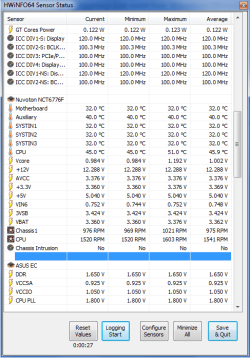
No need to jump start, if the PC powers on we know it "works". HWinfo will tell you if the volts are correct, without them the current is irrelevant.
Download as instructed, run the program with Sensors Only checked, scroll down the window that opens to find.....

Hwinfo.png
 

My Computer My Computer

At a glance

Windows 7 Ultimate X64 SP1Intel i5-2550K, Differing ~4.4-4.8GHz No buil...16GB G.Skill Sniper 1866MHz @ 2133MHz 2x8GBASUS GTX650TIB-DC2OC-2GD5, (650TI Boost)
Computer type
PC/Desktop
Computer Manufacturer/Model Number
Home Built Desktop By DataTech
OS
Windows 7 Ultimate X64 SP1
CPU
Intel i5-2550K, Differing ~4.4-4.8GHz No built in GPU
Motherboard
ASUS P8Z68-V PRO/GEN3
Memory
16GB G.Skill Sniper 1866MHz @ 2133MHz 2x8GB
Graphics Card(s)
ASUS GTX650TIB-DC2OC-2GD5, (650TI Boost)
Sound Card
Onboard Realtek 5-1
Monitor(s) Displays
Samsung P2570HD
Screen Resolution
1920x1080
Hard Drives
Samsung 840 Pro 256GB SSD for OS, 500GB Seagate Constellation (Enterprise drive) for Data
PSU
Corsair HX650W
Case
Inwin Dragon Rider
Cooling
Hyper 212 EVO w/two Noctua fans, push-pull, @1300 RPM
Keyboard
E-Z Eyes, bright yellow keys with large characters
Mouse
steelseries SENSEI Laser Pro Gaming
Internet Speed
48-51Mbs Mbs down, 11 Mbs up Xfinity Cable
Antivirus
Norton Internet Security 2013
Browser
IE 10, Opera, Pale Moon if needed
Other Info
4 case fans, LG BluRay-RE, ASUS DVD-RW, Mr. Fusion power supply, 1.21 gigawatts.
Ok and with HWinfo, what would i do? i dunno if i like the idea of jump starting it. My power supply is under warranty for another 10 months, thank god for 3 year warranty. The problem is the comp store i ordered from is like an hour drive and i hate going over bridges! so i might take it to them.
Also i just noticed something i keep hearing a little... well its not exactly a beep but its something like if a disc is quickly stopping and starting.
No need to jump start, if the PC powers on we know it "works". HWinfo will tell you if the volts are correct, without them the current is irrelevant.
Download as instructed, run the program with Sensors Only checked, scroll down the window that opens to find.....

View attachment 304654

Well, i got mine i guess
 

Attachments

  • hwinfo.png
    hwinfo.png
    18.9 KB · Views: 22

My Computer My Computer

At a glance

windows 7 Ultimate Service pack 1 x64intel i5 2500k8gb RamSapphire AMD 6950 2gb
Computer type
PC/Desktop
OS
windows 7 Ultimate Service pack 1 x64
CPU
intel i5 2500k
Motherboard
Asus p8z68-v motherboard
Memory
8gb Ram
Graphics Card(s)
Sapphire AMD 6950 2gb
Screen Resolution
1920x1080
Hard Drives
2x samsung hd103SJ
1x ST2000DL003-9VT166
PSU
Silverstone silver 850watt power supply (ST85F-P)
Case
silverstone raven RV02-E
Keyboard
microsoft side winder x4
Mouse
Razer death adder v2
That looks good for output. Now try running a game and watch the voltages to see if the +12V drops lower than 11.4
 

My Computer My Computer

At a glance

Windows 7 Ultimate X64 SP1Intel i5-2550K, Differing ~4.4-4.8GHz No buil...16GB G.Skill Sniper 1866MHz @ 2133MHz 2x8GBASUS GTX650TIB-DC2OC-2GD5, (650TI Boost)
Computer type
PC/Desktop
Computer Manufacturer/Model Number
Home Built Desktop By DataTech
OS
Windows 7 Ultimate X64 SP1
CPU
Intel i5-2550K, Differing ~4.4-4.8GHz No built in GPU
Motherboard
ASUS P8Z68-V PRO/GEN3
Memory
16GB G.Skill Sniper 1866MHz @ 2133MHz 2x8GB
Graphics Card(s)
ASUS GTX650TIB-DC2OC-2GD5, (650TI Boost)
Sound Card
Onboard Realtek 5-1
Monitor(s) Displays
Samsung P2570HD
Screen Resolution
1920x1080
Hard Drives
Samsung 840 Pro 256GB SSD for OS, 500GB Seagate Constellation (Enterprise drive) for Data
PSU
Corsair HX650W
Case
Inwin Dragon Rider
Cooling
Hyper 212 EVO w/two Noctua fans, push-pull, @1300 RPM
Keyboard
E-Z Eyes, bright yellow keys with large characters
Mouse
steelseries SENSEI Laser Pro Gaming
Internet Speed
48-51Mbs Mbs down, 11 Mbs up Xfinity Cable
Antivirus
Norton Internet Security 2013
Browser
IE 10, Opera, Pale Moon if needed
Other Info
4 case fans, LG BluRay-RE, ASUS DVD-RW, Mr. Fusion power supply, 1.21 gigawatts.
That looks good for output. Now try running a game and watch the voltages to see if the +12V drops lower than 11.4
You mean i should run a game that normally causes the computer to lock up? Also how can i accurately see the voltage if i have to keep alt tabbing, doesnt seem exactly efficient? Does it keep logs?
 

My Computer My Computer

At a glance

windows 7 Ultimate Service pack 1 x64intel i5 2500k8gb RamSapphire AMD 6950 2gb
Computer type
PC/Desktop
OS
windows 7 Ultimate Service pack 1 x64
CPU
intel i5 2500k
Motherboard
Asus p8z68-v motherboard
Memory
8gb Ram
Graphics Card(s)
Sapphire AMD 6950 2gb
Screen Resolution
1920x1080
Hard Drives
2x samsung hd103SJ
1x ST2000DL003-9VT166
PSU
Silverstone silver 850watt power supply (ST85F-P)
Case
silverstone raven RV02-E
Keyboard
microsoft side winder x4
Mouse
Razer death adder v2
Yes, see the Logging Start button? Hopefully it will save a log if it locks up. The other alternative is to hook up a digital volt meter as has been described.
 

My Computer My Computer

At a glance

Windows 7 Ultimate X64 SP1Intel i5-2550K, Differing ~4.4-4.8GHz No buil...16GB G.Skill Sniper 1866MHz @ 2133MHz 2x8GBASUS GTX650TIB-DC2OC-2GD5, (650TI Boost)
Computer type
PC/Desktop
Computer Manufacturer/Model Number
Home Built Desktop By DataTech
OS
Windows 7 Ultimate X64 SP1
CPU
Intel i5-2550K, Differing ~4.4-4.8GHz No built in GPU
Motherboard
ASUS P8Z68-V PRO/GEN3
Memory
16GB G.Skill Sniper 1866MHz @ 2133MHz 2x8GB
Graphics Card(s)
ASUS GTX650TIB-DC2OC-2GD5, (650TI Boost)
Sound Card
Onboard Realtek 5-1
Monitor(s) Displays
Samsung P2570HD
Screen Resolution
1920x1080
Hard Drives
Samsung 840 Pro 256GB SSD for OS, 500GB Seagate Constellation (Enterprise drive) for Data
PSU
Corsair HX650W
Case
Inwin Dragon Rider
Cooling
Hyper 212 EVO w/two Noctua fans, push-pull, @1300 RPM
Keyboard
E-Z Eyes, bright yellow keys with large characters
Mouse
steelseries SENSEI Laser Pro Gaming
Internet Speed
48-51Mbs Mbs down, 11 Mbs up Xfinity Cable
Antivirus
Norton Internet Security 2013
Browser
IE 10, Opera, Pale Moon if needed
Other Info
4 case fans, LG BluRay-RE, ASUS DVD-RW, Mr. Fusion power supply, 1.21 gigawatts.
Back
Top