Computer no longer has a wireless driver/Can't detect wireless network

Victus

New member
Local time
10:43 AM
Messages
6
I've had wireless on this pc before. A while back, we had a tech come out from out internet provider to fix a few things, and we told him we already have a few other devices on our wireless network, so it may be a better idea to connect through an ether-net cord to our main pc for a more secure connection.

That has worked fine for the most part, but now there's a different problem, and I think I need to be able to connect wireless in order to fix it.
If it matters, the problem is, that any game I try to patch via the game launcher, times-out.
I actually spoke with a CSR from Square Enix, he said it may have to do with the port-forwarding, then I spoke with a rep in technical support from our local provider, and she said there is no port forwarding through the(ir) ether-net but it is available through wireless.

So, that's essential what has brought me here.
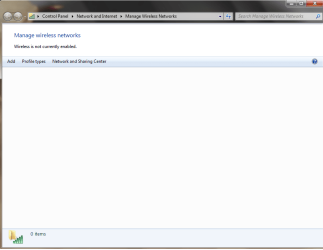
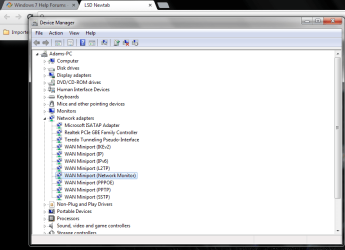
I'll upload a couple of pics, so you can actually see that:
A: There is no wireless enabled on my pc at all and
B: There's no wireless driver - just the one on my driver list that, tbh, I don't know much about.

I've already tried uninstalling the driver then re-installing, (didn't detect anything).
I've tried power-cycling my modem.
I've messed around with every option in the "Network and Internet" settings in my control panel.
I've checked all around the outside of my pc, JUST IN CASE it's weird and has a switch somewhere that enables/disables wireless.
Just to confirm, yes, there is indeed wireless being transmitted throughout our home. We have 2 phones, a 3DS, and a smart tv hooked up to it.

So, does anyone have any recommendations beyond what I've already done?
 

Attachments
  • drivers.png
    drivers.png
    17.8 KB · Views: 0
  • Wireless.png
    Wireless.png
    17.2 KB · Views: 0

My Computer My Computer

Computer type
PC/Desktop
Computer Manufacturer/Model Number
Acer
OS
IA
Memory
12gb Ram
Graphics Card(s)
Nvidia Geforce GTX 750 Ti
Antivirus
360 Defense
Browser
Google Chrome
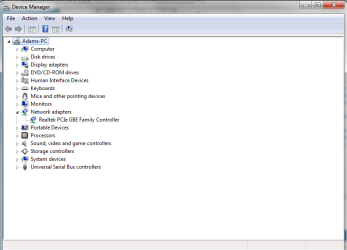
Hi Welcome to Seven Forums .. Can you Post a screenshot of the Device Manager .. With your Network Adapters expanded ... Before you do that go to View Hidden Devices ... Also what is the Model Number of your Computer ? ..
 

My Computer My Computer

Computer Manufacturer/Model Number
W530-3630QM1
OS
windows 7 home 64bit
CPU
INTEL-CORE I7
Memory
16GB
Hard Drives
750GB
Browser
Chrome
Alright, so here's an updated pictures with the device manager, while able to view hidden drivers.
Also, my pc model number (I hope I wrote down the correct numbers/letters... it's really small!)
is: AG3610-UR209
 

Attachments

  • devices2.png
    devices2.png
    27.4 KB · Views: 1

My Computer My Computer

Computer type
PC/Desktop
Computer Manufacturer/Model Number
Acer
OS
IA
Memory
12gb Ram
Graphics Card(s)
Nvidia Geforce GTX 750 Ti
Antivirus
360 Defense
Browser
Google Chrome
Thanks for the Information ... Would seem you have an Acer Predator G3 Model ..

Which is suppose to have a Ralink Wireless Card ... Which Version of Windows are you using ? ...
 

My Computer My Computer

Computer Manufacturer/Model Number
W530-3630QM1
OS
windows 7 home 64bit
CPU
INTEL-CORE I7
Memory
16GB
Hard Drives
750GB
Browser
Chrome
The whole time I've had this computer I've only had Windows 7 Home Premium.
 

My Computer My Computer

Computer type
PC/Desktop
Computer Manufacturer/Model Number
Acer
OS
IA
Memory
12gb Ram
Graphics Card(s)
Nvidia Geforce GTX 750 Ti
Antivirus
360 Defense
Browser
Google Chrome
Looks as if the Wireless Card is Integrated ... There might be a Setting in the BIOS to set it to Enabled ..
 

My Computer My Computer

Computer Manufacturer/Model Number
W530-3630QM1
OS
windows 7 home 64bit
CPU
INTEL-CORE I7
Memory
16GB
Hard Drives
750GB
Browser
Chrome
Entering the BIOS, and going through it thoroughly, I'm actually not seeing any options in regards to networking or otherwise.
Is it possible that it's actually some form of hardware in the tower, that may have been turned off?
In the meantime, I'll go through the BIOS again, just to be 100% sure, and look through some other suggestions as well.
 

My Computer My Computer

Computer type
PC/Desktop
Computer Manufacturer/Model Number
Acer
OS
IA
Memory
12gb Ram
Graphics Card(s)
Nvidia Geforce GTX 750 Ti
Antivirus
360 Defense
Browser
Google Chrome
I have done a Search and could not find any thing which relates to turning on the Wireless Card ... It is true that some Computers have switches for that purpose or even Function Keys that Enable the Card .. I can not see any way that it should be inside a Computer .. I would check under Advanced Options in the BIOS .. There should be one for the Lan Card ...
 

My Computer My Computer

Computer Manufacturer/Model Number
W530-3630QM1
OS
windows 7 home 64bit
CPU
INTEL-CORE I7
Memory
16GB
Hard Drives
750GB
Browser
Chrome
Sorry for the last reply

Been a busy past couple of days.

So to follow up a bit, there's literally no option in the bios to turn on anything that I don't have turned on already.
At this point, I'm wondering if it's not a defective software/internal hardware issue. I may have to resort to buying an external card, as it seems nothing else is providing any results. Then I just have to hope, server timeout problem is actually caused by the connection type....
 

My Computer My Computer

Computer type
PC/Desktop
Computer Manufacturer/Model Number
Acer
OS
IA
Memory
12gb Ram
Graphics Card(s)
Nvidia Geforce GTX 750 Ti
Antivirus
360 Defense
Browser
Google Chrome
Yes your only Option might be to get a new USB Adapter ... At least they are not expensive ..
 

My Computer My Computer

Computer Manufacturer/Model Number
W530-3630QM1
OS
windows 7 home 64bit
CPU
INTEL-CORE I7
Memory
16GB
Hard Drives
750GB
Browser
Chrome
Well, I went and bought an external wireless card, and we're good to go now. I don't know that it has entirely fixed the problem, but at least that's one issue resolved.

Thanks again, Maxie. I may be back in the near future if this doesn't fix the timeout issue... but I'll cross that bridge when I get there.
 

My Computer My Computer

Computer type
PC/Desktop
Computer Manufacturer/Model Number
Acer
OS
IA
Memory
12gb Ram
Graphics Card(s)
Nvidia Geforce GTX 750 Ti
Antivirus
360 Defense
Browser
Google Chrome
Most welcome ... Lets hope the issue is Resolved
 

My Computer My Computer

Computer Manufacturer/Model Number
W530-3630QM1
OS
windows 7 home 64bit
CPU
INTEL-CORE I7
Memory
16GB
Hard Drives
750GB
Browser
Chrome
Back
Top