Computer not shutting down..

PhillCosarca

New member
Local time
10:44 PM
Messages
2
I recently got stuck on this problem.. I click shutdown (and yes, the button is actually set to shutdown) but my computer boots up again right after it was supposed to cut the power(I can see the led flashing off and on again for half a second after the monitor goes blank)..

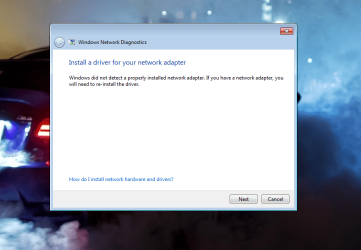
After this weird boot I find myself in windows without internet connection(it says I don't have a network card connected [printscreen attached]).. Again shutting down is not an option as my pc does the exact same thing as before..

Did CMOS reset - still not working.
Disabled Automatically restart (in Advanced system properties/System recovery) - still not working
Tried unplugging the network before shutdown - still not working...

I suspect a hardware problem, maybe the HDD but I am not sure..

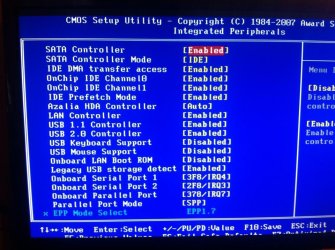
I have attached a screenshot of the post-reboot and the CMOS settings..
 

Attachments
  • Printscreen.png
    Printscreen.png
    92.8 KB · Views: 0
  • CMOS.jpg
    CMOS.jpg
    106.8 KB · Views: 0
  • CMOS2.jpg
    CMOS2.jpg
    82.6 KB · Views: 0

My Computer

Computer type
PC/Desktop
Computer Manufacturer/Model Number
Delux
OS
Windows 7 Ultimate x86 (32 bit)
CPU
Pentium E2200 2,2 gHz
Motherboard
GIGABYTE GA-VM900M (rev. 2.0)
Memory
x1 - 1GB DDR2
Graphics Card(s)
ATi Radeon HD2600XT
Sound Card
Integrated
Hard Drives
1x Western digital 160GB IDE
PSU
Delux 450W
Antivirus
Avast free
Browser
Chrome
Optimal SATA controller setting for Win7 is AHCI. AHCI Enable in Windows 7

If you have no network driver then you probably have other missing drivers which may be causing your restart.

Import the network driver from the PC or adapter's SUpport Downloads webpage to install it and get online, then Enable hardware auto-updating via Windows Update (Step 3), Check for Windows Updates, install all Important and Optional Updates with reboots until no more are offered when you go back to check.

Then post back a screenshot of your Device Manager.

Or start over and follow the steps for a Clean Reinstall Windows 7 which always results in a perfect install which will stay that way for as long as you use only the tools and methods given.
 
Tried the SATA controller mode but I dont have AHCI in BIOS..

Meanwhile did clean reinstall.. Two of them actually, with Windows XP Home ed. and Windows 7 Ultimate .. The problem is still here..
 

My Computer

Computer type
PC/Desktop
Computer Manufacturer/Model Number
Delux
OS
Windows 7 Ultimate x86 (32 bit)
CPU
Pentium E2200 2,2 gHz
Motherboard
GIGABYTE GA-VM900M (rev. 2.0)
Memory
x1 - 1GB DDR2
Graphics Card(s)
ATi Radeon HD2600XT
Sound Card
Integrated
Hard Drives
1x Western digital 160GB IDE
PSU
Delux 450W
Antivirus
Avast free
Browser
Chrome
AHCI can ben worded as native. What are the options for SATA mode?
 

My Computer

Computer type
PC/Desktop
Computer Manufacturer/Model Number
Custom Build
OS
Windows 7 Ultimate x64 SP1
CPU
AMD Phenom 2 1090T
Motherboard
Gigabyte GA-890FXA-UD5
Memory
2x8GB Kingston HyperX Fury Black 1600Mhz Unganged
Graphics Card(s)
MSI GTX 970 Gaming 4G
Sound Card
Realtek On-Board HD 7.1 Audio / Logitech G35
Monitor(s) Displays
3xAcer GD245HQ
Screen Resolution
1920x1080
Hard Drives
Samsung 850 Pro 512GB SSD - OS /
WD Caviar Black SATA 3 - 1 TBx2 - Dynamic RAID 0 /
WD Caviar Green SATA 2 - 640GBx2 - Dynamic RAID 0 /
WD Caviar Green SATA 2 - 640GB - Internal Backup /
Seagate Barracude SATA 3 - 3TB - External Backup/ Sync
PSU
HighPower 1000W
Case
Cooler Master HAF 932
Cooling
Noctua NH-D14
Keyboard
Logitech G19
Mouse
Logitech G500
Internet Speed
100/4 Mbit Cable (100GB quota)
Antivirus
ZoneAlarm Extreme Security / MBAM Pro / MBAE Free / SAS Free
Browser
IE 11 - Firefox - Chrome
Other Info
Logitech F710/ G27/ G940/ Z5500 // TrackIR 5 // Nvidia 3D Surround Vision
Optimal SATA controller setting for Win7 is AHCI. AHCI Enable in Windows 7

If you have no network driver then you probably have other missing drivers which may be causing your restart.

Import the network driver from the PC or adapter's SUpport Downloads webpage to install it and get online, then Enable

Or start over and follow the steps for a [URL="http://www.sevenforums.com/tutorials/219487-clean-reinstall-factory-oem-windows-7-a.html#post1839164"]Clean Reinstall Windows 7
which always results in a perfect install which will stay that way for as long as you use only the tools and methods given.

Newcomer to Windows here: If a clean re-install of Windows 7 is done from the original optical disc, what effect does that have on other files on the C: drive such as programs, email, documents, pictures etc.? Are they erased?

If on the other hand a System Image is used to restore a drive, I think that restores every part of the C: drive, including Windows 7 and all those files I mention above, to the exact same situation when the Image was made. Correct?

Thanks.
 

My Computer

Computer type
PC/Desktop
Computer Manufacturer/Model Number
Gigabyte ATX case with 500 W power supply GZ-M1
OS
Windows 7 Home Premium 64bit
CPU
Intel Pentium Edition G3220 3.0 GHz
Motherboard
Gigabyte Socket 1150 MicroATX Mot Ultra Durable, GA-H81M-S2H
Memory
8 GB DDR3 1600 MHz DIMM
Graphics Card(s)
Not Known
Sound Card
Not known
Monitor(s) Displays
Samsung LS24D590 23.6"
Screen Resolution
1920 x 1080
Hard Drives
256 GB Solid State Drive (C: on which Windows 7 is installed)-
1 TB internal conventional HD (X:)-
Two WD "Elements" " 2TB USB drives as backups
PSU
500 W
Case
Gigabyte ATX case
Cooling
Several fans!
Keyboard
Accuratus 301 USB Compact, white.
Mouse
Microsoft Basic Optical Mouse v2.0, two-button, tethered
Internet Speed
10 to 12 Mb per second
Antivirus
Kaspersky Internet Security 2016, Malwarebytes (paid)
Browser
Firefox (ocassionally Safari)
Other Info
The 256 GB SSD (C:) also has Adobe Photoshop CS6 and InDesign CS6, MS Office, Adobe Lightroom, and other small programs.
Yes you would Know this if you'd read the tutorial.

Do the perfect install and then save a backup image of it.
 
Back
Top