Solved Computer not turning on properly

GRoston

New member
Power User
VIP
Local time
3:27 PM
Messages
374
I ran into an issue with my computer the other day and sent the following to MSI: While adding a SSD drive to my computer, an issue arose. My computer has a MSI P55-GD80 motherboard and in the lower right of the motherboard a button entitled `POWER ON¿. For reasons that I do not understand, to get the computer to turn on, after it has been powered down, I have to touch said button!

Their reply was not terribly helpful: This type of problem is not a known issue at all so there is not solution to this type of problem. This is not normal behavior obviously, so this likely will be a result of some sort of hardware failure more than likely the motherboard. You can try to clearing the CMOS by removing the CMOS battery then shorting out the JBAT1 header.

This made me wonder: There is a CR2032 battery on the motherboard and said battery is at least five years old. Is it possible that the battery died and that led to the issue? Is it possible that by a) clearing the CMOS and b) replacing the battery, that the problem will be resolved?

In terms of clearing the CMOS, I assume that before I clear it, I should enter the BIOS and take pictures of every screen so that I can get everything back the way it was?
 

My Computer

Computer type
PC/Desktop
OS
Windows 7 x64 Pro
CPU
Core i7 860 @ 3.8 GHz
Motherboard
MSI P55-GD80
Memory
16 GB F3-12800CL7D (DDR3 1600 7-7-7-24)
Graphics Card(s)
Sapphire Vapor-X 100283VXL Radeon HD 5770
Monitor(s) Displays
NEC LCD3090WQXi-BK
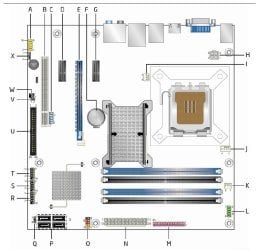
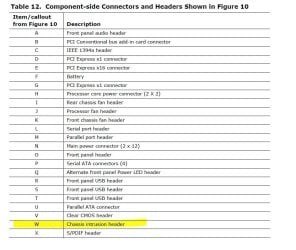
Does your MOBO have a chassis impact or intrusion switch? These are relics from early PCs, but they still exist on a lot of new boards. Here are a couple of pics as an example: 2022_07_24_02_48_211.jpg

mobo2.JPG
Just an idea... Good luck
Phredtx
 

My Computers

System One System Two

  • Computer type
    PC/Desktop
    Computer Manufacturer/Model Number
    Gateway SX2803
    OS
    Windows 7 Home Premium 64 bit Service Pack 1
    CPU
    Pentium Dual-Core E5800 @ 3.20GHz 3.20GHz
    Memory
    6.00 GB
    Graphics Card(s)
    Intel G45/G43 Express Chipset
    Monitor(s) Displays
    Dell E207WFP
    Internet Speed
    1.0 GB
  • Computer type
    PC/Desktop
    System Manufacturer/Model Number
    eMachine T3095
    OS
    XP SP3
    CPU
    AMD Athlon Clock Rate 1191MHz
    Motherboard
    C255346807
    Memory
    704 MB
    Graphics Card(s)
    NVIDIA GeoForce4 MX In GPU VMem 65344KB
    Sound Card
    nForce 6-Channel/Audio
    Monitor(s) Displays
    DELL 174FPC
    Screen Resolution
    1024 by 768
    Hard Drives
    Disk C: NTFS 70.7 GB
    Disk D: NTFS 37.25 GB
I believe it has an intrusion header, not sure about the chassis impact. What are you suggesting?
 

My Computer

Computer type
PC/Desktop
OS
Windows 7 x64 Pro
CPU
Core i7 860 @ 3.8 GHz
Motherboard
MSI P55-GD80
Memory
16 GB F3-12800CL7D (DDR3 1600 7-7-7-24)
Graphics Card(s)
Sapphire Vapor-X 100283VXL Radeon HD 5770
Monitor(s) Displays
NEC LCD3090WQXi-BK
It seems that you have checked the obvious stuff; so, I thought it might be an obscure problem. I experiment with computers and I've encountered some strange problems that are hard to isolate. All I was suggesting was check and see if the switch might have been activated. Maybe you could disarm it. Maybe you could find a technical file from the manufacturer... Good Luck
 

My Computers

System One System Two

  • Computer type
    PC/Desktop
    Computer Manufacturer/Model Number
    Gateway SX2803
    OS
    Windows 7 Home Premium 64 bit Service Pack 1
    CPU
    Pentium Dual-Core E5800 @ 3.20GHz 3.20GHz
    Memory
    6.00 GB
    Graphics Card(s)
    Intel G45/G43 Express Chipset
    Monitor(s) Displays
    Dell E207WFP
    Internet Speed
    1.0 GB
  • Computer type
    PC/Desktop
    System Manufacturer/Model Number
    eMachine T3095
    OS
    XP SP3
    CPU
    AMD Athlon Clock Rate 1191MHz
    Motherboard
    C255346807
    Memory
    704 MB
    Graphics Card(s)
    NVIDIA GeoForce4 MX In GPU VMem 65344KB
    Sound Card
    nForce 6-Channel/Audio
    Monitor(s) Displays
    DELL 174FPC
    Screen Resolution
    1024 by 768
    Hard Drives
    Disk C: NTFS 70.7 GB
    Disk D: NTFS 37.25 GB
The CR2032 CMos battery holds the BIOS configuration settings and runs the clock when the computer is off.
If you start the computer on next day and enter BIOS and the clock is wrong it is a signal that the CMos battery needs to be replaced.

You can run HWInfo It is a portable, don't need to install.
Close the summary and hit the Sensors button (top left)
If the battery voltage is below 3V, replace it.
Before you remove the old one, take photos of the configuration settings.
 

Attachments

  • Cmos_Bat.JPG
    Cmos_Bat.JPG
    54.4 KB · Views: 0

My Computers

System One System Two

  • Computer type
    PC/Desktop
    Computer Manufacturer/Model Number
    custom build
    OS
    Windows 7 HP 64
    CPU
    i5 6600K - 800MHz to 4200MHz
    Motherboard
    GA-Z170-HD3P
    Memory
    4+4G GSkill DDR4 3000
    Graphics Card(s)
    IG - Intel 530
    Monitor(s) Displays
    Samsung 226BW
    Screen Resolution
    1680x1050
    Hard Drives
    (1) -1 SM951 – 128GB M.2 AHCI PCIe SSD drive for Windows 7 and Lubuntu
    (2) -1 WD SATA 3 - 1T for Data
    (3) -1 WD SATA 3 - 1T for backup
    PSU
    Thermaltake 450W TR2 gold
    Keyboard
    Old and good Chicony mechanical keyboard
    Mouse
    Logitech mX performance - 9 buttons (had to disable some)
    Internet Speed
    500Mb/s
    Browser
    Firefox 64
    Other Info
    TinyWall firewall
  • Computer type
    Laptop
    System Manufacturer/Model Number
    Asus Q550LF
    OS
    Windows 7 Pro
    CPU
    i7-4500U 800MHz to 3.0GHz
    Motherboard
    Asus Q550LF
    Memory
    (4+4)G DDR3 1600
    Graphics Card(s)
    IG intel 4400 + NVIDIA GeForce GT 745M
    Sound Card
    Realtek
    Monitor(s) Displays
    LG Display LP156WF4-SPH1
    Screen Resolution
    1920 x 1080
    Hard Drives
    BX500 120G SSD for Windows and programs +
    1T HDD for data
    Internet Speed
    500 Mb/s
    Browser
    Firefox
    Other Info
    TinyWall firewall
Phredtx - there is nothing attached to the headers and I have the manual.
Megahertz07 - cool program, thanks. VBAT is greater than 3.0 V - not the issue...
 

My Computer

Computer type
PC/Desktop
OS
Windows 7 x64 Pro
CPU
Core i7 860 @ 3.8 GHz
Motherboard
MSI P55-GD80
Memory
16 GB F3-12800CL7D (DDR3 1600 7-7-7-24)
Graphics Card(s)
Sapphire Vapor-X 100283VXL Radeon HD 5770
Monitor(s) Displays
NEC LCD3090WQXi-BK
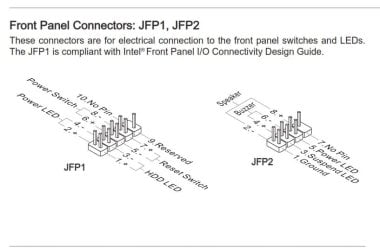
Check all the Front panel connectors (JFP1) , specially - Pins 6&8
The front panel switch should be connected to Pins 6&8
MSI P55-GD80 Manual
 

Attachments

  • FPConnect.JPG
    FPConnect.JPG
    41.1 KB · Views: 0

My Computers

System One System Two

  • Computer type
    PC/Desktop
    Computer Manufacturer/Model Number
    custom build
    OS
    Windows 7 HP 64
    CPU
    i5 6600K - 800MHz to 4200MHz
    Motherboard
    GA-Z170-HD3P
    Memory
    4+4G GSkill DDR4 3000
    Graphics Card(s)
    IG - Intel 530
    Monitor(s) Displays
    Samsung 226BW
    Screen Resolution
    1680x1050
    Hard Drives
    (1) -1 SM951 – 128GB M.2 AHCI PCIe SSD drive for Windows 7 and Lubuntu
    (2) -1 WD SATA 3 - 1T for Data
    (3) -1 WD SATA 3 - 1T for backup
    PSU
    Thermaltake 450W TR2 gold
    Keyboard
    Old and good Chicony mechanical keyboard
    Mouse
    Logitech mX performance - 9 buttons (had to disable some)
    Internet Speed
    500Mb/s
    Browser
    Firefox 64
    Other Info
    TinyWall firewall
  • Computer type
    Laptop
    System Manufacturer/Model Number
    Asus Q550LF
    OS
    Windows 7 Pro
    CPU
    i7-4500U 800MHz to 3.0GHz
    Motherboard
    Asus Q550LF
    Memory
    (4+4)G DDR3 1600
    Graphics Card(s)
    IG intel 4400 + NVIDIA GeForce GT 745M
    Sound Card
    Realtek
    Monitor(s) Displays
    LG Display LP156WF4-SPH1
    Screen Resolution
    1920 x 1080
    Hard Drives
    BX500 120G SSD for Windows and programs +
    1T HDD for data
    Internet Speed
    500 Mb/s
    Browser
    Firefox
    Other Info
    TinyWall firewall
Megahertz07 - Good suggestion. In the past, when i would hear the disk's being accessed, there was a blue LED at the top of the case that was on. Seems that I am not seeing it currently and I see that connection for said LED on JFP1. Anyway, I will check these connectors late next week...
 

My Computer

Computer type
PC/Desktop
OS
Windows 7 x64 Pro
CPU
Core i7 860 @ 3.8 GHz
Motherboard
MSI P55-GD80
Memory
16 GB F3-12800CL7D (DDR3 1600 7-7-7-24)
Graphics Card(s)
Sapphire Vapor-X 100283VXL Radeon HD 5770
Monitor(s) Displays
NEC LCD3090WQXi-BK
Your onboard power buttons use something called Easy Button 2 which apparently is an electromagnetic touch design for the power-on/reset/Green Power. Because of the nature of how this button works, it's conceivably possible you have a static issue or the computer isn't grounded. Or perhaps the board suffered from some kind of electro static discharge from you while installing the SSD.

Things to try:

1) Go into BIOS and use use optimized BIOS defaults. (Note that the SSD should be in AHCI mode, but if your OS drive is not already in AHCI mode you can't use that mode until you make a change in the registry. If you turn on AHCI and the OS drive is not set for AHCI and you can't boot, just turn off AHCI in BIOS. More info. here: 2 Ways to Enable AHCI After Windows 10 Installation Says Windows 10 but should be the same for 7).

2) Try a different SATA and power cable.

3) If you're using SATA ports 1-6 for the SSD, try SATA ports 7 or 8 instead. Ports 1-6 use the Intel P55 chip and SATA ports 7 & 8 use the JMB322 chip by JMicron.

4) I'd see if you could benefit from an updated BIOS.

A) I wouldn't use that Green power saving crap. It just adds more complication to the motherboard and would limit your performance on an already very old MOBO. You also only have SATA II ability unless you buy yourself a PCI-e card with SATA III connectors. There's a particular chipset you'd want with one of those cards but I can't remember that at the moment. Could be VIA.

B) You can backup your BIOS to USB stick prior to monkeying around or flashing with a new BIOS. Refer to page 3-30 of your manual here. If you mess up a motherboard with only one BIOS chip, check out eBay for the chip that has BIOS flashed to it. I'd reflash it once in my MOBO. But that's just me. I do that to second hand routers and modems. You'll need a fine tip soldering iron. Look on YouTube to know how to solder. Specifically with small electronics. It really isn't that difficult. I prefer the tried and true Weller products, but can be a bit pricey.

- - - Updated - - -

MSI P55-GD80 - Pictorial Preview
 
Last edited:

My Computer

Computer type
PC/Desktop
OS
Windows 7 Ultimate x64
Please mark this thread as Solved
 

My Computers

System One System Two

  • Computer type
    PC/Desktop
    Computer Manufacturer/Model Number
    custom build
    OS
    Windows 7 HP 64
    CPU
    i5 6600K - 800MHz to 4200MHz
    Motherboard
    GA-Z170-HD3P
    Memory
    4+4G GSkill DDR4 3000
    Graphics Card(s)
    IG - Intel 530
    Monitor(s) Displays
    Samsung 226BW
    Screen Resolution
    1680x1050
    Hard Drives
    (1) -1 SM951 – 128GB M.2 AHCI PCIe SSD drive for Windows 7 and Lubuntu
    (2) -1 WD SATA 3 - 1T for Data
    (3) -1 WD SATA 3 - 1T for backup
    PSU
    Thermaltake 450W TR2 gold
    Keyboard
    Old and good Chicony mechanical keyboard
    Mouse
    Logitech mX performance - 9 buttons (had to disable some)
    Internet Speed
    500Mb/s
    Browser
    Firefox 64
    Other Info
    TinyWall firewall
  • Computer type
    Laptop
    System Manufacturer/Model Number
    Asus Q550LF
    OS
    Windows 7 Pro
    CPU
    i7-4500U 800MHz to 3.0GHz
    Motherboard
    Asus Q550LF
    Memory
    (4+4)G DDR3 1600
    Graphics Card(s)
    IG intel 4400 + NVIDIA GeForce GT 745M
    Sound Card
    Realtek
    Monitor(s) Displays
    LG Display LP156WF4-SPH1
    Screen Resolution
    1920 x 1080
    Hard Drives
    BX500 120G SSD for Windows and programs +
    1T HDD for data
    Internet Speed
    500 Mb/s
    Browser
    Firefox
    Other Info
    TinyWall firewall
Back
Top