Solved No Bios?

sverne

New member
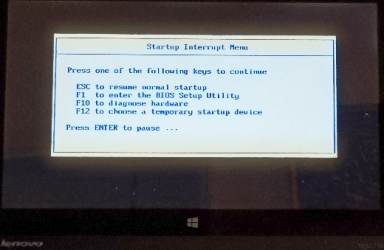
I have an "older" Lenovo Thinkpad (without Novo button) that I cannot access the BIOS menu at startup. Pressing F2 gets me to a sub-screen with 10 options but none are for BIOS; the only possibility is perhaps "repair" which entails using the Win7 OS disk.

On startup, the screen states to "press Enter"-but this does nothing. I have read about removing the CMOS battery or even using the command promt via shutdown /r /fw
Would the prompt work safely, or any other ideas?
[h=2][/h]
 

My Computer

Computer type
PC/Desktop
Computer Manufacturer/Model Number
Lenovo
OS
win7 64bit Pro
CPU
2.4
Memory
8G
Hard Drives
1T SSD
Thanks for the link, but this is for Win 10/11 not 7; Lenovo does have great support for ALL their models though.
 

My Computer

Computer type
PC/Desktop
Computer Manufacturer/Model Number
Lenovo
OS
win7 64bit Pro
CPU
2.4
Memory
8G
Hard Drives
1T SSD
bios has nothing to with o/s it works with linux or any o/s
 

My Computer

Computer type
PC/Desktop
OS
win 8 32 bit
I have an "older" Lenovo Thinkpad (without Novo button) that I cannot access the BIOS menu at startup....
....On startup, the screen states to "press Enter"-but this does nothing.
I too have an older Thinkpad.

If you wait until the screen that says 'Press Enter...' then it's almost too late. There's only a very small window of opportunity. Start pressing Enter as soon as you turn on the power, before the screen appears, and keep pressing it repeatedly. That should get you in....

image.png
 

My Computers

System One System Two

  • Computer type
    Laptop
    Computer Manufacturer/Model Number
    Toshiba satellite C650D
    OS
    Windows 7 Home Premium x64
    CPU
    AMD V120
    Memory
    4GB
    Internet Speed
    150 Mbps
    Antivirus
    MSE
    Browser
    IE11, Edge, Firefox
    Other Info
    I also have W7 Pro on my System Two, and several W7 Hyper-V VMs. My other machines run Windows 10/11. Their specs are in my Ten Forums & Eleven Forum profiles.
  • Computer type
    Laptop
    System Manufacturer/Model Number
    Lenovo Thinkpad T430
    OS
    Windows 7 Pro x64
    CPU
    Intel i5-3320M
    Memory
    8 GB
    Hard Drives
    250GB Samsung SSD 860 EVO
    Other Info
    Antivirus: MSE
WoW! You deserve a beer. The "Enter" did not work for me, until I pressed right away; this is a trick unbeknownst to many including the Lenovo support site.
Finally got to see my BIOS.
 

My Computer

Computer type
PC/Desktop
Computer Manufacturer/Model Number
Lenovo
OS
win7 64bit Pro
CPU
2.4
Memory
8G
Hard Drives
1T SSD
WoW! You deserve a beer. The "Enter" did not work for me, until I pressed right away; this is a trick unbeknownst to many including the Lenovo support site.
Finally got to see my BIOS.
:thumbsup:
 

My Computers

System One System Two

  • Computer type
    Laptop
    Computer Manufacturer/Model Number
    Toshiba satellite C650D
    OS
    Windows 7 Home Premium x64
    CPU
    AMD V120
    Memory
    4GB
    Internet Speed
    150 Mbps
    Antivirus
    MSE
    Browser
    IE11, Edge, Firefox
    Other Info
    I also have W7 Pro on my System Two, and several W7 Hyper-V VMs. My other machines run Windows 10/11. Their specs are in my Ten Forums & Eleven Forum profiles.
  • Computer type
    Laptop
    System Manufacturer/Model Number
    Lenovo Thinkpad T430
    OS
    Windows 7 Pro x64
    CPU
    Intel i5-3320M
    Memory
    8 GB
    Hard Drives
    250GB Samsung SSD 860 EVO
    Other Info
    Antivirus: MSE
Back
Top