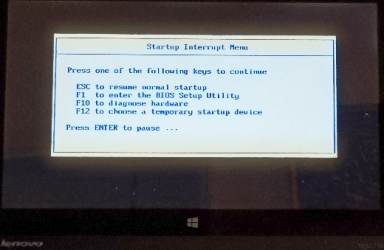
I have an "older" Lenovo Thinkpad (without Novo button) that I cannot access the BIOS menu at startup. Pressing F2 gets me to a sub-screen with 10 options but none are for BIOS; the only possibility is perhaps "repair" which entails using the Win7 OS disk.
On startup, the screen states to "press Enter"-but this does nothing. I have read about removing the CMOS battery or even using the command promt via shutdown /r /fw
Would the prompt work safely, or any other ideas?
[h=2][/h]
On startup, the screen states to "press Enter"-but this does nothing. I have read about removing the CMOS battery or even using the command promt via shutdown /r /fw
Would the prompt work safely, or any other ideas?
[h=2][/h]
My Computer
At a glance
win7 64bit Pro2.48G
- Computer type
- PC/Desktop
- Computer Manufacturer/Model Number
- Lenovo
- OS
- win7 64bit Pro
- CPU
- 2.4
- Memory
- 8G
- Hard Drives
- 1T SSD