Solved Computer not working after system restore. Help

biggreenline

New member
Local time
4:30 PM
Messages
6
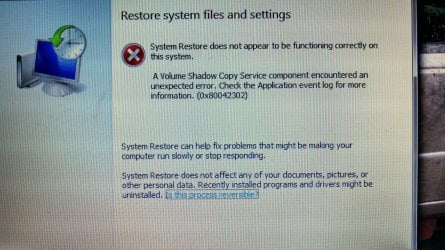
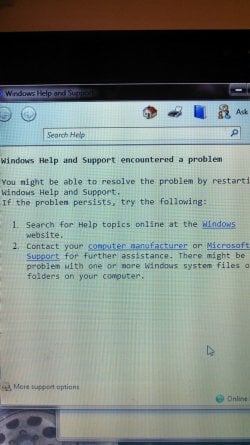
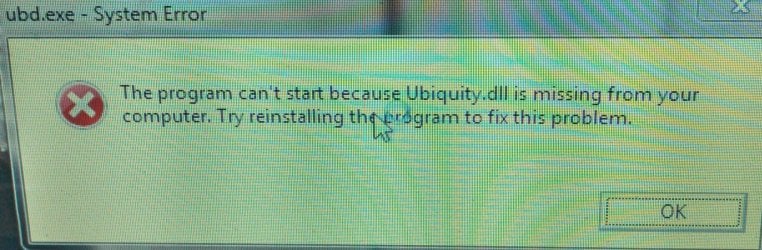
My computer (Toshiba windows seven home premium Intel i3 processor) has been giving me a lot of trouble lately. When an update for iTunes came I let it update but it didn't complete and said that there was an error. When I tried to open iTunes it said that there was a problem so it couldn't open and I should try uninstalling and reinstall. Hat is what I decided to do but when I tried to reinstall I got the same error. I tried several times with no success so I decided to try a system restore. The most recent point I was able to restore to was on my backup hard drive and was from 9 months earlier. Before I did the restore I decided to make a point so I could restore back to that point if something was wrong with the restore. Well the restore was screwed up. I basically could not connect to the internet so I decided to go back to the point that I had set. When I did that and my computer finally started back up I got an error message about a ubiquity.dll missing. Also now I can not do anything. No Microsoft program will open it just says there was a click to run configuration failure. After all of this I found out that you can just undo your system restore but now not even the system restore works. I can't connect to the internet it just says there's no available networks. I include all info that I know about my computer at the beginning. I do not know how to tel what anything else is and I can't open the system in the control panel to look. Any help/advice is greatly appreciated. I am fairly decent with computers but by far no expert. I included some pics of the errors I get. Thanks let me know if I need to include more info.
 

Attachments
  • IMG_20140213_175242_074-1.jpg
    IMG_20140213_175242_074-1.jpg
    307 KB · Views: 0
  • IMG_20140214_134343_805.jpg
    IMG_20140214_134343_805.jpg
    966.2 KB · Views: 0
  • IMG_20140214_134456_617.jpg
    IMG_20140214_134456_617.jpg
    921.5 KB · Views: 0

My Computer

Computer type
Laptop
Computer Manufacturer/Model Number
Toshiba
OS
Windows Seven Home Premium
CPU
i3 processor
May be a long shot, but try restore in safe mode.
Do you have stuff you want to save?
 

My Computer

Computer type
PC/Desktop
Computer Manufacturer/Model Number
Dell XPS 420
OS
Windows 10, Home Clean Install
CPU
Intel Core2 processsor Q8200(2.33Ghz 1333FSB) Quad Core Tech
Motherboard
Dell
Memory
6 gb
Graphics Card(s)
ATI Radeon 256MB HD3650
Sound Card
Intergrated 7.1 Channel Audio
Monitor(s) Displays
Dell SP2009W 20"
Hard Drives
640 GB Serial ATA Hard drive
Cooling
Fan
Keyboard
Dell USB Keyboard
Mouse
Dell Premium Optical USB
Internet Speed
DSL 2.85
Well I just tried it in safe mode but nothing. No I don't really have anything that I want to save. Its all backed up on my external hard drive. Thanks for the help. Any other ideas?
 

My Computer

Computer type
Laptop
Computer Manufacturer/Model Number
Toshiba
OS
Windows Seven Home Premium
CPU
i3 processor
Do you have an install DVD?
 

My Computer

Computer type
PC/Desktop
Computer Manufacturer/Model Number
Dell XPS 420
OS
Windows 10, Home Clean Install
CPU
Intel Core2 processsor Q8200(2.33Ghz 1333FSB) Quad Core Tech
Motherboard
Dell
Memory
6 gb
Graphics Card(s)
ATI Radeon 256MB HD3650
Sound Card
Intergrated 7.1 Channel Audio
Monitor(s) Displays
Dell SP2009W 20"
Hard Drives
640 GB Serial ATA Hard drive
Cooling
Fan
Keyboard
Dell USB Keyboard
Mouse
Dell Premium Optical USB
Internet Speed
DSL 2.85
No unfortunately
 

My Computer

Computer type
Laptop
Computer Manufacturer/Model Number
Toshiba
OS
Windows Seven Home Premium
CPU
i3 processor

My Computer

Computer type
PC/Desktop
Computer Manufacturer/Model Number
Dell XPS 420
OS
Windows 10, Home Clean Install
CPU
Intel Core2 processsor Q8200(2.33Ghz 1333FSB) Quad Core Tech
Motherboard
Dell
Memory
6 gb
Graphics Card(s)
ATI Radeon 256MB HD3650
Sound Card
Intergrated 7.1 Channel Audio
Monitor(s) Displays
Dell SP2009W 20"
Hard Drives
640 GB Serial ATA Hard drive
Cooling
Fan
Keyboard
Dell USB Keyboard
Mouse
Dell Premium Optical USB
Internet Speed
DSL 2.85
Well I tried what it says in the link twice and both times I hold the 0 key down and then it tells me to select my operating system so I select windows 7 which is my only option. Then my computer continues to start. It goes right to my home screen without me even putting in my password. Then I get the same error that is in my first pic? Ideas? Thanks
 

My Computer

Computer type
Laptop
Computer Manufacturer/Model Number
Toshiba
OS
Windows Seven Home Premium
CPU
i3 processor
I am working on getting you a Seven ISO, enabling you to create a Seven install DVD. You will need a valid key.
Wish me luck.
 

My Computer

Computer type
PC/Desktop
Computer Manufacturer/Model Number
Dell XPS 420
OS
Windows 10, Home Clean Install
CPU
Intel Core2 processsor Q8200(2.33Ghz 1333FSB) Quad Core Tech
Motherboard
Dell
Memory
6 gb
Graphics Card(s)
ATI Radeon 256MB HD3650
Sound Card
Intergrated 7.1 Channel Audio
Monitor(s) Displays
Dell SP2009W 20"
Hard Drives
640 GB Serial ATA Hard drive
Cooling
Fan
Keyboard
Dell USB Keyboard
Mouse
Dell Premium Optical USB
Internet Speed
DSL 2.85

My Computer

Computer type
PC/Desktop
Computer Manufacturer/Model Number
Dell XPS 420
OS
Windows 10, Home Clean Install
CPU
Intel Core2 processsor Q8200(2.33Ghz 1333FSB) Quad Core Tech
Motherboard
Dell
Memory
6 gb
Graphics Card(s)
ATI Radeon 256MB HD3650
Sound Card
Intergrated 7.1 Channel Audio
Monitor(s) Displays
Dell SP2009W 20"
Hard Drives
640 GB Serial ATA Hard drive
Cooling
Fan
Keyboard
Dell USB Keyboard
Mouse
Dell Premium Optical USB
Internet Speed
DSL 2.85
Thank you so much for all of your help. As soon as I get a chance to download the software I'll do it. So do you k ow what I did wrong that caused this whole problem?
 

My Computer

Computer type
Laptop
Computer Manufacturer/Model Number
Toshiba
OS
Windows Seven Home Premium
CPU
i3 processor
I cannot answer that, but worse case scenario, sometimes things happen at the wrong time. Your description of the problem indicates that it is software, but hardware can cause problems at any time. Lets just hope that the Install DVD works. If not, I have to go with hardware, anything from hard drive to memory and everything in between.
 
Last edited:

My Computer

Computer type
PC/Desktop
Computer Manufacturer/Model Number
Dell XPS 420
OS
Windows 10, Home Clean Install
CPU
Intel Core2 processsor Q8200(2.33Ghz 1333FSB) Quad Core Tech
Motherboard
Dell
Memory
6 gb
Graphics Card(s)
ATI Radeon 256MB HD3650
Sound Card
Intergrated 7.1 Channel Audio
Monitor(s) Displays
Dell SP2009W 20"
Hard Drives
640 GB Serial ATA Hard drive
Cooling
Fan
Keyboard
Dell USB Keyboard
Mouse
Dell Premium Optical USB
Internet Speed
DSL 2.85
Thanks again for all of your help. My computer is working again. Just working on getting everything back on to it.
 

My Computer

Computer type
Laptop
Computer Manufacturer/Model Number
Toshiba
OS
Windows Seven Home Premium
CPU
i3 processor
Glad that you were able to sort out your problem,
To avoid this sort of thing from happening again. Download the free Macrium Reflect, which will allow you to make an image of your hard drive. If you store it on an external and make images once a week or so, if you ever have a problem you can restore your hard drive with the image. No need to reinstall software etc. Good luck
 

My Computer

Computer type
PC/Desktop
Computer Manufacturer/Model Number
Dell XPS 420
OS
Windows 10, Home Clean Install
CPU
Intel Core2 processsor Q8200(2.33Ghz 1333FSB) Quad Core Tech
Motherboard
Dell
Memory
6 gb
Graphics Card(s)
ATI Radeon 256MB HD3650
Sound Card
Intergrated 7.1 Channel Audio
Monitor(s) Displays
Dell SP2009W 20"
Hard Drives
640 GB Serial ATA Hard drive
Cooling
Fan
Keyboard
Dell USB Keyboard
Mouse
Dell Premium Optical USB
Internet Speed
DSL 2.85
Back
Top