Solved Computer Restarts When I Shutdown

Giaccovitch

New member
Local time
12:46 PM
Messages
55
Recently my computer has been restarting when I shut it down.
I have tried to change the registry values of powerdown on shutdown from 0 to 1 and from 1 to 0.
I have also wake on lan disabled in BIOS.
Also I have disabled the Ethernet adapter to wake up the computer.
 

My Computer

Computer type
PC/Desktop
Computer Manufacturer/Model Number
Custom Build
OS
Windows 7 Ultimate x64
CPU
Intel Core i7 4820k
Motherboard
ASRock X79 Extreme6
Memory
Corsair Vengeance 4x4GB Quad Channel
Graphics Card(s)
Galaxy Nvidia Geforce GTX 680 2GB
Hard Drives
Samsung EVO 250GB SSD
Seagate Barracuda 500GB HDD
Seagate Barracuda 2TB HDD
PSU
EVGA SuperNova G2 1000W
Case
Aerocool XPredator Black Orange
Cooling
Noctua NH-D14
Keyboard
Corsair K95 RGB
Mouse
Thermaltake Theron
Internet Speed
100Mbps/40Mbps
Antivirus
Avast Standard Edition
Browser
Google Chrome
Other Info
Reference GTX 680 2GB in SLI
What happens with shutdown in safe mode? Does it behave?
 

My Computer

Computer type
PC/Desktop
Computer Manufacturer/Model Number
Custom Built
OS
Windows 10 Pro
CPU
AMD Ryzen 5 2400G Processor with Radeon RX Vega 11 Graphics
Motherboard
ASRock X470 Master SLI/AC AM4 AMD Promontory X470 SATA 6Gb/s
Memory
G.SKILL Ripjaws V Series 16GB (2 x 8GB) 288-Pin DDR4 SDRAM D
Graphics Card(s)
2047MB NVIDIA GeForce GTX 1060 6GB (EVGA)
Sound Card
Motherboard Built in
Monitor(s) Displays
Acer R240HY bidx 23.8-Inch IPS HDMI DVI VGA (1920 x 1080) Wi
Screen Resolution
1920 x 1080
Hard Drives
1TB Sandisk SSD PLUS (Main drive)
500 GB Seagate 7200 RPM (Games)
500 GB Western Digital 7200 RPM (Virtual Machines)
PSU
CORSAIR TX Series TX650M 650W 80+ Gold Modular Power Supply
Case
CORSAIR CARBIDE SPEC-02 Mid-Tower Gaming Case, Red LED Fan
Cooling
220mm, two 120mm, and four 60mm fans
Keyboard
Wired Dell keyboard
Mouse
Wireless Logitech mouse
Internet Speed
250mb down, 30mb up
Antivirus
Panda Cloud Antivirus
Browser
Chrome-ish x64
Other Info
Your awesome for reading this.

My Computer

Computer type
PC/Desktop
Computer Manufacturer/Model Number
Custom Build
OS
Windows 7 Ultimate x64
CPU
Intel Core i7 4820k
Motherboard
ASRock X79 Extreme6
Memory
Corsair Vengeance 4x4GB Quad Channel
Graphics Card(s)
Galaxy Nvidia Geforce GTX 680 2GB
Hard Drives
Samsung EVO 250GB SSD
Seagate Barracuda 500GB HDD
Seagate Barracuda 2TB HDD
PSU
EVGA SuperNova G2 1000W
Case
Aerocool XPredator Black Orange
Cooling
Noctua NH-D14
Keyboard
Corsair K95 RGB
Mouse
Thermaltake Theron
Internet Speed
100Mbps/40Mbps
Antivirus
Avast Standard Edition
Browser
Google Chrome
Other Info
Reference GTX 680 2GB in SLI
Sometimes my computer shutdowns first go, but if it doesn't, I have to manually power off.
 

My Computer

Computer type
PC/Desktop
Computer Manufacturer/Model Number
Custom Build
OS
Windows 7 Ultimate x64
CPU
Intel Core i7 4820k
Motherboard
ASRock X79 Extreme6
Memory
Corsair Vengeance 4x4GB Quad Channel
Graphics Card(s)
Galaxy Nvidia Geforce GTX 680 2GB
Hard Drives
Samsung EVO 250GB SSD
Seagate Barracuda 500GB HDD
Seagate Barracuda 2TB HDD
PSU
EVGA SuperNova G2 1000W
Case
Aerocool XPredator Black Orange
Cooling
Noctua NH-D14
Keyboard
Corsair K95 RGB
Mouse
Thermaltake Theron
Internet Speed
100Mbps/40Mbps
Antivirus
Avast Standard Edition
Browser
Google Chrome
Other Info
Reference GTX 680 2GB in SLI

My Computer

Computer type
PC/Desktop
Computer Manufacturer/Model Number
Custom Built
OS
Windows 10 Pro
CPU
AMD Ryzen 5 2400G Processor with Radeon RX Vega 11 Graphics
Motherboard
ASRock X470 Master SLI/AC AM4 AMD Promontory X470 SATA 6Gb/s
Memory
G.SKILL Ripjaws V Series 16GB (2 x 8GB) 288-Pin DDR4 SDRAM D
Graphics Card(s)
2047MB NVIDIA GeForce GTX 1060 6GB (EVGA)
Sound Card
Motherboard Built in
Monitor(s) Displays
Acer R240HY bidx 23.8-Inch IPS HDMI DVI VGA (1920 x 1080) Wi
Screen Resolution
1920 x 1080
Hard Drives
1TB Sandisk SSD PLUS (Main drive)
500 GB Seagate 7200 RPM (Games)
500 GB Western Digital 7200 RPM (Virtual Machines)
PSU
CORSAIR TX Series TX650M 650W 80+ Gold Modular Power Supply
Case
CORSAIR CARBIDE SPEC-02 Mid-Tower Gaming Case, Red LED Fan
Cooling
220mm, two 120mm, and four 60mm fans
Keyboard
Wired Dell keyboard
Mouse
Wireless Logitech mouse
Internet Speed
250mb down, 30mb up
Antivirus
Panda Cloud Antivirus
Browser
Chrome-ish x64
Other Info
Your awesome for reading this.
Okay, so then most likely it is a problem caused by a program running in your startup list.

You may have programs running at startup that is causing this issue. Please see this tutorial to temporary disable them and see if the issue is resolved:

http://www.sevenforums.com/tutorial...ation-conflicts-performing-clean-startup.html

I disabled everything (other than Microsoft services) and it still occurred. Although avast automatically started up even when i disabled it. I went back into msconfig and the only box ticked is avast.
 

My Computer

Computer type
PC/Desktop
Computer Manufacturer/Model Number
Custom Build
OS
Windows 7 Ultimate x64
CPU
Intel Core i7 4820k
Motherboard
ASRock X79 Extreme6
Memory
Corsair Vengeance 4x4GB Quad Channel
Graphics Card(s)
Galaxy Nvidia Geforce GTX 680 2GB
Hard Drives
Samsung EVO 250GB SSD
Seagate Barracuda 500GB HDD
Seagate Barracuda 2TB HDD
PSU
EVGA SuperNova G2 1000W
Case
Aerocool XPredator Black Orange
Cooling
Noctua NH-D14
Keyboard
Corsair K95 RGB
Mouse
Thermaltake Theron
Internet Speed
100Mbps/40Mbps
Antivirus
Avast Standard Edition
Browser
Google Chrome
Other Info
Reference GTX 680 2GB in SLI
Okay, so then most likely it is a problem caused by a program running in your startup list.

You may have programs running at startup that is causing this issue. Please see this tutorial to temporary disable them and see if the issue is resolved:

http://www.sevenforums.com/tutorial...ation-conflicts-performing-clean-startup.html

I disabled everything (other than Microsoft services) and it still occurred. Although avast automatically started up even when i disabled it. I went back into msconfig and the only box ticked is avast.

Okay that is fine. Enable verbose messages to see where it is getting stuck:

Enable Verbose or Highly Detailed Status Messages In Windows 7 | 8


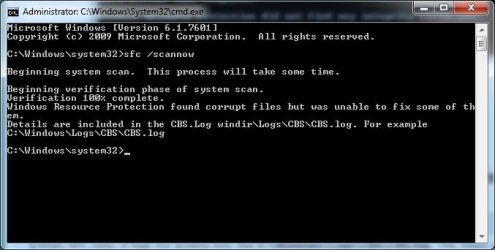
Please Run sfc /scan now using option 2 in this tutorial: SFC /SCANNOW Command - System File Checker

Please post back the results.
Please indicate what message was displayed at the end:

Windows found no integrity violations

OR

Corrupt files were found, and windows was unable to fix them.

OR

Corrupt files were found, and windows successfully repaired them
 

My Computer

Computer type
PC/Desktop
Computer Manufacturer/Model Number
Custom Built
OS
Windows 10 Pro
CPU
AMD Ryzen 5 2400G Processor with Radeon RX Vega 11 Graphics
Motherboard
ASRock X470 Master SLI/AC AM4 AMD Promontory X470 SATA 6Gb/s
Memory
G.SKILL Ripjaws V Series 16GB (2 x 8GB) 288-Pin DDR4 SDRAM D
Graphics Card(s)
2047MB NVIDIA GeForce GTX 1060 6GB (EVGA)
Sound Card
Motherboard Built in
Monitor(s) Displays
Acer R240HY bidx 23.8-Inch IPS HDMI DVI VGA (1920 x 1080) Wi
Screen Resolution
1920 x 1080
Hard Drives
1TB Sandisk SSD PLUS (Main drive)
500 GB Seagate 7200 RPM (Games)
500 GB Western Digital 7200 RPM (Virtual Machines)
PSU
CORSAIR TX Series TX650M 650W 80+ Gold Modular Power Supply
Case
CORSAIR CARBIDE SPEC-02 Mid-Tower Gaming Case, Red LED Fan
Cooling
220mm, two 120mm, and four 60mm fans
Keyboard
Wired Dell keyboard
Mouse
Wireless Logitech mouse
Internet Speed
250mb down, 30mb up
Antivirus
Panda Cloud Antivirus
Browser
Chrome-ish x64
Other Info
Your awesome for reading this.
Okay, so then most likely it is a problem caused by a program running in your startup list.

You may have programs running at startup that is causing this issue. Please see this tutorial to temporary disable them and see if the issue is resolved:

http://www.sevenforums.com/tutorial...ation-conflicts-performing-clean-startup.html

I disabled everything (other than Microsoft services) and it still occurred. Although avast automatically started up even when i disabled it. I went back into msconfig and the only box ticked is avast.

Okay that is fine. Enable verbose messages to see where it is getting stuck:

Enable Verbose or Highly Detailed Status Messages In Windows 7 | 8


Please Run sfc /scan now using option 2 in this tutorial: SFC /SCANNOW Command - System File Checker

Please post back the results.
Please indicate what message was displayed at the end:

Windows found no integrity violations

OR

Corrupt files were found, and windows was unable to fix them.

OR

Corrupt files were found, and windows successfully repaired them

Corrupt files were found, and windows was unable to fix them. I attached the 2 files.
 

Attachments

  • sfc scannow.jpg
    sfc scannow.jpg
    28.3 KB · Views: 54
  • sfcdetails.txt
    sfcdetails.txt
    42 KB · Views: 3

My Computer

Computer type
PC/Desktop
Computer Manufacturer/Model Number
Custom Build
OS
Windows 7 Ultimate x64
CPU
Intel Core i7 4820k
Motherboard
ASRock X79 Extreme6
Memory
Corsair Vengeance 4x4GB Quad Channel
Graphics Card(s)
Galaxy Nvidia Geforce GTX 680 2GB
Hard Drives
Samsung EVO 250GB SSD
Seagate Barracuda 500GB HDD
Seagate Barracuda 2TB HDD
PSU
EVGA SuperNova G2 1000W
Case
Aerocool XPredator Black Orange
Cooling
Noctua NH-D14
Keyboard
Corsair K95 RGB
Mouse
Thermaltake Theron
Internet Speed
100Mbps/40Mbps
Antivirus
Avast Standard Edition
Browser
Google Chrome
Other Info
Reference GTX 680 2GB in SLI
What was the result of enabling the verbose messages? Where does it get stuck?

I am going to have a expert look at your log.
 

My Computer

Computer type
PC/Desktop
Computer Manufacturer/Model Number
Custom Built
OS
Windows 10 Pro
CPU
AMD Ryzen 5 2400G Processor with Radeon RX Vega 11 Graphics
Motherboard
ASRock X470 Master SLI/AC AM4 AMD Promontory X470 SATA 6Gb/s
Memory
G.SKILL Ripjaws V Series 16GB (2 x 8GB) 288-Pin DDR4 SDRAM D
Graphics Card(s)
2047MB NVIDIA GeForce GTX 1060 6GB (EVGA)
Sound Card
Motherboard Built in
Monitor(s) Displays
Acer R240HY bidx 23.8-Inch IPS HDMI DVI VGA (1920 x 1080) Wi
Screen Resolution
1920 x 1080
Hard Drives
1TB Sandisk SSD PLUS (Main drive)
500 GB Seagate 7200 RPM (Games)
500 GB Western Digital 7200 RPM (Virtual Machines)
PSU
CORSAIR TX Series TX650M 650W 80+ Gold Modular Power Supply
Case
CORSAIR CARBIDE SPEC-02 Mid-Tower Gaming Case, Red LED Fan
Cooling
220mm, two 120mm, and four 60mm fans
Keyboard
Wired Dell keyboard
Mouse
Wireless Logitech mouse
Internet Speed
250mb down, 30mb up
Antivirus
Panda Cloud Antivirus
Browser
Chrome-ish x64
Other Info
Your awesome for reading this.
Here's the critical error from the log...
Code:
2014-06-17 13:28:01, Info                  CSI    0000031d [SR] Repairing 1 components
2014-06-17 13:28:01, Info                  CSI    0000031e [SR] Beginning Verify and Repair transaction
2014-06-17 13:28:01, Info                  CSI    00000320 [SR] Cannot repair member file [l:28{14}]"iassdo.dll.mui" of Microsoft-Windows-Networking-Internet_Authentication_Service_Iassdo.Resources, Version = 6.1.7600.16385, pA = PROCESSOR_ARCHITECTURE_INTEL (0), Culture = [l:10{5}]"en-US", VersionScope = 1 nonSxS, PublicKeyToken = {l:8 b:31bf3856ad364e35}, Type neutral, TypeName neutral, PublicKey neutral in the store, hash mismatch

This is a relatively common error - so probably caused by a piece of software you installed. Unfortunately, we haven't managed to work out what software, yet. :(

Please download SFCFix from here... http://www.sysnative.com/niemiro/apps/SFCFix.exe and save it to your desktop (we'll need it later anyhow, I think)

Once saved, double-click on it and accept the warnings. It'll run, and create a file SFCFix.log on the desktop - please upload it to your reply.
 

My Computer

Computer type
Laptop
Computer Manufacturer/Model Number
Asus K52F or Lenovo B51-80
OS
Win 7 x64 Home Premium (and x86 VirtualBox VM)/Win10
CPU
i3 370M/i7 6500U
Motherboard
Asus/Lenovo
Memory
8GB - finally :)/8GB
Graphics Card(s)
it's an i3, dude!/dual Intel&nVidia
Sound Card
onboard
Monitor(s) Displays
15.6" built-in
Screen Resolution
1366x768/1920x1080
Hard Drives
750GB Seagate internal
Sundry external drives attached to other computers on the local network
1TB SSD on the Lenovo
PSU
n/a
Internet Speed
as much as I can get - usually on a dongle/phone, so <1MB/s
Antivirus
MSE/Defender
Browser
IE11/12/Edge/Chrome/FF(if I must)
Attached
 

Attachments

My Computer

Computer type
PC/Desktop
Computer Manufacturer/Model Number
Custom Build
OS
Windows 7 Ultimate x64
CPU
Intel Core i7 4820k
Motherboard
ASRock X79 Extreme6
Memory
Corsair Vengeance 4x4GB Quad Channel
Graphics Card(s)
Galaxy Nvidia Geforce GTX 680 2GB
Hard Drives
Samsung EVO 250GB SSD
Seagate Barracuda 500GB HDD
Seagate Barracuda 2TB HDD
PSU
EVGA SuperNova G2 1000W
Case
Aerocool XPredator Black Orange
Cooling
Noctua NH-D14
Keyboard
Corsair K95 RGB
Mouse
Thermaltake Theron
Internet Speed
100Mbps/40Mbps
Antivirus
Avast Standard Edition
Browser
Google Chrome
Other Info
Reference GTX 680 2GB in SLI
That appears to have worked - we need to check it, though.


Please follow the Windows Update Posting Instructions and post ALL the requested data
If the file is too large (8MB compressed), remove the older CBSPersist cab files until the final file is below the limit - you can always post them separately after zipping them. (the forum doesn't allow the upload of bare CAB files, for a number of reasons)
 

My Computer

Computer type
Laptop
Computer Manufacturer/Model Number
Asus K52F or Lenovo B51-80
OS
Win 7 x64 Home Premium (and x86 VirtualBox VM)/Win10
CPU
i3 370M/i7 6500U
Motherboard
Asus/Lenovo
Memory
8GB - finally :)/8GB
Graphics Card(s)
it's an i3, dude!/dual Intel&nVidia
Sound Card
onboard
Monitor(s) Displays
15.6" built-in
Screen Resolution
1366x768/1920x1080
Hard Drives
750GB Seagate internal
Sundry external drives attached to other computers on the local network
1TB SSD on the Lenovo
PSU
n/a
Internet Speed
as much as I can get - usually on a dongle/phone, so <1MB/s
Antivirus
MSE/Defender
Browser
IE11/12/Edge/Chrome/FF(if I must)
That appears to have worked - we need to check it, though.


Please follow the Windows Update Posting Instructions and post ALL the requested data
If the file is too large (8MB compressed), remove the older CBSPersist cab files until the final file is below the limit - you can always post them separately after zipping them. (the forum doesn't allow the upload of bare CAB files, for a number of reasons)

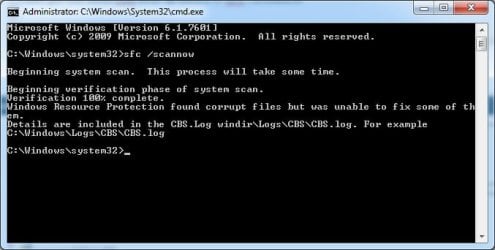
I attached everything in the CBS folder, into split ZIP files.
I also got the same cmd error as before in SFC /SCANNOW
 

Attachments

  • SFC -SCANNOW.jpg
    SFC -SCANNOW.jpg
    28 KB · Views: 21

My Computer

Computer type
PC/Desktop
Computer Manufacturer/Model Number
Custom Build
OS
Windows 7 Ultimate x64
CPU
Intel Core i7 4820k
Motherboard
ASRock X79 Extreme6
Memory
Corsair Vengeance 4x4GB Quad Channel
Graphics Card(s)
Galaxy Nvidia Geforce GTX 680 2GB
Hard Drives
Samsung EVO 250GB SSD
Seagate Barracuda 500GB HDD
Seagate Barracuda 2TB HDD
PSU
EVGA SuperNova G2 1000W
Case
Aerocool XPredator Black Orange
Cooling
Noctua NH-D14
Keyboard
Corsair K95 RGB
Mouse
Thermaltake Theron
Internet Speed
100Mbps/40Mbps
Antivirus
Avast Standard Edition
Browser
Google Chrome
Other Info
Reference GTX 680 2GB in SLI
I was afraid of that - the SFCFix tool still hasn't been properly fixed to deal with this problem, although it tries.


I've uploaded a file - SFCFixScript.txt - to my OneDrive at Noel's OneDrive
Please download and save it.

Open the SFCFix location in Windows Explorer - and drag the SFCFixScript.txt file over onto the SFCFix.exe file - this should force SFCFix to run the file
It will create a new log file - please upload that.
 

My Computer

Computer type
Laptop
Computer Manufacturer/Model Number
Asus K52F or Lenovo B51-80
OS
Win 7 x64 Home Premium (and x86 VirtualBox VM)/Win10
CPU
i3 370M/i7 6500U
Motherboard
Asus/Lenovo
Memory
8GB - finally :)/8GB
Graphics Card(s)
it's an i3, dude!/dual Intel&nVidia
Sound Card
onboard
Monitor(s) Displays
15.6" built-in
Screen Resolution
1366x768/1920x1080
Hard Drives
750GB Seagate internal
Sundry external drives attached to other computers on the local network
1TB SSD on the Lenovo
PSU
n/a
Internet Speed
as much as I can get - usually on a dongle/phone, so <1MB/s
Antivirus
MSE/Defender
Browser
IE11/12/Edge/Chrome/FF(if I must)
Sorry, I can't find the SFCFix.exe. I can only find the SFCFix Folder which has 1 log file in it.
 

My Computer

Computer type
PC/Desktop
Computer Manufacturer/Model Number
Custom Build
OS
Windows 7 Ultimate x64
CPU
Intel Core i7 4820k
Motherboard
ASRock X79 Extreme6
Memory
Corsair Vengeance 4x4GB Quad Channel
Graphics Card(s)
Galaxy Nvidia Geforce GTX 680 2GB
Hard Drives
Samsung EVO 250GB SSD
Seagate Barracuda 500GB HDD
Seagate Barracuda 2TB HDD
PSU
EVGA SuperNova G2 1000W
Case
Aerocool XPredator Black Orange
Cooling
Noctua NH-D14
Keyboard
Corsair K95 RGB
Mouse
Thermaltake Theron
Internet Speed
100Mbps/40Mbps
Antivirus
Avast Standard Edition
Browser
Google Chrome
Other Info
Reference GTX 680 2GB in SLI

My Computer

Computer type
Laptop
Computer Manufacturer/Model Number
Asus K52F or Lenovo B51-80
OS
Win 7 x64 Home Premium (and x86 VirtualBox VM)/Win10
CPU
i3 370M/i7 6500U
Motherboard
Asus/Lenovo
Memory
8GB - finally :)/8GB
Graphics Card(s)
it's an i3, dude!/dual Intel&nVidia
Sound Card
onboard
Monitor(s) Displays
15.6" built-in
Screen Resolution
1366x768/1920x1080
Hard Drives
750GB Seagate internal
Sundry external drives attached to other computers on the local network
1TB SSD on the Lenovo
PSU
n/a
Internet Speed
as much as I can get - usually on a dongle/phone, so <1MB/s
Antivirus
MSE/Defender
Browser
IE11/12/Edge/Chrome/FF(if I must)

Attachments

My Computer

Computer type
PC/Desktop
Computer Manufacturer/Model Number
Custom Build
OS
Windows 7 Ultimate x64
CPU
Intel Core i7 4820k
Motherboard
ASRock X79 Extreme6
Memory
Corsair Vengeance 4x4GB Quad Channel
Graphics Card(s)
Galaxy Nvidia Geforce GTX 680 2GB
Hard Drives
Samsung EVO 250GB SSD
Seagate Barracuda 500GB HDD
Seagate Barracuda 2TB HDD
PSU
EVGA SuperNova G2 1000W
Case
Aerocool XPredator Black Orange
Cooling
Noctua NH-D14
Keyboard
Corsair K95 RGB
Mouse
Thermaltake Theron
Internet Speed
100Mbps/40Mbps
Antivirus
Avast Standard Edition
Browser
Google Chrome
Other Info
Reference GTX 680 2GB in SLI
Thanks - I've sent that back to the developer - hopefully he'll be able to give me some ideas on how to tackle the problem (if not, I have a few of my own, and we can try them)

In the meantime, though - please open an Elevated Command Prompt, and run the following commands...

DIR C:\ /AL /S >>%userprofile%\desktop\npdir.txt
DIR C:\Windows\iassdo.* /S >>%userprofile%\desktop\npdir.txt


They won't appear to do much - but after a minute or two the prompt will come back again, and you'll find a new file on your desktop - npdir.txt
Please upload that to your reply
 

My Computer

Computer type
Laptop
Computer Manufacturer/Model Number
Asus K52F or Lenovo B51-80
OS
Win 7 x64 Home Premium (and x86 VirtualBox VM)/Win10
CPU
i3 370M/i7 6500U
Motherboard
Asus/Lenovo
Memory
8GB - finally :)/8GB
Graphics Card(s)
it's an i3, dude!/dual Intel&nVidia
Sound Card
onboard
Monitor(s) Displays
15.6" built-in
Screen Resolution
1366x768/1920x1080
Hard Drives
750GB Seagate internal
Sundry external drives attached to other computers on the local network
1TB SSD on the Lenovo
PSU
n/a
Internet Speed
as much as I can get - usually on a dongle/phone, so <1MB/s
Antivirus
MSE/Defender
Browser
IE11/12/Edge/Chrome/FF(if I must)
Thanks - I've sent that back to the developer - hopefully he'll be able to give me some ideas on how to tackle the problem (if not, I have a few of my own, and we can try them)

In the meantime, though - please open an Elevated Command Prompt, and run the following commands...

DIR C:\ /AL /S >>%userprofile%\desktop\npdir.txt
DIR C:\Windows\iassdo.* /S >>%userprofile%\desktop\npdir.txt


They won't appear to do much - but after a minute or two the prompt will come back again, and you'll find a new file on your desktop - npdir.txt
Please upload that to your reply

Ok.
 

Attachments

My Computer

Computer type
PC/Desktop
Computer Manufacturer/Model Number
Custom Build
OS
Windows 7 Ultimate x64
CPU
Intel Core i7 4820k
Motherboard
ASRock X79 Extreme6
Memory
Corsair Vengeance 4x4GB Quad Channel
Graphics Card(s)
Galaxy Nvidia Geforce GTX 680 2GB
Hard Drives
Samsung EVO 250GB SSD
Seagate Barracuda 500GB HDD
Seagate Barracuda 2TB HDD
PSU
EVGA SuperNova G2 1000W
Case
Aerocool XPredator Black Orange
Cooling
Noctua NH-D14
Keyboard
Corsair K95 RGB
Mouse
Thermaltake Theron
Internet Speed
100Mbps/40Mbps
Antivirus
Avast Standard Edition
Browser
Google Chrome
Other Info
Reference GTX 680 2GB in SLI
Thanks - but apparently I asked for the wrong list :(

Please open an Elevated Command Prompt, and run the following commands

Code:
fsutil hardlink list C:\Windows\winsxs\amd64_microsoft-windows-tabletpc-journal_31bf3856ad364e35_6.1.7601.21955_none_7636f0d7d474e080\Pretty_Peacock.jpg >>%userprofile%\desktop\nphl.txt
fsutil hardlink list C:\Windows\System32\en-US\iassdo.dll.mui >>%userprofile%\desktop\nphl.txt
fsutil hardlink list C:\Windows\winsxs\x86_microsoft-windows-n..ce_iassdo.resources_31bf3856ad364e35_6.1.7600.16385_en-us_e86c80b89a3f77b7\iassdo.dll.mui >>%userprofile%\desktop\nphl.txt
 
.

Post the resulting nphl.txt file from your desktop - this should check that I now have some clue what I'm talking about :)
 

My Computer

Computer type
Laptop
Computer Manufacturer/Model Number
Asus K52F or Lenovo B51-80
OS
Win 7 x64 Home Premium (and x86 VirtualBox VM)/Win10
CPU
i3 370M/i7 6500U
Motherboard
Asus/Lenovo
Memory
8GB - finally :)/8GB
Graphics Card(s)
it's an i3, dude!/dual Intel&nVidia
Sound Card
onboard
Monitor(s) Displays
15.6" built-in
Screen Resolution
1366x768/1920x1080
Hard Drives
750GB Seagate internal
Sundry external drives attached to other computers on the local network
1TB SSD on the Lenovo
PSU
n/a
Internet Speed
as much as I can get - usually on a dongle/phone, so <1MB/s
Antivirus
MSE/Defender
Browser
IE11/12/Edge/Chrome/FF(if I must)
Back
Top