Computer slowdown - not severe

AlphaBravo

New member
Local time
3:12 AM
Messages
9
Location
Dubai
Hi guys, I've been experiencing a minor delay in processing power. It started 10 days ago, I was playing Colin McRae Dirt 2 on Logitech ForceFeedback steering wheel for 3 hours. usually my computer heats up, but nothing happens. After I quit the game, I noticed the computer was a bit slow. When I say slow, I mean as if its got some tasks running in the background. I also noticed something very peculiar; media files saved on my HDD tend to skip a frame every 30-60secs, pixelating due to the sudden skip, but when I play files from my external hard, it functions perfectly!
In the beginning I thought it was a hardware malfunction, but I ran every diagnostic test there is:
1-chkdsk /X /F /R
2-Extended 3 pass memory test
3-Complete Hardware diagnostics via Dell Support Center.
4-Also ran some diagnostics from the F8 menu. (can't remember exactly what they were, but it was a thorough test)

I've updated my BIOS to the A12, as well as my graphics card driver. I've got Norton Antivirus 2011, which has always suited my needs and browsing/surfing habits, and never did I have a virus, trojan or spybot, Norton always detected them.
I even bought a dual fan cooling dock, a pretty decent one!

Since I bought this laptop, 9 months ago, I had one issue which was the HDD LED would light up at certain times, 10min after it boots, and the computer would freeze for 20-30secs, but afterwards, it would function smoothly. I only experience that within 10 after booting!

I noticed that there's this process called system interrupt, its not taking up much of the processing power, but I never noticed it before on the resource monitor!

I dont know what exactly is wrong, but its definitely not hardware, could it be that the Win 7 OS requires repair?

I'd really appreciate if anyone could help me pinpoint the problem
 
Last edited:

My Computer

Computer Manufacturer/Model Number
Dell Inspiron N5010
OS
Win 7 Home Premium 64-bit
CPU
i5 450M @2.4Ghz
Memory
6 GB
Graphics Card(s)
ATI Mobility Radeon HD 5470 1GB
Sound Card
ATI HD
Hard Drives
Toshiba 640GB
WD 1TB
Internet Speed
8Mb/sec
Hi AlphaBravo and welcome to the forum. It would appear that something is running in the background that perhaps should not be. Open Task Manager, Check Process Tab, check Show All Users. Then click on the header for CPU to sort highest use to lowest use. This will show you all processes running and how much CPU cycles they are using. Perhaps you could post a screen shot using the Snipping Tool for us.
Cheers
JohnnyA
 

My Computer

Computer Manufacturer/Model Number
Toshiba C650
OS
Windows Home Premium 64bit
CPU
T61-- 2.0ghz
Motherboard
Toshiba
Memory
4 GB
Graphics Card(s)
On board
Sound Card
On board
Monitor(s) Displays
15.6"
Hard Drives
500 GB
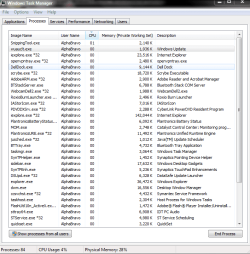
Thanks JohnnyA, I checked so many times that I can list the processes running!


Nothing out of the ordinary!
 

Attachments

  • Task manager @idle.PNG
    Task manager @idle.PNG
    29.4 KB · Views: 26

My Computer

Computer Manufacturer/Model Number
Dell Inspiron N5010
OS
Win 7 Home Premium 64-bit
CPU
i5 450M @2.4Ghz
Memory
6 GB
Graphics Card(s)
ATI Mobility Radeon HD 5470 1GB
Sound Card
ATI HD
Hard Drives
Toshiba 640GB
WD 1TB
Internet Speed
8Mb/sec
Tks AB. Could you click on CPU tab to rank usage? Then repost pic.
Cheers
JohnnyA
 

My Computer

Computer Manufacturer/Model Number
Toshiba C650
OS
Windows Home Premium 64bit
CPU
T61-- 2.0ghz
Motherboard
Toshiba
Memory
4 GB
Graphics Card(s)
On board
Sound Card
On board
Monitor(s) Displays
15.6"
Hard Drives
500 GB
Here's a more recent one, all I have running are 3 tabs Internet Explorer and 1 Windows Explorer.
 

Attachments

  • Task manager 2.PNG
    Task manager 2.PNG
    30.4 KB · Views: 22

My Computer

Computer Manufacturer/Model Number
Dell Inspiron N5010
OS
Win 7 Home Premium 64-bit
CPU
i5 450M @2.4Ghz
Memory
6 GB
Graphics Card(s)
ATI Mobility Radeon HD 5470 1GB
Sound Card
ATI HD
Hard Drives
Toshiba 640GB
WD 1TB
Internet Speed
8Mb/sec
As you said AB nothing pops out as being out of place. I still suspect that some process is jumping in on occasion and causing the slowdown. Right now your CPU usage is very low so it must be running ok at the moment. It costs very little to keep Taskmgr running in background - perhaps you could quick peek at it when slowdown happens and mabe catch the culprit.
JohnnyA
 

My Computer

Computer Manufacturer/Model Number
Toshiba C650
OS
Windows Home Premium 64bit
CPU
T61-- 2.0ghz
Motherboard
Toshiba
Memory
4 GB
Graphics Card(s)
On board
Sound Card
On board
Monitor(s) Displays
15.6"
Hard Drives
500 GB
A stakeout!
I like your approach JohnnyA, I'll play a video file on one half of the screen and Tsak Manager on the other.
Will let you know how it went....
Thanks again JohnnyA
 

My Computer

Computer Manufacturer/Model Number
Dell Inspiron N5010
OS
Win 7 Home Premium 64-bit
CPU
i5 450M @2.4Ghz
Memory
6 GB
Graphics Card(s)
ATI Mobility Radeon HD 5470 1GB
Sound Card
ATI HD
Hard Drives
Toshiba 640GB
WD 1TB
Internet Speed
8Mb/sec
10-4. Don't forget the show processes for all users and Rank CPU usage from highest to lowest by clicking on the header on CPU.
Cheers and good luck.
JohnnyA
 

My Computer

Computer Manufacturer/Model Number
Toshiba C650
OS
Windows Home Premium 64bit
CPU
T61-- 2.0ghz
Motherboard
Toshiba
Memory
4 GB
Graphics Card(s)
On board
Sound Card
On board
Monitor(s) Displays
15.6"
Hard Drives
500 GB
Hi JohnnyA, from what I've noticed, everytime a process starts working, it interrupts the video, specially dwm.exe.
The other processes that affect, but to a lesser extent are iexplore.exe and wuaudt.exe!!
I'm a still confused! Do u think Windows OS needs repairing? And what is that system interrupt??
Best
AB
 

My Computer

Computer Manufacturer/Model Number
Dell Inspiron N5010
OS
Win 7 Home Premium 64-bit
CPU
i5 450M @2.4Ghz
Memory
6 GB
Graphics Card(s)
ATI Mobility Radeon HD 5470 1GB
Sound Card
ATI HD
Hard Drives
Toshiba 640GB
WD 1TB
Internet Speed
8Mb/sec
If you Google DWM.EXE you will find out all about. You may try to shut this service off temporarily to see if it makes any difference. See paste below.

So How Do I Turn dwm.exe Off Then?
Note that I don’t recommend turning this off unless you are playing games in fullscreen mode, and even then it likely won’t help increase speed.
The only way to get rid of the dwm.exe process is to stop the service from running. Open up Services from Control Panel or the start menu, and then find the “Desktop Window Manager Session Manager” service in the list, and click the stop button. Note that you will be switched to the Vista Basic theme when you click the button.

As for if you need to do a Windows repair, I will defer to the more experienced Guru's here at the forum. Perhaps one of them will jump in here.

You mention in your post an "system interupt item" not clear on what you mean.
Cheers
JohnnyA
 

My Computer

Computer Manufacturer/Model Number
Toshiba C650
OS
Windows Home Premium 64bit
CPU
T61-- 2.0ghz
Motherboard
Toshiba
Memory
4 GB
Graphics Card(s)
On board
Sound Card
On board
Monitor(s) Displays
15.6"
Hard Drives
500 GB
Like you said, turning DWM.exe off didn't help at all!

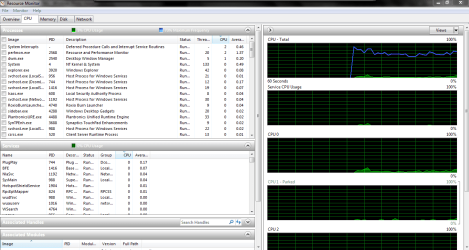
Here's a screenshot of resource monitor. Arranged in descending CPU usage. System Interrupt is among the top 4 always. But still, it doesn't seem to be taking up much of the CPU usage!

According to McGraw Hill Science and Technology Dictionary.
"System Interrupt Handler:
A section of a computer program or of the operating system that takes control when an interrupt is received and performs the operations required to service the interrupt."


I'll see if repairing Windows will help!

Thanks JohnnyA
AB


Attachments

  • Resource Monitor.PNG
    Resource Monitor.PNG
    40.9 KB · Views: 13

My Computer

Computer Manufacturer/Model Number
Dell Inspiron N5010
OS
Win 7 Home Premium 64-bit
CPU
i5 450M @2.4Ghz
Memory
6 GB
Graphics Card(s)
ATI Mobility Radeon HD 5470 1GB
Sound Card
ATI HD
Hard Drives
Toshiba 640GB
WD 1TB
Internet Speed
8Mb/sec
From reading lots of threads relating to System Interupts, most folks are complaining about them taking 10, 20 60 even 100% of their cpu at times. Now that woild be a problem. Your screen shot is showing about 2% for this item so I can't see that as an issue. One thing that does confuses me is you said that Media files ran from main hard drive skip/pixelate, but run smoothly when ran from external HD. ??????
How did you make out with your planned Windows repair?

By the way, while it is on my mind, did you burn a set of Factory System Recovery dvd's when you got your Dell Laptop? Also a Windows Repair CD from within Windows. Start, Control Panel, Backup and Restore, Create a System Repair Disc. You may need one or both of these safety nets in the future.
Cheers
JohnnyA
 

My Computer

Computer Manufacturer/Model Number
Toshiba C650
OS
Windows Home Premium 64bit
CPU
T61-- 2.0ghz
Motherboard
Toshiba
Memory
4 GB
Graphics Card(s)
On board
Sound Card
On board
Monitor(s) Displays
15.6"
Hard Drives
500 GB
Here's a quote from a Microsoft Technet FAQ, concerning missed scheduled tasks that run shortly after startup:

What about if the computer is off when it is supposed to be defragmented? When will the next defrag take place?

Disk Defragmenter will run when the computer comes back up for the first time after the missed scheduled task. The tasks scheduler team has implemented some nice safeguards to limit the impact of such “missed” tasks on system performance. More specifically, execution of such tasks will be delayed by a few minutes so that they do not interfere with a computer booting up or resuming from hibernate/sleep. In addition, such tasks are serialized and occur one at a time.

At this point, people are typically scared that defrag will run when there is an interactive user on the system and make the machine unusable. This was definitely the case in Windows XP and Windows Server 2003, but Windows Vista defrag uses low-priority I/O and low priority CPU, which limit the impact defragmentation has on user activity.

The same situation no doubt pertains to Windows 7, where housekeeping functions - like background defragmentation in this case, but also tasks like checking for automatic updates, compressing unused files etc., start some little time after the next startup.

Although designed to minimize interference with performance, such operations obviously may use processor, memory, disk and network resources, and show some impact on foreground application performance.
 

My Computer

Computer Manufacturer/Model Number
Acer 7520, Packard Bell dot se, Acer travelmate 2423
OS
Win 7 Ult + Starter, XP Pro +Home, 2kAS, Linux Mint 8, SuperOS
CPU
AMD 64 Athlon X2 , Intel Atom N450, Intel Celeron M 1.50 Ghz
Motherboard
Acer Fuquene
Memory
2.5GB ; 1GB; 2GB
Graphics Card(s)
Nvidia GeForce7000m; Intel; Intel
Sound Card
Realtek AC57
Monitor(s) Displays
17" ;10.1"; 19"
Screen Resolution
1440x900;1024x600;1440x900;
Hard Drives
WD 80, WD 320;
PSU
19v
Case
Laptop
Cooling
Air
Internet Speed
9.7Mb/s down 0.99Mb/s up
Other Info
ISP VIRGINMEDIA 10M cable broadband - D-Link DIR615 wireless router, 3Com OfficeConnect ASDL router used as wireless extender switch
I do have a recovery media DVD, thankfuly!!
I finally figured it out, I have a faulty drive, bad sectors and all that $#!%
I restored my computer to an earlier Full system backup (a month and a half back). But things were still the same, if not slower!! Right then I realized this is definitely not a software problem, it has to be hardware. And from the fact that media files on my internal HDD tend to skip and pixelate, but not my external drive. I focused on the hard drive..... and on the second test run I see the magical word: FAIL ERROR 0F00: 1344
It was simple, but I wonder why it wasn't detected before!! I mean I was going about my normal day, with my laptop under my arm, running tests, but only on the third test did it give me an error.
Anyways, its still in warranty, and I called up the service centre and am taking it today.
Thanks a lot JohnnyA.
AB
 

My Computer

Computer Manufacturer/Model Number
Dell Inspiron N5010
OS
Win 7 Home Premium 64-bit
CPU
i5 450M @2.4Ghz
Memory
6 GB
Graphics Card(s)
ATI Mobility Radeon HD 5470 1GB
Sound Card
ATI HD
Hard Drives
Toshiba 640GB
WD 1TB
Internet Speed
8Mb/sec
Way to go AB. Not exactly the best news but you nailed down the problem and are on your way to getting it resolved. Good for you for making those Restore disc's. It's amazing how many people don't know about/get around to this until it is too late. Been good working with you and don't be a stranger here at the Forum - lots of good advice and Tutorials.
Best regards
JohnnyA
 

My Computer

Computer Manufacturer/Model Number
Toshiba C650
OS
Windows Home Premium 64bit
CPU
T61-- 2.0ghz
Motherboard
Toshiba
Memory
4 GB
Graphics Card(s)
On board
Sound Card
On board
Monitor(s) Displays
15.6"
Hard Drives
500 GB
Back
Top