Solved Computer Slows then Freezes, Have to Restart

thinkbig

New member
Member
VIP
Local time
12:42 AM
Messages
118
Hi,

I have a windows 7 desktop Dell Inspiron that slows
down gradually then freezes up.

If I restart, everything is fine for a while, then it happens
again.

I've tried to use windows update, it will not update.

I've run several virus programs, malwarebytes, Microsoft Security Essentials (Installed),
AdAware, SpyBot and a few others.

I've done several disk checks (takes a good 3 hours at least) and it usually runs better
after but the issue keeps returning. I've been living with it for a while fixing it on my
ow but it's time to get some assistance.

I've been reading the tutorials but there is so much info I'm not sure where to start??

I could really use some direction to get this PC working again!!

Thank you.

I also generated a "System Performance Report" as in the tutorial but don't understand what it is telling me. Would it be helpful to post it?
 

My Computer My Computer

At a glance

Microsoft Windows 7 Home Premium 64-bitIntel(R) Core(TM)2 Duo CPU E7600 @ 3.06GHz8.00 GB(1) Intel(R) G45/G43 Express Chipset (2) Inte...
Computer type
PC/Desktop
Computer Manufacturer/Model Number
Dell Inspiron
OS
Microsoft Windows 7 Home Premium 64-bit
CPU
Intel(R) Core(TM)2 Duo CPU E7600 @ 3.06GHz
Motherboard
Dell Inc. 0K83V0
Memory
8.00 GB
Graphics Card(s)
(1) Intel(R) G45/G43 Express Chipset (2) Intel(R) G45/G43
Sound Card
(1) Realtek High Definition Audio (2) Intel(R) High Defini
Monitor(s) Displays
Phillips BDM4065UC
Hard Drives
Samsung SSD 860 EVO 500G
Browser
IE 10
It has been a long time. I am back.
Welcome to the world of malware. Your anti malware is good but the malware is even better.Oops! I should not be saying this but hackers are reading everywhere.

The malware has made a partition in your boot sector. No use of trying to find it.Plain time waster. I get hit by this kind of stuff many times. So I am rather an "expert" in this kind of stuff.However,I cannot help you in getting rid of it!

Things to notice for you.:
1.Access to WWW. Speed slowing down or remaining the same?
2.Uploading stuff when you are idling?
I mean when you are doing nothing on the browser (not uploading or downloading or reading webpages). Is the browser showing that you are uploading something/data?
3.Downloading stuff when you are idling?
I mean when you are doing nothing on the browser (not downloading or reading webpages). Is the browser showing that you are downloading something/data at the back?

I will point you to webpages or forums that can help you.Pls do not post your "System Performance Report" as in the tutorial until someone else can help you. You are opening yourself to attacks.

Start planning to save and backup the data that you have downloaded from the WWW.Pls note that the data and backup you r saving is infected too.
I will tell you what to do next in the next reply.
 

My Computer My Computer

At a glance

Windows 7 Home Premium 64bitIntel Core 2 Duo T6600 2.2 GHz 800MHz4GBNvidia Geforce G105M
Computer type
Laptop
Computer Manufacturer/Model Number
Acer Aspire 4736G
OS
Windows 7 Home Premium 64bit
CPU
Intel Core 2 Duo T6600 2.2 GHz 800MHz
Motherboard
Intel PM65
Memory
4GB
Graphics Card(s)
Nvidia Geforce G105M
Hard Drives
Toshiba MK5055GSX 99FKS993S LBAS 976773167
Antivirus
AVG Free AV 2015
Browser
IE & Chrome
How old is the hard drive?

Check SMART and run a disk check with HDTune. HD Tune website
 

My Computer My Computer

At a glance

Windows 7 Ultimate x64
Computer type
PC/Desktop
OS
Windows 7 Ultimate x64
Hi

If your system specs are correct - IE10 - and you mentioned you cant update
Got a sneaky feeling WindowsUpdate is running and running and running oops i've run out of space

When was your last update installed???


Roy
 

My Computer My Computer

At a glance

W7 home premium 32bit/W7HP 64bit/w10 tp insid...E5300 dual core3gbNvidia Geforce 7100 Nforce 630i
Computer type
PC/Desktop
Computer Manufacturer/Model Number
medionl/Aspire 6930G/acer x55a
OS
W7 home premium 32bit/W7HP 64bit/w10 tp insider ring
CPU
E5300 dual core
Motherboard
medion MS7366
Memory
3gb
Graphics Card(s)
Nvidia Geforce 7100 Nforce 630i
Monitor(s) Displays
avixc
Internet Speed
n (isp resticted to 72)
Antivirus
mse/pands
Browser
palemoon
Other Info
Belkin Fd7050 n USB using Railink RT2870 drivers, more upto date
How much free disk space you have under C:?
Did you cleaned your disk (temp files and other trash files)?

Please open disk manager (C:\Windows\System32\diskmgmt.msc), expand the window and all columns (so we can read them) and with the snipping tool take a snapshot of whole window.
Post it here as an attachment. Use the paper clip on the answer box, browse to the file image - upload.
 

My Computers My Computers

  • At a glance

    Windows 7 HP 64i5 6600K - 800MHz to 4200MHz4+4G GSkill DDR4 3000IG - Intel 530
    Computer type
    PC/Desktop
    Computer Manufacturer/Model Number
    custom build
    OS
    Windows 7 HP 64
    CPU
    i5 6600K - 800MHz to 4200MHz
    Motherboard
    GA-Z170-HD3P
    Memory
    4+4G GSkill DDR4 3000
    Graphics Card(s)
    IG - Intel 530
    Monitor(s) Displays
    Samsung 226BW
    Screen Resolution
    1680x1050
    Hard Drives
    (1) -1 SM951 – 128GB M.2 AHCI PCIe SSD drive for Windows 7 and Lubuntu
    (2) -1 WD SATA 3 - 1T for Data
    (3) -1 WD SATA 3 - 1T for backup
    PSU
    Thermaltake 450W TR2 gold
    Keyboard
    Old and good Chicony mechanical keyboard
    Mouse
    Logitech mX performance - 9 buttons (had to disable some)
    Internet Speed
    500Mb/s
    Browser
    Firefox 64
    Other Info
    TinyWall firewall
  • At a glance

    Windows 7 Proi7-4500U 800MHz to 3.0GHz(4+4)G DDR3 1600IG intel 4400 + NVIDIA GeForce GT 745M
    Computer type
    Laptop
    System Manufacturer/Model Number
    Asus Q550LF
    OS
    Windows 7 Pro
    CPU
    i7-4500U 800MHz to 3.0GHz
    Motherboard
    Asus Q550LF
    Memory
    (4+4)G DDR3 1600
    Graphics Card(s)
    IG intel 4400 + NVIDIA GeForce GT 745M
    Sound Card
    Realtek
    Monitor(s) Displays
    LG Display LP156WF4-SPH1
    Screen Resolution
    1920 x 1080
    Hard Drives
    BX500 120G SSD for Windows and programs +
    1T HDD for data
    Internet Speed
    500 Mb/s
    Browser
    Firefox
    Other Info
    TinyWall firewall
Hi All,

Thank you so much for responding.

I am unexpectedly away and will be back next week.

I will get back to this thread as soon as I return.

Thanks again!!
 

My Computer My Computer

At a glance

Microsoft Windows 7 Home Premium 64-bitIntel(R) Core(TM)2 Duo CPU E7600 @ 3.06GHz8.00 GB(1) Intel(R) G45/G43 Express Chipset (2) Inte...
Computer type
PC/Desktop
Computer Manufacturer/Model Number
Dell Inspiron
OS
Microsoft Windows 7 Home Premium 64-bit
CPU
Intel(R) Core(TM)2 Duo CPU E7600 @ 3.06GHz
Motherboard
Dell Inc. 0K83V0
Memory
8.00 GB
Graphics Card(s)
(1) Intel(R) G45/G43 Express Chipset (2) Intel(R) G45/G43
Sound Card
(1) Realtek High Definition Audio (2) Intel(R) High Defini
Monitor(s) Displays
Phillips BDM4065UC
Hard Drives
Samsung SSD 860 EVO 500G
Browser
IE 10
Hi,

I am back and am ready to fix this.

I've used CCleaner and Cleanup so I believe I have cleaned the temp and trash.

I've attached the diskmgmt.msc file.
 

Attachments

  • w7disk.JPG
    w7disk.JPG
    134.3 KB · Views: 6

My Computer My Computer

At a glance

Microsoft Windows 7 Home Premium 64-bitIntel(R) Core(TM)2 Duo CPU E7600 @ 3.06GHz8.00 GB(1) Intel(R) G45/G43 Express Chipset (2) Inte...
Computer type
PC/Desktop
Computer Manufacturer/Model Number
Dell Inspiron
OS
Microsoft Windows 7 Home Premium 64-bit
CPU
Intel(R) Core(TM)2 Duo CPU E7600 @ 3.06GHz
Motherboard
Dell Inc. 0K83V0
Memory
8.00 GB
Graphics Card(s)
(1) Intel(R) G45/G43 Express Chipset (2) Intel(R) G45/G43
Sound Card
(1) Realtek High Definition Audio (2) Intel(R) High Defini
Monitor(s) Displays
Phillips BDM4065UC
Hard Drives
Samsung SSD 860 EVO 500G
Browser
IE 10
When I open task manager I notice that "System Idle Process" is in the high 90's, 97 - 99. Don't know what that means??
 

My Computer My Computer

At a glance

Microsoft Windows 7 Home Premium 64-bitIntel(R) Core(TM)2 Duo CPU E7600 @ 3.06GHz8.00 GB(1) Intel(R) G45/G43 Express Chipset (2) Inte...
Computer type
PC/Desktop
Computer Manufacturer/Model Number
Dell Inspiron
OS
Microsoft Windows 7 Home Premium 64-bit
CPU
Intel(R) Core(TM)2 Duo CPU E7600 @ 3.06GHz
Motherboard
Dell Inc. 0K83V0
Memory
8.00 GB
Graphics Card(s)
(1) Intel(R) G45/G43 Express Chipset (2) Intel(R) G45/G43
Sound Card
(1) Realtek High Definition Audio (2) Intel(R) High Defini
Monitor(s) Displays
Phillips BDM4065UC
Hard Drives
Samsung SSD 860 EVO 500G
Browser
IE 10
Here is a screenshot of windows update. Under Last Update it says: Never.

Last time I tried to update (last week when I posted this) it was a number I think around 580 something or 980 something days??
It didn't say never.
 

Attachments

  • update.JPG
    update.JPG
    86.6 KB · Views: 5
Last edited:

My Computer My Computer

At a glance

Microsoft Windows 7 Home Premium 64-bitIntel(R) Core(TM)2 Duo CPU E7600 @ 3.06GHz8.00 GB(1) Intel(R) G45/G43 Express Chipset (2) Inte...
Computer type
PC/Desktop
Computer Manufacturer/Model Number
Dell Inspiron
OS
Microsoft Windows 7 Home Premium 64-bit
CPU
Intel(R) Core(TM)2 Duo CPU E7600 @ 3.06GHz
Motherboard
Dell Inc. 0K83V0
Memory
8.00 GB
Graphics Card(s)
(1) Intel(R) G45/G43 Express Chipset (2) Intel(R) G45/G43
Sound Card
(1) Realtek High Definition Audio (2) Intel(R) High Defini
Monitor(s) Displays
Phillips BDM4065UC
Hard Drives
Samsung SSD 860 EVO 500G
Browser
IE 10
I do have IE 10 on here but I never use it. I use Chrome for everything.
 

My Computer My Computer

At a glance

Microsoft Windows 7 Home Premium 64-bitIntel(R) Core(TM)2 Duo CPU E7600 @ 3.06GHz8.00 GB(1) Intel(R) G45/G43 Express Chipset (2) Inte...
Computer type
PC/Desktop
Computer Manufacturer/Model Number
Dell Inspiron
OS
Microsoft Windows 7 Home Premium 64-bit
CPU
Intel(R) Core(TM)2 Duo CPU E7600 @ 3.06GHz
Motherboard
Dell Inc. 0K83V0
Memory
8.00 GB
Graphics Card(s)
(1) Intel(R) G45/G43 Express Chipset (2) Intel(R) G45/G43
Sound Card
(1) Realtek High Definition Audio (2) Intel(R) High Defini
Monitor(s) Displays
Phillips BDM4065UC
Hard Drives
Samsung SSD 860 EVO 500G
Browser
IE 10
You wrote you've done many disk checks and it usually runs better after.
How did you call it, by disk properties or by CMD line (chkdsk c: /f)
Did it find any bad clusters or bad blocks?

You have plenty free space, so it's not the problem.
Don't worry about the Never under WU. The log file could have been cleaned.
Install the important updates only. The optional updates normally you will never use.

I suggest you to install IE 11 as it is part of the OS.

I don't like Chrome as it's loaded on windows start, is memory resident and it spy's everything you do, even if you're not using it. (nothing is for free).
 

My Computers My Computers

  • At a glance

    Windows 7 HP 64i5 6600K - 800MHz to 4200MHz4+4G GSkill DDR4 3000IG - Intel 530
    Computer type
    PC/Desktop
    Computer Manufacturer/Model Number
    custom build
    OS
    Windows 7 HP 64
    CPU
    i5 6600K - 800MHz to 4200MHz
    Motherboard
    GA-Z170-HD3P
    Memory
    4+4G GSkill DDR4 3000
    Graphics Card(s)
    IG - Intel 530
    Monitor(s) Displays
    Samsung 226BW
    Screen Resolution
    1680x1050
    Hard Drives
    (1) -1 SM951 – 128GB M.2 AHCI PCIe SSD drive for Windows 7 and Lubuntu
    (2) -1 WD SATA 3 - 1T for Data
    (3) -1 WD SATA 3 - 1T for backup
    PSU
    Thermaltake 450W TR2 gold
    Keyboard
    Old and good Chicony mechanical keyboard
    Mouse
    Logitech mX performance - 9 buttons (had to disable some)
    Internet Speed
    500Mb/s
    Browser
    Firefox 64
    Other Info
    TinyWall firewall
  • At a glance

    Windows 7 Proi7-4500U 800MHz to 3.0GHz(4+4)G DDR3 1600IG intel 4400 + NVIDIA GeForce GT 745M
    Computer type
    Laptop
    System Manufacturer/Model Number
    Asus Q550LF
    OS
    Windows 7 Pro
    CPU
    i7-4500U 800MHz to 3.0GHz
    Motherboard
    Asus Q550LF
    Memory
    (4+4)G DDR3 1600
    Graphics Card(s)
    IG intel 4400 + NVIDIA GeForce GT 745M
    Sound Card
    Realtek
    Monitor(s) Displays
    LG Display LP156WF4-SPH1
    Screen Resolution
    1920 x 1080
    Hard Drives
    BX500 120G SSD for Windows and programs +
    1T HDD for data
    Internet Speed
    500 Mb/s
    Browser
    Firefox
    Other Info
    TinyWall firewall
Thanks for responding.

To do the disk checks I go to my computer, right click on the C drive then properties, tools, check for errors. I check both boxes, repair errors and bad sectors. Then the box pops up to schedule the check. Then I restart and it takes several hours.

After I do this it works for a while then gradually starts slowing again. Sometimes it rund fine for a while and sometimes it will slow a lot faster.

How would I install IE11?

Would a SSD fix this? If so, I would get one and transfer everything over.

Thanks again!
 
Last edited:

My Computer My Computer

At a glance

Microsoft Windows 7 Home Premium 64-bitIntel(R) Core(TM)2 Duo CPU E7600 @ 3.06GHz8.00 GB(1) Intel(R) G45/G43 Express Chipset (2) Inte...
Computer type
PC/Desktop
Computer Manufacturer/Model Number
Dell Inspiron
OS
Microsoft Windows 7 Home Premium 64-bit
CPU
Intel(R) Core(TM)2 Duo CPU E7600 @ 3.06GHz
Motherboard
Dell Inc. 0K83V0
Memory
8.00 GB
Graphics Card(s)
(1) Intel(R) G45/G43 Express Chipset (2) Intel(R) G45/G43
Sound Card
(1) Realtek High Definition Audio (2) Intel(R) High Defini
Monitor(s) Displays
Phillips BDM4065UC
Hard Drives
Samsung SSD 860 EVO 500G
Browser
IE 10
Also, if I go to IE11 is there a way to transfer everything from Chrome like bookmarks and passwords?
 

My Computer My Computer

At a glance

Microsoft Windows 7 Home Premium 64-bitIntel(R) Core(TM)2 Duo CPU E7600 @ 3.06GHz8.00 GB(1) Intel(R) G45/G43 Express Chipset (2) Inte...
Computer type
PC/Desktop
Computer Manufacturer/Model Number
Dell Inspiron
OS
Microsoft Windows 7 Home Premium 64-bit
CPU
Intel(R) Core(TM)2 Duo CPU E7600 @ 3.06GHz
Motherboard
Dell Inc. 0K83V0
Memory
8.00 GB
Graphics Card(s)
(1) Intel(R) G45/G43 Express Chipset (2) Intel(R) G45/G43
Sound Card
(1) Realtek High Definition Audio (2) Intel(R) High Defini
Monitor(s) Displays
Phillips BDM4065UC
Hard Drives
Samsung SSD 860 EVO 500G
Browser
IE 10
I would like to see the check disk log. I suspect that you have a dying disk.
If you do have a backup disk, back up your data NOW.
Step 1. Open Event Viewer by typing eventvwr.msc in the Start Menu search bar and pressing the Enter key.
Step 2. Navigate to Windows Logs ->Application in the left sidebar:
Step 3. Click the 'Filter current log' button on the right side
Step 4. Select 'Wininit' in the Event sources drop down list. Now you should see only log files from the Wininit even source displayed, which is where you'll find your CHKDSK logs.

Do you have the SP1 installed?
If your Win 7 isn't SP1 download it from here Download Windows 7 and Windows Server 2008 R2 Service Pack 1 (KB976932) from Official Microsoft Download Center. After installation reboot.

Download and install IE 11 - IE 11
Reboot after installation

SSDs are the biggest upgrade you can give to your computer. I'll give some suggestions afterwords.
 

My Computers My Computers

  • At a glance

    Windows 7 HP 64i5 6600K - 800MHz to 4200MHz4+4G GSkill DDR4 3000IG - Intel 530
    Computer type
    PC/Desktop
    Computer Manufacturer/Model Number
    custom build
    OS
    Windows 7 HP 64
    CPU
    i5 6600K - 800MHz to 4200MHz
    Motherboard
    GA-Z170-HD3P
    Memory
    4+4G GSkill DDR4 3000
    Graphics Card(s)
    IG - Intel 530
    Monitor(s) Displays
    Samsung 226BW
    Screen Resolution
    1680x1050
    Hard Drives
    (1) -1 SM951 – 128GB M.2 AHCI PCIe SSD drive for Windows 7 and Lubuntu
    (2) -1 WD SATA 3 - 1T for Data
    (3) -1 WD SATA 3 - 1T for backup
    PSU
    Thermaltake 450W TR2 gold
    Keyboard
    Old and good Chicony mechanical keyboard
    Mouse
    Logitech mX performance - 9 buttons (had to disable some)
    Internet Speed
    500Mb/s
    Browser
    Firefox 64
    Other Info
    TinyWall firewall
  • At a glance

    Windows 7 Proi7-4500U 800MHz to 3.0GHz(4+4)G DDR3 1600IG intel 4400 + NVIDIA GeForce GT 745M
    Computer type
    Laptop
    System Manufacturer/Model Number
    Asus Q550LF
    OS
    Windows 7 Pro
    CPU
    i7-4500U 800MHz to 3.0GHz
    Motherboard
    Asus Q550LF
    Memory
    (4+4)G DDR3 1600
    Graphics Card(s)
    IG intel 4400 + NVIDIA GeForce GT 745M
    Sound Card
    Realtek
    Monitor(s) Displays
    LG Display LP156WF4-SPH1
    Screen Resolution
    1920 x 1080
    Hard Drives
    BX500 120G SSD for Windows and programs +
    1T HDD for data
    Internet Speed
    500 Mb/s
    Browser
    Firefox
    Other Info
    TinyWall firewall
Hi,

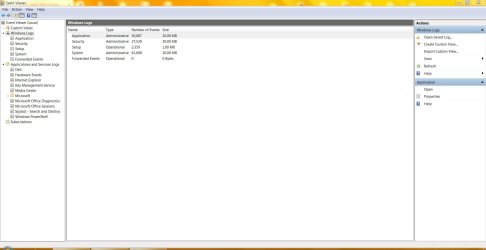
I'm following your directions to get the log you requested but am
not seeing "filter current log" as in step 3. I've attached a screen shot.

I'm pretty sure I have SP2?? I remember getting the disks years ago,
is there a way to tell what I have on here?

I remember several years ago you helped me with an issue and recommended
a SSD. I ordered it, then you helped me fix the issue so the drive was returned to Amazon.
It has been working fine for many years. If I need to get it again I will. I remember
the issue I had with the SSD was getting everything on there.

I will proceed with IE11.

Thank you!
 

Attachments

  • eventviewer.JPG
    eventviewer.JPG
    96 KB · Views: 2
Last edited:

My Computer My Computer

At a glance

Microsoft Windows 7 Home Premium 64-bitIntel(R) Core(TM)2 Duo CPU E7600 @ 3.06GHz8.00 GB(1) Intel(R) G45/G43 Express Chipset (2) Inte...
Computer type
PC/Desktop
Computer Manufacturer/Model Number
Dell Inspiron
OS
Microsoft Windows 7 Home Premium 64-bit
CPU
Intel(R) Core(TM)2 Duo CPU E7600 @ 3.06GHz
Motherboard
Dell Inc. 0K83V0
Memory
8.00 GB
Graphics Card(s)
(1) Intel(R) G45/G43 Express Chipset (2) Intel(R) G45/G43
Sound Card
(1) Realtek High Definition Audio (2) Intel(R) High Defini
Monitor(s) Displays
Phillips BDM4065UC
Hard Drives
Samsung SSD 860 EVO 500G
Browser
IE 10
Below Windows Logs (right panel) you have Application.

Step 1. Open Event Viewer by typing eventvwr.msc in the Start Menu search bar and pressing the Enter key.
Step 2. Navigate to Windows Logs ->Application in the left panel:
Step 3. Click the 'Filter current log' button on the right side panel
Step 4. Select 'Wininit' in the Event sources drop down list. Now you should see only log files from the Wininit even source displayed, which is where you'll find your CHKDSK logs.
 

My Computers My Computers

  • At a glance

    Windows 7 HP 64i5 6600K - 800MHz to 4200MHz4+4G GSkill DDR4 3000IG - Intel 530
    Computer type
    PC/Desktop
    Computer Manufacturer/Model Number
    custom build
    OS
    Windows 7 HP 64
    CPU
    i5 6600K - 800MHz to 4200MHz
    Motherboard
    GA-Z170-HD3P
    Memory
    4+4G GSkill DDR4 3000
    Graphics Card(s)
    IG - Intel 530
    Monitor(s) Displays
    Samsung 226BW
    Screen Resolution
    1680x1050
    Hard Drives
    (1) -1 SM951 – 128GB M.2 AHCI PCIe SSD drive for Windows 7 and Lubuntu
    (2) -1 WD SATA 3 - 1T for Data
    (3) -1 WD SATA 3 - 1T for backup
    PSU
    Thermaltake 450W TR2 gold
    Keyboard
    Old and good Chicony mechanical keyboard
    Mouse
    Logitech mX performance - 9 buttons (had to disable some)
    Internet Speed
    500Mb/s
    Browser
    Firefox 64
    Other Info
    TinyWall firewall
  • At a glance

    Windows 7 Proi7-4500U 800MHz to 3.0GHz(4+4)G DDR3 1600IG intel 4400 + NVIDIA GeForce GT 745M
    Computer type
    Laptop
    System Manufacturer/Model Number
    Asus Q550LF
    OS
    Windows 7 Pro
    CPU
    i7-4500U 800MHz to 3.0GHz
    Motherboard
    Asus Q550LF
    Memory
    (4+4)G DDR3 1600
    Graphics Card(s)
    IG intel 4400 + NVIDIA GeForce GT 745M
    Sound Card
    Realtek
    Monitor(s) Displays
    LG Display LP156WF4-SPH1
    Screen Resolution
    1920 x 1080
    Hard Drives
    BX500 120G SSD for Windows and programs +
    1T HDD for data
    Internet Speed
    500 Mb/s
    Browser
    Firefox
    Other Info
    TinyWall firewall
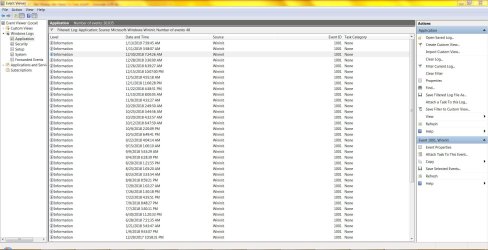
Hi,

I think I got it... screen shot attached.

I've copied the text from the first 3 logs and pasted into notepad (attached).

Is this what you needed to see?

Thank you.
 

Attachments

My Computer My Computer

At a glance

Microsoft Windows 7 Home Premium 64-bitIntel(R) Core(TM)2 Duo CPU E7600 @ 3.06GHz8.00 GB(1) Intel(R) G45/G43 Express Chipset (2) Inte...
Computer type
PC/Desktop
Computer Manufacturer/Model Number
Dell Inspiron
OS
Microsoft Windows 7 Home Premium 64-bit
CPU
Intel(R) Core(TM)2 Duo CPU E7600 @ 3.06GHz
Motherboard
Dell Inc. 0K83V0
Memory
8.00 GB
Graphics Card(s)
(1) Intel(R) G45/G43 Express Chipset (2) Intel(R) G45/G43
Sound Card
(1) Realtek High Definition Audio (2) Intel(R) High Defini
Monitor(s) Displays
Phillips BDM4065UC
Hard Drives
Samsung SSD 860 EVO 500G
Browser
IE 10
Shut down, unplug your external H disk, then turn on machine again and see if symptoms are better. Even though its not your boot drive your H drive is so full that any need to access it will be a bottleneck, so my money is on it being the reason for your slowdown.
 

My Computer My Computer

At a glance

Win7 pro x64stock i7 7700kCorsair Vengeance LPX 16GB (2x8GB) DDR4 @ 320...integrated Intel HD 630
Computer type
PC/Desktop
Computer Manufacturer/Model Number
diy
OS
Win7 pro x64
CPU
stock i7 7700k
Motherboard
Gigabyte Z270N-WIFI mini-ITX
Memory
Corsair Vengeance LPX 16GB (2x8GB) DDR4 @ 3200MHz
Graphics Card(s)
integrated Intel HD 630
Sound Card
onboard Realtek ALC1220
Monitor(s) Displays
two vertically mounted samsung 55" 4k un55mu8000
Screen Resolution
1920x1280
Hard Drives
256GB Samsung EVO 960 M.2 pci-e NVMe SSD
PSU
SilverStone Nightjar ST45NF 450Watt Fanless
Case
No case. Motherboard is mounted directly onto power supply
Cooling
Evercool low profile 815EP with Panaflow 12L fan at 7v
Keyboard
Ortek MCK-86 mini
Mouse
Belkin 5-button USB
Internet Speed
spectrum 400mbps
Last edited:

My Computers My Computers

  • At a glance

    Windows 7 HP 64i5 6600K - 800MHz to 4200MHz4+4G GSkill DDR4 3000IG - Intel 530
    Computer type
    PC/Desktop
    Computer Manufacturer/Model Number
    custom build
    OS
    Windows 7 HP 64
    CPU
    i5 6600K - 800MHz to 4200MHz
    Motherboard
    GA-Z170-HD3P
    Memory
    4+4G GSkill DDR4 3000
    Graphics Card(s)
    IG - Intel 530
    Monitor(s) Displays
    Samsung 226BW
    Screen Resolution
    1680x1050
    Hard Drives
    (1) -1 SM951 – 128GB M.2 AHCI PCIe SSD drive for Windows 7 and Lubuntu
    (2) -1 WD SATA 3 - 1T for Data
    (3) -1 WD SATA 3 - 1T for backup
    PSU
    Thermaltake 450W TR2 gold
    Keyboard
    Old and good Chicony mechanical keyboard
    Mouse
    Logitech mX performance - 9 buttons (had to disable some)
    Internet Speed
    500Mb/s
    Browser
    Firefox 64
    Other Info
    TinyWall firewall
  • At a glance

    Windows 7 Proi7-4500U 800MHz to 3.0GHz(4+4)G DDR3 1600IG intel 4400 + NVIDIA GeForce GT 745M
    Computer type
    Laptop
    System Manufacturer/Model Number
    Asus Q550LF
    OS
    Windows 7 Pro
    CPU
    i7-4500U 800MHz to 3.0GHz
    Motherboard
    Asus Q550LF
    Memory
    (4+4)G DDR3 1600
    Graphics Card(s)
    IG intel 4400 + NVIDIA GeForce GT 745M
    Sound Card
    Realtek
    Monitor(s) Displays
    LG Display LP156WF4-SPH1
    Screen Resolution
    1920 x 1080
    Hard Drives
    BX500 120G SSD for Windows and programs +
    1T HDD for data
    Internet Speed
    500 Mb/s
    Browser
    Firefox
    Other Info
    TinyWall firewall
Thank you all!

Sorry for taking so long to respond back, just found out that all of the response notifications from sevenforums have been going into spam, not sure why??

Anyway, I've disconnected the H Disk yesterday and have not had any issues since??
I don't know how that got full, it has 1T of space, I thought that disk was huge when I purchased it. I use it for backup.
I have a regular backup set for a system image and also have some files I manually put on there.

If I have to keep that H Disk disconnected I am nut sure what to use for backup, or I need to figure out what I can delete on there??

I will get the SSD, just want to make sure I understand... What is the difference between a SSD and an HDD and why would I need both? If I purchase a larger SSD would that take care of it?

Thanks again, really appreciate the help!!
 

My Computer My Computer

At a glance

Microsoft Windows 7 Home Premium 64-bitIntel(R) Core(TM)2 Duo CPU E7600 @ 3.06GHz8.00 GB(1) Intel(R) G45/G43 Express Chipset (2) Inte...
Computer type
PC/Desktop
Computer Manufacturer/Model Number
Dell Inspiron
OS
Microsoft Windows 7 Home Premium 64-bit
CPU
Intel(R) Core(TM)2 Duo CPU E7600 @ 3.06GHz
Motherboard
Dell Inc. 0K83V0
Memory
8.00 GB
Graphics Card(s)
(1) Intel(R) G45/G43 Express Chipset (2) Intel(R) G45/G43
Sound Card
(1) Realtek High Definition Audio (2) Intel(R) High Defini
Monitor(s) Displays
Phillips BDM4065UC
Hard Drives
Samsung SSD 860 EVO 500G
Browser
IE 10
Back
Top