
Solved computer won't boot, no operating system found

MonkeeMadness

New member
Local time
1:44 PM
Messages
14
Hello,

Laptop won't start correctly goes to boot menu. I can access system recovery options with win7 cd/dvd.

*Tried windows 7 64 bit cd - won't repair computer
in the system recovery options: no operating system is displayed

*won't let me restore using a system image - won't access the hard drive at all

*has option to load drivers, the following show on my computer
Boot(x: ) 31.1 MB free of 33.5 MB
CD Drive(D: ) Windows 7 CD
Which drivers do I need?

At the system recover Options screen the following displays:
System Recovery Options
Choose a recovery tool
Operating system: Unknown on (Unknown) Local Disk

I tried command prompt

X:\sources>

i entered command "diskpart" the following displays:
Microsoft DiskPart version 6.1.7601
Copyright ..............
On Computer: MININT-9KIAHGT

next command i entered "list volume" the following displays:
Volume 0 D GSP1RMCHPXF UDF DVD-ROM 3167 MB Healthy

Here is where i am stuck, the hard drive C: is not showing up. I need to recover the files on this computer even if i have to do a full re-install of Windows 7 afterwards. Please let me know if further info is needed. Thank you in advance for your help.
 

My Computer

Computer type
PC/Desktop
Computer Manufacturer/Model Number
Dell XPS L502X
OS
Windows 7 Home Premium 64 bit
CPU
Intel Core i7-2640, 2.80GHz
Memory
8 GB
Hard Drives
Seagate Momentus 7200.4 ST9500423AS 500GB 7200 RPM 16MB Cache SATA 3.0Gb/s 2.5"
Hello MonkeeMadness. Welcome to the forum.

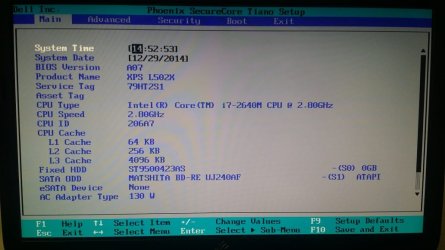
Can you see the hard drive listed in BIOS?
 

My Computer

Computer type
PC/Desktop
Computer Manufacturer/Model Number
Home Built - Jan 2013
OS
Windows 7 64 Bit Home Premium SP1
CPU
i7-3820
Motherboard
Asus P9X79-PRO - Bios 4608
Memory
GSkill F3-14900CL9Q - 16GB
Graphics Card(s)
EVGA GeForce GTX660 - Driver 352.86
Sound Card
On board Realtek ALC898
Monitor(s) Displays
Acer S271HL
Screen Resolution
1920 x 1080
Hard Drives
#1- Samsung 840 Pro Series
#2- Western Digital WD1002FAEX Sata3 Black
#3- Western Digital WD1002FAEX Sata3 Black
PSU
Corsair CMPSU-850TX-V2 - 850 watt (by Seasonic)
Case
Corsair Obsidian 550D
Cooling
Standard 3 120mm case fans, Cooler Master Hyper 212 EVO
Keyboard
MS KC-0405
Mouse
Intellimouse 5-button
Internet Speed
56 Mbits/Sec (on a good day)
Antivirus
Avast & Malwarebytes
Browser
Firefox
Other Info
Asus DVD - DRW-24B1ST 24X
Check all the connections to the hard drive.

Is it running ?

Don`t go running diskpart or trying to re install windows, find out why the hard drive isn`t showing up.
 

My Computer

Computer type
PC/Desktop
Computer Manufacturer/Model Number
Skylake Special #666
OS
Windows 10 Pro x64
CPU
Intel Core i7 6700K
Motherboard
Asus Sabertooth Z170 Mark 1
Memory
GSkill TridentZ RGB 16GB 3600 16-16-16-36
Graphics Card(s)
EVGA GTX 980 Ti SC x2
Sound Card
Realtek High Definition
Monitor(s) Displays
AOC G2460PG
Screen Resolution
1920 x 1080 144Hz
Hard Drives
Samsung 860 Pro 256GB, Seagate Barracuda 4TB x2
PSU
EVGA 1000 P2, EVGA White Custom Braided Cables
Case
Corsair Vengeance C70 Gunmetal Black
Cooling
Corsair H100i v2, Corsair ML120 x2, Thermal Grizzly Kryonaut
Keyboard
Logitech G910 Orion Spectrum
Mouse
Logitech G700s
Internet Speed
Verizon Fios Quantum Gateway 75/75
Antivirus
Windows Defender, Malwarebytes Free 3.8.3
Browser
Chrome
Other Info
Corsair SP120 x4, LG Blu-ray Drive, Durabrand HT-395 100 Watt Dolby Digital Amp, Corsair H2100 Wireless 7.1 Headset
Here is where i am stuck, the hard drive C: is not showing up. I need to recover the files on this computer even if i have to do a full re-install of Windows 7 afterwards. Please let me know if further info is needed. Thank you in advance for your help.
If you plan on doing a fresh reinstall of Windows, you're right that you first need to recover the files on your computer by somehow copying them off to a secondary media (like a large USB flash drive or external USB hard drive). But of course, that requires you can get the current system to boot again, which seems grim from your description.

If the data files on your current hard drive are critical and cannot afford to be lost and if you can't restore a "system image" using standalone recovery media like through Macrium Reflect (which has a standalone boot CD, and expects your "system image" backups to be on external USB drive media... to avoid exactly this type of disaster which has now left you seemingly without any recovery course of action), my suggestion would be to take an emergency course of action.

Of course, if the drive is truly dead and cannot be physically accessed (much less not bootable to Windows), then you're doomed (especially since you don't seem to have a usable backup for your otherwise unrecoverable data). So fingers crossed the drive and the data on its partition(s) can be accessed externally from a second computer, even if Windows on this drive is shot.

(1) buy a new internal hard drive (or SSD) for your laptop, and remove the current one. Plan to reinstall Windows to the new drive.

(2) assuming you have a second computer you can use for [hopefully, assuming the original now-removed drive is actually still usable and accessible, even if you can't boot Windows from it], but an external drive SATA-to-USB adapter like this one from Kingwin. This adapter will allow you to connect your now-removed old laptop hard drive and get to it from a second computer via USB, assuming it still works outside of being non-bootable to Windows, and is truly still readable.

(3) Boot to the second PC, connect the USB drive to the second PC via the Kingwin adapter (power the drive up first before connecting the USB cable to the computer, and connect the USB cable second... after the drive is powered up). In reverse, first "safely remove hardware", then second disconnect the USB cable, then third power down the drive.

(4) See if you can read the externally connected drive, and can salvage the data using the second PC.

Eventually you can do a full reinstall of Windows to the laptop with the new bare hard drive in it. Or, if you want to chance it, you can wipe the original drive clean and just do a fresh Windows reinstall right over it, assuming you've already salvaged the data you want to salvage.


If you do have a second PC, you might try burning Partition Wizard standalone boot CD. If your laptop can then boot to this CD, you will at least get a "second perspective" on whether or not the current internal hard drive is "visible" at all.

And assuming the file system (e.g. NTFS) is still intact on the partition(s), Partition Wizard will allow you to "look around" and "Explore" the contents of the folder structure on the drive's partition(s), to see if you can still salvage data eventually... using that Kingwin adapter approach to use it as an external drive.
 

My Computer

Computer type
PC/Desktop
Computer Manufacturer/Model Number
Home-built, two systems (1) and (2)
OS
Windows 7 Pro x64 (1), Win7 Pro X64 (2)
CPU
i5-3350p 3.1Ghz/6MB-cache (1); E8400 3.0Ghz/6MB-cache (2)
Motherboard
ASUS P8Z77-V Pro (1); ASUS P5Q3 (2)
Memory
8GB PC3-12800 DDR3 (1); 4GB PC3-10600 DDR3 (2)
Graphics Card(s)
ATI HD7750 (1), (see TV cards); ATI R7 250 (2)
Sound Card
Realtek ALC892 HD Audio (1); Realtek ALC1200 HD Audio (2)
Monitor(s) Displays
Eizo HD2441W LCD, Eizo S2433W (1); Eizo 24" S2433W (2)
Screen Resolution
1920x1200, 1920x1200 (1); 1920x1200 (2)
Hard Drives
(1) 1TB SATA-II (7200RPM), 2x2TB SATA-III (7200RPM), 250GB SATA-III (10000RPM) for OS; 2x2TB external USB 3.0

(2) 320GB SATA-II (7200RPM), 750GB SATA-II (7200RPM), 150GB SATA-II (10000RPM) for OS; 2TB external USB 3.0
PSU
Nesteq ECS-6001 600W (1); Nesteq ECS-5001 500W (2)
Case
Acousti-Case 360 (1) and (2)
Cooling
Noctua NH-U12P SE2 for CPU, 2x120mm case fans (1) and (2)
Keyboard
IBM PS/2 (1) and (2)
Mouse
Logitech MX Revolution wireless (1); Microsoft wired (2)
Internet Speed
100mbps down / 10mbps up
Antivirus
Microsoft Security Essentials; Malwarebyte Anti-Malware Pro
Browser
Firefox
Other Info
Ceton InfiniTV 4-tuner cablecard-enabled TV card as well as Hauppauge HVR-2250 OTA/ATSC 2-tuner TV card in (1), running under Win7 WMC
Hello MonkeeMadness. Welcome to the forum.

Can you see the hard drive listed in BIOS?

Thank you.

Yes i can, i have attached a picture.
 

Attachments

  • 20141129_145247.jpg
    20141129_145247.jpg
    70 KB · Views: 1

My Computer

Computer type
PC/Desktop
Computer Manufacturer/Model Number
Dell XPS L502X
OS
Windows 7 Home Premium 64 bit
CPU
Intel Core i7-2640, 2.80GHz
Memory
8 GB
Hard Drives
Seagate Momentus 7200.4 ST9500423AS 500GB 7200 RPM 16MB Cache SATA 3.0Gb/s 2.5"
Here is where i am stuck, the hard drive C: is not showing up. I need to recover the files on this computer even if i have to do a full re-install of Windows 7 afterwards. Please let me know if further info is needed. Thank you in advance for your help.
If you plan on doing a fresh reinstall of Windows, you're right that you first need to recover the files on your...........

I opened the laptop and checked the HDD, it seems to be securely on there. I would have to gather what you have suggested and give a try.

Meanwhile, I saw online someone installing the drivers on the screen from the screenshot below and when they restarted the Operating system and hard drive show up again, only problem is i don't know which drivers i need.
 

Attachments

  • 20141129_131736.jpg
    20141129_131736.jpg
    49.3 KB · Views: 1

My Computer

Computer type
PC/Desktop
Computer Manufacturer/Model Number
Dell XPS L502X
OS
Windows 7 Home Premium 64 bit
CPU
Intel Core i7-2640, 2.80GHz
Memory
8 GB
Hard Drives
Seagate Momentus 7200.4 ST9500423AS 500GB 7200 RPM 16MB Cache SATA 3.0Gb/s 2.5"
Check all the connections to the hard drive.

Is it running ?

Don`t go running diskpart or trying to re install windows, find out why the hard drive isn`t showing up.


I checked the connections it's securely connected.
 

My Computer

Computer type
PC/Desktop
Computer Manufacturer/Model Number
Dell XPS L502X
OS
Windows 7 Home Premium 64 bit
CPU
Intel Core i7-2640, 2.80GHz
Memory
8 GB
Hard Drives
Seagate Momentus 7200.4 ST9500423AS 500GB 7200 RPM 16MB Cache SATA 3.0Gb/s 2.5"
This is what confuses me, i'm not sure what when wrong and where, i honestly don't remember where i clicked to see this screen but according to this screen shot everything should of been fixed but i believe after i restarted the computer at some point it still wouldn't boot, and i think it was after this that i stopped seeing the C: drive and OS.....
 

Attachments

  • 20141127_224142.jpg
    20141127_224142.jpg
    92.2 KB · Views: 1

My Computer

Computer type
PC/Desktop
Computer Manufacturer/Model Number
Dell XPS L502X
OS
Windows 7 Home Premium 64 bit
CPU
Intel Core i7-2640, 2.80GHz
Memory
8 GB
Hard Drives
Seagate Momentus 7200.4 ST9500423AS 500GB 7200 RPM 16MB Cache SATA 3.0Gb/s 2.5"
For some reason your bios shot shows 0 GB for your hard drive.

And there should be no reason to install drivers, that shot could be from someone trying to install windows with improperly prepared install media.

If your hard drive was functioning properly before, there should be no reason for drivers now.
 

My Computer

Computer type
PC/Desktop
Computer Manufacturer/Model Number
Skylake Special #666
OS
Windows 10 Pro x64
CPU
Intel Core i7 6700K
Motherboard
Asus Sabertooth Z170 Mark 1
Memory
GSkill TridentZ RGB 16GB 3600 16-16-16-36
Graphics Card(s)
EVGA GTX 980 Ti SC x2
Sound Card
Realtek High Definition
Monitor(s) Displays
AOC G2460PG
Screen Resolution
1920 x 1080 144Hz
Hard Drives
Samsung 860 Pro 256GB, Seagate Barracuda 4TB x2
PSU
EVGA 1000 P2, EVGA White Custom Braided Cables
Case
Corsair Vengeance C70 Gunmetal Black
Cooling
Corsair H100i v2, Corsair ML120 x2, Thermal Grizzly Kryonaut
Keyboard
Logitech G910 Orion Spectrum
Mouse
Logitech G700s
Internet Speed
Verizon Fios Quantum Gateway 75/75
Antivirus
Windows Defender, Malwarebytes Free 3.8.3
Browser
Chrome
Other Info
Corsair SP120 x4, LG Blu-ray Drive, Durabrand HT-395 100 Watt Dolby Digital Amp, Corsair H2100 Wireless 7.1 Headset
Again, I really would like to see a screenshot of your hard drive, taken when running standalone Partition Wizard from its boot CD (assuming you have a second computer you can burn that CD to, so you can then boot to it on your laptop with the problem). This would answer lots of questions, as PW is an excellent diagnostic tool and not only a fantastic partitioning tool.

I'd like to see if the drive and its current one or more partition(s) are actually visible, and if visible what PW thinks is the "active" partition (if any) which is what is required for Boot Manager and for the BIOS to properly kick off the Windows boot process. I'd also like to see what else is on the drive as seen by PW, before making any unjustified recommendations or suggestions.

Also, PW can do that "Explore" of partitions it can understand and that still have a valid file system on them. We really do need to know if the drive is visible to PW, what (if any) partition(s) are still on it, which partition (if any) is marked "active", what the contents are of any partition(s) with a recognizable and still valid file system, etc.
 

My Computer

Computer type
PC/Desktop
Computer Manufacturer/Model Number
Home-built, two systems (1) and (2)
OS
Windows 7 Pro x64 (1), Win7 Pro X64 (2)
CPU
i5-3350p 3.1Ghz/6MB-cache (1); E8400 3.0Ghz/6MB-cache (2)
Motherboard
ASUS P8Z77-V Pro (1); ASUS P5Q3 (2)
Memory
8GB PC3-12800 DDR3 (1); 4GB PC3-10600 DDR3 (2)
Graphics Card(s)
ATI HD7750 (1), (see TV cards); ATI R7 250 (2)
Sound Card
Realtek ALC892 HD Audio (1); Realtek ALC1200 HD Audio (2)
Monitor(s) Displays
Eizo HD2441W LCD, Eizo S2433W (1); Eizo 24" S2433W (2)
Screen Resolution
1920x1200, 1920x1200 (1); 1920x1200 (2)
Hard Drives
(1) 1TB SATA-II (7200RPM), 2x2TB SATA-III (7200RPM), 250GB SATA-III (10000RPM) for OS; 2x2TB external USB 3.0

(2) 320GB SATA-II (7200RPM), 750GB SATA-II (7200RPM), 150GB SATA-II (10000RPM) for OS; 2TB external USB 3.0
PSU
Nesteq ECS-6001 600W (1); Nesteq ECS-5001 500W (2)
Case
Acousti-Case 360 (1) and (2)
Cooling
Noctua NH-U12P SE2 for CPU, 2x120mm case fans (1) and (2)
Keyboard
IBM PS/2 (1) and (2)
Mouse
Logitech MX Revolution wireless (1); Microsoft wired (2)
Internet Speed
100mbps down / 10mbps up
Antivirus
Microsoft Security Essentials; Malwarebyte Anti-Malware Pro
Browser
Firefox
Other Info
Ceton InfiniTV 4-tuner cablecard-enabled TV card as well as Hauppauge HVR-2250 OTA/ATSC 2-tuner TV card in (1), running under Win7 WMC

My Computer

Computer type
PC/Desktop
Computer Manufacturer/Model Number
Dell XPS L502X
OS
Windows 7 Home Premium 64 bit
CPU
Intel Core i7-2640, 2.80GHz
Memory
8 GB
Hard Drives
Seagate Momentus 7200.4 ST9500423AS 500GB 7200 RPM 16MB Cache SATA 3.0Gb/s 2.5"
Again, I really would like to see a screenshot of your hard drive, taken when running standalone Partition Wizard from its boot CD (assuming you have a second computer you can burn that CD to, ..............

Downloading it now. Hopefully it is able to see something.

i get this error message this bootable CD does not support windows server

i tried the first 2 options same error, should i try the third?
Boot from PW boot disc
Boot from PW Boot Disc (safe mode)
Boot from local drive
 

My Computer

Computer type
PC/Desktop
Computer Manufacturer/Model Number
Dell XPS L502X
OS
Windows 7 Home Premium 64 bit
CPU
Intel Core i7-2640, 2.80GHz
Memory
8 GB
Hard Drives
Seagate Momentus 7200.4 ST9500423AS 500GB 7200 RPM 16MB Cache SATA 3.0Gb/s 2.5"
I don't understand what that could mean... unless the hard drive contains Windows Server? Can't begin to imagine what it's coming from, assuming you downloaded the 8.1.1 ISO for the standalone bootable CD from the PW site and burned it, and assuming you were truly booting from that CD as it appears you were.

Although it should produce the same ISO download, here's another link from the PW web site that should produce the same ordinary bootable CD (it's a Linux boot disc I believe, but the launched program is the standard PW program). Just something else to try, although I would think it's going to produce the same burned bootable 8.1.1 CD.
 

My Computer

Computer type
PC/Desktop
Computer Manufacturer/Model Number
Home-built, two systems (1) and (2)
OS
Windows 7 Pro x64 (1), Win7 Pro X64 (2)
CPU
i5-3350p 3.1Ghz/6MB-cache (1); E8400 3.0Ghz/6MB-cache (2)
Motherboard
ASUS P8Z77-V Pro (1); ASUS P5Q3 (2)
Memory
8GB PC3-12800 DDR3 (1); 4GB PC3-10600 DDR3 (2)
Graphics Card(s)
ATI HD7750 (1), (see TV cards); ATI R7 250 (2)
Sound Card
Realtek ALC892 HD Audio (1); Realtek ALC1200 HD Audio (2)
Monitor(s) Displays
Eizo HD2441W LCD, Eizo S2433W (1); Eizo 24" S2433W (2)
Screen Resolution
1920x1200, 1920x1200 (1); 1920x1200 (2)
Hard Drives
(1) 1TB SATA-II (7200RPM), 2x2TB SATA-III (7200RPM), 250GB SATA-III (10000RPM) for OS; 2x2TB external USB 3.0

(2) 320GB SATA-II (7200RPM), 750GB SATA-II (7200RPM), 150GB SATA-II (10000RPM) for OS; 2TB external USB 3.0
PSU
Nesteq ECS-6001 600W (1); Nesteq ECS-5001 500W (2)
Case
Acousti-Case 360 (1) and (2)
Cooling
Noctua NH-U12P SE2 for CPU, 2x120mm case fans (1) and (2)
Keyboard
IBM PS/2 (1) and (2)
Mouse
Logitech MX Revolution wireless (1); Microsoft wired (2)
Internet Speed
100mbps down / 10mbps up
Antivirus
Microsoft Security Essentials; Malwarebyte Anti-Malware Pro
Browser
Firefox
Other Info
Ceton InfiniTV 4-tuner cablecard-enabled TV card as well as Hauppauge HVR-2250 OTA/ATSC 2-tuner TV card in (1), running under Win7 WMC
I don't understand what that could mean... unless the hard drive contains Windows Server? Can't begin to imagine what it's coming from, assuming you downloaded the 8.1.1 ISO for the standalone bootable CD from the PW site and burned it, and assuming you were truly booting from that CD as it appears you were.

Although it should produce the same ISO download, here's another link from the PW web site that should produce the same ordinary bootable CD (it's a Linux boot disc I believe, but the launched program is the standard PW program). Just something else to try, although I would think it's going to produce the same burned bootable 8.1.1 CD.

downloading the other one now, this one is an exe file, will it still work? Also should i try the 3rd option?
 

My Computer

Computer type
PC/Desktop
Computer Manufacturer/Model Number
Dell XPS L502X
OS
Windows 7 Home Premium 64 bit
CPU
Intel Core i7-2640, 2.80GHz
Memory
8 GB
Hard Drives
Seagate Momentus 7200.4 ST9500423AS 500GB 7200 RPM 16MB Cache SATA 3.0Gb/s 2.5"
downloading the other one now, this one is an exe file, will it still work?
At the bottom of that page, there was a link for the "bootable CD". It is a link to the ISO. Don't know what you downloaded that produced an EXE.


Also should i try the 3rd option?
No, you've already said the hard drive is unbootable.

Try re-burning this link above, to the ISO. But if when you then use it, if after all the Linux boot messages are finished and you're then supposed to see the launched PW user interface window on your screen, if instead you get the same message about Windows Server (meaning PW is not happy with the hard drive's format or content), I would suspect something very strange (or nothing at all!) is currently on your laptop's hard drive. How did it get there?? Don't know.

(gotta run out for a while. Be back later.)
 

My Computer

Computer type
PC/Desktop
Computer Manufacturer/Model Number
Home-built, two systems (1) and (2)
OS
Windows 7 Pro x64 (1), Win7 Pro X64 (2)
CPU
i5-3350p 3.1Ghz/6MB-cache (1); E8400 3.0Ghz/6MB-cache (2)
Motherboard
ASUS P8Z77-V Pro (1); ASUS P5Q3 (2)
Memory
8GB PC3-12800 DDR3 (1); 4GB PC3-10600 DDR3 (2)
Graphics Card(s)
ATI HD7750 (1), (see TV cards); ATI R7 250 (2)
Sound Card
Realtek ALC892 HD Audio (1); Realtek ALC1200 HD Audio (2)
Monitor(s) Displays
Eizo HD2441W LCD, Eizo S2433W (1); Eizo 24" S2433W (2)
Screen Resolution
1920x1200, 1920x1200 (1); 1920x1200 (2)
Hard Drives
(1) 1TB SATA-II (7200RPM), 2x2TB SATA-III (7200RPM), 250GB SATA-III (10000RPM) for OS; 2x2TB external USB 3.0

(2) 320GB SATA-II (7200RPM), 750GB SATA-II (7200RPM), 150GB SATA-II (10000RPM) for OS; 2TB external USB 3.0
PSU
Nesteq ECS-6001 600W (1); Nesteq ECS-5001 500W (2)
Case
Acousti-Case 360 (1) and (2)
Cooling
Noctua NH-U12P SE2 for CPU, 2x120mm case fans (1) and (2)
Keyboard
IBM PS/2 (1) and (2)
Mouse
Logitech MX Revolution wireless (1); Microsoft wired (2)
Internet Speed
100mbps down / 10mbps up
Antivirus
Microsoft Security Essentials; Malwarebyte Anti-Malware Pro
Browser
Firefox
Other Info
Ceton InfiniTV 4-tuner cablecard-enabled TV card as well as Hauppauge HVR-2250 OTA/ATSC 2-tuner TV card in (1), running under Win7 WMC
downloading the other one now, this one is an exe file, will it still work?
At the bottom of that page, there was a link for the "bootable CD". It is a link to the ISO. Don't know what you downloaded that produced an EXE.


Also should i try the 3rd option?
No, you've already said the hard drive is unbootable.

Try re-burning this link above, to the ISO. But if when you then use it, if after all the Linux boot messages are finished and you're then supposed to see the launched PW user interface window on your screen, if instead you get the same message about Windows Server (meaning PW is not happy with the hard drive's format or content), I would suspect something very strange (or nothing at all!) is currently on your laptop's hard drive. How did it get there?? Don't know.


downloaded the second one, i get the same error. I will order the SATA to USB you suggested and give that a try.... i will post my findings once i get it .. meanwhile, thank you for your help. I will keep you posted.
 

My Computer

Computer type
PC/Desktop
Computer Manufacturer/Model Number
Dell XPS L502X
OS
Windows 7 Home Premium 64 bit
CPU
Intel Core i7-2640, 2.80GHz
Memory
8 GB
Hard Drives
Seagate Momentus 7200.4 ST9500423AS 500GB 7200 RPM 16MB Cache SATA 3.0Gb/s 2.5"
downloaded the second one, i get the same error. I will order the SATA to USB you suggested and give that a try.... i will post my findings once i get it
Well, given the results from PW standalone which apparently can't read the drive via the machine's BIOS, and as was already mentioned the fact that the BIOS sees it as having 0GB capacity (shown in your screenshot), it really sounds like the drive itself has had a "catastrophic failure" making it completely unusable.

So while it's always a great convenience to have that SATA-to-USB adapter kit in your bag of tricks (so as to always feel you can most likely salvage the contents of a still-working and still-usable drive through a second computer, even if the rest of the first computer becomes useless and the working drive is all you have left), I'm afraid I'm pessimistic. So far all of the diagnostic clues point to a drive whose electronics are no longer functioning workably no matter through the BIOS or via external hardware adapter kit. But... fingers crossed. Realistically, however, I'm not optimistic.

While there are external data recovery services available to salvage data off of the disc platters, if it comes to that, my investigation has found them to be RIDICULOUSLY EXPENSIVE, assuming they can be successful. I would think these situations can only be justified in extreme cases of truly valuable or priceless data which must absolutely be recovered at any cost.

Looking grim right now, I'm afraid.
 

My Computer

Computer type
PC/Desktop
Computer Manufacturer/Model Number
Home-built, two systems (1) and (2)
OS
Windows 7 Pro x64 (1), Win7 Pro X64 (2)
CPU
i5-3350p 3.1Ghz/6MB-cache (1); E8400 3.0Ghz/6MB-cache (2)
Motherboard
ASUS P8Z77-V Pro (1); ASUS P5Q3 (2)
Memory
8GB PC3-12800 DDR3 (1); 4GB PC3-10600 DDR3 (2)
Graphics Card(s)
ATI HD7750 (1), (see TV cards); ATI R7 250 (2)
Sound Card
Realtek ALC892 HD Audio (1); Realtek ALC1200 HD Audio (2)
Monitor(s) Displays
Eizo HD2441W LCD, Eizo S2433W (1); Eizo 24" S2433W (2)
Screen Resolution
1920x1200, 1920x1200 (1); 1920x1200 (2)
Hard Drives
(1) 1TB SATA-II (7200RPM), 2x2TB SATA-III (7200RPM), 250GB SATA-III (10000RPM) for OS; 2x2TB external USB 3.0

(2) 320GB SATA-II (7200RPM), 750GB SATA-II (7200RPM), 150GB SATA-II (10000RPM) for OS; 2TB external USB 3.0
PSU
Nesteq ECS-6001 600W (1); Nesteq ECS-5001 500W (2)
Case
Acousti-Case 360 (1) and (2)
Cooling
Noctua NH-U12P SE2 for CPU, 2x120mm case fans (1) and (2)
Keyboard
IBM PS/2 (1) and (2)
Mouse
Logitech MX Revolution wireless (1); Microsoft wired (2)
Internet Speed
100mbps down / 10mbps up
Antivirus
Microsoft Security Essentials; Malwarebyte Anti-Malware Pro
Browser
Firefox
Other Info
Ceton InfiniTV 4-tuner cablecard-enabled TV card as well as Hauppauge HVR-2250 OTA/ATSC 2-tuner TV card in (1), running under Win7 WMC
The next thing to try will be to remove that drive from the laptop and hook it up to a desktop PC using a spare SATA cable and SATA power connector.
You will need to find someone that has a desktop.

The reason I suggest this is because transfer cables add another layer of complexity - another system that can go wrong - that you don't need right now.

If the drive can't be seen or accessed directly through a straight SATA connection on a running PC then you are probably looking at a dead drive. It will be very difficult to access and recover any data from that drive if it can not be seen or recognized. So give it a try.
 

My Computer

Computer type
PC/Desktop
Computer Manufacturer/Model Number
Home Built - Jan 2013
OS
Windows 7 64 Bit Home Premium SP1
CPU
i7-3820
Motherboard
Asus P9X79-PRO - Bios 4608
Memory
GSkill F3-14900CL9Q - 16GB
Graphics Card(s)
EVGA GeForce GTX660 - Driver 352.86
Sound Card
On board Realtek ALC898
Monitor(s) Displays
Acer S271HL
Screen Resolution
1920 x 1080
Hard Drives
#1- Samsung 840 Pro Series
#2- Western Digital WD1002FAEX Sata3 Black
#3- Western Digital WD1002FAEX Sata3 Black
PSU
Corsair CMPSU-850TX-V2 - 850 watt (by Seasonic)
Case
Corsair Obsidian 550D
Cooling
Standard 3 120mm case fans, Cooler Master Hyper 212 EVO
Keyboard
MS KC-0405
Mouse
Intellimouse 5-button
Internet Speed
56 Mbits/Sec (on a good day)
Antivirus
Avast & Malwarebytes
Browser
Firefox
Other Info
Asus DVD - DRW-24B1ST 24X
Hi MonkeeMadness,

Before you take out the HDD from the laptop, please try to access the drive from a live Linux pendrive to check whether it can access the drive. Follow the post here http://www.sevenforums.com/hardware...ly-unrecognisable-hard-drive.html#post2936753

If it still fails to find your drive:

You seem to have a Seagate drive. Run Seagate Seatools for DOS and check your drive. It can also repair the drive if possible. http://www.sevenforums.com/tutorials/313457-seatools-dos-windows-how-use.html

Rufus: Rufus - Create bootable USB drives the easy way

Lucid Puppy (Ubuntu Compatible Build) 5.2.8 ISO from Long-Term-Supported WaryPuppy (LTS)
 

My Computer

OS
Windows 7 Home Premium 32 bit
I don't understand what that could mean... unless the hard drive contains Windows Server?

That`s exactly what it means :)
 

My Computer

Computer type
PC/Desktop
Computer Manufacturer/Model Number
Skylake Special #666
OS
Windows 10 Pro x64
CPU
Intel Core i7 6700K
Motherboard
Asus Sabertooth Z170 Mark 1
Memory
GSkill TridentZ RGB 16GB 3600 16-16-16-36
Graphics Card(s)
EVGA GTX 980 Ti SC x2
Sound Card
Realtek High Definition
Monitor(s) Displays
AOC G2460PG
Screen Resolution
1920 x 1080 144Hz
Hard Drives
Samsung 860 Pro 256GB, Seagate Barracuda 4TB x2
PSU
EVGA 1000 P2, EVGA White Custom Braided Cables
Case
Corsair Vengeance C70 Gunmetal Black
Cooling
Corsair H100i v2, Corsair ML120 x2, Thermal Grizzly Kryonaut
Keyboard
Logitech G910 Orion Spectrum
Mouse
Logitech G700s
Internet Speed
Verizon Fios Quantum Gateway 75/75
Antivirus
Windows Defender, Malwarebytes Free 3.8.3
Browser
Chrome
Other Info
Corsair SP120 x4, LG Blu-ray Drive, Durabrand HT-395 100 Watt Dolby Digital Amp, Corsair H2100 Wireless 7.1 Headset
Back
Top