Computer won't sleep or shut down at home

Leothil

New member
Local time
5:42 PM
Messages
3
Location
Helsinki
I got my first own laptop in september this year (2010), a HP Envy 14, which runs 64-bit Windows 7. The problem is that it never sleeps or shuts down when I'm at home. When eg. closing the lid, which whould put it to sleep, the screen shuts down but the computer is still running full performance. When trying to "wake it up", it doesn't react to anything and I'm forced to shut it down using the power button. When I'm trying to shut it down via the start menu, it just stays on the screen "Shutting Down..." and can't move on from there, forcing me to use the power button again.
The weird thing is that this only happens at home; in school or any other place the computer both sleeps and shuts down perfectly. I've checked the power settings, and thinking that maybe our wlan-shared hard drive would keep my computer from sleeping/shutting down I tried to disable it, but nothing has worked so far. The BIOS also says that a sleep mode (hibernate hybrid sleep) should be available. I also tried switching our home network settings from "home" to "work" network, but that did nothing either.

Any guesses to what might be causing this?
 

My Computer My Computer

At a glance

Windows 7 Home Premium x64Intel Core i7-720QM4GB DDR3ATI Mobility Radeon HD 5650
Computer Manufacturer/Model Number
Hewlett-Packard/HP Envy 14
OS
Windows 7 Home Premium x64
CPU
Intel Core i7-720QM
Memory
4GB DDR3
Graphics Card(s)
ATI Mobility Radeon HD 5650
Tervetuloa to SF!

Is the notebook plugged in at home or on battery? Is that different from at school?
 

My Computer My Computer

At a glance

Systems 1 and 2: Windows 7 Enterprise x64, Wi...System 1: i7 [email protected], System 2: AMD FX-41...System 1: 8GB System 2: 8GBSystem 1: ATI FirePro V4800 System 2: Radeon ...
Computer Manufacturer/Model Number
Dell and Custom
OS
Systems 1 and 2: Windows 7 Enterprise x64, Win 8 Developer
CPU
System 1: i7 [email protected], System 2: AMD FX-4100 Zambezi 3.6G
Motherboard
System 1:Dell 06NWYK System 2: ASUS M5A97 AM3+
Memory
System 1: 8GB System 2: 8GB
Graphics Card(s)
System 1: ATI FirePro V4800 System 2: Radeon HD 6850
Sound Card
System 1: onboard System 2: onboard
Monitor(s) Displays
System1: Viewsonic HDMI 24"
Screen Resolution
System 1: 1920x1080 System 2: 1920x1080
Hard Drives
System 1: Mirrored .5B drives System 2: Seagate Barracuda ST1000DM003 1TB 7200 RPM 64MB Cache SATA 6.0Gb/s
Case
System 1: Dell System 2: Cooler Master
Internet Speed
10 MBPS
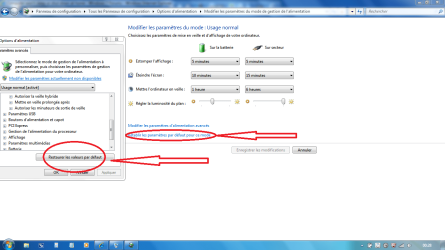
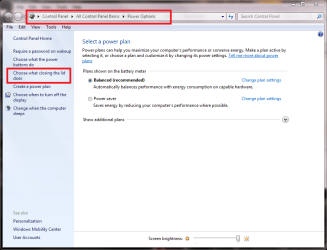
What's about reseting the Power management to default then reboot and see what's happen?
 

Attachments

  • Capture.PNG
    Capture.PNG
    58.8 KB · Views: 260

My Computer My Computer

At a glance

Windows 7 Professional SP1 - x64 [Non-UEFI Boot]Ivy Bridge Core i5 3570K (Delidded)G.Skill "Ares" DDR3 PC3-12800 - 1600MHz (16Gb)Asus Dual-RX480-O4G
Computer type
PC/Desktop
Computer Manufacturer/Model Number
Custom Build
OS
Windows 7 Professional SP1 - x64 [Non-UEFI Boot]
CPU
Ivy Bridge Core i5 3570K (Delidded)
Motherboard
Asus P8Z77-V LE PLUS
Memory
G.Skill "Ares" DDR3 PC3-12800 - 1600MHz (16Gb)
Graphics Card(s)
Asus Dual-RX480-O4G
Sound Card
Creative Sound Blaster Z w/5.1 sound system
Monitor(s) Displays
Asus IPS 23"
Screen Resolution
16/9
Hard Drives
Internal:
500Go Sata 6Gb/s (x2)
500Go Sata 3Gb/s (x2)
SSD 60Go Sata 6Gb/s
PSU
In Win C 900W Series 80+ Platinum
Case
Thermaltake Chaser A71
Cooling
Custom Water Cooling Loop
Keyboard
Cooler Master QuickFire XTi
Mouse
Razer Imperator 2012 (4G)
Antivirus
MSE
Browser
IE 11.0.xxx Rtm
Other Info
"Raid0" with Intel Smart Response Technology (HDD/SSD)
If it is a recently bought computer, try calling in the company you bought it from. If nothing can be worked out on this forum or over the phone, ask if they have a replacement plan (Assuming you find your computer to be faulty)
 

My Computer My Computer

At a glance

Microsoft Windows 8.1 Pro 64-bitIntel(R) Core(TM) i3-4130 CPU @ 3.40GHz8.00 GBNone
Computer type
PC/Desktop
Computer Manufacturer/Model Number
Custom Asus Build
OS
Microsoft Windows 8.1 Pro 64-bit
CPU
Intel(R) Core(TM) i3-4130 CPU @ 3.40GHz
Motherboard
B85M-E
Memory
8.00 GB
Graphics Card(s)
None
Sound Card
Realtek High Definition Audio
Monitor(s) Displays
Asus 23.6" Monitor
Screen Resolution
1920 x 1080 x 32 bits (4294967296 colors) @ 60 Hz
Hard Drives
INTEL SSDSC2BW180A4
Samsung SSD 840 PRO Series
PSU
Seasonic S12II-380Bronze
Case
Lian Li
Cooling
Fan, Passive
Keyboard
Logitech K120
Mouse
Microsoft Touch Mouse
Internet Speed
4ms Ping, 19.0 Mbps Download, 19.0 Mbps Upload
Antivirus
Eset Endpoint
Browser
Internet Explorer, Chrome
30389d1254677547-win7-problem-finland_orb_small.png


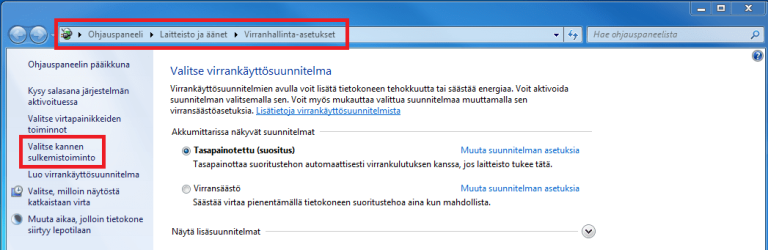
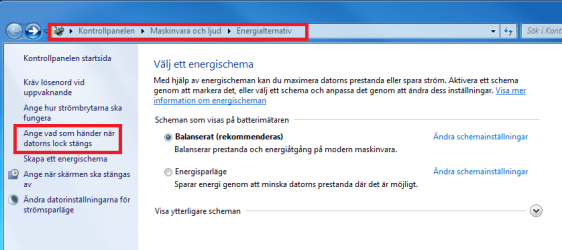
Moi Leo, tervetuloa Seiska Foorumille. Kun en tiedä onko sinulla Windows suomeksi vai ruotsiksi, tässä varmuuden vuoksi molemmilla.

Avaa virranhallinta-asetukset virtasymbolista tai ohjauspaneelista. Klikkaa ensin Valitse kannen sulkemistoiminto (Ange vad som händer när datorns lock stängs):

Hibernate_FI_0.png
Hibernate_SE_0.png

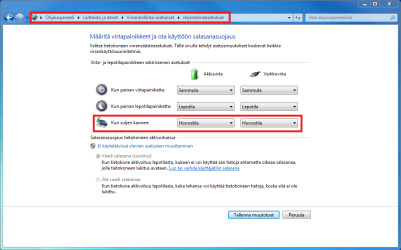
Tarkista punaisella merkityt kohdat. Vaihda asetukseksi Horrostila (Viloläge) :

Hibernate_FI_1.png
Hibernate_SE_1.png

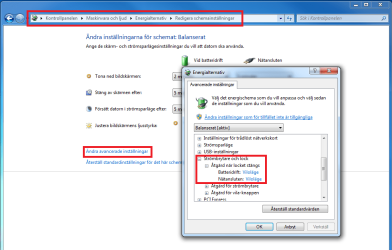
Seuraavaksi muokkaa valitsemasi virrankäyttösuunnitelman asetuksia (schema inställingar):

Hibernate_FI_2.png
Hibernate_SE_2.png

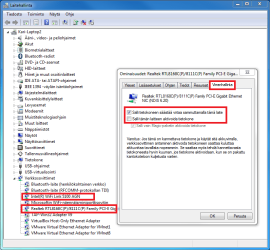
Sitten vielä laitehallinta (enhetshanteraren). Klikkaa hiiren oikealla painikkeella verkkosovitinta, valitse Ominaisuudet (Egenskaper), avaa Virranhallinta välilehti (Energiesparfunktioner). Aseta sekä LAN- että WiFi-sovittimen virranhallinta-asetukset kuvan mukaisesti:

Hibernate_FI_3.png
Hibernate_SE_3.png

Kaiken pitäisi nyt olla kunnossa.


30388d1254677173-win7-problem-us-uk.png


Hi Leo, welcome to the Seven Forums. Your name indicates that you could also be a Swedish speaking Finn, so above the instructions in Finnish and Swedish, in case you have Windows in one of the domestic languages. Here's the same in English.

First, open power options either from power symbol in notification area or from Control Panel. Click Choose what closing the lid does from the left pane:

Hibernate_EN_0.png

Change the settings marked with red rectangle to Hibernate:

Hibernate_EN_1.png

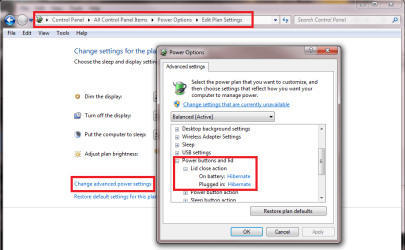
Now edit the power plan settings. Click Change advanced power settings, check that lid close action is set to hibernate:

Hibernate_EN_2.png

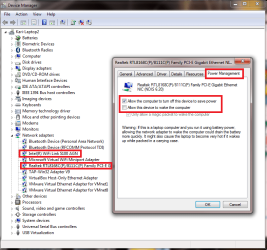
Then open the Device Manager. Right click your network adapter, choose Properties, open Power Management tab. Change settings as shown in screenshot:

Hibernate_EN_3.png

That should do it.

Kari
 

My Computer My Computer

At a glance

Windows 10 Pro x64 EN-GB1.6 GHz Intel Core i7-720QM Processor6 GBATI Mobility Radeon HD 5850 Graphics
Computer type
Laptop
Computer Manufacturer/Model Number
HP ENVY 17-1150eg
OS
Windows 10 Pro x64 EN-GB
CPU
1.6 GHz Intel Core i7-720QM Processor
Memory
6 GB
Graphics Card(s)
ATI Mobility Radeon HD 5850 Graphics
Sound Card
Beats sound system with integrated subwoofer
Monitor(s) Displays
17" laptop display, 22" LED and 32" Full HD TV through HDMI
Screen Resolution
1600*900 (1), 1920*1080 (2&3)
Hard Drives
Internal: 2 x 500 GB SATA Hard Disk Drive 7200 rpm
External: 2TB for backups, 3TB USB3 network drive for media
Cooling
As Envy runs a bit warm, I have it on a Cooler Master pad
Keyboard
Logitech diNovo Media Desktop Laser (bluetooth)
Mouse
Logitech Performance Mouse MX
Internet Speed
50/10 Mbps VDSL
Antivirus
Windows Defender 4.3.9431.0
Browser
Maxthon 3.5.2., IE11
Thanks for your replies, kiitos vastauksesta, tack för svaret!
All these settings are okay, and the computer still refuses to sleep and shut down at home. I'm using it on both battery power and plugged in both at home and elsewhere.

(Kiitos Kari laajasta vastauksesta! Ja kyllä, olen suomenruotsalainen :))
 

My Computer My Computer

At a glance

Windows 7 Home Premium x64Intel Core i7-720QM4GB DDR3ATI Mobility Radeon HD 5650
Computer Manufacturer/Model Number
Hewlett-Packard/HP Envy 14
OS
Windows 7 Home Premium x64
CPU
Intel Core i7-720QM
Memory
4GB DDR3
Graphics Card(s)
ATI Mobility Radeon HD 5650
29244d1253753993-default-gateway-not-available-sweden_small.png


Jag tänkte du kunde vara en hurri. Jag förlåtar dig ;)

Kolla dina Bluetooth enheter, so att dom inte har lov att väcka datorn. Gör det på samma viset som med nätverkskortet, egenskaper i enhetshantering, energiesparfunktioner. Jag har till exempel haft en HP Bluetooth skrivare vilken kunde väcka min datorn; so snart skrivaren skickade en signal, var min datorn uppe igen.


29245d1253753993-default-gateway-not-available-us-uk.png


One point for me! I guessed right Leo's native language Swedish, the other of two official languages in Finland, only because of his name.

Anyway, I'm telling him here above to also check power settings for bluetooth devices from Device Manager. I have had an HP Bluetooth printer that could wake up an HP laptop, every time another computer printed something.

Kari
 

My Computer My Computer

At a glance

Windows 10 Pro x64 EN-GB1.6 GHz Intel Core i7-720QM Processor6 GBATI Mobility Radeon HD 5850 Graphics
Computer type
Laptop
Computer Manufacturer/Model Number
HP ENVY 17-1150eg
OS
Windows 10 Pro x64 EN-GB
CPU
1.6 GHz Intel Core i7-720QM Processor
Memory
6 GB
Graphics Card(s)
ATI Mobility Radeon HD 5850 Graphics
Sound Card
Beats sound system with integrated subwoofer
Monitor(s) Displays
17" laptop display, 22" LED and 32" Full HD TV through HDMI
Screen Resolution
1600*900 (1), 1920*1080 (2&3)
Hard Drives
Internal: 2 x 500 GB SATA Hard Disk Drive 7200 rpm
External: 2TB for backups, 3TB USB3 network drive for media
Cooling
As Envy runs a bit warm, I have it on a Cooler Master pad
Keyboard
Logitech diNovo Media Desktop Laser (bluetooth)
Mouse
Logitech Performance Mouse MX
Internet Speed
50/10 Mbps VDSL
Antivirus
Windows Defender 4.3.9431.0
Browser
Maxthon 3.5.2., IE11
In Device Manager see if the Network LAN adapter has a Power Management tab, then try changing its settings.

Check what is hanging sleep in the Performance Log on Advanced Tools page accessed by clicking your WEI score at Computer Properties. Google repeat errrors text + ID# to resolution. Check for cued issues at top of Tools page, Generate A System health Report.

Type "solutions" in start search box to check if any have been sent for problems reported or not.

Here is how to technically troubleshoot sleep issues: http://www.msfn.org/board/topic/140247-trace-windows-7-bootshutdownhibernatestandbyresume-issues/
 
Thank you both, but the problem still remains. The performance log had lots of warnings and errors in it concerning booting and standby, but at least a quick scroll through most of them revealed nothing that could be the cause of this.
 

My Computer My Computer

At a glance

Windows 7 Home Premium x64Intel Core i7-720QM4GB DDR3ATI Mobility Radeon HD 5650
Computer Manufacturer/Model Number
Hewlett-Packard/HP Envy 14
OS
Windows 7 Home Premium x64
CPU
Intel Core i7-720QM
Memory
4GB DDR3
Graphics Card(s)
ATI Mobility Radeon HD 5650
Back
Top