
Confused- tj.max on Intel Atom CPU's?

Trin

New member
Local time
2:28 AM
Messages
5
Hi!

I'm confused about the info on TJ.Max on the web. Some say its the max temp and should not be reached, otherwise system shuts down ....others say that, with Intel chips, its the ideal temperature for operation and if it drops DOWN, to 0, the slower and worst it gets (so 20*C is really bad for my Atom Atom N270 (Diamondville) )

My education so far is:

Post by ucode on: What is Tj Max? - Page 2 - Overclock.net - Overclocking.net

Posts by GigaByte and DuckieHo on Whats TJ. Max stand for? - Page 2 - Overclock.net - Overclocking.net

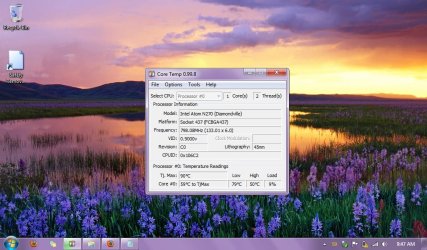
Currently, after bringing up my PC from shutdown or sleep, my temperature according to Core Temp is 70-73*C, and then (oddly- to my thinking), it drops to 60s- 50s when I start running Firefox, Windows Explorer, etc. Here's a current snapshot.

Also wanted a clarify, especially for anyone who uses Core Temp. According to this, the Low is 79*C! Shouldnt the low be- well a lower number?
 

Attachments
  • temp- May 30 2011.jpg
    temp- May 30 2011.jpg
    110.3 KB · Views: 318

My Computer My Computer

Computer Manufacturer/Model Number
Del Latitude 2100
OS
Windows 7 Home Premium 32-Bit SP1
CPU
Intel Atom CPU N270 @1.60GHz
Memory
512MB
Graphics Card(s)
Mobile Intel 945 Express Chipset Family
Hard Drives
64 GB SSD
Case
Plastic
Cooling
3 Side Vents,w/ 3-fan [home] & Thermapak [travel] coolers
Other Info
I just found out, apparently I only have 1 Core....but its been running fine so far so I guess that's OK:

http://www.sevenforums.com/hardware-devices/16849-my-intel-atom-dual-core.html
Besides comments to specific questions/clarifications above, what I'm really looking for is accurate temp info for my own CPU in which I can run my system on with optimization towards longevity AND performance- longevity being a priority, as I'm tight on money at the moment and very dependent on this PC for everything, including my bread.
 

My Computer My Computer

Computer Manufacturer/Model Number
Del Latitude 2100
OS
Windows 7 Home Premium 32-Bit SP1
CPU
Intel Atom CPU N270 @1.60GHz
Memory
512MB
Graphics Card(s)
Mobile Intel 945 Express Chipset Family
Hard Drives
64 GB SSD
Case
Plastic
Cooling
3 Side Vents,w/ 3-fan [home] & Thermapak [travel] coolers
Other Info
I just found out, apparently I only have 1 Core....but its been running fine so far so I guess that's OK:

http://www.sevenforums.com/hardware-devices/16849-my-intel-atom-dual-core.html
TJ Max is the maximum temperature your CPU can go to before it takes defensive action to prevent damage. It is not an operating temperature you want to be near. The processor will lower its clock to reduce temperature if it gets too hot, so you will see reduced performance at higher temperatures. If the temperature can't be kept below the maximum junction temp, the processor will be shut down to prevent damage.

You can read about it in your processor datasheet here:

http://download.intel.com/design/processor/datashts/320032.pdf
 

My Computer My Computer

Computer type
PC/Desktop
Computer Manufacturer/Model Number
Home built (GeneO industries)/Model 4
OS
Windows 10 Pro. EFI boot partition, full EFI boot
CPU
i7 4770k 4.4GHz (44-44-43-43 turbo) @ 1.248V
Motherboard
ASUS Maximus VI Hero
Memory
16GB (8GBx2) @2200 MHz G.skill Sniper 10-11-10-30-1, 1.6V
Graphics Card(s)
MSI GTX 970 Gaming 4G
Sound Card
Onboard SupremeFX Audio
Monitor(s) Displays
NEC Spectraview 2490WUXi-SV
Screen Resolution
1920 x 1200
Hard Drives
Samsung 850 Pro 256GB (OS), Samsung 2x 128GB 840 Pro SSD in RAID0, 3x WD Blue 6Gb/s 1TB RAID0, WD 2TB Black external USB 3.0, 2TB WD20EARS Green external USB 3.0, 2x 500GB Seagate and 1 750 GB external USB, 1x 350GB external USB3
PSU
Seasonic X-850 (2012 KM3 model)
Case
Fractal Design Define R4
Cooling
NH-D14, NF-F12, NF-A15; NF-P14, NF-P12,NF-A14, S12A PWM
Keyboard
Cooler Master Storm Quickfire Rapid - Brown
Mouse
Logitech G602
Internet Speed
126.4 Mb/s down, 24.3 Mb/s up
Other Info
USB 3.0 x8 , SATA III x8, eSATA, USB 2.0 x6. Samsung DVD R/W drive.

WEI: CPU 7.8, Memory 7.9, Graphics 7.9, Disk 7.9
Tjmax is the max temperature that your cpu can reach, of course it'll throttle and the thermal protection mechanism will shut it down around 10 degrees celsius before its reached. The tjmax for your processor is 90 degrees celsius.

Intel® Atom

So yes, 79 degrees is somewhat high. But do your fans start whirring noisily?

Different temp monitoring tools show somewhat different results- I remember reading different tools even use different reference temps (tjmax) plus the sensors are not 100 percent accurate, they can vary plus minus 5-10 degrees. So using another tool may well give a somewhat different result.

However, momentary high temps should not cause too much concern. You can check what programs you have set to startup at boot. Also take some steps most laptop owners do- blow out dust, use a usb chillpad, dont use on the bed, dont use high performance plan all the time.
 

My Computer My Computer

Computer Manufacturer/Model Number
Too many to describe...
OS
Windows 7 x64 pro/ Windows 7 x86 Pro/ XP SP3 x86
@GeneO: Wow!! Thank you! Thanks for the link, its very helpful! Granted I'm not geeky enough to know what all the specs refer to, but its good to have any case. :) :)


@Bill2: Thanks!!! In response:

Intel® Atom

So yes, 79 degrees is somewhat high. But do your fans start whirring noisily?

I run a 3-fan USB cooler at home with it ....taking the cooler out, exactly 1 or 2 minutes after = sitting up without my ear close to the keyboard, it seems quiet (my external drive hums louder and more obviously)...its when I put my ear next to to the keyboard, when I hear the fan.

After 5 minutes you do hear the fan louder, and when you put the ear closer to the keyboard you hear a ticking sound, rapid ticks. Both are gentle and not aggressive. ATM I'm running at 51-61*C


Different temp monitoring tools show somewhat different results- I remember reading different tools even use different reference temps (tjmax) plus the sensors are not 100 percent accurate, they can vary plus minus 5-10 degrees. So using another tool may well give a somewhat different result.

That's a relief. What do you use to measure? I've looked at different threads and upon recommendations decided to use CoreTemp but I think I'll DL others as well.

However, momentary high temps should not cause too much concern. You can check what programs you have set to startup at boot. Also take some steps most laptop owners do- blow out dust, use a usb chillpad, dont use on the bed, dont use high performance plan all the time.

I use a balanced plan, with mods so that I dont have to restart PC from hibernate all the time everytime I leave my PC alone for ten minutes.

What do you recommend to use to blow out dust? More info- My dust level so far seems fine- the extra fans have helped a lot, and there are no dust clusters on my side vents. My keyboard is completely sealed, all one piece so there is very little chance for dust to get in.

I'm getting a Thermapak in a few weeks to use on the road, but what do you recommend for a chillpad?
 
Last edited:

My Computer My Computer

Computer Manufacturer/Model Number
Del Latitude 2100
OS
Windows 7 Home Premium 32-Bit SP1
CPU
Intel Atom CPU N270 @1.60GHz
Memory
512MB
Graphics Card(s)
Mobile Intel 945 Express Chipset Family
Hard Drives
64 GB SSD
Case
Plastic
Cooling
3 Side Vents,w/ 3-fan [home] & Thermapak [travel] coolers
Other Info
I just found out, apparently I only have 1 Core....but its been running fine so far so I guess that's OK:

http://www.sevenforums.com/hardware-devices/16849-my-intel-atom-dual-core.html
Back
Top