Solved Connect router wirelessly to main router

spongebot64

Maurice Moss' Cousin
Member
Local time
3:22 AM
Messages
43
Recently I bought a TP-Link WR841N router and, unaware of what it needed, there had to be an ethernet cable coming from the main router (BT Homehub 3) for it to work. Is there any way I can connect these two wirelessly? I don't mind whatever way I connect it to my PC.
 

My Computer My Computer

Computer type
Laptop
Computer Manufacturer/Model Number
HP Envy 17 1050EA
OS
Windows 7 SP1 64-bit
CPU
Intel Core i7 720QM @ 1.6GHz
Motherboard
HP 144D
Memory
4GB (2x2GB)
Graphics Card(s)
ATi Mobility Radeon HD 5850 1GB
Sound Card
Asus Xonar U3
Screen Resolution
1920x1080@60Hz
Hard Drives
500GB Toshiba MK505GSY @ 7200rpm
Keyboard
Logitech K260 Wireless
Mouse
Logitech M210 Wireless
Antivirus
Norton 360
Browser
Chrome 38
Why do you need the additional TP-Link router - is the BT hub not a combined N modem/ router ? A bit more detail of your setup would help understand what you're trying to achieve...
 

My Computer My Computer

Computer Manufacturer/Model Number
HP Desktop Slimline
OS
Windows 7 Home Premium 64-bit
CPU
Athlon
Memory
3GB
Graphics Card(s)
Integrated
Monitor(s) Displays
HP 20" LCD
Hard Drives
500GB
Internet Speed
Slow
Basically, all I want is a semi-wireless connection between my desktop and the router - my desktop connecting to what I've got (which should have been an access point) and then connecting wirelessly to the BT Hub. All I want to know is that is this possible, or will I have to take this back (which I'm more annoyed of frankly)?
 

My Computer My Computer

Computer type
Laptop
Computer Manufacturer/Model Number
HP Envy 17 1050EA
OS
Windows 7 SP1 64-bit
CPU
Intel Core i7 720QM @ 1.6GHz
Motherboard
HP 144D
Memory
4GB (2x2GB)
Graphics Card(s)
ATi Mobility Radeon HD 5850 1GB
Sound Card
Asus Xonar U3
Screen Resolution
1920x1080@60Hz
Hard Drives
500GB Toshiba MK505GSY @ 7200rpm
Keyboard
Logitech K260 Wireless
Mouse
Logitech M210 Wireless
Antivirus
Norton 360
Browser
Chrome 38
Is this your BT Homehub 3?
New BT Home Hub 3 - BT Shop

If it is then you already have a wireless router and don't need the TP-Link WR841N.

If you're using the TP-Link WR841N as an repeater/extender then that's different.

ibshaw asked a very good question. I'm not sure that your answer cleared things up though.

You can have a wired connection and / or a wireless connection. I don't know what a semi-wireless connection is.

You currently connect to the BT Homehub wired?
my desktop connecting to what I've got (which should have been an access point)
You want to connect to to the BT Homehub wirelessly?
then connecting wirelessly to the BT Hub
AS far as I can tell, you can do that without the TP-Link WR841N. It depends on more information about the BT Homehub 3. It alwso depends on the distance between the BT Homehub 3 and your machine.

You have a desktop and the BT Homehub 3 is near enough to the PC, then a wired connection will give you superior throughput.

BT Homehub 3 references:
http://bt.custhelp.com/app/answers/detail/a_id/32813/~/bt-home-hub-3
.
 

My Computer My Computer

Computer type
Laptop
Computer Manufacturer/Model Number
HP Pavilion dv6-6c10us
OS
x64 (6.3.9600) Win8.1 Pro & soon dual boot x64 (6.1.7601) Win7_SP1 HomePrem
CPU
AMD A6-3420M APU with Radeon(tm) HD Graphics
Motherboard
Hewlett-Packard 1805
Memory
6.00 GB
Graphics Card(s)
AMD Radeon(TM) HD 6520G
Sound Card
(1) AMD High Definition Audio Device (2) IDT High Definiti
Monitor(s) Displays
HP W2072a 20" LCD (1600 x 900) @ 60 Hz
Screen Resolution
1366 x 768 x 32 bits (4294967296 colors) @ 60 Hz
Hard Drives
ST640LM0 00 HM641JI SATA Disk Device
Keyboard
Logitech k520 wireless KB
Mouse
Logitech m320 wireless mouse (bundled with KB)
Internet Speed
15/5 | 54 MB Wireless 'n'
Antivirus
Realtime: Defender or Avast | On-demand: Malwarebytes, ESET
Browser
IE 11 on Win8, IE 10 on win 7
Other Info
Media: [Gimp, Audacity, VLC] || Comm: [WEmail 2012, Skype] || Productivity: [OpenOffice,| Textpad] || Utils: [Sysinternals, cCleaner, Speccy, Defraggler]
Basically, can I turn the TP-Link router into something like an acccess point or a repeater? I'm sorry for the vague answers, it's just that I've been following online guides (carefully), resulting in no success.

I know I can connect wirelessly from the desktop to the BT Hub in the first place, but the connection is rubbish thnaks to the only place I can put my desktop. As for wired, it offers a better connection, though it poses the disadvantage of running throughout the house.

So, it lead me to get something that can connect semi-wirelessly (a term that I've coined in this instance); connect an ethernet cable from the desktop to the TP-Link router (which now I know should have been an access point in this case), and let the connection from there be wireless.
 

My Computer My Computer

Computer type
Laptop
Computer Manufacturer/Model Number
HP Envy 17 1050EA
OS
Windows 7 SP1 64-bit
CPU
Intel Core i7 720QM @ 1.6GHz
Motherboard
HP 144D
Memory
4GB (2x2GB)
Graphics Card(s)
ATi Mobility Radeon HD 5850 1GB
Sound Card
Asus Xonar U3
Screen Resolution
1920x1080@60Hz
Hard Drives
500GB Toshiba MK505GSY @ 7200rpm
Keyboard
Logitech K260 Wireless
Mouse
Logitech M210 Wireless
Antivirus
Norton 360
Browser
Chrome 38
Don't mean to But into the thread, but the system you are looking for is available, I use it personally to connect my Ethernet only Media devices, (TV/STB/BD-Surround System), in the living room, wirelessly from my router. I have tested it with laptops, and PCs also

Whether you can achieve this with a Router that is designed to distribute a wired service from a Wired one, will depend on the router

The unit I uses is quite cheap and works for me :)

Edimax CV-7428nS - N300 Universal Wi-Fi Bridge for Smart TV, Blu-ray and Gaming

Check the normal sources such as eBay for prices ;)
 

My Computers My Computers

System One System Two

  • Computer type
    PC/Desktop
    Computer Manufacturer/Model Number
    ChillBlast - Custom to my design
    OS
    Windows 11 Pro x64 [Latest Release and Release Preview]
    CPU
    Ryzen 9 5950X, 3.8 - 5.2 MHz
    Motherboard
    Asus Prime X570-Pro
    Memory
    64GB [2 x 32GB] DDR4 3200MHz
    Graphics Card(s)
    4GB NVIDIA GEFORCE GTX 1650 Ti
    Sound Card
    On-board SPDIF to 5.1 System + HDMI [5.1 system]
    Monitor(s) Displays
    32" UHD 32 Bit HDR Monitor + 43" UHD 4K 32Bit HDR TV
    Screen Resolution
    2 x 3840 x 2160 @60Hz
    Hard Drives
    1TB M2 SSD OS, 500GB Fast Access SSD, 2 x 8TB Data + Various Externals from 1TB to 4TB, 10TB NAS
    PSU
    NZXT C750 80 PLUS Gold 750W Modular PSU
    Case
    Workstation Case [Matt Black]
    Cooling
    NZXT Kraken X63 280mm CPU Cooler +2x Quiet Case fans
    Keyboard
    Logitech Wireless MX Keys & K400 + others
    Mouse
    Logitech Wireless MX Master 3S
    Internet Speed
    920 MB Down 50 MB Up
    Antivirus
    BitDefender Total Security Pro
    Browser
    Chrome (always run latest Non-Beta)
    Other Info
    Also run ...
    Laptop - Quad 8GB - Windows 10 Pro x64
    Nexus 7 Android tablet x2
    Samsung 10.2" tablet
    Blackview TAB 8 4G Android Tablet c/w Keyboard
    Wacom Intuos Pro Medium Pen Pad
    Wacom Intuos Pro Small Pen Pad
    Wacom Expresskeys Remote
    Loopdeck+ Graphics Controller
    Shuttle Pro v2 Control
  • Computer type
    Laptop
    System Manufacturer/Model Number
    Dell XPS 17 10750H
    OS
    Windows 11 Pro x64 Latest RP
    CPU
    Intel I7 10750H 5.0GHz
    Motherboard
    Dell XPS
    Memory
    32GB [2x16GB] DDR4 2933 MHz
    Graphics Card(s)
    nVidia GTX1650Ti 4 GB GDDR6
    Sound Card
    Stock [Realtek] 4 Speaker
    Monitor(s) Displays
    17" IPS UHD+ Infinity Edge Touchscreen
    Screen Resolution
    3840 x 2400
    Hard Drives
    2TB M2 NVMe, 4TB External + various 500GB & 1TB External NVMe (also have access to spinner HDD from
    PSU
    Stock
    Case
    Stock XPS Aluminium & Carbon Fibre
    Cooling
    Stock - Active Fan Control
    Keyboard
    Backlit + Various Logitech
    Mouse
    Stock Track Pad + Logitech MX Trackball
    Internet Speed
    72 MB Down 18MB Up
    Browser
    Chrome
    Other Info
    Also run ...
    Laptop - Quad 8GB - Windows 10 Pro x64
    Nexus 7 Android tablet x2
    10.2" tablet
    Sony Z3 Android Smartphone
    Wacom Intuos Pro Medium Pen Pad
    Wacom Intuos Pro Small Pen Pad
    Wacom Expresskeys Remote
    Loopdeck+ Graphics Controller
    Shuttle Pro v2 Control Pad
    10TB NAS
Thanks for the suggestion, I'll keep that in mind if I have to return the router. But for now, on what I'm trying to achieve.
 

My Computer My Computer

Computer type
Laptop
Computer Manufacturer/Model Number
HP Envy 17 1050EA
OS
Windows 7 SP1 64-bit
CPU
Intel Core i7 720QM @ 1.6GHz
Motherboard
HP 144D
Memory
4GB (2x2GB)
Graphics Card(s)
ATi Mobility Radeon HD 5850 1GB
Sound Card
Asus Xonar U3
Screen Resolution
1920x1080@60Hz
Hard Drives
500GB Toshiba MK505GSY @ 7200rpm
Keyboard
Logitech K260 Wireless
Mouse
Logitech M210 Wireless
Antivirus
Norton 360
Browser
Chrome 38
If the wireless connection to the BT Homehub is "rubbish" then it will still be rubbish with the other wireless router. You did mention location, so you might get better throughput with the TP-Link WR841N as a repeater.

Here's something that might work better for you - probably around the same cost as the TP-Link WR841N router.

A neighbor of mine had them in his house and they worked well. I spoke with a tech at a big box store and he suggested that a powerline adapter might meet my needs (nope, I have a completly different requirement), so I set up a repeater.

Note that you lose half the signal in repeater mode.

Once you settle on the means, I or another member can help you get it up and running.
 

My Computer My Computer

Computer type
Laptop
Computer Manufacturer/Model Number
HP Pavilion dv6-6c10us
OS
x64 (6.3.9600) Win8.1 Pro & soon dual boot x64 (6.1.7601) Win7_SP1 HomePrem
CPU
AMD A6-3420M APU with Radeon(tm) HD Graphics
Motherboard
Hewlett-Packard 1805
Memory
6.00 GB
Graphics Card(s)
AMD Radeon(TM) HD 6520G
Sound Card
(1) AMD High Definition Audio Device (2) IDT High Definiti
Monitor(s) Displays
HP W2072a 20" LCD (1600 x 900) @ 60 Hz
Screen Resolution
1366 x 768 x 32 bits (4294967296 colors) @ 60 Hz
Hard Drives
ST640LM0 00 HM641JI SATA Disk Device
Keyboard
Logitech k520 wireless KB
Mouse
Logitech m320 wireless mouse (bundled with KB)
Internet Speed
15/5 | 54 MB Wireless 'n'
Antivirus
Realtime: Defender or Avast | On-demand: Malwarebytes, ESET
Browser
IE 11 on Win8, IE 10 on win 7
Other Info
Media: [Gimp, Audacity, VLC] || Comm: [WEmail 2012, Skype] || Productivity: [OpenOffice,| Textpad] || Utils: [Sysinternals, cCleaner, Speccy, Defraggler]
When I mean the connection is rubbish, it's not due to the BT Hub - it's where my desktop is located that's giving me problems. And don't suggest that I move it because I can't move it anywhere else.

But now, after some time with the DD-WRT flashed onto the router, it's now able to pick up my BT Hub's signal wirelessly. However the down/upload speed has taken a hit: Down - 75/76Mbps > 18Mbps; Up 18Mbps > 7Mbps.
 

My Computer My Computer

Computer type
Laptop
Computer Manufacturer/Model Number
HP Envy 17 1050EA
OS
Windows 7 SP1 64-bit
CPU
Intel Core i7 720QM @ 1.6GHz
Motherboard
HP 144D
Memory
4GB (2x2GB)
Graphics Card(s)
ATi Mobility Radeon HD 5850 1GB
Sound Card
Asus Xonar U3
Screen Resolution
1920x1080@60Hz
Hard Drives
500GB Toshiba MK505GSY @ 7200rpm
Keyboard
Logitech K260 Wireless
Mouse
Logitech M210 Wireless
Antivirus
Norton 360
Browser
Chrome 38

My Computer My Computer

Computer type
Laptop
Computer Manufacturer/Model Number
HP Pavilion dv6-6c10us
OS
x64 (6.3.9600) Win8.1 Pro & soon dual boot x64 (6.1.7601) Win7_SP1 HomePrem
CPU
AMD A6-3420M APU with Radeon(tm) HD Graphics
Motherboard
Hewlett-Packard 1805
Memory
6.00 GB
Graphics Card(s)
AMD Radeon(TM) HD 6520G
Sound Card
(1) AMD High Definition Audio Device (2) IDT High Definiti
Monitor(s) Displays
HP W2072a 20" LCD (1600 x 900) @ 60 Hz
Screen Resolution
1366 x 768 x 32 bits (4294967296 colors) @ 60 Hz
Hard Drives
ST640LM0 00 HM641JI SATA Disk Device
Keyboard
Logitech k520 wireless KB
Mouse
Logitech m320 wireless mouse (bundled with KB)
Internet Speed
15/5 | 54 MB Wireless 'n'
Antivirus
Realtime: Defender or Avast | On-demand: Malwarebytes, ESET
Browser
IE 11 on Win8, IE 10 on win 7
Other Info
Media: [Gimp, Audacity, VLC] || Comm: [WEmail 2012, Skype] || Productivity: [OpenOffice,| Textpad] || Utils: [Sysinternals, cCleaner, Speccy, Defraggler]
Yeah, I think I'll get a powerline adapter. Now should I get a 500Mbps one, or would 200Mbps do?
 

My Computer My Computer

Computer type
Laptop
Computer Manufacturer/Model Number
HP Envy 17 1050EA
OS
Windows 7 SP1 64-bit
CPU
Intel Core i7 720QM @ 1.6GHz
Motherboard
HP 144D
Memory
4GB (2x2GB)
Graphics Card(s)
ATi Mobility Radeon HD 5850 1GB
Sound Card
Asus Xonar U3
Screen Resolution
1920x1080@60Hz
Hard Drives
500GB Toshiba MK505GSY @ 7200rpm
Keyboard
Logitech K260 Wireless
Mouse
Logitech M210 Wireless
Antivirus
Norton 360
Browser
Chrome 38
That's your call spongebot... it depends on the service plan you have with your provider. If you have a screaming connection, then go with the high end powerline. If you have a lower tier plan, go with the low end powerline.


It's mega bits, not mega bytes right?
So divide by 8 (500 Mb = 62 MB) add in some transmisson overhead (~10% takes you down to ~56 MB) and that's with optimal settings - real world results will be lower. How much lower depends on a number of factors.

As an example, I have two devices, a laptop and a tablet. They both have N wireless cards and both "talk" to the same router. The laptop gets 26-72 Mbps and the tablet gets a consistent 150 Mbps. Big difference! I mention this only becasue I can't figure out the numbers on my laptop - other than it's a crappy card. I've set, reset, upgraded, updated, reset.... those exercises were over about 6 months to a year and I did get a good improvement, but still not the rated speeds.

I guess what I'm saying is talk with the tech people in the store, get the best piece of equipment for the lowest price (not the lowest price equipment though). Sales people will sell you anything - the technical people work with it.

I'm sorry that I can't recommend a brand or model, I can tell you that my neighbor had Monster powerline adapters.

You'll still need ethernet cables from your PC to one powerline adaper and another cable for the powerline adapter that connects to the BT Homehub.

Bill
.

on a good day.
 

My Computer My Computer

Computer type
Laptop
Computer Manufacturer/Model Number
HP Pavilion dv6-6c10us
OS
x64 (6.3.9600) Win8.1 Pro & soon dual boot x64 (6.1.7601) Win7_SP1 HomePrem
CPU
AMD A6-3420M APU with Radeon(tm) HD Graphics
Motherboard
Hewlett-Packard 1805
Memory
6.00 GB
Graphics Card(s)
AMD Radeon(TM) HD 6520G
Sound Card
(1) AMD High Definition Audio Device (2) IDT High Definiti
Monitor(s) Displays
HP W2072a 20" LCD (1600 x 900) @ 60 Hz
Screen Resolution
1366 x 768 x 32 bits (4294967296 colors) @ 60 Hz
Hard Drives
ST640LM0 00 HM641JI SATA Disk Device
Keyboard
Logitech k520 wireless KB
Mouse
Logitech m320 wireless mouse (bundled with KB)
Internet Speed
15/5 | 54 MB Wireless 'n'
Antivirus
Realtime: Defender or Avast | On-demand: Malwarebytes, ESET
Browser
IE 11 on Win8, IE 10 on win 7
Other Info
Media: [Gimp, Audacity, VLC] || Comm: [WEmail 2012, Skype] || Productivity: [OpenOffice,| Textpad] || Utils: [Sysinternals, cCleaner, Speccy, Defraggler]
Well my connection, at best, is around 75 megabits/s which, divided by 8, equals 9.375 megabyte/s. It all comes from the fibre optic connection I have.

But yeah, I'll talk to the tech people at the store that I bought my router (which should have been different in the first place). Thanks.
 

My Computer My Computer

Computer type
Laptop
Computer Manufacturer/Model Number
HP Envy 17 1050EA
OS
Windows 7 SP1 64-bit
CPU
Intel Core i7 720QM @ 1.6GHz
Motherboard
HP 144D
Memory
4GB (2x2GB)
Graphics Card(s)
ATi Mobility Radeon HD 5850 1GB
Sound Card
Asus Xonar U3
Screen Resolution
1920x1080@60Hz
Hard Drives
500GB Toshiba MK505GSY @ 7200rpm
Keyboard
Logitech K260 Wireless
Mouse
Logitech M210 Wireless
Antivirus
Norton 360
Browser
Chrome 38
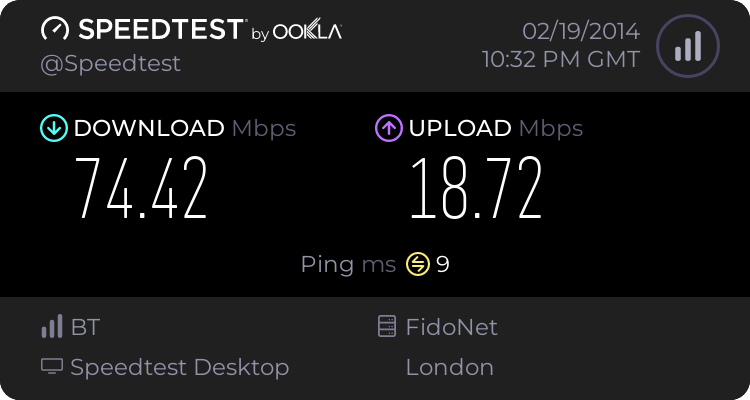
Well, here are my results from using the powerline (specifically the TP Link PA4010):
 

My Computer My Computer

Computer type
Laptop
Computer Manufacturer/Model Number
HP Envy 17 1050EA
OS
Windows 7 SP1 64-bit
CPU
Intel Core i7 720QM @ 1.6GHz
Motherboard
HP 144D
Memory
4GB (2x2GB)
Graphics Card(s)
ATi Mobility Radeon HD 5850 1GB
Sound Card
Asus Xonar U3
Screen Resolution
1920x1080@60Hz
Hard Drives
500GB Toshiba MK505GSY @ 7200rpm
Keyboard
Logitech K260 Wireless
Mouse
Logitech M210 Wireless
Antivirus
Norton 360
Browser
Chrome 38
Looks good, glad I was able to help. Those numbers look pretty good (faster than 95% of GB)

Thanks for marking the thread solved too.

Bill
.
 

My Computer My Computer

Computer type
Laptop
Computer Manufacturer/Model Number
HP Pavilion dv6-6c10us
OS
x64 (6.3.9600) Win8.1 Pro & soon dual boot x64 (6.1.7601) Win7_SP1 HomePrem
CPU
AMD A6-3420M APU with Radeon(tm) HD Graphics
Motherboard
Hewlett-Packard 1805
Memory
6.00 GB
Graphics Card(s)
AMD Radeon(TM) HD 6520G
Sound Card
(1) AMD High Definition Audio Device (2) IDT High Definiti
Monitor(s) Displays
HP W2072a 20" LCD (1600 x 900) @ 60 Hz
Screen Resolution
1366 x 768 x 32 bits (4294967296 colors) @ 60 Hz
Hard Drives
ST640LM0 00 HM641JI SATA Disk Device
Keyboard
Logitech k520 wireless KB
Mouse
Logitech m320 wireless mouse (bundled with KB)
Internet Speed
15/5 | 54 MB Wireless 'n'
Antivirus
Realtime: Defender or Avast | On-demand: Malwarebytes, ESET
Browser
IE 11 on Win8, IE 10 on win 7
Other Info
Media: [Gimp, Audacity, VLC] || Comm: [WEmail 2012, Skype] || Productivity: [OpenOffice,| Textpad] || Utils: [Sysinternals, cCleaner, Speccy, Defraggler]
Back
Top