
Connection hangs

fungole

New member
Local time
11:11 AM
Messages
10
Hi there.

I have connection issues with Windows 7. Problem is that my connection runs fine for 5-10 minutes then afterwards while opening new tabs in mozilla it just hangs there and say unable to connect, then reconnects 30 seconds after. It's even worse with Internet explorer... and with safari it's another story lol. Seems like it just loses signals when too much packets are sent. Another issue is that right after boot, the computer has hard time logging to the internet.

I've tried almost every ' tips and tricks ' available on the forum for internet connectivity optimization such as removing bonjour, unchecking lan boxes, updating drivers for my lan card, setting up a ' work network ' instead of home, etc.

I had a smilar issue with build 7100 but now on build 7600 its just a pita.

I am on a wired home network with an EBR-2310 REV_B rooter.

here's my speedtest
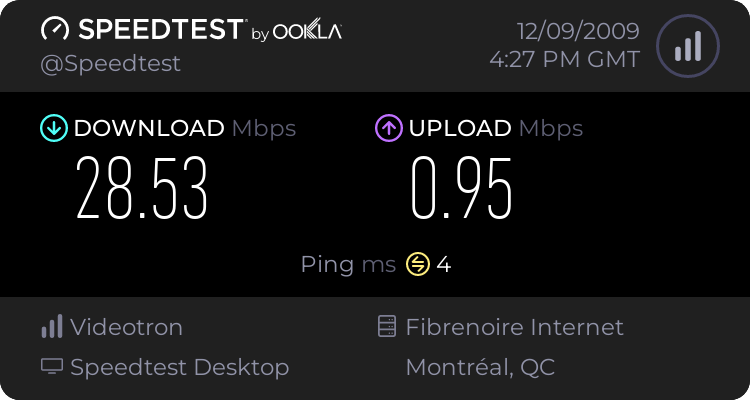
647402654.png


here is my workstation rig

Win 7 professional x64 build 7600

Asus P5Q-E Deluxe with Marvell gigabyte internet lab card hooked to 88E8001.
Intel Q5500 Processor
Corsair Dominator DDR2 6 gigs
Nvidia Quadro FX 1700 512mb
Western Digital caviar black 750 gig hard drive.


I'm seriously out of ressources and need some help.
 

My Computer

OS
Win 7 x64 pro
Hi fungole, welcome to the forums

Let's try some simple things first: have you rebooted your router and or modem?
Have you contacted your service provider? I once had similar problems and it turned out to be their problem.

Do you have alternate equipment you could test? As you say you were also having problems with the RC, the hardware seems to be the constant

Also, you mention build 7600. Are you using the RTM or the retail version? If RTM, check how you downloaded it (depending on the source they contained viruses) and if the download and burn were OK (check MD5 sum)
 

My Computer

Computer Manufacturer/Model Number
Wally, Innc.
OS
Windows 7 x64 finally!
CPU
AMD Athlon II X2 240
Motherboard
Biostar TA790GX XE
Memory
OCZ Platinum 4GB DDR2 1066 (will not work past 800MHz)
Graphics Card(s)
MSI R4670-MD1G Radeon HD 4670 1GB 128-bit GDDR3
Sound Card
ATI High Definition Audio Device Realtek ALC888
Monitor(s) Displays
HP w19e
Screen Resolution
1440x900
Hard Drives
Western Digital Caviar Green WD5000AADS 500GB SATA
Western Digital Caviar Blue WD5000AAKS 500GB SATA
PSU
Athena Power Micro ATX 400W
Case
HEC 6T 6T10BB Black MicroATX Mini Tower
Cooling
stock
Keyboard
wired, many keys
Mouse
HP wireless, 2 buttons, 1 wheel
Internet Speed
DSL 2Mb (recently getting 1.65M!)
I have already contacted my ISP for a check-up and there is no problem. Besides, they just upgraded their cables. Since I got my key from college, I didn't have access to an OEM windows CD, I dl'ed the RTM build from a secure source.

I've done countless resets on my rooter. My two other computers ( one on XP 32 the other on vista oem 32) are running just fine with no connection hangs.

I think it's hardware related but so far I can't really diagnose the problem since everything seems to be updated correctly...

edit :

it seems that both my IPV6 and IPV4 protocols are working, but I only receive packets from an IPV4 network. I think that's my problem right there... is there a way to convert the IPV4 network into IPV6?
 

My Computer

OS
Win 7 x64 pro
fungole, good catch. You should deactivate the IPv6 protocol. In system tray, right click network icon. Choose Open Network and Sharing Center. Click on Local Area Connection | Properties | double click Internet Protocol Version 4 (TCP/IPv4) (tks Torrentg)

IPv6 is a completely different animal, I don't think there is a conversion.

Let me know if this does the trick, otherwise we have to look further. In that case, pls let us know how DNS is set up, better yet, pls post a snip of a ipconfig /all
 
Last edited:

My Computer

Computer Manufacturer/Model Number
Wally, Innc.
OS
Windows 7 x64 finally!
CPU
AMD Athlon II X2 240
Motherboard
Biostar TA790GX XE
Memory
OCZ Platinum 4GB DDR2 1066 (will not work past 800MHz)
Graphics Card(s)
MSI R4670-MD1G Radeon HD 4670 1GB 128-bit GDDR3
Sound Card
ATI High Definition Audio Device Realtek ALC888
Monitor(s) Displays
HP w19e
Screen Resolution
1440x900
Hard Drives
Western Digital Caviar Green WD5000AADS 500GB SATA
Western Digital Caviar Blue WD5000AAKS 500GB SATA
PSU
Athena Power Micro ATX 400W
Case
HEC 6T 6T10BB Black MicroATX Mini Tower
Cooling
stock
Keyboard
wired, many keys
Mouse
HP wireless, 2 buttons, 1 wheel
Internet Speed
DSL 2Mb (recently getting 1.65M!)
i'll post that tonight, i'm at work atm. thanks for the quick answers D:
 

My Computer

OS
Win 7 x64 pro
okay... so I've turned off IPV6, i've seen a small improvement in stability but nothing drastic. I still get intermittent hangs.

What do you want to know about DNS and how do I look for it?
 

My Computer

OS
Win 7 x64 pro
Back
Top