Considering an SSD upgrade.

Karim Kahale

New member
Local time
3:23 PM
Messages
15
Hello everyone,
I'm new to this forum.
I was using recently a new laptop that had an SSD and not hdd. My mind was blown by the speed of the laptop (Samsung)for daily use(browsing-opening lightweight softwares-light tasks). Some of its specs include:
-Intel Core i3-2377M 1.5 ghz
-128 GB SSD
- 4 GB RAM
-Integrated Graphics
-Windows 7 X64 Ultimate

Looking at those specs again, I realized that this not a hell of a machine, simple specs. When I used my own HP laptop again, I felt the great speed gap: it is considered very slow compared to the Samsung Laptop. It even has very good specs:
-Intel Core i3-380M 2.3ghz
-AMD Radeon 5650 HD Grahics
-300 GB HDD
-3 GB RAM
-Windows 7 X64 Ultimate
The only downside here I guess is the SSD, so I was actually considering upgrading to an SSD which would lead to a dramatic increase of in performance (I guess).
Am I right here?
Do I also need a RAM upgrade?

(Other comparison: boot time in the Samsung 5 sec > almost 25-30 sec HP)

Thanks All and sorry for the long post.:)
 

My Computer

Computer type
Laptop
Computer Manufacturer/Model Number
HP
OS
Windows 7 Ultimate 32-bit
CPU
Intel Core i3 CPU
Memory
3 GB RAM
Graphics Card(s)
Intel HD Graphics-ATI Radeon HD 5450
Antivirus
Avast
Browser
Google Chrome

My Computer

Computer type
PC/Desktop
Computer Manufacturer/Model Number
Customs, Dell, Gateway, HP, Toshiba, Acer, ASUS
OS
Windows 7 Ultimate 64-bit, Windows 8.1 64-bit, Mac OS X 10.10, Linux Mint 17, Windows 10 Pro TP
Keyboard
Microsoft
Mouse
Microsoft
Do I also need a RAM upgrade?
Wouldn't hurt as long as the case is open for changing the drive. Put the model name and number in Crucial.com - DRAM, solid state drive (SSD) memory upgrades for Dell, Mac, Apple, HP, Compaq, Lenovo, Acer, ASUS to check what the maximum is. Depending on its age it may have a max of 4GB but could be more.

I just checked, It appears that can upgrade to 8GB of RAM and from HDD to SDD. Although I'm confused about upgrading since I need someone to confirm that this lag is resulting form old hardware (HDD)
 

My Computer

Computer type
Laptop
Computer Manufacturer/Model Number
HP
OS
Windows 7 Ultimate 32-bit
CPU
Intel Core i3 CPU
Memory
3 GB RAM
Graphics Card(s)
Intel HD Graphics-ATI Radeon HD 5450
Antivirus
Avast
Browser
Google Chrome
An SSD and a RAM upgrade will give you a serious upgrade in performance, most notably in boot times, and application opening/loading. An SSD is the best money you can spend on a PC upgrade for enhanced performance at low cost.
 

My Computer

Computer type
PC/Desktop
Computer Manufacturer/Model Number
Mellon Labs (custom build)
OS
Win 7 Pro x64/Win 10 Pro x64 dual boot
CPU
AMD FX 8350 Vishera @ 4200
Motherboard
ASUS M5A97 R2.0
Memory
16 GB Mushkin Blackline DDR3-2400 @ 1866 (9-10-10-10-31)
Graphics Card(s)
XFX Radeon R9 280 Double D Black Edition
Sound Card
Realtek HD Audio on MB. Sounds great.
Monitor(s) Displays
Acer 24", Acer 22"
Screen Resolution
3840 x 1080
Hard Drives
1 x Mushkin Chronos 120 GB SSD (Win 10)
1 x Samsung 850 EVO 250 GB SSD (Win 7)
1 x WD 1TB SATA Blue
1 x WD 1TB SATA Green
PSU
Corsair TX-750
Case
CoolerMaster HAF 912+
Cooling
Coolermaster Seidon 240M Liquid AIO. 6 case fans
Keyboard
Logitech G710+
Mouse
Logitech G500s
Internet Speed
Much better since I got fiber, but still way overpriced.
Antivirus
MSE, Malware Bytes for scanning
Browser
Firefox
Other Info
Corsair VOID USB headphones.

A Mellon Labs X-1 - LCD Smartie driven system status display.

Brought to you by the letter E
An SSD and a RAM upgrade will give you a serious upgrade in performance, most notably in boot times, and application opening/loading. An SSD is the best money you can spend on a PC upgrade for enhanced performance at low cost.

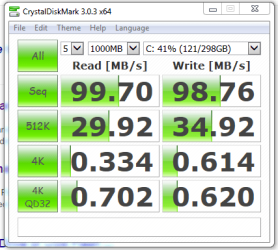
My motherboard only supports SATA 2, this is my benchmark for mu current HDD.
Is it still worth upgrading?
 

Attachments

  • Capture.PNG
    Capture.PNG
    18.3 KB · Views: 11

My Computer

Computer type
Laptop
Computer Manufacturer/Model Number
HP
OS
Windows 7 Ultimate 32-bit
CPU
Intel Core i3 CPU
Memory
3 GB RAM
Graphics Card(s)
Intel HD Graphics-ATI Radeon HD 5450
Antivirus
Avast
Browser
Google Chrome
Even with only SATA 2 you'll still get a serious performance boost with SSD and more RAM so in my opinion and from past experience yes it's worth it
 

My Computer

Computer type
PC/Desktop
Computer Manufacturer/Model Number
Home Made
OS
Windows 7 Ultimate x64
CPU
Q6600 3.1ghz
Motherboard
Gigabyte GA-P35-DS3L
Memory
Kingston DDR2 6400 8GB
Graphics Card(s)
Gigabyte Radeon HD 6850 1GB 256-Bit
Sound Card
On board
Monitor(s) Displays
Acer X243H
Screen Resolution
1920x1080
Hard Drives
Intel 330 120GB SSD
WD 2TB 7200
PSU
Thermaltake Toughpower 750W Semi Modular
Case
Modified Alienware
Keyboard
A4Tech
Mouse
Gigabyte ECO600
Antivirus
Comodo
Browser
Cyberfox
Back
Top