
Constant 100% HDD Activity Light

FJimbo

New member
Local time
10:13 PM
Messages
2
I've searched around various places and I have found different problems with hard disk lights blinking and constant hard disk activity, but I have not found one that matches my exact problem. I have a fairly newish computer, with an Asrock x58 Xtreme 3 motherboard, Intel Core i7 930, and an OCZ Vertex LE SSD. When I first installed Windows, I disabled things like auto disk defragmentation, prefetch or superfetch (whichever the one is that most people disable when they have SSDs, I don't exactly remember), and so on. After this, my hard drive light would blink probably once per second.

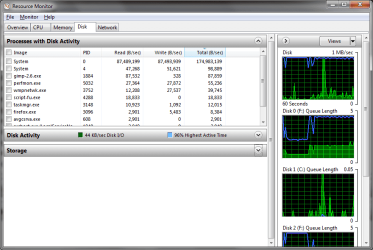
I'm not sure what happened, I don't even know WHEN it happened, but my hard drive light started being on constantly. 100% of the time. The light doesn't even blink, it's just on solid. I went into Resource Monitor to try to track down which program was doing it. Sadly, the process that looked like it was the problem was "System". It is constantly reading and writing about 87,000,000 Bytes per second 100% of the time every day. I am worried this is going to ruin my SSD, and I would really like to figure out what is causing this problem. This screenshot shows my Resource Monitor. I ran a full computer scan with AVG and it didn't seem to find any problems. I was hoping someone could help me troubleshoot this. It didn't used to be like this. Thanks.
 

Attachments
  • diskactivity.png
    diskactivity.png
    28.1 KB · Views: 686

My Computer

OS
Windows 7 Ultimate
CPU
Core i7 930
Motherboard
Asrock X58 Xtreme 3
Memory
12 Gigabytes
Graphics Card(s)
Gigabyte GTX 260
Sound Card
Soundblaster xfi
Hard Drives
OCZ Vertex LE

My Computer

Computer Manufacturer/Model Number
Assembled in my workshop
OS
Windows 7 Home Premium
CPU
Intel Core 2 Duo @ 3.00gHz
Motherboard
Gigabyte GA-P35-S3G
Memory
4 GB
Graphics Card(s)
ATI Radeon HD 2600 XT
Sound Card
RME 24/96 Card, Realtek Internal Audio PreSonus FireStudio
Monitor(s) Displays
Acer 1917 (x2)
Screen Resolution
1280 x 1024 on both monitors
Hard Drives
Three 250GB Seagate SATA Barracuda 7200rpm
PSU
Rosewill 500-watt
Case
Rosewill mid-tower
Cooling
Noctua NH-U9B (CPU), PwrSupply fan + single large case Fan
Keyboard
Macally w/2/USB ports.
Mouse
Trackman Wheel
Other Info
Event 20/20 bas studio monitors, Yamaha sub.
Rackmount Korg/Roland/Yamaha synthesizers,
Cubase MIDI/audio recording. Sony Soundforge audio/mastering software. CD Architect Mastering. RME & Presonus audio interfaces.
SuperFetch or search indexing would likely be the culprit. Try turning one or both of them off.

You also wanna try this program to monitor your HDD activity and find out the culprit:
Process Monitor
 

My Computer

Computer Manufacturer/Model Number
Lenovo IdeaPad Y460
OS
64-Bit Windows 7 - Home Premium Edition; Linux Mint 11
CPU
2.67-GHz Intel Core i7-620M
Motherboard
Lenovo KL2
Memory
8-GB DDR3 RAM
Graphics Card(s)
1-GB ATI Radeon HD 5650M; Intel HD Series
Sound Card
Realtek High Definition Audio; Dolby Home Theater 3
Screen Resolution
1366 X 768 (Default); 1280 X 720 (For Video Gaming)
Hard Drives
656-GB Samsung Hybrid HDD (With Integrated 32-GB SSD); 1-TB Seagate HDD (In A.C. Ryan Enclosure And USB)
Mouse
Logitech M305 Wireless Mouse
Internet Speed
2 Mbps (Globe DSL); 1 Mbps (Sun Broadband Wireless Postpaid)
Hard drive activity sometime is caused by malware. If you are connected to the internet you should check whether your modem or router activity lights are also flashing. Your machine could be acting as a server to relay malware. If you have scanned with an updated AVG, also scan using the rootkit scanner, then I suggest you download Malwarebytes. When you get a malware problem you need to check it out with at least two separate types of scanner if not three! It could of course be a propriety defragger or something scheduled working in the background. Go to task manager and check what services are running.
 

My Computer

Computer Manufacturer/Model Number
Various desktops, laptops and network storage devices.
OS
Windows 7 32bit, Windows XP Pro., Ubunto.
Other Info
Also main desktop set up as dual boot with XP Pro and Win7 Pro 32bit.
Indeed, this could be a HDD Controller chip issue to...

I know from unfortunate experience, that a constant activity light, and frequently random HDD accesses indicate the early symptoms of controller failure - which in most cases requires a new mobo...

And that's bad!

Try going into the Event Viewer in the Administrative section of the Control Panel. Click on System in the left panel, and look for errors - if the controller is the culprit, it should say something like "The device /HardDisk0/ encountered a controller I/O error."

Hope this is some help to you.
 

My Computer

Computer Manufacturer/Model Number
Spitfire X (Custom Rig)
OS
Windows 7 Ultimate x64 Service Pack 1
CPU
Intel Pentium E5500 Dual Core 2.8GHz OC'd @3.2GHz
Motherboard
AsRock G31M-S R2.0
Memory
4GB Corsair DDR2 800MHz (2x2GB)
Graphics Card(s)
Inno 3D Geforce GT 440 1GB
Sound Card
Realtek ALC662 Audio w/ Logitech Z506 5.1 Surround Speakers
Monitor(s) Displays
BenQ G2220HDA 21.5" Monitor
Screen Resolution
1920 x 1080 (1080p)
Hard Drives
OS: Seagate Barracuda 7200.12 250GB
Data and Programs: Seagate Barracuda 7200.12 500GB
PSU
Antec High Current Gamer HCG-520w
Case
Antec One Hundred
Cooling
140 mm Roof Fan, 120mm Rear Fan, 120mm Frontal Fan
Keyboard
Logitech Ultra Flat Keyboard PN 967653-0100
Mouse
Trust GXT 14S Gaming Mouse
Other Info
2x10cm Blue LED strips inside case
This is very very weird, but when I got up this morning the light was back to its normal intermittent blinking. It was not on solid. I am very confused, because it was pretty much solid for 2 or 3 days straight. I checked my Event Viewer like you said, and I didn't see any errors that were complaining about HardDisk0 or any other hard disk for that matter, so I guess I'm at a loss. I'm just going to cross my fingers and hope it doesn't start happening again. RMAing a motherboard is a pain. Thanks for all of your suggestions.
 

My Computer

OS
Windows 7 Ultimate
CPU
Core i7 930
Motherboard
Asrock X58 Xtreme 3
Memory
12 Gigabytes
Graphics Card(s)
Gigabyte GTX 260
Sound Card
Soundblaster xfi
Hard Drives
OCZ Vertex LE
Well something like turning the indexing of the drive on if it was off could cause that. It's one of the reasons a lot of people turn it off when they do a new install. The first few days after a new install the HD is going off CONSTANTLY.

So if you had maybe just turned indexing back on.. Or AV programs can caus it, though a full HD scan on an SSD is generally pretty fast, not lasting hours over several days :/
 

My Computer

Computer Manufacturer/Model Number
Scratch built
OS
Windows 7 x64 Ultimate
CPU
i7 960
Motherboard
Asus P6X58D
Memory
12 Gig Corsair Dominator
Graphics Card(s)
Nvidia 480
Sound Card
Maudio Delta 44 + breakout box
Monitor(s) Displays
Dell UltraSharp U2410 24in and Samsung 21 dual monitors
Screen Resolution
1920x1200 and 1280x1024
Hard Drives
Primary: Intel X-25M G2 160G SSD
Secondary: Segate baracuda 1.0 TB
HDs in AHCI mode.
PSU
Corasair TX850
Case
Cooler Master HAF
Cooling
Corsair H50
Keyboard
Logitech G15 + N52 game pad
Mouse
Logitech MX518
Internet Speed
15kbs down 4.5kbps up
Other Info
WEI 7.6
CPU & RAM 7.6
Graphics 7.9
Hard disk 7.7
How did this resolve???

Hello FJimbo ~ Yes, I'm looking at the exact same problem and wondering how your issue finally resolved.

Errrrrrrgggggggg!

Thank you!
 

My Computer

Computer type
PC/Desktop
Computer Manufacturer/Model Number
custom build
OS
Windows 7 x64 Professional
CPU
Intel i5-4590
Motherboard
Asus Z87-A
Memory
8 GB
Hard Drives
SAMSUNG 850 PRO 2.5" 512GB SATA III 3-D Internal (SSD)
Antivirus
MalwareBytes; Windows Defender
Browser
Chrome
Cured HDD light on constantly

I just updated my IDE drive Vista installation to Windows 7 on a blank SATA drive (Intel Mobo DP965LT). From then on the HDD light stayed on constantly- never a flicker even. I'd removed the old IDE drive not thinking it was needed. Wrong! After much trial and error I refitted the IDE drive (still set to master) and reset the boot order in BIOS to boot from the SATA drive. BINGO! HDD light now working as it is supposed to. I can only surmise there was something on the IDE drive that was needed for the HDD light to function.
 

My Computer

Computer type
PC/Desktop
OS
7 pro 32 bit
Back
Top