
Constant 90% Ram usage

Kuxikaa

New member
Local time
5:13 PM
Messages
4
My computer has recently been alot slower than normal, it is loading things extremely slow, and programs often chrash, even though its a beefy pc. I figured out that my ram was the problem. The ram usage can sometimes hit 100% even though i've closed almost all processes in the taskmanager and only chrome is open. If i restart my computer, my ram usage is around 50% but increases to 90% in less than 30 minutes. I have really no idea what to do, since i have 8GB ram installed;( Can anyone help me?:) I know that chrome often uses alot of ram, but i've tried completely shutting down all chrome processes, and i didn't work.
 

My Computer

Computer type
PC/Desktop
Computer Manufacturer/Model Number
Custom Build
OS
Windows 7 Home Premium 64bit
CPU
Intel Core i5 4690 3.5 GHz
Motherboard
MSI z87-g43
Memory
8GB ram G.skill Ripjaws
Graphics Card(s)
GTX 760
Hard Drives
2x 1 TB hdd
1x 250GB ssd
Antivirus
Eset
Browser
Chrome

My Computer

Computer type
PC/Desktop
Computer Manufacturer/Model Number
Custom Build
OS
Windows 7 Ultimate x64 SP1
CPU
AMD Phenom 2 1090T
Motherboard
Gigabyte GA-890FXA-UD5
Memory
2x8GB Kingston HyperX Fury Black 1600Mhz Unganged
Graphics Card(s)
MSI GTX 970 Gaming 4G
Sound Card
Realtek On-Board HD 7.1 Audio / Logitech G35
Monitor(s) Displays
3xAcer GD245HQ
Screen Resolution
1920x1080
Hard Drives
Samsung 850 Pro 512GB SSD - OS /
WD Caviar Black SATA 3 - 1 TBx2 - Dynamic RAID 0 /
WD Caviar Green SATA 2 - 640GBx2 - Dynamic RAID 0 /
WD Caviar Green SATA 2 - 640GB - Internal Backup /
Seagate Barracude SATA 3 - 3TB - External Backup/ Sync
PSU
HighPower 1000W
Case
Cooler Master HAF 932
Cooling
Noctua NH-D14
Keyboard
Logitech G19
Mouse
Logitech G500
Internet Speed
100/4 Mbit Cable (100GB quota)
Antivirus
ZoneAlarm Extreme Security / MBAM Pro / MBAE Free / SAS Free
Browser
IE 11 - Firefox - Chrome
Other Info
Logitech F710/ G27/ G940/ Z5500 // TrackIR 5 // Nvidia 3D Surround Vision
Welcoem to the forum.
Post a screenshot of Task Manager - Performance tab when the problem occurs.
 

My Computer

Computer type
PC/Desktop
Computer Manufacturer/Model Number
HP
OS
Windows 7 Pro 64 bit
CPU
Xeon W3520
Memory
8 GB
Graphics Card(s)
Nvidia Geforce 210
Yes, screenshots when the issue occurs please, wait a bit if you have to :)
 

My Computer

Computer type
PC/Desktop
Computer Manufacturer/Model Number
Custom Build
OS
Windows 7 Ultimate x64 SP1
CPU
AMD Phenom 2 1090T
Motherboard
Gigabyte GA-890FXA-UD5
Memory
2x8GB Kingston HyperX Fury Black 1600Mhz Unganged
Graphics Card(s)
MSI GTX 970 Gaming 4G
Sound Card
Realtek On-Board HD 7.1 Audio / Logitech G35
Monitor(s) Displays
3xAcer GD245HQ
Screen Resolution
1920x1080
Hard Drives
Samsung 850 Pro 512GB SSD - OS /
WD Caviar Black SATA 3 - 1 TBx2 - Dynamic RAID 0 /
WD Caviar Green SATA 2 - 640GBx2 - Dynamic RAID 0 /
WD Caviar Green SATA 2 - 640GB - Internal Backup /
Seagate Barracude SATA 3 - 3TB - External Backup/ Sync
PSU
HighPower 1000W
Case
Cooler Master HAF 932
Cooling
Noctua NH-D14
Keyboard
Logitech G19
Mouse
Logitech G500
Internet Speed
100/4 Mbit Cable (100GB quota)
Antivirus
ZoneAlarm Extreme Security / MBAM Pro / MBAE Free / SAS Free
Browser
IE 11 - Firefox - Chrome
Other Info
Logitech F710/ G27/ G940/ Z5500 // TrackIR 5 // Nvidia 3D Surround Vision
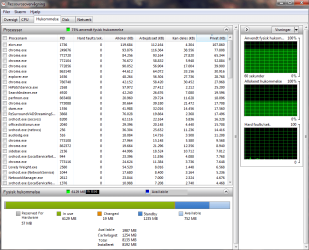
Unfortunatly my windows is in danish:( Did my best to translate would i thought would be important:)
 

Attachments

  • Unavngivet.png
    Unavngivet.png
    114.8 KB · Views: 2

My Computer

Computer type
PC/Desktop
Computer Manufacturer/Model Number
Custom Build
OS
Windows 7 Home Premium 64bit
CPU
Intel Core i5 4690 3.5 GHz
Motherboard
MSI z87-g43
Memory
8GB ram G.skill Ripjaws
Graphics Card(s)
GTX 760
Hard Drives
2x 1 TB hdd
1x 250GB ssd
Antivirus
Eset
Browser
Chrome
And it is only at 75% at the moment:)
 

My Computer

Computer type
PC/Desktop
Computer Manufacturer/Model Number
Custom Build
OS
Windows 7 Home Premium 64bit
CPU
Intel Core i5 4690 3.5 GHz
Motherboard
MSI z87-g43
Memory
8GB ram G.skill Ripjaws
Graphics Card(s)
GTX 760
Hard Drives
2x 1 TB hdd
1x 250GB ssd
Antivirus
Eset
Browser
Chrome
Performance tab of Task Manager too please as LMiller asked, there are a few more info in that page missing here.

And I got no idea what's taking your RAM, the list is clean. All I can think of is, do you have any Virtual PC software? VirtualBox, VMware etc?
 

My Computer

Computer type
PC/Desktop
Computer Manufacturer/Model Number
Custom Build
OS
Windows 7 Ultimate x64 SP1
CPU
AMD Phenom 2 1090T
Motherboard
Gigabyte GA-890FXA-UD5
Memory
2x8GB Kingston HyperX Fury Black 1600Mhz Unganged
Graphics Card(s)
MSI GTX 970 Gaming 4G
Sound Card
Realtek On-Board HD 7.1 Audio / Logitech G35
Monitor(s) Displays
3xAcer GD245HQ
Screen Resolution
1920x1080
Hard Drives
Samsung 850 Pro 512GB SSD - OS /
WD Caviar Black SATA 3 - 1 TBx2 - Dynamic RAID 0 /
WD Caviar Green SATA 2 - 640GBx2 - Dynamic RAID 0 /
WD Caviar Green SATA 2 - 640GB - Internal Backup /
Seagate Barracude SATA 3 - 3TB - External Backup/ Sync
PSU
HighPower 1000W
Case
Cooler Master HAF 932
Cooling
Noctua NH-D14
Keyboard
Logitech G19
Mouse
Logitech G500
Internet Speed
100/4 Mbit Cable (100GB quota)
Antivirus
ZoneAlarm Extreme Security / MBAM Pro / MBAE Free / SAS Free
Browser
IE 11 - Firefox - Chrome
Other Info
Logitech F710/ G27/ G940/ Z5500 // TrackIR 5 // Nvidia 3D Surround Vision
Here you go:) And nope, i dont have any virtual pc software installed:(
 

Attachments

  • ram.png
    ram.png
    22.1 KB · Views: 12

My Computer

Computer type
PC/Desktop
Computer Manufacturer/Model Number
Custom Build
OS
Windows 7 Home Premium 64bit
CPU
Intel Core i5 4690 3.5 GHz
Motherboard
MSI z87-g43
Memory
8GB ram G.skill Ripjaws
Graphics Card(s)
GTX 760
Hard Drives
2x 1 TB hdd
1x 250GB ssd
Antivirus
Eset
Browser
Chrome
Back
Top