Solved Constant Explorer/thumbnail crash. MSVCR80.dll culprit? How to fix?

Well you could try clearing thumbnail cache again using the batch file here:

Thumbnail Cache - Clear and Reset

I've seen cases where video files were corrupt and thus thumbnails for those video files cause Explorer to crash. Same goes for image files. Sage thumbs works with a lot of file formats.

Unfortunately it seems that it will need to be a case of transferring any suspect files onto an external hard drive then disconnecting the external drive before rebooting to test and see if the problem remains. The problem is often with media files (video or image files)

For video files see this post:

Where are the Most Recently Used Lists?

If you get a copy of MediaPreview it will display thumbnails for all video types listed if selected. Forget about MediaPreview image file options because you are using SageThumbs for those.

Also see MediaPreview usage here:

But I tried out Media Preview anyway. And guess what? Besides seemingly working good, it allows Explorer to show thumbnails for .flv files. And I quickly discovered that it doesn't build a thumbnail for a corrupt file! It turns out I had a lot of corrupt .flv files!

And it was a breeze deleting them all, too. I just set Explorer to show medium icons and deleted all that didn't have a preview thumbnail. Boom, done! So it turns out to also be a good tool for finding corrupt files, too.

Before, I had to open each file and see if it would play in VLC or not, and delete the ones that didn't play. Obviously, very time consuming which is why I was so far behind in looking for corrupt video files.
.

For image files see:

Are flash drives reliable for storing photos and documents?

Use with caution or at least have a backup (on external drive) of important personal image files.

Are flash drives reliable for storing photos and documents?

File not showing up in folder,but showing up in Remove Empty Directori

I will look at your dumps and see if there is anything new showing up. It might take 5-15 minutes.
 

My Computer My Computer

At a glance

Microsoft Windows 7 Home Premium 64-bit 7601 ...AMD C-60 APU with Radeon(tm) HD Graphics4.00 GBAMD Radeon HD 6290 Graphics
Computer type
Laptop
Computer Manufacturer/Model Number
ASUS
OS
Microsoft Windows 7 Home Premium 64-bit 7601 Multiprocessor Free Service Pack 1
CPU
AMD C-60 APU with Radeon(tm) HD Graphics
Motherboard
ASUSTeK COMPUTER INC. X501U
Memory
4.00 GB
Graphics Card(s)
AMD Radeon HD 6290 Graphics
Sound Card
(1) AMD High Definition Audio Device (2) Realtek High Defi
Screen Resolution
1366 x 768 x 32 bits (4294967296 colors) @ 60 Hz
Hard Drives
Hitachi HTS545050A7E380 SATA Disk Device
Antivirus
Comodo CIS & FW, SecureAplus App Whitelisting, Threatfire
Browser
Cyberfox 64bit, Opera 64bit, Airfox
Other Info
Spy-The-Spy, HitmanPro.Alert, Norton Connect Safe, MJRegWatcher, BitDefender TrafficLight, Voodoo Shield, Zemana AntiMalware
USER A Dump:

Code:
FAULTING_IP: 
msvcr80!wcscpy_s+97
00000000`7514df67 b822000000      mov     eax,22h

EXCEPTION_RECORD:  ffffffffffffffff -- (.exr 0xffffffffffffffff)
ExceptionAddress: 000000007514df67 (msvcr80!wcscpy_s+0x0000000000000097)
   ExceptionCode: c000000d
  ExceptionFlags: 00000000
NumberParameters: 0

DEFAULT_BUCKET_ID:  WRONG_SYMBOLS

PROCESS_NAME:  explorer.exe

ADDITIONAL_DEBUG_TEXT:  

Use '!findthebuild' command to search for the target build information.

If the build information is available, run '!findthebuild -s ; .reload' to set symbol path and load symbols.

MODULE_NAME: msvcr80

FAULTING_MODULE: 0000000077ba0000 ntdll

DEBUG_FLR_IMAGE_TIMESTAMP:  4dcdd833

ERROR_CODE: (NTSTATUS) 0xc000000d - An invalid parameter was passed to a service or function.

EXCEPTION_CODE: (NTSTATUS) 0xc000000d - An invalid parameter was passed to a service or function.

LAST_CONTROL_TRANSFER:  from 00000000072ef010 to 000000007513b0ec

FAULTING_THREAD:  ffffffffffffffff

PRIMARY_PROBLEM_CLASS:  WRONG_SYMBOLS

BUGCHECK_STR:  APPLICATION_FAULT_WRONG_SYMBOLS

IP_ON_STACK: 
+97
00000000`072ef010 20f0            and     al,dh

FRAME_ONE_INVALID: 1

STACK_TEXT:  
00000000`072eefe0 00000000`072ef010 : 00000000`00000006 00000000`00000000 00000000`00000001 00000000`003c2df0 : msvcr80!_invalid_parameter+0x6c
00000000`072eefe8 00000000`00000006 : 00000000`00000000 00000000`00000001 00000000`003c2df0 00000000`18000000 : 0x72ef010
00000000`072eeff0 00000000`00000000 : 00000000`00000001 00000000`003c2df0 00000000`18000000 00000000`072ef020 : 0x6


FOLLOWUP_IP: 
msvcr80!wcscpy_s+97
00000000`7514df67 b822000000      mov     eax,22h

FAULTING_SOURCE_LINE:  f:\dd\vctools\crt_bld\self_64_amd64\crt\src\tcscpy_s.inl

FAULTING_SOURCE_FILE:  f:\dd\vctools\crt_bld\self_64_amd64\crt\src\tcscpy_s.inl

FAULTING_SOURCE_LINE_NUMBER:  30

SYMBOL_STACK_INDEX:  0

SYMBOL_NAME:  msvcr80!wcscpy_s+97

FOLLOWUP_NAME:  MachineOwner

IMAGE_NAME:  msvcr80.dll

STACK_COMMAND:  ~23s; .ecxr ; kb

BUCKET_ID:  WRONG_SYMBOLS

FAILURE_BUCKET_ID:  WRONG_SYMBOLS_c000000d_msvcr80.dll!wcscpy_s

Same as before. However it also mentions this:

ERROR: Module load completed but symbols could not be loaded for rpcrt4.dll

I'm not sure what that means but a search reveals:

https://support.microsoft.com/en-us/kb/2958386

I have to confess that I don#t know what a Windows Embedded Compact 7-based device is. Plus it is stated that the device crashes rather than Explorer.

Will look at the next dump.
 

My Computer My Computer

At a glance

Microsoft Windows 7 Home Premium 64-bit 7601 ...AMD C-60 APU with Radeon(tm) HD Graphics4.00 GBAMD Radeon HD 6290 Graphics
Computer type
Laptop
Computer Manufacturer/Model Number
ASUS
OS
Microsoft Windows 7 Home Premium 64-bit 7601 Multiprocessor Free Service Pack 1
CPU
AMD C-60 APU with Radeon(tm) HD Graphics
Motherboard
ASUSTeK COMPUTER INC. X501U
Memory
4.00 GB
Graphics Card(s)
AMD Radeon HD 6290 Graphics
Sound Card
(1) AMD High Definition Audio Device (2) Realtek High Defi
Screen Resolution
1366 x 768 x 32 bits (4294967296 colors) @ 60 Hz
Hard Drives
Hitachi HTS545050A7E380 SATA Disk Device
Antivirus
Comodo CIS & FW, SecureAplus App Whitelisting, Threatfire
Browser
Cyberfox 64bit, Opera 64bit, Airfox
Other Info
Spy-The-Spy, HitmanPro.Alert, Norton Connect Safe, MJRegWatcher, BitDefender TrafficLight, Voodoo Shield, Zemana AntiMalware
USER B dump:

Code:
FAULTING_IP: 
msvcr80!wcscpy_s+97
00000000`748cdf67 b822000000      mov     eax,22h

EXCEPTION_RECORD:  ffffffffffffffff -- (.exr 0xffffffffffffffff)
ExceptionAddress: 00000000748cdf67 (msvcr80!wcscpy_s+0x0000000000000097)
   ExceptionCode: c000000d
  ExceptionFlags: 00000000
NumberParameters: 0

DEFAULT_BUCKET_ID:  WRONG_SYMBOLS

PROCESS_NAME:  explorer.exe

ADDITIONAL_DEBUG_TEXT:  

Use '!findthebuild' command to search for the target build information.

If the build information is available, run '!findthebuild -s ; .reload' to set symbol path and load symbols.

MODULE_NAME: msvcr80

FAULTING_MODULE: 0000000077000000 ntdll

DEBUG_FLR_IMAGE_TIMESTAMP:  4dcdd833

ERROR_CODE: (NTSTATUS) 0xc000000d - An invalid parameter was passed to a service or function.

EXCEPTION_CODE: (NTSTATUS) 0xc000000d - An invalid parameter was passed to a service or function.

LAST_CONTROL_TRANSFER:  from 00000000064aeaa0 to 00000000748bb0ec

FAULTING_THREAD:  ffffffffffffffff

PRIMARY_PROBLEM_CLASS:  WRONG_SYMBOLS

BUGCHECK_STR:  APPLICATION_FAULT_WRONG_SYMBOLS

IP_ON_STACK: 
+97
00000000`064aeaa0 b0ea            mov     al,0EAh

FRAME_ONE_INVALID: 1

STACK_TEXT:  
00000000`064aea70 00000000`064aeaa0 : 00000000`00000006 00000000`00000000 00000000`00000001 00000000`003c2de0 : msvcr80!_invalid_parameter+0x6c
00000000`064aea78 00000000`00000006 : 00000000`00000000 00000000`00000001 00000000`003c2de0 00000000`18000000 : 0x64aeaa0
00000000`064aea80 00000000`00000000 : 00000000`00000001 00000000`003c2de0 00000000`18000000 00000000`064aeab0 : 0x6


FOLLOWUP_IP: 
msvcr80!wcscpy_s+97
00000000`748cdf67 b822000000      mov     eax,22h

FAULTING_SOURCE_LINE:  f:\dd\vctools\crt_bld\self_64_amd64\crt\src\tcscpy_s.inl

FAULTING_SOURCE_FILE:  f:\dd\vctools\crt_bld\self_64_amd64\crt\src\tcscpy_s.inl

FAULTING_SOURCE_LINE_NUMBER:  30

SYMBOL_STACK_INDEX:  0

SYMBOL_NAME:  msvcr80!wcscpy_s+97

FOLLOWUP_NAME:  MachineOwner

IMAGE_NAME:  msvcr80.dll

STACK_COMMAND:  ~37s; .ecxr ; kb

BUCKET_ID:  WRONG_SYMBOLS

FAILURE_BUCKET_ID:  WRONG_SYMBOLS_c000000d_msvcr80.dll!wcscpy_s

Same. Except that it does not include "ERROR: Module load completed but symbols could not be loaded for rpcrt4.dll" so I guess it can be ruled out.
 

My Computer My Computer

At a glance

Microsoft Windows 7 Home Premium 64-bit 7601 ...AMD C-60 APU with Radeon(tm) HD Graphics4.00 GBAMD Radeon HD 6290 Graphics
Computer type
Laptop
Computer Manufacturer/Model Number
ASUS
OS
Microsoft Windows 7 Home Premium 64-bit 7601 Multiprocessor Free Service Pack 1
CPU
AMD C-60 APU with Radeon(tm) HD Graphics
Motherboard
ASUSTeK COMPUTER INC. X501U
Memory
4.00 GB
Graphics Card(s)
AMD Radeon HD 6290 Graphics
Sound Card
(1) AMD High Definition Audio Device (2) Realtek High Defi
Screen Resolution
1366 x 768 x 32 bits (4294967296 colors) @ 60 Hz
Hard Drives
Hitachi HTS545050A7E380 SATA Disk Device
Antivirus
Comodo CIS & FW, SecureAplus App Whitelisting, Threatfire
Browser
Cyberfox 64bit, Opera 64bit, Airfox
Other Info
Spy-The-Spy, HitmanPro.Alert, Norton Connect Safe, MJRegWatcher, BitDefender TrafficLight, Voodoo Shield, Zemana AntiMalware
RE: Autoruns > Explorer tab. If you look at software version for any software that installed a .dll file (the information is displayed in the results list) you could check for updates for the software(s)

If updates are needed try updating - exiting the program before applying updates if program is running.7
 

My Computer My Computer

At a glance

Microsoft Windows 7 Home Premium 64-bit 7601 ...AMD C-60 APU with Radeon(tm) HD Graphics4.00 GBAMD Radeon HD 6290 Graphics
Computer type
Laptop
Computer Manufacturer/Model Number
ASUS
OS
Microsoft Windows 7 Home Premium 64-bit 7601 Multiprocessor Free Service Pack 1
CPU
AMD C-60 APU with Radeon(tm) HD Graphics
Motherboard
ASUSTeK COMPUTER INC. X501U
Memory
4.00 GB
Graphics Card(s)
AMD Radeon HD 6290 Graphics
Sound Card
(1) AMD High Definition Audio Device (2) Realtek High Defi
Screen Resolution
1366 x 768 x 32 bits (4294967296 colors) @ 60 Hz
Hard Drives
Hitachi HTS545050A7E380 SATA Disk Device
Antivirus
Comodo CIS & FW, SecureAplus App Whitelisting, Threatfire
Browser
Cyberfox 64bit, Opera 64bit, Airfox
Other Info
Spy-The-Spy, HitmanPro.Alert, Norton Connect Safe, MJRegWatcher, BitDefender TrafficLight, Voodoo Shield, Zemana AntiMalware
My opinion.

Once one uses Advance System Care in many cases cows will learn to tap dance before the computer is fixed.

A Clean Install is needed to start off fresh.

Jack
 

My Computer My Computer

At a glance

Windows 10 Pro. 64/ version 1709 Windows 7 Pr...Intel i7-6800K @ 4.3Corsair Platinum 16 gig @2400EVGA GTX 1070 OC
Computer type
PC/Desktop
Computer Manufacturer/Model Number
Home made Desktop
OS
Windows 10 Pro. 64/ version 1709 Windows 7 Pro/64
CPU
Intel i7-6800K @ 4.3
Motherboard
ASUS X-99 Deluxe II
Memory
Corsair Platinum 16 gig @2400
Graphics Card(s)
EVGA GTX 1070 OC
Monitor(s) Displays
Asus 27" LED LCD/VE278Q
Screen Resolution
1920-1080 or 1280-720 HDMI
Hard Drives
INTEL SSD 730-240 Gb Sata 3.0/
PSU
EVGA Platium 1200W
Case
Phanteks Luxe Tempered Glass 8 fans/ one radiator
Cooling
XSPC/ Water Cooled CPU
Keyboard
Das 4 Professional
Mouse
Logitech M705/MX Anywhere 2-S
Internet Speed
100 mbits
Antivirus
Microsoft Security Essentials/ Malwarebytes Premium 3.0/ SAS
Browser
I.E. 11 default/Firefox/ ISP Time Warner Cable/Spectrum
Other Info
LG BluRay Burner/
Sound system-KLipsch-THX/
Icy Dock ssd Hot Swap bays.
Other thoughts:

I was going to suggest replacing MSVCR80.dll system file in SYSWOW64 but maybe it's not necessary?

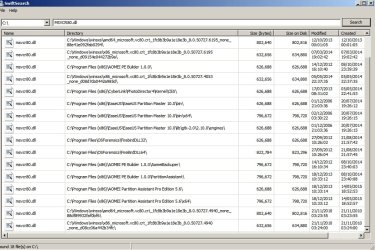
A search of my machine reveals the following:

SwiftSearch.jpg

The results clearly show that the MSVCR80.dll file exists in multiple locations. Suggest checking the file paths for software that installed a version of the dll and maybe updating the softwares or uninstalling if no used currently.
 

My Computer My Computer

At a glance

Microsoft Windows 7 Home Premium 64-bit 7601 ...AMD C-60 APU with Radeon(tm) HD Graphics4.00 GBAMD Radeon HD 6290 Graphics
Computer type
Laptop
Computer Manufacturer/Model Number
ASUS
OS
Microsoft Windows 7 Home Premium 64-bit 7601 Multiprocessor Free Service Pack 1
CPU
AMD C-60 APU with Radeon(tm) HD Graphics
Motherboard
ASUSTeK COMPUTER INC. X501U
Memory
4.00 GB
Graphics Card(s)
AMD Radeon HD 6290 Graphics
Sound Card
(1) AMD High Definition Audio Device (2) Realtek High Defi
Screen Resolution
1366 x 768 x 32 bits (4294967296 colors) @ 60 Hz
Hard Drives
Hitachi HTS545050A7E380 SATA Disk Device
Antivirus
Comodo CIS & FW, SecureAplus App Whitelisting, Threatfire
Browser
Cyberfox 64bit, Opera 64bit, Airfox
Other Info
Spy-The-Spy, HitmanPro.Alert, Norton Connect Safe, MJRegWatcher, BitDefender TrafficLight, Voodoo Shield, Zemana AntiMalware
Collender: Thanks as usual for the input. Well, I have done many of the things you suggested and the outcome is improving. I tried to take it systematically, looking for instant cause-and-effect but the results are not always instant.

I checked all the video and Flash files and found nothing corrupt. I deleted the thumbnail cache a few times (as done many times before).

Idea: I realized I had more than a few folders and folder aliases on my desktop. I decided, using User B (set to see no thumbs, only icons) to look inside User A’s Desktop folder (set to show thumbs, but crashes when I log in) and put all in a folder/aliases into a new folder called “Desktop Folders.” Remember, they are exact copies of each other other than the icon/thumb settings.

I logged out of User B and logged into User A, and ... no crash. Hmm. That shows something relating to the Desktop files/folders is the issue.

I put User A thought its paces while opening work-related folders here and there, looking for errant files or URL aliases (in the past Google and eBay URL icons would cause a crash).

While doing this, Explorer crashed a time or two, but it would recover, meaning I did not have to log out and log back in. That’s a big step!

I did the same thing to User B, and logged in. Same thing: no crash at first. After deleting a few more incidental files here and there (again, nothing jumps out as the culprit) I am getting better and better reliability, meaning if it does crash, Explorer comes back and keeps going.

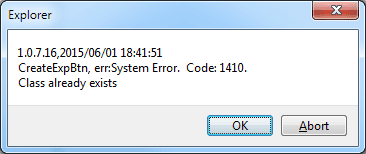
One thing I noticed though, is that the Photoshop PSD files are not all appearing as thumbnails even though SageThumbs is set to render them. To see if a restart could fix that, I rebooted, and when Explorer came back up,I got this message error:

Explorer-error-code.png

I saw something similar a few days ago, and had clicked OK but this time I clicked "Abort" and Explorer crashed immediately and restarted. No idea if this crash is of any value. After that, Explorer is still behaving itself. Still, some icons do not render to thumbnail images, but that's okay.

Anyway, the system is slowly getting more reliable, and now, when it crashes (which has become more rare), it is not in a constant loop of restart-and-crash any longer.

For what it’s worth, a couple of the latest crash dump files are attached.

Thanks again for you assistance! If more happens, I will let you know.
 

Attachments

Last edited:

My Computer My Computer

At a glance

Microsoft Windows 7 Home Premium 64-bit 7601 ...AMD Athlon(tm) II X4 645 Processor8.00 GB(1) NVIDIA GeForce 9500 GT (2) LogMeIn Mirror...
Computer type
PC/Desktop
Computer Manufacturer/Model Number
Lenovo H405
OS
Microsoft Windows 7 Home Premium 64-bit 7601 Multiprocessor Free Service Pack 1
CPU
AMD Athlon(tm) II X4 645 Processor
Motherboard
LENOVO Tilapia CRB
Memory
8.00 GB
Graphics Card(s)
(1) NVIDIA GeForce 9500 GT (2) LogMeIn Mirror Driver
Sound Card
(1) Realtek High Definition Audio (2) NVIDIA Virtual Audio
Screen Resolution
(1) 1920 x 1080 x 32 bits (4294967296 colors) @ 60 Hz (2)
Hard Drives
(1) Hitachi HDS721010CLA332 ATA Device (2) SAMSUNG HD103SI USB Device
Antivirus
Kaspersky 17.*
Browser
FF, Chrome
Okay you might find this handy. It restarts explorer with a single click.

Restart Explorer

RE: PSD files - no thumbnails. Must be a clue.

You can try portable Explorer++ to navigate and open directories that might cause Explorer to crash.

Explorer++ - A small and fast file manager for Windows

Here's what I see using Explorer++ to view some PSD image files and jpg's

Explorer++ [Administrators].jpg

It usually gets around problem shell extensions (dll's) when Explorer will not work. I don't know if you will manage to see thumbnails but assuming that you can see them look for files that do not display thumbnails and suspect those as corrupt.

RE: Error seems message. It's not something that I understand much about but it seems that there must be a conflict between two or more applications.
 
Last edited:

My Computer My Computer

At a glance

Microsoft Windows 7 Home Premium 64-bit 7601 ...AMD C-60 APU with Radeon(tm) HD Graphics4.00 GBAMD Radeon HD 6290 Graphics
Computer type
Laptop
Computer Manufacturer/Model Number
ASUS
OS
Microsoft Windows 7 Home Premium 64-bit 7601 Multiprocessor Free Service Pack 1
CPU
AMD C-60 APU with Radeon(tm) HD Graphics
Motherboard
ASUSTeK COMPUTER INC. X501U
Memory
4.00 GB
Graphics Card(s)
AMD Radeon HD 6290 Graphics
Sound Card
(1) AMD High Definition Audio Device (2) Realtek High Defi
Screen Resolution
1366 x 768 x 32 bits (4294967296 colors) @ 60 Hz
Hard Drives
Hitachi HTS545050A7E380 SATA Disk Device
Antivirus
Comodo CIS & FW, SecureAplus App Whitelisting, Threatfire
Browser
Cyberfox 64bit, Opera 64bit, Airfox
Other Info
Spy-The-Spy, HitmanPro.Alert, Norton Connect Safe, MJRegWatcher, BitDefender TrafficLight, Voodoo Shield, Zemana AntiMalware
Collender: I just realized the PSD files that did not render were large -- 50Mb or so -- and SageThumbs is set to render "Maximum size of image file" at 10Mb. Not sure if I should change that to 100Mb in case it slows down the system or makes the icon cache too large -- if that's a problem?

Other than that, after weeks of struggle, the system is much better today.

I have a suspect large folder full of architectural files (AI, EPS, JPG, PDF, PSD, DXF, URLs, etc.) that may have a corrupt file or two in it. I had an alias of that folder on the Desktop that was deleted when I cleaned up the Desktop yesterday, and noted things got better fast.

I suspect that particular folder because today, about two minutes after that folder was open, and Sage Thumbs was doing it's thing, rendering thumbnails, and Explorer crashed and restarted. I am looking at each file now.

Thanks again!
 

My Computer My Computer

At a glance

Microsoft Windows 7 Home Premium 64-bit 7601 ...AMD Athlon(tm) II X4 645 Processor8.00 GB(1) NVIDIA GeForce 9500 GT (2) LogMeIn Mirror...
Computer type
PC/Desktop
Computer Manufacturer/Model Number
Lenovo H405
OS
Microsoft Windows 7 Home Premium 64-bit 7601 Multiprocessor Free Service Pack 1
CPU
AMD Athlon(tm) II X4 645 Processor
Motherboard
LENOVO Tilapia CRB
Memory
8.00 GB
Graphics Card(s)
(1) NVIDIA GeForce 9500 GT (2) LogMeIn Mirror Driver
Sound Card
(1) Realtek High Definition Audio (2) NVIDIA Virtual Audio
Screen Resolution
(1) 1920 x 1080 x 32 bits (4294967296 colors) @ 60 Hz (2)
Hard Drives
(1) Hitachi HDS721010CLA332 ATA Device (2) SAMSUNG HD103SI USB Device
Antivirus
Kaspersky 17.*
Browser
FF, Chrome
I'd leave the max thumbnails size alone. I suppose you could test for larger files.

Actually on my machine I tend to keep thumbnails disabled and for large size image files I prefer Wildbit Image Viewer over Explorer as it's possible to specify the path t a custom defined thumbnail cache.

Anyway this might be of interest.

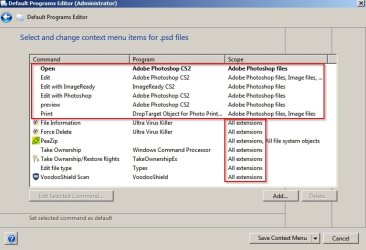
Using DefaultProgramsEditor portable I see only Photoshop as registered as the defualt program for image files. Plus some other apps that access all types of file. No sign of Sage Thumbs in the list.

Default Programs Editor (Administrator).jpg

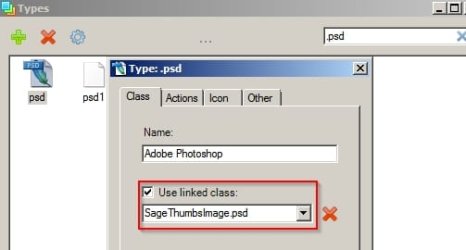
Using Types (installed) I see the following regarding Sage Thumbs and the text looks familiar as per your error message. Types appears in Control Panel.

Types.jpg
 

My Computer My Computer

At a glance

Microsoft Windows 7 Home Premium 64-bit 7601 ...AMD C-60 APU with Radeon(tm) HD Graphics4.00 GBAMD Radeon HD 6290 Graphics
Computer type
Laptop
Computer Manufacturer/Model Number
ASUS
OS
Microsoft Windows 7 Home Premium 64-bit 7601 Multiprocessor Free Service Pack 1
CPU
AMD C-60 APU with Radeon(tm) HD Graphics
Motherboard
ASUSTeK COMPUTER INC. X501U
Memory
4.00 GB
Graphics Card(s)
AMD Radeon HD 6290 Graphics
Sound Card
(1) AMD High Definition Audio Device (2) Realtek High Defi
Screen Resolution
1366 x 768 x 32 bits (4294967296 colors) @ 60 Hz
Hard Drives
Hitachi HTS545050A7E380 SATA Disk Device
Antivirus
Comodo CIS & FW, SecureAplus App Whitelisting, Threatfire
Browser
Cyberfox 64bit, Opera 64bit, Airfox
Other Info
Spy-The-Spy, HitmanPro.Alert, Norton Connect Safe, MJRegWatcher, BitDefender TrafficLight, Voodoo Shield, Zemana AntiMalware
RE: Crash Dumps. The first one shows something new:

Code:
FOLLOWUP_IP: 
UninstallExplorer+391f3
00000000`075191f3 ??              ???

SYMBOL_STACK_INDEX:  2

SYMBOL_NAME:  uninstallexplorer+391f3

FOLLOWUP_NAME:  MachineOwner

MODULE_NAME: UninstallExplorer

IMAGE_NAME:  UninstallExplorer.dll

STACK_COMMAND:  ~30s; .ecxr ; kb

BUCKET_ID:  WRONG_SYMBOLS

FAILURE_BUCKET_ID:  WRONG_SYMBOLS_AFTER_CALL_eedfade_UninstallExplorer.dll!Unknown

Do you know what UninstallExplorer.dll relates to? Is it IOBit Uninstaller. It doesn't get a good reputation here but having sais that I use an old portable version of it. I remember that it added something to Explorer window and I removed it. I'll try to remember how.

I will look at the second dump.
 
Last edited:

My Computer My Computer

At a glance

Microsoft Windows 7 Home Premium 64-bit 7601 ...AMD C-60 APU with Radeon(tm) HD Graphics4.00 GBAMD Radeon HD 6290 Graphics
Computer type
Laptop
Computer Manufacturer/Model Number
ASUS
OS
Microsoft Windows 7 Home Premium 64-bit 7601 Multiprocessor Free Service Pack 1
CPU
AMD C-60 APU with Radeon(tm) HD Graphics
Motherboard
ASUSTeK COMPUTER INC. X501U
Memory
4.00 GB
Graphics Card(s)
AMD Radeon HD 6290 Graphics
Sound Card
(1) AMD High Definition Audio Device (2) Realtek High Defi
Screen Resolution
1366 x 768 x 32 bits (4294967296 colors) @ 60 Hz
Hard Drives
Hitachi HTS545050A7E380 SATA Disk Device
Antivirus
Comodo CIS & FW, SecureAplus App Whitelisting, Threatfire
Browser
Cyberfox 64bit, Opera 64bit, Airfox
Other Info
Spy-The-Spy, HitmanPro.Alert, Norton Connect Safe, MJRegWatcher, BitDefender TrafficLight, Voodoo Shield, Zemana AntiMalware
The second dump is the same as your other dumps. MSVCR80.dll
 

My Computer My Computer

At a glance

Microsoft Windows 7 Home Premium 64-bit 7601 ...AMD C-60 APU with Radeon(tm) HD Graphics4.00 GBAMD Radeon HD 6290 Graphics
Computer type
Laptop
Computer Manufacturer/Model Number
ASUS
OS
Microsoft Windows 7 Home Premium 64-bit 7601 Multiprocessor Free Service Pack 1
CPU
AMD C-60 APU with Radeon(tm) HD Graphics
Motherboard
ASUSTeK COMPUTER INC. X501U
Memory
4.00 GB
Graphics Card(s)
AMD Radeon HD 6290 Graphics
Sound Card
(1) AMD High Definition Audio Device (2) Realtek High Defi
Screen Resolution
1366 x 768 x 32 bits (4294967296 colors) @ 60 Hz
Hard Drives
Hitachi HTS545050A7E380 SATA Disk Device
Antivirus
Comodo CIS & FW, SecureAplus App Whitelisting, Threatfire
Browser
Cyberfox 64bit, Opera 64bit, Airfox
Other Info
Spy-The-Spy, HitmanPro.Alert, Norton Connect Safe, MJRegWatcher, BitDefender TrafficLight, Voodoo Shield, Zemana AntiMalware
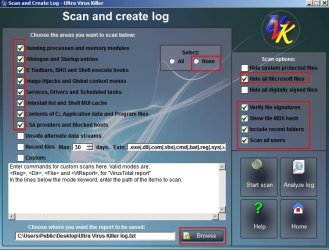
Did you use UVK as per this post:

explorer crashes

to reinstall MS VC++ ? If so you could try uploading a UVK scan log.

Scan and Create Log - Ultra Virus Killer.jpg
 

My Computer My Computer

At a glance

Microsoft Windows 7 Home Premium 64-bit 7601 ...AMD C-60 APU with Radeon(tm) HD Graphics4.00 GBAMD Radeon HD 6290 Graphics
Computer type
Laptop
Computer Manufacturer/Model Number
ASUS
OS
Microsoft Windows 7 Home Premium 64-bit 7601 Multiprocessor Free Service Pack 1
CPU
AMD C-60 APU with Radeon(tm) HD Graphics
Motherboard
ASUSTeK COMPUTER INC. X501U
Memory
4.00 GB
Graphics Card(s)
AMD Radeon HD 6290 Graphics
Sound Card
(1) AMD High Definition Audio Device (2) Realtek High Defi
Screen Resolution
1366 x 768 x 32 bits (4294967296 colors) @ 60 Hz
Hard Drives
Hitachi HTS545050A7E380 SATA Disk Device
Antivirus
Comodo CIS & FW, SecureAplus App Whitelisting, Threatfire
Browser
Cyberfox 64bit, Opera 64bit, Airfox
Other Info
Spy-The-Spy, HitmanPro.Alert, Norton Connect Safe, MJRegWatcher, BitDefender TrafficLight, Voodoo Shield, Zemana AntiMalware
Sorry for the late entry

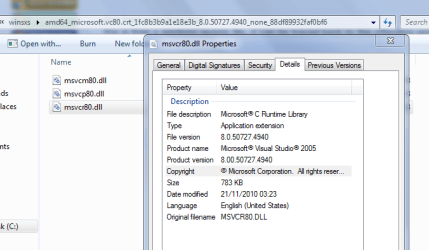
C:\windows\WinSxS\amd64_microsoft.vc80.crt_1fc8b3b9a1e18e3b_8.0.50727.6195_none_88e41e092fab0294\MSV CR80.dll


this from your first post
this is from a windows update file, it can be traced back to the offending update but its far easier just to replace it

back when i've found it

Roy
 

My Computer My Computer

At a glance

W7 home premium 32bit/W7HP 64bit/w10 tp insid...E5300 dual core3gbNvidia Geforce 7100 Nforce 630i
Computer type
PC/Desktop
Computer Manufacturer/Model Number
medionl/Aspire 6930G/acer x55a
OS
W7 home premium 32bit/W7HP 64bit/w10 tp insider ring
CPU
E5300 dual core
Motherboard
medion MS7366
Memory
3gb
Graphics Card(s)
Nvidia Geforce 7100 Nforce 630i
Monitor(s) Displays
avixc
Internet Speed
n (isp resticted to 72)
Antivirus
mse/pands
Browser
palemoon
Other Info
Belkin Fd7050 n USB using Railink RT2870 drivers, more upto date
Hi Rprosser,

The error causes a failure within VB C++ (any version). Uninstalling/reinstalling the program will NOT fix it.

I cannot source the file, as i have not got C++ on my system so i didnt get the update.
but hopefully @Callender can by navigating to the folder in my screenshot.
Once there please copy and upload it as a Zip, titled
SFCFix.zip - do not rename it

RP
please download and run this please, copy/paste the output, it should identify the same problem dll might even fixit

http://www.sysnative.com/niemiro/apps/SFCFix.exe

KEEP it on your desktop we will need it again.


Roy
 

Attachments

  • msvcr80.PNG
    msvcr80.PNG
    23 KB · Views: 25

My Computer My Computer

At a glance

W7 home premium 32bit/W7HP 64bit/w10 tp insid...E5300 dual core3gbNvidia Geforce 7100 Nforce 630i
Computer type
PC/Desktop
Computer Manufacturer/Model Number
medionl/Aspire 6930G/acer x55a
OS
W7 home premium 32bit/W7HP 64bit/w10 tp insider ring
CPU
E5300 dual core
Motherboard
medion MS7366
Memory
3gb
Graphics Card(s)
Nvidia Geforce 7100 Nforce 630i
Monitor(s) Displays
avixc
Internet Speed
n (isp resticted to 72)
Antivirus
mse/pands
Browser
palemoon
Other Info
Belkin Fd7050 n USB using Railink RT2870 drivers, more upto date
Hi Roy,

here is the contents of that folder zipped but note my machine is Windows 7 Home Premium AMD 64 bit and files may be specific.

Also files and folder are quite old dated 21 November 2010


RE: SFC Fix. I've seen that software but not used it. Hopefully it just reports SFC errors when run rather than fixing them?

Personally I avoid SFC as it always reports errors due to customizations I've made and I prefer to manually replace (and backup original) system files using this:

SysMate - Easily Replace Windows System Files - Technibble

I'm not convinced that the dll is the problem but if you say that it is a known issue with a faulty update perhaps you could post the KB number so that we can check to see if the update is installed.

RE: IOBit Explorer Window Helper.

I think this might be causing your error message when used with Sage Thumbs.

395228d1484099896-constant-explorer-thumbnail-crash-msvcr80-dll-culprit-how-fix-explorer-error-code.png

Anyway it should be possible to delete it. See registry entries listed. Back them up then delete them and reboot.

[HKEY_LOCAL_MACHINE\SOFTWARE\Classes\CLSID\{10921475-03CE-4E04-90CE-E2E7EF20C814}]

[HKEY_LOCAL_MACHINE\SOFTWARE\Microsoft\Windows\CurrentVersion\Explorer\Browser Helper Objects\{10921475-03CE-4E04-90CE-E2E7EF20C814}]

[HKEY_CURRENT_USER\Software\Microsoft\Windows\CurrentVersion\Ext\Stats\{10921475-03CE-4E04-90CE-E2E7EF20C814

No need to delete the dll:

%ProgramFiles%\IObit\IObit Uninstaller (might have installed with Advanced System Care instead)

If that's the case it suggests that ASC did not uninstall cleanly.

Type: BHO
CLSID: {10921475-03CE-4E04-90CE-E2E7EF20C814}
Name: ExplorerWnd Helper
Filename(s): UninstallExplorer32.dll, UninstallExplorer64.dll
Location: %ProgramFiles%\IObit\IObit Uninstaller
Description: Browser plugin bundled with IObit Uninstaller

Note: On my machine I only have 64bit version of the .dll - UninstallExplorer64.dll and deleted the BHO a long time ago.

See related Posts #2 & #3 here: What's a Good Program For Uninstalling Applications/Programs on PC?
 
Last edited:

My Computer My Computer

At a glance

Microsoft Windows 7 Home Premium 64-bit 7601 ...AMD C-60 APU with Radeon(tm) HD Graphics4.00 GBAMD Radeon HD 6290 Graphics
Computer type
Laptop
Computer Manufacturer/Model Number
ASUS
OS
Microsoft Windows 7 Home Premium 64-bit 7601 Multiprocessor Free Service Pack 1
CPU
AMD C-60 APU with Radeon(tm) HD Graphics
Motherboard
ASUSTeK COMPUTER INC. X501U
Memory
4.00 GB
Graphics Card(s)
AMD Radeon HD 6290 Graphics
Sound Card
(1) AMD High Definition Audio Device (2) Realtek High Defi
Screen Resolution
1366 x 768 x 32 bits (4294967296 colors) @ 60 Hz
Hard Drives
Hitachi HTS545050A7E380 SATA Disk Device
Antivirus
Comodo CIS & FW, SecureAplus App Whitelisting, Threatfire
Browser
Cyberfox 64bit, Opera 64bit, Airfox
Other Info
Spy-The-Spy, HitmanPro.Alert, Norton Connect Safe, MJRegWatcher, BitDefender TrafficLight, Voodoo Shield, Zemana AntiMalware
I have an idea that it might be worth reinstalling ASC along with IOBit uninstaller if it was also automatically downloaded and installed. It would need to be a "monitored installation" so that it can subsequently easily be completely removed. If you want to try that let me know and I'll post details of "how to" later.
 

My Computer My Computer

At a glance

Microsoft Windows 7 Home Premium 64-bit 7601 ...AMD C-60 APU with Radeon(tm) HD Graphics4.00 GBAMD Radeon HD 6290 Graphics
Computer type
Laptop
Computer Manufacturer/Model Number
ASUS
OS
Microsoft Windows 7 Home Premium 64-bit 7601 Multiprocessor Free Service Pack 1
CPU
AMD C-60 APU with Radeon(tm) HD Graphics
Motherboard
ASUSTeK COMPUTER INC. X501U
Memory
4.00 GB
Graphics Card(s)
AMD Radeon HD 6290 Graphics
Sound Card
(1) AMD High Definition Audio Device (2) Realtek High Defi
Screen Resolution
1366 x 768 x 32 bits (4294967296 colors) @ 60 Hz
Hard Drives
Hitachi HTS545050A7E380 SATA Disk Device
Antivirus
Comodo CIS & FW, SecureAplus App Whitelisting, Threatfire
Browser
Cyberfox 64bit, Opera 64bit, Airfox
Other Info
Spy-The-Spy, HitmanPro.Alert, Norton Connect Safe, MJRegWatcher, BitDefender TrafficLight, Voodoo Shield, Zemana AntiMalware
Hi
Thanks for trying Callender, thats the same as mine, we needed ........6195
The AMD part is irrelevant its a throwback, ALL W7 installs have that file NAME, and thats all it is!

As for SFCfix, that was written by a former member, who now lives on the Sysnative forum he's quite a genius.

The really good thing about that prog is it automatically Takes Ownership and reverts it back, making it an excellent tool for fixing Update files, its also a good equivalent for SURT and doesnt take as long to run.

BHO's can be removed directly from IE, via the settings panel.

As for Iobit's uninstaller i find it an excellent remover, used it for years, like most program it has extra's and i ALLWAYS install any prog using the CUSTOM mode, Flash is a pain:mad:
I also remove
the containing folders in progs
AND MORE especially the Appdata ones
NOT forgetting any related Task Scheduler items.
and if i feel like it the prefetch ones


Im not saying its a known faulty KB, wish it was it'd be so much easier to fix, just that its not correctly installed on his comp, and it was the 1st reported bugcheck.

Right off to find the KB


Roy
 

My Computer My Computer

At a glance

W7 home premium 32bit/W7HP 64bit/w10 tp insid...E5300 dual core3gbNvidia Geforce 7100 Nforce 630i
Computer type
PC/Desktop
Computer Manufacturer/Model Number
medionl/Aspire 6930G/acer x55a
OS
W7 home premium 32bit/W7HP 64bit/w10 tp insider ring
CPU
E5300 dual core
Motherboard
medion MS7366
Memory
3gb
Graphics Card(s)
Nvidia Geforce 7100 Nforce 630i
Monitor(s) Displays
avixc
Internet Speed
n (isp resticted to 72)
Antivirus
mse/pands
Browser
palemoon
Other Info
Belkin Fd7050 n USB using Railink RT2870 drivers, more upto date

My Computer My Computer

At a glance

Microsoft Windows 7 Home Premium 64-bit 7601 ...AMD C-60 APU with Radeon(tm) HD Graphics4.00 GBAMD Radeon HD 6290 Graphics
Computer type
Laptop
Computer Manufacturer/Model Number
ASUS
OS
Microsoft Windows 7 Home Premium 64-bit 7601 Multiprocessor Free Service Pack 1
CPU
AMD C-60 APU with Radeon(tm) HD Graphics
Motherboard
ASUSTeK COMPUTER INC. X501U
Memory
4.00 GB
Graphics Card(s)
AMD Radeon HD 6290 Graphics
Sound Card
(1) AMD High Definition Audio Device (2) Realtek High Defi
Screen Resolution
1366 x 768 x 32 bits (4294967296 colors) @ 60 Hz
Hard Drives
Hitachi HTS545050A7E380 SATA Disk Device
Antivirus
Comodo CIS & FW, SecureAplus App Whitelisting, Threatfire
Browser
Cyberfox 64bit, Opera 64bit, Airfox
Other Info
Spy-The-Spy, HitmanPro.Alert, Norton Connect Safe, MJRegWatcher, BitDefender TrafficLight, Voodoo Shield, Zemana AntiMalware

My Computer My Computer

At a glance

Microsoft Windows 7 Home Premium 64-bit 7601 ...AMD C-60 APU with Radeon(tm) HD Graphics4.00 GBAMD Radeon HD 6290 Graphics
Computer type
Laptop
Computer Manufacturer/Model Number
ASUS
OS
Microsoft Windows 7 Home Premium 64-bit 7601 Multiprocessor Free Service Pack 1
CPU
AMD C-60 APU with Radeon(tm) HD Graphics
Motherboard
ASUSTeK COMPUTER INC. X501U
Memory
4.00 GB
Graphics Card(s)
AMD Radeon HD 6290 Graphics
Sound Card
(1) AMD High Definition Audio Device (2) Realtek High Defi
Screen Resolution
1366 x 768 x 32 bits (4294967296 colors) @ 60 Hz
Hard Drives
Hitachi HTS545050A7E380 SATA Disk Device
Antivirus
Comodo CIS & FW, SecureAplus App Whitelisting, Threatfire
Browser
Cyberfox 64bit, Opera 64bit, Airfox
Other Info
Spy-The-Spy, HitmanPro.Alert, Norton Connect Safe, MJRegWatcher, BitDefender TrafficLight, Voodoo Shield, Zemana AntiMalware
Back
Top