Solved Constant Explorer/thumbnail crash. MSVCR80.dll culprit? How to fix?

Hi RProsser,

Found a reference regarding Netframework in regard to this
please goto Programs/feature >> features(top left) FULLY enable NF 3.5.1
(keep it enabled its needed to fully update your system from the KB below)
it may ask you to reboot.
Possible that this will cure the problem, test it please
If your still back at square 1

The file relates to this KB ----- from an elevated command mode, copy/paste the following

wusa /uninstall /kb:2538242

REBOOT

Try your system with your previous checks, as you may not need to re-install the update

failure >> re-install KB.


Roy


http://support.microsoft.com/kb/2538242
 

My Computer My Computer

At a glance

W7 home premium 32bit/W7HP 64bit/w10 tp insid...E5300 dual core3gbNvidia Geforce 7100 Nforce 630i
Computer type
PC/Desktop
Computer Manufacturer/Model Number
medionl/Aspire 6930G/acer x55a
OS
W7 home premium 32bit/W7HP 64bit/w10 tp insider ring
CPU
E5300 dual core
Motherboard
medion MS7366
Memory
3gb
Graphics Card(s)
Nvidia Geforce 7100 Nforce 630i
Monitor(s) Displays
avixc
Internet Speed
n (isp resticted to 72)
Antivirus
mse/pands
Browser
palemoon
Other Info
Belkin Fd7050 n USB using Railink RT2870 drivers, more upto date
Personally I don't have that update installed. Just checked.

Administrator_ Elevated Command Prompt - Powershell.jpg

Have had almost undetectable .NET Framework problems in the past.
 

My Computer My Computer

At a glance

Microsoft Windows 7 Home Premium 64-bit 7601 ...AMD C-60 APU with Radeon(tm) HD Graphics4.00 GBAMD Radeon HD 6290 Graphics
Computer type
Laptop
Computer Manufacturer/Model Number
ASUS
OS
Microsoft Windows 7 Home Premium 64-bit 7601 Multiprocessor Free Service Pack 1
CPU
AMD C-60 APU with Radeon(tm) HD Graphics
Motherboard
ASUSTeK COMPUTER INC. X501U
Memory
4.00 GB
Graphics Card(s)
AMD Radeon HD 6290 Graphics
Sound Card
(1) AMD High Definition Audio Device (2) Realtek High Defi
Screen Resolution
1366 x 768 x 32 bits (4294967296 colors) @ 60 Hz
Hard Drives
Hitachi HTS545050A7E380 SATA Disk Device
Antivirus
Comodo CIS & FW, SecureAplus App Whitelisting, Threatfire
Browser
Cyberfox 64bit, Opera 64bit, Airfox
Other Info
Spy-The-Spy, HitmanPro.Alert, Norton Connect Safe, MJRegWatcher, BitDefender TrafficLight, Voodoo Shield, Zemana AntiMalware
Friends, sorry for the delay in replies, and thanks to all who have spoken up since!

I just came back to this site to share some observations, and found lots of contributing thoughts. Odd ... I never got an email notice on the last 10 or so posts. Funny thing is, I used to and there is nothing in the spam folder.

Since I was unaware that there were so many recent suggestions, I was trying new things on my own. Here's what happened.

After lots of tidying-up, i.e., removing/reinstalling programs that were old and crusty AND deleting everything from Advanced System Care (except their driver update) things started improving. I also uninstalled and reinstalled Sage Thumbs.

I should also note at this point that while browsing using Fire Fox or Chrome, I sometimes drag a website's URL to the desktop or a subfolder. When I do that, the icon is immediately rendered as a graphical thumbnail representation of the website, not the Fire Fox icon.

I guess I must have installed a utility to do this long ago, but I can't recall what it was. Perhaps it's Mystic Thumbs but I don't find any reference to it on the computer now. As far as I know, Sage Thumbs does not render website files like this, does it? If not, does anyone have an idea what program it may be?

Here is why I ask: Anyway, as I said, things started getting much better, however there was the occasional Explorer crash when opening a folder that contained, among other file thumbnails, some drag-to-the-desktop browser URL files.

After some testing, I found that two types of URL/thumbnails crashed Explorer EVERY TIME I opened the folder: They were "xxx xxxx - Google Search.URL" and any search done on Ebay.com. So, while in "icon only" mode, I did a global search for those icon/address links, deleted any with those extensions, restarted, deleted the icon cache in Sage Thumbs, went back to "thumbnail mode" and have not had an Explorer crash since (knock on wood).

Conclusion: I do not know if it was a combination of things, or simply this URL icon issue that caused the issue. Regardless, it's worth noting.

Thanks again for all the help from you folks! : )
 

My Computer My Computer

At a glance

Microsoft Windows 7 Home Premium 64-bit 7601 ...AMD Athlon(tm) II X4 645 Processor8.00 GB(1) NVIDIA GeForce 9500 GT (2) LogMeIn Mirror...
Computer type
PC/Desktop
Computer Manufacturer/Model Number
Lenovo H405
OS
Microsoft Windows 7 Home Premium 64-bit 7601 Multiprocessor Free Service Pack 1
CPU
AMD Athlon(tm) II X4 645 Processor
Motherboard
LENOVO Tilapia CRB
Memory
8.00 GB
Graphics Card(s)
(1) NVIDIA GeForce 9500 GT (2) LogMeIn Mirror Driver
Sound Card
(1) Realtek High Definition Audio (2) NVIDIA Virtual Audio
Screen Resolution
(1) 1920 x 1080 x 32 bits (4294967296 colors) @ 60 Hz (2)
Hard Drives
(1) Hitachi HDS721010CLA332 ATA Device (2) SAMSUNG HD103SI USB Device
Antivirus
Kaspersky 17.*
Browser
FF, Chrome
Well done. You might want to mark the thread as "Solved"

Anyway regarding those bookmarks. I've seen similar issues before. Perhaps read the last page of this thread:

Favicons: I Need To Find The File Path

Personally I use Cyberfox installed plus Palemoon portable and only have an old portable version of Firefox. Also I'm not a Chrome user - again I prefer Chrome variants.
 

My Computer My Computer

At a glance

Microsoft Windows 7 Home Premium 64-bit 7601 ...AMD C-60 APU with Radeon(tm) HD Graphics4.00 GBAMD Radeon HD 6290 Graphics
Computer type
Laptop
Computer Manufacturer/Model Number
ASUS
OS
Microsoft Windows 7 Home Premium 64-bit 7601 Multiprocessor Free Service Pack 1
CPU
AMD C-60 APU with Radeon(tm) HD Graphics
Motherboard
ASUSTeK COMPUTER INC. X501U
Memory
4.00 GB
Graphics Card(s)
AMD Radeon HD 6290 Graphics
Sound Card
(1) AMD High Definition Audio Device (2) Realtek High Defi
Screen Resolution
1366 x 768 x 32 bits (4294967296 colors) @ 60 Hz
Hard Drives
Hitachi HTS545050A7E380 SATA Disk Device
Antivirus
Comodo CIS & FW, SecureAplus App Whitelisting, Threatfire
Browser
Cyberfox 64bit, Opera 64bit, Airfox
Other Info
Spy-The-Spy, HitmanPro.Alert, Norton Connect Safe, MJRegWatcher, BitDefender TrafficLight, Voodoo Shield, Zemana AntiMalware
Callender replies: Well done. You might want to mark the thread as "Solved"

“Don’t jinx it... ” I thought before typing ...”don’t reply lest the problem comes back.”

Yes, things have gone well over the weekend, but fifteen minutes after replying, I clicked into a folder with URLs and Explorer EFFING crashed again. Arrrrgh!

I think Sage Thumbs is working just fine now since it does not render URLs. I think the problem is with the utility I once loaded to render URLs in Explorer as thumbnails. (I couldn’t recall the utility if you will remember.)

So, I reviewed the last crash dump (attached as a Zip file), searching for the word “thumb.” Besides other entries, that I recognized, I see this that I did not:
[FONT=&quot]RVA 000087DC, 00000000`04b20000 - 00000000`04b32000: 'C:\Windows\HTML thumbnail preview\64bit\HTMLPreviewShellExt.dll[/FONT]
Ah, now I remember! I got the code from here a few years back: https://www.aveapps.com/htmlpreviews.html

No idea if this is the culprit but my problem is with saved URL file thumbnails so it seems very likely. This is not a program of sorts, it’s just a DLL file called “HTMLPreviewShellExt.dll” that you add to the registry (attached as a Zip file of what you can download). The Read Me says “Make sure you have the Visual Studio 2005 SP1 Runtime Files installed.” Well, I did that recently (uninstall/reinstall), along with all the other MS Visual C++ files, including those much more recent.

For the heck of it, I followed the install instructions again, which is nothing more than “Run register.bat with Admin rights.” At this stage, I guess it can’t hurt, but maybe I need something newer than some eight-year-old code. I searched around but did not find much.

Yup, gonna have to hold off on "Solved" for a bit longer.
 

Attachments

My Computer My Computer

At a glance

Microsoft Windows 7 Home Premium 64-bit 7601 ...AMD Athlon(tm) II X4 645 Processor8.00 GB(1) NVIDIA GeForce 9500 GT (2) LogMeIn Mirror...
Computer type
PC/Desktop
Computer Manufacturer/Model Number
Lenovo H405
OS
Microsoft Windows 7 Home Premium 64-bit 7601 Multiprocessor Free Service Pack 1
CPU
AMD Athlon(tm) II X4 645 Processor
Motherboard
LENOVO Tilapia CRB
Memory
8.00 GB
Graphics Card(s)
(1) NVIDIA GeForce 9500 GT (2) LogMeIn Mirror Driver
Sound Card
(1) Realtek High Definition Audio (2) NVIDIA Virtual Audio
Screen Resolution
(1) 1920 x 1080 x 32 bits (4294967296 colors) @ 60 Hz (2)
Hard Drives
(1) Hitachi HDS721010CLA332 ATA Device (2) SAMSUNG HD103SI USB Device
Antivirus
Kaspersky 17.*
Browser
FF, Chrome
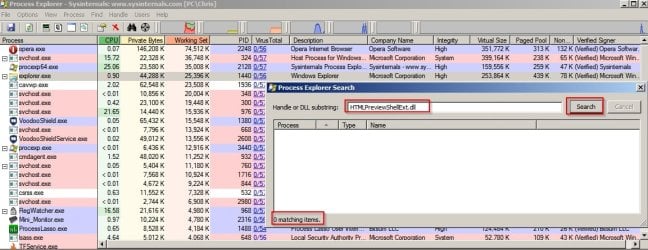
Okay I searched my machine and there's no trace of HTMLPreviewShellExt.dll anywhere.

I downloaded (from the manufacturer's site) and ran the batch file as admin.

There's still no trace of it.

Process Explorer - Sysinternals.jpg

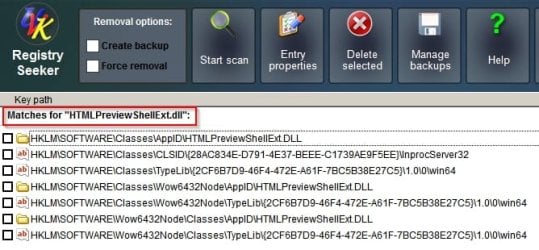
A registry search does show a few traces.

Will look at the dump.
 

My Computer My Computer

At a glance

Microsoft Windows 7 Home Premium 64-bit 7601 ...AMD C-60 APU with Radeon(tm) HD Graphics4.00 GBAMD Radeon HD 6290 Graphics
Computer type
Laptop
Computer Manufacturer/Model Number
ASUS
OS
Microsoft Windows 7 Home Premium 64-bit 7601 Multiprocessor Free Service Pack 1
CPU
AMD C-60 APU with Radeon(tm) HD Graphics
Motherboard
ASUSTeK COMPUTER INC. X501U
Memory
4.00 GB
Graphics Card(s)
AMD Radeon HD 6290 Graphics
Sound Card
(1) AMD High Definition Audio Device (2) Realtek High Defi
Screen Resolution
1366 x 768 x 32 bits (4294967296 colors) @ 60 Hz
Hard Drives
Hitachi HTS545050A7E380 SATA Disk Device
Antivirus
Comodo CIS & FW, SecureAplus App Whitelisting, Threatfire
Browser
Cyberfox 64bit, Opera 64bit, Airfox
Other Info
Spy-The-Spy, HitmanPro.Alert, Norton Connect Safe, MJRegWatcher, BitDefender TrafficLight, Voodoo Shield, Zemana AntiMalware
FYI: Registry entries.

Registry Seeker.jpg
 

My Computer My Computer

At a glance

Microsoft Windows 7 Home Premium 64-bit 7601 ...AMD C-60 APU with Radeon(tm) HD Graphics4.00 GBAMD Radeon HD 6290 Graphics
Computer type
Laptop
Computer Manufacturer/Model Number
ASUS
OS
Microsoft Windows 7 Home Premium 64-bit 7601 Multiprocessor Free Service Pack 1
CPU
AMD C-60 APU with Radeon(tm) HD Graphics
Motherboard
ASUSTeK COMPUTER INC. X501U
Memory
4.00 GB
Graphics Card(s)
AMD Radeon HD 6290 Graphics
Sound Card
(1) AMD High Definition Audio Device (2) Realtek High Defi
Screen Resolution
1366 x 768 x 32 bits (4294967296 colors) @ 60 Hz
Hard Drives
Hitachi HTS545050A7E380 SATA Disk Device
Antivirus
Comodo CIS & FW, SecureAplus App Whitelisting, Threatfire
Browser
Cyberfox 64bit, Opera 64bit, Airfox
Other Info
Spy-The-Spy, HitmanPro.Alert, Norton Connect Safe, MJRegWatcher, BitDefender TrafficLight, Voodoo Shield, Zemana AntiMalware
The strange thing is that your dump shows this path:

C:\Windows\HTML thumbnail preview\64bit\HTMLPreviewShellExt.dll

I don't get those directories or files when running the batch file.
 

My Computer My Computer

At a glance

Microsoft Windows 7 Home Premium 64-bit 7601 ...AMD C-60 APU with Radeon(tm) HD Graphics4.00 GBAMD Radeon HD 6290 Graphics
Computer type
Laptop
Computer Manufacturer/Model Number
ASUS
OS
Microsoft Windows 7 Home Premium 64-bit 7601 Multiprocessor Free Service Pack 1
CPU
AMD C-60 APU with Radeon(tm) HD Graphics
Motherboard
ASUSTeK COMPUTER INC. X501U
Memory
4.00 GB
Graphics Card(s)
AMD Radeon HD 6290 Graphics
Sound Card
(1) AMD High Definition Audio Device (2) Realtek High Defi
Screen Resolution
1366 x 768 x 32 bits (4294967296 colors) @ 60 Hz
Hard Drives
Hitachi HTS545050A7E380 SATA Disk Device
Antivirus
Comodo CIS & FW, SecureAplus App Whitelisting, Threatfire
Browser
Cyberfox 64bit, Opera 64bit, Airfox
Other Info
Spy-The-Spy, HitmanPro.Alert, Norton Connect Safe, MJRegWatcher, BitDefender TrafficLight, Voodoo Shield, Zemana AntiMalware
Also the crash dump is the same as before. HTMLPreviewShellExt.dll does show up in the loaded module list.

Maybe see if it shows up in Autoruns > Explorer tab or just search for it by name in Autoruns and if found uncheck the box to disable it for test purposes.

If it doesn't show up then it will require more thought.

Will check back here tomorrow.
 

My Computer My Computer

At a glance

Microsoft Windows 7 Home Premium 64-bit 7601 ...AMD C-60 APU with Radeon(tm) HD Graphics4.00 GBAMD Radeon HD 6290 Graphics
Computer type
Laptop
Computer Manufacturer/Model Number
ASUS
OS
Microsoft Windows 7 Home Premium 64-bit 7601 Multiprocessor Free Service Pack 1
CPU
AMD C-60 APU with Radeon(tm) HD Graphics
Motherboard
ASUSTeK COMPUTER INC. X501U
Memory
4.00 GB
Graphics Card(s)
AMD Radeon HD 6290 Graphics
Sound Card
(1) AMD High Definition Audio Device (2) Realtek High Defi
Screen Resolution
1366 x 768 x 32 bits (4294967296 colors) @ 60 Hz
Hard Drives
Hitachi HTS545050A7E380 SATA Disk Device
Antivirus
Comodo CIS & FW, SecureAplus App Whitelisting, Threatfire
Browser
Cyberfox 64bit, Opera 64bit, Airfox
Other Info
Spy-The-Spy, HitmanPro.Alert, Norton Connect Safe, MJRegWatcher, BitDefender TrafficLight, Voodoo Shield, Zemana AntiMalware
RE: What you were saying about user accounts.

Check the tutorial here:

Thumbnail Previews - Enable or Disable

Check settings are the same in both accounts. See Options Two and Three regarding different users.

Also I've searched internet for C:\Windows\HTML thumbnail preview\ and there is no mention of it.
 

My Computer My Computer

At a glance

Microsoft Windows 7 Home Premium 64-bit 7601 ...AMD C-60 APU with Radeon(tm) HD Graphics4.00 GBAMD Radeon HD 6290 Graphics
Computer type
Laptop
Computer Manufacturer/Model Number
ASUS
OS
Microsoft Windows 7 Home Premium 64-bit 7601 Multiprocessor Free Service Pack 1
CPU
AMD C-60 APU with Radeon(tm) HD Graphics
Motherboard
ASUSTeK COMPUTER INC. X501U
Memory
4.00 GB
Graphics Card(s)
AMD Radeon HD 6290 Graphics
Sound Card
(1) AMD High Definition Audio Device (2) Realtek High Defi
Screen Resolution
1366 x 768 x 32 bits (4294967296 colors) @ 60 Hz
Hard Drives
Hitachi HTS545050A7E380 SATA Disk Device
Antivirus
Comodo CIS & FW, SecureAplus App Whitelisting, Threatfire
Browser
Cyberfox 64bit, Opera 64bit, Airfox
Other Info
Spy-The-Spy, HitmanPro.Alert, Norton Connect Safe, MJRegWatcher, BitDefender TrafficLight, Voodoo Shield, Zemana AntiMalware
Friends, I decided to do everything possible to remove reference to HTMLPreviewShellExt.dll on the system, including removing all references in the registry editor and where it exists on the hard drive (c:/Windows).

I used Crap Cleaner to clean the registry and rebooted. Upon restart and entry into my user account, I immediately go this error.

attachment.php


I hit "Abort." Immediately Explorer crashed, but restarted. It seemed to run fine after that, but I logged off and logged back in and this time I did not receive the error message.

I have no idea if that OS function error is related to my removal of the DLL, but thinking ... that error is exactly the same one I got a week ago, as noted in an earlier post on this thread.

Constant Explorer/thumbnail crash. MSVCR80.dll culprit? How to fix?

Noting the error reads:
1.0.7.16,2015/06/01 18:41:51
CreateExpBtn, err:System Error. Code: 1410.
Class already exists
Would this have anything to do with my recent update of Visual C++Runtime201564bit and Visual C++Runtime201532bit (among all the others)?

That said, things seem to be stable right now, though no URL icons are no longer rendered as snapshots of the websites.

As usual, thanks for any insight or answers!
 

My Computer My Computer

At a glance

Microsoft Windows 7 Home Premium 64-bit 7601 ...AMD Athlon(tm) II X4 645 Processor8.00 GB(1) NVIDIA GeForce 9500 GT (2) LogMeIn Mirror...
Computer type
PC/Desktop
Computer Manufacturer/Model Number
Lenovo H405
OS
Microsoft Windows 7 Home Premium 64-bit 7601 Multiprocessor Free Service Pack 1
CPU
AMD Athlon(tm) II X4 645 Processor
Motherboard
LENOVO Tilapia CRB
Memory
8.00 GB
Graphics Card(s)
(1) NVIDIA GeForce 9500 GT (2) LogMeIn Mirror Driver
Sound Card
(1) Realtek High Definition Audio (2) NVIDIA Virtual Audio
Screen Resolution
(1) 1920 x 1080 x 32 bits (4294967296 colors) @ 60 Hz (2)
Hard Drives
(1) Hitachi HDS721010CLA332 ATA Device (2) SAMSUNG HD103SI USB Device
Antivirus
Kaspersky 17.*
Browser
FF, Chrome
Noting the error reads:
1.0.7.16,2015/06/01 18:41:51
CreateExpBtn, err:System Error. Code: 1410.
Class already exists


Did you try running "Types" as per this post?

Constant Explorer/thumbnail crash. MSVCR80.dll culprit? How to fix?

I'm not expert on it but see what shows up as linked class for URL, HTML or other suspect extensions.

RE: AveHTMLPreview

It doesn't work for me I think because I use Windows 7 HP with aero disabled. Also AveHTMLPreview is pretty old and doesn't seem to have been updated.

Also as far as I can work out you have to run the batch file to unregister the .dll from the directory where it is located.

set currentdir=%~dp0

%windir%\system32\regsvr32.exe /u "%currentdir%HTMLPreviewShellExt.dll"

If you like you could run a UVK Scan and upload the results (or check them yourself)

Constant Explorer/thumbnail crash. MSVCR80.dll culprit? How to fix?
 

My Computer My Computer

At a glance

Microsoft Windows 7 Home Premium 64-bit 7601 ...AMD C-60 APU with Radeon(tm) HD Graphics4.00 GBAMD Radeon HD 6290 Graphics
Computer type
Laptop
Computer Manufacturer/Model Number
ASUS
OS
Microsoft Windows 7 Home Premium 64-bit 7601 Multiprocessor Free Service Pack 1
CPU
AMD C-60 APU with Radeon(tm) HD Graphics
Motherboard
ASUSTeK COMPUTER INC. X501U
Memory
4.00 GB
Graphics Card(s)
AMD Radeon HD 6290 Graphics
Sound Card
(1) AMD High Definition Audio Device (2) Realtek High Defi
Screen Resolution
1366 x 768 x 32 bits (4294967296 colors) @ 60 Hz
Hard Drives
Hitachi HTS545050A7E380 SATA Disk Device
Antivirus
Comodo CIS & FW, SecureAplus App Whitelisting, Threatfire
Browser
Cyberfox 64bit, Opera 64bit, Airfox
Other Info
Spy-The-Spy, HitmanPro.Alert, Norton Connect Safe, MJRegWatcher, BitDefender TrafficLight, Voodoo Shield, Zemana AntiMalware
Callender and other friends: I have been on this machine all day and it hasn't hiccuped once after that initial Explorer startup error:
1.0.7.16,2015/06/01 18:41:51
CreateExpBtn, err:System Error. Code: 1410.
Class already exists
... which I clicked Abort when I was given the option. I have restarted the computer a time or two since and have not received the error again. Things seem pretty good now.

I suspect it was that old "HTMLPreviewShellExt.dll" -- as mentioned in an earlier post, it's 8-9 years old now. I like the option of seeing HTML thumbnails, but not at the expense of a unreliable machine, or for that matter CPU and resources being slowed down by all the graphical renderings needed to make the thumbnails.

If this keeps up, I will click problem solved. Thanks as always for the support.
 

My Computer My Computer

At a glance

Microsoft Windows 7 Home Premium 64-bit 7601 ...AMD Athlon(tm) II X4 645 Processor8.00 GB(1) NVIDIA GeForce 9500 GT (2) LogMeIn Mirror...
Computer type
PC/Desktop
Computer Manufacturer/Model Number
Lenovo H405
OS
Microsoft Windows 7 Home Premium 64-bit 7601 Multiprocessor Free Service Pack 1
CPU
AMD Athlon(tm) II X4 645 Processor
Motherboard
LENOVO Tilapia CRB
Memory
8.00 GB
Graphics Card(s)
(1) NVIDIA GeForce 9500 GT (2) LogMeIn Mirror Driver
Sound Card
(1) Realtek High Definition Audio (2) NVIDIA Virtual Audio
Screen Resolution
(1) 1920 x 1080 x 32 bits (4294967296 colors) @ 60 Hz (2)
Hard Drives
(1) Hitachi HDS721010CLA332 ATA Device (2) SAMSUNG HD103SI USB Device
Antivirus
Kaspersky 17.*
Browser
FF, Chrome
Just a note to say that I added Ave's HTML Preview to another machine and it worked okay showing thumbnail previews in Explorer as it is supposed to. Having said that it does seem to be deleloped for Vista and not updated since. The machine used does not have Sage Thumbs or anything IObit installed and pretty much has no other image viewing software installed. I reckon it must have had compatibility issues with other installed software on your machine.
 

My Computer My Computer

At a glance

Microsoft Windows 7 Home Premium 64-bit 7601 ...AMD C-60 APU with Radeon(tm) HD Graphics4.00 GBAMD Radeon HD 6290 Graphics
Computer type
Laptop
Computer Manufacturer/Model Number
ASUS
OS
Microsoft Windows 7 Home Premium 64-bit 7601 Multiprocessor Free Service Pack 1
CPU
AMD C-60 APU with Radeon(tm) HD Graphics
Motherboard
ASUSTeK COMPUTER INC. X501U
Memory
4.00 GB
Graphics Card(s)
AMD Radeon HD 6290 Graphics
Sound Card
(1) AMD High Definition Audio Device (2) Realtek High Defi
Screen Resolution
1366 x 768 x 32 bits (4294967296 colors) @ 60 Hz
Hard Drives
Hitachi HTS545050A7E380 SATA Disk Device
Antivirus
Comodo CIS & FW, SecureAplus App Whitelisting, Threatfire
Browser
Cyberfox 64bit, Opera 64bit, Airfox
Other Info
Spy-The-Spy, HitmanPro.Alert, Norton Connect Safe, MJRegWatcher, BitDefender TrafficLight, Voodoo Shield, Zemana AntiMalware
I agree, HTML preview is outdated. I wonder if there is something as useful but newer available? I haven't found it yet.
 

My Computer My Computer

At a glance

Microsoft Windows 7 Home Premium 64-bit 7601 ...AMD Athlon(tm) II X4 645 Processor8.00 GB(1) NVIDIA GeForce 9500 GT (2) LogMeIn Mirror...
Computer type
PC/Desktop
Computer Manufacturer/Model Number
Lenovo H405
OS
Microsoft Windows 7 Home Premium 64-bit 7601 Multiprocessor Free Service Pack 1
CPU
AMD Athlon(tm) II X4 645 Processor
Motherboard
LENOVO Tilapia CRB
Memory
8.00 GB
Graphics Card(s)
(1) NVIDIA GeForce 9500 GT (2) LogMeIn Mirror Driver
Sound Card
(1) Realtek High Definition Audio (2) NVIDIA Virtual Audio
Screen Resolution
(1) 1920 x 1080 x 32 bits (4294967296 colors) @ 60 Hz (2)
Hard Drives
(1) Hitachi HDS721010CLA332 ATA Device (2) SAMSUNG HD103SI USB Device
Antivirus
Kaspersky 17.*
Browser
FF, Chrome
I've looked and haven't found anything either. I got a copy of XYPlorer Portable Free and it you can set it to show thumbnail previews in "View> Views> Details with thumbnails" setting but there is no explorer integration except for drives and directories via "Tools > Integration". That means that you can locate a folder in Explorer and right click to preview contents of files in the folder with XYPlorer via context menu but you cannot right click on an individual file in Explorer to do the same.

Tools> Configuration> Previewed Formats to select file types.

Unfortunately the download link for free portable version is not currently available from the manufacturer's website. I'll PM you the link.
 

My Computer My Computer

At a glance

Microsoft Windows 7 Home Premium 64-bit 7601 ...AMD C-60 APU with Radeon(tm) HD Graphics4.00 GBAMD Radeon HD 6290 Graphics
Computer type
Laptop
Computer Manufacturer/Model Number
ASUS
OS
Microsoft Windows 7 Home Premium 64-bit 7601 Multiprocessor Free Service Pack 1
CPU
AMD C-60 APU with Radeon(tm) HD Graphics
Motherboard
ASUSTeK COMPUTER INC. X501U
Memory
4.00 GB
Graphics Card(s)
AMD Radeon HD 6290 Graphics
Sound Card
(1) AMD High Definition Audio Device (2) Realtek High Defi
Screen Resolution
1366 x 768 x 32 bits (4294967296 colors) @ 60 Hz
Hard Drives
Hitachi HTS545050A7E380 SATA Disk Device
Antivirus
Comodo CIS & FW, SecureAplus App Whitelisting, Threatfire
Browser
Cyberfox 64bit, Opera 64bit, Airfox
Other Info
Spy-The-Spy, HitmanPro.Alert, Norton Connect Safe, MJRegWatcher, BitDefender TrafficLight, Voodoo Shield, Zemana AntiMalware
Unfortunately the download link for free portable version is not currently available from the manufacturer's website. I'll PM you the link.

Ignore that link. It's for the installed version.
 

My Computer My Computer

At a glance

Microsoft Windows 7 Home Premium 64-bit 7601 ...AMD C-60 APU with Radeon(tm) HD Graphics4.00 GBAMD Radeon HD 6290 Graphics
Computer type
Laptop
Computer Manufacturer/Model Number
ASUS
OS
Microsoft Windows 7 Home Premium 64-bit 7601 Multiprocessor Free Service Pack 1
CPU
AMD C-60 APU with Radeon(tm) HD Graphics
Motherboard
ASUSTeK COMPUTER INC. X501U
Memory
4.00 GB
Graphics Card(s)
AMD Radeon HD 6290 Graphics
Sound Card
(1) AMD High Definition Audio Device (2) Realtek High Defi
Screen Resolution
1366 x 768 x 32 bits (4294967296 colors) @ 60 Hz
Hard Drives
Hitachi HTS545050A7E380 SATA Disk Device
Antivirus
Comodo CIS & FW, SecureAplus App Whitelisting, Threatfire
Browser
Cyberfox 64bit, Opera 64bit, Airfox
Other Info
Spy-The-Spy, HitmanPro.Alert, Norton Connect Safe, MJRegWatcher, BitDefender TrafficLight, Voodoo Shield, Zemana AntiMalware
I agree, HTML preview is outdated. I wonder if there is something as useful but newer available? I haven't found it yet.

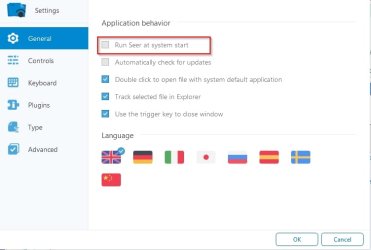
Update: You might want to try Seer free version v0.8.1

You can run it on demand.

Settings - Seer.jpg

Basics: Navigate to folder containing .html file in explorer and highlight the file. Press the space bar to preview. Press space bar again to close preview.

Bonus: It also works well with image, video and audio files.
 

My Computer My Computer

At a glance

Microsoft Windows 7 Home Premium 64-bit 7601 ...AMD C-60 APU with Radeon(tm) HD Graphics4.00 GBAMD Radeon HD 6290 Graphics
Computer type
Laptop
Computer Manufacturer/Model Number
ASUS
OS
Microsoft Windows 7 Home Premium 64-bit 7601 Multiprocessor Free Service Pack 1
CPU
AMD C-60 APU with Radeon(tm) HD Graphics
Motherboard
ASUSTeK COMPUTER INC. X501U
Memory
4.00 GB
Graphics Card(s)
AMD Radeon HD 6290 Graphics
Sound Card
(1) AMD High Definition Audio Device (2) Realtek High Defi
Screen Resolution
1366 x 768 x 32 bits (4294967296 colors) @ 60 Hz
Hard Drives
Hitachi HTS545050A7E380 SATA Disk Device
Antivirus
Comodo CIS & FW, SecureAplus App Whitelisting, Threatfire
Browser
Cyberfox 64bit, Opera 64bit, Airfox
Other Info
Spy-The-Spy, HitmanPro.Alert, Norton Connect Safe, MJRegWatcher, BitDefender TrafficLight, Voodoo Shield, Zemana AntiMalware
Thanks for this!

I have an older laptop that I've been bringing up to date. I started getting the error message:
1.0.7.16,2015/06/01 18:41:51
CreateExpBtn, err:System Error. Code: 1410.
Class already exists

I found this thread, and after reading it, I decided that the thing that made the most sense was to uninstall IObit Uninstaller. Which I had just recently upgraded. And it was a big upgrade, skipping one or two major revisions. So far (after several reboots and a half-day of running), the error has not re-appeared.

I would not have thought to try uninstalling that one program without this post, so ... thanks for this!

-Jim :)
 

My Computer My Computer

At a glance

Windows 7 Pro x64
OS
Windows 7 Pro x64
Back
Top