constant high physical memory usage

zuth

New member
Local time
3:15 PM
Messages
18
hello everybody
im having a really nasty problem here
a few days ago i started experiencing slowdowns and sluggishness on my PC
even when nothing too resource hungry running
then i experienced a few crashes, in situations where there wasnt an apparent reason
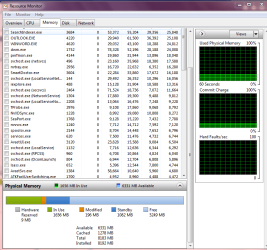
so i checked resource monitor and was horrified to find my memory usage around 90%
and constant, with no processes running except the ones that start with windows

dont know if it has anything to do with this, but shortly before this problem started i had trouble with booting my PC from my system HD after installing a new HD
i got help in this forum and solved my problem
here is the thread if it has any connection
http://www.sevenforums.com/installation-setup/164513-change-system-hard-drive.html
although the problem didnt start right away after this, i cant think of anything else that changed

i would appreciate any help coming before my PC explodes :)
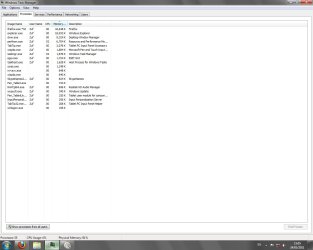
here's a screenshot of my Resource monitor and my processes in task manager
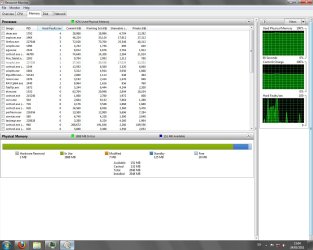
Res-monitor.jpgProcesses.jpg
 

My Computer

OS
Windows 7 Ultimate x64
Have you had a look at startup & background services.?
 

My Computer

Computer Manufacturer/Model Number
Asus
OS
Seven ultimate 32bit
CPU
Core2Duo E5700
Motherboard
Asus p5qlem
Memory
3GB DDR2
Graphics Card(s)
HD5670
Sound Card
Onboard
Monitor(s) Displays
Philips 18.5 widescreen
Screen Resolution
Depends
Hard Drives
500GB Samsung 7200RPM
PSU
500w Sparta
Case
Aerocool
Cooling
Standard + 2x 40's inserted
Keyboard
Multimedia
Mouse
Genius
Internet Speed
10meg.
do you mean the 'services' tab in task manager?
 

My Computer

OS
Windows 7 Ultimate x64
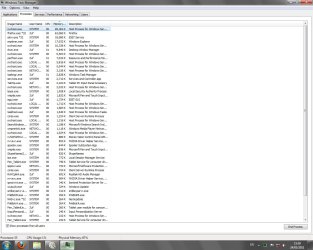
In your right Snip of Task Manager you will see in bottom left corner "Show processes from all users". Click it in Task Manager and post a Snip please.

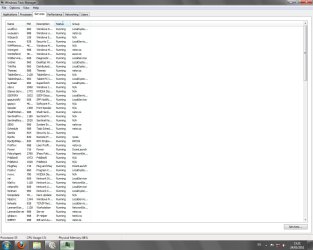
You can post Services tab in TM also that might help.

Mike


Also 2GB of RAM is minimum to run Win 7 64bit. That is part of the reason usage is high.

There could be other high usage items also that may not be needed to run all the time.
 

My Computer

Computer Manufacturer/Model Number
Hopalong/ Godzilla
OS
Windows7 Pro 64bit SP-1; Windows XP Pro 32bit
CPU
Intel Core i7-870 Lynnfield 2.93GHz LGA 1156 95W Quad-Core
Motherboard
ASUS P7P55D-E PRO
Memory
8GB@1400MHz Crucial Ballistix DDR3-1600 4x2GB
Graphics Card(s)
ASUS ENGTX460 DirectCU/2DI/1GD5 1GB 256-bit GDDR5
Sound Card
VIA Onboard
Monitor(s) Displays
Asus VS248H-P 24"; Samsung SyncMaster 941BW 19"ws
Screen Resolution
1920x1080; 1440x900
Hard Drives
Samsung 830 120GB SSD
Intel 320 120GB SSD
Western Digital Caviar Black WD7501AALS 750GB 7200 RPM SATA 3.0Gb/s
Western Digital Caviar Black WD6401AALS 640GB 7200 RPM SATA 3.0Gb/s
PSU
COOLER MASTER Silent Pro RS850-AMBAJ3-US 850W Modular
Case
COOLER MASTER HAF 932 RC-932-KKN5-GP Black
Cooling
Scythe "Mugen-2 Rev.B" (2 ScytheKaze-Jyuni PWM fans)
Keyboard
Logitech K-320
Mouse
Kensington
Antivirus
Avast Inernet Suite
Browser
IE 9 ; Chrome
here is screenshots of both processes (all users) and services tabs
Processes-2.jpgservices.jpg

edit - im aware 2GB is minimum, but iv managed with it just fine for a long time until now
 

My Computer

OS
Windows 7 Ultimate x64
I do not see anything extreme or out of place in usage.

If you look at the Snip I posted of my ResMon I am also using almost 2000MB/ 2GB at an idle.

I have 8GB installed but that has no effect on idle usage. 64bit loves RAM.

Your Task Manager and ResMon all appear to be normal usage to me.

If possible I would consider adding more RAM in the future.
Up to 4GB total. This is often the limit if you are using a laptop.

Hope that answers some questions for you.
Others may also post with other suggestions also.

Mike
 

Attachments

  • ResMon.PNG
    ResMon.PNG
    35.2 KB · Views: 160

My Computer

Computer Manufacturer/Model Number
Hopalong/ Godzilla
OS
Windows7 Pro 64bit SP-1; Windows XP Pro 32bit
CPU
Intel Core i7-870 Lynnfield 2.93GHz LGA 1156 95W Quad-Core
Motherboard
ASUS P7P55D-E PRO
Memory
8GB@1400MHz Crucial Ballistix DDR3-1600 4x2GB
Graphics Card(s)
ASUS ENGTX460 DirectCU/2DI/1GD5 1GB 256-bit GDDR5
Sound Card
VIA Onboard
Monitor(s) Displays
Asus VS248H-P 24"; Samsung SyncMaster 941BW 19"ws
Screen Resolution
1920x1080; 1440x900
Hard Drives
Samsung 830 120GB SSD
Intel 320 120GB SSD
Western Digital Caviar Black WD7501AALS 750GB 7200 RPM SATA 3.0Gb/s
Western Digital Caviar Black WD6401AALS 640GB 7200 RPM SATA 3.0Gb/s
PSU
COOLER MASTER Silent Pro RS850-AMBAJ3-US 850W Modular
Case
COOLER MASTER HAF 932 RC-932-KKN5-GP Black
Cooling
Scythe "Mugen-2 Rev.B" (2 ScytheKaze-Jyuni PWM fans)
Keyboard
Logitech K-320
Mouse
Kensington
Antivirus
Avast Inernet Suite
Browser
IE 9 ; Chrome
well, i cant be sure what was my memory usage before the slowdowns began
it might have been the same, but when i searched for reasons for the problem i couldnt find anything wrong aside from constant 90% memory usage, which seemed high to me
this slowdowns and crashes prevent me from using any software on my PC, opening TM while firefox is running almost crashed the system

so if anyone has an idea what is wrong here, id like to hear it

p.s - i believe reinstalling windows would solve this, but im in period where i would like to avoid it, and dont the have the time to start reinstalling all the stuff i need for my studies (im an animation student) and i need my PC running for at least a month before i can start taking care of it
 

My Computer

OS
Windows 7 Ultimate x64
Hello zuth,

I didn't see this info, so I will just ask - You have recently scanned your system in SAFE MODE and you are sure it's clean?

I prefer MalwareBytes for this... but what ever you use to scan be sure it's up to date, and run it in SAFE MODE.

Stealth Technology allows viruses to run and appear to be valid Windows files... SAFE MODE is the only way to be sure...

You didn't mention this, so I had to ask! :)

Let us know...

Patrick
 

My Computer

Computer Manufacturer/Model Number
Custom Creation
OS
Windows 7 Pro, Vista Business, Vista Ultimate, Windows XP
CPU
Core 2 Extreme

My Computer

Computer Manufacturer/Model Number
Hopalong/ Godzilla
OS
Windows7 Pro 64bit SP-1; Windows XP Pro 32bit
CPU
Intel Core i7-870 Lynnfield 2.93GHz LGA 1156 95W Quad-Core
Motherboard
ASUS P7P55D-E PRO
Memory
8GB@1400MHz Crucial Ballistix DDR3-1600 4x2GB
Graphics Card(s)
ASUS ENGTX460 DirectCU/2DI/1GD5 1GB 256-bit GDDR5
Sound Card
VIA Onboard
Monitor(s) Displays
Asus VS248H-P 24"; Samsung SyncMaster 941BW 19"ws
Screen Resolution
1920x1080; 1440x900
Hard Drives
Samsung 830 120GB SSD
Intel 320 120GB SSD
Western Digital Caviar Black WD7501AALS 750GB 7200 RPM SATA 3.0Gb/s
Western Digital Caviar Black WD6401AALS 640GB 7200 RPM SATA 3.0Gb/s
PSU
COOLER MASTER Silent Pro RS850-AMBAJ3-US 850W Modular
Case
COOLER MASTER HAF 932 RC-932-KKN5-GP Black
Cooling
Scythe "Mugen-2 Rev.B" (2 ScytheKaze-Jyuni PWM fans)
Keyboard
Logitech K-320
Mouse
Kensington
Antivirus
Avast Inernet Suite
Browser
IE 9 ; Chrome
@Pierre50

hi :) did as you suggested, and it couldnt find any infections

@Hopalong X

did a cleanup too, cant hurt :) but i really believe the problem is much more serious than this

i really dont know whats wrong anymore
 

My Computer

OS
Windows 7 Ultimate x64
If i were in your position zuth i'd prob be stumped too. I've seen machines run fine with 1GB of memory using Win7. but running ccleaner, defraggler, and a quick scan in malwarebytes in safe mode would be the first thing to try. What's your system hardware?, update you sytem specs under your profile, please? :D Some things you could try, go into msconfig and disable any startup program you don't need. From your processes tab i can see your using eset anti-virus, correct? Make sure it's not running any scans in the background as that could be spiking mem usage. Other than that, you could try running sfc /scannow in command prompt.
 

My Computer

Computer Manufacturer/Model Number
Custom Built Gaming PC
OS
Windows 7 Ultimate 64-bit
CPU
AMD Phenom II X4 940 BE @ 3.8Ghz
Motherboard
Gigabyte GA-MA790FX-UD5P
Memory
4GB G.Skill DDR2 1066 @ 800Mhz 4-4-4-12
Graphics Card(s)
Sapphire Radeon HD 4890 OC @ 950/1050
Sound Card
Auzen X-Fi Bravura 7.1
Monitor(s) Displays
Acer AL2016W
Screen Resolution
1680x1050
Hard Drives
640GB WD Cavier Black
PSU
Corsair TX-750W
Case
CM HAF 922
Cooling
Cooler Master Hyper 212 Plus Push/Pull
Keyboard
Logitech G15 2ND Gen
Mouse
Razer Deathadder Black Edition
Internet Speed
2 Mbps Down, .5 Mbps UP
  • Like
Reactions: JMH
@zuth, can you post another resmon screenshot, but this time sorted by "Working set"? I can see an svchost and ekrn.exe possibly as potential places to start looking into, but as to which (and if they're the only ones) is hard to say. You didn't sort the data by anything useful :).
 

My Computer

Computer type
PC/Desktop
Computer Manufacturer/Model Number
Custom
OS
Windows 10 Pro x64
CPU
Intel Core i7 4790K @ 4.5GHz
Motherboard
Asus Maximus Hero VII
Memory
32GB DDR3
Graphics Card(s)
Nvidia GeForce GTX970
Sound Card
Realtek HD Audio
Screen Resolution
1920x1200
Hard Drives
1x Samsung 250GB SSD
4x WD RE 2TB (RAIDZ)
PSU
Corsair AX760i
Case
Fractal Design Define R4
Cooling
Noctua NH-D15
Some of this may be due to programs starting and running with Windows.

Messengers etc ..

May want to look through Start up items, and disable things that are not needed. Then reboot.


With only 2GB of RAM, you would probably be better off with 32bit IMHO.
 

My Computer

Computer Manufacturer/Model Number
Custom (Self Build)
OS
Windows 7 Home Premium 64bit
CPU
Intel Core i7 2700k
Motherboard
eVGA P67 SLI
Memory
8GB Mushkin Redline Ridgebacks @1866
Graphics Card(s)
EVGA GTX570 SC
Sound Card
XiFi Titanium HD
Monitor(s) Displays
LG W2453V
Screen Resolution
1920x1080
Hard Drives
Intel 320 80GB -- Intel X25-V 40GB --WD Black 1TB x2 -- WD Blue 640GB
PSU
Seasonic x750
Case
Corsair 600T SE White
Cooling
eVGA Superclocked CPU Cooler
Keyboard
Saitek Cyborg
Antivirus
Kaspersky
Browser
IE
Other Info
LG BD/DVD
Back
Top