Constant System Restore Error - Windows 7 Ultimate RTM

paranoid365

Banned
Local time
12:04 AM
Messages
8
Location
Canada
Hey guys and gals,

I am new to the forum, (please be gentle), so I wanted to start off, 1st, by saying Hello to everyone out there, and in here. :D

Now on to the issue I have run into.

** I am currently running WIN 7 Ultimate 64 Bit RTM **

Every single time I try to use system restore, it comes back with the exact same error, on reboot:

{"System restore did not complete successfully. Your computer's system files and settings were not changed.

Details:

Unspecified error occurred during System Restore. (0xc0000043)"}


I have tried different system restore points, (within Windows), but it does not seem to fix the issue.

I have also tried disabling my security software, (KIS 2010), and that doesn't seem to help either.

The puzzling thing is that when I run system restore in safe mode it seems to work no problem, but it just will not work within windows itself, (normal boot). :mad:


Any help would be greatly appreciated. Thank you very much in advance.
 
Last edited:

My Computer

Computer Manufacturer/Model Number
Home Build
OS
Windows 7 RTM
CPU
AMD Athlon(tm) 64 X2 Dual Core Processor 5000+, 2.6 GHz
Motherboard
Foxconn A6VMX
Memory
GSKILL Dual Channel - 4GB(2x2gb) DDR2-800
Graphics Card(s)
Onboard ATI Xpress 1200
Sound Card
Onboard
Monitor(s) Displays
HP F-2105
Screen Resolution
1280 x 768 (Native res. is a lot higher, but to small)
Hard Drives
WD-(3.5) -SATA II - 500 GB Internal
Seagate-(3.5) IDE - 250 GB Internal
WD My Book- 500 GB External
PSU
Thermaltake X Silent Pure Power - 480 Watt
Case
Antec
Cooling
Cpu - Stock AMD
Keyboard
Microsoft Wireless Entertainment Keyboard 8000
Mouse
Microsoft Wireless Laser Mouse 8000
Internet Speed
10 Mbps (down) - 1 Mbps (UP)

My Computer

OS
vista x64
CPU
E8600 Core Duo
Motherboard
EVGA 780i Sli
Memory
8 GB
Graphics Card(s)
BFG 8800 GTX
Hello paranoid. Try first the sfc like Sammy here above told you. It is a mighty tool, capable to fix several system errors.

If nothing helps and you are not able to do system restore, you could completely disable system restore, reboot and then enable it again. Has worked for me, a big minus is though that doing this you lose all previous restore points.

But, listen to Sammy, do sfc /scannow first.

Kari
 

My Computer

Computer type
Laptop
Computer Manufacturer/Model Number
HP ENVY 17-1150eg
OS
Windows 10 Pro x64 EN-GB
CPU
1.6 GHz Intel Core i7-720QM Processor
Memory
6 GB
Graphics Card(s)
ATI Mobility Radeon HD 5850 Graphics
Sound Card
Beats sound system with integrated subwoofer
Monitor(s) Displays
17" laptop display, 22" LED and 32" Full HD TV through HDMI
Screen Resolution
1600*900 (1), 1920*1080 (2&3)
Hard Drives
Internal: 2 x 500 GB SATA Hard Disk Drive 7200 rpm
External: 2TB for backups, 3TB USB3 network drive for media
Cooling
As Envy runs a bit warm, I have it on a Cooler Master pad
Keyboard
Logitech diNovo Media Desktop Laser (bluetooth)
Mouse
Logitech Performance Mouse MX
Internet Speed
50/10 Mbps VDSL
Antivirus
Windows Defender 4.3.9431.0
Browser
Maxthon 3.5.2., IE11
Hey guys and gals,

I am new to the forum, (please be gentle), so I wanted to start off, 1st, by saying Hello to everyone out there, and in here. :D

Now on to the issue I have run into.

** I am currently running WIN 7 Ultimate 64 Bit RTM **

Every single time I try to use system restore, it comes back with the exact same error, on reboot:

{"System restore did not complete successfully. Your computer's system files and settings were not changed.

Details:

Unspecified error occurred during System Restore. (0xc0000043)"}


I have tried different system restore points, (within Windows), but it does not seem to fix the issue.

I have also tried disabling my security software, (KIS 2010), and that doesn't seem to help either.

The puzzling thing is that when I run system restore in safe mode it seems to work no problem, but it just will not work within windows itself, (normal boot). :mad:


Any help would be greatly appreciated. Thank you very much in advance.

Hi and welcome to seven forums

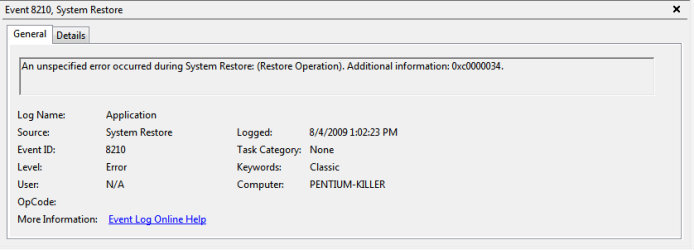
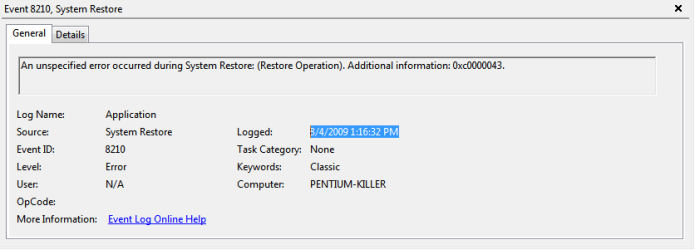
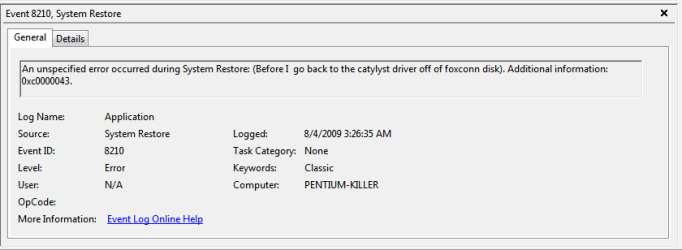
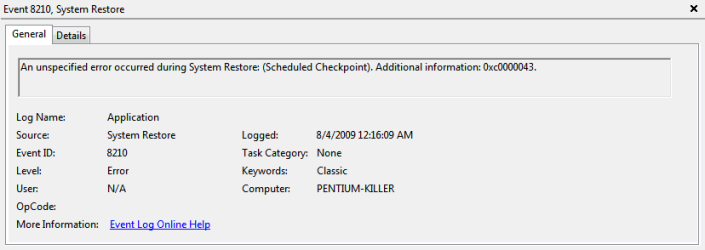
the error code is a failure to initialize error. there is something in a normal boot preventing its launch, hence it working in safe mode. You want to gointo event viewer (type event viewer in search) and look for errors related to the problem. If ther are could you upload them to us? use the paperclip icon in reply to attach the errors, and you can use the snipping tool (yeah type snipping tool in search) to make a snip of them

Hope this helps and again welcome

Ken
 

My Computer

Computer Manufacturer/Model Number
HP Pavillion dv-7 1005 Tx
OS
Win 8 Release candidate 8400
CPU
[email protected]
Memory
4 gigs
Graphics Card(s)
Nvidia 9600M
Sound Card
HD built-in
Monitor(s) Displays
17" Wxga
Screen Resolution
1440x900
Cooling
none
Internet Speed
45Mb down 5Mb up
Welcome to the forum,

You may want to run sfc /scannow this will scan all your system file integrity and replace damaged/changed or missing files.

http://www.sevenforums.com/tutorials/1538-sfc-scannow-command-system-file-checker.html
Or a repair install http://www.sevenforums.com/tutorials/3413-repair-install.html

Hope this helps and good luck

Hey Sammy, thanks for the quick reply. I went ahead and ran the sfc /scannow, and it came back with no issues.


Hello paranoid. Try first the sfc like Sammy here above told you. It is a mighty tool, capable to fix several system errors.

If nothing helps and you are not able to do system restore, you could completely disable system restore, reboot and then enable it again. Has worked for me, a big minus is though that doing this you lose all previous restore points.

But, listen to Sammy, do sfc /scannow first.

Kari

Hey Kari, thanks for the quick reply, but I am going to use your suggestion as a last resort, since I would like to try and keep my restore points. :D


Hi and welcome to seven forums

the error code is a failure to initialize error. there is something in a normal boot preventing its launch, hence it working in safe mode. You want to gointo event viewer (type event viewer in search) and look for errors related to the problem. If ther are could you upload them to us? use the paperclip icon in reply to attach the errors, and you can use the snipping tool (yeah type snipping tool in search) to make a snip of them

Hope this helps and again welcome

Ken

Hey zigzag3143, thanks for the quick reply also. I will go ahead and upload the screens you requested.


Attachments

  • 8.4.2009 1.02.23 PM.PNG
    8.4.2009 1.02.23 PM.PNG
    6.6 KB · Views: 440
  • 8.4.2009 1.16.32 PM.PNG
    8.4.2009 1.16.32 PM.PNG
    6.6 KB · Views: 275
  • 8.4.2009 3.26.35 AM.PNG
    8.4.2009 3.26.35 AM.PNG
    7 KB · Views: 256
  • 8_4_2009 12_16_09 AM.PNG
    8_4_2009 12_16_09 AM.PNG
    6.6 KB · Views: 193

My Computer

Computer Manufacturer/Model Number
Home Build
OS
Windows 7 RTM
CPU
AMD Athlon(tm) 64 X2 Dual Core Processor 5000+, 2.6 GHz
Motherboard
Foxconn A6VMX
Memory
GSKILL Dual Channel - 4GB(2x2gb) DDR2-800
Graphics Card(s)
Onboard ATI Xpress 1200
Sound Card
Onboard
Monitor(s) Displays
HP F-2105
Screen Resolution
1280 x 768 (Native res. is a lot higher, but to small)
Hard Drives
WD-(3.5) -SATA II - 500 GB Internal
Seagate-(3.5) IDE - 250 GB Internal
WD My Book- 500 GB External
PSU
Thermaltake X Silent Pure Power - 480 Watt
Case
Antec
Cooling
Cpu - Stock AMD
Keyboard
Microsoft Wireless Entertainment Keyboard 8000
Mouse
Microsoft Wireless Laser Mouse 8000
Internet Speed
10 Mbps (down) - 1 Mbps (UP)
Just wondering if anyone had a chance to look over my error screens??

Thanx :D
 

My Computer

Computer Manufacturer/Model Number
Home Build
OS
Windows 7 RTM
CPU
AMD Athlon(tm) 64 X2 Dual Core Processor 5000+, 2.6 GHz
Motherboard
Foxconn A6VMX
Memory
GSKILL Dual Channel - 4GB(2x2gb) DDR2-800
Graphics Card(s)
Onboard ATI Xpress 1200
Sound Card
Onboard
Monitor(s) Displays
HP F-2105
Screen Resolution
1280 x 768 (Native res. is a lot higher, but to small)
Hard Drives
WD-(3.5) -SATA II - 500 GB Internal
Seagate-(3.5) IDE - 250 GB Internal
WD My Book- 500 GB External
PSU
Thermaltake X Silent Pure Power - 480 Watt
Case
Antec
Cooling
Cpu - Stock AMD
Keyboard
Microsoft Wireless Entertainment Keyboard 8000
Mouse
Microsoft Wireless Laser Mouse 8000
Internet Speed
10 Mbps (down) - 1 Mbps (UP)
thnx

thanx 4 sharing ur xperience bor...it worked for me...
regards from india:D
 

My Computer

Computer Manufacturer/Model Number
dell inspiron 1440
OS
windows 7 64
Hard Drives
320
Back
Top