How to Add "Copy To Folder" and "Move To Folder" to Context Menu in Windows 7 and Windows 8
Information
This tutorial will show you how to add or remove Copy To Folder and Move to Folder to the context menu for all users in Windows 7 and Windows 8.
You must me logged in as an administrator to be able to do the steps in this tutorial.
You must me logged in as an administrator to be able to do the steps in this tutorial.
Note
Copy To Folder allows you to right click selected file(s) and folder(s) and copy them to another location immediately.
Move to Folder allows you to right click on selected file(s) and folder(s) and move them to another location, then remove them from their current location immediately.
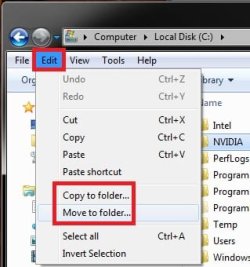
In Windows 7, the default location for Copy To Folder and Move To Folder is in the Edit menu bar menu in Windows Explorer.
In Windows 8 and 8.1, the default location for Copy To Folder and Move To Folder is in the Home tab in the ribbon of File Explorer. You would click/tap on Choose location to see the "Copy Items" or "Move Items" dialog.

Move to Folder allows you to right click on selected file(s) and folder(s) and move them to another location, then remove them from their current location immediately.
In Windows 7, the default location for Copy To Folder and Move To Folder is in the Edit menu bar menu in Windows Explorer.
In Windows 8 and 8.1, the default location for Copy To Folder and Move To Folder is in the Home tab in the ribbon of File Explorer. You would click/tap on Choose location to see the "Copy Items" or "Move Items" dialog.
Tip
To Copy file(s) regardless of the source and target destination, hold down the CTRL key while you drag and drop the file(s).
To Move file(s) regardless of the source and target destination, hold down the SHIFT key while you drag and drop the file(s).
To Move file(s) regardless of the source and target destination, hold down the SHIFT key while you drag and drop the file(s).
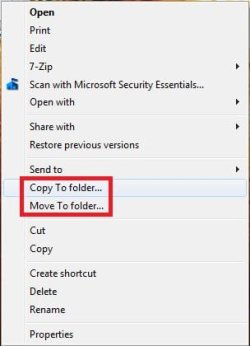
EXAMPLE: "Copy To Folder" and "Move To Folder" added to the Context Menu
NOTE: Right click on selected file(s) and folder(s) to see your new additions.

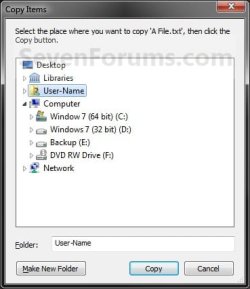
EXAMPLE: Copy To Folder and Move To Folder windows
NOTE: You can see what happens when you click on each of these context menu items to.


OPTION ONE
Add or Remove "Copy To Folder" from the Context Menu
1. To Add "Copy To Folder" to Context Menu
A) Click/tap on the Download button below to download the file below, and go to step 3 below.
Add_Copy_To_Folder.reg
Download
B) Go to step 3.
2. To Remove "Copy To Folder" from Context Menu
A) Click/tap on the Download button below to download the file below, and go to step 3 below.
Remove_Copy_To_Folder.reg
Download
3. Save the .reg file to the desktop.
4. Double click/tap on the downloaded .reg file to merge it.
5. When prompted, click/tap on Run, Yes (UAC), Yes, and OK to approve merging the .reg file.
6. You can now delete the downloaded .reg file if you like.
OPTION TWO
Add or Remove "Move To Folder" from the Context Menu
1. To Add "Move To Folder" to Context Menu
A) Click/tap on the Download button below to download the file below, and go to step 3 below.
Add_Move_To_Folder.reg
Download
B) Go to step 3.
2. To Remove "Move To Folder" from Context Menu
A) Click/tap on the Download button below to download the file below, and go to step 3 below.
Remove_Move_To_Folder.reg
Download
3. Save the .reg file to the desktop.
4. Double click/tap on the downloaded .reg file to merge it.
5. When prompted, click/tap on Run, Yes (UAC), Yes, and OK to approve merging the .reg file.
6. You can now delete the downloaded .reg file if you like.
That's it,
Shawn
Related Tutorials
- How to Reset Browse For Folders type Dialog Boxes to Default Size in Windows
- How to Add Empty Folder and Subfolders to the Windows 7 Context Menu
- How to Expand the Windows 7 Context Menu for More Options
- How to Enable or Disable Windows 7 Explorer Context Menu
- How to Add Shortcuts to the Windows 7 Context Menu with Icons
- How to Remove and Restore the Default Windows 7 Send To Context Menu Items
- How to Add "Copy Content to Clipboard" to Context Menu in Vista, Windows 7, and Windows 8
Attachments

Last edited: