Context Menu - Add Copy To Folder and Move To Folder

How to Add "Copy To Folder" and "Move To Folder" to Context Menu in Windows 7 and Windows 8

   Information
This tutorial will show you how to add or remove Copy To Folder and Move to Folder to the context menu for all users in Windows 7 and Windows 8.

You must me logged in as an administrator to be able to do the steps in this tutorial.

   Note
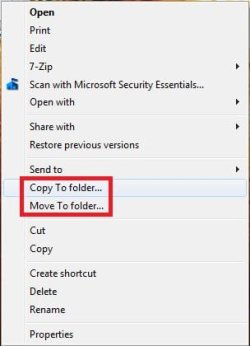
Copy To Folder allows you to right click selected file(s) and folder(s) and copy them to another location immediately.

Move to Folder allows you to right click on selected file(s) and folder(s) and move them to another location, then remove them from their current location immediately.

In Windows 7, the default location for Copy To Folder and Move To Folder is in the Edit menu bar menu in Windows Explorer.
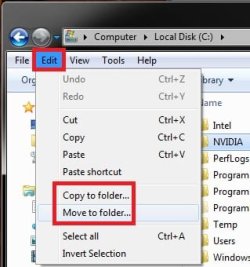
Default.jpg
In Windows 8 and 8.1, the default location for Copy To Folder and Move To Folder is in the Home tab in the ribbon of File Explorer. You would click/tap on Choose location to see the "Copy Items" or "Move Items" dialog.
W8.jpg
   Tip
To Copy file(s) regardless of the source and target destination, hold down the CTRL key while you drag and drop the file(s).

To Move file(s) regardless of the source and target destination, hold down the SHIFT key while you drag and drop the file(s).


EXAMPLE: "Copy To Folder" and "Move To Folder" added to the Context Menu
NOTE: Right click on selected file(s) and folder(s) to see your new additions.
Default_Context_Menu.jpgAdded.jpg
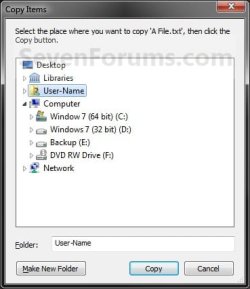
EXAMPLE: Copy To Folder and Move To Folder windows
NOTE: You can see what happens when you click on each of these context menu items to.
578d1226688176-context-menu-add-copy-folder-move-folder-copy_to_folder.jpg
579d1226688176-context-menu-add-copy-folder-move-folder-move_to_folder.jpg


OPTION ONE

Add or Remove "Copy To Folder" from the Context Menu


1. To Add "Copy To Folder" to Context Menu
A) Click/tap on the Download button below to download the file below, and go to step 3 below.
Add_Copy_To_Folder.reg

Download


B) Go to step 3.
2. To Remove "Copy To Folder" from Context Menu
A) Click/tap on the Download button below to download the file below, and go to step 3 below.
Remove_Copy_To_Folder.reg

Download


3. Save the .reg file to the desktop.

4. Double click/tap on the downloaded .reg file to merge it.

5. When prompted, click/tap on Run, Yes (UAC), Yes, and OK to approve merging the .reg file.

6. You can now delete the downloaded .reg file if you like.


OPTION TWO

Add or Remove "Move To Folder" from the Context Menu


1. To Add "Move To Folder" to Context Menu
A) Click/tap on the Download button below to download the file below, and go to step 3 below.
Add_Move_To_Folder.reg

Download


B) Go to step 3.
2. To Remove "Move To Folder" from Context Menu
A) Click/tap on the Download button below to download the file below, and go to step 3 below.
Remove_Move_To_Folder.reg

Download


3. Save the .reg file to the desktop.

4. Double click/tap on the downloaded .reg file to merge it.

5. When prompted, click/tap on Run, Yes (UAC), Yes, and OK to approve merging the .reg file.

6. You can now delete the downloaded .reg file if you like.

That's it,
Shawn


Attachments

Last edited:
Hello Shawn.


I just wondered because I have this tutorial linked in a couple tutorials, so I'll have to look at my wording in them to see if it's still appropriate.

I personally use both all the time.


Thanks mate! :)
 

My Computer My Computer

Computer Manufacturer/Model Number
* BFK Customs *
OS
W 7 64-bit Ultimate
CPU
Intel Q9550 Yorkfield
Motherboard
ASUS P5Q Pro
Memory
8GB Dominator 8500C5D
Graphics Card(s)
ATI : XFX 5870
Sound Card
Realtek HD Audio 7-1
Monitor(s) Displays
1x 47" LCD HDMI & 3x 26" LCD HDMI
Screen Resolution
1920x1080P & 1920x1200
Hard Drives
1x 80GB Intel X25-M G2 SSD : 1x 500GB & 1x 640GB WD Caviar Black(s)
PSU
Corsair 620HX
Case
Cooler Master RC-690
Cooling
Tuniq Tower 120, 2x 140mm and 3x 120mm case fans
Keyboard
Microsoft 500
Mouse
Razer Diamondback 3G
Internet Speed
14 Mb/s
Other Info
1x Koutech 3Gb/s SATA HDD Hot Swap Rack
De nada. :)
 

My Computer My Computer

Computer type
PC/Desktop
Computer Manufacturer/Model Number
Self built custom
OS
64-bit Windows 11 Pro for Workstations
CPU
Intel i7-8700K OC'd to 5 GHz
Motherboard
ASUS ROG Maximus XI Formula Z390
Memory
64 GB (4x16GB) G.SKILL TridentZ RGB DDR4 3600 MHz
Graphics Card(s)
ASUS ROG-STRIX-GTX1080TI-O11G-GAMING
Sound Card
Integrated
Monitor(s) Displays
2 x Samsung Odyssey G7 27"
Screen Resolution
2560x1440
Hard Drives
1TB Samsung 990 PRO M.2,
4TB Samsung 990 PRO PRO M.2,
TerraMaster F8 SSD Plus NAS
PSU
Seasonic Prime Titanium 850W
Case
Thermaltake Core P3
Cooling
Corsair Hydro H115i
Keyboard
Logitech wireless K800
Mouse
Logitech MX Master 4
Internet Speed
2 Gb/s Download and 100 Mb/s Upload
Antivirus
Malwarebyte Anti-Malware Premium
Browser
Google Chrome
Other Info
Logitech Z625 speaker system,
Logitech BRIO 4K Pro webcam,
HP Color LaserJet Pro MFP M477fdn,
APC SMART-UPS RT 1000 XL - SURT1000XLI,
Galaxy S23 Plus phone
Shawn, Howdy. Am a newbie to the forum. Just came across your excellent tutorial on adding the Copy to and Move To Folder in the context menu. I applied the two reg entries and I now have the Copy to and Move to entries when I right click on a file or folder. What I am not seeing is the "Edit" tab on the menu bar. The Copy to and move to function works perfectly. I just don't see the "Edit" tab like in your screenshot.
 

My Computer My Computer

Computer type
PC/Desktop
Computer Manufacturer/Model Number
Dell XPS600
OS
Win7 Pro x64 SP1
CPU
3.2ghz
Motherboard
Nvidia nForce4 SLI
Memory
8.0 gb Samsung Ram
Graphics Card(s)
Evga GTX260 898mb
Sound Card
Onboard AC97
Monitor(s) Displays
Dell 2407 WFP
Hard Drives
WD 250gb Sata
Antivirus
NIS 2014
Hello Aviator,

Do you have the menu bar turned on in Windows Explorer?

Hope this helps,
Shawn
 

My Computer My Computer

Computer type
PC/Desktop
Computer Manufacturer/Model Number
Self built custom
OS
64-bit Windows 11 Pro for Workstations
CPU
Intel i7-8700K OC'd to 5 GHz
Motherboard
ASUS ROG Maximus XI Formula Z390
Memory
64 GB (4x16GB) G.SKILL TridentZ RGB DDR4 3600 MHz
Graphics Card(s)
ASUS ROG-STRIX-GTX1080TI-O11G-GAMING
Sound Card
Integrated
Monitor(s) Displays
2 x Samsung Odyssey G7 27"
Screen Resolution
2560x1440
Hard Drives
1TB Samsung 990 PRO M.2,
4TB Samsung 990 PRO PRO M.2,
TerraMaster F8 SSD Plus NAS
PSU
Seasonic Prime Titanium 850W
Case
Thermaltake Core P3
Cooling
Corsair Hydro H115i
Keyboard
Logitech wireless K800
Mouse
Logitech MX Master 4
Internet Speed
2 Gb/s Download and 100 Mb/s Upload
Antivirus
Malwarebyte Anti-Malware Premium
Browser
Google Chrome
Other Info
Logitech Z625 speaker system,
Logitech BRIO 4K Pro webcam,
HP Color LaserJet Pro MFP M477fdn,
APC SMART-UPS RT 1000 XL - SURT1000XLI,
Galaxy S23 Plus phone
Thanks Shawn. That worked. I am learning something new everyday with Win7.;)
 

My Computer My Computer

Computer type
PC/Desktop
Computer Manufacturer/Model Number
Dell XPS600
OS
Win7 Pro x64 SP1
CPU
3.2ghz
Motherboard
Nvidia nForce4 SLI
Memory
8.0 gb Samsung Ram
Graphics Card(s)
Evga GTX260 898mb
Sound Card
Onboard AC97
Monitor(s) Displays
Dell 2407 WFP
Hard Drives
WD 250gb Sata
Antivirus
NIS 2014
You're most welcome. :)
 

My Computer My Computer

Computer type
PC/Desktop
Computer Manufacturer/Model Number
Self built custom
OS
64-bit Windows 11 Pro for Workstations
CPU
Intel i7-8700K OC'd to 5 GHz
Motherboard
ASUS ROG Maximus XI Formula Z390
Memory
64 GB (4x16GB) G.SKILL TridentZ RGB DDR4 3600 MHz
Graphics Card(s)
ASUS ROG-STRIX-GTX1080TI-O11G-GAMING
Sound Card
Integrated
Monitor(s) Displays
2 x Samsung Odyssey G7 27"
Screen Resolution
2560x1440
Hard Drives
1TB Samsung 990 PRO M.2,
4TB Samsung 990 PRO PRO M.2,
TerraMaster F8 SSD Plus NAS
PSU
Seasonic Prime Titanium 850W
Case
Thermaltake Core P3
Cooling
Corsair Hydro H115i
Keyboard
Logitech wireless K800
Mouse
Logitech MX Master 4
Internet Speed
2 Gb/s Download and 100 Mb/s Upload
Antivirus
Malwarebyte Anti-Malware Premium
Browser
Google Chrome
Other Info
Logitech Z625 speaker system,
Logitech BRIO 4K Pro webcam,
HP Color LaserJet Pro MFP M477fdn,
APC SMART-UPS RT 1000 XL - SURT1000XLI,
Galaxy S23 Plus phone
Well, I am still confused. I still have those two icons on my desktop. When I copied the "move to folder" it too is on my desktop. Can't I get all three of them off. I know I have had these kinds of icons and words on my desktop before and I don't know what I did with them. But I would need to rename them no matter where they go so I know what installation they are for?
 

My Computer My Computer

Computer Manufacturer/Model Number
Vostro 220 Mini Tower Desktop Details | Dell
OS
Windows 7 Home Premium SP 1, 32-bit
CPU
Intel(R) Core(TM)2 Duo CPU E7400 @ 2.80GHz
Motherboard
Dell Inc. 0P301D
Memory
3.00 GB
Graphics Card(s)
(1) Intel(R) G45/G43 Express Chipset (2) Intel(R) G45/G43
Sound Card
(1) High Definition Audio Device (2) High Definition Audio
Monitor(s) Displays
Dell 22" wide E228WFP Analog flat panelq
Mouse
Dell optical usb mouse vostro
Other Info
OPTICAL READER, MOUSE,SPEAKERS, MONITOR, MODEM
Hello Patti,

I'm not quite sure what you mean by "those icons on my desktop"??

Could you give some more details and screenshots of what you mean? :)
 

My Computer My Computer

Computer type
PC/Desktop
Computer Manufacturer/Model Number
Self built custom
OS
64-bit Windows 11 Pro for Workstations
CPU
Intel i7-8700K OC'd to 5 GHz
Motherboard
ASUS ROG Maximus XI Formula Z390
Memory
64 GB (4x16GB) G.SKILL TridentZ RGB DDR4 3600 MHz
Graphics Card(s)
ASUS ROG-STRIX-GTX1080TI-O11G-GAMING
Sound Card
Integrated
Monitor(s) Displays
2 x Samsung Odyssey G7 27"
Screen Resolution
2560x1440
Hard Drives
1TB Samsung 990 PRO M.2,
4TB Samsung 990 PRO PRO M.2,
TerraMaster F8 SSD Plus NAS
PSU
Seasonic Prime Titanium 850W
Case
Thermaltake Core P3
Cooling
Corsair Hydro H115i
Keyboard
Logitech wireless K800
Mouse
Logitech MX Master 4
Internet Speed
2 Gb/s Download and 100 Mb/s Upload
Antivirus
Malwarebyte Anti-Malware Premium
Browser
Google Chrome
Other Info
Logitech Z625 speaker system,
Logitech BRIO 4K Pro webcam,
HP Color LaserJet Pro MFP M477fdn,
APC SMART-UPS RT 1000 XL - SURT1000XLI,
Galaxy S23 Plus phone
Well, I am still confused. I still have those two icons on my desktop. When I copied the "move to folder" it too is on my desktop. Can't I get all three of them off. I know I have had these kinds of icons and words on my desktop before and I don't know what I did with them. But I would need to rename them no matter where they go so I know what installation they are for?

I just suggested this as an easy way to move things around in your other thread.

If you want to just delete them you can do that, they are just installers for SP1

and Office. Have you tried to delete them via the right click context menu?

This reg file just adds 2 options to your right click context menu so when you

right click on a file or folder, you can choose to copy or move it to a specified

location. If you merged the .reg file already you can delete that too.

Hi Shawn,

This is her other thread,

http://www.sevenforums.com/general-discussion/193098-where-do-i-put-these.html#post1625547
 

My Computer My Computer

Computer type
PC/Desktop
Computer Manufacturer/Model Number
Self Built
OS
Win 10 Pro x64
CPU
Intel I5-2500K @3.3GHz
Motherboard
Asrock P67 Extreme4
Memory
16GB G.Skill Ripjaws X (4x4GB)
Graphics Card(s)
EVGA GeForce 750 Ti SC 2GB
Sound Card
ASUS Xonar DG 5.1 Channels 24-bit 96KHz PCI Interface Sound
Monitor(s) Displays
auria eq2367
Screen Resolution
1920 x 1080
Hard Drives
250GB Samsung 850 EVO SSD
1TB WD Blue
1TB Hitachi
PSU
SeaSonic X 650W 80 Plus Gold
Case
Corsair Obsidian 750D
Cooling
Corsair H60, Three 140mm case fans
Keyboard
Logitech Wireless Keyboard K520
Mouse
Logitech Wireless Mouse M310
Internet Speed
Wave Broadband ~ 100 dn 5 up
Antivirus
Windows Defender, Malwarebytes Premium
Browser
Edge, IE11, Chrome
Other Info
Laptop specs: HP g7-1365dx /
CPU: AMD A6-3420M APU with Radeon(tm) HD Graphics /
RAM: Crucial 8Gb (2x4Gb) /
SSD: Crucial M4-CT128M4SSD2 ATA Device/ FW 000F /
GFX: AMD Radeon HD 6520G /
OS: Windows 10 Pro x64
Ah, ok. Thank you Derek.

Patti,

This should really be posted in your original thread on this instead so that it could all be kept together. :)
 

My Computer My Computer

Computer type
PC/Desktop
Computer Manufacturer/Model Number
Self built custom
OS
64-bit Windows 11 Pro for Workstations
CPU
Intel i7-8700K OC'd to 5 GHz
Motherboard
ASUS ROG Maximus XI Formula Z390
Memory
64 GB (4x16GB) G.SKILL TridentZ RGB DDR4 3600 MHz
Graphics Card(s)
ASUS ROG-STRIX-GTX1080TI-O11G-GAMING
Sound Card
Integrated
Monitor(s) Displays
2 x Samsung Odyssey G7 27"
Screen Resolution
2560x1440
Hard Drives
1TB Samsung 990 PRO M.2,
4TB Samsung 990 PRO PRO M.2,
TerraMaster F8 SSD Plus NAS
PSU
Seasonic Prime Titanium 850W
Case
Thermaltake Core P3
Cooling
Corsair Hydro H115i
Keyboard
Logitech wireless K800
Mouse
Logitech MX Master 4
Internet Speed
2 Gb/s Download and 100 Mb/s Upload
Antivirus
Malwarebyte Anti-Malware Premium
Browser
Google Chrome
Other Info
Logitech Z625 speaker system,
Logitech BRIO 4K Pro webcam,
HP Color LaserJet Pro MFP M477fdn,
APC SMART-UPS RT 1000 XL - SURT1000XLI,
Galaxy S23 Plus phone
thanks
 

My Computer My Computer

Computer Manufacturer/Model Number
Sony
OS
XP
CPU
P4
Motherboard
Asus
Memory
1 gig
Graphics Card(s)
X700ATI
Sound Card
Realtek
Monitor(s) Displays
Acer
Hard Drives
Seagate
PSU
500 W
Case
ATX
Cooling
Zaherman
You're most welcome xptowindows7. :)
 

My Computer My Computer

Computer type
PC/Desktop
Computer Manufacturer/Model Number
Self built custom
OS
64-bit Windows 11 Pro for Workstations
CPU
Intel i7-8700K OC'd to 5 GHz
Motherboard
ASUS ROG Maximus XI Formula Z390
Memory
64 GB (4x16GB) G.SKILL TridentZ RGB DDR4 3600 MHz
Graphics Card(s)
ASUS ROG-STRIX-GTX1080TI-O11G-GAMING
Sound Card
Integrated
Monitor(s) Displays
2 x Samsung Odyssey G7 27"
Screen Resolution
2560x1440
Hard Drives
1TB Samsung 990 PRO M.2,
4TB Samsung 990 PRO PRO M.2,
TerraMaster F8 SSD Plus NAS
PSU
Seasonic Prime Titanium 850W
Case
Thermaltake Core P3
Cooling
Corsair Hydro H115i
Keyboard
Logitech wireless K800
Mouse
Logitech MX Master 4
Internet Speed
2 Gb/s Download and 100 Mb/s Upload
Antivirus
Malwarebyte Anti-Malware Premium
Browser
Google Chrome
Other Info
Logitech Z625 speaker system,
Logitech BRIO 4K Pro webcam,
HP Color LaserJet Pro MFP M477fdn,
APC SMART-UPS RT 1000 XL - SURT1000XLI,
Galaxy S23 Plus phone
I love this kind of efficient working, but I personally have found eliminating the mouse as much as possible is the best way and that's worked for me for some time. I was initially intrigued by this as it may be useful to have a quick way to send something to (a folder on) the desktop for example, however I still would find using a combination of ctrl+c then ctrl+v (maybe adding a windows+D in-between there to get to the desktop or windows+e to bring up 'computer' followed by either usage of alt+tab to switch between windows, or tab to move around in a window and the arrow keys or even F3 in some cases if the destination folder is buried obscurely in a potentially unknown location or is simply too many folders deep amongst highly populated folder structures)

Now is there anything anyone can build on or pick apart with my system. I'm very open to criticism as I have after all criticised this method of using the mouse. Perhaps there's something I'm missing or some kind of flaw with my system for some?
 

My Computer My Computer

Computer type
PC/Desktop
Computer Manufacturer/Model Number
Dell
OS
Windows 7 Professional 64bit
CPU
Intel Core i5-3320M @ 2.60GHz
Memory
8GB
Graphics Card(s)
Intel HD Graphics 4000 (integrated)
Sound Card
IDT Audio (integrated)
Monitor(s) Displays
generic dual monitors (various brands)
Screen Resolution
1366 x 768
Hard Drives
500GB built in 5400RPM
various externals (Lacie 4TB, WD 3TB)
PSU
pretty standard.. no sparks or melting
Case
mainly consists of plastic, metal and a few screws
Cooling
there is a fan... somewhere... I can hear it.
Mouse
Microsoft Intellimouse Explorer 3.0
Internet Speed
50 down / 10 up
Antivirus
Avast
Browser
Chrome
Other Info
I have a secondary laptop (replaced due to multiple issues):
- Zoostorm i5, 16GB RAM

I also have desktops:
- AMD Bulldozer, 8GB RAM - keeps turning off - currently unusable
- Acer Core 2 Duo, 2GB RAM - won't boot - currently unusable

I have various other ancient desktops that I don't seem to want to get rid of.
reg keys not working, the remove one's. windows 7

FIXED IT>>>>>>>>>>>>>>>>>>>>>>>>>>>>>>>>>>>>>>>>>>>

To fix the issue i opened the reg key's with notepad and went to the reg key location and there were keys for
Copy To and Move To, I just deleted them keys and the options were gone on the context menu. hope this helps anyone else with this issue:)
 
Last edited:

My Computer My Computer

Computer type
Laptop
OS
WINDOWS 7 X64
Memory
8GB RAM
Hard Drives
1TB
Mouse
BUILT IN AND I HATE IT LOL
Internet Speed
FREE COMCAST BUISNESS CLASS SINE IM A EMPLOYEE
Antivirus
bitdefender total security 2013 64 bit
Browser
FIREFOX
Hello SexyBlonde, and welcome to Seven Forums. :)

They're working fine for me. You might check to make sure that you approved all the prompts at step 5. Missing any one of them will cause the remove .reg to not work.
 

My Computer My Computer

Computer type
PC/Desktop
Computer Manufacturer/Model Number
Self built custom
OS
64-bit Windows 11 Pro for Workstations
CPU
Intel i7-8700K OC'd to 5 GHz
Motherboard
ASUS ROG Maximus XI Formula Z390
Memory
64 GB (4x16GB) G.SKILL TridentZ RGB DDR4 3600 MHz
Graphics Card(s)
ASUS ROG-STRIX-GTX1080TI-O11G-GAMING
Sound Card
Integrated
Monitor(s) Displays
2 x Samsung Odyssey G7 27"
Screen Resolution
2560x1440
Hard Drives
1TB Samsung 990 PRO M.2,
4TB Samsung 990 PRO PRO M.2,
TerraMaster F8 SSD Plus NAS
PSU
Seasonic Prime Titanium 850W
Case
Thermaltake Core P3
Cooling
Corsair Hydro H115i
Keyboard
Logitech wireless K800
Mouse
Logitech MX Master 4
Internet Speed
2 Gb/s Download and 100 Mb/s Upload
Antivirus
Malwarebyte Anti-Malware Premium
Browser
Google Chrome
Other Info
Logitech Z625 speaker system,
Logitech BRIO 4K Pro webcam,
HP Color LaserJet Pro MFP M477fdn,
APC SMART-UPS RT 1000 XL - SURT1000XLI,
Galaxy S23 Plus phone
woo hoo, they work :) thank you Brink :) I don't know if the uninstall work as I won't be getting rid of them, they are too usefull these copy & move context menu thingys :) cheers
 

My Computer My Computer

Computer type
PC/Desktop
Computer Manufacturer/Model Number
custom build
OS
Windows 7 x64 Ultimate
CPU
i5 [email protected]
Motherboard
Asus P8Z68-V Pro/Gen 3
Memory
2x4GB Low profile Corsair Vengence
Graphics Card(s)
Sapphire 7970 OC v2@1180/1480
Sound Card
ASUS Zonar DSX
Monitor(s) Displays
27" Black Tune by Crossover & 22" Viewsonic
Screen Resolution
2560x1440 & 1680x1050
Hard Drives
1x 128GB Samsung 840 Pro
1x 640GB WD Black
3x 3TB Seagate Barracuda
PSU
XFX 850W Black Edition
Case
NZXT Phantom 820
Cooling
Noctua NH-D15
Keyboard
Razor Tarantula
Mouse
Logitech G500s
Internet Speed
5.5Mb/s down via satellite
Antivirus
Bitdefender Total Security 2014
Browser
Firefox
You're most welcome Bear. :)
 

My Computer My Computer

Computer type
PC/Desktop
Computer Manufacturer/Model Number
Self built custom
OS
64-bit Windows 11 Pro for Workstations
CPU
Intel i7-8700K OC'd to 5 GHz
Motherboard
ASUS ROG Maximus XI Formula Z390
Memory
64 GB (4x16GB) G.SKILL TridentZ RGB DDR4 3600 MHz
Graphics Card(s)
ASUS ROG-STRIX-GTX1080TI-O11G-GAMING
Sound Card
Integrated
Monitor(s) Displays
2 x Samsung Odyssey G7 27"
Screen Resolution
2560x1440
Hard Drives
1TB Samsung 990 PRO M.2,
4TB Samsung 990 PRO PRO M.2,
TerraMaster F8 SSD Plus NAS
PSU
Seasonic Prime Titanium 850W
Case
Thermaltake Core P3
Cooling
Corsair Hydro H115i
Keyboard
Logitech wireless K800
Mouse
Logitech MX Master 4
Internet Speed
2 Gb/s Download and 100 Mb/s Upload
Antivirus
Malwarebyte Anti-Malware Premium
Browser
Google Chrome
Other Info
Logitech Z625 speaker system,
Logitech BRIO 4K Pro webcam,
HP Color LaserJet Pro MFP M477fdn,
APC SMART-UPS RT 1000 XL - SURT1000XLI,
Galaxy S23 Plus phone
Need help with Context Menu additions

I followed the instructions in the Tutorial to Add Copy to Folder and Move To Folder and installed the registry entries per instructions but the items do not show in the right click context drop down items. Am I doing something wrong?

TIA
Mary
 

My Computer My Computer

OS
Win 7
Hello Mary,

These context menu items will only show up when you right click on a file or folder, and nothing else.

Were you logged in to an administrator account when you merged the .reg files?

Did you use the .reg files from step 1 in both Option One & Two?

This context menu item will only show up when you right click on a file or folder, and nothing else.

Hope this helps for now, :)
Shawn
 

My Computer My Computer

Computer type
PC/Desktop
Computer Manufacturer/Model Number
Self built custom
OS
64-bit Windows 11 Pro for Workstations
CPU
Intel i7-8700K OC'd to 5 GHz
Motherboard
ASUS ROG Maximus XI Formula Z390
Memory
64 GB (4x16GB) G.SKILL TridentZ RGB DDR4 3600 MHz
Graphics Card(s)
ASUS ROG-STRIX-GTX1080TI-O11G-GAMING
Sound Card
Integrated
Monitor(s) Displays
2 x Samsung Odyssey G7 27"
Screen Resolution
2560x1440
Hard Drives
1TB Samsung 990 PRO M.2,
4TB Samsung 990 PRO PRO M.2,
TerraMaster F8 SSD Plus NAS
PSU
Seasonic Prime Titanium 850W
Case
Thermaltake Core P3
Cooling
Corsair Hydro H115i
Keyboard
Logitech wireless K800
Mouse
Logitech MX Master 4
Internet Speed
2 Gb/s Download and 100 Mb/s Upload
Antivirus
Malwarebyte Anti-Malware Premium
Browser
Google Chrome
Other Info
Logitech Z625 speaker system,
Logitech BRIO 4K Pro webcam,
HP Color LaserJet Pro MFP M477fdn,
APC SMART-UPS RT 1000 XL - SURT1000XLI,
Galaxy S23 Plus phone
Shawn,

OK now I understand duh. Now it works. Many thanks for your patience and assistance.

Mary
 

My Computer My Computer

OS
Win 7
Back
Top