Context Menu - Add Copy To Folder and Move To Folder

How to Add "Copy To Folder" and "Move To Folder" to Context Menu in Windows 7 and Windows 8

   Information
This tutorial will show you how to add or remove Copy To Folder and Move to Folder to the context menu for all users in Windows 7 and Windows 8.

You must me logged in as an administrator to be able to do the steps in this tutorial.

   Note
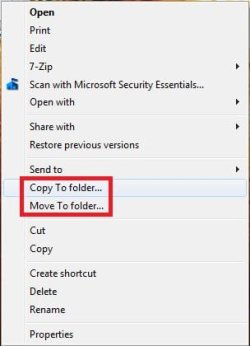
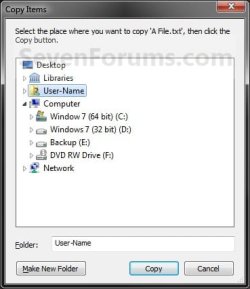
Copy To Folder allows you to right click selected file(s) and folder(s) and copy them to another location immediately.

Move to Folder allows you to right click on selected file(s) and folder(s) and move them to another location, then remove them from their current location immediately.

In Windows 7, the default location for Copy To Folder and Move To Folder is in the Edit menu bar menu in Windows Explorer.
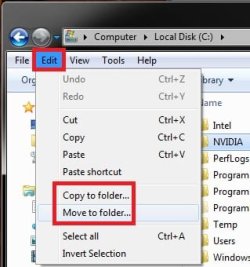
Default.jpg
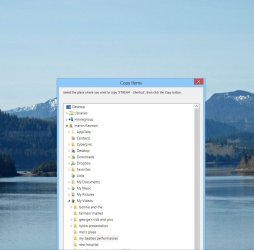
In Windows 8 and 8.1, the default location for Copy To Folder and Move To Folder is in the Home tab in the ribbon of File Explorer. You would click/tap on Choose location to see the "Copy Items" or "Move Items" dialog.
W8.jpg
   Tip
To Copy file(s) regardless of the source and target destination, hold down the CTRL key while you drag and drop the file(s).

To Move file(s) regardless of the source and target destination, hold down the SHIFT key while you drag and drop the file(s).


EXAMPLE: "Copy To Folder" and "Move To Folder" added to the Context Menu
NOTE: Right click on selected file(s) and folder(s) to see your new additions.
Default_Context_Menu.jpgAdded.jpg
EXAMPLE: Copy To Folder and Move To Folder windows
NOTE: You can see what happens when you click on each of these context menu items to.
578d1226688176-context-menu-add-copy-folder-move-folder-copy_to_folder.jpg
579d1226688176-context-menu-add-copy-folder-move-folder-move_to_folder.jpg


OPTION ONE

Add or Remove "Copy To Folder" from the Context Menu


1. To Add "Copy To Folder" to Context Menu
A) Click/tap on the Download button below to download the file below, and go to step 3 below.
Add_Copy_To_Folder.reg

Download


B) Go to step 3.
2. To Remove "Copy To Folder" from Context Menu
A) Click/tap on the Download button below to download the file below, and go to step 3 below.
Remove_Copy_To_Folder.reg

Download


3. Save the .reg file to the desktop.

4. Double click/tap on the downloaded .reg file to merge it.

5. When prompted, click/tap on Run, Yes (UAC), Yes, and OK to approve merging the .reg file.

6. You can now delete the downloaded .reg file if you like.


OPTION TWO

Add or Remove "Move To Folder" from the Context Menu


1. To Add "Move To Folder" to Context Menu
A) Click/tap on the Download button below to download the file below, and go to step 3 below.
Add_Move_To_Folder.reg

Download


B) Go to step 3.
2. To Remove "Move To Folder" from Context Menu
A) Click/tap on the Download button below to download the file below, and go to step 3 below.
Remove_Move_To_Folder.reg

Download


3. Save the .reg file to the desktop.

4. Double click/tap on the downloaded .reg file to merge it.

5. When prompted, click/tap on Run, Yes (UAC), Yes, and OK to approve merging the .reg file.

6. You can now delete the downloaded .reg file if you like.

That's it,
Shawn


Attachments

Last edited:
Anytime Mary. I'm happy to hear that you got them added. :)
 

My Computer My Computer

Computer type
PC/Desktop
Computer Manufacturer/Model Number
Self built custom
OS
64-bit Windows 11 Pro for Workstations
CPU
Intel i7-8700K OC'd to 5 GHz
Motherboard
ASUS ROG Maximus XI Formula Z390
Memory
64 GB (4x16GB) G.SKILL TridentZ RGB DDR4 3600 MHz
Graphics Card(s)
ASUS ROG-STRIX-GTX1080TI-O11G-GAMING
Sound Card
Integrated
Monitor(s) Displays
2 x Samsung Odyssey G7 27"
Screen Resolution
2560x1440
Hard Drives
1TB Samsung 990 PRO M.2,
4TB Samsung 990 PRO PRO M.2,
TerraMaster F8 SSD Plus NAS
PSU
Seasonic Prime Titanium 850W
Case
Thermaltake Core P3
Cooling
Corsair Hydro H115i
Keyboard
Logitech wireless K800
Mouse
Logitech MX Master 4
Internet Speed
2 Gb/s Download and 100 Mb/s Upload
Antivirus
Malwarebyte Anti-Malware Premium
Browser
Google Chrome
Other Info
Logitech Z625 speaker system,
Logitech BRIO 4K Pro webcam,
HP Color LaserJet Pro MFP M477fdn,
APC SMART-UPS RT 1000 XL - SURT1000XLI,
Galaxy S23 Plus phone
Copy To/Move To folder in context menu - problems with directory

Hi, I'm using Brink's right-click reg fix for moving and copying files. However, after clicking on Copy To or Move To I'm presented with a directory the lower half of which is always off the screen. Also the directory has some items expanded and others not; making it difficult to locate a destination folder.
Are there fixes for these two issues?
Thanks
 

My Computer My Computer

Computer type
PC/Desktop
Computer Manufacturer/Model Number
custom
OS
windows 7 64 bit
CPU
amd black 64
Can you take a screen shot and post it so we can see what you mean, please?
 

My Computer My Computer

Computer type
PC/Desktop
Computer Manufacturer/Model Number
Mellon Labs (custom build)
OS
Win 7 Pro x64/Win 10 Pro x64 dual boot
CPU
AMD FX 8350 Vishera @ 4200
Motherboard
ASUS M5A97 R2.0
Memory
16 GB Mushkin Blackline DDR3-2400 @ 1866 (9-10-10-10-31)
Graphics Card(s)
XFX Radeon R9 280 Double D Black Edition
Sound Card
Realtek HD Audio on MB. Sounds great.
Monitor(s) Displays
Acer 24", Acer 22"
Screen Resolution
3840 x 1080
Hard Drives
1 x Mushkin Chronos 120 GB SSD (Win 10)
1 x Samsung 850 EVO 250 GB SSD (Win 7)
1 x WD 1TB SATA Blue
1 x WD 1TB SATA Green
PSU
Corsair TX-750
Case
CoolerMaster HAF 912+
Cooling
Coolermaster Seidon 240M Liquid AIO. 6 case fans
Keyboard
Logitech G710+
Mouse
Logitech G500s
Internet Speed
Much better since I got fiber, but still way overpriced.
Antivirus
MSE, Malware Bytes for scanning
Browser
Firefox
Other Info
Corsair VOID USB headphones.

A Mellon Labs X-1 - LCD Smartie driven system status display.

Brought to you by the letter E
Copy To/Move To folder in context menu - problems with directory

Thanks for responding - screenshot attached.
 

Attachments

  • Capture.JPG
    Capture.JPG
    85.2 KB · Views: 589

My Computer My Computer

Computer type
PC/Desktop
Computer Manufacturer/Model Number
custom
OS
windows 7 64 bit
CPU
amd black 64
directory problem

Thanks for your help. However the questions I'm asking are . . . .

1) Is there a way to get the directory to open so that it is fully on the screen.

2) Is there a way to get the directory to open un-expanded?
 

My Computer My Computer

Computer type
PC/Desktop
Computer Manufacturer/Model Number
custom
OS
windows 7 64 bit
CPU
amd black 64

My Computer My Computer

Computer type
PC/Desktop
Computer Manufacturer/Model Number
Self Built
OS
Win 10 Pro x64
CPU
Intel I5-2500K @3.3GHz
Motherboard
Asrock P67 Extreme4
Memory
16GB G.Skill Ripjaws X (4x4GB)
Graphics Card(s)
EVGA GeForce 750 Ti SC 2GB
Sound Card
ASUS Xonar DG 5.1 Channels 24-bit 96KHz PCI Interface Sound
Monitor(s) Displays
auria eq2367
Screen Resolution
1920 x 1080
Hard Drives
250GB Samsung 850 EVO SSD
1TB WD Blue
1TB Hitachi
PSU
SeaSonic X 650W 80 Plus Gold
Case
Corsair Obsidian 750D
Cooling
Corsair H60, Three 140mm case fans
Keyboard
Logitech Wireless Keyboard K520
Mouse
Logitech Wireless Mouse M310
Internet Speed
Wave Broadband ~ 100 dn 5 up
Antivirus
Windows Defender, Malwarebytes Premium
Browser
Edge, IE11, Chrome
Other Info
Laptop specs: HP g7-1365dx /
CPU: AMD A6-3420M APU with Radeon(tm) HD Graphics /
RAM: Crucial 8Gb (2x4Gb) /
SSD: Crucial M4-CT128M4SSD2 ATA Device/ FW 000F /
GFX: AMD Radeon HD 6520G /
OS: Windows 10 Pro x64
directory problem

Thanks for responding. What is "my inquiries"?
 

My Computer My Computer

Computer type
PC/Desktop
Computer Manufacturer/Model Number
custom
OS
windows 7 64 bit
CPU
amd black 64
Hello erewhon,

By default, the "Copy To" and "Move To" dialogs open centered on your screen.

Try adjusting the borders (drag) of the dialog to have it fit on your screen to see if that may help. It looks like you dragged the bottom border down to far. :)
 

My Computer My Computer

Computer type
PC/Desktop
Computer Manufacturer/Model Number
Self built custom
OS
64-bit Windows 11 Pro for Workstations
CPU
Intel i7-8700K OC'd to 5 GHz
Motherboard
ASUS ROG Maximus XI Formula Z390
Memory
64 GB (4x16GB) G.SKILL TridentZ RGB DDR4 3600 MHz
Graphics Card(s)
ASUS ROG-STRIX-GTX1080TI-O11G-GAMING
Sound Card
Integrated
Monitor(s) Displays
2 x Samsung Odyssey G7 27"
Screen Resolution
2560x1440
Hard Drives
1TB Samsung 990 PRO M.2,
4TB Samsung 990 PRO PRO M.2,
TerraMaster F8 SSD Plus NAS
PSU
Seasonic Prime Titanium 850W
Case
Thermaltake Core P3
Cooling
Corsair Hydro H115i
Keyboard
Logitech wireless K800
Mouse
Logitech MX Master 4
Internet Speed
2 Gb/s Download and 100 Mb/s Upload
Antivirus
Malwarebyte Anti-Malware Premium
Browser
Google Chrome
Other Info
Logitech Z625 speaker system,
Logitech BRIO 4K Pro webcam,
HP Color LaserJet Pro MFP M477fdn,
APC SMART-UPS RT 1000 XL - SURT1000XLI,
Galaxy S23 Plus phone

My Computer My Computer

Computer type
PC/Desktop
Computer Manufacturer/Model Number
custom
OS
windows 7 64 bit
CPU
amd black 64
Thanks Brink - it doesn't want to open in any other position!

Thanks everyone - guess I'll have to learn to live with it.
 

My Computer My Computer

Computer type
PC/Desktop
Computer Manufacturer/Model Number
custom
OS
windows 7 64 bit
CPU
amd black 64
erewhon,

Were you able to drag the bottom border of the dialog up to make it smaller so that it will fit on your screen, then close the dialog to see how it opens next?
 

My Computer My Computer

Computer type
PC/Desktop
Computer Manufacturer/Model Number
Self built custom
OS
64-bit Windows 11 Pro for Workstations
CPU
Intel i7-8700K OC'd to 5 GHz
Motherboard
ASUS ROG Maximus XI Formula Z390
Memory
64 GB (4x16GB) G.SKILL TridentZ RGB DDR4 3600 MHz
Graphics Card(s)
ASUS ROG-STRIX-GTX1080TI-O11G-GAMING
Sound Card
Integrated
Monitor(s) Displays
2 x Samsung Odyssey G7 27"
Screen Resolution
2560x1440
Hard Drives
1TB Samsung 990 PRO M.2,
4TB Samsung 990 PRO PRO M.2,
TerraMaster F8 SSD Plus NAS
PSU
Seasonic Prime Titanium 850W
Case
Thermaltake Core P3
Cooling
Corsair Hydro H115i
Keyboard
Logitech wireless K800
Mouse
Logitech MX Master 4
Internet Speed
2 Gb/s Download and 100 Mb/s Upload
Antivirus
Malwarebyte Anti-Malware Premium
Browser
Google Chrome
Other Info
Logitech Z625 speaker system,
Logitech BRIO 4K Pro webcam,
HP Color LaserJet Pro MFP M477fdn,
APC SMART-UPS RT 1000 XL - SURT1000XLI,
Galaxy S23 Plus phone
Copy To/Move To folder in context menu - problems with directory

Wow! That worked Brink. The upper limit is set, but not the lower.

Now the other problem is worse! Having all those sub-folders expanded in such a small window is a real pain.

Anything we can do with that?
 

My Computer My Computer

Computer type
PC/Desktop
Computer Manufacturer/Model Number
custom
OS
windows 7 64 bit
CPU
amd black 64
About all you can do is to drag the bottom border down as far as you can without it going off screen, and close the dialog. After that, it's a matter of having to use the scroll bar.
 

My Computer My Computer

Computer type
PC/Desktop
Computer Manufacturer/Model Number
Self built custom
OS
64-bit Windows 11 Pro for Workstations
CPU
Intel i7-8700K OC'd to 5 GHz
Motherboard
ASUS ROG Maximus XI Formula Z390
Memory
64 GB (4x16GB) G.SKILL TridentZ RGB DDR4 3600 MHz
Graphics Card(s)
ASUS ROG-STRIX-GTX1080TI-O11G-GAMING
Sound Card
Integrated
Monitor(s) Displays
2 x Samsung Odyssey G7 27"
Screen Resolution
2560x1440
Hard Drives
1TB Samsung 990 PRO M.2,
4TB Samsung 990 PRO PRO M.2,
TerraMaster F8 SSD Plus NAS
PSU
Seasonic Prime Titanium 850W
Case
Thermaltake Core P3
Cooling
Corsair Hydro H115i
Keyboard
Logitech wireless K800
Mouse
Logitech MX Master 4
Internet Speed
2 Gb/s Download and 100 Mb/s Upload
Antivirus
Malwarebyte Anti-Malware Premium
Browser
Google Chrome
Other Info
Logitech Z625 speaker system,
Logitech BRIO 4K Pro webcam,
HP Color LaserJet Pro MFP M477fdn,
APC SMART-UPS RT 1000 XL - SURT1000XLI,
Galaxy S23 Plus phone
About all you can do is to drag the bottom border down as far as you can without it going off screen, and close the dialog. After that, it's a matter of having to use the scroll bar.

So how does Windows decide which sub-folders to expand and which not to?
 

My Computer My Computer

Computer type
PC/Desktop
Computer Manufacturer/Model Number
custom
OS
windows 7 64 bit
CPU
amd black 64
You should be able to collapse them, then close the dialog to have them open the same way afterwards.
 

My Computer My Computer

Computer type
PC/Desktop
Computer Manufacturer/Model Number
Self built custom
OS
64-bit Windows 11 Pro for Workstations
CPU
Intel i7-8700K OC'd to 5 GHz
Motherboard
ASUS ROG Maximus XI Formula Z390
Memory
64 GB (4x16GB) G.SKILL TridentZ RGB DDR4 3600 MHz
Graphics Card(s)
ASUS ROG-STRIX-GTX1080TI-O11G-GAMING
Sound Card
Integrated
Monitor(s) Displays
2 x Samsung Odyssey G7 27"
Screen Resolution
2560x1440
Hard Drives
1TB Samsung 990 PRO M.2,
4TB Samsung 990 PRO PRO M.2,
TerraMaster F8 SSD Plus NAS
PSU
Seasonic Prime Titanium 850W
Case
Thermaltake Core P3
Cooling
Corsair Hydro H115i
Keyboard
Logitech wireless K800
Mouse
Logitech MX Master 4
Internet Speed
2 Gb/s Download and 100 Mb/s Upload
Antivirus
Malwarebyte Anti-Malware Premium
Browser
Google Chrome
Other Info
Logitech Z625 speaker system,
Logitech BRIO 4K Pro webcam,
HP Color LaserJet Pro MFP M477fdn,
APC SMART-UPS RT 1000 XL - SURT1000XLI,
Galaxy S23 Plus phone
You should be able to collapse them, then close the dialog to have them open the same way afterwards.

No such luck!
 

My Computer My Computer

Computer type
PC/Desktop
Computer Manufacturer/Model Number
custom
OS
windows 7 64 bit
CPU
amd black 64
After some playing, the dialog opens expanded to the same location you last copied or moved to. "This PC" seems to always remain expanded as well.

I don't see a way to change this behavior.
 

My Computer My Computer

Computer type
PC/Desktop
Computer Manufacturer/Model Number
Self built custom
OS
64-bit Windows 11 Pro for Workstations
CPU
Intel i7-8700K OC'd to 5 GHz
Motherboard
ASUS ROG Maximus XI Formula Z390
Memory
64 GB (4x16GB) G.SKILL TridentZ RGB DDR4 3600 MHz
Graphics Card(s)
ASUS ROG-STRIX-GTX1080TI-O11G-GAMING
Sound Card
Integrated
Monitor(s) Displays
2 x Samsung Odyssey G7 27"
Screen Resolution
2560x1440
Hard Drives
1TB Samsung 990 PRO M.2,
4TB Samsung 990 PRO PRO M.2,
TerraMaster F8 SSD Plus NAS
PSU
Seasonic Prime Titanium 850W
Case
Thermaltake Core P3
Cooling
Corsair Hydro H115i
Keyboard
Logitech wireless K800
Mouse
Logitech MX Master 4
Internet Speed
2 Gb/s Download and 100 Mb/s Upload
Antivirus
Malwarebyte Anti-Malware Premium
Browser
Google Chrome
Other Info
Logitech Z625 speaker system,
Logitech BRIO 4K Pro webcam,
HP Color LaserJet Pro MFP M477fdn,
APC SMART-UPS RT 1000 XL - SURT1000XLI,
Galaxy S23 Plus phone
After some playing, the dialog opens expanded to the same location you last copied or moved to. "This PC" seems to always remain expanded as well.

I don't see a way to change this behavior.

I suppose this makes sense in some circumstances. It'd be nice if we could customize this.

I'll look for a workaround. One thing I find very useful is being able to drag files into a folder in the start menu via the start button.

Anyway I appreciate your help.
 

My Computer My Computer

Computer type
PC/Desktop
Computer Manufacturer/Model Number
custom
OS
windows 7 64 bit
CPU
amd black 64
I am registering here only to say thanks to Brink for this extremely useful registry hack.
 

My Computer My Computer

Computer type
PC/Desktop
OS
windows 8.1
Thanks for "How to Add "Copy To Folder" and "Move To Folder" "

Thanks so much for these registry hacks. They work perfectly. One of my final steps in forcing Windows 7 to do what I need (and what it should have been able to do in the first place).
 

My Computer My Computer

Computer type
Laptop
Computer Manufacturer/Model Number
ACER Aspire Netbook AOD270
OS
Windows 7 Home Premium 32bit
CPU
Atom Dual Core N2800
Browser
Opera
Back
Top