Control Panel - Rename in Windows 7 Navigation Pane

How to Rename "Control Panel" in Navigation Pane in Windows 7 and Windows 8


   Information
This tutorial will show you how to rename the Control Panel in the Navigation Pane when you have Show all folders checked, and the Control Panel desktop icon to any name that you like for all users in Windows 7 and Windows 8.

You must be logged in as an administrator to be able to do the steps in this tutorial.


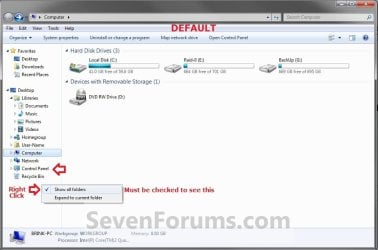
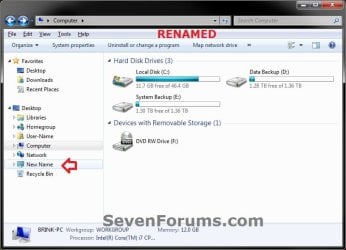
EXAMPLE: Control Panel in Navigation Pane
NOTE: This is the Control Panel group default name (left screenshot below) and renamed (right screenshot below) in the Navigation Pane.Control_Panel_Default.jpg

Control_Panel_Renamed.jpgHere's How:1. Press the Windows + R keys to open the Run dialog, type regedit, then press Enter.

2. If prompted by UAC, then click/tap on Yes.

3. In regedit, navigate to the locations below one at a time. (see screenshot below step 4)
Navigation Pane Location:
HKEY_CLASSES_ROOT\CLSID\{26EE0668-A00A-44D7-9371-BEB064C98683}

Desktop Icon Location:
HKEY_CLASSES_ROOT\CLSID\{5399E694-6CE5-4D6C-8FCE-1D8870FDCBA0}
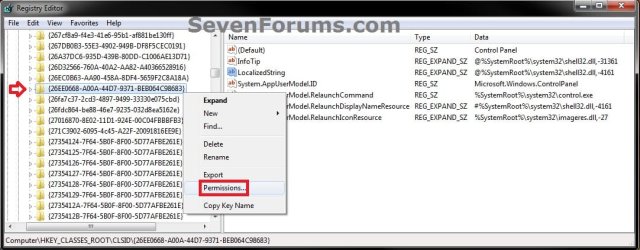
4. In the left pane of regedit, right click on the {long number} key for the Desktop or Navigation Pane location, and click/tap on Permissions. (see screenshot below)Control_Panel1.jpg
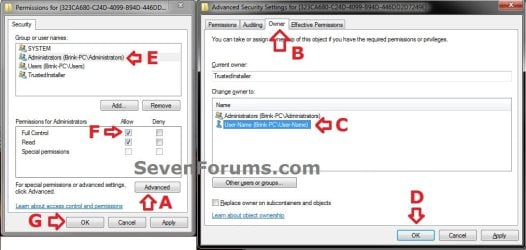
5. In Windows 7, do the following below in order below to take ownership and full control of this registry key, and go to step 7 below. (see example screenshot below)A) Click on the Advanced button.
B) Click on the Owner tab.
C) Select your Administrator account.
D) Click on OK.
E) At the top, select the Administrators group.
F) At the bottom, check the Allow box to the right of Full Control.
G) Click on OK.Step2.jpg
6. In Windows 8, Windows RT, Windows 8.1, or Windows RT 8.1, you will need to take ownership (step 3 of Option Three at link) of the DefaultIcon key, set permissions (step 4 of Option Two at link) to "Allow" Administrators "Full Control" of the DefaultIcon key, and go to step 7 below.

7. In the right pane of regedit, double click/tap on LocalizedString to modify it, and do step 8 or 9 below for what you would like to do. (see screenshot below)Control_Panel3.jpg
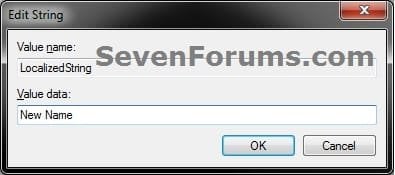
8. To Rename "Control Panel" in the Navigation PaneA) Type in any name that your would like, click/tap on OK, and go to step 10 below. (see screenshot below)Step4.jpg
9. To Restore the Default "Control Panel" Name in the Navigation Pane
NOTE: This is the default setting.A) Copy and Paste the value below, click/tap on OK, and go to step 10 below. (see screenshot below)@%SystemRoot%\system32\shell32.dll,-4161

Control_Panel5.jpg
10. In regedit, navigate to the location below.HKEY_CLASSES_ROOT\CLSID\{5399E694-6CE5-4D6C-8FCE-1D8870FDCBA0}
11. Repeat steps 3 to 7, then either step 8 or 9 for the other key location in step 3 as well.

12. When finished, close regedit.

13. Refresh (F5) the desktop or the Windows Explorer (Windows 7/8) or File Explorer (Windows 8.1) window to see the change.
That's it,
Shawn


Last edited:
Hey Brink,

thanks for your tutorial!

But i' got a question: How did you get the navigation pane look like the first picture of this tutorial? Especially how you got the desktop directly in the navigation pane and move library, computer and network below the new desktop icon?

Thx in advance :)
 

My Computer My Computer

OS
Windows 7 Pro x32
Hello Hedak, and welcome to Seven Forums.

You can get this by right clicking in the Navigation pane, and clicking on Show all folders. :)

Hope this helps,
Shawn
 

My Computer My Computer

Computer type
PC/Desktop
Computer Manufacturer/Model Number
Self built custom
OS
64-bit Windows 11 Pro for Workstations
CPU
Intel i7-8700K OC'd to 5 GHz
Motherboard
ASUS ROG Maximus XI Formula Z390
Memory
64 GB (4x16GB) G.SKILL TridentZ RGB DDR4 3600 MHz
Graphics Card(s)
ASUS ROG-STRIX-GTX1080TI-O11G-GAMING
Sound Card
Integrated
Monitor(s) Displays
2 x Samsung Odyssey G7 27"
Screen Resolution
2560x1440
Hard Drives
1TB Samsung 990 PRO M.2,
4TB Samsung 990 PRO PRO M.2,
TerraMaster F8 SSD Plus NAS
PSU
Seasonic Prime Titanium 850W
Case
Thermaltake Core P3
Cooling
Corsair Hydro H115i
Keyboard
Logitech wireless K800
Mouse
Logitech MX Master 4
Internet Speed
2 Gb/s Download and 100 Mb/s Upload
Antivirus
Malwarebyte Anti-Malware Premium
Browser
Google Chrome
Other Info
Logitech Z625 speaker system,
Logitech BRIO 4K Pro webcam,
HP Color LaserJet Pro MFP M477fdn,
APC SMART-UPS RT 1000 XL - SURT1000XLI,
Galaxy S23 Plus phone
Nice and easy :D Thanks!

BTW, do you know any solution how to move "Desktop" above "Favorites"?
 

My Computer My Computer

OS
Windows 7 Pro x32

My Computer My Computer

Computer type
PC/Desktop
Computer Manufacturer/Model Number
Self built custom
OS
64-bit Windows 11 Pro for Workstations
CPU
Intel i7-8700K OC'd to 5 GHz
Motherboard
ASUS ROG Maximus XI Formula Z390
Memory
64 GB (4x16GB) G.SKILL TridentZ RGB DDR4 3600 MHz
Graphics Card(s)
ASUS ROG-STRIX-GTX1080TI-O11G-GAMING
Sound Card
Integrated
Monitor(s) Displays
2 x Samsung Odyssey G7 27"
Screen Resolution
2560x1440
Hard Drives
1TB Samsung 990 PRO M.2,
4TB Samsung 990 PRO PRO M.2,
TerraMaster F8 SSD Plus NAS
PSU
Seasonic Prime Titanium 850W
Case
Thermaltake Core P3
Cooling
Corsair Hydro H115i
Keyboard
Logitech wireless K800
Mouse
Logitech MX Master 4
Internet Speed
2 Gb/s Download and 100 Mb/s Upload
Antivirus
Malwarebyte Anti-Malware Premium
Browser
Google Chrome
Other Info
Logitech Z625 speaker system,
Logitech BRIO 4K Pro webcam,
HP Color LaserJet Pro MFP M477fdn,
APC SMART-UPS RT 1000 XL - SURT1000XLI,
Galaxy S23 Plus phone
Ok, thanks anyway!
There are really good infos here. Keep on that excellent work!
 

My Computer My Computer

OS
Windows 7 Pro x32
Why didn't the desktop icon change on my computer?
Just in the navigation it changed.
 

My Computer My Computer

Computer Manufacturer/Model Number
ASUS G72 Notebook
OS
Windows 7 Ultimate 64-bit
CPU
Intel® Core™2 Duo mobile processor P8700 2.53 GHz
Memory
6GB DDRII
Graphics Card(s)
NVIDIA GeForce GTX 260M
Sound Card
EAX Advanced HD 4.0 + Logitech Wireless Headset G930
Monitor(s) Displays
17.3" LED-backlit LCD high-definition plus widescreen
Screen Resolution
1600 x 900
Hard Drives
2 x Seagate Momentus 500 GB 5400.6 SATA 3Gb/s
Cooling
Targus
Mouse
Logitech Wireless Trackball M570
Internet Speed
3 to 6 Mbps Download / .5 to 1 Mbps Upload
Other Info
Clear Modem with Wi-fi*
Comodo Internet Security Premium
IMAyNeed,

It appears that it no longer worked on the desktop icon. I have updated the tutorial and added steps 9-12 to allow it to work for the desktop icon as well again. :)
 

My Computer My Computer

Computer type
PC/Desktop
Computer Manufacturer/Model Number
Self built custom
OS
64-bit Windows 11 Pro for Workstations
CPU
Intel i7-8700K OC'd to 5 GHz
Motherboard
ASUS ROG Maximus XI Formula Z390
Memory
64 GB (4x16GB) G.SKILL TridentZ RGB DDR4 3600 MHz
Graphics Card(s)
ASUS ROG-STRIX-GTX1080TI-O11G-GAMING
Sound Card
Integrated
Monitor(s) Displays
2 x Samsung Odyssey G7 27"
Screen Resolution
2560x1440
Hard Drives
1TB Samsung 990 PRO M.2,
4TB Samsung 990 PRO PRO M.2,
TerraMaster F8 SSD Plus NAS
PSU
Seasonic Prime Titanium 850W
Case
Thermaltake Core P3
Cooling
Corsair Hydro H115i
Keyboard
Logitech wireless K800
Mouse
Logitech MX Master 4
Internet Speed
2 Gb/s Download and 100 Mb/s Upload
Antivirus
Malwarebyte Anti-Malware Premium
Browser
Google Chrome
Other Info
Logitech Z625 speaker system,
Logitech BRIO 4K Pro webcam,
HP Color LaserJet Pro MFP M477fdn,
APC SMART-UPS RT 1000 XL - SURT1000XLI,
Galaxy S23 Plus phone
Thanks!
 

My Computer My Computer

Computer Manufacturer/Model Number
ASUS G72 Notebook
OS
Windows 7 Ultimate 64-bit
CPU
Intel® Core™2 Duo mobile processor P8700 2.53 GHz
Memory
6GB DDRII
Graphics Card(s)
NVIDIA GeForce GTX 260M
Sound Card
EAX Advanced HD 4.0 + Logitech Wireless Headset G930
Monitor(s) Displays
17.3" LED-backlit LCD high-definition plus widescreen
Screen Resolution
1600 x 900
Hard Drives
2 x Seagate Momentus 500 GB 5400.6 SATA 3Gb/s
Cooling
Targus
Mouse
Logitech Wireless Trackball M570
Internet Speed
3 to 6 Mbps Download / .5 to 1 Mbps Upload
Other Info
Clear Modem with Wi-fi*
Comodo Internet Security Premium
You're most welcome. Thank you for bringing this to my attention. :)
 

My Computer My Computer

Computer type
PC/Desktop
Computer Manufacturer/Model Number
Self built custom
OS
64-bit Windows 11 Pro for Workstations
CPU
Intel i7-8700K OC'd to 5 GHz
Motherboard
ASUS ROG Maximus XI Formula Z390
Memory
64 GB (4x16GB) G.SKILL TridentZ RGB DDR4 3600 MHz
Graphics Card(s)
ASUS ROG-STRIX-GTX1080TI-O11G-GAMING
Sound Card
Integrated
Monitor(s) Displays
2 x Samsung Odyssey G7 27"
Screen Resolution
2560x1440
Hard Drives
1TB Samsung 990 PRO M.2,
4TB Samsung 990 PRO PRO M.2,
TerraMaster F8 SSD Plus NAS
PSU
Seasonic Prime Titanium 850W
Case
Thermaltake Core P3
Cooling
Corsair Hydro H115i
Keyboard
Logitech wireless K800
Mouse
Logitech MX Master 4
Internet Speed
2 Gb/s Download and 100 Mb/s Upload
Antivirus
Malwarebyte Anti-Malware Premium
Browser
Google Chrome
Other Info
Logitech Z625 speaker system,
Logitech BRIO 4K Pro webcam,
HP Color LaserJet Pro MFP M477fdn,
APC SMART-UPS RT 1000 XL - SURT1000XLI,
Galaxy S23 Plus phone
When Computer and HomeGroup names are changed, they are also changing in Start Menu also (Start Button - Right Panel), but Control Panel and Network is not changing does anyone know why?
 

My Computer My Computer

Computer Manufacturer/Model Number
ASUS G72 Notebook
OS
Windows 7 Ultimate 64-bit
CPU
Intel® Core™2 Duo mobile processor P8700 2.53 GHz
Memory
6GB DDRII
Graphics Card(s)
NVIDIA GeForce GTX 260M
Sound Card
EAX Advanced HD 4.0 + Logitech Wireless Headset G930
Monitor(s) Displays
17.3" LED-backlit LCD high-definition plus widescreen
Screen Resolution
1600 x 900
Hard Drives
2 x Seagate Momentus 500 GB 5400.6 SATA 3Gb/s
Cooling
Targus
Mouse
Logitech Wireless Trackball M570
Internet Speed
3 to 6 Mbps Download / .5 to 1 Mbps Upload
Other Info
Clear Modem with Wi-fi*
Comodo Internet Security Premium
Hello IMAyNeed,

They are not changed in the Start Menu since the name in that location has to be changed in another unknown registry location than what are in the tutorials for changing their names in the navigation pane and desktop icon.

I'll look into it to see if I may be able to track it down, and post back if able to later. :)
 

My Computer My Computer

Computer type
PC/Desktop
Computer Manufacturer/Model Number
Self built custom
OS
64-bit Windows 11 Pro for Workstations
CPU
Intel i7-8700K OC'd to 5 GHz
Motherboard
ASUS ROG Maximus XI Formula Z390
Memory
64 GB (4x16GB) G.SKILL TridentZ RGB DDR4 3600 MHz
Graphics Card(s)
ASUS ROG-STRIX-GTX1080TI-O11G-GAMING
Sound Card
Integrated
Monitor(s) Displays
2 x Samsung Odyssey G7 27"
Screen Resolution
2560x1440
Hard Drives
1TB Samsung 990 PRO M.2,
4TB Samsung 990 PRO PRO M.2,
TerraMaster F8 SSD Plus NAS
PSU
Seasonic Prime Titanium 850W
Case
Thermaltake Core P3
Cooling
Corsair Hydro H115i
Keyboard
Logitech wireless K800
Mouse
Logitech MX Master 4
Internet Speed
2 Gb/s Download and 100 Mb/s Upload
Antivirus
Malwarebyte Anti-Malware Premium
Browser
Google Chrome
Other Info
Logitech Z625 speaker system,
Logitech BRIO 4K Pro webcam,
HP Color LaserJet Pro MFP M477fdn,
APC SMART-UPS RT 1000 XL - SURT1000XLI,
Galaxy S23 Plus phone
Back
Top