
HerculesDD
New member
- Local time
- 7:04 AM
- Messages
- 3
control panel>system and security>power options, change when computer
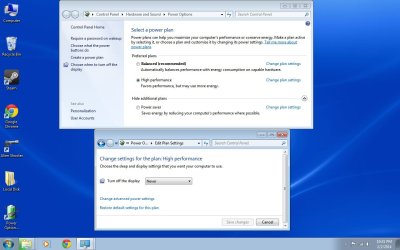
control panel > system and security > power options, {change when computer sleeps option is missing}. I have tried to dig into the related tutorials and forums for this problem. This is a desktop PC. Win 7 Pro 64 bit. 8 gb memory and a Seagate barracuda 2TB Hdd. The problem is The radio button to [choose when the computer sleeps] is missing that normally resides just below The radio button titled {choose when to turn off the display} I would really like to get this restored. Please see the attached file for a visual reference. win 7 pro 64 bit was just installed 2 days ago on a new Hard drive. Your help is needed .
control panel > system and security > power options, {change when computer sleeps option is missing}. I have tried to dig into the related tutorials and forums for this problem. This is a desktop PC. Win 7 Pro 64 bit. 8 gb memory and a Seagate barracuda 2TB Hdd. The problem is The radio button to [choose when the computer sleeps] is missing that normally resides just below The radio button titled {choose when to turn off the display} I would really like to get this restored. Please see the attached file for a visual reference. win 7 pro 64 bit was just installed 2 days ago on a new Hard drive. Your help is needed .
Attachments
My Computer
At a glance
Windows 7 Pro x64 bitintel Q6700 quad 2.6 ghzsuper talent pc6400 800mhz 8gbnvidia GEforce 650ti
- Computer type
- PC/Desktop
- Computer Manufacturer/Model Number
- custom build
- OS
- Windows 7 Pro x64 bit
- CPU
- intel Q6700 quad 2.6 ghz
- Motherboard
- MSI P6N diamond
- Memory
- super talent pc6400 800mhz 8gb
- Graphics Card(s)
- nvidia GEforce 650ti
- Hard Drives
- Seagate Barracuda 2 TB
- Antivirus
- Msse, Ccleaner, Hitman pro,
- Browser
- Sandboxie, IE 11, Google Chrome, Srware Iron


