Copy green folder?

yankleber

IT Dinosaur
Member
VIP
Local time
2:51 PM
Messages
212
Location
Home
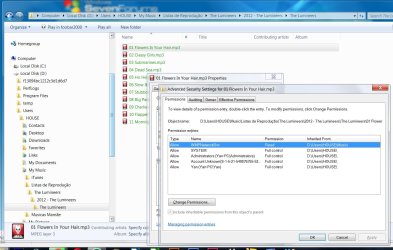
Today a client came to me with an HD asking me to backup stuff from a certain folder. I hooked the drive to my own computer, browsed it and when I got to the folder its name is in green color. I tried to copy and paste the contents but it doesn't allow me (permission). I tried to change the permissions but it is still green and I still cannot copy it.

Any idea?

Thanks!
 

My Computer

Computer type
PC/Desktop
Computer Manufacturer/Model Number
Custom
OS
Windows 7 Professional 64bit
CPU
Intel i5-3330
Motherboard
GigaByte B75M-D3H
Memory
8GB
Graphics Card(s)
Onboard
Sound Card
Behringer UCA222
Monitor(s) Displays
Samsung 22.5"
Screen Resolution
1920x1080
Hard Drives
SSD Kingston 120GB
HDD Samsung 320GB
Internet Speed
1M
Antivirus
ZoneAlarm FW + AV Free
Browser
Chrome
Are files from a Mac? Green means there encrypted in property for folder untick encrypt files in advanced attributes
 

My Computer

Computer type
PC/Desktop
OS
win 8 32 bit
Are files from a Mac? Green means there encrypted in property for folder untick encrypt files in advanced attributes

Hi, Samuria, no it's a folder with ten MP3 PC files. The HD was taken from a former Dell PC with Windows 7. When I first tried to access the upper user folder it popped a message saying that I wasn't authorized, blah, blah, blah, so I continued and it let me in. Then I browsed around and the ONLY folder I want to copy things is this green one.

The exact message error is: "FILE ACCESS DENIED - You'll need to provide administrator permission to copy this file"

:confused:

PS: I tried to boot from a Linux pendrive and it doesn't let me copy the files. I selected the files I want, then I hit control-C and when I hit control-V in the destination is when it tells me that I cannot copy it.
 

My Computer

Computer type
PC/Desktop
Computer Manufacturer/Model Number
Custom
OS
Windows 7 Professional 64bit
CPU
Intel i5-3330
Motherboard
GigaByte B75M-D3H
Memory
8GB
Graphics Card(s)
Onboard
Sound Card
Behringer UCA222
Monitor(s) Displays
Samsung 22.5"
Screen Resolution
1920x1080
Hard Drives
SSD Kingston 120GB
HDD Samsung 320GB
Internet Speed
1M
Antivirus
ZoneAlarm FW + AV Free
Browser
Chrome
Folders with green names indicate that that branch is encrypted, while a blue name would mean it is compressed.

Your access problems have nothing to do with the colours. If you would like a permission issue resolved, use one of the options in the tutorial linked below.

NTFS Permissions - View and Post
 

My Computer

Computer type
PC/Desktop
OS
Windows 10, Windows 8.1 Pro, Windows 7 Professional, OS X El Capitan
Here it goes! :)
 

Attachments

  • green.jpg
    green.jpg
    172.4 KB · Views: 3

My Computer

Computer type
PC/Desktop
Computer Manufacturer/Model Number
Custom
OS
Windows 7 Professional 64bit
CPU
Intel i5-3330
Motherboard
GigaByte B75M-D3H
Memory
8GB
Graphics Card(s)
Onboard
Sound Card
Behringer UCA222
Monitor(s) Displays
Samsung 22.5"
Screen Resolution
1920x1080
Hard Drives
SSD Kingston 120GB
HDD Samsung 320GB
Internet Speed
1M
Antivirus
ZoneAlarm FW + AV Free
Browser
Chrome
Hm. Are you able to copy these mp3s individually? You have full control to them.

If you’re copying the folder containing these mp3s, posting the permissions of the folder.

And I’ll get back to you on this a little later.
 

My Computer

Computer type
PC/Desktop
OS
Windows 10, Windows 8.1 Pro, Windows 7 Professional, OS X El Capitan
Hm. Are you able to copy these mp3s individually? You have full control to them.
Unfortunately I already tried it.

Also, I don't know if I REALLY have full control despite what the screen says. That's why: checking Properties >> Advanced of the files I figured out that all of them has the option "Encrypt contents to secure data" checked (that I think is the root of the issue). So when I uncheck the option and click OK I got the message "You will need to provide administrator permission to change these attributes. Click continue to complete the operation." So when I finally click "continue" it tells me "An error occurred applying attributes to the file. Access is denied." From this point on the only thing I can do is to click "Cancel" button.

:sarc:

So from my point of view I think that I need to disable the encryption to get files copied. But then Windows doesn't allow me to do that because I have no permissions. Of course I am the administrator of my system (so I have permissions) BUT this HD I hooked to the computer is not originally from my PC but from another Windows 7 machine which I don't have permissions.

:p

PS: Since it is just a band album I already downloaded the songs to my client from somewhere else. But I really would like to know how to figure this issue because it could be files impossible to get anywhere...
 

My Computer

Computer type
PC/Desktop
Computer Manufacturer/Model Number
Custom
OS
Windows 7 Professional 64bit
CPU
Intel i5-3330
Motherboard
GigaByte B75M-D3H
Memory
8GB
Graphics Card(s)
Onboard
Sound Card
Behringer UCA222
Monitor(s) Displays
Samsung 22.5"
Screen Resolution
1920x1080
Hard Drives
SSD Kingston 120GB
HDD Samsung 320GB
Internet Speed
1M
Antivirus
ZoneAlarm FW + AV Free
Browser
Chrome
Right click on explorer and choose run as administrator see if it works then
 

My Computer

Computer type
PC/Desktop
OS
win 8 32 bit
Guys, Gals, I'm fishing here, could it be that the folder in question was part of the original computer/original user EFS? In short, if EFS was in force, that particular password would be needed, correct? Others here can correct me if I'm guessing amiss.
 

My Computer

Computer type
PC/Desktop
Computer Manufacturer/Model Number
Antec desktop; Acer Aspire laptops
OS
Windows 7 Professional 64-bit
CPU
Desktop i5; Acers i5 & i7
Memory
desktop 16GB; 1 Acer 8GB & 1 Acer 16GB
Hard Drives
1TB split into 2 equal partitions [OS and data] usable by RJS
Internet Speed
AT&T DSL
Browser
FF, GChrome, msIE
Other Info
Windows 7 Firewall, Emsisoft AM/AV, MSE [scan-only], SpywareBlaster, Ruiware/BillP combine

My Computer

Computer type
PC/Desktop
Computer Manufacturer/Model Number
Custom
OS
Windows 7 Professional 64bit
CPU
Intel i5-3330
Motherboard
GigaByte B75M-D3H
Memory
8GB
Graphics Card(s)
Onboard
Sound Card
Behringer UCA222
Monitor(s) Displays
Samsung 22.5"
Screen Resolution
1920x1080
Hard Drives
SSD Kingston 120GB
HDD Samsung 320GB
Internet Speed
1M
Antivirus
ZoneAlarm FW + AV Free
Browser
Chrome
Guys, Gals, I'm fishing here, could it be that the folder in question was part of the original computer/original user EFS? In short, if EFS was in force, that particular password would be needed, correct? Others here can correct me if I'm guessing amiss.

I think you are correct in this assumption. Probably the only way to solve this problem would be to put the HD back to the original machine, use the original password and then decrypt it. Otherwise the files are definitively lost.
 

My Computer

Computer type
PC/Desktop
Computer Manufacturer/Model Number
Custom
OS
Windows 7 Professional 64bit
CPU
Intel i5-3330
Motherboard
GigaByte B75M-D3H
Memory
8GB
Graphics Card(s)
Onboard
Sound Card
Behringer UCA222
Monitor(s) Displays
Samsung 22.5"
Screen Resolution
1920x1080
Hard Drives
SSD Kingston 120GB
HDD Samsung 320GB
Internet Speed
1M
Antivirus
ZoneAlarm FW + AV Free
Browser
Chrome
Guys, Gals, I'm fishing here, could it be that the folder in question was part of the original computer/original user EFS? In short, if EFS was in force, that particular password would be needed, correct? Others here can correct me if I'm guessing amiss.

I think you are correct in this assumption. Probably the only way to solve this problem would be to put the HD back to the original machine, use the original password and then decrypt it. Otherwise the files are definitively lost.
Of course. You’re right, you’re right.

:doh:

I’ve never encrypted before so I was unaware of what to expect.

Not only do you have to plug it back in its original machine, you must also use the exact same user account to perform the decryption.
 

My Computer

Computer type
PC/Desktop
OS
Windows 10, Windows 8.1 Pro, Windows 7 Professional, OS X El Capitan
worth a try it depends if they are encrypted on the old pc if you get files from a mac theyare not encrypted on the mac but windows imprts them and doe sit for some strange reason only know to ms Green Files in Windows Explorer: What they are, and how to fix them | Scottie's Tech.Info

I have found this article before to start this thread. It didnt work because it doesnt allow me to deisable encryption due to the permissions issue. I think I mentioned it. I am trapped in a vicious circle...
 

My Computer

Computer type
PC/Desktop
Computer Manufacturer/Model Number
Custom
OS
Windows 7 Professional 64bit
CPU
Intel i5-3330
Motherboard
GigaByte B75M-D3H
Memory
8GB
Graphics Card(s)
Onboard
Sound Card
Behringer UCA222
Monitor(s) Displays
Samsung 22.5"
Screen Resolution
1920x1080
Hard Drives
SSD Kingston 120GB
HDD Samsung 320GB
Internet Speed
1M
Antivirus
ZoneAlarm FW + AV Free
Browser
Chrome
Of course. You’re right, you’re right.

:doh:

I’ve never encrypted before so I was unaware of what to expect.

Not only do you have to plug it back in its original machine, you must also use the exact same user account to perform the decryption.

Yup... since it was an easy fix (I found the songs online and d/l it for my client) I am going to send her HD back tomorrow. I am just scared to think that it may be an insoluble issue and that is very frustrating have the files in front of you and cannot retrieve them...
 

My Computer

Computer type
PC/Desktop
Computer Manufacturer/Model Number
Custom
OS
Windows 7 Professional 64bit
CPU
Intel i5-3330
Motherboard
GigaByte B75M-D3H
Memory
8GB
Graphics Card(s)
Onboard
Sound Card
Behringer UCA222
Monitor(s) Displays
Samsung 22.5"
Screen Resolution
1920x1080
Hard Drives
SSD Kingston 120GB
HDD Samsung 320GB
Internet Speed
1M
Antivirus
ZoneAlarm FW + AV Free
Browser
Chrome
Back
Top