Copying Large Files

Phoenon

New member
Local time
4:03 AM
Messages
24
I am having some problems copying large files to my computer from an external hard drive. The copying process starts but then seems to freeze after a couple of minutes. Is this happening to anyone else and is there anything I can do?
 

My Computer

OS
vista
OS is Vista?.........according to your specs, along with no other information to help us whatsoever?

So I could 'guess', but a little more information would be nice ;):)
 

My Computer

OS
XP
I had crashing problems at first when moving large files accross the network. I had to bump up my Ram voltage a tad and the SPP "northbridge" voltage as well which ended all stability problems for me. Vista was stable with the same settings.
 

My Computer

Computer type
PC/Desktop
Computer Manufacturer/Model Number
Home built
OS
Windows 7 Ult, Windows 8.1 Pro,
CPU
Q9650-4.275GHz, E8600 4.5GHz, E6750-3.8GHz
Motherboard
Evga 780i FTW
Memory
G.Skill PC2 9600 1200Mhz 5 5 5 15 2T
Graphics Card(s)
GTX480
Sound Card
Asus Xonar D2
Monitor(s) Displays
HannsG
Screen Resolution
1680X1050
Hard Drives
GSkill Phoenix Pro 120GB SSD
PSU
ThermalTake Toughpower 1000Watt modular
Case
ThermalTake XaserV
Cooling
Xigmatek S1283
Keyboard
Logitech G15
Mouse
Logitech G9
Internet Speed
T1
Are you sure its not getting unplugged after you start transffering?

We need a lot more info.

~Lordbob
 

My Computer

Computer Manufacturer/Model Number
Hera
OS
Windows 7 Ultimate x64, Mint 9
CPU
Intel i5-2500k
Motherboard
ASUS P8P67 Pro
Memory
2x 4Gb Corsair VENGEANCE DDR3-1600
Graphics Card(s)
NVidia GeForce N260GTX Twin Frozr
Sound Card
Realtek HD OnBoard Audio
Monitor(s) Displays
ASUS 24" Monitor
Screen Resolution
1920x1080
Hard Drives
G.SKILL Phoenix Series 60GB SATA II MLC Internal Solid State Drive (SSD)
SAMSUNG Spinpoint F3R 1TB 7200 RPM 32MB Cache SATA II
PSU
Cooler Master Real Power Pro 750W
Case
Cooler Master Haf 932
Cooling
Fans
Keyboard
Razer Tarantula
Mouse
Razer Lachesis
Internet Speed
not fast enough
Yeah, we need more info. But it does, sound like you haven't been ejecting the drive before removing the usb cord. I'm assuming that the issue.
 

My Computer

Computer type
PC/Desktop
Computer Manufacturer/Model Number
twah
OS
Windows 7 Ultimate x64
CPU
AMD FX-8120
Motherboard
Biostar TA990FXE
Memory
8gb (4x2gb) DDR3 1600mHz
Graphics Card(s)
AMD 7850 2gb
Monitor(s) Displays
27"
Screen Resolution
1920x1080
Hard Drives
1TB HDD + 128GB SSD
Yeah, we need more info. But it does, sound like you haven't been ejecting the drive before removing the usb cord. I'm assuming that the issue.
That should not cause an issue. I do it all the time.

~Lordbob
 

My Computer

Computer Manufacturer/Model Number
Hera
OS
Windows 7 Ultimate x64, Mint 9
CPU
Intel i5-2500k
Motherboard
ASUS P8P67 Pro
Memory
2x 4Gb Corsair VENGEANCE DDR3-1600
Graphics Card(s)
NVidia GeForce N260GTX Twin Frozr
Sound Card
Realtek HD OnBoard Audio
Monitor(s) Displays
ASUS 24" Monitor
Screen Resolution
1920x1080
Hard Drives
G.SKILL Phoenix Series 60GB SATA II MLC Internal Solid State Drive (SSD)
SAMSUNG Spinpoint F3R 1TB 7200 RPM 32MB Cache SATA II
PSU
Cooler Master Real Power Pro 750W
Case
Cooler Master Haf 932
Cooling
Fans
Keyboard
Razer Tarantula
Mouse
Razer Lachesis
Internet Speed
not fast enough
My iPod does that when I get lazy and forget to eject. You have to do a manual restore, I wonder if that same idea would apply here.
 
Last edited:

My Computer

Computer type
PC/Desktop
Computer Manufacturer/Model Number
twah
OS
Windows 7 Ultimate x64
CPU
AMD FX-8120
Motherboard
Biostar TA990FXE
Memory
8gb (4x2gb) DDR3 1600mHz
Graphics Card(s)
AMD 7850 2gb
Monitor(s) Displays
27"
Screen Resolution
1920x1080
Hard Drives
1TB HDD + 128GB SSD
Sorry for not giving enough information. The problem has worked out somewhat but there are still some problems. I am using Windows 7 (Build 7000) on a HP laptop. The hard drive is a Western Digital Mybook and the speeds are awfully slow. Copying from my computer to the drive is fairly fast (20-30MBps) but the other way around I am always getting speeds below 1MBps. What could the problem be? I have run a SMART check and it failed... Is there anything I can do to fix the hard drive or do you guys think the problem is Windows 7 related? I have tried connecting the drive to XP desktops and the results are quite surprising. On the first desktop I get a "invalid parameter" or "Input Output" error and on the other desktop everything works slightly faster than on the windows 7 one. However, my windows 7 laptop has much better hardware which is why I am expecting better performance than on the working XP dekstop...


Thanks
 

My Computer

OS
vista
Could be a bad drive. Test it on another computer with Seven on it.

~Lordbob
 

My Computer

Computer Manufacturer/Model Number
Hera
OS
Windows 7 Ultimate x64, Mint 9
CPU
Intel i5-2500k
Motherboard
ASUS P8P67 Pro
Memory
2x 4Gb Corsair VENGEANCE DDR3-1600
Graphics Card(s)
NVidia GeForce N260GTX Twin Frozr
Sound Card
Realtek HD OnBoard Audio
Monitor(s) Displays
ASUS 24" Monitor
Screen Resolution
1920x1080
Hard Drives
G.SKILL Phoenix Series 60GB SATA II MLC Internal Solid State Drive (SSD)
SAMSUNG Spinpoint F3R 1TB 7200 RPM 32MB Cache SATA II
PSU
Cooler Master Real Power Pro 750W
Case
Cooler Master Haf 932
Cooling
Fans
Keyboard
Razer Tarantula
Mouse
Razer Lachesis
Internet Speed
not fast enough
This is why I like commercial backup programs like acronis true image (this also backups partition and disk images - but that's another topic).
(Backup software for data backup and disaster recovery in Windows and Linux - Acronis)

Select backup data -- select the files you want and point to your new drive

Choose NO Compression then it will copy the files as they are quite quickly.

If you choose compression copy to a "Staging device" ( i.e any spare directory) and the choose Restore to your new disk. Now you've got a backup copy as well -- perfect.

(Added -- if your Ipod is recognized as an external disc you can "backup" files to this as well - choose NO Compression. Note this doesn't alter the compression of the music files if they are already compressed. It just copies the source files to the target Ipod).

Cheers
jimbo
 

My Computer

Computer type
PC/Desktop
Computer Manufacturer/Model Number
Custom built, several laptops HP/ASUS
OS
Linux CENTOS 7 / various Windows OS'es and servers
CPU
Intel i7 Intel i5
Memory
8GB, 16GB
Graphics Card(s)
On Motherboard
Sound Card
Realtek HD audio
Monitor(s) Displays
Apple Cinema display, Samsung LCD
Screen Resolution
1920 X 1080
Hard Drives
4 X 1TB SATA
Mouse
Toshiba wireless laser
Internet Speed
> 20MB up
I'm having the same issue, also with a MyBook. It's connected via USB. I forgot to format it NTFS before I starting using it so it's still FAT32. Now I want to copy everything off of it to format it but it freezes Windows whenever I try to copy a large amount of data from it. Transfer speeds are also incredibly slow (<4MB/s). Any ideas?
 

My Computer

Computer Manufacturer/Model Number
Built by my Indian friend.
OS
Windows7 7201
CPU
Intel P4 2.8GHz
Motherboard
Asus P48X-X
Memory
2GB
Graphics Card(s)
GeForce 7300GT
Sound Card
on board
Monitor(s) Displays
HP w2007
Screen Resolution
1680x1050
Hard Drives
150GB IDE, 1TB SATA internal
1TB MyBook eSATA
PSU
RPI
Case
White and blue
Cooling
Air cooled
Keyboard
Logitech Wave
Mouse
Logitech cordless
Other Info
Also running W7 on an old Dell Insprion laptop (1.5Ghz, 1.5GB).
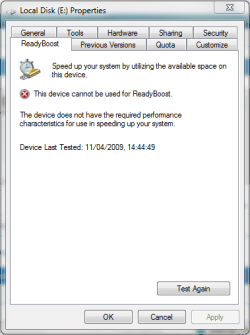
Just as a thought, have you looked at the 'Ready Boost' option in the device properties of your external HD? (See pic below). If it's enabled i'm not sure what sort of effects it would have so it might be an idea to disable it and try copying again.

Added: Sorry, pic didn't show
 

Attachments

  • Capture.PNG
    Capture.PNG
    13.3 KB · Views: 57

My Computer

Computer Manufacturer/Model Number
Compaq Desktop
OS
Windows 7 Ultimate x64
CPU
AMD Sempron Dual Core
Memory
3GB
Graphics Card(s)
NVIDIA GeForce 6150SE nForce 430
Screen Resolution
1024x768
Hard Drives
150GB Sata
i used to have the same problem, it was freeze and not responding however it's still running behind the background...maybe u shoukd wait for few more mins to decide if u should force closing it. but i do believe it is still running
 

My Computer

Computer Manufacturer/Model Number
Asus F83VF Noteook
OS
Windows 7 Home Premium x64
CPU
Intel Core 2 Duo P8800
Motherboard
Intel PM45 Chipset
Memory
4 GB DDR3
Graphics Card(s)
NVIDIA GeForce GT 220M, 1 GB GDDR3 SDRAM
Sound Card
Realtek
Screen Resolution
1366x768
Hard Drives
Seagate 500 GB
PSU
-
Case
-
Cooling
-
Keyboard
-
Mouse
Razer Lachesis
Internet Speed
10 Mb/s
Hi all, sorry for my bad english, but i'll try help. My external HD is a WD Elite, and works fine with FAT32 (original partition). The question is: our friend steel have a standart files to give with product? They have all tools for resolve this, check and configure. Not need pass to NTFS, my transfer velocity is 20 a 30 MB/s. So, i sugest the pick all files standart, on WD site (if you dont have a backup, or buy with no knows about it) and try identify product with folder name call "WD_Windows_Tools"...However, you can try this page on WD: WD Support > Downloads > My Passport > My Passport Elite because to me always work's reinstall drivers, and format with wd tools...(backup first, ok?)...i just hope help...!!! Regards...sorry bad english...rsrsrs!!!
 

My Computer

Computer Manufacturer/Model Number
PHOENIX BIOS
OS
Seven 7100 - Mac Osx for iPC - Xp too - of course!!
CPU
INTEL CORE2DUO
Motherboard
FOXCONN
Memory
2GB
Graphics Card(s)
NVIDIA 8500 GT 1MB
Sound Card
CREATIVE SOUND BLASTER AUDIGY 24-BITS
Monitor(s) Displays
SAMSUMG SyncMaster 2263uw 3.0 mpxl
Screen Resolution
1680x1050 (recomended!)
Hard Drives
160 GB IDE MAXTOR
160 GB SATA WERSTERN DIGITAL
Mouse
MICROSOFT REAL GOOD
Internet Speed
3 MB SPEED - 300KB DOWNL
Other Info
I Love Jesus, my Lord, with all my heart, my soul and my mind!!
I had the exact same problem as the OP. I try to copy a large file to my external HDD, and halfway through it quits. Cancel button doesn't work, other programs behave weird. Only thing to solve it was a restart.

The sollution for me was a life without DAEMON Tools. I did a fresh installation of Win 7. I copied 40 GB of files to my HDD, no problems! Then I installed Poweriso, wich comes with a virtual disk, and copied another 20 GB to mij HDD. Again no problems! Hope this will solve it for you.
 

My Computer

OS
windows 7 RC
Same problem

I am running 7600 now but even with beta or rc, anytime I try to copy or move a large amount of files to my external drives, the system grinds to a hault. If I try cpr to stop the process it takes forever and even if I can eventually stop it and eject the drive, I still have to do a re-start to get full functionality back.

I had thought this was maybe the seagates I was using but it also happened with a new WD passport and today, tried to sync about 10gb of music to my zune and had the same problem. I was playing a song when I set-up the sync and it couldn't even play it?? I have 2ghz amd and 4gb ram with a 2 dual core which obviously should have no problems copying that much info as well as being able to run other programs. Or at least I never had this problem in Vista.

The free program "blue screen review" reports it as a BSOD error related to the hal.dll driver file. Could this just be a bug with the hardware abstraction layer? I had heard there were some unpublished updates that changed the HAL from 16385 to 16399.
 

My Computer

Computer Manufacturer/Model Number
HP Pavilion dv9925nr Notebook
OS
Windows 7 build 7600
CPU
AMD Turion 64x2
Motherboard
Integrated Nvidia Geforce 7150m/630m gpu/mobo
Memory
4GB
Graphics Card(s)
Geforce 7150m
Sound Card
Conexant 221 Smart Audio
Monitor(s) Displays
17" Laptop Display/ 26" Samsung(syncmaster) as external
Screen Resolution
1400X900, 1920x1200
Hard Drives
Toshiba 250 GB, WD 500 GB, External Seagate Go 320 GB(3), External Toshiba 320, External Seagate 1 TB
You can successfully repair a HDD that failed S.M.A.R.T. using SpinRite. This is for recovery purposes. If it was me, I'd get a new HDD even after a seemingly good repair run.

http://en.wikipedia.org/wiki/SpinRite

Here is an interesting statement though:

"Gibson Research Corporation claims their SpinRite software will diagnose the quality of a disk drive, and to make it work as reliably as possible for future use."
 

My Computer

Computer Manufacturer/Model Number
self built
OS
7600.20510 x86
CPU
P4 550 3.4 GHz HT running at 3.5 GHz
Motherboard
MSI PM8M3-V (MS-7211 v1.x) Micro-ATX mainboard
Memory
OCZ 2 GB(2x1GB) DDR400mHz running @ 414 mHz
Graphics Card(s)
HIS Radeon HD 3850 IceQ 3 Turbo HDMI Dual DL-DVI AGP
Sound Card
MOTU Traveler firewire studio interface 192 kHz 24 bit
Monitor(s) Displays
22" widescreen Acer X223W LCD, 17" Compaq P75 CRT
Screen Resolution
1680x1050 and 1280x1024
Hard Drives
SATA I x2 WD, 400 GB and 120 GB, SATA 2 WD Caviar Black 1 TB
PSU
350W generic
Case
Cybertronpc, it glows blue
Cooling
stock cpu fan, Ice-Q 3 gpu and system, many case fans
Keyboard
Logitch Classical Keyboard 200
Mouse
Logitech Mediaplay cordless
Internet Speed
1792/448 kbits/sec
Other Info
SATA II PCI fake RAID adapter, 1 GB Readyboost, original ATI Remote Wonder (even works with WMC perfectly), Logitech Rumblepad 2 game controller x2
You can successfully repair a HDD that failed S.M.A.R.T. using SpinRite. This is for recovery purposes. If it was me, I'd get a new HDD even after a seemingly good repair run.

SpinRite - Wikipedia, the free encyclopedia

Here is an interesting statement though:

"Gibson Research Corporation claims their SpinRite software will diagnose the quality of a disk drive, and to make it work as reliably as possible for future use."

SpinRite is to HDDs "repair" what homeopathy and crystal pendants are to medicine ;)
 

My Computer

Computer Manufacturer/Model Number
Multiple machines in various stages of decomposition.
OS
Win7x64
I am running 7600 now but even with beta or rc, anytime I try to copy or move a large amount of files to my external drives, the system grinds to a hault. If I try cpr to stop the process it takes forever and even if I can eventually stop it and eject the drive, I still have to do a re-start to get full functionality back.

I had thought this was maybe the seagates I was using but it also happened with a new WD passport and today, tried to sync about 10gb of music to my zune and had the same problem. I was playing a song when I set-up the sync and it couldn't even play it?? I have 2ghz amd and 4gb ram with a 2 dual core which obviously should have no problems copying that much info as well as being able to run other programs. Or at least I never had this problem in Vista.

The free program "blue screen review" reports it as a BSOD error related to the hal.dll driver file. Could this just be a bug with the hardware abstraction layer? I had heard there were some unpublished updates that changed the HAL from 16385 to 16399.

You might want to consider starting a new thread since there's no reason to believe, at present, that the cause of your symptom is the same as the OP's.

Nor do these things have to be caused by hardware. "Inspection" filter drivers, such as those used by anti-virus and other security utilities, can sometimes mismanage their interception and analysis of the content being copied to the point where they're leaking memory or causing outright lockups.

A few questions:

1) Do you actually experience BSODs during the copy operation?

2) Have you tried deactivating or even uninstalling your anti-virus long enough to see what happens without it?

3) What happens in safe mode? (assuming you have access to your drive)

4) Is there a "magic" content size where you've noticed you're more likely to run into problems? Conversely, if you stay below a certain size, do the transfers work OK?

5) Does the copy mechanism make a difference? For example, is it just as bad when using Xcopy or Robocopy from a command prompt, as opposed to copying and pasting in Explorer?

6) Do the same external drives work without issues on other machines?
 

My Computer

Computer Manufacturer/Model Number
Multiple machines in various stages of decomposition.
OS
Win7x64
  • Like
Reactions: tmp
Starting a new thread is prob a good idea this was just the only similar thread I could find on a quick search. At any rate-

1-No actual BSOD, just complete feeze out and as I said, even if I can manage to end the process string, the only way I can get my computer to function properly again is restart. Sometimes forced.

2-Yes disable my AV software-two different ones in fact. I used AVG at first and when 360 became compatible-ready, I removed AVG, did a clean install of 7, then re-installed 360. No difference at all. I had never used AVG b4 and had thought that might be it, ended it's process string, no change. Same with 360 though it's almost impossible to completely shut it down.

3-I will try safe mode. But I have disable aero, indexing, and a few other process/services to see if it made a difference. It performed slightly better but still kept my cpu maxed out, intermittent freezes, etc.

4-Drag-n-drop is definitely the worst-causes the system to freeze and crash the fastest but so does copy and paste and robocopy though they do actually copy more info b4 the freeze.

5-Not really a magic size. If I move one file at a time it doesn't crash the system but still runs slow. Small folders/files with data like documents have no problems. Single large media files will actually get through the process as long as I don't do anything else while it's copying and still very slow.

When I used Vista, I could be essentially syncing or copying huge GBs of media/data simultaneously, reduce the "copying" windows for the various folders-5 or 6 at a time, and continue using as normal with no noticeable loss in usability. Running two or three other programs while copying was not an issue. This is why I was asking about the HAL file, same machine,same processor, same external HDs(all pass every test I can find including SMART),a seemingly much better OS in just about every other aspect????

Incidentally, I did a backup using wind back-up now that it copies the drive image, and it took two tries. The first failed-not sure why. It ground the system to a hault but did eventually finish before informing me it had failed. The 2nd time, no problems and I was doing nothing differently.

6-Yes, no problems with the drives whatsoever. I have about 400 gb of movies and 100 of music and have used them on 3 other machines just to test and not issues. But I have not been able to find anyone else around here with 7 to test it and don't have a 2nd machine capable of running it(other is my daughters DT, compaq 1 ghz, 766 ram-I know it technically would work but so little graphics memory available, "if it ain't broke, don't fix it" kind of thing.

So where do you suggest I post a new topic? Hardware? Drivers, Performance maybe?? Let me know and we can continue this there.

By the way, thanks for the response.

 
Last edited:

My Computer

Computer Manufacturer/Model Number
HP Pavilion dv9925nr Notebook
OS
Windows 7 build 7600
CPU
AMD Turion 64x2
Motherboard
Integrated Nvidia Geforce 7150m/630m gpu/mobo
Memory
4GB
Graphics Card(s)
Geforce 7150m
Sound Card
Conexant 221 Smart Audio
Monitor(s) Displays
17" Laptop Display/ 26" Samsung(syncmaster) as external
Screen Resolution
1400X900, 1920x1200
Hard Drives
Toshiba 250 GB, WD 500 GB, External Seagate Go 320 GB(3), External Toshiba 320, External Seagate 1 TB
Back
Top