Corrupt boot sector?

JackProject

New member
Local time
3:23 AM
Messages
10
Hello,

For a while now i have a stupid problem, which is like this:
In the begining, it had the wierd way of reasigning letters to my partitions, making C: (windows) as D: and what was supposed to be the boot sector, whici is usually 100 MB (made automaticaly by windows), it assign the letter C:. Of course, this made windows not start anymore and i had 2 choices, either reinstall it, or use a backup. I use acronis backup and it seems it works to restore my windows and everything. In the end i thought i solved the problem making the boot files be writen in windows c:, there was a tutorial about makind drive c: active and then repair windows 3 times to make the boot sector in drive c. And it worked, one month almost without the drive changing thing.
But today it happed again, and i had an old tutorial about how to use the windows cd, use repair and then cmd and there, using this comands "dispart" "list volume" "select volume c" assign letter = C, this should have assign a partition the letter i want. Bad part was that i found that windows had the letter C:, but in the table raw that sed FS (whici it seems its the partition format, ntfs), it sed ntfs for all partition but on c it sed Raw.

My question is, wtf is wrong with my computer?:(
 

My Computer

OS
windows 7
Hi Jack

Open up a Command Prompt as an Administrator :

Steps

:ar: Click on :orb:

:ar: Type in CMD( Doesn't matter if its caps or not )

:ar: Right-click or Press Ctrl+Shift+Enter

:ar: Click on Yes to bypass the UAC window

   Tip
You could even press Alt+Y


Type in this command

Code:
 chkdsk c: /f /r

   Tip
Change the letter " c " to what your Windows Letter is
 

My Computer

Computer Manufacturer/Model Number
Custom Built
OS
Windows 7 Ultimate 32-Bit & Windows 7 Ultimate 64-Bit
CPU
Intel Core i7 CPU 950 @ 3.07GHz
Motherboard
ASUS P6T DELUXE V2
Memory
OCZ 6GB (3 x 2GB) 240-Pin DDR3 SDRAM DDR3 1600 OCZ3X1600R2
Graphics Card(s)
ATI Radeon HD 5700 Series
Sound Card
OnBoard
Hard Drives
WD6400AACS-00M3B0 (640GB SATA )
PSU
CORSAIR 850w
Case
NZXT LEXA
Cooling
Intel Stock Heatsink Fan
Keyboard
Microsoft Wireless Laser Keyboard 7000
Mouse
Microsoft Wireless Laser Mouse 7000
what does /f /r do, i know that chkdsk c: means it will check drive c, but don't know what /f /r do.

Also, the problem doesn't seem to be that it reasign letters, but a problem with boot sector or something, it sed raw under the partition c.

Also, that only works if i get into windows, but i don't get that far, the computer just restarts.
 

My Computer

OS
windows 7
You seem a little confused as to what your problem is! You started with Windows re asigning Drive letters, but now you say you cant boot into Windows. How do you view your Disk management if you can't boot into Windows?
 

My Computer

Computer type
PC/Desktop
OS
Microsoft Windows 7 Home Premium 64-bit 7601 Multiprocessor Free Service Pack 1
CPU
Intel(R) Core(TM) i7-3770 CPU @ 3.40GHz
Motherboard
ASUSTeK COMPUTER INC. P8H77-M
Memory
8.00 GB
Graphics Card(s)
Intel(R) HD Graphics 4000
Sound Card
On Board
Monitor(s) Displays
Dell 24"
Screen Resolution
1920 x 1080
Hard Drives
(1) INTEL SSDSC2CT180A3 ATA Device (2) ST500DM002-1BD142 ATA Device (3) WDC WD3200AAKS-75L9A0 ATA Device (4) Generic- Compact Flash USB Device (5) Generic- MS/MS-Pro USB Device (6) Generic- SD/MMC USB Device (7) Generic- SM/xD-Picture USB
PSU
500w Corsair
Case
Cooler Master
Cooling
3 Fans
Keyboard
Logitech MK300
Mouse
Logitech WOM
Internet Speed
75Mb
Antivirus
Norton 360
Browser
Firefox, Opera, IE
i viewed it with acronis backup. It as a boot backup, before windows starts and there i can see the partitions and saw that it reasign my drive letters.
 

My Computer

OS
windows 7

My Computer

Computer Manufacturer/Model Number
Custom Built
OS
Windows 7 Ultimate 32-Bit & Windows 7 Ultimate 64-Bit
CPU
Intel Core i7 CPU 950 @ 3.07GHz
Motherboard
ASUS P6T DELUXE V2
Memory
OCZ 6GB (3 x 2GB) 240-Pin DDR3 SDRAM DDR3 1600 OCZ3X1600R2
Graphics Card(s)
ATI Radeon HD 5700 Series
Sound Card
OnBoard
Hard Drives
WD6400AACS-00M3B0 (640GB SATA )
PSU
CORSAIR 850w
Case
NZXT LEXA
Cooling
Intel Stock Heatsink Fan
Keyboard
Microsoft Wireless Laser Keyboard 7000
Mouse
Microsoft Wireless Laser Mouse 7000
will give it a try next time. Also found some stuff how to fix the boot with the windows dvd, will keep both options up for next time.
 

My Computer

OS
windows 7
You should be setting the drive letter to Auto in Acronis when reimaging. Drive letters don't just change. You may have a bad install with boot sector corruption.

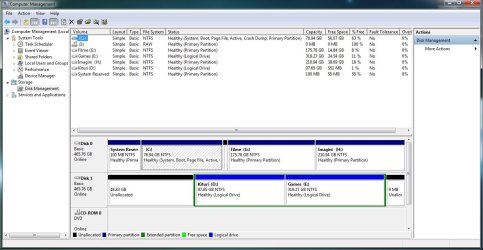
After you reimage with Auto drive letter selection, please post back a screenshot of Disk Management - Post a Screen Capture Image - Windows 7 Forums

Also look over these steps to get a perfect Clean Reinstall Windows 7
as this may be your best course if problems persist, but this time wipe the HD first with Diskpart Clean Command to clear the boot sector.
 
Don't mind the unnalocated space on disk 1, its there like that for a different reason, had some bads on that disk and since i couldn't isolated them i deleted the partition and let it be, windows is on a new hard drive, disk 0, not a year old.:D

Kind of don't want to formate the whole disk, but will do it if the problem persists.

Can't i just remake the boot sector with bomands like bootrec /fixboot /bootrec /RebuildBCD?
 

Attachments

  • disk.jpg
    disk.jpg
    112 KB · Views: 14
Last edited by a moderator:

My Computer

OS
windows 7
You've cut out System Reserved partition which is no longer booting Windows.

What I'd do is delete that and C and focus on getting a perfect Clean Reinstall Windows 7 in the space, then after its set up and running perfectly capture another image to use in place of reinstall. I seriously doubt you have a perfect install using best practices so that would be a necessary precursor to fumbling around with a dodgy image.

In the future use Auto drive letter selection, choose to reimage both partitions to Primary space, with SysReserved being marked Active, copy MBR and Track0 back to the HD.
 
You kind of lost me a little, what do you mean i cut out system reserved?

System reserved is still there, yea, its not active because i made C active and moved the MBR to c: by using the windows CD and choosed repair 3 times, got a tutorial from somewhere. Did that because how i sed, system reserved was assign automatically the drive letter c and windows was assign drive letter d and the windows didn't start.
I reinstalled windows 3 times before i did that, got to pissed, then used acronis with a backup (i though windows was crashing from an other reason) and then i found out about the drive letters being all messed out. I didn't delete the partition and remade it, just format it. A friend suggested i format/delete the partition of the hole drive, but i really don't want to do that since i have a lot of stuff i need on it and its large, not something i can put on a few dvd's.

Anyways, the moving the MBR to C: worked for about 2,3 weeks till it happend again, then i came here for help.:(

Ps:what is auto drive selection?
 

My Computer

OS
windows 7
I don't know why you're concerned about the System reserved drive letter. It can be removed in Disk Mgmt. We could have told you this before you moved the boot files to C.

But since you have already moved the System Boot files to C, boot into DVD or REpair CD to run a few Startup Repairs to see if it finds anything to repair.

Then if necessary work through these Troubleshooting Steps for Windows 7 starting with Disk Check.
 
well, it happened again:(

I think the windows update might be the problems, messes with something, i closed the updates for now.

Anyway, the problem was the same, using disk part, i used the command list volumes, and volume c instead of having the system format ntfs it sed raw, all the other partitions sed ntfs.:(
Again, using diskpart, made the partition c active, then using the repair system 3 times, it managed to rewrite a new mbr on disk c and windows started normaly.
Hopefully with the updates disabled it will stop, if not, next weekend i will delete all partitions on the drive, format the drive and remake the partitions and windows.
 

My Computer

OS
windows 7
What were the results of the Disk Check?

Why do you ask for help here and then ignore it? This is how you ended up abandoning your System Reserved partition based on wrong assumptions about the drive letter.

I also specified in #8 that you need to wipe the HD before effective reinstall, not delete all partitions or format which do nothing to get rid of possibly corrupt code.
 
The disk check was ok, no errors.
Also don't think that i was wrong about the drive letters, it is wierd that when i used acronis at boot it showed me the windows partition as d and the system reserved as c, also the fact that in diskpart it showed c: as raw and not ntfs, thats wierd.

For the moment i disabled the updates, also since i know that it works to remake the boot by running system repair 3 times, i have a temporary fix.
I really can't wipe the whole drive right now, i have like 100 gb of programs and stuff on it and can't really move it.
 

My Computer

OS
windows 7
Always be sure to select Auto drive letter setting when reimaging with Acronis, so that it will let Win7 be C. Often times at boot the SysReserved partition takes C but that has no bearing on how it appears in Windows, where it should be hidden.
 
Back
Top