Corrupted registry

Status
Not open for further replies.

xpansive

New member
Local time
12:33 AM
Messages
16
A couple days ago I went to start up my computer and it gave me a blue screen for about a second. I tried windows startup repair and it couldn't fix it. I checked the log file and it says corrupted registry. Is there any way I could load the default registry values? Safe mode doesn't work; the only things I can actually get into are windows startup repair and UBCD4WIN (which is what I am using right now). I am yet to try the sfc /scannow command but I probably will soon.

Thanks,
xpansive
 

My Computer

OS
Windows 7 RC1 x64
CPU
Core i7 920 @ 3.6 GHz
Motherboard
MSI Eclipse SLI
Memory
6GB Corsair Dominator DDR3 1600
Graphics Card(s)
XFX Radeon HD 4870
Sound Card
Sound Blaster X-Fi Xtreme Audio
Hard Drives
WD Caviar Black 1TB
WD Caviar Green 1TB
PSU
PC Power & Cooling Silencer 750 Watt
Case
Xoxide EXE Purity Edition
Cooling
Zalman CNPS9900 LED

My Computer

Computer type
PC/Desktop
Computer Manufacturer/Model Number
Airbot 2.0
OS
Windows 7 Ultimate x64 SP1
CPU
Core i7 920 (D0) @ 4Ghz, *26c idle *65c full load on air
Motherboard
Asus P6X58D Premium - Sata 6Gb/s - USB 3.0
Memory
12GB DDR3 Corsair Dominator -CMD12GX3M6A1600C8 at 1600MHz
Graphics Card(s)
Zotac Geforce GTX 770
Sound Card
ASUS Xonar D2X
Monitor(s) Displays
1 LG 24" Flatron W2453V-PF 1 Samsung 24" P2450H both 2ms RT
Screen Resolution
1920x1080@60hz
Hard Drives
1 Samsung 250GB 840 Evo SSD
1 OCZ Vertex2 180GB SSD
1 TB Samsung Spinpoint F1 7200RPM 32MB cache
2 500GB WD Caviar Blacks 7200RPM 32MB cache (WD5001AALS)

Pioneer DVD Burner DVR-S18M
PSU
Corsair HX1000W
Case
Cooler Master HAF 932
Cooling
Case Fans *3 230mm, *1 140mm/CPU - *Tuniq Tower 120 Extreme
Keyboard
Logitech Wireless MK700
Mouse
Logitech Wireless MK700
Internet Speed
DL 15 Mbps UL 0.98 Mbps
Antivirus
None
Browser
Firefox Nightly
Other Info
Processor-7.7 *RAM- 7.9 *Graphics-7.9 *Gaming Graphics- 7.9 *SSD- 7.8 W.E.I final score= 7.7
*Phone- LG Nexus 5
Hello Xpansive, and welcome to Seven Forums.

You might see if doing a System Restore using a restore point dated before the problem may be able to fix it for you.

Hope this helps,
Shawn
 

My Computer

Computer type
PC/Desktop
Computer Manufacturer/Model Number
Self built custom
OS
64-bit Windows 11 Pro for Workstations
CPU
Intel i7-8700K OC'd to 5 GHz
Motherboard
ASUS ROG Maximus XI Formula Z390
Memory
64 GB (4x16GB) G.SKILL TridentZ RGB DDR4 3600 MHz
Graphics Card(s)
ASUS ROG-STRIX-GTX1080TI-O11G-GAMING
Sound Card
Integrated
Monitor(s) Displays
2 x Samsung Odyssey G7 27"
Screen Resolution
2560x1440
Hard Drives
1TB Samsung 990 PRO M.2,
4TB Samsung 990 PRO PRO M.2,
TerraMaster F8 SSD Plus NAS
PSU
Seasonic Prime Titanium 850W
Case
Thermaltake Core P3
Cooling
Corsair Hydro H115i
Keyboard
Logitech wireless K800
Mouse
Logitech MX Master 4
Internet Speed
2 Gb/s Download and 100 Mb/s Upload
Antivirus
Malwarebyte Anti-Malware Premium
Browser
Google Chrome
Other Info
Logitech Z625 speaker system,
Logitech BRIO 4K Pro webcam,
HP Color LaserJet Pro MFP M477fdn,
APC SMART-UPS RT 1000 XL - SURT1000XLI,
Galaxy S23 Plus phone

My Computer

Computer type
PC/Desktop
Computer Manufacturer/Model Number
Dwarf Dwf/11/2012 r09/2013
OS
Windows 8.1 Pro RTM x64
CPU
Intel Core-i5-3570K 4-core @ 3.4GHz (Ivy Bridge) (OC 4.4GHz)
Motherboard
ASRock Z77 Extreme4-M
Memory
4 x 4GB DDR3-1600 Corsair Vengeance CMZ8GX3M2A1600C9B (16GB)
Graphics Card(s)
MSI GeForce GTX770 Gaming OC 2GB
Sound Card
Realtek High Definition on board solution (ALC 898)
Monitor(s) Displays
ViewSonic VA1912w Widescreen (VGA)
Screen Resolution
1440x900
Hard Drives
OCZ Agility 3 SSD 120GB SATA III x2 (RAID 0)
Samsung HD501LJ 500GB SATA II x2
Hitachi HDS721010CLA332 1TB SATA II
Iomega 1.5TB Ext USB 2.0
WD 2.0TB Ext USB 3.0
PSU
XFX Pro Series 850W Semi-Modular
Case
Gigabyte IF233
Cooling
1 x 120mm Front Inlet 1 x 120mm Rear Exhaust
Keyboard
Microsoft Comfort Curve Keyboard 3000 (USB)
Mouse
Microsoft Comfort Mouse 3000 for Business (USB)
Internet Speed
NetGear DG834Gv3 ADSL Modem/Router (Ethernet) ~4.0 Mb/s (O2)
Antivirus
Avast! 8.0.1497
Browser
IE 11
Other Info
Optical Drive: HL-DT-ST BD-RE BH10LS30 SATA Bluray
Lexmark S305 Printer/Scanner/Copier (USB)
WEI Score: 8.1/8.1/8.5/8.5/8.25
Asus Eee PC 1011PX Netbook (Windows 7 x86 Starter)
When I try to do sfc /scannow it says that a repair is pending and you have to restart before I can run sfc. Restarting doesn't change anything.

If I try to use system restore it says that you need to enable system protection on the drive before you can use system restore.

Using Last Known Good Configuration (advanced) starts up as if I selected Start Windows Normally.
 

My Computer

OS
Windows 7 RC1 x64
CPU
Core i7 920 @ 3.6 GHz
Motherboard
MSI Eclipse SLI
Memory
6GB Corsair Dominator DDR3 1600
Graphics Card(s)
XFX Radeon HD 4870
Sound Card
Sound Blaster X-Fi Xtreme Audio
Hard Drives
WD Caviar Black 1TB
WD Caviar Green 1TB
PSU
PC Power & Cooling Silencer 750 Watt
Case
Xoxide EXE Purity Edition
Cooling
Zalman CNPS9900 LED

My Computer

Computer type
PC/Desktop
Computer Manufacturer/Model Number
Airbot 2.0
OS
Windows 7 Ultimate x64 SP1
CPU
Core i7 920 (D0) @ 4Ghz, *26c idle *65c full load on air
Motherboard
Asus P6X58D Premium - Sata 6Gb/s - USB 3.0
Memory
12GB DDR3 Corsair Dominator -CMD12GX3M6A1600C8 at 1600MHz
Graphics Card(s)
Zotac Geforce GTX 770
Sound Card
ASUS Xonar D2X
Monitor(s) Displays
1 LG 24" Flatron W2453V-PF 1 Samsung 24" P2450H both 2ms RT
Screen Resolution
1920x1080@60hz
Hard Drives
1 Samsung 250GB 840 Evo SSD
1 OCZ Vertex2 180GB SSD
1 TB Samsung Spinpoint F1 7200RPM 32MB cache
2 500GB WD Caviar Blacks 7200RPM 32MB cache (WD5001AALS)

Pioneer DVD Burner DVR-S18M
PSU
Corsair HX1000W
Case
Cooler Master HAF 932
Cooling
Case Fans *3 230mm, *1 140mm/CPU - *Tuniq Tower 120 Extreme
Keyboard
Logitech Wireless MK700
Mouse
Logitech Wireless MK700
Internet Speed
DL 15 Mbps UL 0.98 Mbps
Antivirus
None
Browser
Firefox Nightly
Other Info
Processor-7.7 *RAM- 7.9 *Graphics-7.9 *Gaming Graphics- 7.9 *SSD- 7.8 W.E.I final score= 7.7
*Phone- LG Nexus 5
Hi,

You won't be able to do a repair install if you can't boot in.

It is very easy to replace the registry hives from the backup by booting to the command prompt in Vista.

Unfortunately, I haven't figured out how to do it on 7 yet.

I think a reinstall is the quickest and easiest way now.

If you need to save stuff that's on there , either:

1. Download this freebie from Paragon - it burns to a cd - boot from that and use the file transfer wizard to copy anything off you need .

FREE Rescue Kit Express - Free Download!

Or

2. During the reinstall - when you get to the screen asking where to install, do not go to Drive Options (advanced), do not format anything - just click on the partition you wish to install to.

You should get the option to save everything to save everything to a Windows.old folder.

Hope it helps
 

My Computers

System One System Two

  • Computer type
    PC/Desktop
    OS
    7 X64
    CPU
    i5 8400
    Motherboard
    gigabyte b365m ds3h
    Memory
    2x8gb 3200mhz
    Hard Drives
    various
    PSU
    pure power 11 400w cm
    Case
    Coolermaster
    Cooling
    cryorig m9i
  • Computer type
    PC/Desktop
    OS
    7x64
    CPU
    g5400
    Motherboard
    ga b365m ds3h
    Memory
    8gb ddr4 2400
    PSU
    xfx pro 450w
I can't believe I completly forgot about the fact that Windows 7 can save your preivious version of windows to a windows.old folder.

Thanks for all your help,
xpansive
 

My Computer

OS
Windows 7 RC1 x64
CPU
Core i7 920 @ 3.6 GHz
Motherboard
MSI Eclipse SLI
Memory
6GB Corsair Dominator DDR3 1600
Graphics Card(s)
XFX Radeon HD 4870
Sound Card
Sound Blaster X-Fi Xtreme Audio
Hard Drives
WD Caviar Black 1TB
WD Caviar Green 1TB
PSU
PC Power & Cooling Silencer 750 Watt
Case
Xoxide EXE Purity Edition
Cooling
Zalman CNPS9900 LED
I can't believe I completly forgot about the fact that Windows 7 can save your preivious version of windows to a windows.old folder.

Thanks for all your help,
xpansive


That won't help you -- it's just a set of data --

You'll either have to recover an image etc from a backup program or do a fresh install.


Fresh install probably is the best especially if you are planning to D/L the official RC.

Cheers
jimbo
 

My Computer

Computer type
PC/Desktop
Computer Manufacturer/Model Number
Custom built, several laptops HP/ASUS
OS
Linux CENTOS 7 / various Windows OS'es and servers
CPU
Intel i7 Intel i5
Memory
8GB, 16GB
Graphics Card(s)
On Motherboard
Sound Card
Realtek HD audio
Monitor(s) Displays
Apple Cinema display, Samsung LCD
Screen Resolution
1920 X 1080
Hard Drives
4 X 1TB SATA
Mouse
Toshiba wireless laser
Internet Speed
> 20MB up
It is very easy to replace the registry hives from the backup by booting to the command prompt in Vista.

Unfortunately, I haven't figured out how to do it on 7 yet.

What procedure do you use for vista that you keep referring to? all the commands i use for replacing the hives from the backup via the command prompt for windows 7 still work the same.
 

My Computer

OS
Win 7
Hi YupYup,

Not sure why you say "keep" referring to.

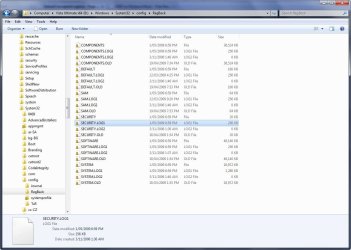
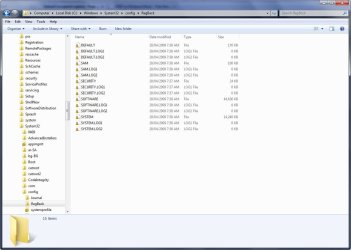
Just copying from Windows\System32\config\RegBack to Windows\System32\config.

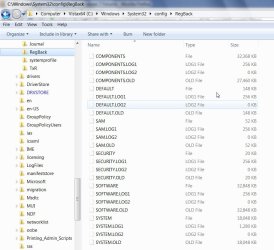
Looks like this on Vista:

VISTAREGBAK2009-05-03_035059.jpg

And on 7100:

SEVENREGBAK2009-05-03_035344.jpg

Usually make my own backups of the Hives periodically as well.
 

My Computers

System One System Two

  • Computer type
    PC/Desktop
    OS
    7 X64
    CPU
    i5 8400
    Motherboard
    gigabyte b365m ds3h
    Memory
    2x8gb 3200mhz
    Hard Drives
    various
    PSU
    pure power 11 400w cm
    Case
    Coolermaster
    Cooling
    cryorig m9i
  • Computer type
    PC/Desktop
    OS
    7x64
    CPU
    g5400
    Motherboard
    ga b365m ds3h
    Memory
    8gb ddr4 2400
    PSU
    xfx pro 450w
Hi YupYup,

Not sure why you say "keep" referring to.

Just copying from Windows\System32\config\RegBack to Windows\System32\config.

Looks like this on Vista:

View attachment 9476

And on 7:

View attachment 9477

Usually make my own backups of the Hives periodically as well.

"keep" because you mentioned that here. Your pic just looks different than vista because you have "hide protected operating system files" checked, and i would suspect the .old file are not present yet because you recently installed. As far as the commands go they are still the same though and from a command prompt you would see all the files anyway.
 

My Computer

OS
Win 7
Hi,

I have protected o/s files showing.

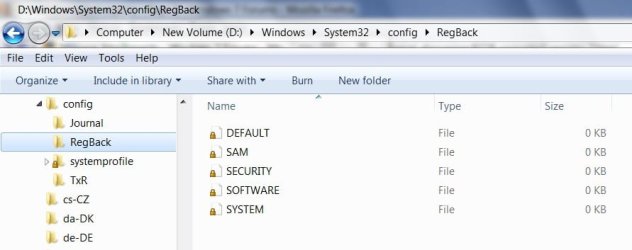
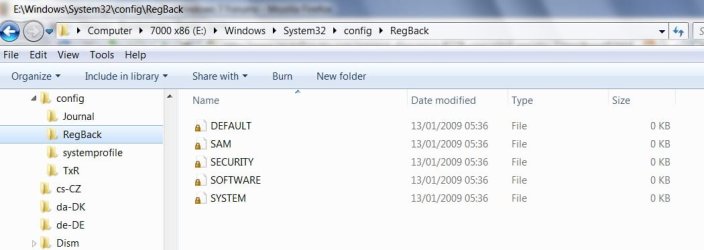
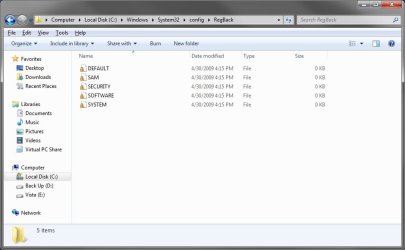
Curious they show as 0kb in 7 regbak.

Even if you copy them elsewhere.

I have had 7000x86 installed for quite a while on another partition - no .old there either:

SEVENx86REGBAK2009-05-03_043513.jpg
 

My Computers

System One System Two

  • Computer type
    PC/Desktop
    OS
    7 X64
    CPU
    i5 8400
    Motherboard
    gigabyte b365m ds3h
    Memory
    2x8gb 3200mhz
    Hard Drives
    various
    PSU
    pure power 11 400w cm
    Case
    Coolermaster
    Cooling
    cryorig m9i
  • Computer type
    PC/Desktop
    OS
    7x64
    CPU
    g5400
    Motherboard
    ga b365m ds3h
    Memory
    8gb ddr4 2400
    PSU
    xfx pro 450w
Never noticed the 0 kb here is shot from my 7100 build, i have a 7068 as well i'll go check it.

Update: 7068 is the same no .old


7100
 

Attachments

  • reg.JPG
    reg.JPG
    44.4 KB · Views: 142

My Computer

OS
Win 7
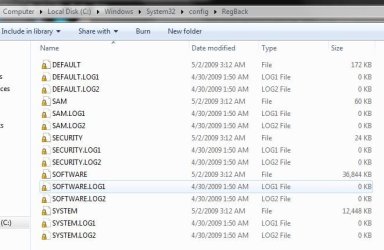
How come your RegBack\Software is 36mb or so and mine is 0kb on 7100?
 

My Computers

System One System Two

  • Computer type
    PC/Desktop
    OS
    7 X64
    CPU
    i5 8400
    Motherboard
    gigabyte b365m ds3h
    Memory
    2x8gb 3200mhz
    Hard Drives
    various
    PSU
    pure power 11 400w cm
    Case
    Coolermaster
    Cooling
    cryorig m9i
  • Computer type
    PC/Desktop
    OS
    7x64
    CPU
    g5400
    Motherboard
    ga b365m ds3h
    Memory
    8gb ddr4 2400
    PSU
    xfx pro 450w
Maybe someone else will post theirs.
 

My Computers

System One System Two

  • Computer type
    PC/Desktop
    OS
    7 X64
    CPU
    i5 8400
    Motherboard
    gigabyte b365m ds3h
    Memory
    2x8gb 3200mhz
    Hard Drives
    various
    PSU
    pure power 11 400w cm
    Case
    Coolermaster
    Cooling
    cryorig m9i
  • Computer type
    PC/Desktop
    OS
    7x64
    CPU
    g5400
    Motherboard
    ga b365m ds3h
    Memory
    8gb ddr4 2400
    PSU
    xfx pro 450w
Is this what you wanted?

2009-05-03_151721.jpg

Woops just noticed that was Vista :o

Try this one.

2009-05-03_152130.jpg
 

My Computer

Computer Manufacturer/Model Number
Home Brew
OS
Windows 7 Ultimate Vista Ultimate x64
CPU
Core 2 Duo E8500 3.16Ghz @ 3.8Ghz
Motherboard
eVGA 750i FTW
Memory
2x2Gigs Patriot PC2-6400 LL
Graphics Card(s)
Inno3D GeForce GTX260 216 SP
Monitor(s) Displays
ASUS VW222U 22" 2ms Response time
Screen Resolution
1680x1050
Hard Drives
SATA 150GB
SATA II 250GB
USB IDE 750GB Ext.
PSU
HYTEC 600W & Thermaltake 650W Toughpower Power Exp
Case
Thermaltake Armor LCS (Liquid Cooling System)
Cooling
Liquid Cooling System
Keyboard
Logitech G15 Gaming Keyboard
Mouse
Logitech G9 Gaming Mouse
Thanks Mr Grim.

Ok anyone else got only 0kb files in System32\config\RegBack ?
 

My Computers

System One System Two

  • Computer type
    PC/Desktop
    OS
    7 X64
    CPU
    i5 8400
    Motherboard
    gigabyte b365m ds3h
    Memory
    2x8gb 3200mhz
    Hard Drives
    various
    PSU
    pure power 11 400w cm
    Case
    Coolermaster
    Cooling
    cryorig m9i
  • Computer type
    PC/Desktop
    OS
    7x64
    CPU
    g5400
    Motherboard
    ga b365m ds3h
    Memory
    8gb ddr4 2400
    PSU
    xfx pro 450w
I have 0 kb files there to.

RegBack.jpg
 

My Computer

Computer type
PC/Desktop
Computer Manufacturer/Model Number
Self built custom
OS
64-bit Windows 11 Pro for Workstations
CPU
Intel i7-8700K OC'd to 5 GHz
Motherboard
ASUS ROG Maximus XI Formula Z390
Memory
64 GB (4x16GB) G.SKILL TridentZ RGB DDR4 3600 MHz
Graphics Card(s)
ASUS ROG-STRIX-GTX1080TI-O11G-GAMING
Sound Card
Integrated
Monitor(s) Displays
2 x Samsung Odyssey G7 27"
Screen Resolution
2560x1440
Hard Drives
1TB Samsung 990 PRO M.2,
4TB Samsung 990 PRO PRO M.2,
TerraMaster F8 SSD Plus NAS
PSU
Seasonic Prime Titanium 850W
Case
Thermaltake Core P3
Cooling
Corsair Hydro H115i
Keyboard
Logitech wireless K800
Mouse
Logitech MX Master 4
Internet Speed
2 Gb/s Download and 100 Mb/s Upload
Antivirus
Malwarebyte Anti-Malware Premium
Browser
Google Chrome
Other Info
Logitech Z625 speaker system,
Logitech BRIO 4K Pro webcam,
HP Color LaserJet Pro MFP M477fdn,
APC SMART-UPS RT 1000 XL - SURT1000XLI,
Galaxy S23 Plus phone
Status
Not open for further replies.
Back
Top