corrupted SFC scan and failed sfcfix.exe

Macari

New member
Local time
4:20 AM
Messages
10
hello I have run a sfc scan and it showed I had corrupted files upon research I cam accross the sfcfix.exe which had also failed. Please help if you can Thanks
 

Attachments

My Computer My Computer

Computer type
PC/Desktop
Computer Manufacturer/Model Number
Acer Aspire x3470
OS
Windows 7 Home Premium 64bit
CPU
Amd Quad core A6-3620 APU with Radeon HD6530D Graphics 2.20G
Memory
4GB DDR3
Hard Drives
WDC WD20 EARX-22PASB0 SATA 2TB
Antivirus
Avast
Browser
Torch, Chrome, Firefox
Hello Macari and welcome to Seven Forums.

It's been reported that several Windows Updates starting in May 2015 have caused people to experience corrupted system files after running sfc /scannow.

I'd try uninstalling all updates from May and June. Then try running the sfc again. If it works (no integrity violations found) then you'll know one or more of the Updates was responsible for the corrupted files. You could try reinstalling just a few at a time and run sfc after each group. If sfc runs successfully install the next group. If the sfc shows corrupted system files after running the scan you'll know which Update(s) were at fault. Uninstall those few updates, and install just one at a time. Run the sfc after each install until you know for sure which Update(s) is causing the issue.

http://www.sevenforums.com/tutorials/24373-windows-update-uninstall-update.html

Hopefully other Forum members will jump in with other suggestions.
 

My Computer My Computer

Computer type
Laptop
Computer Manufacturer/Model Number
Sony Vaio VPCEB47GM Laptop
OS
Win 7 Pro 64-bit
CPU
Intel i5 2.4 Ghz
Memory
8GB DDR3
Graphics Card(s)
Intel HD 3000
Sound Card
IDT High Definition
Monitor(s) Displays
15.6 WGXA Anti-Glare LED
Screen Resolution
1280x800
Hard Drives
640Gb 7200rpm
Antivirus
MSE
Browser
Opera (primary) with IE9 backup
Thanks for the reply marsimar, unfortunately I have been having issues for quite a while now, it's not only the sfc sacan, but others errors, as well as the 0x45d error while trying to restore to factory default settings, so in the end I just gave up, probably a bad thing to do, but I have the windows 10 upgrade reserved, so hopefully that may help. but I am always willing to try any advice that is offered, however I am reluctant to try the repair upgrade as it is a factory OEM and it came with no recovery media, so I aint sure if it would accept my product key or not.
 

My Computer My Computer

Computer type
PC/Desktop
Computer Manufacturer/Model Number
Acer Aspire x3470
OS
Windows 7 Home Premium 64bit
CPU
Amd Quad core A6-3620 APU with Radeon HD6530D Graphics 2.20G
Memory
4GB DDR3
Hard Drives
WDC WD20 EARX-22PASB0 SATA 2TB
Antivirus
Avast
Browser
Torch, Chrome, Firefox
You need a Windows 7 Home Premium install dvd, to use your key on the COA.
 

Attachments

  • HardwareCOA.gif
    HardwareCOA.gif
    707.8 KB · Views: 37

My Computer My Computer

Computer type
PC/Desktop
Computer Manufacturer/Model Number
Skylake Special #666
OS
Windows 10 Pro x64
CPU
Intel Core i7 6700K
Motherboard
Asus Sabertooth Z170 Mark 1
Memory
GSkill TridentZ RGB 16GB 3600 16-16-16-36
Graphics Card(s)
EVGA GTX 980 Ti SC x2
Sound Card
Realtek High Definition
Monitor(s) Displays
AOC G2460PG
Screen Resolution
1920 x 1080 144Hz
Hard Drives
Samsung 860 Pro 256GB, Seagate Barracuda 4TB x2
PSU
EVGA 1000 P2, EVGA White Custom Braided Cables
Case
Corsair Vengeance C70 Gunmetal Black
Cooling
Corsair H100i v2, Corsair ML120 x2, Thermal Grizzly Kryonaut
Keyboard
Logitech G910 Orion Spectrum
Mouse
Logitech G700s
Internet Speed
Verizon Fios Quantum Gateway 75/75
Antivirus
Windows Defender, Malwarebytes Free 3.8.3
Browser
Chrome
Other Info
Corsair SP120 x4, LG Blu-ray Drive, Durabrand HT-395 100 Watt Dolby Digital Amp, Corsair H2100 Wireless 7.1 Headset
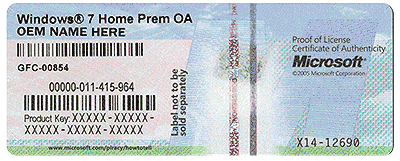
Mine says Window 7 Home Prem OA
Acer Group
 

My Computer My Computer

Computer type
PC/Desktop
Computer Manufacturer/Model Number
Acer Aspire x3470
OS
Windows 7 Home Premium 64bit
CPU
Amd Quad core A6-3620 APU with Radeon HD6530D Graphics 2.20G
Memory
4GB DDR3
Hard Drives
WDC WD20 EARX-22PASB0 SATA 2TB
Antivirus
Avast
Browser
Torch, Chrome, Firefox
The problematic updates are KB3022345 and KB3068708. If you remove KB3022345 it won't reappear for update again. If you remove KB3068708 it will remove KB3045999, KB3063858, and KB2882822 as well and they will all reappear for update again. When they reappear, if you hide KB3068708, the system will only install the other three and you should get a good indication from SFC.

I just spoke with a Microsoft Level 2 tech and their only solution is to do a clean install or wait for future updates. Microsoft is aware of this issue and if enough users contact them and complain, they might do something sooner rather than later.

I'm running Win 7 Pro x64, so your mileage may vary pertaining to what I indicated in the first part of this post.

Regards

PS - I ran the SFCfix and it didn't work for me.
 

My Computer My Computer

Computer type
PC/Desktop
Computer Manufacturer/Model Number
Custom Build
OS
Windows 7 Professional x64 SP1
CPU
Intel i7-980x @ 3.6GHz
Motherboard
Intel DX58SO
Memory
Corsair 12GB DDR3 RAM (3x4GB)
Graphics Card(s)
EVGA NVIDIA GeForce GTX 760 SC
Sound Card
Intel High Definition 7.1 Audio Subsystem - Realtek ALC889
Monitor(s) Displays
Dual Display - LG Electronics Flatron L227WTG
Screen Resolution
1680 x 1050 60Hz 32-bit
Hard Drives
2 Seagate Constellation ST1000NM0033 1TB SATA 6Gb/s HDDs configured as Intel SATA Array 0, RST RAID 1, Vol. 0 (C:\) & Vol. 1 (D:\), & 2 Seagate Barracuda ST500DM002 500GB SATA 6Gb/s HDDs configured as Intel SATA Array 1 RST RAID 1, Vol. 0 (E:\)
PSU
Corsair HX850W
Case
Antec P182
Cooling
Stock Intel i7-980x Cooling Solution + 4 120mm Case Fans
Keyboard
Microsoft Wireless Multimedia Keyboard 1.1
Mouse
Microsoft Standard Wireless Optical Mouse
Internet Speed
DSL - 3.0 Mb/s download 768 Kb/s upload
Antivirus
ESET Smart Security 12, Defender & SuperAntiSpyware Pro
Browser
Firefox Quantum 64-bit
Other Info
Optical Drives: Pioneer DVR-216R & TSSTcorp SH-S223Q, Anker USB 3.0 PCI-E Card, Hauppauge WinTV-HVR 2250 Dual TV Tuner Board for Windows Media Center, Bose Companion 3 Series II multimedia speaker system, APC Smart-UPS SMT1500
ok thanx for that tjg79, I will remove the update and hide when reappears and I will run sfc scan after removal and post
 

My Computer My Computer

Computer type
PC/Desktop
Computer Manufacturer/Model Number
Acer Aspire x3470
OS
Windows 7 Home Premium 64bit
CPU
Amd Quad core A6-3620 APU with Radeon HD6530D Graphics 2.20G
Memory
4GB DDR3
Hard Drives
WDC WD20 EARX-22PASB0 SATA 2TB
Antivirus
Avast
Browser
Torch, Chrome, Firefox
Hi tj, I don't have KB3022345, and removed and set KB3068708 to when it reappeared and installed the other 3 as stated, however sfc sacn still shows corruptions, and sfcfix failed. So I guess I have limited options , repair upgrade or clean installation, I do have windows 10 reserved, so I may just wait for that first.

Thoughts please.
 

My Computer My Computer

Computer type
PC/Desktop
Computer Manufacturer/Model Number
Acer Aspire x3470
OS
Windows 7 Home Premium 64bit
CPU
Amd Quad core A6-3620 APU with Radeon HD6530D Graphics 2.20G
Memory
4GB DDR3
Hard Drives
WDC WD20 EARX-22PASB0 SATA 2TB
Antivirus
Avast
Browser
Torch, Chrome, Firefox
Hi tj, I don't have KB3022345, and removed and set KB3068708 to when it reappeared and installed the other 3 as stated, however sfc sacn still shows corruptions, and sfcfix failed. So I guess I have limited options , repair upgrade or clean installation, I do have windows 10 reserved, so I may just wait for that first.

Thoughts please.

I would make sure that KB3022345 and KB3068708 are removed and then do a complete disk cleanup and then run SFC /Scannow. If you ran the sfcfix, restore your system to a previous time.

When I do a complete disk cleanup I run the TFC (Temp File Cleaner by OldTimer), delete all the files in the prefetch directory, run disk cleanup and then run Ccleaner.

I ran the sfcfix, but it didn't work for me. I then restored my system to before the sfcfix. If I remove the updates described above, I get a good sfc result.

Regards
 

My Computer My Computer

Computer type
PC/Desktop
Computer Manufacturer/Model Number
Custom Build
OS
Windows 7 Professional x64 SP1
CPU
Intel i7-980x @ 3.6GHz
Motherboard
Intel DX58SO
Memory
Corsair 12GB DDR3 RAM (3x4GB)
Graphics Card(s)
EVGA NVIDIA GeForce GTX 760 SC
Sound Card
Intel High Definition 7.1 Audio Subsystem - Realtek ALC889
Monitor(s) Displays
Dual Display - LG Electronics Flatron L227WTG
Screen Resolution
1680 x 1050 60Hz 32-bit
Hard Drives
2 Seagate Constellation ST1000NM0033 1TB SATA 6Gb/s HDDs configured as Intel SATA Array 0, RST RAID 1, Vol. 0 (C:\) & Vol. 1 (D:\), & 2 Seagate Barracuda ST500DM002 500GB SATA 6Gb/s HDDs configured as Intel SATA Array 1 RST RAID 1, Vol. 0 (E:\)
PSU
Corsair HX850W
Case
Antec P182
Cooling
Stock Intel i7-980x Cooling Solution + 4 120mm Case Fans
Keyboard
Microsoft Wireless Multimedia Keyboard 1.1
Mouse
Microsoft Standard Wireless Optical Mouse
Internet Speed
DSL - 3.0 Mb/s download 768 Kb/s upload
Antivirus
ESET Smart Security 12, Defender & SuperAntiSpyware Pro
Browser
Firefox Quantum 64-bit
Other Info
Optical Drives: Pioneer DVR-216R & TSSTcorp SH-S223Q, Anker USB 3.0 PCI-E Card, Hauppauge WinTV-HVR 2250 Dual TV Tuner Board for Windows Media Center, Bose Companion 3 Series II multimedia speaker system, APC Smart-UPS SMT1500
Sorry to be asking this, but it has happened before: When you say you are running sfcfix, you are drag dropping the second file on to sfcfix.exe, right? and not double clicking.
 

My Computer My Computer

Computer type
PC/Desktop
Computer Manufacturer/Model Number
Custom Build
OS
Windows 7 Ultimate x64 SP1
CPU
AMD Phenom 2 1090T
Motherboard
Gigabyte GA-890FXA-UD5
Memory
2x8GB Kingston HyperX Fury Black 1600Mhz Unganged
Graphics Card(s)
MSI GTX 970 Gaming 4G
Sound Card
Realtek On-Board HD 7.1 Audio / Logitech G35
Monitor(s) Displays
3xAcer GD245HQ
Screen Resolution
1920x1080
Hard Drives
Samsung 850 Pro 512GB SSD - OS /
WD Caviar Black SATA 3 - 1 TBx2 - Dynamic RAID 0 /
WD Caviar Green SATA 2 - 640GBx2 - Dynamic RAID 0 /
WD Caviar Green SATA 2 - 640GB - Internal Backup /
Seagate Barracude SATA 3 - 3TB - External Backup/ Sync
PSU
HighPower 1000W
Case
Cooler Master HAF 932
Cooling
Noctua NH-D14
Keyboard
Logitech G19
Mouse
Logitech G500
Internet Speed
100/4 Mbit Cable (100GB quota)
Antivirus
ZoneAlarm Extreme Security / MBAM Pro / MBAE Free / SAS Free
Browser
IE 11 - Firefox - Chrome
Other Info
Logitech F710/ G27/ G940/ Z5500 // TrackIR 5 // Nvidia 3D Surround Vision
no gokay I am double clicking the sfc.exe from my download folder
 

My Computer My Computer

Computer type
PC/Desktop
Computer Manufacturer/Model Number
Acer Aspire x3470
OS
Windows 7 Home Premium 64bit
CPU
Amd Quad core A6-3620 APU with Radeon HD6530D Graphics 2.20G
Memory
4GB DDR3
Hard Drives
WDC WD20 EARX-22PASB0 SATA 2TB
Antivirus
Avast
Browser
Torch, Chrome, Firefox
no gokay, I am double clicking the sfcfix.exe from my download folder
 

My Computer My Computer

Computer type
PC/Desktop
Computer Manufacturer/Model Number
Acer Aspire x3470
OS
Windows 7 Home Premium 64bit
CPU
Amd Quad core A6-3620 APU with Radeon HD6530D Graphics 2.20G
Memory
4GB DDR3
Hard Drives
WDC WD20 EARX-22PASB0 SATA 2TB
Antivirus
Avast
Browser
Torch, Chrome, Firefox
no gokay I am double clicking the sfc.exe from my download folder

That could be part of the problem. You are just supposed to drag and drop the appropriate version (x32 or x64) sfcfix.zip onto the sfcfix.exe file. There's no double clicking involved.

Regards

The Tech Cookbook – Windows 7 update (KB3022345) causing corrupt files


1. Download SFCFix.exe (by niemiro) and save this to your Desktop.
2. Download SFCFix.zip from one of the below links, and save this to your Desktop. Ensure that this file is named SFCFix.zip – do not rename it.
3. If you have a x64 machine download this version: SFCFix (x64 fix)
4. If you have a x86 machine download this version: SFCFix (x86 fix)
5. Save any open documents and close all open windows.
6. On your Desktop, you should see two files: SFCFix.exe and SFCFix.zip.
7. Drag the file SFCFix.zip onto the file SFCFix.exe and release it.
8. SFCFix will now process the script.
9. Upon completion, a file should be created on your Desktop: SFCFix.txt.
10. The results should return as Fixed:


I suggest restoring your system to a point in time before you attempted any sfcfix operations and starting over being sure to follow the instructions carefully.


My Computer My Computer

Computer type
PC/Desktop
Computer Manufacturer/Model Number
Custom Build
OS
Windows 7 Professional x64 SP1
CPU
Intel i7-980x @ 3.6GHz
Motherboard
Intel DX58SO
Memory
Corsair 12GB DDR3 RAM (3x4GB)
Graphics Card(s)
EVGA NVIDIA GeForce GTX 760 SC
Sound Card
Intel High Definition 7.1 Audio Subsystem - Realtek ALC889
Monitor(s) Displays
Dual Display - LG Electronics Flatron L227WTG
Screen Resolution
1680 x 1050 60Hz 32-bit
Hard Drives
2 Seagate Constellation ST1000NM0033 1TB SATA 6Gb/s HDDs configured as Intel SATA Array 0, RST RAID 1, Vol. 0 (C:\) & Vol. 1 (D:\), & 2 Seagate Barracuda ST500DM002 500GB SATA 6Gb/s HDDs configured as Intel SATA Array 1 RST RAID 1, Vol. 0 (E:\)
PSU
Corsair HX850W
Case
Antec P182
Cooling
Stock Intel i7-980x Cooling Solution + 4 120mm Case Fans
Keyboard
Microsoft Wireless Multimedia Keyboard 1.1
Mouse
Microsoft Standard Wireless Optical Mouse
Internet Speed
DSL - 3.0 Mb/s download 768 Kb/s upload
Antivirus
ESET Smart Security 12, Defender & SuperAntiSpyware Pro
Browser
Firefox Quantum 64-bit
Other Info
Optical Drives: Pioneer DVR-216R & TSSTcorp SH-S223Q, Anker USB 3.0 PCI-E Card, Hauppauge WinTV-HVR 2250 Dual TV Tuner Board for Windows Media Center, Bose Companion 3 Series II multimedia speaker system, APC Smart-UPS SMT1500
No need to system restore, just drag drop the correct zip file on to exe.
 

My Computer My Computer

Computer type
PC/Desktop
Computer Manufacturer/Model Number
Custom Build
OS
Windows 7 Ultimate x64 SP1
CPU
AMD Phenom 2 1090T
Motherboard
Gigabyte GA-890FXA-UD5
Memory
2x8GB Kingston HyperX Fury Black 1600Mhz Unganged
Graphics Card(s)
MSI GTX 970 Gaming 4G
Sound Card
Realtek On-Board HD 7.1 Audio / Logitech G35
Monitor(s) Displays
3xAcer GD245HQ
Screen Resolution
1920x1080
Hard Drives
Samsung 850 Pro 512GB SSD - OS /
WD Caviar Black SATA 3 - 1 TBx2 - Dynamic RAID 0 /
WD Caviar Green SATA 2 - 640GBx2 - Dynamic RAID 0 /
WD Caviar Green SATA 2 - 640GB - Internal Backup /
Seagate Barracude SATA 3 - 3TB - External Backup/ Sync
PSU
HighPower 1000W
Case
Cooler Master HAF 932
Cooling
Noctua NH-D14
Keyboard
Logitech G19
Mouse
Logitech G500
Internet Speed
100/4 Mbit Cable (100GB quota)
Antivirus
ZoneAlarm Extreme Security / MBAM Pro / MBAE Free / SAS Free
Browser
IE 11 - Firefox - Chrome
Other Info
Logitech F710/ G27/ G940/ Z5500 // TrackIR 5 // Nvidia 3D Surround Vision
I did the drag and drop and got the txt file(attached) and re ran the sfc /scanow from cmd and it still returned corrupted
 

Attachments

My Computer My Computer

Computer type
PC/Desktop
Computer Manufacturer/Model Number
Acer Aspire x3470
OS
Windows 7 Home Premium 64bit
CPU
Amd Quad core A6-3620 APU with Radeon HD6530D Graphics 2.20G
Memory
4GB DDR3
Hard Drives
WDC WD20 EARX-22PASB0 SATA 2TB
Antivirus
Avast
Browser
Torch, Chrome, Firefox
I did the drag and drop and got the txt file(attached) and re ran the sfc /scanow from cmd and it still returned corrupted

It didn't work for me either. I just removed the offending update and then hid it so that it won't present itself for reinstall. I get good results with SFC as long as that update isn't installed.

Regards
 

My Computer My Computer

Computer type
PC/Desktop
Computer Manufacturer/Model Number
Custom Build
OS
Windows 7 Professional x64 SP1
CPU
Intel i7-980x @ 3.6GHz
Motherboard
Intel DX58SO
Memory
Corsair 12GB DDR3 RAM (3x4GB)
Graphics Card(s)
EVGA NVIDIA GeForce GTX 760 SC
Sound Card
Intel High Definition 7.1 Audio Subsystem - Realtek ALC889
Monitor(s) Displays
Dual Display - LG Electronics Flatron L227WTG
Screen Resolution
1680 x 1050 60Hz 32-bit
Hard Drives
2 Seagate Constellation ST1000NM0033 1TB SATA 6Gb/s HDDs configured as Intel SATA Array 0, RST RAID 1, Vol. 0 (C:\) & Vol. 1 (D:\), & 2 Seagate Barracuda ST500DM002 500GB SATA 6Gb/s HDDs configured as Intel SATA Array 1 RST RAID 1, Vol. 0 (E:\)
PSU
Corsair HX850W
Case
Antec P182
Cooling
Stock Intel i7-980x Cooling Solution + 4 120mm Case Fans
Keyboard
Microsoft Wireless Multimedia Keyboard 1.1
Mouse
Microsoft Standard Wireless Optical Mouse
Internet Speed
DSL - 3.0 Mb/s download 768 Kb/s upload
Antivirus
ESET Smart Security 12, Defender & SuperAntiSpyware Pro
Browser
Firefox Quantum 64-bit
Other Info
Optical Drives: Pioneer DVR-216R & TSSTcorp SH-S223Q, Anker USB 3.0 PCI-E Card, Hauppauge WinTV-HVR 2250 Dual TV Tuner Board for Windows Media Center, Bose Companion 3 Series II multimedia speaker system, APC Smart-UPS SMT1500
Tj, ever considered you may have a different issue?

Macari, sfcfix worked fine. And replaced the 2 offending files.

Open cmd and run:
findstr /c:"[SR]" %windir%\logs\cbs\cbs.log >sfcdetails.txt

And attach sfcdetails.txt here
 

My Computer My Computer

Computer type
PC/Desktop
Computer Manufacturer/Model Number
Custom Build
OS
Windows 7 Ultimate x64 SP1
CPU
AMD Phenom 2 1090T
Motherboard
Gigabyte GA-890FXA-UD5
Memory
2x8GB Kingston HyperX Fury Black 1600Mhz Unganged
Graphics Card(s)
MSI GTX 970 Gaming 4G
Sound Card
Realtek On-Board HD 7.1 Audio / Logitech G35
Monitor(s) Displays
3xAcer GD245HQ
Screen Resolution
1920x1080
Hard Drives
Samsung 850 Pro 512GB SSD - OS /
WD Caviar Black SATA 3 - 1 TBx2 - Dynamic RAID 0 /
WD Caviar Green SATA 2 - 640GBx2 - Dynamic RAID 0 /
WD Caviar Green SATA 2 - 640GB - Internal Backup /
Seagate Barracude SATA 3 - 3TB - External Backup/ Sync
PSU
HighPower 1000W
Case
Cooler Master HAF 932
Cooling
Noctua NH-D14
Keyboard
Logitech G19
Mouse
Logitech G500
Internet Speed
100/4 Mbit Cable (100GB quota)
Antivirus
ZoneAlarm Extreme Security / MBAM Pro / MBAE Free / SAS Free
Browser
IE 11 - Firefox - Chrome
Other Info
Logitech F710/ G27/ G940/ Z5500 // TrackIR 5 // Nvidia 3D Surround Vision
Tj, ever considered you may have a different issue?

Macari, sfcfix worked fine. And replaced the 2 offending files.

Open cmd and run:
findstr /c:"[SR]" %windir%\logs\cbs\cbs.log >sfcdetails.txt

And attach sfcdetails.txt here

I guess it's possible, but very unlikely. If I have KB3068708 installed, I get the corruption issue with SFC, but if it's removed from the system, I get a good indication from SFC. So, my issue is directly related to KB3068708.

I suspect the problem is that I deleted KB3022345, which was the update that was originally identified with this issue. It's my understanding that KB3068708 was supposed to fix the KB3022345 SFC issue.

Perhaps if I hadn't deleted anything, the issue would have resolved itself, but by deleting the updates, the system could have corrupted something that is now causing the issue to appear with KB3068708 and resist the SFCFix solution.

Presently, I have KB3068708 removed and hidden, so my sfc results are good. If I decide to go with the Win 10 upgrade, I'll just unhide KB3068708 and check for updates before the Win 10 upgrade. But, the more I think about the Win 10 upgrade, the more likely I am to just stay with Win 7.
 

My Computer My Computer

Computer type
PC/Desktop
Computer Manufacturer/Model Number
Custom Build
OS
Windows 7 Professional x64 SP1
CPU
Intel i7-980x @ 3.6GHz
Motherboard
Intel DX58SO
Memory
Corsair 12GB DDR3 RAM (3x4GB)
Graphics Card(s)
EVGA NVIDIA GeForce GTX 760 SC
Sound Card
Intel High Definition 7.1 Audio Subsystem - Realtek ALC889
Monitor(s) Displays
Dual Display - LG Electronics Flatron L227WTG
Screen Resolution
1680 x 1050 60Hz 32-bit
Hard Drives
2 Seagate Constellation ST1000NM0033 1TB SATA 6Gb/s HDDs configured as Intel SATA Array 0, RST RAID 1, Vol. 0 (C:\) & Vol. 1 (D:\), & 2 Seagate Barracuda ST500DM002 500GB SATA 6Gb/s HDDs configured as Intel SATA Array 1 RST RAID 1, Vol. 0 (E:\)
PSU
Corsair HX850W
Case
Antec P182
Cooling
Stock Intel i7-980x Cooling Solution + 4 120mm Case Fans
Keyboard
Microsoft Wireless Multimedia Keyboard 1.1
Mouse
Microsoft Standard Wireless Optical Mouse
Internet Speed
DSL - 3.0 Mb/s download 768 Kb/s upload
Antivirus
ESET Smart Security 12, Defender & SuperAntiSpyware Pro
Browser
Firefox Quantum 64-bit
Other Info
Optical Drives: Pioneer DVR-216R & TSSTcorp SH-S223Q, Anker USB 3.0 PCI-E Card, Hauppauge WinTV-HVR 2250 Dual TV Tuner Board for Windows Media Center, Bose Companion 3 Series II multimedia speaker system, APC Smart-UPS SMT1500
command not working, let me find the hammer lol
 

My Computer My Computer

Computer type
PC/Desktop
Computer Manufacturer/Model Number
Acer Aspire x3470
OS
Windows 7 Home Premium 64bit
CPU
Amd Quad core A6-3620 APU with Radeon HD6530D Graphics 2.20G
Memory
4GB DDR3
Hard Drives
WDC WD20 EARX-22PASB0 SATA 2TB
Antivirus
Avast
Browser
Torch, Chrome, Firefox
In my screen (I am at the phone) the command shows as 2 lines, but needs to be 1. Maybe that's why
 

My Computer My Computer

Computer type
PC/Desktop
Computer Manufacturer/Model Number
Custom Build
OS
Windows 7 Ultimate x64 SP1
CPU
AMD Phenom 2 1090T
Motherboard
Gigabyte GA-890FXA-UD5
Memory
2x8GB Kingston HyperX Fury Black 1600Mhz Unganged
Graphics Card(s)
MSI GTX 970 Gaming 4G
Sound Card
Realtek On-Board HD 7.1 Audio / Logitech G35
Monitor(s) Displays
3xAcer GD245HQ
Screen Resolution
1920x1080
Hard Drives
Samsung 850 Pro 512GB SSD - OS /
WD Caviar Black SATA 3 - 1 TBx2 - Dynamic RAID 0 /
WD Caviar Green SATA 2 - 640GBx2 - Dynamic RAID 0 /
WD Caviar Green SATA 2 - 640GB - Internal Backup /
Seagate Barracude SATA 3 - 3TB - External Backup/ Sync
PSU
HighPower 1000W
Case
Cooler Master HAF 932
Cooling
Noctua NH-D14
Keyboard
Logitech G19
Mouse
Logitech G500
Internet Speed
100/4 Mbit Cable (100GB quota)
Antivirus
ZoneAlarm Extreme Security / MBAM Pro / MBAE Free / SAS Free
Browser
IE 11 - Firefox - Chrome
Other Info
Logitech F710/ G27/ G940/ Z5500 // TrackIR 5 // Nvidia 3D Surround Vision
Back
Top