I've finally pulled the trigger on an i7-4790k and thought upping my cooler would be a good idea due to the 600MHz jump in clock speed on my i5-4670k, so I chose the Corsair h80i. They seem to have very good reviews so I'm pretty comfortable with the choice, my only question is about the thermal paste that comes pre-applied. Is it good enough or should I opt for some Arctic MX-4/Silver 5?
My Computer
At a glance
W7 Pro x64 SP1 | W10 Pro IP x64 | W8.1 Pro x6...i7-4790k @ 4GHz (4.4GHz Boost)16GB DDR3 Kingston HyperX Fury @ 1600MHz CL 9...EVGA GTX 980 Classified
Computer type
PC/Desktop
Computer Manufacturer/Model Number
Custom Build
OS
W7 Pro x64 SP1 | W10 Pro IP x64 | W8.1 Pro x64 VM | Linux Mint VM
1*Samsung 840 EVO 120GB SSD;
1*OCZ Vertex 2 60GB SSD;
2*Samsung F3 SpinPoint 1TB in RAID0;
1*Samsung F1 SpinPoint 1TB;
2*Western Digital 1TB External USB 3.0
1*Western Digital 500GB External USB 3.0
1*Seagate 500GB External USB 2.0
PSU
Thermaltake ToughPower QFan 750W
Case
Thermaltake Element S VK60001W2Z
Cooling
Corsair H60 Water Cooling, 2*230mm and 2*80mm case fans
Sounds good Col, appreciate the input mate. If the install is as easy as the BIOS flash it's only the credit card bill that's been painful in this upgrade.
My Computer
At a glance
W7 Pro x64 SP1 | W10 Pro IP x64 | W8.1 Pro x6...i7-4790k @ 4GHz (4.4GHz Boost)16GB DDR3 Kingston HyperX Fury @ 1600MHz CL 9...EVGA GTX 980 Classified
Computer type
PC/Desktop
Computer Manufacturer/Model Number
Custom Build
OS
W7 Pro x64 SP1 | W10 Pro IP x64 | W8.1 Pro x64 VM | Linux Mint VM
1*Samsung 840 EVO 120GB SSD;
1*OCZ Vertex 2 60GB SSD;
2*Samsung F3 SpinPoint 1TB in RAID0;
1*Samsung F1 SpinPoint 1TB;
2*Western Digital 1TB External USB 3.0
1*Western Digital 500GB External USB 3.0
1*Seagate 500GB External USB 2.0
PSU
Thermaltake ToughPower QFan 750W
Case
Thermaltake Element S VK60001W2Z
Cooling
Corsair H60 Water Cooling, 2*230mm and 2*80mm case fans
1*Samsung 840 EVO 120GB SSD;
1*OCZ Vertex 2 60GB SSD;
2*Samsung F3 SpinPoint 1TB in RAID0;
1*Samsung F1 SpinPoint 1TB;
2*Western Digital 1TB External USB 3.0
1*Western Digital 500GB External USB 3.0
1*Seagate 500GB External USB 2.0
PSU
Thermaltake ToughPower QFan 750W
Case
Thermaltake Element S VK60001W2Z
Cooling
Corsair H60 Water Cooling, 2*230mm and 2*80mm case fans
The Paste they use is supposed to be Shin Etsu, which is supposed to be very good. It should do a good job. I always change it. Mostly because I'm OCD. But I have used what comes on the cooler and had good results with it.
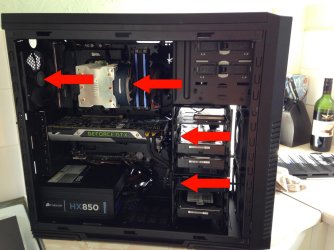
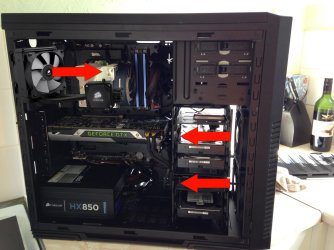
One more quick question lads. I took a look at the H80i earlier today (I'll be fitting it and the new CPU tomorrow) and it recommends having the fans draw air in over the rad which makes sense, but as my front fans are pulling air in over my hard drives won't that just leave warm air collecting inside the case?
My current airflow is this:
Using Corsair's recommendation my airflow will then be:
Would you go with their recommendation or have the fans pushing out of the case?
My Computer
At a glance
W7 Pro x64 SP1 | W10 Pro IP x64 | W8.1 Pro x6...i7-4790k @ 4GHz (4.4GHz Boost)16GB DDR3 Kingston HyperX Fury @ 1600MHz CL 9...EVGA GTX 980 Classified
Computer type
PC/Desktop
Computer Manufacturer/Model Number
Custom Build
OS
W7 Pro x64 SP1 | W10 Pro IP x64 | W8.1 Pro x64 VM | Linux Mint VM
Yes I would and always do. I understand your concern. But I have tried it both ways and have had better results pulling the cooler air through the radiator. I'm not familiar with your case, but could you mount the Radiator in the top?
Gav, I set up my H60 to draw air through the radiator and expel it out the back as per the top picture (I do however have a top fan that exhausts air too, which I don't think you have). I would ignore Corsair's recommendation, and setup as per the top picture.
My Computer
At a glance
Windows 10 Pro x64 ; Xubuntu x64Intel i7 860 @ 2.80 GHz O/C'ed to 4.0GHz16GB Corsair Vengance DDR3 @ 661 MHz Dual Cha...EVGA NVidia GTX 560 1024MB
1*Samsung 840 EVO 120GB SSD;
1*OCZ Vertex 2 60GB SSD;
2*Samsung F3 SpinPoint 1TB in RAID0;
1*Samsung F1 SpinPoint 1TB;
2*Western Digital 1TB External USB 3.0
1*Western Digital 500GB External USB 3.0
1*Seagate 500GB External USB 2.0
PSU
Thermaltake ToughPower QFan 750W
Case
Thermaltake Element S VK60001W2Z
Cooling
Corsair H60 Water Cooling, 2*230mm and 2*80mm case fans
Thanks again for the input lads. I do have the capacity to mount two fans to the top of the case, trouble is where my rig is situated there's a shelf sits directly above it so the airflow would be virtually zero.
I'll report back later when I'm done with the temps, it won't be any hassle to reconfigure the rad if needs be. Is the TP Link worth bothering with? I've heard that's caused problems in the past.
My Computer
At a glance
W7 Pro x64 SP1 | W10 Pro IP x64 | W8.1 Pro x6...i7-4790k @ 4GHz (4.4GHz Boost)16GB DDR3 Kingston HyperX Fury @ 1600MHz CL 9...EVGA GTX 980 Classified
Computer type
PC/Desktop
Computer Manufacturer/Model Number
Custom Build
OS
W7 Pro x64 SP1 | W10 Pro IP x64 | W8.1 Pro x64 VM | Linux Mint VM
Gav, again I am not familiar with your case, but if you could remove a hard drive cage, it can be mounted on one of the front intake fans. Several people here have done that. I was surprised too. It didn't look bad.
That's food for thought Steve. The middle cage is removable (case is a Cooler Master Silencio 650) but I'm not sure if I'd have enough room to fit all of my hard drives then (3 x HDD, 2 x SSD). I'm definitely going to have a look at that later though as I really like that idea. I'm not adverse to having my SSDs just sitting somewhere as opposed to being mounted into the cage so maybe it's a possiiblity.
My Computer
At a glance
W7 Pro x64 SP1 | W10 Pro IP x64 | W8.1 Pro x6...i7-4790k @ 4GHz (4.4GHz Boost)16GB DDR3 Kingston HyperX Fury @ 1600MHz CL 9...EVGA GTX 980 Classified
Computer type
PC/Desktop
Computer Manufacturer/Model Number
Custom Build
OS
W7 Pro x64 SP1 | W10 Pro IP x64 | W8.1 Pro x64 VM | Linux Mint VM
Gav, on my case both hard drive cages are removable. I wanted as much airflow as possible, so I removed them both. I bought one of these Amazon.com: ICY DOCK ToughArmor MB996SP-6SB 6 x 2.5 SATA 6Gbps HDD / SSD Mobile Rack / Cage in 1 x 5.25 bay: Computers & Accessories and put it in a 5.25" bay. I have 5 SSDs and a 1 TB 2.5" hard drive just for backups, all in 1 5.25" Bay. So, I have about 1.5 TB of SSDs and 1 TB hard drive for Backups, all in 1 5.25" Bay. I also have pretty darn good airflow. Something similar you may want to consider.
After a complete and utter nightmare it's all together. Just powered up to see if it POSTs and it does with nothing leaking, time to put everything back together and see what's what. I need a beer now.
My Computer
At a glance
W7 Pro x64 SP1 | W10 Pro IP x64 | W8.1 Pro x6...i7-4790k @ 4GHz (4.4GHz Boost)16GB DDR3 Kingston HyperX Fury @ 1600MHz CL 9...EVGA GTX 980 Classified
Computer type
PC/Desktop
Computer Manufacturer/Model Number
Custom Build
OS
W7 Pro x64 SP1 | W10 Pro IP x64 | W8.1 Pro x64 VM | Linux Mint VM
I'll probably have three for you Steve the way I feel, and a few for Colin as well. :shock:
Still...
Photos and a report to follow later. I've just ordered Crispy Shredded Chicken in Cantonese Sauce with Chilli Chips. The beer and report and photos will come after that.
My Computer
At a glance
W7 Pro x64 SP1 | W10 Pro IP x64 | W8.1 Pro x6...i7-4790k @ 4GHz (4.4GHz Boost)16GB DDR3 Kingston HyperX Fury @ 1600MHz CL 9...EVGA GTX 980 Classified
Computer type
PC/Desktop
Computer Manufacturer/Model Number
Custom Build
OS
W7 Pro x64 SP1 | W10 Pro IP x64 | W8.1 Pro x64 VM | Linux Mint VM