
Could i change 'System drive' to another partition?

Dj SharK

New member
Member
Local time
2:28 PM
Messages
93
Location
S.E.A
I've been having numerous issues with my installation since 3 weeks ago when everything came crashing down. Tired of trying to fix everything, i decided to do a clean format. But i've got a question though.

I have 2 HDD. Main drive (OS) have 3 partitions and my storage drive.
Before this, my main drive consist of XP, Windows 7 and the other is just a small storage.

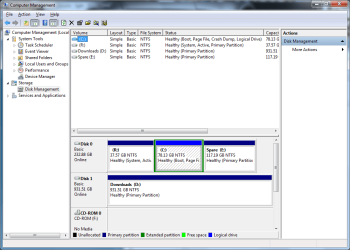
I just formatted my PC and decided to get rid of XP and use the space for my Windows 7 backup (as posted here.) Now in Disk Management, i see that the partition (previous XP) shows as 'system' (see attachment).

Could i still backup my Windows 7 on that partition? If not, how could i go about this?
 

Attachments
  • Untitled.png
    Untitled.png
    34.3 KB · Views: 124

My Computer My Computer

At a glance

Windows 7 Ultimate x86 7600Intel Pentium Dual CPU E2180 @ 2.00 GHz1 x 2GB | 1 x 1GB Kingston 667512MB Nvidia GeForce EN8500GT Silent Magic
Computer Manufacturer/Model Number
DIY
OS
Windows 7 Ultimate x86 7600
CPU
Intel Pentium Dual CPU E2180 @ 2.00 GHz
Motherboard
Gigabyte G41M Combo (rev 1.3)
Memory
1 x 2GB | 1 x 1GB Kingston 667
Graphics Card(s)
512MB Nvidia GeForce EN8500GT Silent Magic
Sound Card
Onboard HD 7.1 Audio
Monitor(s) Displays
22" LG W2242T
Screen Resolution
1680 X 1050
Hard Drives
1 x 500GB SATA Hitachi ( Internal )
1 x 1TB SATA Hitachi ( Internal )
1 x 320GB Western Digital ( External )
PSU
500W
Case
Coolermaster
Cooling
Coolermaster
Keyboard
Logitech Media Wireless Keyboard
Mouse
A4Tech G6 Wireless Mouse
Internet Speed
DL : 12MB/s | UL : 1.2MB/s
Other Info
I'm not a gamer. I don't overclock. I use my PC for web browsing, listening to music and watching HD movies.
Hello Dj SharK.

Be advised: if you haven't formatted the XP partition yet don't do it or the Windows 7 partition won't boot at all on its own.


I'm aware of a method to assist you but will you answer a few questions first?


1) Is XP still booting/starting-up or have you done the format already?

If you have formatted XP already you may not be able to boot to the Windows 7 partition so don't shut down the PC yet.


2) Is there unused space on the "Disk 1, partition E:" that could be used?
 

My Computer My Computer

At a glance

W 7 64-bit UltimateIntel Q9550 Yorkfield8GB Dominator 8500C5DATI : XFX 5870
Computer Manufacturer/Model Number
* BFK Customs *
OS
W 7 64-bit Ultimate
CPU
Intel Q9550 Yorkfield
Motherboard
ASUS P5Q Pro
Memory
8GB Dominator 8500C5D
Graphics Card(s)
ATI : XFX 5870
Sound Card
Realtek HD Audio 7-1
Monitor(s) Displays
1x 47" LCD HDMI & 3x 26" LCD HDMI
Screen Resolution
1920x1080P & 1920x1200
Hard Drives
1x 80GB Intel X25-M G2 SSD : 1x 500GB & 1x 640GB WD Caviar Black(s)
PSU
Corsair 620HX
Case
Cooler Master RC-690
Cooling
Tuniq Tower 120, 2x 140mm and 3x 120mm case fans
Keyboard
Microsoft 500
Mouse
Razer Diamondback 3G
Internet Speed
14 Mb/s
Other Info
1x Koutech 3Gb/s SATA HDD Hot Swap Rack
1) Is XP still booting/starting-up or have you done the format already?

If you have formatted XP already you may not be able to boot to the Windows 7 partition so don't shut down the PC yet.

Basically when i wanted to re-install my Windows 7, there's a point where it asks which drive do i want to install it to. First, i 'format' my XP partition. After which, i format my Windows 7 partition and install it (Windows 7) on the same drive. I've restarted my PC numerous times the past few hours (updates).


2) Is there unused space on the "Disk 1, partition E:" that could be used?

Partition E is wayyyy too overpack (647 MB remaining).
 

My Computer My Computer

At a glance

Windows 7 Ultimate x86 7600Intel Pentium Dual CPU E2180 @ 2.00 GHz1 x 2GB | 1 x 1GB Kingston 667512MB Nvidia GeForce EN8500GT Silent Magic
Computer Manufacturer/Model Number
DIY
OS
Windows 7 Ultimate x86 7600
CPU
Intel Pentium Dual CPU E2180 @ 2.00 GHz
Motherboard
Gigabyte G41M Combo (rev 1.3)
Memory
1 x 2GB | 1 x 1GB Kingston 667
Graphics Card(s)
512MB Nvidia GeForce EN8500GT Silent Magic
Sound Card
Onboard HD 7.1 Audio
Monitor(s) Displays
22" LG W2242T
Screen Resolution
1680 X 1050
Hard Drives
1 x 500GB SATA Hitachi ( Internal )
1 x 1TB SATA Hitachi ( Internal )
1 x 320GB Western Digital ( External )
PSU
500W
Case
Coolermaster
Cooling
Coolermaster
Keyboard
Logitech Media Wireless Keyboard
Mouse
A4Tech G6 Wireless Mouse
Internet Speed
DL : 12MB/s | UL : 1.2MB/s
Other Info
I'm not a gamer. I don't overclock. I use my PC for web browsing, listening to music and watching HD movies.
As far as I see from your Disk Management, it is the "R" partition that is active. So that contains the MBR. If your C partition contains XP, you should be able to delete it - unless there is something I do not see that BFK refers to - e.g. if XP is on R.
 

My Computer My Computer

At a glance

Vista, Windows7, Mint Mate, Zorin, Windows 8from 1.6GHz Duo to i7
Computer Manufacturer/Model Number
HP, Dell, Gateway, Toshiba - 4 laptops and 2 desktops
OS
Vista, Windows7, Mint Mate, Zorin, Windows 8
CPU
from 1.6GHz Duo to i7
Monitor(s) Displays
2x HP w2207
Hard Drives
5x HDD, 7x SSD, 12x Externals
Keyboard
with trackball - no mices
Mouse
Trackball mice
Internet Speed
DSL 6000
Whether you formatted R or not, Win7 placed its boot files there when you reinstalled it to C, because C is Logical and boot files cannot be placed on a Logical partition.

I will give you the steps to fix this, but you need to decide if you'd like to have C in the first partition slot which is preferred for WIn7 since it is closer to where the disk reader parks. If so the steps given below to convert Logical to Primary and recover the System MBR into C should include Resizing C into deleted R space.

Download, burn to CD and boot free Partition Wizard bootable CD, select 1 for screen res, rightlick C>Modify>Convert to Primary, OK. Next rightlick C>Modify>Set to Active, OK, Apply steps.

If you want put C Win7 in the first partition space, next rightclick R>Delete, then rightclick C>Resize, slide left border all the way to the left over deleted R, then resize right border as desired, OK, Apply steps.

If you want to leave R where it is, rightclick R>Modify>Set to Inactive, OK, Apply step.

Now confirm from booted CD that C is Primary marked Active and if R still exists it is Inactive.

Win7 will not boot now. Boot the Win7 DVD Repair console, click through to Recovery Tools list to run Startup Repair up to 3 separate times with reboots until Win7 starts.
 
@whs: Before all these crazy happenings, when i'm on 7, XP is D and 7 is C. After i format my XP partition, it doesn't have a drive name. So i name it R.

I'm sooo lost right now. Should i remove my 1TB (D) drive and reinstall XP to R? Now i can't play HD videos. No idea what's going on. :S
 

My Computer My Computer

At a glance

Windows 7 Ultimate x86 7600Intel Pentium Dual CPU E2180 @ 2.00 GHz1 x 2GB | 1 x 1GB Kingston 667512MB Nvidia GeForce EN8500GT Silent Magic
Computer Manufacturer/Model Number
DIY
OS
Windows 7 Ultimate x86 7600
CPU
Intel Pentium Dual CPU E2180 @ 2.00 GHz
Motherboard
Gigabyte G41M Combo (rev 1.3)
Memory
1 x 2GB | 1 x 1GB Kingston 667
Graphics Card(s)
512MB Nvidia GeForce EN8500GT Silent Magic
Sound Card
Onboard HD 7.1 Audio
Monitor(s) Displays
22" LG W2242T
Screen Resolution
1680 X 1050
Hard Drives
1 x 500GB SATA Hitachi ( Internal )
1 x 1TB SATA Hitachi ( Internal )
1 x 320GB Western Digital ( External )
PSU
500W
Case
Coolermaster
Cooling
Coolermaster
Keyboard
Logitech Media Wireless Keyboard
Mouse
A4Tech G6 Wireless Mouse
Internet Speed
DL : 12MB/s | UL : 1.2MB/s
Other Info
I'm not a gamer. I don't overclock. I use my PC for web browsing, listening to music and watching HD movies.
Yes. It just seems a little risky.

Firstly, i'm going to remove my D drive, then reinstall my XP to R. Hopefully this would fix it. If it doesn't, i'll be sure to use your method. Back in a bit.
 

My Computer My Computer

At a glance

Windows 7 Ultimate x86 7600Intel Pentium Dual CPU E2180 @ 2.00 GHz1 x 2GB | 1 x 1GB Kingston 667512MB Nvidia GeForce EN8500GT Silent Magic
Computer Manufacturer/Model Number
DIY
OS
Windows 7 Ultimate x86 7600
CPU
Intel Pentium Dual CPU E2180 @ 2.00 GHz
Motherboard
Gigabyte G41M Combo (rev 1.3)
Memory
1 x 2GB | 1 x 1GB Kingston 667
Graphics Card(s)
512MB Nvidia GeForce EN8500GT Silent Magic
Sound Card
Onboard HD 7.1 Audio
Monitor(s) Displays
22" LG W2242T
Screen Resolution
1680 X 1050
Hard Drives
1 x 500GB SATA Hitachi ( Internal )
1 x 1TB SATA Hitachi ( Internal )
1 x 320GB Western Digital ( External )
PSU
500W
Case
Coolermaster
Cooling
Coolermaster
Keyboard
Logitech Media Wireless Keyboard
Mouse
A4Tech G6 Wireless Mouse
Internet Speed
DL : 12MB/s | UL : 1.2MB/s
Other Info
I'm not a gamer. I don't overclock. I use my PC for web browsing, listening to music and watching HD movies.

My Computer My Computer

At a glance

W 7 64-bit UltimateIntel Q9550 Yorkfield8GB Dominator 8500C5DATI : XFX 5870
Computer Manufacturer/Model Number
* BFK Customs *
OS
W 7 64-bit Ultimate
CPU
Intel Q9550 Yorkfield
Motherboard
ASUS P5Q Pro
Memory
8GB Dominator 8500C5D
Graphics Card(s)
ATI : XFX 5870
Sound Card
Realtek HD Audio 7-1
Monitor(s) Displays
1x 47" LCD HDMI & 3x 26" LCD HDMI
Screen Resolution
1920x1080P & 1920x1200
Hard Drives
1x 80GB Intel X25-M G2 SSD : 1x 500GB & 1x 640GB WD Caviar Black(s)
PSU
Corsair 620HX
Case
Cooler Master RC-690
Cooling
Tuniq Tower 120, 2x 140mm and 3x 120mm case fans
Keyboard
Microsoft 500
Mouse
Razer Diamondback 3G
Internet Speed
14 Mb/s
Other Info
1x Koutech 3Gb/s SATA HDD Hot Swap Rack
Back
Top