Solved Restored Windows Back Up To Another Partition Of Dual Boot Drive

Botard

New member
Member
Local time
12:26 AM
Messages
92
Location
Cavite
Hello Windows Seven Forums,

I have to hard drives in my desktop. One drive has Windows 7 which I'm going to back up to the second hard drive of other partition. The second hard drive have dual boot OS its default is Windows 8.1 and second is Windows 7. This Windows 7 is the same with the other one I'm going to back up but not the installed apps. When the time the back up is done, I want to replace the second Windows 7 of dual boot drive completely. The result will have 1T bytes hard dive run in my desktop only with dual boot Windows 8.1 still is my default and a new replaced Windows 7.

In my view, the same windows back up tutorial provided in this forum to take its way. :rolleyes:

Thanks
 

My Computer My Computer

At a glance

Windows 7 guest, Debian hostAMD FX-6100DDR3/16384 MBytes/2000.6MHzAMD Radeon HD 5500 Series
Computer type
PC/Desktop
Computer Manufacturer/Model Number
MSI
OS
Windows 7 guest, Debian host
CPU
AMD FX-6100
Motherboard
880GMS-E41(FX)(MS-7641)
Memory
DDR3/16384 MBytes/2000.6MHz
Graphics Card(s)
AMD Radeon HD 5500 Series
Sound Card
Built-in
Monitor(s) Displays
Samsung SyncMaster S23B300
Screen Resolution
1920x1080
Hard Drives
ST1000DM003-9YN162 ATA Device
WDC WD5000AAKX-00ERMAQ ATA Device
PSU
500W NAXN
Case
APOLLO
Cooling
XY
Keyboard
Logitech
Mouse
Samsung
Internet Speed
.79Mbps/1.71Mbps
Antivirus
Microsoft Security Essentials
Browser
Google Chrome/FireFox/Internet Explorer
Other Info
3in1 creative speaker
It's done for back up but I'm having a problem the partition. It will restore the back up in Local Disk C which I don't want to place there. I haven't seen Local Disk D in repair disc I created when loaded from BIOS set up went on. Does anyone knows how can I restore it in Local Disk D only?
 

My Computer My Computer

At a glance

Windows 7 guest, Debian hostAMD FX-6100DDR3/16384 MBytes/2000.6MHzAMD Radeon HD 5500 Series
Computer type
PC/Desktop
Computer Manufacturer/Model Number
MSI
OS
Windows 7 guest, Debian host
CPU
AMD FX-6100
Motherboard
880GMS-E41(FX)(MS-7641)
Memory
DDR3/16384 MBytes/2000.6MHz
Graphics Card(s)
AMD Radeon HD 5500 Series
Sound Card
Built-in
Monitor(s) Displays
Samsung SyncMaster S23B300
Screen Resolution
1920x1080
Hard Drives
ST1000DM003-9YN162 ATA Device
WDC WD5000AAKX-00ERMAQ ATA Device
PSU
500W NAXN
Case
APOLLO
Cooling
XY
Keyboard
Logitech
Mouse
Samsung
Internet Speed
.79Mbps/1.71Mbps
Antivirus
Microsoft Security Essentials
Browser
Google Chrome/FireFox/Internet Explorer
Other Info
3in1 creative speaker
Please post back a screenshot of Disk Management - Post a Screen Capture Image.
Tell us where you want everything to end up.

I'd use http://www.sevenforums.com/tutorials/73828-imaging-free-macrium.html?ltr=I so you have flexibility of where to restore it which isn't offered in Win7 imaging.

I am assuming you want to replace Win7 in the Dual Boot with the backed up image. When ready delete the Win7 in the Dual Boot which you want to replace, apply the backup image to that partition. Then unplug the other drive so it doesn't interfere while configuring a Dual Boot.

Boot into Win 8.1 on the Dual Boot drive, install EasyBCD (click Download - no Name or Email required) to add the new Win7 OS on other partition to a Windows Dual Boot menu.

You may have to run Win7 Startup Repair from Win7 disk to start it. Unplug all other drives when doing this.

The booted OS should always boot as C with the other OS taking D. You do not want Win7 to boot as D so let the imaging app choose the drive letter Automatically or choose C.

Let us know how this works.
 
Very nice will try it. Thanks

I'll let you inform this.

Edit:
while reading the links you provide me, here's the computer management picture you ask.
From this picture, Local Disk F here is where my Windows 8.1 installed. I change the letter that is why it's appeared Local Disk F for Windows 8.1. I'm in Windows 7 now and I changed the letter to C. I remember the local Disk C was appeared in repair disc a while ago. I'm thinking to change back its default letter to make sure and try to run the repair disc again first before try the replied links you gave to me.

attachment.php
 
Last edited:

My Computer My Computer

At a glance

Windows 7 guest, Debian hostAMD FX-6100DDR3/16384 MBytes/2000.6MHzAMD Radeon HD 5500 Series
Computer type
PC/Desktop
Computer Manufacturer/Model Number
MSI
OS
Windows 7 guest, Debian host
CPU
AMD FX-6100
Motherboard
880GMS-E41(FX)(MS-7641)
Memory
DDR3/16384 MBytes/2000.6MHz
Graphics Card(s)
AMD Radeon HD 5500 Series
Sound Card
Built-in
Monitor(s) Displays
Samsung SyncMaster S23B300
Screen Resolution
1920x1080
Hard Drives
ST1000DM003-9YN162 ATA Device
WDC WD5000AAKX-00ERMAQ ATA Device
PSU
500W NAXN
Case
APOLLO
Cooling
XY
Keyboard
Logitech
Mouse
Samsung
Internet Speed
.79Mbps/1.71Mbps
Antivirus
Microsoft Security Essentials
Browser
Google Chrome/FireFox/Internet Explorer
Other Info
3in1 creative speaker
Hello Greg,

Problems occurred in Macrium Reflect for my system. It didn't create an image or back up to use. I'm not sure I did follow the procedure to create the image. I installed and ran Macrium Reflect in Windows 7 and tried to put its image and back up to my dual boot drive partition but it was aborted because of some other error chkdsk C in my system. I did check the drive for errors on C but there's no issue supposedly.

This time, here is my Disk management picture,
www.JPG

Other updates is Local Disk F was already formatted.
 

My Computer My Computer

At a glance

Windows 7 guest, Debian hostAMD FX-6100DDR3/16384 MBytes/2000.6MHzAMD Radeon HD 5500 Series
Computer type
PC/Desktop
Computer Manufacturer/Model Number
MSI
OS
Windows 7 guest, Debian host
CPU
AMD FX-6100
Motherboard
880GMS-E41(FX)(MS-7641)
Memory
DDR3/16384 MBytes/2000.6MHz
Graphics Card(s)
AMD Radeon HD 5500 Series
Sound Card
Built-in
Monitor(s) Displays
Samsung SyncMaster S23B300
Screen Resolution
1920x1080
Hard Drives
ST1000DM003-9YN162 ATA Device
WDC WD5000AAKX-00ERMAQ ATA Device
PSU
500W NAXN
Case
APOLLO
Cooling
XY
Keyboard
Logitech
Mouse
Samsung
Internet Speed
.79Mbps/1.71Mbps
Antivirus
Microsoft Security Essentials
Browser
Google Chrome/FireFox/Internet Explorer
Other Info
3in1 creative speaker
to be short: you want to clone C to F, So overwrite what's on F now. Correct?
 

My Computer My Computer

At a glance

Microsoft Windows 7 Home Premium 64-bits 7601...Intel(R) Core(TM) i3 CPU M 370 @ 2.40GHz4,00 GBATI Mobility Radeon HD 5400 Series
Computer type
Laptop
Computer Manufacturer/Model Number
ACER ASPIRE 5742G
OS
Microsoft Windows 7 Home Premium 64-bits 7601 Multiprocessor Free Service Pack 1
CPU
Intel(R) Core(TM) i3 CPU M 370 @ 2.40GHz
Motherboard
Acer Aspire 5742G
Memory
4,00 GB
Graphics Card(s)
ATI Mobility Radeon HD 5400 Series
Sound Card
(1) AMD High Definition Audio Device (2) Realtek High Defi
Screen Resolution
1366 x 768 x 32 bits (4294967296 colors) @ 60 Hz
Hard Drives
WDC WD5000BEVT-22ZAT0
Yes :)
 

My Computer My Computer

At a glance

Windows 7 guest, Debian hostAMD FX-6100DDR3/16384 MBytes/2000.6MHzAMD Radeon HD 5500 Series
Computer type
PC/Desktop
Computer Manufacturer/Model Number
MSI
OS
Windows 7 guest, Debian host
CPU
AMD FX-6100
Motherboard
880GMS-E41(FX)(MS-7641)
Memory
DDR3/16384 MBytes/2000.6MHz
Graphics Card(s)
AMD Radeon HD 5500 Series
Sound Card
Built-in
Monitor(s) Displays
Samsung SyncMaster S23B300
Screen Resolution
1920x1080
Hard Drives
ST1000DM003-9YN162 ATA Device
WDC WD5000AAKX-00ERMAQ ATA Device
PSU
500W NAXN
Case
APOLLO
Cooling
XY
Keyboard
Logitech
Mouse
Samsung
Internet Speed
.79Mbps/1.71Mbps
Antivirus
Microsoft Security Essentials
Browser
Google Chrome/FireFox/Internet Explorer
Other Info
3in1 creative speaker

My Computer My Computer

At a glance

Microsoft Windows 7 Home Premium 64-bits 7601...Intel(R) Core(TM) i3 CPU M 370 @ 2.40GHz4,00 GBATI Mobility Radeon HD 5400 Series
Computer type
Laptop
Computer Manufacturer/Model Number
ACER ASPIRE 5742G
OS
Microsoft Windows 7 Home Premium 64-bits 7601 Multiprocessor Free Service Pack 1
CPU
Intel(R) Core(TM) i3 CPU M 370 @ 2.40GHz
Motherboard
Acer Aspire 5742G
Memory
4,00 GB
Graphics Card(s)
ATI Mobility Radeon HD 5400 Series
Sound Card
(1) AMD High Definition Audio Device (2) Realtek High Defi
Screen Resolution
1366 x 768 x 32 bits (4294967296 colors) @ 60 Hz
Hard Drives
WDC WD5000BEVT-22ZAT0
Post when partition has been copied successful. Later instructions follow.

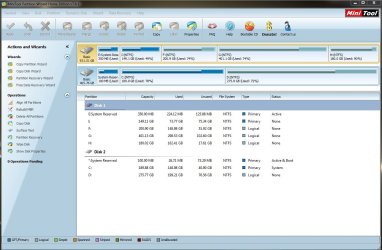
Ok, Kaktussoft. I think the partition Wizard was successfully copied the Local Disk C to Local Disk F. As you instructed, I deleted the F and copy the C then resized the new partition but I didn't allocate it from the Partition Wizard app.

Here is the Partition Wizard's view for my drives now, the Local Disk F was restored its letter as it was after I deleted it...
Partition Wizard.JPG
 

My Computer My Computer

At a glance

Windows 7 guest, Debian hostAMD FX-6100DDR3/16384 MBytes/2000.6MHzAMD Radeon HD 5500 Series
Computer type
PC/Desktop
Computer Manufacturer/Model Number
MSI
OS
Windows 7 guest, Debian host
CPU
AMD FX-6100
Motherboard
880GMS-E41(FX)(MS-7641)
Memory
DDR3/16384 MBytes/2000.6MHz
Graphics Card(s)
AMD Radeon HD 5500 Series
Sound Card
Built-in
Monitor(s) Displays
Samsung SyncMaster S23B300
Screen Resolution
1920x1080
Hard Drives
ST1000DM003-9YN162 ATA Device
WDC WD5000AAKX-00ERMAQ ATA Device
PSU
500W NAXN
Case
APOLLO
Cooling
XY
Keyboard
Logitech
Mouse
Samsung
Internet Speed
.79Mbps/1.71Mbps
Antivirus
Microsoft Security Essentials
Browser
Google Chrome/FireFox/Internet Explorer
Other Info
3in1 creative speaker
Now power down to unplug Disk 2 so it cannot interfere.

Reboot to see if perchance the Dual Boot still works, which is unlikely. If so check both OS's to see if they work.

If not, boot into Win8, install EasyBCD (click Download - no Name or Email required) to add Windows 7. It should autocomplete drive letter choice but if not provide the drive letter as viewed from Windows 8 explorer.

Reboot to see if Dual Boot menu appears with working choice for both OSes. Confirm that Windows 7 sees itself as C when booted.

If this fails boot Win7 disk to run Startup Repair.

There are opinions traded here in the past that an OS must be imaged and not copied. If this works please keep us posted on performance.
 
Yes Greg, I unplug it and found Windows 7 needs a Windows installation disc to repair it from booting. I didn't insert the Windows 7 installation disc because I'm afraid it will change the booting menu from Windows 8 to Windows 7 (black Screen menu). I'm in Windows 8 now and downloading EasyBCD and hopefully this will not change the Windows 8 booting menu when it successful to boot the Windows 7.
 

My Computer My Computer

At a glance

Windows 7 guest, Debian hostAMD FX-6100DDR3/16384 MBytes/2000.6MHzAMD Radeon HD 5500 Series
Computer type
PC/Desktop
Computer Manufacturer/Model Number
MSI
OS
Windows 7 guest, Debian host
CPU
AMD FX-6100
Motherboard
880GMS-E41(FX)(MS-7641)
Memory
DDR3/16384 MBytes/2000.6MHz
Graphics Card(s)
AMD Radeon HD 5500 Series
Sound Card
Built-in
Monitor(s) Displays
Samsung SyncMaster S23B300
Screen Resolution
1920x1080
Hard Drives
ST1000DM003-9YN162 ATA Device
WDC WD5000AAKX-00ERMAQ ATA Device
PSU
500W NAXN
Case
APOLLO
Cooling
XY
Keyboard
Logitech
Mouse
Samsung
Internet Speed
.79Mbps/1.71Mbps
Antivirus
Microsoft Security Essentials
Browser
Google Chrome/FireFox/Internet Explorer
Other Info
3in1 creative speaker
Didn't Botard just report that it booted into Windows 8 when the other drive was unplugged? This would confirm that the Dual Boot hard drive is bootable on its own, since the "System" ("Boot" in Partition Wizard) flag that normally confirms this will not show on a drive that is not booted.

So this is why we do not see the PW "Boot" flag on Drive 1 System Reserved partition in screenshot that is booted into Drive 2.

In that case all that's needed is to add Win7 to Dual Boot using EasyBCD.

If Drive 1 is not bootable on its own, then it would need Windows 8 Automatic Repair to start 8 and then add 7 using EasyBCD. This will preserve the modern Dual boot menu.

If Win7 will not start then, it may require Startup Repair from its disk. Kaktussoft may have some commands that will start it without replacing the modern Dual Boot menu.
 
Yes Greg, I unplug it and found Windows 7 needs a Windows installation disc to repair it from booting. I didn't insert the Windows 7 installation disc because I'm afraid it will change the booting menu from Windows 8 to Windows 7 (black Screen menu). I'm in Windows 8 now and downloading EasyBCD and hopefully this will not change the Windows 8 booting menu when it successful to boot the Windows 7.
Just add the new win7 clone to the boot menu using easybcd from within win8. In win8 the drive letter is also F?

Is it in the boot menu afterwards?
I think it doesn't boot.... what error message?
 

My Computer My Computer

At a glance

Microsoft Windows 7 Home Premium 64-bits 7601...Intel(R) Core(TM) i3 CPU M 370 @ 2.40GHz4,00 GBATI Mobility Radeon HD 5400 Series
Computer type
Laptop
Computer Manufacturer/Model Number
ACER ASPIRE 5742G
OS
Microsoft Windows 7 Home Premium 64-bits 7601 Multiprocessor Free Service Pack 1
CPU
Intel(R) Core(TM) i3 CPU M 370 @ 2.40GHz
Motherboard
Acer Aspire 5742G
Memory
4,00 GB
Graphics Card(s)
ATI Mobility Radeon HD 5400 Series
Sound Card
(1) AMD High Definition Audio Device (2) Realtek High Defi
Screen Resolution
1366 x 768 x 32 bits (4294967296 colors) @ 60 Hz
Hard Drives
WDC WD5000BEVT-22ZAT0
Didn't Botard just report that it booted into Windows 8 when the other drive was unplugged? This would confirm that the Dual Boot hard drive is bootable on its own since the System (Boot in Partition Wizard) flag that normally confirms this will not show on a drive that is not booted.

So this is why we do not see the PW Boot flag on Drive 1 System Reserved partition in screenshot that is booted into Drive 2.

In that case all that's needed is to add Win7 to Dual Boot using EasyBCD.

If Drive 1 is not bootable on its own, then it would need Windows 8 Automatic Repair to start 8 and then add 7 using EasyBCD. This will preserve the modern Dual boot menu.
Sorry... I did make my message while he was posting. So i didn't read that post. I removed my previous post
 

My Computer My Computer

At a glance

Microsoft Windows 7 Home Premium 64-bits 7601...Intel(R) Core(TM) i3 CPU M 370 @ 2.40GHz4,00 GBATI Mobility Radeon HD 5400 Series
Computer type
Laptop
Computer Manufacturer/Model Number
ACER ASPIRE 5742G
OS
Microsoft Windows 7 Home Premium 64-bits 7601 Multiprocessor Free Service Pack 1
CPU
Intel(R) Core(TM) i3 CPU M 370 @ 2.40GHz
Motherboard
Acer Aspire 5742G
Memory
4,00 GB
Graphics Card(s)
ATI Mobility Radeon HD 5400 Series
Sound Card
(1) AMD High Definition Audio Device (2) Realtek High Defi
Screen Resolution
1366 x 768 x 32 bits (4294967296 colors) @ 60 Hz
Hard Drives
WDC WD5000BEVT-22ZAT0
Where it becomes tricky is if the copy will not start once added to Dual Boot menu. Is it because it's copied and not imaged?

If Win7 Startup Repair is run it may replace the modern Dual Boot menu with the older style. Kaktussoft may have commands to try to start Win7 without affecting the modern boot menu. If not then once Win7 starts if you want the Modern boot menu back then run 8 Automatic Repair to restore it, if necessary add Win7 again.
 
Didn't Botard just report that it booted into Windows 8 when the other drive was unplugged? This would confirm that the Dual Boot hard drive is bootable on its own since the System (Boot in Partition Wizard) flag that normally confirms this will not show on a drive that is not booted.

Two drives have each system reserved. Windows 8 was booted but not the Windows 7 for 1T Bytes while other drive was unplug. When I booted the Windows 7 there are 3 step to take. I remember step 1 to insert Windows 7 installation disc...
 

My Computer My Computer

At a glance

Windows 7 guest, Debian hostAMD FX-6100DDR3/16384 MBytes/2000.6MHzAMD Radeon HD 5500 Series
Computer type
PC/Desktop
Computer Manufacturer/Model Number
MSI
OS
Windows 7 guest, Debian host
CPU
AMD FX-6100
Motherboard
880GMS-E41(FX)(MS-7641)
Memory
DDR3/16384 MBytes/2000.6MHz
Graphics Card(s)
AMD Radeon HD 5500 Series
Sound Card
Built-in
Monitor(s) Displays
Samsung SyncMaster S23B300
Screen Resolution
1920x1080
Hard Drives
ST1000DM003-9YN162 ATA Device
WDC WD5000AAKX-00ERMAQ ATA Device
PSU
500W NAXN
Case
APOLLO
Cooling
XY
Keyboard
Logitech
Mouse
Samsung
Internet Speed
.79Mbps/1.71Mbps
Antivirus
Microsoft Security Essentials
Browser
Google Chrome/FireFox/Internet Explorer
Other Info
3in1 creative speaker
Where it becomes tricky is if the copy will not start once added to Dual Boot menu. Is it because it's copied and not imaged? If Repairs are run it may replace the Modern Dual Boot menu with the older style. Kaktussoft may have commands to try to start Win7 without affecting the modern boot menu, which he knows better than I. If not then once Win7 starts if you want the Modern boot menu back then run 8 Automatic Repair to restore it, if necessary add Win7 again.
Greg he did clone... so an EXACT copy.


In the clone:
  • It registry has a value that defines C. It is pointing to the old C.
  • It registry has a value that defines F. It is pointing to the old F.
Old C is unavailable so can be reused automagically. That's why you always advise to unplug the old drive.
But new C is already called F.... so won't be renamed automagically!

All he has to do is:
Mount the win7 registry from within win8. And modify key HKEY_LOCAL_MACHINE\SYSTEM\MountedDevices

So from elevated command prompt in win8:
Code:
reg  load  HKLM\MY_SYSTEM   D:\Windows\System32\config\system
[COLOR=red]REG  DELETE  HKLM\MY_SYSTEM\MountedDevices  /v  \DosDevices\C:  /f[/COLOR]
[COLOR=red][COLOR=red]REG  DELETE  HKLM\MY_SYSTEM\MountedDevices  /v  \DosDevices\F:  /f[/COLOR]
[/COLOR]reg  unload  HKLM\MY_SYSTEM

Replace D with actual drive letter of new win7 partition.
 
Last edited:

My Computer My Computer

At a glance

Microsoft Windows 7 Home Premium 64-bits 7601...Intel(R) Core(TM) i3 CPU M 370 @ 2.40GHz4,00 GBATI Mobility Radeon HD 5400 Series
Computer type
Laptop
Computer Manufacturer/Model Number
ACER ASPIRE 5742G
OS
Microsoft Windows 7 Home Premium 64-bits 7601 Multiprocessor Free Service Pack 1
CPU
Intel(R) Core(TM) i3 CPU M 370 @ 2.40GHz
Motherboard
Acer Aspire 5742G
Memory
4,00 GB
Graphics Card(s)
ATI Mobility Radeon HD 5400 Series
Sound Card
(1) AMD High Definition Audio Device (2) Realtek High Defi
Screen Resolution
1366 x 768 x 32 bits (4294967296 colors) @ 60 Hz
Hard Drives
WDC WD5000BEVT-22ZAT0
Didn't Botard just report that it booted into Windows 8 when the other drive was unplugged? This would confirm that the Dual Boot hard drive is bootable on its own since the System (Boot in Partition Wizard) flag that normally confirms this will not show on a drive that is not booted.

Two drives have each system reserved. Windows 8 was booted but not the Windows 7 for 1T Bytes while other drive was unplug. When I booted the Windows 7 there are 3 step to take. I remember step 1 to insert Windows 7 installation disc...
Until all has been fiexed... keep other drive unplugged! What exact error message if you boot to new win7?
new win7 already added to bootmenu using easybcd (done when other drive was unplugged!!)?
 

My Computer My Computer

At a glance

Microsoft Windows 7 Home Premium 64-bits 7601...Intel(R) Core(TM) i3 CPU M 370 @ 2.40GHz4,00 GBATI Mobility Radeon HD 5400 Series
Computer type
Laptop
Computer Manufacturer/Model Number
ACER ASPIRE 5742G
OS
Microsoft Windows 7 Home Premium 64-bits 7601 Multiprocessor Free Service Pack 1
CPU
Intel(R) Core(TM) i3 CPU M 370 @ 2.40GHz
Motherboard
Acer Aspire 5742G
Memory
4,00 GB
Graphics Card(s)
ATI Mobility Radeon HD 5400 Series
Sound Card
(1) AMD High Definition Audio Device (2) Realtek High Defi
Screen Resolution
1366 x 768 x 32 bits (4294967296 colors) @ 60 Hz
Hard Drives
WDC WD5000BEVT-22ZAT0
Until all has been fiexed... keep other drive unplugged! What exact error message if you boot to new win7?
new win7 already added to bootmenu using easybcd (done when other drive was unplugged!!)?

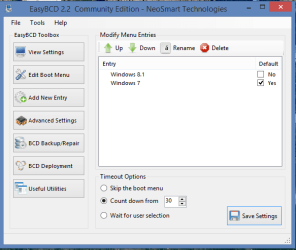
Windows 7 failed to start from Windows boot manager, Kaktussoft. This is what I did in EasyBCD...

Capture.PNG

Should I try to insert Windows 7 installation disc then try Windows 8 repair for its boot menu as Greg mentioned to go back or did I correctly used the EasyBCD?
 

My Computer My Computer

At a glance

Windows 7 guest, Debian hostAMD FX-6100DDR3/16384 MBytes/2000.6MHzAMD Radeon HD 5500 Series
Computer type
PC/Desktop
Computer Manufacturer/Model Number
MSI
OS
Windows 7 guest, Debian host
CPU
AMD FX-6100
Motherboard
880GMS-E41(FX)(MS-7641)
Memory
DDR3/16384 MBytes/2000.6MHz
Graphics Card(s)
AMD Radeon HD 5500 Series
Sound Card
Built-in
Monitor(s) Displays
Samsung SyncMaster S23B300
Screen Resolution
1920x1080
Hard Drives
ST1000DM003-9YN162 ATA Device
WDC WD5000AAKX-00ERMAQ ATA Device
PSU
500W NAXN
Case
APOLLO
Cooling
XY
Keyboard
Logitech
Mouse
Samsung
Internet Speed
.79Mbps/1.71Mbps
Antivirus
Microsoft Security Essentials
Browser
Google Chrome/FireFox/Internet Explorer
Other Info
3in1 creative speaker
Back
Top