Solved Running a custom W7 install disc over a existing W7 install

videobruce

Member
Member
VIP
Local time
1:16 PM
Messages
182
I have a stock W7 x64 installed on a GPT drive, no tweaks or updates.
I have a custom W7 boot disc with updates and a number of tweaks I want to install over and replacing this existing O/S to make things easier since many of the changes will save a lot of time and hassle.

This custom W7 x64 (AFAIK) disc (RT7 Lite) wouldn't install to this disc with the GPT error message, so I tried a 'stock' W7 which worked to my surprise.

Will installing W7 over W7 wipe the existing data in the 3 O/S partitions?

Side note the drive itself was already partitioned with the 2nd partition being used for storage. There was no issue here, the original finished install didn't bother this data partition. I hope all of that makes some sense. ;)
 

My Computers My Computers

  • At a glance

    Win7 x64AMD
    Computer type
    Laptop
    Computer Manufacturer/Model Number
    Toshiba
    OS
    Win7 x64
    CPU
    AMD
  • At a glance

    Win 7 Pro x64AMD FX-835016GBnVidia GeForce 1060
    Computer type
    PC/Desktop
    System Manufacturer/Model Number
    AMD based MB
    OS
    Win 7 Pro x64
    CPU
    AMD FX-8350
    Motherboard
    Gigabyte GA-970A-D3P
    Memory
    16GB
    Graphics Card(s)
    nVidia GeForce 1060
    Monitor(s) Displays
    25"
    Screen Resolution
    1920x1200
    Hard Drives
    two SSD;
    two 4TB HDD
    PSU
    700watt Seasonic
    Internet Speed
    300MB up & down
    Browser
    Firefox
    Other Info
    BD Recorder
What is "the GPT error message" .

It might be you booted the media in bios mode instead of uefi mode
 

My Computers My Computers

  • At a glance

    7 X64i5 84002x8gb 3200mhz
    Computer type
    PC/Desktop
    OS
    7 X64
    CPU
    i5 8400
    Motherboard
    gigabyte b365m ds3h
    Memory
    2x8gb 3200mhz
    Hard Drives
    various
    PSU
    pure power 11 400w cm
    Case
    Coolermaster
    Cooling
    cryorig m9i
  • At a glance

    7x64g54008gb ddr4 2400
    Computer type
    PC/Desktop
    OS
    7x64
    CPU
    g5400
    Motherboard
    ga b365m ds3h
    Memory
    8gb ddr4 2400
    PSU
    xfx pro 450w
It was booted the same as it was with the original disc version and that worked.
W7 has issues with GPT.
 

My Computers My Computers

  • At a glance

    Win7 x64AMD
    Computer type
    Laptop
    Computer Manufacturer/Model Number
    Toshiba
    OS
    Win7 x64
    CPU
    AMD
  • At a glance

    Win 7 Pro x64AMD FX-835016GBnVidia GeForce 1060
    Computer type
    PC/Desktop
    System Manufacturer/Model Number
    AMD based MB
    OS
    Win 7 Pro x64
    CPU
    AMD FX-8350
    Motherboard
    Gigabyte GA-970A-D3P
    Memory
    16GB
    Graphics Card(s)
    nVidia GeForce 1060
    Monitor(s) Displays
    25"
    Screen Resolution
    1920x1200
    Hard Drives
    two SSD;
    two 4TB HDD
    PSU
    700watt Seasonic
    Internet Speed
    300MB up & down
    Browser
    Firefox
    Other Info
    BD Recorder
W7 has issues with GPT

no it doesnt

if you booted the dvd in bios mode then setup.exe will not want to install to gpt disk.

if you booted the dvd in uefi mode setup.exe will install to gpt disk

That is assuming the custom dvd you created is properly configured for both bios and uefi boot.
 

My Computers My Computers

  • At a glance

    7 X64i5 84002x8gb 3200mhz
    Computer type
    PC/Desktop
    OS
    7 X64
    CPU
    i5 8400
    Motherboard
    gigabyte b365m ds3h
    Memory
    2x8gb 3200mhz
    Hard Drives
    various
    PSU
    pure power 11 400w cm
    Case
    Coolermaster
    Cooling
    cryorig m9i
  • At a glance

    7x64g54008gb ddr4 2400
    Computer type
    PC/Desktop
    OS
    7x64
    CPU
    g5400
    Motherboard
    ga b365m ds3h
    Memory
    8gb ddr4 2400
    PSU
    xfx pro 450w
How can I check if the DVD is or not? I will have to look closer to see what the entries in the BOOT menu are.
When I did a search for this issue there surely was enough hits regarding this.
 

My Computers My Computers

  • At a glance

    Win7 x64AMD
    Computer type
    Laptop
    Computer Manufacturer/Model Number
    Toshiba
    OS
    Win7 x64
    CPU
    AMD
  • At a glance

    Win 7 Pro x64AMD FX-835016GBnVidia GeForce 1060
    Computer type
    PC/Desktop
    System Manufacturer/Model Number
    AMD based MB
    OS
    Win 7 Pro x64
    CPU
    AMD FX-8350
    Motherboard
    Gigabyte GA-970A-D3P
    Memory
    16GB
    Graphics Card(s)
    nVidia GeForce 1060
    Monitor(s) Displays
    25"
    Screen Resolution
    1920x1200
    Hard Drives
    two SSD;
    two 4TB HDD
    PSU
    700watt Seasonic
    Internet Speed
    300MB up & down
    Browser
    Firefox
    Other Info
    BD Recorder
Rebuild it with efi and bios el torito

If you dont know how an easy workaround is to EDIT the official iso

replace the original sources\install.wim with the install.wim from your custom iso

can be done with anyburn free

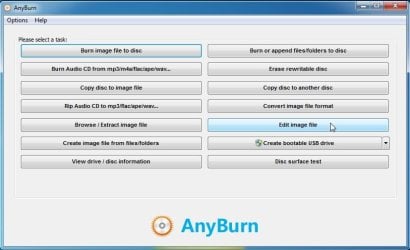
Download AnyBurn

select "Edit Image File"

anyburn-edit1.jpg

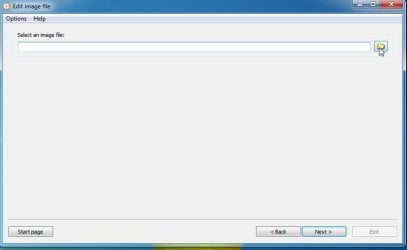
browse to the ms win7 iso

anyburn-edit2.jpg

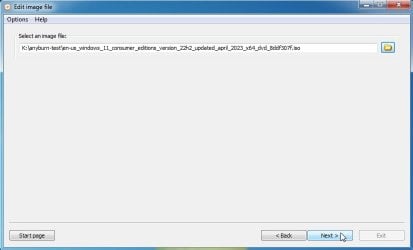
click next

anyburn-edit2A.jpg

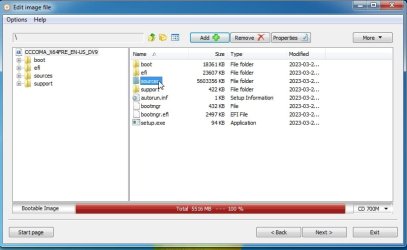
dble click the sources folder

anyburn-edit3.jpg

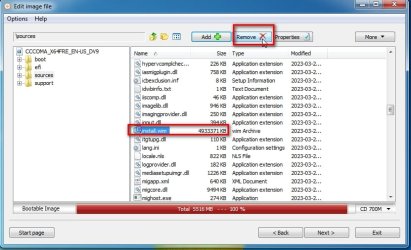
scroll to install.wim and select Remove

anyburn-edit4.jpg

Then click ADD

browse to your customized install.wim

etc it should be obvious from there
 

My Computers My Computers

  • At a glance

    7 X64i5 84002x8gb 3200mhz
    Computer type
    PC/Desktop
    OS
    7 X64
    CPU
    i5 8400
    Motherboard
    gigabyte b365m ds3h
    Memory
    2x8gb 3200mhz
    Hard Drives
    various
    PSU
    pure power 11 400w cm
    Case
    Coolermaster
    Cooling
    cryorig m9i
  • At a glance

    7x64g54008gb ddr4 2400
    Computer type
    PC/Desktop
    OS
    7x64
    CPU
    g5400
    Motherboard
    ga b365m ds3h
    Memory
    8gb ddr4 2400
    PSU
    xfx pro 450w
I would be replacing the custom version with the official version of the install.wim file?
Assuming I still have the original .iso from 10+ years ago. :o
 

My Computers My Computers

  • At a glance

    Win7 x64AMD
    Computer type
    Laptop
    Computer Manufacturer/Model Number
    Toshiba
    OS
    Win7 x64
    CPU
    AMD
  • At a glance

    Win 7 Pro x64AMD FX-835016GBnVidia GeForce 1060
    Computer type
    PC/Desktop
    System Manufacturer/Model Number
    AMD based MB
    OS
    Win 7 Pro x64
    CPU
    AMD FX-8350
    Motherboard
    Gigabyte GA-970A-D3P
    Memory
    16GB
    Graphics Card(s)
    nVidia GeForce 1060
    Monitor(s) Displays
    25"
    Screen Resolution
    1920x1200
    Hard Drives
    two SSD;
    two 4TB HDD
    PSU
    700watt Seasonic
    Internet Speed
    300MB up & down
    Browser
    Firefox
    Other Info
    BD Recorder
you would replace the install.wim in the official iso with the custom install.wim

anyburn will retain the original structure when the edited iso is saved


Anyburn cannot create multiboot iso from scratch, but it can save it fine
 

My Computers My Computers

  • At a glance

    7 X64i5 84002x8gb 3200mhz
    Computer type
    PC/Desktop
    OS
    7 X64
    CPU
    i5 8400
    Motherboard
    gigabyte b365m ds3h
    Memory
    2x8gb 3200mhz
    Hard Drives
    various
    PSU
    pure power 11 400w cm
    Case
    Coolermaster
    Cooling
    cryorig m9i
  • At a glance

    7x64g54008gb ddr4 2400
    Computer type
    PC/Desktop
    OS
    7x64
    CPU
    g5400
    Motherboard
    ga b365m ds3h
    Memory
    8gb ddr4 2400
    PSU
    xfx pro 450w
Ok, I had that backwards.
I have all the iso's and the unpacked versions, both the W7 Pro original and the edited RT7 Lite iso's.
Can I just do the swap just by a C&P move (no extra program), convent it into a iso then load that into a bootable USB or DVD?

BUT, is that going to transfer all the tweaks, programs removals (bloat), drivers added on, added updates, changes etc??

The size difference between the two .wim files is HUGE! 1,136 MB difference with the RT7 Lite being smaller of course.
2,883,769 vs
1,747,959
 

My Computers My Computers

  • At a glance

    Win7 x64AMD
    Computer type
    Laptop
    Computer Manufacturer/Model Number
    Toshiba
    OS
    Win7 x64
    CPU
    AMD
  • At a glance

    Win 7 Pro x64AMD FX-835016GBnVidia GeForce 1060
    Computer type
    PC/Desktop
    System Manufacturer/Model Number
    AMD based MB
    OS
    Win 7 Pro x64
    CPU
    AMD FX-8350
    Motherboard
    Gigabyte GA-970A-D3P
    Memory
    16GB
    Graphics Card(s)
    nVidia GeForce 1060
    Monitor(s) Displays
    25"
    Screen Resolution
    1920x1200
    Hard Drives
    two SSD;
    two 4TB HDD
    PSU
    700watt Seasonic
    Internet Speed
    300MB up & down
    Browser
    Firefox
    Other Info
    BD Recorder
BUT, is that going to transfer all the tweaks, programs removals (bloat), drivers added on, added updates, changes etc??

Those will be in yout rt7 install.wim that you are putting into the official iso


********************************************************************************


Can I just do the swap just by a C&P move (no extra program), convent it into a iso then load that into a bootable USB or DVD?

To convert the distribution folder to an iso that supports bios and efi boot

example commands:

OSCDIMG.exe -M -o -U1 -UDFVER102 -bootdata:2#p0,e,b"%WIMDIR%\boot\etfsboot.com"#pEF,e,b"%WIMDIR%\efi\Microsoft\boot\efisys.bin" "%WIMDIR%" "%isodest%"

it uses both etfsboot.com and efisys.bin

Most of the gui tools like anyburn, imgburn etc can only create an iso with etfsboot image which does not work for uefi

That is why it easier for most people to edit an existing bootable iso

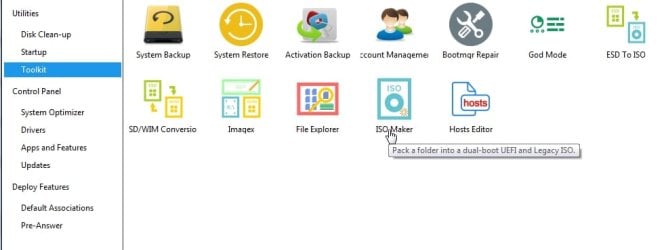
dism++ can do it if etfsboot and efisys are in the expected places

https://github.com/Chuyu-Team/Dism-.../download/v10.1.1002.2/Dism++10.1.1002.1B.zip

dism++-isomaker.jpg

- - - Updated - - -
 

My Computers My Computers

  • At a glance

    7 X64i5 84002x8gb 3200mhz
    Computer type
    PC/Desktop
    OS
    7 X64
    CPU
    i5 8400
    Motherboard
    gigabyte b365m ds3h
    Memory
    2x8gb 3200mhz
    Hard Drives
    various
    PSU
    pure power 11 400w cm
    Case
    Coolermaster
    Cooling
    cryorig m9i
  • At a glance

    7x64g54008gb ddr4 2400
    Computer type
    PC/Desktop
    OS
    7x64
    CPU
    g5400
    Motherboard
    ga b365m ds3h
    Memory
    8gb ddr4 2400
    PSU
    xfx pro 450w
So this is a 2 step process? This is kinda over my head especially if it involves command lines, but I will try it. :confused:

- - - Updated - - -

I know there are a number of USB boot 'Burner' programs, but what would be a good choice to do this type of burning since that programs burn function is not available in the free version?
Rufus, maybe?

- - - Updated - - -

Well, I tried the program, when I get to the 'Add" stage, I keep on getting a error message that the .iso was already selected.

Edit ISO file

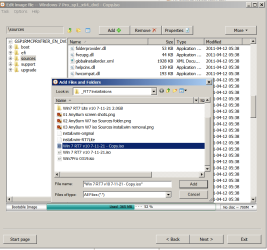
04 AnyBurn W7 iso Sources install.wim add.png05 AnyBurn W7 iso Sources install.wim add conflic.png
 
Last edited:

My Computers My Computers

  • At a glance

    Win7 x64AMD
    Computer type
    Laptop
    Computer Manufacturer/Model Number
    Toshiba
    OS
    Win7 x64
    CPU
    AMD
  • At a glance

    Win 7 Pro x64AMD FX-835016GBnVidia GeForce 1060
    Computer type
    PC/Desktop
    System Manufacturer/Model Number
    AMD based MB
    OS
    Win 7 Pro x64
    CPU
    AMD FX-8350
    Motherboard
    Gigabyte GA-970A-D3P
    Memory
    16GB
    Graphics Card(s)
    nVidia GeForce 1060
    Monitor(s) Displays
    25"
    Screen Resolution
    1920x1200
    Hard Drives
    two SSD;
    two 4TB HDD
    PSU
    700watt Seasonic
    Internet Speed
    300MB up & down
    Browser
    Firefox
    Other Info
    BD Recorder
post#6
replace the original sources\install.wim with the install.wim from your custom iso

You should be editing the original MS iso , not your customized iso


After Removing the original install.wim from the sources folder of the original ms iso

ADD your RT7 customized install.wim to the sources folder of the original ms iso

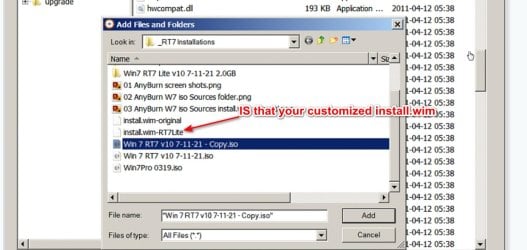
Is it the install.wim-rt7lite in your screenshot ?

You will have to rename it to install.wim then ADD it

I have no idea why you are trying ADD an .iso to the sources folder

then click Next

give the new iso it is going to create a name that makes sense to you
 
Last edited:

My Computers My Computers

  • At a glance

    7 X64i5 84002x8gb 3200mhz
    Computer type
    PC/Desktop
    OS
    7 X64
    CPU
    i5 8400
    Motherboard
    gigabyte b365m ds3h
    Memory
    2x8gb 3200mhz
    Hard Drives
    various
    PSU
    pure power 11 400w cm
    Case
    Coolermaster
    Cooling
    cryorig m9i
  • At a glance

    7x64g54008gb ddr4 2400
    Computer type
    PC/Desktop
    OS
    7x64
    CPU
    g5400
    Motherboard
    ga b365m ds3h
    Memory
    8gb ddr4 2400
    PSU
    xfx pro 450w
post#6]
I have no idea why you are trying ADD an .iso to the sources folder
I'm not, the program is.
When I go to add that file by clicking the "Add" button, I search for my iso, but as soon as I get to the .iso file, it doesn't allow opening the iso. I wind up with that 2nd attachment screen shot.

The idea is to 1st remove that file in the original W7 iso, correct?
Isn't the the "Add" function used to extract (or copy) that install.wim file? Or should I ask, how do you get the custom file, is that done separately??
Their website says nothing about this at all. Or do I need mind reading abilities ??
 

My Computers My Computers

  • At a glance

    Win7 x64AMD
    Computer type
    Laptop
    Computer Manufacturer/Model Number
    Toshiba
    OS
    Win7 x64
    CPU
    AMD
  • At a glance

    Win 7 Pro x64AMD FX-835016GBnVidia GeForce 1060
    Computer type
    PC/Desktop
    System Manufacturer/Model Number
    AMD based MB
    OS
    Win 7 Pro x64
    CPU
    AMD FX-8350
    Motherboard
    Gigabyte GA-970A-D3P
    Memory
    16GB
    Graphics Card(s)
    nVidia GeForce 1060
    Monitor(s) Displays
    25"
    Screen Resolution
    1920x1200
    Hard Drives
    two SSD;
    two 4TB HDD
    PSU
    700watt Seasonic
    Internet Speed
    300MB up & down
    Browser
    Firefox
    Other Info
    BD Recorder
it doesn't allow opening the iso.

why are you trying to open the iso with the ADD browse window. It is only for adding

When I go to add that file by clicking the "Add" button, I search for my iso

Why are you searching for the rt7 iso ? You do not want to ADD the rt7 iso

you want to add the customized install.wim

Is this a wind up ?

custinstwim.jpg

If it is

go to the _RT7installations folder and RENAME it to just install.wim

then use the ADD button and add it
 
Last edited:

My Computers My Computers

  • At a glance

    7 X64i5 84002x8gb 3200mhz
    Computer type
    PC/Desktop
    OS
    7 X64
    CPU
    i5 8400
    Motherboard
    gigabyte b365m ds3h
    Memory
    2x8gb 3200mhz
    Hard Drives
    various
    PSU
    pure power 11 400w cm
    Case
    Coolermaster
    Cooling
    cryorig m9i
  • At a glance

    7x64g54008gb ddr4 2400
    Computer type
    PC/Desktop
    OS
    7x64
    CPU
    g5400
    Motherboard
    ga b365m ds3h
    Memory
    8gb ddr4 2400
    PSU
    xfx pro 450w
"When I go to add that file by clicking the "Add" button, I search for my iso Why are you searching for the rt7 iso ? You do not want to ADD the rt7 iso"

I searched for my iso since I needed to extract the install.wim file from it WITHIN the program. Then add that file to the original install, again WITHIN the program since that would be the LOGICAL procedure to do BOTH functions within the SAME program !

But, since the lack of PROPER instructions and just now the known fact that the extract function has to be done OUTSIDE of this program made it impossible to use the program since I'm NOT a mind reader!

Note the emphasis. :devil:
This must of been compiled by some post teenager that use to work for MS and was responsible in re-writing Win 8. :rolleyes:

AFA that install file being in that list, I did that separately as a backup earlier, not to do with this program. It just happened to be next to the custom iso file. I didn't know if this could be done manually based on the complexity of all of this in and outside a .ios file.
I didn't know if manually extracting that file would cause some weird problem or not so I did the logical route and use the other iso.

But, since I NOW know the proper procedure, I'll give it a try.

- - - Updated - - -

Well, I just tried it, no good, it didn't work, I still get the GPT error message. And that was using that programs USB bootable function which I thought was a 'pay' option.
There has to be something else outside of that install.wim file that is the problem.

- - - Updated - - -

Well, I just tried it, no good, it didn't work, I still get the GPT error message. And that was using that programs USB bootable function which I thought was a 'pay' option.
There has to be something else outside of that install.wim file that is the problem.
 

My Computers My Computers

  • At a glance

    Win7 x64AMD
    Computer type
    Laptop
    Computer Manufacturer/Model Number
    Toshiba
    OS
    Win7 x64
    CPU
    AMD
  • At a glance

    Win 7 Pro x64AMD FX-835016GBnVidia GeForce 1060
    Computer type
    PC/Desktop
    System Manufacturer/Model Number
    AMD based MB
    OS
    Win 7 Pro x64
    CPU
    AMD FX-8350
    Motherboard
    Gigabyte GA-970A-D3P
    Memory
    16GB
    Graphics Card(s)
    nVidia GeForce 1060
    Monitor(s) Displays
    25"
    Screen Resolution
    1920x1200
    Hard Drives
    two SSD;
    two 4TB HDD
    PSU
    700watt Seasonic
    Internet Speed
    300MB up & down
    Browser
    Firefox
    Other Info
    BD Recorder
what is the exact "gpt error message" and when does it occur ?

"Windows Cannot be installed to this disk. The selected disk is of the GPT partition style", suggests that your installation media is booted in bios mode.

OR

if the installation media is booted in uefi mode, it will not install to an mbr disk. You would need to delete all partitions for installation to proceed
 

My Computers My Computers

  • At a glance

    7 X64i5 84002x8gb 3200mhz
    Computer type
    PC/Desktop
    OS
    7 X64
    CPU
    i5 8400
    Motherboard
    gigabyte b365m ds3h
    Memory
    2x8gb 3200mhz
    Hard Drives
    various
    PSU
    pure power 11 400w cm
    Case
    Coolermaster
    Cooling
    cryorig m9i
  • At a glance

    7x64g54008gb ddr4 2400
    Computer type
    PC/Desktop
    OS
    7x64
    CPU
    g5400
    Motherboard
    ga b365m ds3h
    Memory
    8gb ddr4 2400
    PSU
    xfx pro 450w
That is the error message.
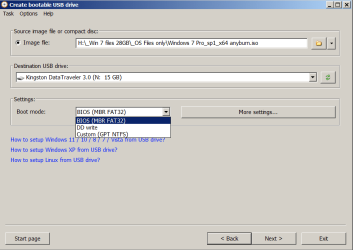
The settings in AnyBurn, are the default; BIOS mode (MBR). I then tried a custom mode; GPT/NTFS, but that didn't work either.

08 AnyBurn W7 Create bootable USB drive Partirtion settings .png
 

My Computers My Computers

  • At a glance

    Win7 x64AMD
    Computer type
    Laptop
    Computer Manufacturer/Model Number
    Toshiba
    OS
    Win7 x64
    CPU
    AMD
  • At a glance

    Win 7 Pro x64AMD FX-835016GBnVidia GeForce 1060
    Computer type
    PC/Desktop
    System Manufacturer/Model Number
    AMD based MB
    OS
    Win 7 Pro x64
    CPU
    AMD FX-8350
    Motherboard
    Gigabyte GA-970A-D3P
    Memory
    16GB
    Graphics Card(s)
    nVidia GeForce 1060
    Monitor(s) Displays
    25"
    Screen Resolution
    1920x1200
    Hard Drives
    two SSD;
    two 4TB HDD
    PSU
    700watt Seasonic
    Internet Speed
    300MB up & down
    Browser
    Firefox
    Other Info
    BD Recorder
The Setup .exe inside of the .iso in the USB drive? Or are you talking about running that while in Windows?
 

My Computers My Computers

  • At a glance

    Win7 x64AMD
    Computer type
    Laptop
    Computer Manufacturer/Model Number
    Toshiba
    OS
    Win7 x64
    CPU
    AMD
  • At a glance

    Win 7 Pro x64AMD FX-835016GBnVidia GeForce 1060
    Computer type
    PC/Desktop
    System Manufacturer/Model Number
    AMD based MB
    OS
    Win 7 Pro x64
    CPU
    AMD FX-8350
    Motherboard
    Gigabyte GA-970A-D3P
    Memory
    16GB
    Graphics Card(s)
    nVidia GeForce 1060
    Monitor(s) Displays
    25"
    Screen Resolution
    1920x1200
    Hard Drives
    two SSD;
    two 4TB HDD
    PSU
    700watt Seasonic
    Internet Speed
    300MB up & down
    Browser
    Firefox
    Other Info
    BD Recorder
While in Windows.
 

My Computer My Computer

At a glance

Windows 7 Home Premium
Computer type
PC/Desktop
OS
Windows 7 Home Premium
Back
Top