Solved Running a custom W7 install disc over a existing W7 install

You can do that ????
 

My Computers My Computers

  • At a glance

    Win7 x64AMD
    Computer type
    Laptop
    Computer Manufacturer/Model Number
    Toshiba
    OS
    Win7 x64
    CPU
    AMD
  • At a glance

    Win 7 Pro x64AMD FX-835016GBnVidia GeForce 1060
    Computer type
    PC/Desktop
    System Manufacturer/Model Number
    AMD based MB
    OS
    Win 7 Pro x64
    CPU
    AMD FX-8350
    Motherboard
    Gigabyte GA-970A-D3P
    Memory
    16GB
    Graphics Card(s)
    nVidia GeForce 1060
    Monitor(s) Displays
    25"
    Screen Resolution
    1920x1200
    Hard Drives
    two SSD;
    two 4TB HDD
    PSU
    700watt Seasonic
    Internet Speed
    300MB up & down
    Browser
    Firefox
    Other Info
    BD Recorder
Sure, and then select custom install.
 

My Computer My Computer

At a glance

Windows 7 Home Premium
Computer type
PC/Desktop
OS
Windows 7 Home Premium
Running the setup off the Thumb Drive within the O/S that would be written over?
 
Last edited:

My Computers My Computers

  • At a glance

    Win7 x64AMD
    Computer type
    Laptop
    Computer Manufacturer/Model Number
    Toshiba
    OS
    Win7 x64
    CPU
    AMD
  • At a glance

    Win 7 Pro x64AMD FX-835016GBnVidia GeForce 1060
    Computer type
    PC/Desktop
    System Manufacturer/Model Number
    AMD based MB
    OS
    Win 7 Pro x64
    CPU
    AMD FX-8350
    Motherboard
    Gigabyte GA-970A-D3P
    Memory
    16GB
    Graphics Card(s)
    nVidia GeForce 1060
    Monitor(s) Displays
    25"
    Screen Resolution
    1920x1200
    Hard Drives
    two SSD;
    two 4TB HDD
    PSU
    700watt Seasonic
    Internet Speed
    300MB up & down
    Browser
    Firefox
    Other Info
    BD Recorder
Sure.
 

My Computer My Computer

At a glance

Windows 7 Home Premium
Computer type
PC/Desktop
OS
Windows 7 Home Premium
Ok, I'll try anything at this point. Never heard of this in 25+ years, I hope I'm not misunderstanding you. :shock:
(I corrected my previous post)

- - - Updated - - -

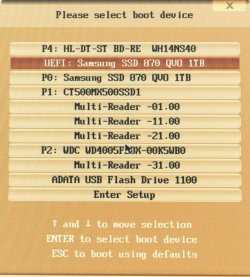
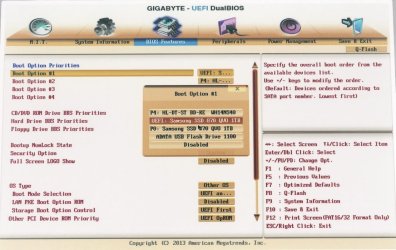
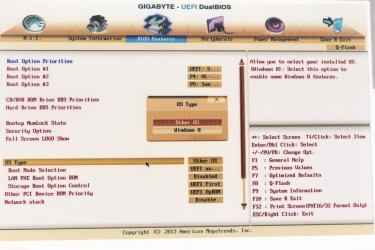
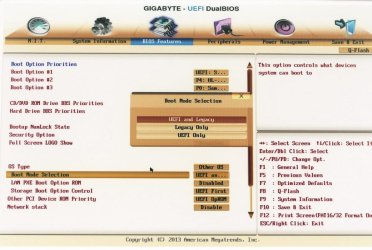
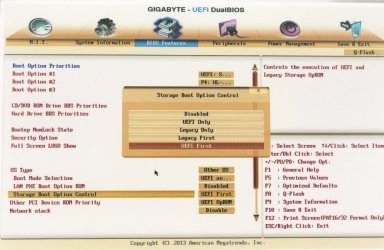
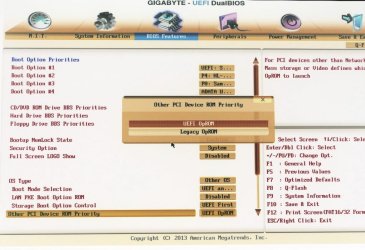
FWIW, attached are screen shot of related BIOS screens. Note that each device only has one type as a choice;

00.JPG 01.JPG 02.JPG 03.JPG 04.JPG 05.JPG
 

My Computers My Computers

  • At a glance

    Win7 x64AMD
    Computer type
    Laptop
    Computer Manufacturer/Model Number
    Toshiba
    OS
    Win7 x64
    CPU
    AMD
  • At a glance

    Win 7 Pro x64AMD FX-835016GBnVidia GeForce 1060
    Computer type
    PC/Desktop
    System Manufacturer/Model Number
    AMD based MB
    OS
    Win 7 Pro x64
    CPU
    AMD FX-8350
    Motherboard
    Gigabyte GA-970A-D3P
    Memory
    16GB
    Graphics Card(s)
    nVidia GeForce 1060
    Monitor(s) Displays
    25"
    Screen Resolution
    1920x1200
    Hard Drives
    two SSD;
    two 4TB HDD
    PSU
    700watt Seasonic
    Internet Speed
    300MB up & down
    Browser
    Firefox
    Other Info
    BD Recorder
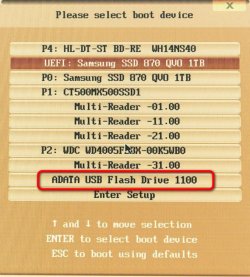
It recognizes the samsung 870 qvo as efi bootable but not the adata flash drive or the WD.

Volume Z is referring to what is called a repair install or in place upgrade install :ar: Repair Install
 

My Computers My Computers

  • At a glance

    7 X64i5 84002x8gb 3200mhz
    Computer type
    PC/Desktop
    OS
    7 X64
    CPU
    i5 8400
    Motherboard
    gigabyte b365m ds3h
    Memory
    2x8gb 3200mhz
    Hard Drives
    various
    PSU
    pure power 11 400w cm
    Case
    Coolermaster
    Cooling
    cryorig m9i
  • At a glance

    7x64g54008gb ddr4 2400
    Computer type
    PC/Desktop
    OS
    7x64
    CPU
    g5400
    Motherboard
    ga b365m ds3h
    Memory
    8gb ddr4 2400
    PSU
    xfx pro 450w
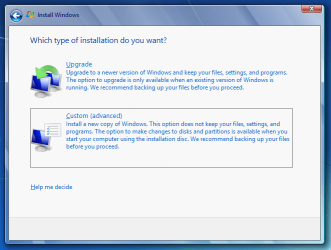
Basically, but running setup.exe isn't about upgrade only. You will get to choose between upgrade and custom install, and custom install is actually a clean install minus the partitioning/deleting/formatting options. Windows 7 will be installed clean, but the old installation will be saved under Windows.old and needs to be cleaned up later.
 

My Computer My Computer

At a glance

Windows 7 Home Premium
Computer type
PC/Desktop
OS
Windows 7 Home Premium
The WD is a storage drive, no O/S.
The Flash Drive is the custom W7 installer that I get the GPT error from after I already entered setup.

Where are you see this Volume "Z" ??

I don't want to do a "upgrade" or a Repair, I want a full install, wiping the existing original W7 install (which I have a backup). I have no program getting to that point until I get to the screen that shows the available drives withe text below that that won't happen due to the GPT issue.

My question was/is , of those specific settings, are they correct? There are no "GPT" choices, just UEFI.
 

My Computers My Computers

  • At a glance

    Win7 x64AMD
    Computer type
    Laptop
    Computer Manufacturer/Model Number
    Toshiba
    OS
    Win7 x64
    CPU
    AMD
  • At a glance

    Win 7 Pro x64AMD FX-835016GBnVidia GeForce 1060
    Computer type
    PC/Desktop
    System Manufacturer/Model Number
    AMD based MB
    OS
    Win 7 Pro x64
    CPU
    AMD FX-8350
    Motherboard
    Gigabyte GA-970A-D3P
    Memory
    16GB
    Graphics Card(s)
    nVidia GeForce 1060
    Monitor(s) Displays
    25"
    Screen Resolution
    1920x1200
    Hard Drives
    two SSD;
    two 4TB HDD
    PSU
    700watt Seasonic
    Internet Speed
    300MB up & down
    Browser
    Firefox
    Other Info
    BD Recorder
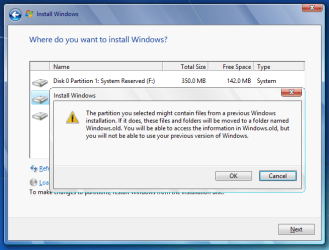
Sure. You will have a clean installation with the old Windows files saved in a folder. It will be on the same partition (drive C) as the current one. The Windows.old folder can be cleaned up later in Disk cleanup.
 

My Computer My Computer

At a glance

Windows 7 Home Premium
Computer type
PC/Desktop
OS
Windows 7 Home Premium
adata-no-efi-mode00.JPG


The Flash Drive is the custom W7 installer that I get the GPT error from after I already entered setup.

You must be booting it in bios mode. That is why you get the message.
To boot from the flash drive in efi mode it needs the EFI folder on the root with this file \efi\Boot\bootx64.efi

:ar: View attachment efi.zip

most bios will only search fat32 partitions . If it is found it will show up as efi bootable


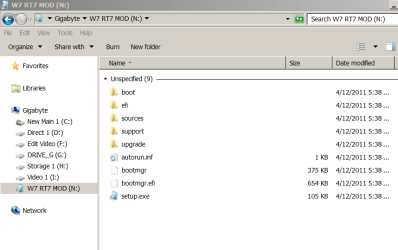
You havent shown us screenshots of the flash drive . So we dont know if you have the rest of the EFI folder and contents on there.
 
Last edited:

My Computers My Computers

  • At a glance

    7 X64i5 84002x8gb 3200mhz
    Computer type
    PC/Desktop
    OS
    7 X64
    CPU
    i5 8400
    Motherboard
    gigabyte b365m ds3h
    Memory
    2x8gb 3200mhz
    Hard Drives
    various
    PSU
    pure power 11 400w cm
    Case
    Coolermaster
    Cooling
    cryorig m9i
  • At a glance

    7x64g54008gb ddr4 2400
    Computer type
    PC/Desktop
    OS
    7x64
    CPU
    g5400
    Motherboard
    ga b365m ds3h
    Memory
    8gb ddr4 2400
    PSU
    xfx pro 450w
Sorry, I didn't see the request, here it is;
Since there already is a EFI folder, do I delete that and replace it with the new one?? Within that folder is another "Boot' folder & a 'Microsoft' folder.

01 Root of W7 RT7 USB installer.png

- - - Updated - - -

Sure. You will have a clean installation with the old Windows files saved in a folder. It will be on the same partition (drive C) as the current one. The Windows.old folder can be cleaned up later in Disk cleanup.

Is that folder in the root of 'C' and can that folder be deleted? I surely don't need 2 W7's in one drive. :rolleyes:
 

My Computers My Computers

  • At a glance

    Win7 x64AMD
    Computer type
    Laptop
    Computer Manufacturer/Model Number
    Toshiba
    OS
    Win7 x64
    CPU
    AMD
  • At a glance

    Win 7 Pro x64AMD FX-835016GBnVidia GeForce 1060
    Computer type
    PC/Desktop
    System Manufacturer/Model Number
    AMD based MB
    OS
    Win 7 Pro x64
    CPU
    AMD FX-8350
    Motherboard
    Gigabyte GA-970A-D3P
    Memory
    16GB
    Graphics Card(s)
    nVidia GeForce 1060
    Monitor(s) Displays
    25"
    Screen Resolution
    1920x1200
    Hard Drives
    two SSD;
    two 4TB HDD
    PSU
    700watt Seasonic
    Internet Speed
    300MB up & down
    Browser
    Firefox
    Other Info
    BD Recorder
Sure. It's going to be C:\Windows.old and Setup even notifies you. Deleting the folder will require running Disk Cleanup.
 

Attachments

  • Custom.PNG
    Custom.PNG
    28.5 KB · Views: 11
  • Windows old.PNG
    Windows old.PNG
    30.2 KB · Views: 9

My Computer My Computer

At a glance

Windows 7 Home Premium
Computer type
PC/Desktop
OS
Windows 7 Home Premium
I'll see what SIW2 has to say about this efi folder and the duplicate Boot folder.

But, there isn't a way just to have the existing 'Windows' deleted during the re-install? Except for a few 'installed' programs 90% of the programs I use are Portables placed in a separate partition in the same drive.
 

My Computers My Computers

  • At a glance

    Win7 x64AMD
    Computer type
    Laptop
    Computer Manufacturer/Model Number
    Toshiba
    OS
    Win7 x64
    CPU
    AMD
  • At a glance

    Win 7 Pro x64AMD FX-835016GBnVidia GeForce 1060
    Computer type
    PC/Desktop
    System Manufacturer/Model Number
    AMD based MB
    OS
    Win 7 Pro x64
    CPU
    AMD FX-8350
    Motherboard
    Gigabyte GA-970A-D3P
    Memory
    16GB
    Graphics Card(s)
    nVidia GeForce 1060
    Monitor(s) Displays
    25"
    Screen Resolution
    1920x1200
    Hard Drives
    two SSD;
    two 4TB HDD
    PSU
    700watt Seasonic
    Internet Speed
    300MB up & down
    Browser
    Firefox
    Other Info
    BD Recorder
Since there already is a EFI folder, do I delete that and replace it with the new one?
just overwrite it
 

My Computers My Computers

  • At a glance

    7 X64i5 84002x8gb 3200mhz
    Computer type
    PC/Desktop
    OS
    7 X64
    CPU
    i5 8400
    Motherboard
    gigabyte b365m ds3h
    Memory
    2x8gb 3200mhz
    Hard Drives
    various
    PSU
    pure power 11 400w cm
    Case
    Coolermaster
    Cooling
    cryorig m9i
  • At a glance

    7x64g54008gb ddr4 2400
    Computer type
    PC/Desktop
    OS
    7x64
    CPU
    g5400
    Motherboard
    ga b365m ds3h
    Memory
    8gb ddr4 2400
    PSU
    xfx pro 450w
Ok, but how about the 2 Boot folders, the original one and the new one within the new efi folder?
 

My Computers My Computers

  • At a glance

    Win7 x64AMD
    Computer type
    Laptop
    Computer Manufacturer/Model Number
    Toshiba
    OS
    Win7 x64
    CPU
    AMD
  • At a glance

    Win 7 Pro x64AMD FX-835016GBnVidia GeForce 1060
    Computer type
    PC/Desktop
    System Manufacturer/Model Number
    AMD based MB
    OS
    Win 7 Pro x64
    CPU
    AMD FX-8350
    Motherboard
    Gigabyte GA-970A-D3P
    Memory
    16GB
    Graphics Card(s)
    nVidia GeForce 1060
    Monitor(s) Displays
    25"
    Screen Resolution
    1920x1200
    Hard Drives
    two SSD;
    two 4TB HDD
    PSU
    700watt Seasonic
    Internet Speed
    300MB up & down
    Browser
    Firefox
    Other Info
    BD Recorder
just overwrite it
 

My Computers My Computers

  • At a glance

    7 X64i5 84002x8gb 3200mhz
    Computer type
    PC/Desktop
    OS
    7 X64
    CPU
    i5 8400
    Motherboard
    gigabyte b365m ds3h
    Memory
    2x8gb 3200mhz
    Hard Drives
    various
    PSU
    pure power 11 400w cm
    Case
    Coolermaster
    Cooling
    cryorig m9i
  • At a glance

    7x64g54008gb ddr4 2400
    Computer type
    PC/Desktop
    OS
    7x64
    CPU
    g5400
    Motherboard
    ga b365m ds3h
    Memory
    8gb ddr4 2400
    PSU
    xfx pro 450w
One Boot folder is in the EFI folder, the other is not.

Ok, I deleted the existing Boot and EFI folders and added the new EFI folder. It didn't work!

I got;
Failed to start,
Boot selection failed-Device is inaccessible.

I did get 2 instances of the USB drive, I chooseUEFI which I didn't have before.
 
Last edited:

My Computers My Computers

  • At a glance

    Win7 x64AMD
    Computer type
    Laptop
    Computer Manufacturer/Model Number
    Toshiba
    OS
    Win7 x64
    CPU
    AMD
  • At a glance

    Win 7 Pro x64AMD FX-835016GBnVidia GeForce 1060
    Computer type
    PC/Desktop
    System Manufacturer/Model Number
    AMD based MB
    OS
    Win 7 Pro x64
    CPU
    AMD FX-8350
    Motherboard
    Gigabyte GA-970A-D3P
    Memory
    16GB
    Graphics Card(s)
    nVidia GeForce 1060
    Monitor(s) Displays
    25"
    Screen Resolution
    1920x1200
    Hard Drives
    two SSD;
    two 4TB HDD
    PSU
    700watt Seasonic
    Internet Speed
    300MB up & down
    Browser
    Firefox
    Other Info
    BD Recorder
Do you ant me to delete the stand alone Boot folder?

no leave that as is
 

My Computers My Computers

  • At a glance

    7 X64i5 84002x8gb 3200mhz
    Computer type
    PC/Desktop
    OS
    7 X64
    CPU
    i5 8400
    Motherboard
    gigabyte b365m ds3h
    Memory
    2x8gb 3200mhz
    Hard Drives
    various
    PSU
    pure power 11 400w cm
    Case
    Coolermaster
    Cooling
    cryorig m9i
  • At a glance

    7x64g54008gb ddr4 2400
    Computer type
    PC/Desktop
    OS
    7x64
    CPU
    g5400
    Motherboard
    ga b365m ds3h
    Memory
    8gb ddr4 2400
    PSU
    xfx pro 450w
What was changed between the 2 efi folders??
 
Last edited:

My Computers My Computers

  • At a glance

    Win7 x64AMD
    Computer type
    Laptop
    Computer Manufacturer/Model Number
    Toshiba
    OS
    Win7 x64
    CPU
    AMD
  • At a glance

    Win 7 Pro x64AMD FX-835016GBnVidia GeForce 1060
    Computer type
    PC/Desktop
    System Manufacturer/Model Number
    AMD based MB
    OS
    Win 7 Pro x64
    CPU
    AMD FX-8350
    Motherboard
    Gigabyte GA-970A-D3P
    Memory
    16GB
    Graphics Card(s)
    nVidia GeForce 1060
    Monitor(s) Displays
    25"
    Screen Resolution
    1920x1200
    Hard Drives
    two SSD;
    two 4TB HDD
    PSU
    700watt Seasonic
    Internet Speed
    300MB up & down
    Browser
    Firefox
    Other Info
    BD Recorder
\efi\Boot\bootx64.efi
 

My Computers My Computers

  • At a glance

    7 X64i5 84002x8gb 3200mhz
    Computer type
    PC/Desktop
    OS
    7 X64
    CPU
    i5 8400
    Motherboard
    gigabyte b365m ds3h
    Memory
    2x8gb 3200mhz
    Hard Drives
    various
    PSU
    pure power 11 400w cm
    Case
    Coolermaster
    Cooling
    cryorig m9i
  • At a glance

    7x64g54008gb ddr4 2400
    Computer type
    PC/Desktop
    OS
    7x64
    CPU
    g5400
    Motherboard
    ga b365m ds3h
    Memory
    8gb ddr4 2400
    PSU
    xfx pro 450w
Back
Top